
Tax Exemption for WooCommerce
| 开发者 |
ElliotVS
RelyWP freemius |
|---|---|
| 更新时间 | 2026年10月7日 23:58 |
| 捐献地址: | 去捐款 |
| PHP版本: | 5.1 及以上 |
| WordPress版本: | 7.1 |
| 版权: | GPLv3 or later. |
| 版权网址: | 版权信息 |
详情介绍:
- Enable or disable the tax exemption feature.
- Select the tax class to use for the Tax / VAT exemption.
- Select the location on checkout to display the tax exemption fields.
- Show the tax exemption checkbox and fields on the cart page too, and choose where.
- Enable or disable removal of tax on shipping for exempt customers.
- Enable or disable the tax exemption fields on the "My Account" page.
- Choose which details to collect - the name and reason fields can each be shown, hidden, or made required.
- Collect a registration number (VAT number, charity number, ABN and more) and choose which types you accept.
- Get an email whenever a tax exempt order is placed.
- Customise the text/labels used throughout the plugin.
[tefw_exemption_form] shortcode.
Managing Exempt Customers & Orders
- Exempt Customers - a searchable list of every customer claiming tax exemption, along with their details. Customers can be added and edited here directly.
- Exempt Orders - every order placed with tax exemption, filterable by date.
- If an order is marked as tax / VAT exempt, this will be shown on the admin order details page, where you can see the tax exempt details. An optional column on the orders list marks which orders were exempt.
- Each customer's exemption details can also be viewed and edited from their WordPress user profile.
- Tax exemption details are included in WordPress personal data exports and erasure requests.
- Registration number verification (VAT, charity, ABN, GSTIN and more).
- Live lookups against the official registers - VIES, HMRC, the Australian Business Register and the Charity Commission.
- Automatic approval for customers whose number verifies.
- Consultation references recorded as proof that a number was checked.
- Re-check a customer's stored number at any time.
- Option to show ex-tax prices to exempt customers across the whole store.
- Optional "inc/ex tax" price toggle for every visitor.
- Custom tax exemption form fields.
- Tax exemption certificate upload field.
- Tax exemption expiration date field.
- Automatic expiry reminder & expired notification emails.
- Customisable exemption request, approval and decline emails.
- Default validity period (auto-calculate expiration dates).
- Tax exemption city/state field.
- Tax exemption fields on registration form.
- Exemption status management for admins.
- Only allow exemption for approved users.
- Hide the tax exemption fields on checkout.
- Only remove tax from specific products.
- Only allow exemption for logged in users.
- Only allow exemption for selected user roles.
- Only allow exemption for selected countries.
- Only allow exemption for selected states/cities.
- Customize the tax class for each user.
- Export CSV files of exempt customers.
- Export CSV files of exempt orders.
- Integration with "AvaTax".
屏幕截图:
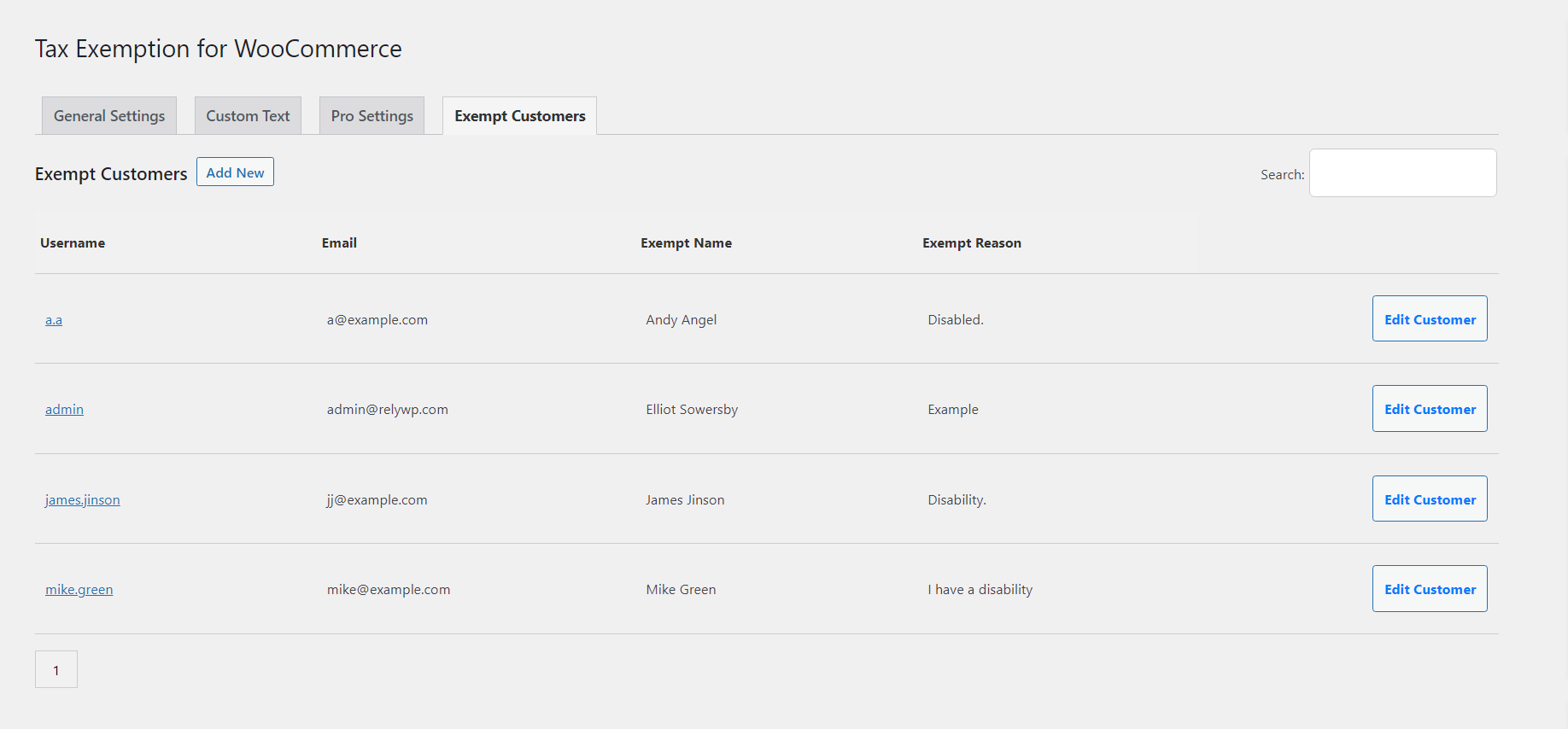
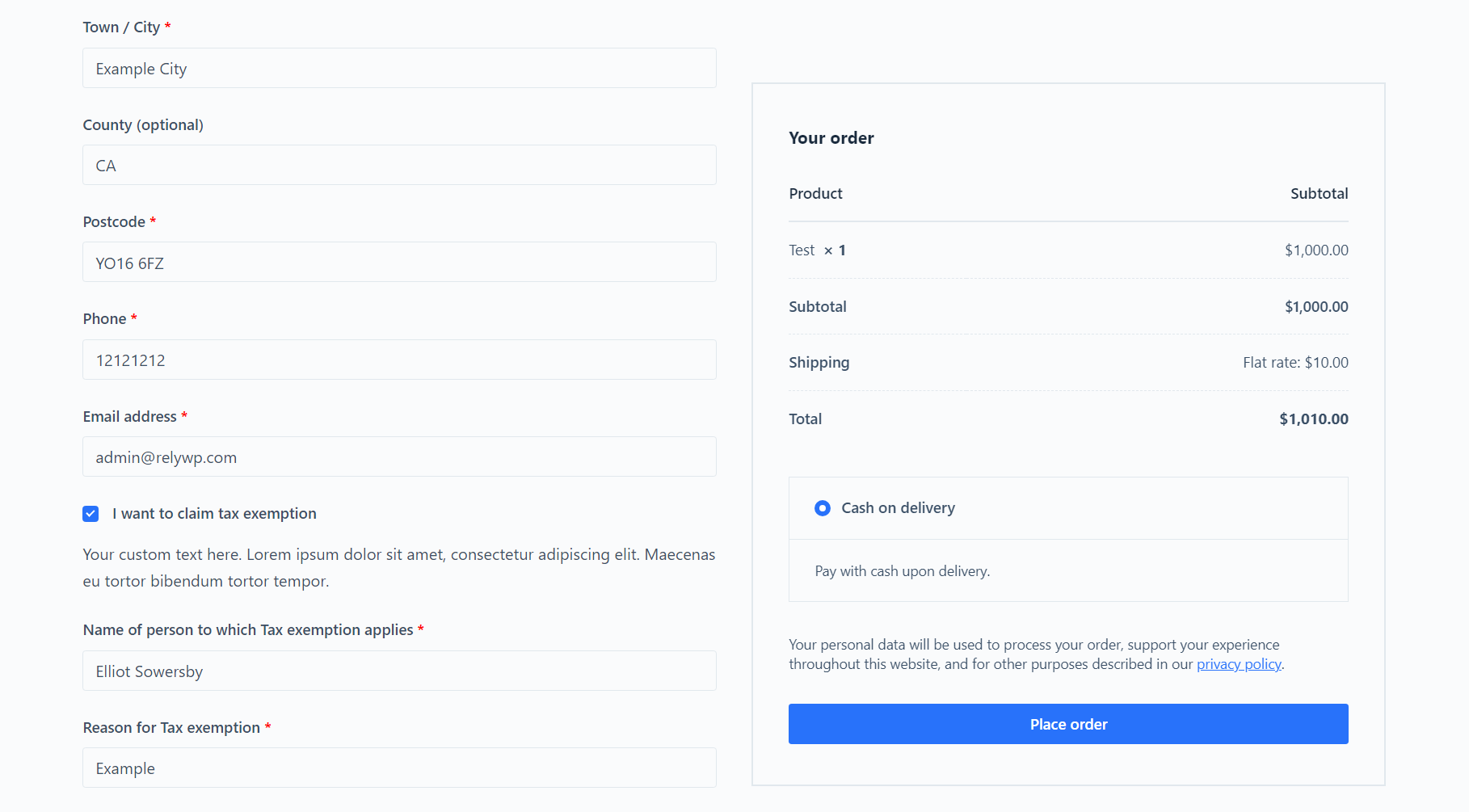
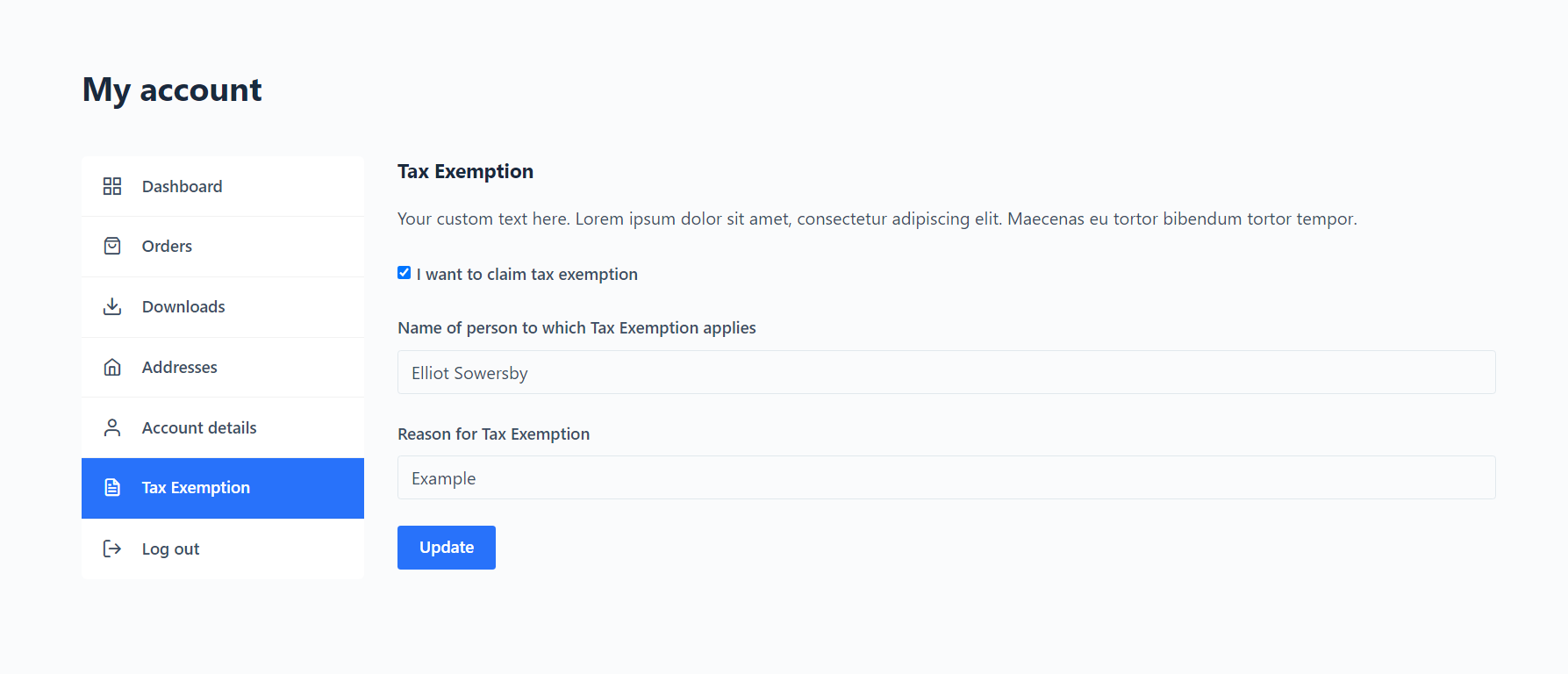
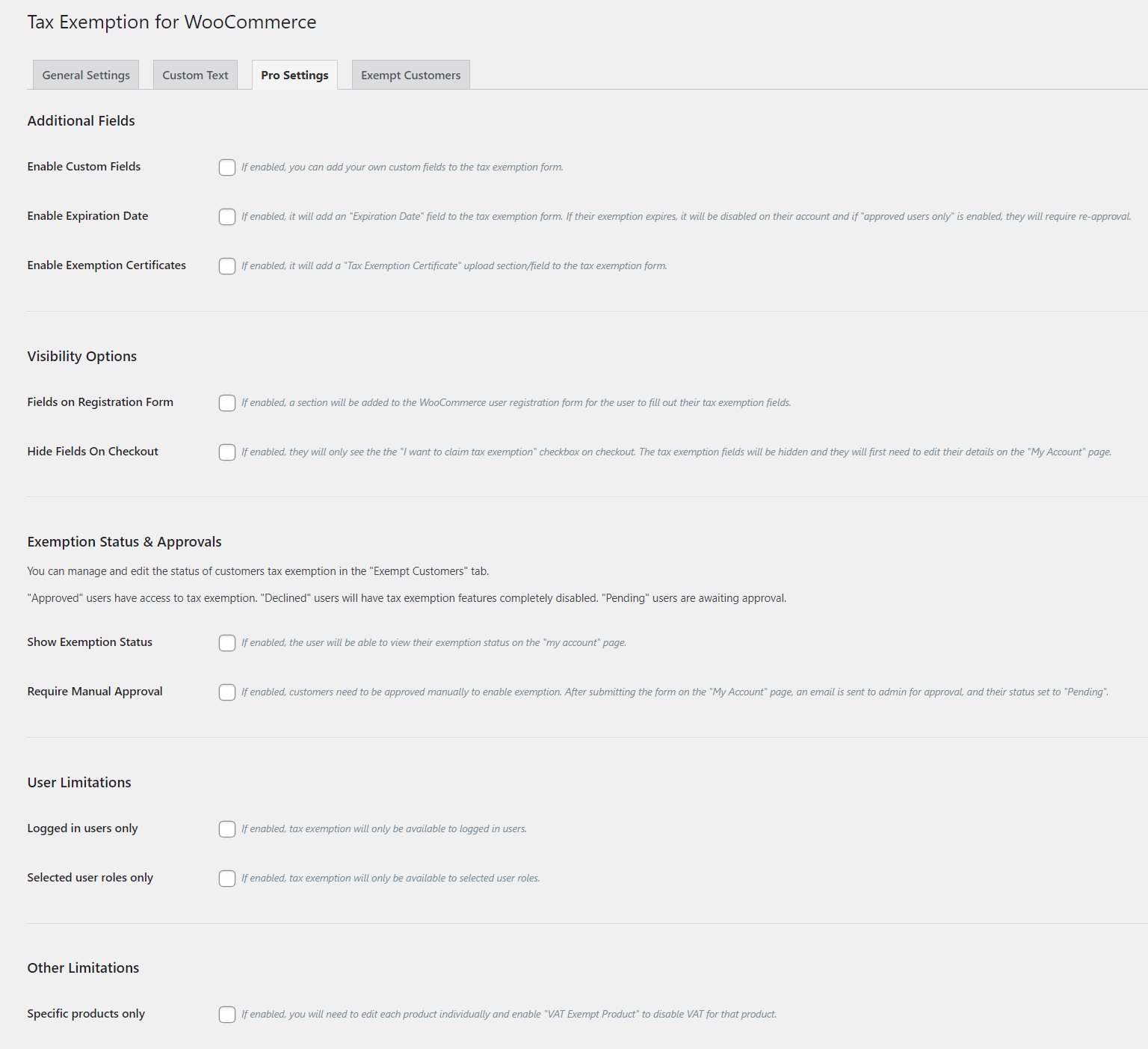
常见问题:
What is the purpose of this plugin?
Tax Exemption for WooCommerce allows customers to declare their tax exemption status on the WooCommerce checkout page, and provide their tax exemption details. This is useful for customers that are eligible for tax relief, such as charities or disabled individuals.
How does the tax exemption work?
When a customer selects the "I want to claim tax exemption" checkbox on the checkout page, they will be able to enter their tax exemption details. If they have entered their details successfully, tax will be removed from their order.
Is it compatible with Stripe Tax?
Yes, the plugin is compatible with Stripe Tax. If you are using the Stripe Tax plugin, it will automatically remove tax from orders for customers that have declared their tax exemption status.
Is it compatible with AvaTax?
The PRO version of the plugin is compatible with AvaTax. If you are using the AvaTax integration, it will automatically remove tax from orders for customers that have declared their tax exemption status.
Is it compatible with WooCommerce Subscriptions?
Yes, the plugin is compatible with WooCommerce Subscriptions.
Is it compatible with WooCommerce Block Checkout?
Yes, the plugin is fully compatible with WooCommerce Block Checkout. Customers can enable and disable tax exemption directly on the block checkout page, and tax will be removed from their order if they are exempt.
Is it compatible with other checkout plugins?
The plugin is designed to be compatible with the default WooCommerce checkout and WooCommerce Block Checkout. It will also work fine with many other popular checkout plugins like CheckoutWC and Flux Checkout. If you are using a different checkout plugin and having issues, please get in touch.
Do you provide support?
Yes. If you need any help setting up the plugin, please free to get in touch and we'll be happy to help!
How can I report feature issues/bugs with the plugin?
You can report feature bugs by creating a support ticket. Please provide as much information as possible to make it easier for us to find a solution for you.
Does this plugin use a 3rd party service?
Freemius: The plugin uses the Freemius SDK for optional usage tracking and licensing of PRO features; see Freemius privacy and terms for details. Font Awesome: The plugin uses Font Awesome (free) for icons; see Font Awesome privacy and terms for details. Official registers (PRO): if you enable registration number verification and switch on one of the official registers, the registration number the customer entered is sent to that register to be checked. Every register is off by default, and none is ever contacted unless you turn it on and supply its credentials:
- EU VAT numbers are sent to the European Commission's VIES service; see the VIES service and the European Commission privacy policy.
- UK VAT numbers are sent to HMRC's "Check a UK VAT number" API; see the HMRC API documentation and the GOV.UK privacy notice.
- Australian ABNs are sent to the Australian Business Register; see the ABR and its privacy policy.
- England & Wales charity numbers are sent to the Charity Commission Register API; see the Charity Commission API portal and its personal information charter.
How does registration number verification work?
Every number is first checked against its own format, and against its official check digit where the number type has one - UK VAT, Australian ABNs, India GSTIN, New Zealand IRD and Canadian Business Numbers all do. That needs no setup or account, and catches effectively every typo and invented number. On top of that, PRO can look the number up against its official register in real time, for the four registers listed above. You choose whether a number that is actively rejected simply gets flagged for your review, or blocks the customer from claiming exemption. A register being temporarily unreachable is never treated as an invalid number. Customers are only ever blocked when a register actively rejects their number and you have chosen to block on failure.
How can I report security bugs?
You can report security bugs through the Patchstack Vulnerability Disclosure Program. The Patchstack team helps validate, triage and handle any security vulnerabilities. Report a security vulnerability.
更新日志:
- New: (PRO) Added "Allowed File Types" on the "Certificates" tab, so customers can upload their certificate as a JPG, PNG or Word document as well as a PDF. Each file is checked to be the type it claims to be. Developers can use the "tefw_certificate_allowed_mimes" filter; HTML, SVG and script files are never accepted.
- New: Added a "Remove Tax on Fees" option to the "General" tab, to also remove tax from fees added to the cart by other plugins (such as handling or payment fees) for tax exempt customers.
- New: Added a "Save Details to Account" option to the "Display Locations" tab. Choose "Customers only" if your staff place orders for customers while logged in as themselves, so each customer's exemption details are saved to their order rather than to the staff account and filled in on the next order.
- New: (PRO) Added a "Hide Selected Locations Note" option under "Custom Text" > "Restriction Notes", to hide the "Tax exemption will only apply in: ..." note while keeping the country and state restrictions.
- New: (PRO) Added a "Reply-To Address" setting for the tax exemption emails. Replies to the admin request email now go to the customer who made the request.
- New: Added the tefw_render_order_exemption_details( $order, $plain_text ) function, to show an order's tax exemption details in your own email templates, such as an overridden admin-new-order.php.
- Tweak: The "Add New / Update Customer" form on the "Exempt Customers" page now accepts an email address as well as a username, and explains when no account is found.
- Tweak: Customers outside the allowed user roles can no longer submit a tax exemption request from the cart or My Account.
- Tweak: The plugin's own icon is now shown on the Account page.
- Tweak: Updated the translation template, and made the remaining messages shown by the plugin's scripts translatable.
- Fix: Fixed an issue where the required "Name" and "Reason" fields were not enforced on the classic checkout, the block checkout, or express payment buttons (Apple Pay, Google Pay, Link), so a tax exempt order could be placed with them left empty.
- Fix: Fixed an issue on the cart and block checkout where a customer whose saved exemption details were missing a required field was shown the tax exemption box unticked, but was still treated as tax exempt and could not place their order. The totals now always match the box.
- Fix: Fixed an issue where tax was removed from shipping, but not from the products, for customers who are not eligible for tax exemption, such as those still awaiting approval.
- Fix: Fixed an issue where checkout builders such as FunnelKit showed the required field marker as raw HTML, e.g. "Full Name *". Required fields are now marked by WooCommerce in the same way as its own fields.
- Fix: Fixed an issue where placing an order on the block checkout could clear a tax exemption granted by the store, save "undefined" as the customer's name and reason, and send the store an unwanted "Tax Exemption Request" email - particularly when the checkbox is hidden on checkout.
- Fix: (PRO) Fixed an issue where, with "Require Manual Approval" enabled, customers awaiting approval and guests saw an empty box on the block checkout instead of the "Want to claim tax exemption? Click here" message.
- Fix: (PRO) Fixed an issue where the block checkout ignored the custom URL set for the "Exemption Message", always linking to the My Account page.
- Fix: (PRO) Fixed an issue where customers awaiting approval were told "Tax exemption is enabled" on the block checkout.
- Fix: (PRO) Fixed an issue where the "Hide this message from checkout if exemption is enabled" option had no effect on the block checkout.
- Fix: (PRO) Fixed an issue where, with "Specific products only" enabled, visiting the cart page removed tax from every product in the order - and from shipping - rather than just the eligible products.
- Fix: Fixed an issue where the cart page removed tax from shipping even with "Remove Tax on Shipping" disabled.
- Fix: Fixed an issue where the admin "New Order" email and the order received page did not show the tax exemption details for some exempt orders, including "Specific products only" orders and stores that hide the "Name" field. Every detail the order has is now shown, and plain text emails get a plain text version.
- Fix: (PRO) Fixed an issue where the "Tax Exemption Approved" and "Tax Exemption Declined" emails were only sent when using the buttons in the admin request email. They are now sent whenever a customer's status changes, including from the "Exempt Customers" page, the user profile and registration number auto-approval.
- Fix: (PRO) Fixed an issue where customers claiming tax exemption on the registration form were not set to "Pending", and no request email was sent, when "Require Manual Approval" is enabled.
- Fix: (PRO) Fixed an issue where a certificate uploaded on the registration form was not saved.
- Fix: Fixed an "Undefined variable $show_exemption" PHP warning on the checkout page.
- Fix: Fixed an issue where HTML in the "My Account Description" setting was removed when saving. If you had used HTML there, please enter it again.
- Fix: Fixed an issue where the "Checkbox Description" was not shown under the checkbox on the classic checkout.
- Fix: Fixed an issue where an order could record tax exemption for a customer who was not eligible for it, so the order screens and emails disagreed with the tax charged.
- Fix: (PRO) Fixed an issue where saving the block checkout's tax exemption form cleared the customer's AvaTax exemption type.
- Security: (PRO) Fixed an issue where the "Tax Exemption Approved" and "Tax Exemption Declined" emails sent from the approve/decline buttons in the admin request email could include the plugin's settings.
- Fix: Fixed an issue where the "Exempt Customers" page could time out on stores with a large number of customers, showing "The customer list could not be loaded (HTTP 500)" instead of the customer list. The "Expiring Soon" and "Expired" filters and the CSV export were affected in the same way.
- Fix: (PRO) Fixed an issue where uploading a certificate on the checkout page always failed with "Your certificate could not be uploaded. Please try again."
- Fix: Fixed an issue where express checkout buttons (Apple Pay, Google Pay and Link from the Stripe or WooPayments plugins) kept the tax exempt total after the tax exemption box was unticked on the checkout page, and could show a different total to the order review until the page was refreshed. Unticking the box now removes the exemption from the order straight away, including for customers who are exempt on their account and had visited the cart page first.
- Fix: (PRO) Fixed an issue where customers who are tax exempt on their account were still charged tax on the block checkout when the "Hide Checkbox On Checkout" option was enabled, even though the cart page had already removed the tax. The exemption is now taken from the customer's account in the same way as the classic checkout.
- Fix: Fixed an issue where a customer whose exemption was still pending approval, or had been declined, could be tax exempt on the block checkout. The block checkout now applies the same approval, user role and expiry rules as the cart and the classic checkout.
- New: (PRO) Added a "Price Display" settings tab with an option to show prices excluding tax to customers who are already tax exempt - across the shop, product pages and widgets, not just at the cart and checkout - so the price they browse is the price they pay.
- New: (PRO) Added an optional price toggle letting every visitor switch between prices including and excluding tax. Place it above the shop listing, on product pages, or anywhere with the
[tefw_price_toggle]shortcode. Both prices are rendered into the page and swapped in the browser, so it works on cached pages with no price flashing before it settles. The toggle changes what is displayed only - tax is still removed by the tax exemption form as usual. - Fix: Fixed an issue where activating the PRO plugin failed with a fatal error if the free version was still active.
- Fix: Fixed an issue where an exempt customer could still be charged tax on their order total, even though the exemption had been applied to the products.
- Fix: Fixed an issue where a customer's tax exemption could be cleared part way through checkout by a third-party checkout or payment plugin.
- Fix: Fixed an issue where updating to 3.0.0 made the exemption certificate mandatory on stores that had never asked for one, quietly removing exemption from customers without a certificate on file.
- Fix: Fixed an issue where the customer's tax exempt flag was cleared on every view of the checkout page, which could leave shipping tax charged to exempt customers.
- Fix: (PRO) Fixed an issue where the daily expiry check permanently switched off a customer's tax exemption, and nothing switched it back on when they renewed.
- Fix: (PRO) Fixed an issue where a customer's status stayed on "Expired" after their exemption had been renewed, so they were still charged tax.
- Fix: (PRO) Fixed an issue where switching on the "Expiration Date" field stopped tax exemption working for existing customers who had no expiration date saved.
- Fix: (PRO) Fixed an issue where an expired tax exemption was still applied on the block checkout.
- Fix: Fixed an issue where the "Exempt Customers" page could hang on "Loading..." and never show the customer list.
- Fix: Fixed an issue where the "Guest Customers" list on the "Exempt Customers" page was always empty.
- Fix: Fixed an issue where the "Last Exempt Order" column was empty, and its links broken, on stores using High-Performance Order Storage.
- Fix: Fixed an issue where a store with a large number of tax exempt guest orders could run out of memory building the "Guest Customers" list.
- Fix: Fixed an issue where the "Exempt Customers" page could time out on stores using the AvaTax integration.
- Fix: Fixed an issue where turning off the "Enable Tax Exemption" option left the "Exempt Customers" page unable to load, save or export anything.
- Fix: Fixed an issue where shop managers were shown links to plugin pages they were not allowed to open.
- Fix: Fixed an issue where changing a customer's status reported "Failed to update status" when they were already on the status chosen.
- Fix: Fixed an issue where saving a customer from the "Add New / Update Customer" form gave no response at all when the save failed.
- Fix: Fixed an issue where the free version's "Exempt Customers" table was missing two column headings.
- Fix: (PRO) Fixed an issue where a customer could not delete their own tax exemption certificate from the My Account page, always seeing "Access denied".
- Fix: (PRO) Fixed an issue, introduced in 3.0.0, where uploading a tax exemption certificate at checkout failed with "Your certificate could not be uploaded".
- Fix: (PRO) The free version is now automatically deactivated if it is still active when PRO is activated, since only one is ever meant to run at a time.
- New: Added an option to show a "Registration Number" field to the tax exemption form, so customers can supply a VAT number, charity number, ABN, GSTIN, EIN, resale certificate number and more. Choose which number types your store accepts on the new "Registration Number" settings tab; tick a single type and the type dropdown is hidden entirely so customers just see one field.
- New: The registration number is shown alongside the other exemption details everywhere they already appear - the customer's account, the Exempt Customers and Exempt Orders pages and their CSV exports, the admin order screen, and the admin notification emails.
- New: (PRO) Added registration number verification. Every number is checked against its own format and checksum rules, and the types that have an official register can be looked up live: EU VAT via VIES, UK VAT via HMRC, Australian ABNs via the ABR, and English & Welsh charity numbers via the Charity Commission. Each number type is its own row on the settings tab, and the types with a register expand to hold that register's setup, so everything for a given type lives in one place.
- New: (PRO) Added an "Auto-approve on Success" option. When a customer's number verifies, their exemption is approved automatically. Numbers that fail are left pending for you to review rather than being declined outright.
- New: (PRO) Successful VIES and HMRC checks record a consultation reference against the customer and the order - the evidence you need to show you verified a customer's VAT number.
- New: (PRO) Added a "Re-check" button on the customer profile and the Exempt Customers page to re-verify a stored number on demand.
- New: (PRO) The verification badge now explains itself on hover, wherever it is shown: which official register the number was looked up in - or that only its checksum or format could be checked, and why - along with the name the register holds for it, the consultation reference and when it was last checked.
- New: (PRO) Added automatic certificate/exemption expiry reminder emails. When the "Expiration Date" field is enabled, you can now send customers reminder emails a configurable number of days before their tax exemption expires (e.g. 30, 7 and 1 days before), each with a link to renew their details on the My Account page.
- New: (PRO) Added an optional "Tax Exemption Expired" email, sent once to the customer when their exemption lapses.
- New: (PRO) Added an "Expiring Soon" / "Expired" filter and status badges to the "Exempt Customers" admin page, so you can quickly see which exemptions need attention.
- New: (PRO) Added a "Send Reminder" button on the "Exempt Customers" admin page to manually send an expiry reminder email to a customer.
- New: (PRO) Added an optional daily admin digest email summarising exemptions that are expiring soon or have expired.
- New: (PRO) Added an optional "Default Validity Period" setting. When enabled, exemption expiration dates are calculated automatically (e.g. valid for 12 months from setup/renewal) and the manual expiration date field is hidden from customers.
- New: Added two new customer emails ("Tax Exemption Expiring Soon" and "Tax Exemption Expired") to the Emails settings tab, with new {expiration_date}, {days_until_expiry} and {renew_url} merge tags.
- New: Tax exemption is now applied on accelerated/express checkout (Apple Pay, Google Pay, Stripe Link and similar), where the normal checkout fields never load and tax was previously charged in full. A logged in customer's saved exemption is used, and is still checked against their approval status, allowed user roles and expiration date before any tax is removed.
- Tweak: Redesigned the admin settings page.
- Tweak: (PRO) A register being temporarily unreachable is never treated as an invalid number. Customers are only ever blocked when a register actively rejects their number and you have chosen to block on failure - VIES member state services go offline regularly, and a checkout should not fail with them.
- Tweak: The tax exemption checkbox and form are now shown directly on the WooCommerce block checkout by default, and are no longer a beta feature. The "[Beta] Block Checkout: Checkbox + Form" setting has been removed as it is now always enabled.
- Tweak: The "Settings on My Account Page" option can now be turned off while using the block checkout. It was previously forced on and locked, as the block checkout relied on linking customers to the My Account page.
- Tweak: Standardised expiry date comparisons to use the site timezone (current_time) for consistency.
- Tweak: (PRO) Expired exemptions are now deactivated by the daily expiry scan, rather than waiting until the customer next reaches the checkout page. This keeps the "Exempt Customers" list accurate and makes sure a lapsed exemption cannot be used on express checkout.
- Tweak: (PRO) The "Tax Exemption Expired" email is only sent for exemptions that lapsed within the last 30 days, so turning the feature on cannot email years of previously expired customers in one go. Use the "tefw_expired_email_max_age_days" filter to change the window.
- Tweak: (PRO) The admin expiry digest email now lists at most 100 customers per section and reports how many more were not shown, so stores with a large number of exempt customers still get a usable email. Use the "tefw_expiry_digest_max_rows" filter to change the limit.
- Tweak: (PRO) The "Exempt Customers" list now also matches customers on their expiration date, so anyone whose exemption has lapsed stays visible under the "Expired" filter.
- Tweak: (PRO) Where an exemption certificate is required but there is no upload field on the page being submitted (the cart checkbox, block checkout, or checkout with "Show on Checkout" disabled), the message now points the customer to the "Tax Exemption" page in "My Account" instead of only repeating that a certificate is needed.
- Fix: Fixed an issue where the Emails settings tab accordions would not open, and several other settings (Custom Text restriction notes, Stripe Tax, Block Checkout and AvaTax enforcement, and the selected states options) would not show or hide correctly, caused by a JavaScript error on the plugin settings page.
- Fix: Fixed an issue where the "Tax Exemption" tab could be missing from the My Account menu on block-based or page-builder account pages, even though the endpoint page loaded correctly, by registering the endpoint with WooCommerce's query var system.
- Fix: Fixed an issue where a product's tax class could be permanently changed to the tax exemption class. The exemption is only ever applied while a customer is shopping, but the exempt tax class could previously be picked up in the WordPress admin and by external tools, so using Quick Edit or Bulk Edit on the Products list, importing products, or syncing products through the REST API could save it to the product for good. The exemption is now limited to the storefront, cart and checkout only.
- Fix: Fixed the excessive spacing above and below the tax exemption message ("Want to claim tax exemption? Click here") on checkout, caused by line break tags being added around the message.
- Fix: (PRO) Fixed an issue where the "Required" setting for exemption certificates was not enforced on block checkout, so customers could tick the tax exemption checkbox and place an order without uploading a certificate. The certificate is now required on the cart and block checkout as well, and the order is blocked if one is missing.
- Fix: (PRO) Fixed an issue where a failed certificate upload on checkout (for example a file that was not a PDF, or was over the maximum upload size) was treated as successful, allowing the order to be placed with no certificate actually saved. Failed uploads now show the reason and the certificate is re-requested.
- Fix: (PRO) Fixed an issue where the "Per-Order Upload" certificate setting was not enforced for returning customers, whose previously uploaded certificate was reused instead of a new upload being requested for each order.
- Fix: (PRO) Fixed an issue where customers who already had a certificate on file were still forced to upload a new one on checkout.
- Fix: (PRO) Fixed an issue where the certificate upload field was shown on checkout even when the "Show on Checkout" setting was disabled, leaving a required field that could not be completed.
- Fix: (PRO) Fixed an issue where the required certificate field could prevent the checkout form from being submitted at all when the tax exemption checkbox was not ticked.
- Fix: (PRO) Hardened the checkout certificate upload so an uploaded certificate can only be claimed by the customer who uploaded it. The file name was previously trusted from the checkout form on its own, so a known file name could be used to satisfy the "certificate required" check, and be attached to an account, without a file actually being uploaded.
- Other: Updated the Freemius SDK.
- Improvement: Changed the "My Account Description" field in Custom Text settings from a single-line input to a textarea that properly supports HTML formatting.
- Improvement: Increased the priority of the shipping tax exemption filter to ensure compatibility with third-party shipping plugins (e.g. Canada Post Shipping) that may add rates at later priorities.
- Fix: Fixed an issue where tax exempt customers were still being charged VAT when placing an order, caused by the exemption session being prematurely reset during checkout updates.
- Fix: Fixed an issue where the AJAX exemption session update could silently fail due to strict nonce verification.
- Fix: Fixed an issue where the tax exemption meta box on order edit pages could be empty in some cases when exemption details exist.
- Fix: Fixed an issue where WooCommerce would calculate incorrect tax rates (falling back to base rate) when the VAT exemption checkbox was not checked or VAT fields were empty on checkout.
- Fix: (PRO) Fixed the exemption certificate not displaying in tax exemption request emails.
- Fix: (PRO) Fixed incorrect field labels displaying in tax exemption request emails.
- Fix: (PRO) Fixed the "Approve Request" and "Decline Request" buttons in approval emails not triggering status changes.
- Improvement: Multiple improvements and fixes to the new full integration with WooCommerce Block Checkout to now work with all the different options.
- Tweak: Updated the Exemption Message custom URL placeholder to show the default tax exemption page URL.
- Tweak: Added an option to set a custom URL for the tax exemption message link on checkout.
- Tweak: Improved the pagination on the "Exempt Orders" admin page.
- Tweak: Added missing styles to the [tefw_exemption_form] shortcode form.
- Fix: Fixed an issue where removing the VAT number during checkout recalculation could restore the wrong tax rate.
- Fix: Fixed an issue with the emails customisation accordion not opening in some cases.
- Fix: Fixed an issue with trying to activate the PRO version when the free version is also active.
- Fix: (PRO) Fixed duplicate "User Limitations" settings showing.
- Fix: (PRO) Fixed the admin emails for new tax exemption requests not showing the correct field labels and showing empty rows.
- New: Added new full integration with WooCommerce Block Checkout. You can now choose to show the tax exemption checkbox and form directly on the block checkout page, instead of a message linking to the my account page. This can be enabled via the new "Block Checkout: Tax Exemption Checkbox + Form" setting on the plugin settings page.
- Tweak: Adjusted the tax exemption form checkbox label layout to sit inline to the right of the checkbox.
- Fix: The tax exemption shortcode now works even when the My Account tax exemption page is disabled.
- Fix: Prevented an infinite loop and memory exhaustion when saving orders with 'tefw_exempt' meta.
- Fix: Fixed an issue with restoring the correct tax rate after unchecking tax exemption during checkout recalculation.
- Fix: Potential fix for the specific products only option not working correctly in some cases.
- Fix: Fixed an issue with the remove tax on shipping option not working correctly in some cases.
- New: Added an option to set a custom admin notification email address for tax exemption requests.
- Fix: Fixed an issue in some cases where updating an order would reset its tax exemption status to exempt, when the order was placed as non-exempt, but the users default status is set to exempt. This will only apply to new orders.
- Tweak: HTML tags are now allowed in the custom text "Checkbox Description" field.
- Fix: Fixed an issue with the "Tax exemption will only apply in" message showing even when no location restrictions are set.
- Fix: Fixed an issue where conflicts may occur with other plugins that modify the cart totals.
- Fix: Fixed an issue with the "Require Manual Approval" option not working correctly.
- Fix: Potential fix for a visual bug with WooCommerce subscriptions.
- Other: Updated to Freemius SDK 2.13.0
- Fix: Fixed a PHP error with the last update.
- Tweak: Made a variety of tweaks and improvements to the codebase to better follow WordPress coding standards.
- New: (PRO) Added a new "Enable "Exemption City/State" Limitation Field" option. If enabled, an additional field will be shown on the tax exemption form on checkout and my account page, where users can enter their city/state for exemption purposes. You can then limit tax exemption to only be available when the checkout billing state matches the entered city/state.
- New: (PRO) Added a new "Selected states only" option. If enabled, you can limit tax exemption fields to only be available to certain states (billing address on checkout).
- Tweak: Made a few small tweaks and fixes to the admin pages.
- Fix: (PRO) Potential fix for a niche issue with the "Specific products only" option.
- Tweak: Added integration with Flux checkout plugin for improved compatibility.
- Tweak: Made a few tweaks to the admin pages. Added a new header bar to the admin pages, with quick links for the plugin.
- Fix: Fixed an issue in some cases with the calculated totals for orders with multiple quantity of the same item.
- Fix: Fixed an issue with toggling off tax exemption on checkout (when user account is set to defaulted enabled) not removing tax after placing the order in some cases.
- Fix: Fixed the edit order page showing tax exemption as enabled, even though it is not, when the user account is set to defaulted enabled, but they toggled it off on checkout.
- Other: Updated to Freemius SDK 2.12.2
- Fix: Potential fix for some users enabling tax exemption on checkout but tax is not being removed in some cases.
- Fix: Fixed a potential PHP error on the admin "Exempt Customers" page in some cases.
- Fix: (PRO) Fixed an issue with the "tax exemption certificate" upload field on the my account page.
- Tweak: Made some improvements to the shortcode and block checkout functionality when toggling tax exemption.
- Fix: Fixed an issue where if tax exempt users toggled off tax exemption on checkout, it would still save the tax exemption meta data to the order.
- Fix: Fixed an issue with the cart page tax exemption checkbox not working correctly in some cases.
- Fix: Fixed an issue with the "Selected countries only" option.
- New: (PRO) Added a new option to choose which address the "Selected countries only" is checked against.
- Fix: Fixed an issue causing an error with new orders when saving meta data in some cases.
- Fix: Fixed an issue with tax exemption on the block checkout.
- Fix: Fixed an issue with the "Selected countries only" option on block checkout.
- Fix: Fixed an issue with the "I want to claim tax exemption" checkbox on the cart page when logged out.
- Fix: (PRO) Fixed an issue in some cases when required fields were stopping orders from being placed in some cases.
- Fix: (PRO) Fixed an issue with the certificate upload field not showing on the my account page in some cases since a previous update.
- Fix: (PRO) Fixed an issue in some cases when required fields were stopping orders from being placed, even when the tax exemption checkbox was not checked.
- Fix: (PRO) Fixed an issue with the certificate upload field not showing on the my account page in some cases since a previous update.
- Improvement: Improved tax exemption functionality when manually adding an order as an admin.
- New: Added a new "Exempt Orders" admin page, where you can view all the exempt orders and tax exemption details for each order. Includes a date range filter.
- New: Added a new "Show Checkbox on Cart Page" option, which allows you to show the tax exemption checkbox on the cart page as well as the checkout page.
- New: Added integration with the "Stripe Tax" plugin.
- New: Added the shortcode "[tefw_exemption_form]" which can be used to display the tax exemption form on any custom page.
- Improvement: Moved the "Exempt Customers" tab from the settings tab to its own admin page.
- Improvement: For the "Exempt Customers" page, added a dropdown to choose the customer type, which now has an option to view "guest" customers that have placed orders with tax exemption.
- Improvement: Added "Export CSV" buttons to both the "Exempt Customers" and "Exempt Orders" admin pages, to allow you to export the list of exempt customers and orders to a CSV file.
- Tweak: Made some styling changes to the admin pages.
- Tweak: Modified the error notice when the name or reason fields are required but not set when placing an order.
- Fix: Fixed an issue where the tax exemption details were not being saved to the order meta in some cases.
- New: Added an option to make the tax exemption checkbox checked by default on the checkout page.
- Fix: Fixed an issue causing some payment gateways to not working properly with the plugin since the last update.
- Fix: Fixed a "Uncaught ArgumentCountError" PHP error.
- Other: Tested with WordPress 6.7.2
- Improvement: When adding new orders manually as an admin, upon saving the order or clicking "Recalculate", it will now check the customer's tax exemption status and remove tax if they are exempt.
- Fix: Fixed the custom text for "Tax Exemption Certificate" not applying to the checkout page.
- Fix: Fixed an issue with the certifiate upload is not saving in the order meta when this option is enabled: "Certificate upload needed for each individual order, rather than it being saved to the customer/user account."
- Other: Tested with WooCommerce 9.6.1
- Other: Updated to Freemius SDK 2.11.0
- Fix: (PRO) Fixed an issue with the tax exemption fields not saving to the order if the "Hide Fields On Checkout" option is enabled.
- New: Added a new "My Account Description" option to the "Custom Text" settings tab, which allows you to show text at the very top of only the "My Account" page.
- TweakL Added some info tooltips to some of the "custom text" settings.
- Tweak: (PRO) The tax exemption message will now hide on checkout if a country is selected that is not allowed to use tax exemption.
- Tweak: (PRO) Added styling to ensure the certificate upload field button does not get hidden.
- Fix: When refreshing after submitting the tax exemption form on the my account page, it will no longer try to re-submit the form.
- Fix: (PRO) Fixed an issue with the "Specific products only" option not working with variable products.
- Fix: (PRO) Fixed an issue with the upload file not working in some cases for guest checkouts.
- Other: Tested with WooCommerce 9.5.1
- Other: Tested with WordPress 6.7.1
- Other: Updated to Freemius SDK 2.10.1
- Fix: Fixed an issue with the tax exemption fields not showing on the checkout page in some cases.
- Other: Updated to Freemius SDK 2.8.1
- Other: Tested with WordPress 6.6.2
- Improvement: (PRO) Added the following option under the "Exemption Certificates" settings: Require certificate uploads for each individual order, rather than it being saved to the customer/user.
- Fix: Fixed an issue with the name and reason fields being required even when they are disabled.
- Other: Tested with WooCommerce 9.2.3
- Other: Updated to Freemius SDK 2.7.4
- Fix: Fixed an issue with the plugin causing an error when editing pages.
- Tweak: Now automatically adds a "Zero rate" tax rate when visiting the settings page, if one does not already exist. Now shows a warning if this is not set as the tax class for tax exemption.
- Fix: (PRO) Fixed an issue with the current certificate file link not working correctly on the checkout page if one has already been uploaded previously.
- Fix: (PRO) Fixed an issue with the certificate upload field being required on the registration form even if the exemption option is not checked.
- Fix: (PRO) If tax exemption is shown on registration form, now hides the fields, unless the checkbox is checked.
- Other: Tested with WooCommerce 9.1.4
- Other: Tested with WordPress 6.6.1
- Fix: Fixed an error with the name and reason fields being disabled, but if the required option was still enabled, it would show the error message stating the field is required.
- Fix: (PRO) Fixed an issue with the maximum file size for the certificate upload field not working correctly.
- Improvement: Added compatibility with WooCommerce Block Checkout. It will now remove tax from the block checkout. However, the checkbox and fields can not be shown on the block checkout page, but it will now show the "Exemption Message" and link to the my account page.
- Tweak: You can now edit whether the customer has exemption enabled or disabled on the admin "Exempt Customers" page.
- Tweak: Added a languages folder with a .pot file for translations. Also added "Spanish" translation files.
- Tweak: (PRO) Modified the max file size for the certificate upload field to use the WordPress "wp_max_upload_size" value.
- Fix: (PRO) Fixed a PHP error with the AvaTax integration enabled.
- Other: Tested with WordPress 6.5.5
- Other: Tested with WooCommerce 9.0.2
- Other: Updated to Freemius SDK 2.7.3
- Fix: Fixed an issue with the checkout divs / layout formatting for the tax exemption section on the checkout page (in some cases), since the last update.
- Tweak: (PRO) Improved the "Tax Exemption" meta box on the admin order edit page when AvaTax integration is enabled.
- Tweak: Made a few small CSS/styling tweaks.
- Fix: Fixed an issue with the "Hide Fields On Checkout" option.
- Fix: Fixed issue in some cases with the file upload field on the checkout page not working.
- Other: Tested with WordPress 6.5.4
- Other: Tested with WooCommerce 8.9.3
- Other: Updated to Freemius SDK 2.7.2
- Fix: Fixed an issue in the free version in some cases where the name and reason fields were not showing.
- New: Added options to select whether the "Name" and "Reason" fields are shown and required on the tax exemption form.
- Other: Tested with WordPress 6.4.2
- Other: Tested with WooCommerce 8.5.0
- Fix: (PRO) Fixed an issue with the new "AvaTax" integration.
- Tweak: Made a few other small tweaks.
- New: (PRO) Added support for AvaTax. View the "AvaTax" tab on the plugin settings page for more information.
- New: (PRO) Added a new "Selected countries only" option. If enabled, you can limit tax exemption fields to only be available to certain countries (billing address on checkout).
- New: (PRO) Added a new "Tax Class Per Customer" option to PRO settings. If enabled, you can set a custom "Tax Class for Tax Exemption" for specific customers. This will override the global tax class set in the general settings.
- New: (PRO) When "Specific products only" is enabled, added an option to make it so an eligible product must be in cart to show tax exemption checkbox/form on checkout.
- New: Added "Tax Exemption Details" to the admin "New Order" email.
- Tweak: Made a few small changes to the admin page.
- Tweak: Added a loading spinner and message on the "Exempt Customers" tab, when loading the list of customers.
- Other: Tested with WordPress 6.4.1
- Other: Tested with WooCommerce 8.3.0
- New: Added an "Exempt Customers" tab to the admin page, where you can manage, edit and add tax exempt customers.
- New: Added the "Settings on My Account Page" option to the free version.
- New: (PRO) Added an option to enable a "Expiration Date" field on the tax exemption form. If their exemption expires, it will be disabled on their account and if "approved users only" is enabled, they will require re-approval.
- New: (PRO) Added option to enable tax exemption fields on the WooCommerce user registration form.
- New: (PRO) When "Approved users only" is enabled, added option to show a tax exemption message on checkout with link to account page for non-approved users.
- New: (PRO) Added an option to "Hide Fields On Checkout". If enabled, they will only see the the "I want to claim tax exemption" checkbox on checkout. The tax exemption fields will be hidden and they will first need to edit their details on the "My Account" page.
- New: Added an option to show an "Exempt" orders column on the WooCommerce orders page.
- New: Added an "Tax Exemption Description" option to the "Custom Text" settings tab, which allows you to show text above the tax exemption fields.
- Improvement: (PRO) Files uploaded at checkout are now added to a temporary folder, and moved to the main folder when the order is completed.
- Improvement: (PRO) Automatically delete temporary PDF files that are not assigned to a user or order. Checked daily.
- Improvement: (PRO) Automatically delete the previous/old PDF file when a new one is uploaded to a user.
- Improvement: Added a few more possible locations for the "location on checkout" option for the tax exemption checkbox and fields on the checkout page.
- Tweak: Some small changes to the admin page.
- Tweak: Added the default WooCommerce classes to the tax exemption checkbox on the checkout page.
- Tweak: (PRO) When "Selected user roles only" is enabled, it will also hide the "Tax Exemption" tab on the "My Account" page, for users that are not allowed to use tax exemption.
- Fix: Fixed issue with some websites where tax exemption was not removing tax for logged in users that have not previously set their tax exemption details.
- Fix: (PRO) Fixed issue with the file upload field sometimes not working correctly on checkout page.
- Fix: (PRO) Fixed issue with deleting cerfiticate from my account page, if the file does not exist.
- Fix: (PRO) Fixed issue with certificate not being linked to order properly for guest checkout orders.
- Fix: Fixed the "Tax Exemption Title" custom text option not working correctly.
- Fix: Fixed some issues with HPOS compatibility.
- Fix: A few other small fixes.
- Other: Updated to Freemius SDK 2.6.0
- Other: Tested with WordPress 6.4.0
- Tweak: Some small changes to the admin page.
- Other: Tested with WordPress 6.3.2
- Tweak: Fixed issue with the "Enable Tax Exemption" option when disabled.
- Tweak: A few small changes to the admin page.
- Tweak: Added a check to make sure WooCommerce is installed before running the plugin code.
- New: Free version released.
- Tweak: A few small tweaks and fixes.
- New: Initial PRO version release.