The 9 Dollar URLnip
| 开发者 | the9dollarplugins |
|---|---|
| 更新时间 | 2026年7月5日 18:40 |
| 捐献地址: | 去捐款 |
| PHP版本: | 7.4 及以上 |
| WordPress版本: | 7.0 |
| 版权: | GPLv2 or later |
| 版权网址: | 版权信息 |
详情介绍:
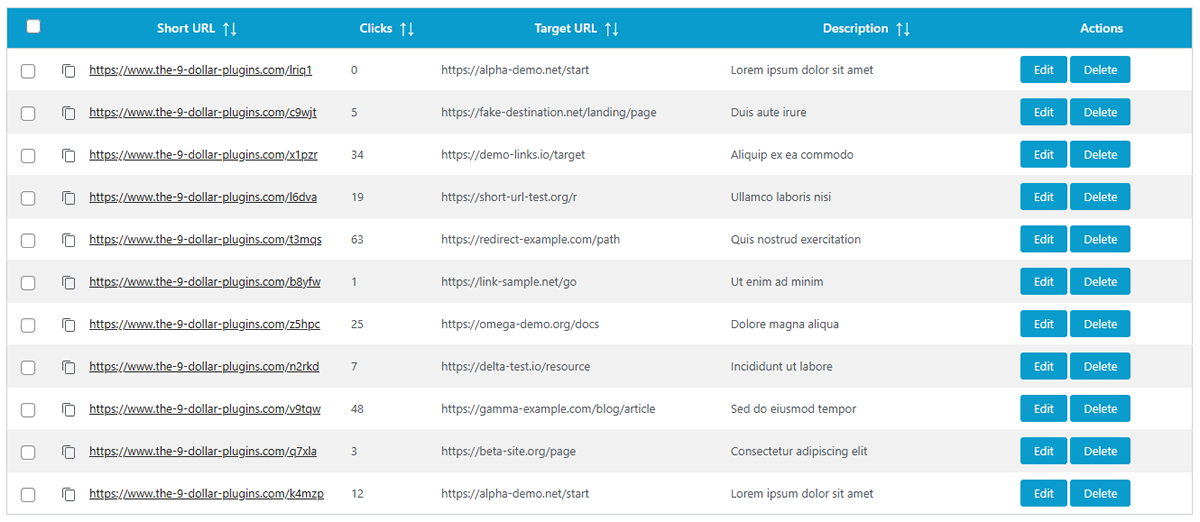
- Create, edit, delete shortlinks — all from your WordPress admin, no extra dashboard to learn
- Automatic 301 redirects — permanent, SEO-friendly, and fast
- Unique 5‑character slugs — no thinking required, just works
- Click counter — every visit increments automatically. See what's popular
- Export as CSV or TXT — full export including click counts. Great for reporting or backups
- Live search with real‑time filtering — start typing, results update instantly. Also shows current count
- Sortable columns — sort by short URL, clicks, target URL, or description
- One‑click copy to clipboard — grab your shortlink in a split second
- Bulk delete — select multiple shortlinks and delete them all at once
- Configurable duplicate handling — choose whether the same target URL can have multiple shortlinks
- JSON file storage — faster than database queries for this use case. Zero database tables created
- Fully translatable — ready for WordPress.org translations PRO Version extras
- Bulk import via CSV or TXT — upload hundreds of shortlinks in seconds. Invalid rows are skipped and reported. Duplicate handling is configurable
- Reset click counters — reset individual counters in bulk actions
- Priority support — because sometimes you need a human How it works
- Install and activate the plugin.
- Go to URLnip in your WordPress admin menu.
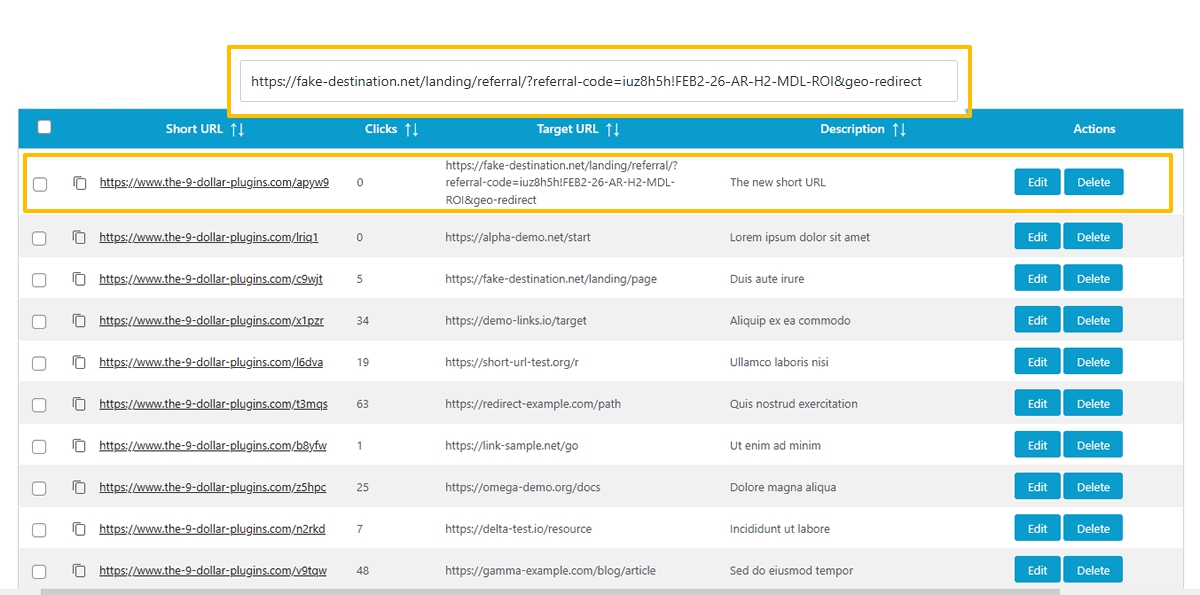
- Enter a target URL and an optional description.
- Boom — your shortlink is ready. Copy it, use it, track clicks. That's it. No hidden steps, no config files, no PhD required.
安装:
- Upload the plugin to
/wp-content/plugins/or install directly from the WordPress plugins screen. - Activate it — the usual WordPress way.
- Go to URLnip in your admin sidebar.
- Add your first target URL and grab your shortlink.
屏幕截图:
常见问题:
What's the difference between LITE and PRO?
LITE (free) gives you everything you need: create, edit, delete, export as CSV/TXT, live search, sortable columns, click counting, one-click copy, and bulk delete. PRO adds more:
- Bulk import — upload CSV/TXT files with hundreds of links. Duplicate handling is configurable
- Reset click counters — individual with bulk reset
- Priority support — faster help when you need it Everything else is identical. No hidden paywalls, no crippleware.
Can I customize the shortlink slug?
No, and that's intentional. Slugs are auto-generated as 5-character alphanumeric strings (like aB3xY). Why? Because letting everyone pick custom slugs leads to:
- Slug collisions (someone already took
/deal) - People picking terrible, hard-to-type slugs
- You spending time thinking about what to name a link With auto-slugs, you just create and go. No decisions, no delays.
Where are the links stored?
Inside a JSON file located at /wp-content/uploads/t9pURLnip/redirects.json. The directory is automatically protected with .htaccess rules that block direct web access. No database tables are created — your wp_options stays clean.
Is this GDPR compliant?
Yes, completely. URLnip stores only:
- The target URL
- The short slug
- An optional description
- A click counter (just a number) No personal user data. No IP addresses. No cookies. No tracking. If you use it for your own links (not user-submitted), there's zero GDPR exposure.
What happens if I deactivate the plugin?
Shortlinks stop working immediately — WordPress won't process the redirects anymore. However, your data file remains safe in /wp-content/uploads/t9pURLnip/. Reactivate the plugin, and everything is back exactly as you left it. No data loss, no re-importing.
What happens if I uninstall the plugin?
By default, the JSON data file stays on your server (just in case). If you want to remove everything, you'll need to delete the t9pURLnip folder manually from /wp-content/uploads/. The plugin does not auto-delete your data on uninstall — because that would be rude.
How many links can it handle?
The JSON format is surprisingly robust. You can easily handle 100,000+ shortlinks without any performance issues. If you have more links than that, you're either a massive enterprise or you need a hobby. 😄
Is it fast?
Very fast. Here's why:
- JSON file is smaller and simpler than a database query
- No complex SQL joins or indexes
- Direct file read with
file_get_contents() - PHP array lookup by slug is O(n) but with 100k entries still takes <50ms on average hosting For comparison: a database query has connection overhead, query parsing, and execution. JSON is just file I/O and a quick array scan.
Can I import existing shortlinks from another tool?
Yes — but only with PRO. You can upload CSV or TXT files. The plugin validates each row, skips invalid URLs, and shows you exactly what was skipped and why. Example import files are available directly in the plugin admin page.
Can I use this for affiliate links?
Yes. Any valid URL works — including affiliate links, long tracking URLs, or ugly ?utm_source=... monstrosities. URLnip makes them pretty.
Can I use it for internal redirects?
Absolutely. Point a shortlink to any page, post, product, or media file on your own site. Great for creating memorable shortcuts like your.site/s/contact (well, actually your.site/s/aB3xY — but you get the idea).
Does it work with caching plugins?
Yes, with one small note: the click counter updates on every redirect. If you use aggressive page caching, the counter might not update in real-time. The redirect itself (the shortlink URL) is usually excluded from caching by most plugins because it's a redirect endpoint.
Does it work with WooCommerce?
Yes. Shortlinks work anywhere WordPress runs — including product pages, cart, checkout, and thank-you pages.
Can I create shortlinks programmatically via API?
No. The Plugin does not include an API either (currently). This is a deliberate choice — URLnip is an admin tool for humans, not an API endpoint for machines. If you need programmatic shortlink creation, this isn't the right plugin.
Can I track who clicked my links?
No. URLnip only counts clicks (a simple number). No IP tracking, no user agent logging, no referrer data. This is by design: GDPR-friendly, lightweight, and drama-free.
What's the difference between 301 and other redirects?
URLnip uses 301 Permanent Redirects exclusively. That's the SEO-friendly standard for URL shorteners. It tells search engines: "This shortlink is the permanent address — transfer any link juice to the target URL."
Can I change a shortlink's target URL after creating it?
Yes. Edit any shortlink from the management table. The slug stays the same, the click counter stays intact, but from now on it redirects to the new URL. Old clicks remain counted.
Can I delete a shortlink and reuse its slug later?
No. Once a slug is deleted, it's gone forever. URLnip does not recycle slugs — that would cause confusion if someone bookmarked the old link and it suddenly points somewhere else.
Does it work on WordPress Multisite / Network?
Yes, with one caveat: each site in the network has its own independent JSON file and its own set of shortlinks. There's no global network-wide shortlink pool (unless you manually symlink the file, but that's advanced territory).
Do I need an API key or an account anywhere?
No. Never. URLnip runs entirely on your own server.
更新日志:
- Added configurable duplicate target URL handling — choose whether the same target URL can have multiple shortlinks (applies to both manual creation and import)
- Code cleanup and bug fixes
- Review Notice fixed
- Added a dismissible review notice for LITE users (appears 14 days after first activation)
- Removed inaccurate "no external API calls" and "no external services" claims from readme FAQ
- Added Freemius Customer Portal and License Recovery links in the PRO license info box
- Fixed false success message on import when file could not be written (permissions issue)
- Improved translation strings (DE, ES, FR, PT)
- Code cleanup and bug fixes
- Fixed design issues in the admin table
- Optimized JSON file handling for better performance
- Added license information / license box for WordPress.org compliance
- Initial release
- Create, edit, delete shortlinks
- Click counter with automatic increment
- Export as CSV/TXT
- Live search with real-time filtering
- Sortable columns
- Bulk delete
- One-click copy to clipboard