Automated Shipping for EasyPost WooCommerce – Bulk Labels, Easy Returns, Zero Manual Work
| 开发者 | thepluginforge |
|---|---|
| 更新时间 | 2026年5月1日 18:52 |
| PHP版本: | 7.4 及以上 |
| WordPress版本: | 6.9 |
| 版权: | GPL-2.0-or-later |
| 版权网址: | 版权信息 |
详情介绍:
- Create a free account at easypost.com
- Copy your API key from the EasyPost dashboard
- Install and activate this plugin
- Go to WooCommerce → Settings → Shipping → EasyPost Shipping and enter your API key
- Set your origin address and add your box sizes under Packing
- Live rates appear at checkout automatically — set up AutoShip rules when ready
安装:
- Upload the plugin folder to
/wp-content/plugins/or install via the WordPress plugin search - Activate the plugin from the Plugins screen
- Go to WooCommerce → Settings → Shipping → EasyPost Shipping
- Enter your EasyPost API key
- Set your origin address and add your shipping boxes under Packing
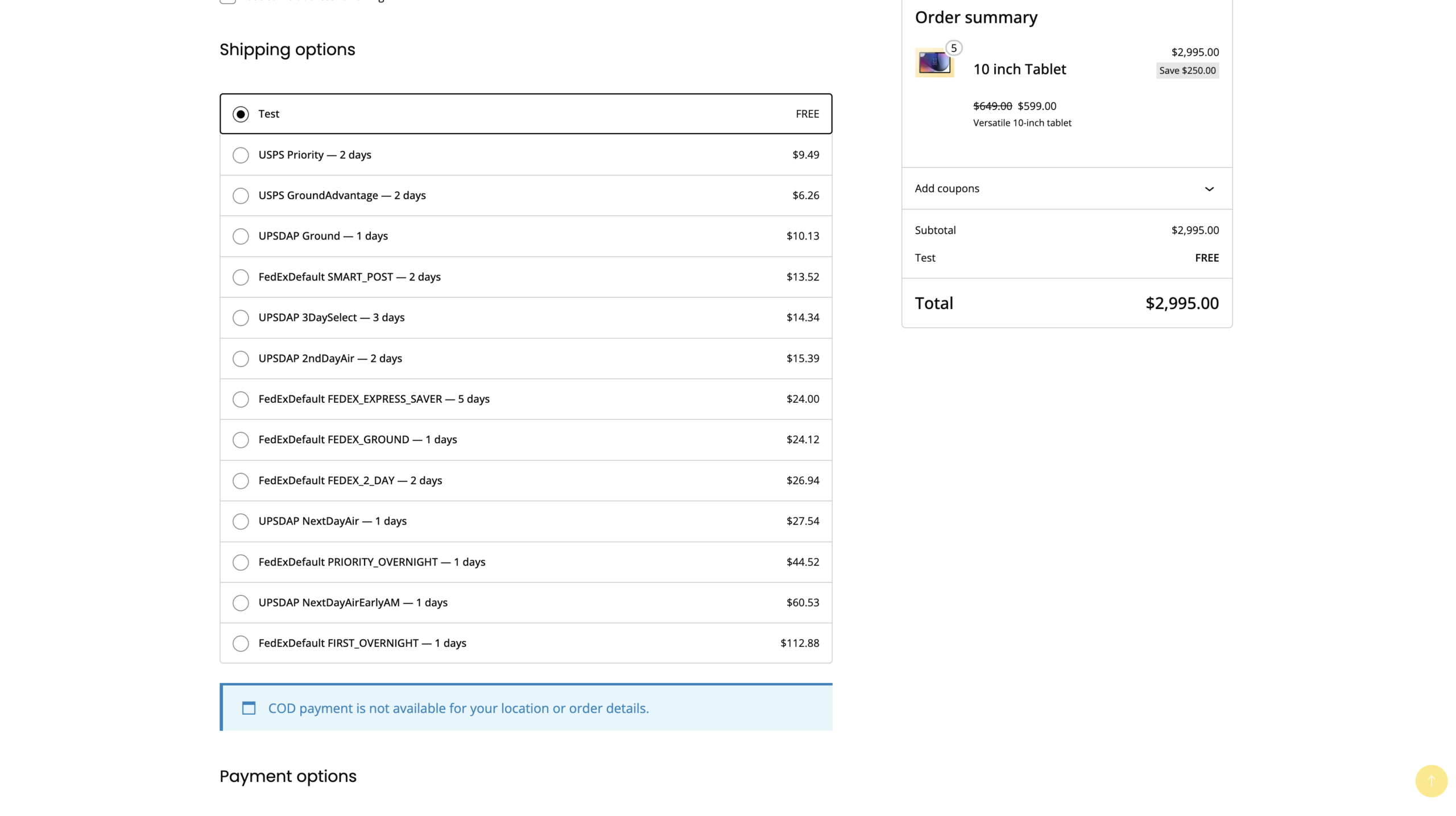
- Enable desired carrier services — live rates will appear at checkout immediately
屏幕截图:



常见问题:
Where do I get an EasyPost API key?
Sign up free at easypost.com. Test and production API keys are available immediately in your dashboard. Test mode lets you preview rates and generate test labels at no charge.
Which carriers are supported?
EasyPost connects 100+ carriers including USPS, UPS, FedEx, DHL Express, DHL eCommerce, OnTrac, LaserShip, GSO, and many more. Available carriers depend on your EasyPost account and any carrier accounts you've connected.
Can I use my own negotiated carrier rates?
Yes. Connect your UPS, FedEx, or other carrier accounts to EasyPost and those negotiated rates are returned automatically at checkout and at label generation.
How does AutoShip work?
You create rules based on conditions (product, category, weight, volume, order total) and assign a carrier, service, and box size to each. When an order reaches the status you configure, the matching rule fires and a label is generated — no human needed. Multiple rules are evaluated in priority order.
Does it support multiple packages per order?
Yes. When an order doesn't fit in one box, the Smart Packing engine splits it automatically. Each package gets its own label, tracking number, and download link — all visible from the order page and Label Management.
How does Batch Print work?
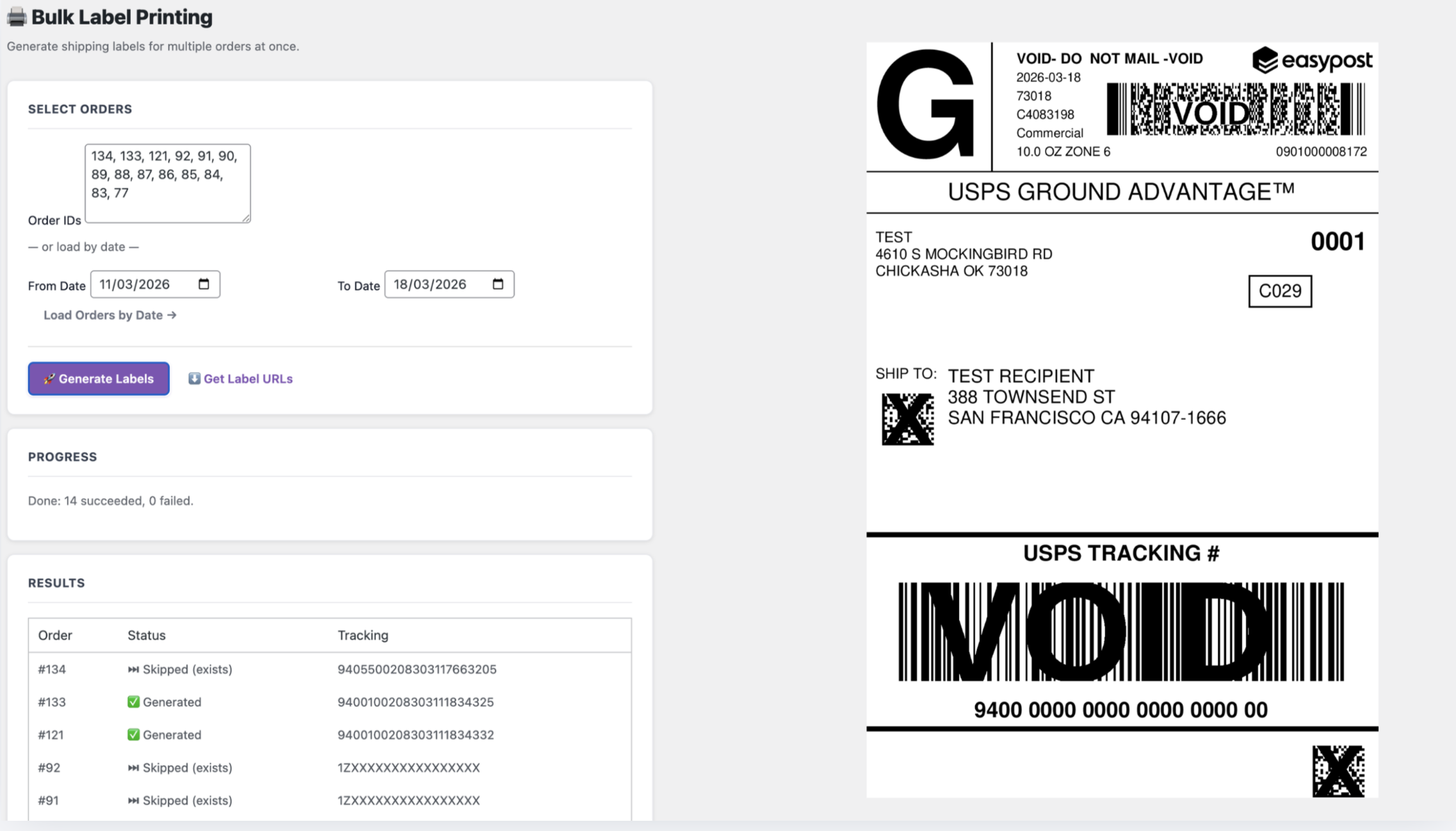
Go to Bulk Labels, enter order IDs or pick a date range, and click Generate Labels. Labels are created via EasyPost for each order in one request. Already-labelled orders are skipped. Results show generated, skipped, or failed per order with direct print links.
How do Easy Returns work?
From any shipped order, click Fetch Return Rates in the order panel. Live rates from all available carriers are displayed — pick the one you want and click Generate Return Label. The label is created with addresses automatically swapped (customer → store). You can email it to the customer in the same step.
What is Address Validation and does it affect checkout speed?
It verifies the customer's shipping address against EasyPost's database in real time. It runs asynchronously so it never blocks or slows checkout. Customers see a correction suggestion if an issue is detected before they place the order.
How does shipment insurance work?
Insurance is added through EasyPost at label purchase time. The insured value is the WooCommerce order subtotal or a configured percentage — no separate insurance account or third-party service needed.
What does Ship Insights show?
Full shipment history with carrier, service, cost, and tracking per label. Date-range filtering and carrier filtering. Trend charts for label volume and spend. Carrier mix donut chart. Period-over-period comparison badges. CSV export for accounting or reporting.
Is it compatible with WooCommerce HPOS?
Yes. Fully compatible with WooCommerce High-Performance Order Storage (custom order tables).
Can I test without real charges?
Yes. Enable Test Mode in settings and use your EasyPost test API key. No carrier charges are incurred in test mode. Use Force live rates in Test Mode if you want accurate rate previews without generating real labels.
Where are customer tracking links sent?
The plugin uses the EasyPost public tracker URL (track.easypost.com) for tracking links when available — giving customers a real-time tracking page without exposing your EasyPost merchant dashboard. No data is sent to carrier websites by the plugin — the customer's browser handles that when they click the link.
Where can I get support?
Visit thepluginforge.com for documentation and support. Email: support@thepluginforge.com
更新日志:
- Shield Insurance — Customer insurance opt-in is now checked by default at checkout; insurance field and fee only appear when an EasyPost shipping method is selected (flat rate, free shipping, etc. are excluded)
- Insurance rate corrected — Fee formula updated to 1.0% of declared value (minimum $1.00) per EasyPost documentation; insurance amount passed to EasyPost API as a string as required
- Non-EasyPost label skip — Auto label generation and bulk label generation now silently skip orders that used a non-EasyPost shipping method; no error note is added to the order
- UI rebrand — All admin pages rebranded from WooCommerce purple to a professional blue palette; hero gradients, KPI accents, buttons, and interactive states updated across Dashboard, Labels, Settings, Analytics, Bulk Labels, Pickups, Rules, Automation, and Setup Wizard
- Settings highlights — Shield Insurance and Checkout Address Validation cards now display with distinct colored headers for quick visual identification
- Handling Fee removed — Handling Fee option removed from Settings
- Manage link fixed — "Manage ↗" button in Label Management now links to the EasyPost dashboard; previous per-shipment deep link returned 404
- Plugin renamed — Now "Automated Shipping for EasyPost WooCommerce – Bulk Labels, Easy Returns, Zero Manual Work"
- Easy Returns upgrade — Fetch live return rates from all carriers before generating; pick the right service instead of defaulting to cheapest
- Batch Print fix — Results table now shows label print links immediately after generation; duplicate results row eliminated
- Label Management alignment — Action buttons (Download, Print, Return, Manage) stay on one row per label; Box 1 now labelled consistently with Box 2, 3 for multi-package orders
- Performance — Analytics and Label Management pages batch-load orders in a single query; eliminates N+1 slowness on large datasets
- Tracking URLs — EasyPost public tracker URL (track.easypost.com) stored per label and used everywhere: emails, order panel, analytics, label management
- Analytics — Tracking URL and label URL now read from analytics DB table directly; zero per-row order meta queries
- Insurance — Block Checkout (WC 8.9+ Blocks) now supported for customer insurance opt-in alongside classic shortcode checkout
- Units — Packing summary in order panel now uses WooCommerce store dimension/weight units instead of hardcoded in/oz
- New screenshots added across all major feature pages
- Easy Returns upgrade — Fetch live return rates from all carriers before generating; pick the right service instead of defaulting to cheapest
- Batch Print fix — Results table now shows label print links immediately after generation; duplicate results row eliminated
- All Labels alignment — Action buttons (Download, Print, Return, Manage) no longer wrap unpredictably; consistent single-row layout per label
- Box labelling — Box 1 now labelled consistently alongside Box 2, Box 3 for multi-package orders in Label Management
- Performance — Analytics and Label Management pages now batch-load orders in one query instead of one per row (eliminates N+1 slowness on large datasets)
- Tracking URLs — EasyPost public tracker URL (track.easypost.com) now stored per label and used everywhere tracking links appear — emails, order panel, analytics, label management
- Analytics — Tracking URL and label URL now read directly from the analytics DB table, eliminating all per-row order meta queries
- Insurance — Block Checkout (WC 8.9+ Blocks) now supported for customer insurance opt-in field alongside classic shortcode checkout
- Units fix — Packing summary in order panel now uses WooCommerce store dimension and weight units instead of hardcoded in/oz
- Ship-From address now auto-fills from WooCommerce store address on first setup
- Added "Load from WooCommerce" button in Ship-From panel to instantly sync store address
- Fixed critical error when clicking "Validate Address" on Ship-From panel
- Shipping zone instance settings — 10 config options per zone: markup, free shipping threshold, max rates shown, tax status, cart restrictions, delivery estimate toggle
- Rate caching disabled by default on new installs
- Logging defaults to Off
- Fixed WordPress admin notices appearing inside hero banners
- Redesigned Dashboard — purple gradient hero, KPI cards with trend indicators, carrier breakdown, recent labels
- Redesigned Ship Insights (Analytics) — Chart.js line and donut charts, date presets, CSV export, period-over-period comparison
- Redesigned Batch Print (Bulk Label Printing) — tab input, progress steps, color-coded results, label download grid
- Deactivation feedback survey
- Dashboard widget — labels today/this week with spend stats
- Settings page 3-step quick-start guide auto-hides once configured
- Fixed CSS scoping across all admin pages
- Address validation mismatch detection — state/ZIP auto-correction warnings at checkout
- Dedicated Pickups page for batch carrier pickup scheduling
- Redesigned order meta box with multi-box label layout
- Debug log level control from Logs & Diagnostics page
- Return label fix — correct EasyPost API address swap flow
- Complete plugin rewrite — PHP 8.1+, HPOS compatible
- 3D bin packing algorithm (First-Fit Decreasing with rotation)
- Advanced rule engine — category, product, weight, and volume conditions
- Ship Insights shipping analytics — spend tracking and carrier breakdown
- Batch Print — bulk label generation with date-range order loading
- AutoShip — auto-label on status change, auto-complete on delivery
- Carrier pickup scheduling
- Easy Returns — return label generation
- Flat rate shipping support
- Shipment insurance