ThreadTandem — Post Publishing and Comment Sync for Telegram
| 开发者 | ichi-nya |
|---|---|
| 更新时间 | 2026年11月6日 18:30 |
| 捐献地址: | 去捐款 |
| PHP版本: | 7.4 及以上 |
| WordPress版本: | 7.1.4 |
| 版权: | GPLv2 or later |
| 版权网址: | 版权信息 |
详情介绍:
- Choose link previews or photos with descriptions. Link previews use a plain-text announcement and visible article URL; Telegram generates the card from the public article page. Photo mode uploads the featured image or first content image with a plain-text description and link.
- Customize the article link text in settings. Russian sites default to "Читать статью" even without an installed plugin language pack.
- Import new channel text posts and media captions as WordPress drafts through the background queue.
- Receive incoming updates through a webhook or poll the Bot API once a minute using WP-Cron. Polling works without a public incoming HTTPS connection.
- Recover up to 100 pending events after a delivery outage, acknowledging only events durably accepted by the queue and restoring the webhook afterwards.
- Review unmatched publications under Settings > ThreadTandem synchronization: ignore, link to an existing article, or queue a website article for delivery.
- Preserve WordPress as the source for linked articles; Telegram edits update untouched imported drafts only. Matching keeps the original source draft available.
- Disable Telegram publishing for an individual post. Drafts, private posts and password-protected posts are excluded.
- Control publishing in the block editor sidebar on WordPress 7.1, with a classic-editor fallback.
- Copy text replies from linked Telegram discussions into native WordPress comments.
- Send approved website comments to the same discussion, replying to the exact parent message.
- Continue a nested conversation across both platforms without echoing imported comments back to Telegram.
- Hold new Telegram comments for review by default. WordPress spam and moderation rules still apply.
- Hold edited Telegram text for review, even if its previous text was approved.
- Identify users by Telegram IDs rather than names. No invented email addresses or automatically created WordPress accounts.
- Process deliveries in a database queue with duplicate detection, worker leases, rate-limit delays and visible diagnostics.
- Keep uncertain outgoing results for manual investigation instead of silently sending duplicate messages.
- Configure a separate HTTPS Bot API server and an optional external webhook URL.
- English interface and bundled Russian translations, including block-editor controls. Also supports WordPress.org language packs.
安装:
- Upload the threadtandem-sync-for-telegram directory to wp-content/plugins/ or install the ZIP from Plugins > Add New > Upload Plugin.
- Activate ThreadTandem on the individual site. Network-wide activation is not supported.
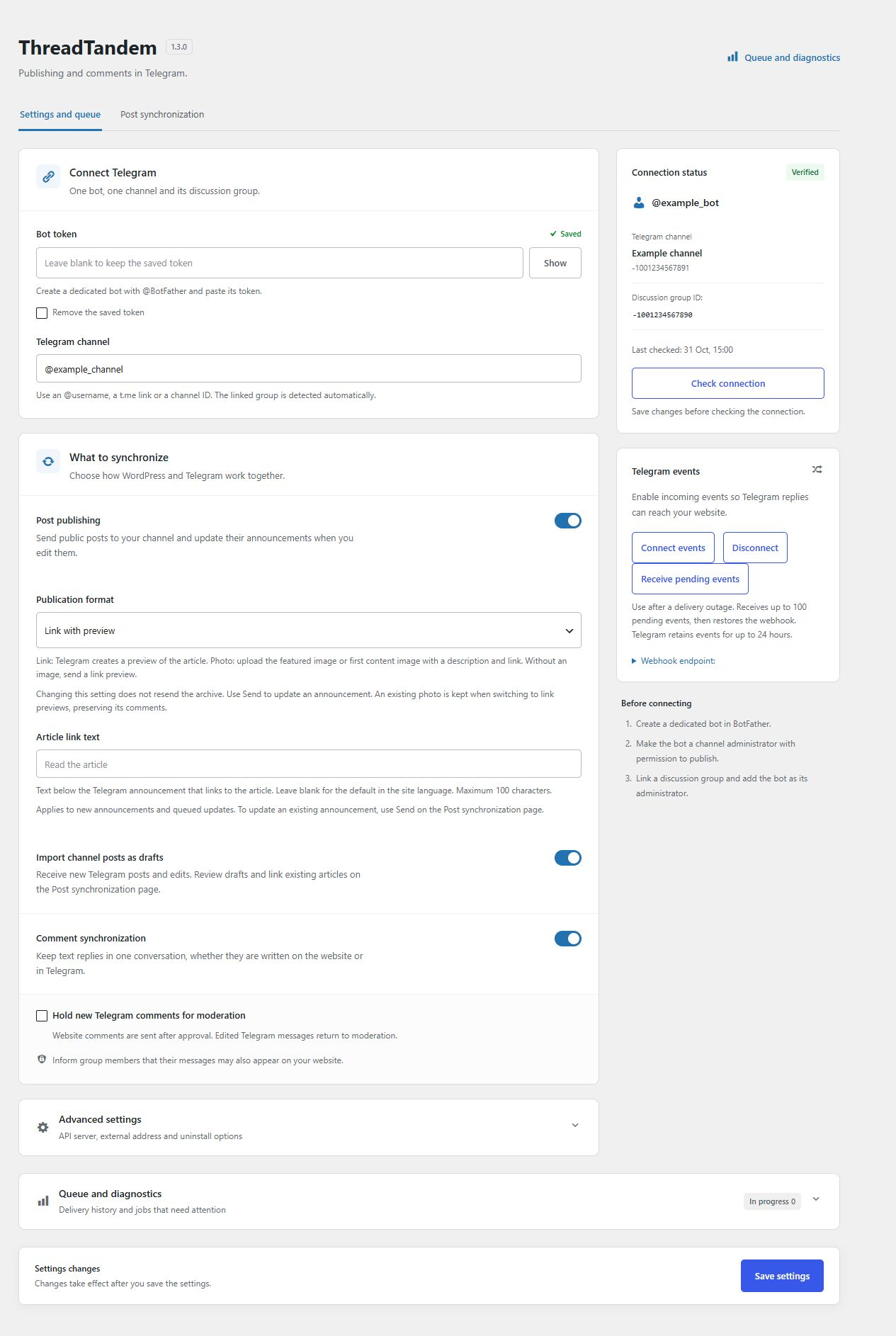
- Open Settings > ThreadTandem. Save a dedicated bot token and a channel ID, @username or public link such as https://t.me/username.
- Add the bot as a channel administrator with permission to publish. For comments, link a discussion group to the channel and make the bot an administrator of that group too.
- Enable the features you want, save, and click Check connection. Publishing and comment synchronization are off by default.
- Select an update delivery mode and save. Webhook mode requires public incoming HTTPS. Cron polling removes this site's webhook and retrieves updates once a minute, without discarding pending events. ThreadTandem refuses to replace a different integration webhook. Use a dedicated bot with only one receiver.
- Publish a test post. Check Queue and diagnostics, or use Process queue now.
- Reply under the announcement in Telegram, review the imported comment in WordPress, then reply from the site to verify the conversation.
屏幕截图:

常见问题:
Does viewing a post call Telegram?
No. Visitors read native WordPress comments. Network work runs in the background queue or through explicit administrator actions.
Why is delivery delayed?
WP-Cron depends on site visits. ThreadTandem schedules a batch about once a minute and handles up to three jobs per batch. Configure a server cron for wp-cron.php when predictable delivery matters. Rate limits and unresolved parent mappings delay individual jobs.
What if the send result is unknown?
A timeout may occur after Telegram accepted a message. ThreadTandem marks this as Result unknown and does not automatically repeat it. Check Telegram before using the administrator retry control. A manual retry can create a duplicate; automatic reconciliation is not provided.
Can I use a local WordPress installation?
Yes. Choose Cron polling, every minute in Telegram events, save and check the connection. Polling needs outgoing HTTPS access to the configured Bot API and a running WP-Cron, but no public incoming address. Webhook mode requires a public HTTPS route to the REST endpoint. The external webhook URL option does not create a tunnel. A proxy must preserve the request body and X-Telegram-Bot-Api-Secret-Token header.
How does cron polling work?
The existing minute worker requests up to 100 updates with getUpdates before processing the queue. Each accepted event is durably queued before its ID is confirmed in a later request. Duplicate receipts do not create duplicate jobs. The cursor is scoped to the bot and API server. A transport switch keeps existing publication and comment mappings. Disconnect pauses polling; Start polling resumes it. Receive updates now runs one batch without restoring a webhook. The settings show the last successful poll and any receiving error. Configure a system cron to run wp-cron.php every minute for predictable delivery; otherwise WP-Cron depends on site visits. Telegram stores updates for no more than 24 hours. Another polling application or webhook using the same bot causes conflicts. Switching back to Webhook registers this site's webhook and stops automatic polling.
Can I use a custom Bot API server?
Yes, through the advanced HTTPS API URL setting. All requests use it. WordPress safe HTTP rules may reject private IP addresses and nonstandard ports. HTTP endpoints and URLs containing credentials or query parameters are rejected.
Which comments are imported?
Only text messages in the configured discussion group that belong to an exactly mapped post thread or reply chain. Unmatched parents wait rather than being assigned to another post. Bot messages, commands, media and unrelated chat messages are not imported. A site requiring registered commenters cannot import Telegram-only authors.
Are moderation and deletion mirrored everywhere?
Website comments are sent only after approval. Unapproving, spamming, trashing or deleting a website-origin comment attempts to remove its bot-authored Telegram copy. Telegram may reject removal because of permissions or message age; the queue reports that failure. Moderation or deletion of an imported Telegram comment affects its WordPress copy. It does not delete the participant's original Telegram message. Telegram does not deliver ordinary group message deletions to Bot API clients, so those deletions cannot automatically remove the WordPress copy.
Can I change the bot or channel?
New settings need a new connection check. Existing post mappings are not silently moved to another bot or channel. An old queued job may need to be saved again after a connection change. Historical remapping is outside this release.
What data is retained?
Successful incoming jobs have their message payload cleared. Completed and failed incoming job records are removed after seven days. Comment content is native site content; message mappings remain until integration data is removed. The Privacy Policy Guide includes suggested ThreadTandem text. Additional sender metadata participates in email-based WordPress privacy tools when a matching comment email exists. Telegram-only authors have no email supplied by Telegram and must contact the site administrator to verify their identity for access or removal requests.
What happens when I deactivate or uninstall ThreadTandem?
Deactivation stops the scheduled worker and preserves data. Disconnect the webhook before removing the plugin. By default, uninstall keeps integration data. Clear Keep integration data when deleting the plugin to remove ThreadTandem options, tables and integration metadata during uninstall. Core posts and comments remain. Telegram copies and other externally stored data are not removed automatically.
更新日志:
- Add DaLink and DonationAlerts links to the plugin description and settings.
- Migrate legacy integration identifiers to ThreadTandem while preserving bot settings, publication links, comments, queue history and update cursors.
- Restore recognition of previously published articles after updating from the earlier plugin name, without resending them.
- Use the threadtandem/v1 webhook endpoint and retain authenticated compatibility with previously registered webhook URLs.
- Add minute-based cron polling as an alternative to webhooks, preserving pending Telegram updates when switching modes.
- Preserve polling pause state during migration and safely handle delayed discussion forwards from replaced announcements.
- Skip SVN commits when only development tests or documentation change and the published package and directory images are unchanged.
- Add a choice between link previews and photo announcements with plain-text descriptions, preserving existing settings by default.
- Upload local posters directly, update captions and images without duplicate messages, and allow longer upload processing time.
- Keep existing photos and discussions when switching back to link previews; format changes do not resend the archive.
- Send new announcements in publication-date order, oldest first, and wait for earlier delayed, failed or uncertain sends.
- Preserve chronological bulk cursors across batches and continue previously queued archive operations safely.
- Show failed and uncertain delivery jobs first, with status filters and pagination in diagnostics.
- Report jobs queued for an old Telegram connection as failed instead of silently marking them done.
- Include Russian and English translations for publication formats and queue guidance.
- Include complete Russian and English PHP and block-editor translations, including fallback for older language packs.
- Add editable article link text for Telegram announcements with a Russian default on Russian sites.
- Apply custom link text when creating or updating the same announcement through the queue.
- Add queued channel-to-WordPress imports as drafts, with safe text formatting and duplicate protection.
- Add publication matching, ignore/restore controls and queued manual delivery on a synchronization page.
- Keep linked website articles authoritative and preserve manually edited drafts.
- Subscribe to channel publication and edit events while preserving existing comment delivery.
- Include a featured image or the first post image in Telegram announcements, with direct uploads for local JPEG and PNG files.
- Add archive sending through the queue, behind a collapsed panel and a separate confirmation screen.
- Rename settings URLs to page=threadtandem and page=threadtandem-sync, with redirects from the previous URLs.
- Accept public t.me channel links in settings and normalize them to the equivalent @username before validation and saving.
- Keep existing connection verification when the same channel is entered as a link instead of an @username.
- Identify whether a connection error concerns the token, channel or linked discussion group, and show the checked bot username when available.
- Rename the plugin to ThreadTandem — Post Publishing and Comment Sync for Telegram.
- Use the threadtandem-sync-for-telegram text domain and standard WordPress.org language packs.
- Preserve existing bot settings, publication mappings, comments and queue data when replacing the previous plugin.
- Link imported comment authors to their original Telegram message, with a small black paper-plane icon.
- Remove the separate source paragraph below imported comments and respect privacy erasure when rendering author links.
- Keep new publications in the queue when saved connection settings need a fresh permission check.
- Revalidate the connection in the background worker before delivery and report failures in queue diagnostics.
- Redesign the settings screen with separate connection, synchronization, delivery and diagnostics sections.
- Add responsive layout, clear status indicators, token visibility control and webhook URL copying.
- Keep the save action visible and prevent connection actions from using unsaved changes.
- Add a native Telegram publishing panel for the WordPress block editor, using the current editor API with a fallback for WordPress 6.2.
- Save the per-post publishing preference through capability-protected REST metadata.
- Queue post exports after WordPress has saved REST metadata, avoiding stale publishing preferences and duplicate scheduling.
- Retain the classic-editor control and exclude editorial notes from public Telegram comments.
- Initial release: channel publishing, exact discussion mapping, bidirectional text replies, native moderation, durable queue and privacy controls.