
TicketDrum – Event Tickets & QR Check-in
| 开发者 | markgarbers |
|---|---|
| 更新时间 | 2026年10月20日 23:31 |
| PHP版本: | 7.4 及以上 |
| WordPress版本: | 7.1 |
| 版权: | GPLv2 or later |
| 版权网址: | 版权信息 |
详情介绍:
- Sell tickets on your own pages with the TicketDrum block (or a shortcode)
- Payments direct to your own Stripe account - we never hold your money
- PDF tickets with QR codes, attached to every confirmation email
- Door check-in: scan QR codes with your phone camera, no extra app
- Promo codes with usage limits and expiry dates
- Waitlists that automatically email buyers when spaces open up
- One-click refunds (our fee is refunded to you too)
- Printable receipts, automatic Stripe receipts, add-to-calendar files
- Custom checkout fields, attendee lists and CSV exports
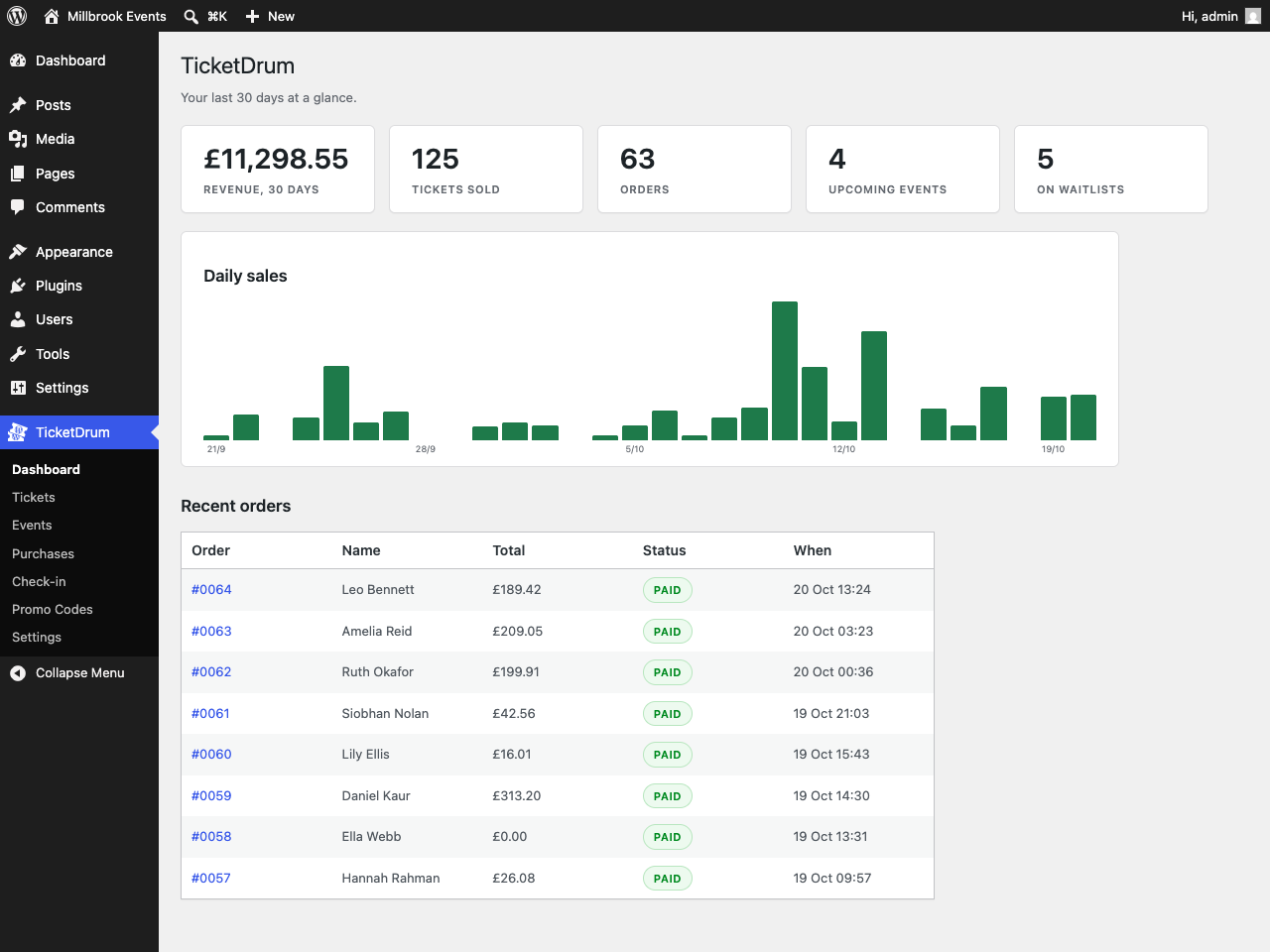
- Sales dashboard, capacity limits and oversell protection
- Event structured data for Google event rich results
安装:
- Install and activate the plugin.
- Create an event and its ticket types.
- Add the TicketDrum block to any page. You are now selling free tickets, with QR ticket PDFs and door check-in.
- To take card payments, click Get Started on the TicketDrum dashboard to connect the site, then go to TicketDrum → Settings → Stripe and link your Stripe account.
屏幕截图:
![An upcoming-events list for any page, from a block or the [ticketdrum] shortcode.](https://cdn.jsdelivr.net/wp/ticketdrum/assets/screenshot-2.png)


常见问题:
What does it cost?
4.9% + 30p per paid ticket, all-in - card processing included. Free tickets are free. No subscription.
When do I get my money?
Immediately - payments go directly into your own Stripe account at the moment of sale.
Do I need WooCommerce?
No. TicketDrum is completely standalone.
My buyers are not receiving their ticket emails
Ticket emails are sent by WordPress itself, so they are subject to whatever mail setup your host provides, and a lot of shared hosting either sends nothing or lands in spam. The fix is the same as for any WordPress email: install an SMTP plugin and point it at a proper mail service. TicketDrum needs no configuration for this and will use it automatically. Sending mail yourself also means your buyers' names and email addresses never leave your site.
Why do card payments need a connection to TicketDrum?
TicketDrum holds the Stripe Connect platform account that your own Stripe account links to. Connecting an account to a platform is an OAuth exchange that Stripe will only complete against that platform's client ID and client secret, and Stripe issues the resulting connected-account credentials to the platform, not to the site. A platform's client secret cannot be distributed inside a GPL plugin: it would be readable by everyone who downloaded it, and Stripe's terms do not allow it. The exchange therefore has to happen on a server we control. That is real processing which the plugin genuinely cannot do locally, not a check standing between you and code you already have. Clicking Get Started registers your site's domain and issues an account ID identifying you to that platform. Nothing is sent to ticketdrum.com before you click it.
Is any feature locked or limited?
No. Everything except card payments works with no connection at all: events, ticket types, free tickets, PDF tickets with QR codes, confirmation emails, door check-in, promo codes, waitlists, capacity limits, attendee lists, CSV exports, receipts and calendar files are all produced on your own site and need no account, no key and no connection. Nothing is disabled, time-limited or usage-capped. There is no lock of any kind in this plugin. No feature is disabled, time-limited, usage-capped or held back pending payment. The account ID is not a licence key: nothing verifies it, nothing expires, and removing it simply stops the Stripe Connect handshake from being possible. The service endpoints are ordinary constants (TICKETDRUM_URL and TICKETDRUM_API_URL) which you can redefine in wp-config.php to point somewhere else entirely. All the code is plain, readable PHP with nothing obfuscated or minified.
What about refunds?
Refund from your dashboard in one click; our booking fee is refunded to you in proportion.
How is tax handled?
You set the tax mode (none / included in prices / added at checkout), the label (VAT, GST, Sales Tax...) and a default rate in Settings, and individual tickets can override the rate - including to 0 for exempt tickets. You are responsible for the tax rules that apply to your events.
更新日志:
- Translation-ready: every screen, email, ticket and checkout message can now be translated at translate.wordpress.org
- A one-time, dismissible review request after your first door check-in or fifth order
- PDF tickets keep accented characters and the euro sign when a name or title also contains an emoji or other character the PDF font can't show
- System info now reports the actual plugin version
- Clearer plugin name, tags and short description in the plugin directory
- Fix: check-in log is readable on a phone (no mid-word breaks or clipped status labels)
- Fix: "already checked in" time is shown in the site's timezone, matching the session log
- Fix: fixed-amount promo code discounts were hidden behind the code in the Promo Codes table
- Renamed to TicketDrum
- QR ticket PDFs attached to confirmation emails, plus print-at-home link
- Door check-in with camera QR scanning
- Promo codes, waitlists, one-click refunds
- Sales dashboard, duplicate events, event location + Google event structured data
- Add-to-calendar files, printable receipts, Stripe receipts
- Gutenberg block for adding ticket sales to any page
- All-in fee structure with buyer-pays option
- Original release as TicketDrum