TokenLink SSO Login for Zendesk
| 开发者 | mailborder |
|---|---|
| 更新时间 | 2026年6月6日 09:01 |
| 捐献地址: | 去捐款 |
| PHP版本: | 7.4 及以上 |
| WordPress版本: | 7.0 |
| 版权: | GPLv3 or later |
| 版权网址: | 版权信息 |
详情介绍:
安装:
- In your WordPress admin dashboard, go to Plugins → Add New.
- Search for TokenLink SSO Login for Zendesk.
- Click Install Now, then Activate.
- Download the plugin ZIP file from mailborder.com or from WordPress.org.
- In your WordPress admin dashboard, go to Plugins → Add New and click Upload Plugin at the top.
- Select the ZIP file and click Install Now.
- When installation completes, click Activate Plugin.
- Download the plugin ZIP file and extract it on your computer.
- Upload the extracted folder to
/wp-content/plugins/using FTP or your hosting file manager. - Activate it through the Plugins menu in WordPress.
- Navigate to Settings → TokenLink Zendesk SSO.
- Enter your Zendesk Subdomain and Shared Secret.
- Set a Login Redirect Page if you use a custom login URL.
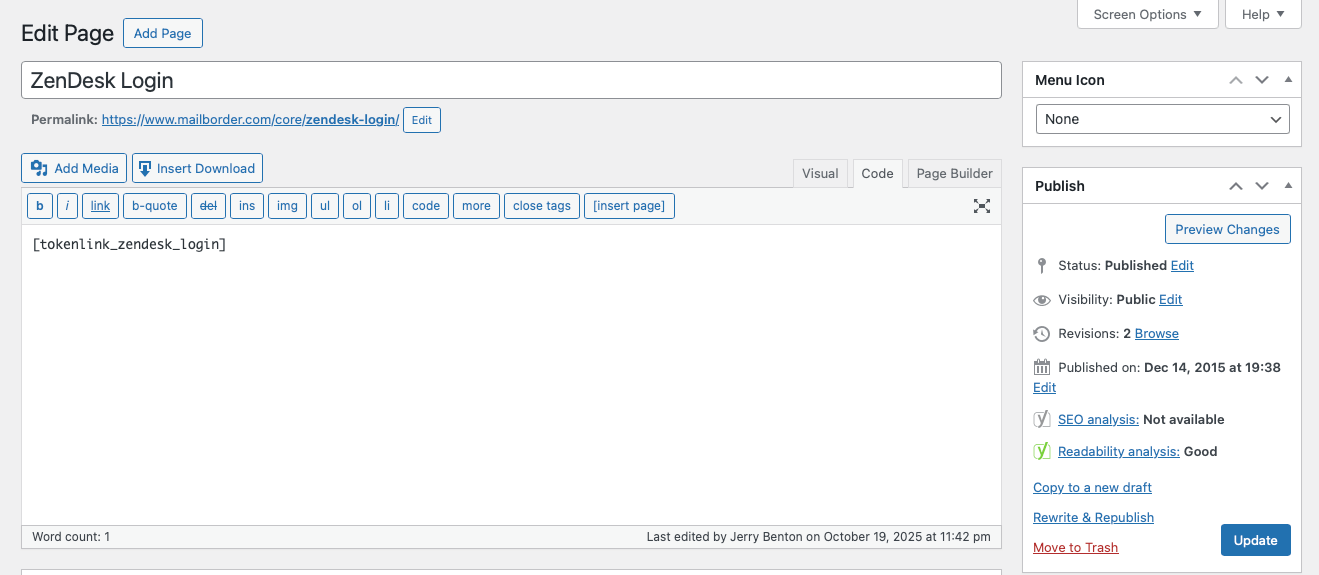
- Create a blank WordPress page and insert this shortcode: ** [tokenlink_zendesk_login] **
- (Optional) Create a menu item that links to that page. (e.g. a Support link)
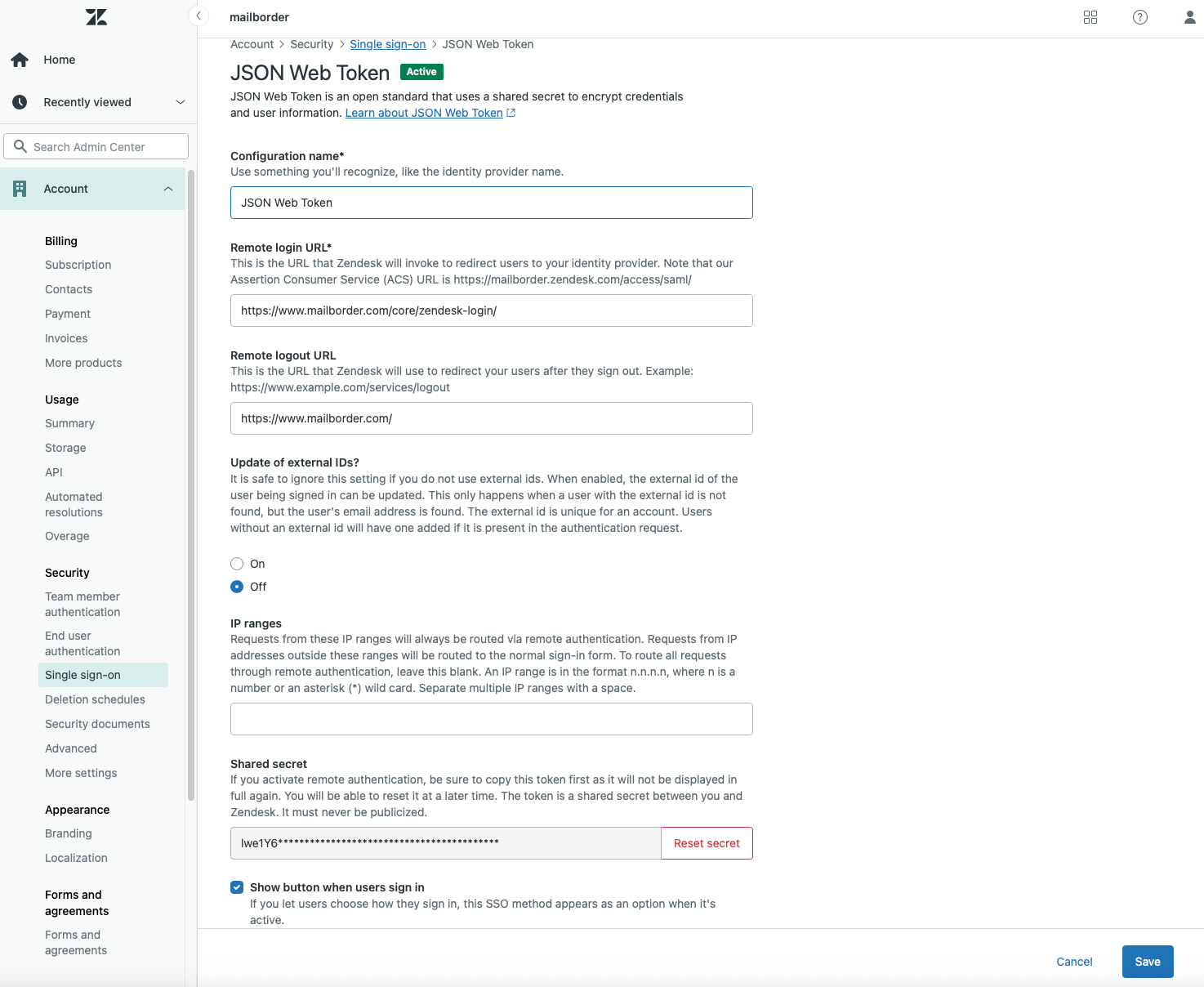
- Use that page’s URL as your Remote Login URL in the zendesk.com SSO settings. The plugin will automatically handle authentication to Zendesk and redirect users to Zendesk via secure JWT SSO.
屏幕截图:
常见问题:
Does this plugin require any other plugin?
= Is this plugin free? Yes. 100% free. As in free beer. No pro version. No nagware. = Is this plugin lightweight? Yes. It loads ~40kb of code when it runs. No. This is a standalone plugin and does not depend on any other plugin.
Does it work with modern Zendesk accounts?
Yes. It implements the standard JWT-based SSO endpoint (/access/jwt).
Is Composer required?
No. The JWT library is bundled directly in the plugin for convenience and meets WordPress PHPCS standards.
Does this plugin store any user data?
No. It simply authenticates the current logged-in WordPress user and securely passes their name and email to Zendesk for SSO. No personal data is logged or retained by the plugin.
Can I customize the login redirect page?
Yes. You can set a custom login page under Settings → Zendesk SSO → Login Redirect Page.\ If left blank, it defaults to the standard WordPress login screen.
Does this plugin support multisite installations?
Yes. It can be network-activated or activated on individual subsites. Each site can have its own Zendesk configuration.
Can this be used with caching or security plugins?
Yes. It’s compatible with common caching and security plugins.\
If your caching plugin caches logged-in pages, exclude the page containing [tokenlink_zendesk_login] to ensure proper redirects.
Will it conflict with existing SSO or login plugins?
No, it runs independently. It only triggers when the [tokenlink_zendesk_login] shortcode is executed, so it won’t interfere with other authentication systems.
Does this plugin work with Cloudflare or reverse proxies?
Yes. As long as HTTPS and PHP sessions function normally, JWT SSO works over any proxy or CDN.
I’m getting a 502 or redirect loop. What should I check?
Verify your Zendesk subdomain and shared secret are correct, and that your Zendesk SSO settings point to your WordPress page URL containing [tokenlink_zendesk_login].
更新日志:
- Verified compatible with WordPress 7.0 (released 2026-05-20). No DataViews or classic meta box dependencies.
- Added modern plugin header fields: Requires at least, Requires PHP, Tested up to, Text Domain.
- Moved SSO redirect from the shortcode callback to the
template_redirectaction (priority 1) so headers are always available; runs ahead of most caching plugins. - Added gates so preview, customizer, REST, AJAX, cron, XML-RPC and WP-CLI requests are not redirected.
- Honour
post_password_required()so password-protected pages keep their gate. - New
tokenlink_zendesk_sso_page_matchfilter so page builders (Elementor, Bricks, etc.) can flag SSO pages whose shortcode lives outside post_content. - Loop guard: if the configured login redirect resolves back to the SSO page itself, fall back to the default WP login URL.
- External login redirect URLs (off-site IdPs) are now actually followed instead of silently falling back to wp-login.php.
- Security: JWT now includes
exp(now+120s) andnbf(now-60s, 60s skew tolerance) claims; URL-safejti; 128-bit entropy. - Security: subdomain strictly validated at both save time and use time (lowercase alphanumeric + hyphens, RFC-style DNS label), rejecting pasted URLs or malicious strings.
- Security: redirects now send
nocache_headers()and HTTP 303 so intermediate caches cannot cross-serve a JWT to another user. - Security: Shared Secret field changed to password input with autocomplete disabled.
- Hardened login-redirect option sanitizer: requires empty, "/"-rooted path, or full http(s):// URL; rejects protocol-relative and other schemes.
- Shared secret sanitizer relaxed to trim-only so legitimate Zendesk-generated secrets are not mutated.
display_nameis HTML-decoded and tag-stripped before going into the JWT;user_emailis lowercased to avoid duplicate Zendesk users.- Localized previously hardcoded English strings in the settings UI.
- Guarded
get_plugin_data()call with explicitwp-admin/includes/plugin.phpinclude. - New activation notice points administrators at the settings page on first activation.
- Added tabbed settings interface with General and About tabs.
- Added About page with plugin information, features, and support links.
- Code compliance review for WordPress 6.9.
- Updated documentation.
- Code compliance review for WordPress PHPCS standards.
- Added Settings link to plugin action links.
- Improved plugin description.
- Initial public release.
- Modernized JWT implementation (Firebase PHP-JWT).
- Added WordPress settings screen.
- Added
[tokenlink_zendesk_login]shortcode.