
Total Cost Input for WooCommerce
| 开发者 |
ethereumicoio
freemius |
|---|---|
| 更新时间 | 2026年11月1日 23:54 |
| 捐献地址: | 去捐款 |
| PHP版本: | 7.4 及以上 |
| WordPress版本: | 7.1 |
| 版权: | GPLv2 or later |
| 版权网址: | 版权信息 |
详情介绍:
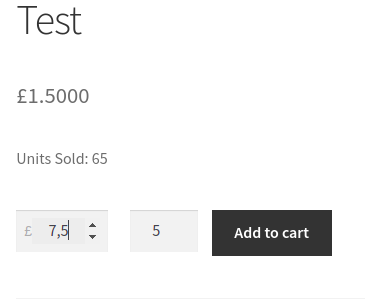
Total Cost Input for WooCommerce plugin lets customers enter the amount of money they want to spend. The matching product quantity is calculated for them and shown right next to the sum (and, in the PRO version, the customer can also type the quantity and the two numbers stay in sync).
This plugin is ideal to sell products that can not be counted in portions, like liquids, powders, gas, cryptocurrencies, etc.
With this plugin used, your customer can just enter a sum, like $100 for example, and buy some amount of product you are selling, in grams, litres, bitcoins, etc.
https://youtu.be/j3BcdPSFNno
It can be a valuable addition to your crypto selling store with the Cryptocurrency WordPress Plugin for WooCommerce!
安装:
- Install and activate it as you would any other plugin.
- Make a new WooCommerce product, or just check the
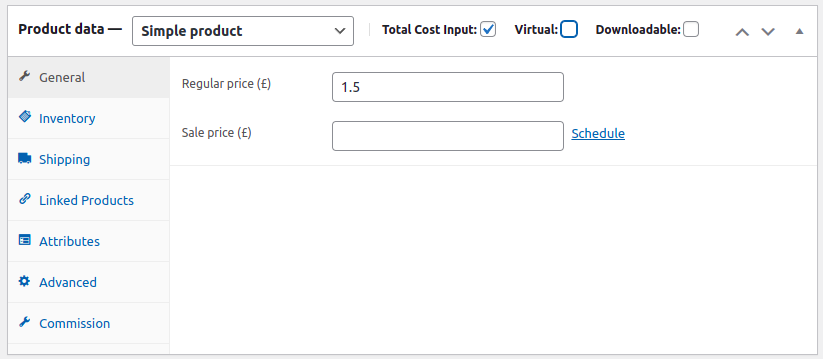
Total Cost Inputcheckbox on an existing one. - To sell from a widget, drop the
[total_cost_input_widget]shortcode (or theTotal Cost Input: Productblock) into a page.
屏幕截图:




更新日志:
2.0.0
- Rewritten on a layered architecture:
app/is split into Domain / Views / Controllers / Modules, andInfrastructure\Hooksis the only place that registers a hook. The plugin option, the product meta key, the public hooks and thetotal_costasset handle are unchanged, so an upgrade keeps the configuration. - The
Total Cost Inputper-product checkbox is now part of the FREE version. - The
Product Quantity Stepsetting is FREE too: enter0.1and the customer can buy0.1,0.2,0.3... without a licence. - The
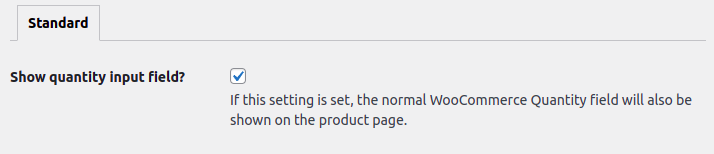
global/quantity-input.phptemplate override was rebased on WooCommerce 10.1.0 (unifiedwoocommerce_before/after_quantity_input_fieldhooks,aria-label, conditionalsize/max). - The PRO-only "show the quantity field too" option no longer hides the field with CSS: the standard quantity input is a hidden field and the visible one is rendered by PRO only.
- New product-sale widget: the
[total_cost_input_widget]shortcode and theTotal Cost Input: ProductGutenberg block - a dropdown of every product that can be bought right now (names only, no prices) and aBuybutton that adds the product to the cart and takes the customer straight to the checkout. - PRO: the widget's amount field (a sum in the site currency), the product-list restriction, a custom button text, a theme style (the widget inherits the site theme's own styling), a custom style (widget and button background, text colour, font family and size, corner radius) and the vendor restriction on WC Vendors / Dokan / WCFM pages.
- The widget is a flat 12-column grid: every field claims a span of
1to12columns and a field that spans all twelve takes the whole row, so the card stacks by default and smaller spans make a row. The oldlayoutattribute/option (vertical/horizontal) is gone - the spans are the layout. - The front end is a Vite + React bundle. jQuery is no longer used - not a dependency, not in the code - and
assets/widget.jsand the root*.js/*.min.jsfiles are gone. - A widget that renders nothing publishes the reason (
empty_catalog,no_vendor,no_vendor_products) throughtotal_cost_input_for_woocommerce_widget_empty. - The
productsattribute of the widget is cast with(int), so a negative id means "no products" rather than product 1. - Requires WordPress 6.6 and PHP 7.4; tested up to WordPress 7.1 and WooCommerce 11.2.
- Known limitation: block-based product surfaces (the Single Product block, the Cart and Checkout blocks) are not supported yet.
- freemius library version update
- tested up to WordPress 7.1 and WooCommerce 11.2
- freemius library version update
- freemius library version update
- The
Product Quantity Stepsetting is introduced. Enter 0.1 to allow customer to buy 0.1, 0.2, 0.3, e.t.c. quantity of your products.
- WooCommerce
global/quantity-input.phptemplate update to the latest version
- freemius library version update
- Initial release.