
Trackful - Server-Side Conversion Tracking for WooCommerce
| 开发者 | trackful |
|---|---|
| 更新时间 | 2026年11月12日 21:41 |
| PHP版本: | 7.4 及以上 |
| WordPress版本: | 7.1 |
| 版权: | GPLv2 or later |
| 版权网址: | 版权信息 |
详情介绍:
- Ad-blockers block 30-40% of conversion tracking
- Safari ITP limits cookies to 7 days (vs 1 year needed for attribution)
- iOS 14+ App Tracking Transparency blocks tracking
- GDPR/consent reduces data quality
- Hosted checkout pages lose attribution data
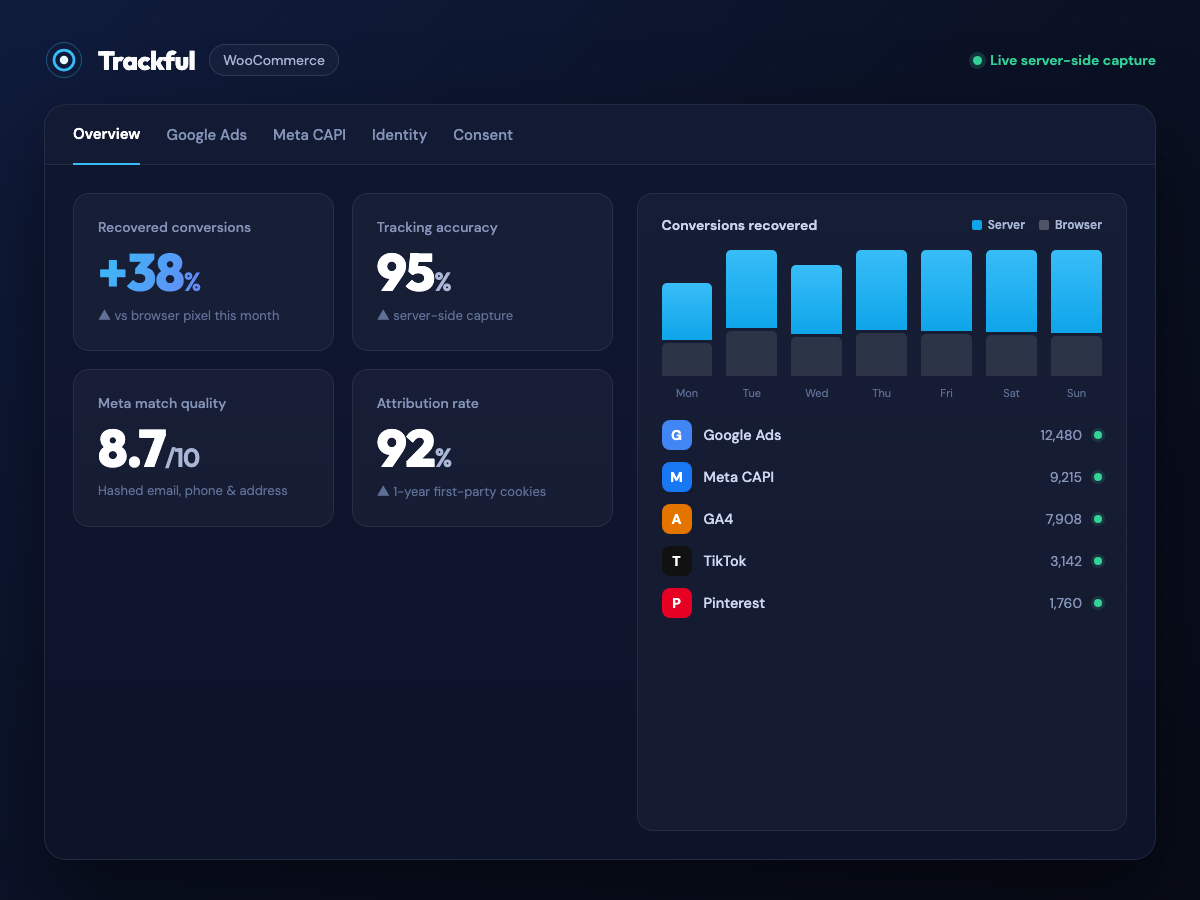
- 95%+ tracking accuracy (vs 60-70% with client-side)
- Server-set first-party cookies that keep the ad click for up to 1 year, beyond Safari ITP's 7-day limit on script cookies
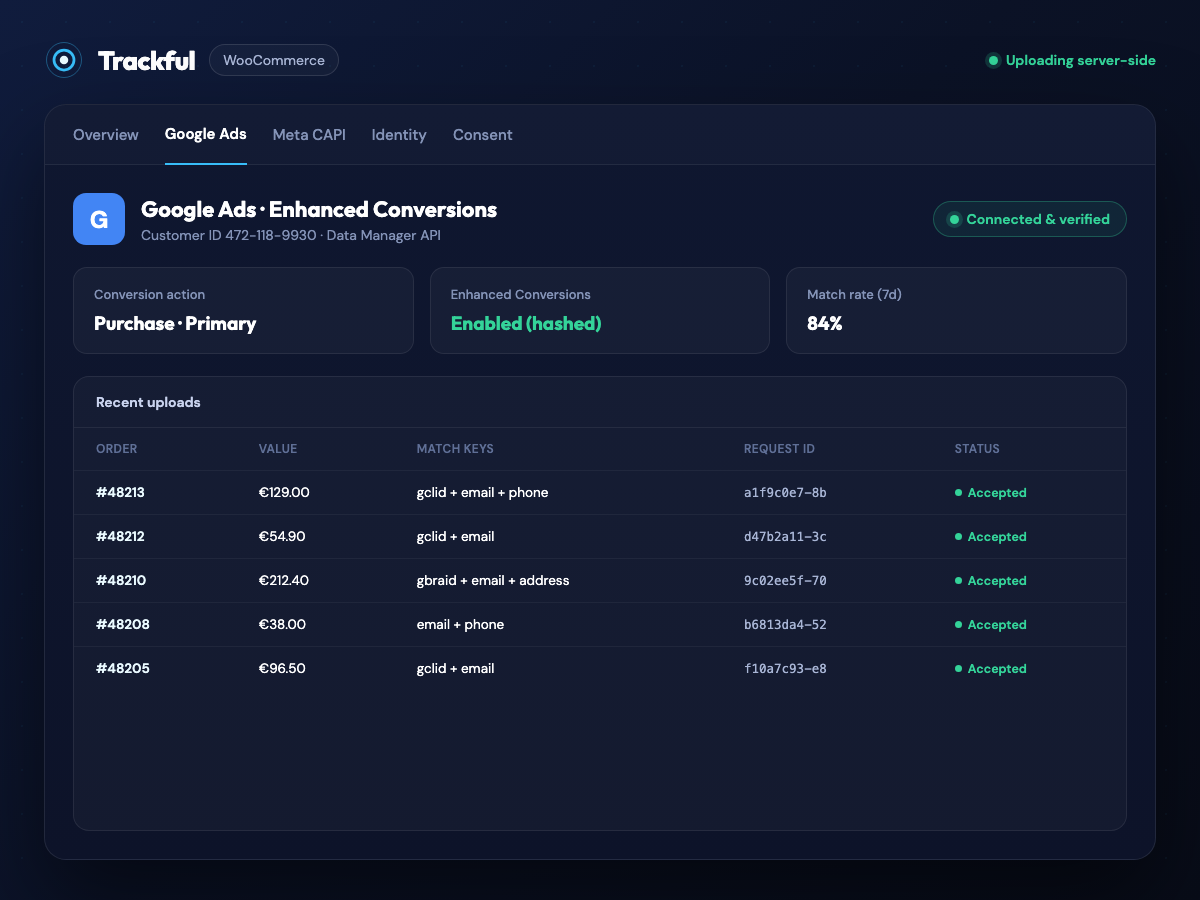
- Google Ads Enhanced Conversions with hashed customer data
- Meta Conversions API (CAPI) with Event Match Quality monitoring
- GA4, TikTok, Pinterest and Snapchat server-side conversions
- Identity graph for cross-session attribution
- GDPR/Consent Mode v2 compliant
- Click ID Capture: Automatically captures gclid, gbraid, wbraid, fbclid, ttclid, epik and ScCid, even on pages served from a full-page cache
- Server-Set Cookies: Sets HTTP cookies via PHP to extend attribution beyond Safari ITP restrictions
- Order Tracking: Direct PHP hooks (not webhooks) for maximum reliability, on the classic checkout and the Cart and Checkout blocks
- Enhanced Conversions: Sends hashed customer data (email, phone, address) to Google Ads
- Meta CAPI: Sends conversion events to Facebook/Instagram with high EMQ scores
- Works with any Consent Mode v2 CMP: reads the standard signal itself, so no per-vendor setup. Named support for Axeptio, Didomi, Cookiebot, OneTrust, Complianz and WP Consent API on top, and a one-line hook for anything else
- Deduplication: Deterministic event IDs prevent duplicate conversions, and the dashboard warns when another tag reports the same purchases to Google Ads
- Real-Time Dashboard: Monitor conversions, EMQ scores, delivery per channel and platform health
- Landing Page: Capture click IDs (gclid, fbclid...) and store them in first-party cookies
- Shopping: Track product views, add to cart and checkout events
- Purchase: Send the conversion with full attribution to your ad platforms
- Server Processing: Trackful's backend uploads to each platform with the right format
- Google Ads Enhanced Conversions
- Meta Conversions API (Facebook/Instagram)
- GA4 (Measurement Protocol)
- TikTok Events API
- Pinterest Conversions API
- Snapchat Conversions API
- WooCommerce 7.0 or higher
- PHP 7.4 or higher
- A Trackful account, created automatically when you click "Connect to Trackful"
安装:
- Go to Plugins > Add New in WordPress admin.
- Search for "Trackful".
- Click "Install Now", then "Activate".
- Download the plugin ZIP file.
- Go to Plugins > Add New > Upload Plugin.
- Choose the ZIP file, click "Install Now", then "Activate".
- Open WooCommerce > Marketing > Trackful in WordPress (or the "Settings" link on the Plugins page).
- Click "Connect to Trackful". This registers your site and creates your account; there is no API key to copy. The screen states what is sent (your site URL and admin email) before you click.
- Click "Open Trackful Dashboard". It opens in a new tab, already signed in.
- Connect the ad platforms you use. For Google Ads, Trackful creates its conversion actions in your account when you pick the account.
- Back in WordPress, the Trackful page shows which platforms are live and when the last event arrived.
屏幕截图:

常见问题:
Do I need a Trackful account?
Yes. Trackful processes and delivers conversions from its servers, so an account is required. It is created automatically when you click "Connect to Trackful", and a free plan is available.
Does it work with a page cache?
Yes. Click IDs are captured by the tracker on the page itself, so a landing page served from a full-page cache (WP Rocket, Cache Enabler, LiteSpeed, host caches) still records the click. After updating the plugin, clear your page cache so cached pages load the current tracker.
Does it work with the Cart and Checkout blocks?
Yes, and with the classic checkout. The click, session and consent are recorded on the order in both.
Which consent banner (CMP) does it work with?
Any banner that supports Google Consent Mode v2, without setup: Trackful reads the Consent Mode updates on the page. Axeptio, Didomi, Cookiebot, OneTrust, Complianz and the WP Consent API are also supported through their own APIs.
My banner does not support Consent Mode. What now?
Call this from your banner's "consent given" callback:
window.TrackfulConsent.update({ ad_storage: 'granted', analytics_storage: 'granted', ad_user_data: 'granted', ad_personalization: 'granted' });
If the decision only exists on the server (a custom cookie, user meta), use the PHP filter:
add_filter('trackful_consent_state', function (array $consent) { $consent['adUserData'] = 'GRANTED'; return $consent; });
What happens before the visitor answers the banner?
Trackful follows your banner. If it declares a Consent Mode default (many set "denied" for European visitors), that default applies until the visitor answers, and the answer is then remembered on every later page. If there is no banner default, nothing is assumed: consent is "not specified", which means click IDs only and no personal data. "Denied" is stricter and stops Meta, TikTok, Pinterest, Snapchat and GA4 entirely. You choose Trackful's own default in the Trackful dashboard.
Should I keep my existing Google Ads tag?
You can keep it while you compare numbers. Google Ads only removes duplicates within a single conversion action, so do not keep two purchase actions set as "Primary": the dashboard detects this and offers to keep only Trackful's action as primary. Once Trackful's conversions appear in Google Ads, you can remove the old tag.
Will it slow down my site?
No. The storefront tracker is a single lightweight first-party script, loaded in the footer, that sends events asynchronously. Purchases are sent from the server after the order is placed, so page load speed is not affected.
How does this compare to client-side pixels?
Client-side pixels (JavaScript) are blocked by ad-blockers, iOS 14+ ITP and browser privacy features, resulting in 30-40% data loss. Trackful uses server-side tracking to recover these lost conversions.
What data is sent to Trackful?
Order data (ID, value, currency, items), customer contact details used for matching (email, phone, name, address), click IDs, UTM parameters, the consent state, and the visitor's IP address and browser user agent. See the Privacy section below for how each is protected and how long it is kept.
How do I know it is working?
The Trackful page in WordPress shows the live platforms and the last event received. In the dashboard, "Live Events" lists conversions as they arrive with the platforms each one reached, and the Google Ads page has a "Test Connection" button that validates your account and conversion action with Google.
Where do I report a problem?
Email support@trackful.io with your site URL.
更新日志:
- New: an invitation to review the plugin on WordPress.org, shown only on the Trackful settings page, at least 14 days after the site was connected and only while tracking is live. It can be postponed or dismissed for good.
- The French translation now follows the typography and glossary of the French WordPress translation team.
- The plugin is now named "Trackful - Server-Side Conversion Tracking for WooCommerce".
- First public release.
- Server-side conversions for Google Ads, Meta, GA4, TikTok, Pinterest and Snapchat.
- Click ID capture that works behind full-page caches.
- Order data recorded for both the classic checkout and the Cart and Checkout blocks.
- Consent Mode v2 support for any compatible consent banner.
- WordPress admin page showing live platforms and the last event received.