Trilobita DocVault
| 开发者 | trilobita |
|---|---|
| 更新时间 | 2026年10月8日 18:03 |
| PHP版本: | 7.4 及以上 |
| WordPress版本: | 7.1 |
| 版权: | GPLv2 or later |
| 版权网址: | 版权信息 |
详情介绍:
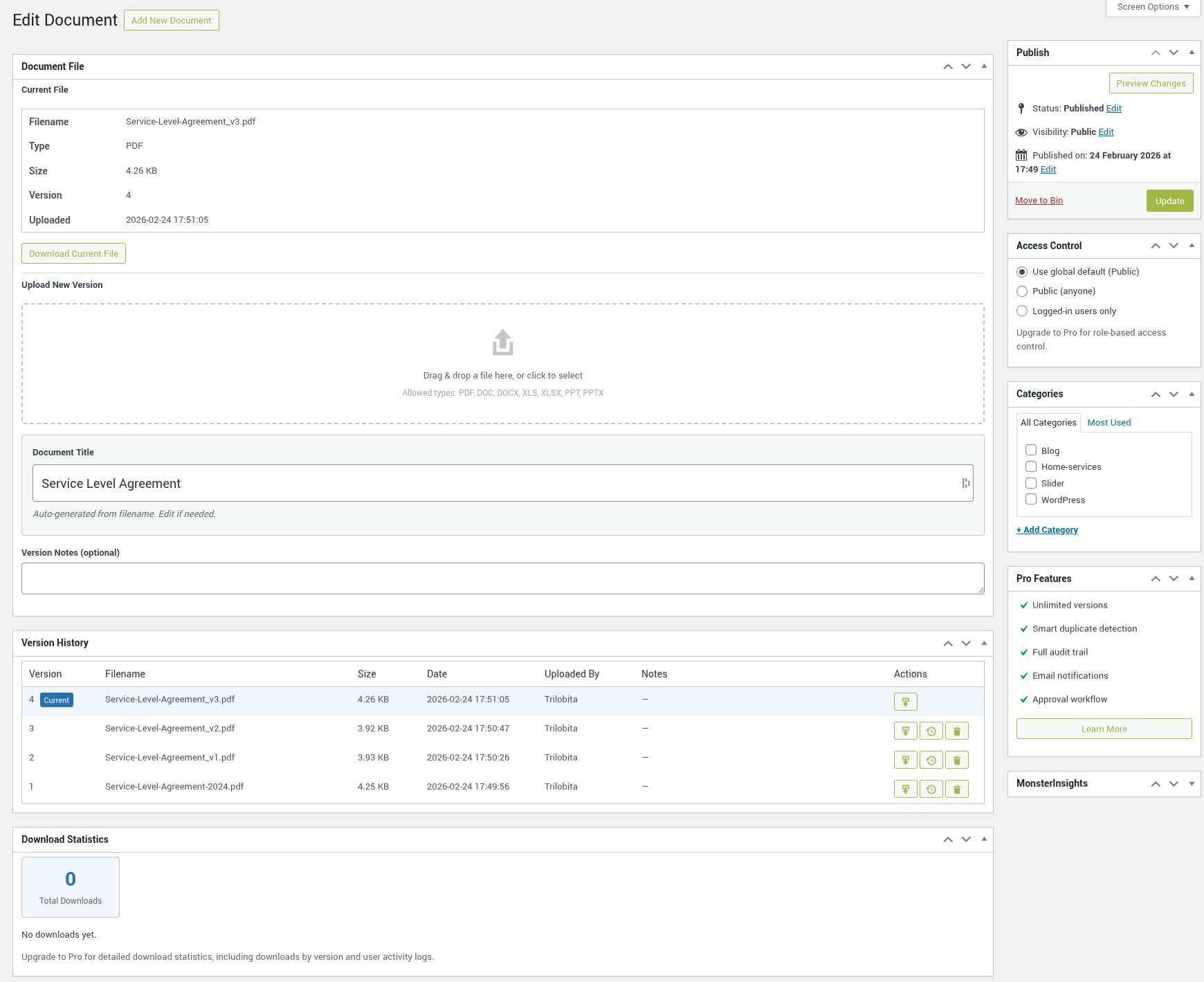
- Version History - Upload a new version and the download link stays the same. Download, restore or delete earlier versions (up to 5 per document), with optional version notes.
- Searchable Document Library - The
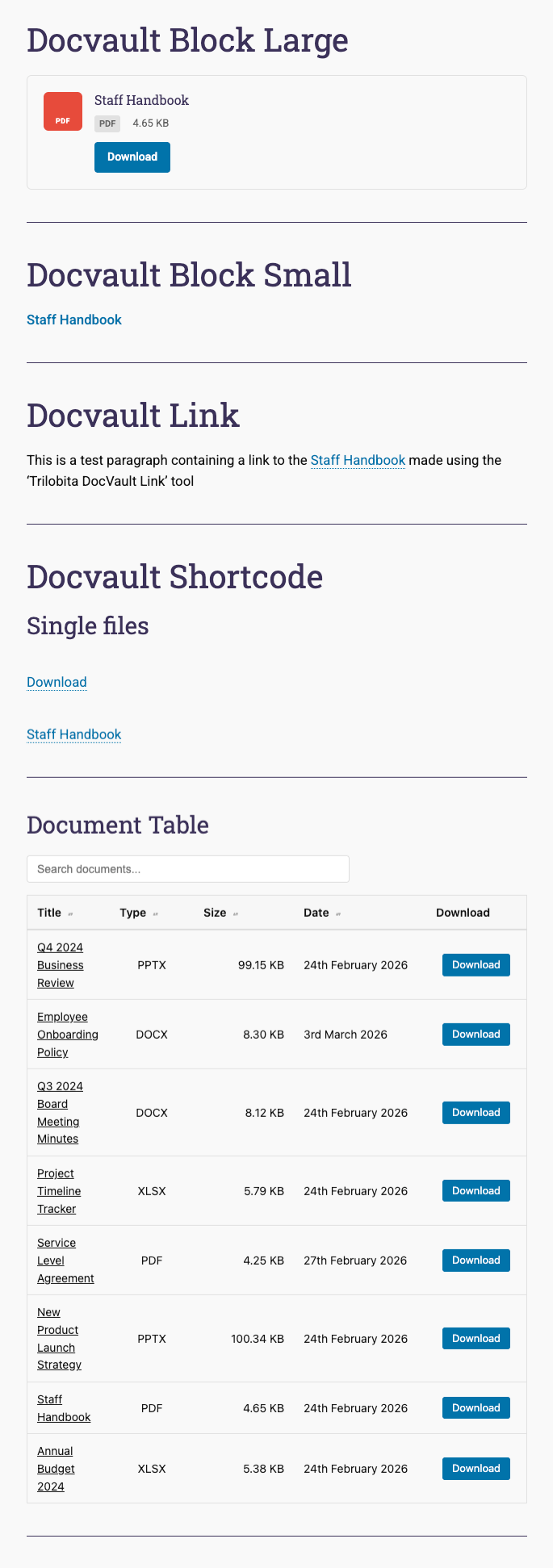
[trdv_list]shortcode shows a responsive table with live search, sortable columns and pagination, plus optional category, tag and file type filters. - View in Browser - PDFs get a View button so visitors can read them without downloading.
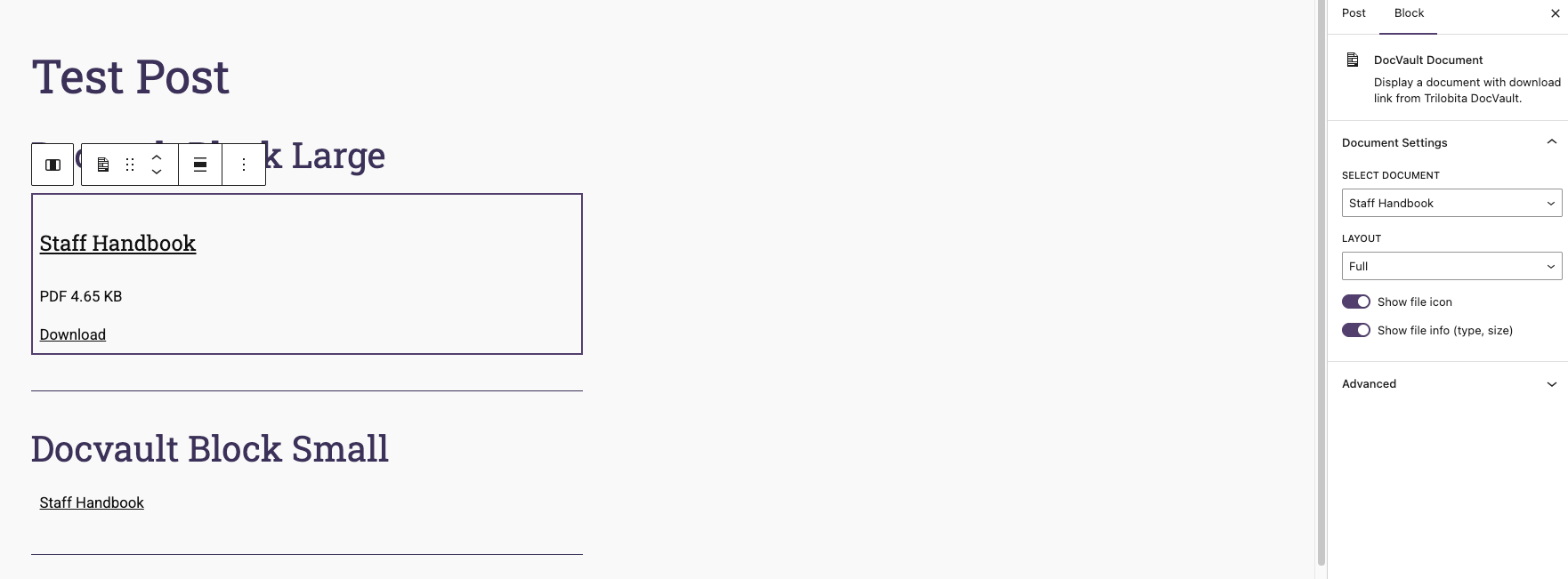
- Document Block - Add a single document to any page or post in the block editor, with Full and Minimal layouts.
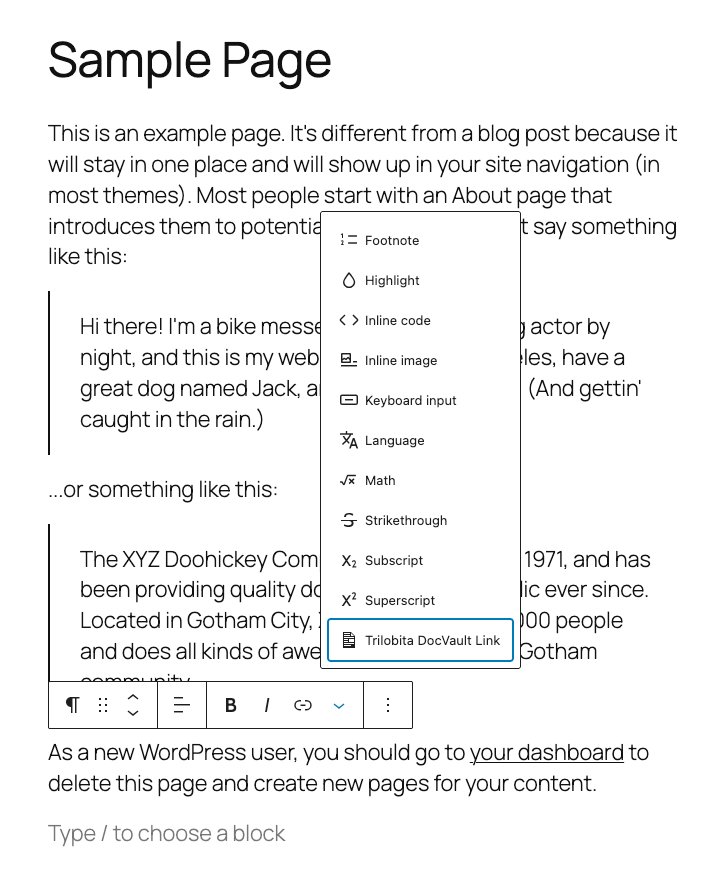
- Inline Download Links - Link any text to a document from the block editor toolbar, or with the
[trdv_link]shortcode. - Access Control - Make documents public or available to logged-in users only, as a site-wide default or per document.
- Protected Files - Files are served only through DocVault's download links, which check access first. Direct access to the upload folder is blocked on Apache, and Site Health warns you if your server (for example Nginx) needs a rule.
- Expiry Dates - Set an optional expiry date and the document is hidden automatically once it passes.
- Download Tracking - See download counts in the admin list, and optionally show them on the frontend.
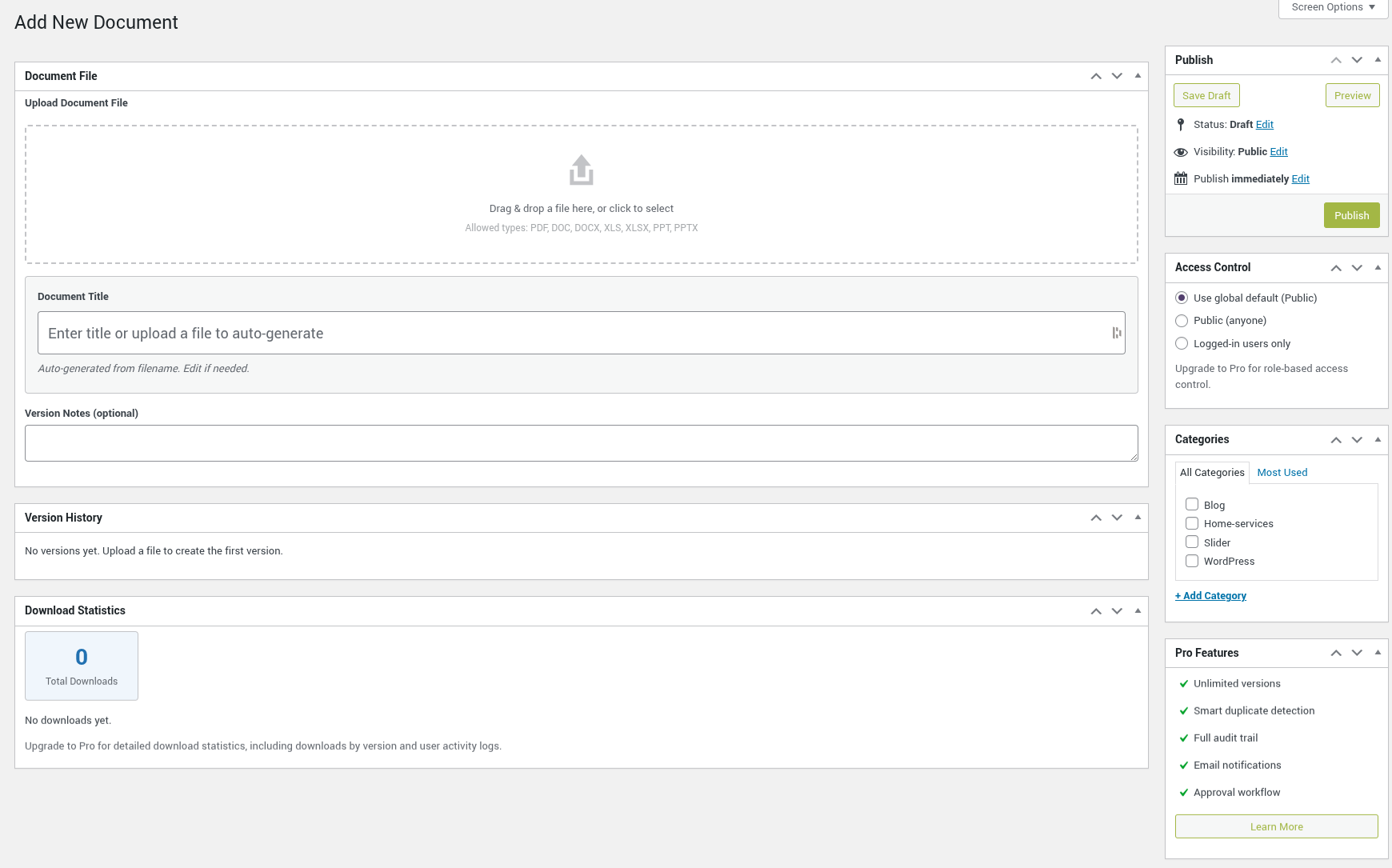
- Drag & Drop Upload - Drop a file to upload it; the title is filled in from the file name.
- Categories and Tags - Organise documents with their own categories (or share your post categories) and tags.
- Manual Sort Order - Drag documents into your preferred order and use
[trdv_list orderby="menu_order"]to show that order on the frontend. - Site Search - Documents appear in your site's search results (can be turned off).
- Privacy Tools - Works with the WordPress personal data export and erasure tools.
- File Types - PDF, DOC, DOCX, XLS, XLSX, PPT, PPTX, ODT, ODS, ODP, RTF, CSV and TXT.
- Unlimited Version History - Remove the 5-version limit, with optional per-document limits and automatic pruning of old versions.
- Per-Document Access Control - Restrict individual documents to specific user roles.
- Audit Trail - Full activity log with CSV export for compliance and accountability.
- Email Notifications - Configurable alerts for uploads, updates, and approvals.
- Document Approval Workflow - Require documents to be reviewed before publishing.
- Bulk Upload - Upload multiple documents at once with duplicate detection.
- Download Analytics - Detailed per-version download statistics.
- Duplicate Detection - Find and merge duplicate documents to save storage.
- Storage Management - Advanced tools for monitoring and cleaning up storage.
- Card and Button Layouts - Two extra layouts for the Document block.
- More File Types - Allow images (JPG, PNG, GIF, WebP), ZIP, AI and EPS files.
- Button Colours - Match download buttons to your brand.
安装:
- Go to Plugins > Add New in your WordPress admin.
- Search for "Trilobita DocVault".
- Click Install Now, then Activate.
- Go to the new Documents menu in the admin sidebar. A short getting-started guide walks you through uploading your first document and creating a documents page.
- Upload the
trilobita-docvaultfolder to/wp-content/plugins/. - Activate the plugin through the 'Plugins' menu in WordPress.
- Go to the new Documents menu in the admin sidebar. A short getting-started guide walks you through uploading your first document and creating a documents page.
屏幕截图:


常见问题:
What file types are supported?
Trilobita DocVault supports PDF, DOC, DOCX, XLS, XLSX, PPT, PPTX, ODT, ODS, ODP, RTF, CSV, and TXT files.
How does version control work?
From the Edit Document screen, you can upload new versions of a file. The plugin keeps a full version history with the ability to download, restore, or delete any previous version. By default, up to 5 versions per document are kept.
How do I display documents on the frontend?
There are three ways:
- DocVault Document block — add a single document with a download button directly in the Gutenberg block editor.
[trdv_list]shortcode — displays a searchable, sortable table of documents on any page or post. On a new site, the getting-started guide's Create a documents page button sets up a draft page with this table for you.[trdv_link]shortcode — inserts an inline download link within any text. You can also use the Trilobita DocVault Link toolbar button in the block editor to link selected text to a document without using a shortcode.
Are download links secure?
Yes. Download links use the format /trdv/download/{id}/ rather than a direct path to the file. Every download request is handled by WordPress, which checks access permissions before serving the file. The actual file location on the server is never exposed. Restricted documents cannot be accessed by guessing a URL, and files are always forced to download rather than opened inline in the browser (except PDFs and images opened with the View button).
On Apache, DocVault blocks direct web access to its upload folder with an .htaccess file, so stored files can only be reached through these download links. Nginx and some other servers ignore .htaccess files, so on those servers you should add an equivalent rule to your server configuration. DocVault checks this for you: go to Tools > Site Health, and if stored files can be downloaded directly you will see a warning with the exact rule for your site. For Nginx:
location ^~ /wp-content/uploads/trdv-documents/ { deny all; }
If your site has a legacy sdm-documents folder from an early version of the plugin, add the same rule for that folder too.
Can I restrict document access?
Yes. In Documents > Settings, set the default access to Public or Logged-in users only. Each document can override the default in its Access Control box. Restricting documents to specific user roles is available in DocVault Pro.
Where are uploaded files stored?
Files are stored in /wp-content/uploads/trdv-documents/. By default all files are kept in one folder; in Documents > Settings you can choose folders by document ID or by year and month instead.
Can I replace a document without breaking links?
Yes. Open the document, drop the new file into Upload New Version and click Update. Download links point to the document, not the file, so every existing link now serves the new version. The previous file stays in the version history.
Can I count downloads?
Yes. Every download through a DocVault link is counted. Counts appear in the admin document list and on each document's edit screen, and you can show them on the frontend with [trdv_list show_count="true"] or the Document block's Show download count option.
How many versions are kept?
By default, up to 5 versions per document are kept. Older versions are automatically removed when the limit is reached.
Can I set an expiry date on a document?
Yes. Each document has an optional expiry date field in the admin. Once the date passes, the document is automatically hidden from all frontend listings — the [trdv_list] shortcode, AJAX search, Query Loop block, and REST API. Direct download and view URLs are also blocked for non-admin, non-author users. To include expired documents in a specific [trdv_list] listing, use [trdv_list show_expired="true"]. Admins and the document's author can still download expired documents directly; they remain visible and manageable in the admin.
Is the plugin translation-ready?
Yes, Trilobita DocVault is fully translatable. A .pot template file is included in the plugin's languages/ folder to help you get started. Translation files should be named trilobita-docvault-{locale}.mo (e.g. trilobita-docvault-fr_FR.mo) and can be placed either in the plugin's own languages/ folder or in /wp-content/languages/plugins/.
更新日志:
- Security: Documents restricted to logged-in users or specific roles, and expired documents, no longer appear in site search results or on document category and tag pages for visitors who cannot access them. Previously their titles and descriptions could be listed there (downloads were always blocked).
- Security: Choosing "Specific roles" without selecting any roles now saves "Logged-in users only" with a warning, since that is how it behaved. Saved role settings are no longer cleared when the settings page is saved without DocVault Pro.
- Security: Several hardening fixes: uploads must belong to a document, the document list is limited to 100 documents per page, downloads are marked private so shared caches never store them, legacy files are checked to be inside the DocVault folders, unknown access settings now deny access, and sort-order changes only affect documents you can edit.
- Fix: The expiry date help text now describes the current behaviour.
- Improvement: The Plugins screen now has a Settings link and Docs, Support and review links for DocVault, and the plugin description matches the WordPress.org listing.
- New: Getting-started guide for new sites. While there are no documents, the Documents screen shows three short steps (upload a document, show documents on a page, choose who can see them), and the Plugins screen shows a short dismissible notice. The guide hides itself once you are set up, or you can hide it at any time. Sites that already have documents are not shown it.
- New: "Create a documents page" button that creates a draft page containing the searchable document list and opens it in the editor for you to review and publish.
- Improvement: The review prompt is no longer shown on sites without any documents, or while the file protection warning or the getting-started guide is showing.
- Security: The Document block no longer shows restricted or expired documents when page content is rendered through admin-ajax.php (for example by a theme's "load more" feature) for visitors who cannot access them.
- Developer: The Document block's Layout control and display toggles can now be extended by other plugins through the
trdv.document.layoutOptionsandtrdv.document.layoutControlsJavaScript filters. DocVault Pro 1.5.4 uses these to add its Card and Button layouts to the same Layout control, fixing a duplicate Layout control and missing toggles in the block sidebar when Pro is active. No change for sites without Pro.
- Fix: Download counts are no longer lost when the same document is downloaded several times at once. The total is now updated in a single database operation.
- Fix: Saving a document no longer reports an expiry date change unless the expiry date actually changed. Previously every save of a document without an expiry date was reported as "cleared", which created misleading entries in the DocVault Pro audit log.
- Fix: The Upload Date column in the admin document list and the Date column in the
[trdv_list]table now show your site's time zone instead of UTC.
- Security: Direct web access to the DocVault upload folder is now blocked on Apache servers. Previously, a stored file could be downloaded straight from its storage URL, bypassing access restrictions and expiry dates. Existing sites are protected automatically on upgrade. Nginx users should add the server rule described in the FAQ.
- Security: New Site Health check that tests whether stored document files can be downloaded directly. If they can (for example on Nginx without the server rule), Site Health and the DocVault admin screens show a warning with the exact rule to add.
- Improvement: The review prompt can now also appear once you have added 5 or more documents (and have used DocVault for at least 7 days), in addition to the existing 21-day prompt. Whichever comes first is shown; dismissing or snoozing it applies to both.
- Compatibility: Confirmed compatible with WordPress 7.1.
- Fix: Document block editor styles now declared via
style_handlesso they load correctly inside the always-iframed post editor introduced in WordPress 7.1, instead of relying on a WordPress core compatibility fallback.
- Improvement: The Document block's document picker is now a live search field backed by the REST API, replacing the static dropdown that was silently limited to 100 documents.
- Fix: Download and View buttons in the document list no longer wrap their label across two lines.
- Fix: Admin CSS accent colours now use
var(--wp-admin-theme-color)so buttons, borders, and links match whichever admin colour scheme is active (Fresh, Modern, Ocean, etc.).
- Docs: corrected expiry date FAQ — expired documents are now blocked at download, view, and REST level for non-admin/non-author users (enforced since 1.4.9; FAQ previously described the old behaviour).
- Docs: corrected stale line number in phpcs:disable comment in class-admin-interface.php.
- Compatibility: Confirmed compatible with WordPress 7.0.
- Enhancement: Block API version updated to 3, enabling iframed post editor support in WordPress 7.0 when all blocks in a post are version 3 or higher.
- Enhancement: Public stylesheet now declared via
style_handlesin block registration, ensuring styles load correctly inside the iframed editor. - Fix: Plugin Check warning for interpolated
$placeholdersin sort-order query suppressed with targetedphpcs:disable/enable— the variable contains only%dtokens and is not user-controlled. - Fix: Plugin Check warning for
meta_queryin pre_get_posts access-control filter suppressed — no alternative API covers this use case.
- New: Single document page visits now redirect (302) to the download endpoint. This makes the Query Loop block's "make title a link" option work correctly.
- New: Documents now appear as a selectable post type in the Core Query Loop block, enabling custom frontend layouts built entirely in the block editor. Public and logged-in access restrictions are enforced at the REST level; role-restricted documents are blocked on individual REST fetches (collection-level role filtering has the same limitation as
[trdv_list]). - Fix: Expiry dates are now enforced at the download, view, and REST level via
can_view_document(). Previously expiry only filtered documents from[trdv_list]output; direct download/view URLs and REST requests could still reach expired documents. - Fix: Expired and access-restricted documents are now hidden from the Query Loop block listing entirely. A pre_get_posts hook applies access control and expiry at query level; a the_posts row-level filter removes role-restricted documents that cannot be excluded in SQL.
- New: Manual sort order — drag the handle column in the admin document list to reorder documents. The first drag establishes positions for all existing documents; subsequent drags update only the visible page. Use
[trdv_list orderby="menu_order"]to display documents on the frontend in their manually-defined order. - New: Tag support — documents can be tagged via a new flat Tags taxonomy shown as an admin column. Use
[trdv_list tag="slug"]to pre-filter by tag and[trdv_list show_tag_filter="true"]for a tag dropdown filter.
- New: "Include documents in site search" setting — when enabled, documents appear alongside posts and pages in WordPress search results. Access restrictions are respected.
- New: View button for PDF and image files — opens the file in a new browser tab without forcing a download. Supported in both the
[trdv_list]shortcode (show_view="false"to hide) and the DocVault Document block. - New: Document description field — set an optional description per document; displayed inline in
[trdv_list]with a toggle button, and directly in the DocVault Document block (full layout). - New: Clear search button — an × button appears inside the search field when text is entered; clicking it resets the field and refreshes the list.
- New: Category filter dropdown —
[trdv_list show_category_filter="true"]adds a category dropdown alongside the search box. - New: File type filter dropdown —
[trdv_list show_type_filter="true"]adds a file type dropdown; only types present in the library are listed. - New: Download count column —
[trdv_list show_count="true"]adds a Downloads column showing total download count per document. Also available as a toggle in the DocVault Document block (full layout). - Fixed: Expiry days-remaining calculation now anchors both dates to UTC before comparison, ensuring correct behaviour on servers where the PHP default timezone differs from UTC.
- Added a description to the Version History metabox explaining that the Restore button makes a previous version the active file served to users.
- Security: all upload entry points now reject files immediately when content-based MIME validation fails — no fallback to browser-supplied MIME type.
- Developer: added
trdv_allowed_file_typesfilter to the upload validation,wp_handle_upload()mimes, download tracker MIME check, and upload UI — allows Pro to extend the accepted file type list without patching free plugin code.
- Fixed: legacy files stored in the old
sdm-documents/directory are now correctly hidden from the media library. - Fixed: media library deletion guard now protects legacy
sdm-documents/files, not just the currenttrdv-documents/directory. - Fixed: storage stats "current vs. old" byte split now uses the explicit current-version pointer rather than assuming the last array entry is current.
- Fixed: legacy attachment-based files can be deleted through DocVault version management again — the deletion guard was incorrectly blocking the operation.
- Fixed: replaced deprecated
current_time('timestamp', true)calls withtime()to eliminate notices on sites with WP_DEBUG enabled.
- New uploads are no longer registered as WordPress media library attachments — DocVault files are now stored privately and managed entirely within DocVault.
- Legacy attachment-based files are hidden from the media library grid and modal to prevent accidental deletion.
- Attempting to delete a DocVault-managed attachment from the media library is now blocked with an explanatory error.
- Version limit warning replaced with a prominent dismissible banner above the upload area — includes the limit message, a Pro upgrade link, and a "Continue anyway" button. Saving is blocked until the warning is acknowledged or the file is removed.
- Security: path containment validation added for all path-based file operations (serve and delete) using realpath() to prevent arbitrary file access or deletion if post meta is tampered.
- Fixed: introduced an explicit current-version pointer (_trdv_current_version_num) so the active file is preserved correctly after a merge operation. Prevents version number collisions and accidental deletion of the current version.
- Added file type filter dropdown to the admin document list — filter by PDF, DOCX, etc. in one click.
- Fixed: expiry date hook now fires when the expiry date is cleared, so Pro audit log and email notifications correctly record the change.
- Added document expiry dates — set an optional expiry date per document; expired documents are hidden from the frontend list automatically. Use
[trdv_list show_expired="true"]to include them. - Fixed: block renderer and [trdv_link] shortcode now check access control before exposing document metadata
- Fixed: frontend query applies access-control filtering at query level for anonymous users
- Fixed: AJAX search reads show_expired from the PHP-rendered data attribute for consistency with initial render; value cannot be set independently via client-side input
- Fixed: per-document roles access type no longer silently discarded by the save handler
- Fixed: _trdv_upload_date now uses current_time() WordPress API
- Added dismissible review notice shown after 21 days on DocVault admin pages
- Replaced version limit confirm dialog with an inline notice linking to DocVault Pro
- Fixed download button text being hidden when the theme link colour matches the button background colour
- Fixed drag-and-drop upload not attaching the file on Publish/Update (title was pre-filled but file was silently discarded)
- Fixed drag-and-drop: cancelling the version-limit confirmation dialog no longer silently queues the dropped file for upload
- Settings page redesigned with card layout matching Pro (File Storage, Categories, Access Control cards)
- Block title corrected to "DocVault Document" in both PHP and JS registrations
- Added support for ODT, ODS, ODP, RTF, CSV, and TXT file types
- readme.txt: usage section reorganised, block and toolbar button documented, Pro section added, FAQ expanded
- Fixed version history upload dates stored in local time instead of UTC
- Fixed version history dates displaying raw UTC string instead of converting to site timezone
- Improved folder structure locked-state warning to explain impact and what would be required to change it
- Global "Specific roles" access option now shows an upgrade prompt for free users; existing saved configurations continue to be honoured
- Help page: version limit note now hidden when Pro is active; Pro features section appended when Pro is active
- Added trdv_help_page_after_content action hook for extensibility
- Fixed flat folder structure filename prefix going out of sync after version pruning
- Fixed download log timestamps stored in local time instead of UTC
- Added admin notice when uploads directory is not writable on activation
- Initial release on WordPress.org
- Fixed remaining WordPress Plugin Check warnings: corrected phpcs:ignore comment placement
- Fixed WordPress Plugin Check warnings: phpcs:ignore for unavoidable direct DB queries and slow query args
- Fixed unprefixed variables in admin view templates (WordPress.NamingConventions.PrefixAllGlobals)
- Applied wp_check_filetype_and_ext MIME type validation to non-AJAX upload path
- Breaking change: Renamed shortcode
[trdv_documents]to[trdv_list]— update any pages using the old shortcode - Breaking change: Renamed shortcode
[docvault_link]to[trdv_link]— update any content using the old shortcode - Renamed plugin from Smart Document Manager to Trilobita DocVault
- Fixed null dereference on get_post_status_object() in privacy exporter
- Fixed incorrect log prefix in download tracker
- Fixed custom upload directory filter firing without a valid document context
- Improved MIME type handling: validates detected type against allowlist before sending Content-Type header
- Validates file MIME type from actual file content rather than browser-supplied value on upload
- Added explicit file upload validation before processing
- Added phpcs ignore comments for intentional code patterns
- Addresses all three common WordPress.org rejection reasons
- Fixed all WordPress Plugin Check errors
- Added translators comments for all placeholder strings
- Fixed ordered placeholders for i18n compliance
- Fixed unescaped output in frontend display
- Fixed %i placeholder for WP 5.8 compatibility
- Removed deprecated load_plugin_textdomain call
- Updated Tested up to WordPress 6.9
- Added phpcs ignore comments for intentional code patterns
- Added index.php to all directories for security
- Added LICENSE.txt file
- Added privacy disclosure section for IP logging
- Moved inline styles and scripts to enqueued files
- Generated translation template (.pot file)
- Fixed wp_unslash() usage on POST data
- Fixed $wpdb->prepare() in uninstall.php
- Added upload directory protection (index.php, .htaccess)
- Updated Tested up to 6.7.1
- Refactored plugin architecture for extensibility
- Version history limited to 5 versions per document by default
- Added E2E test suite with Playwright
- Code cleanup and stability improvements
- Added role-based access control for documents
- Added download tracking with statistics
- Added Document block for Gutenberg editor
- Added [trdv_link] shortcode for inline document links
- Added Settings page with access control options
- Added option to use WordPress categories or separate document categories
- Improved security for file downloads
- Fixed HTTP header injection vulnerability in downloads
- Fixed path traversal protection using realpath validation
- Initial release
- Custom post type for documents
- File upload with drag-and-drop
- Version history with rollback
- Frontend shortcode display with AJAX search
- Document categories taxonomy