
Tukify — AI Shopping Assistant for WooCommerce
| 开发者 | shrohan03 |
|---|---|
| 更新时间 | 2026年11月3日 22:13 |
| PHP版本: | 7.4 及以上 |
| WordPress版本: | 7.0 |
| 版权: | GPLv2 or later |
| 版权网址: | 版权信息 |
详情介绍:
- AI chatbot for WooCommerce - a natural, conversational way to shop, available around the clock.
- Conversational search - matches by meaning, not just keywords ("warm clothes for winter" surfaces jackets and sweaters).
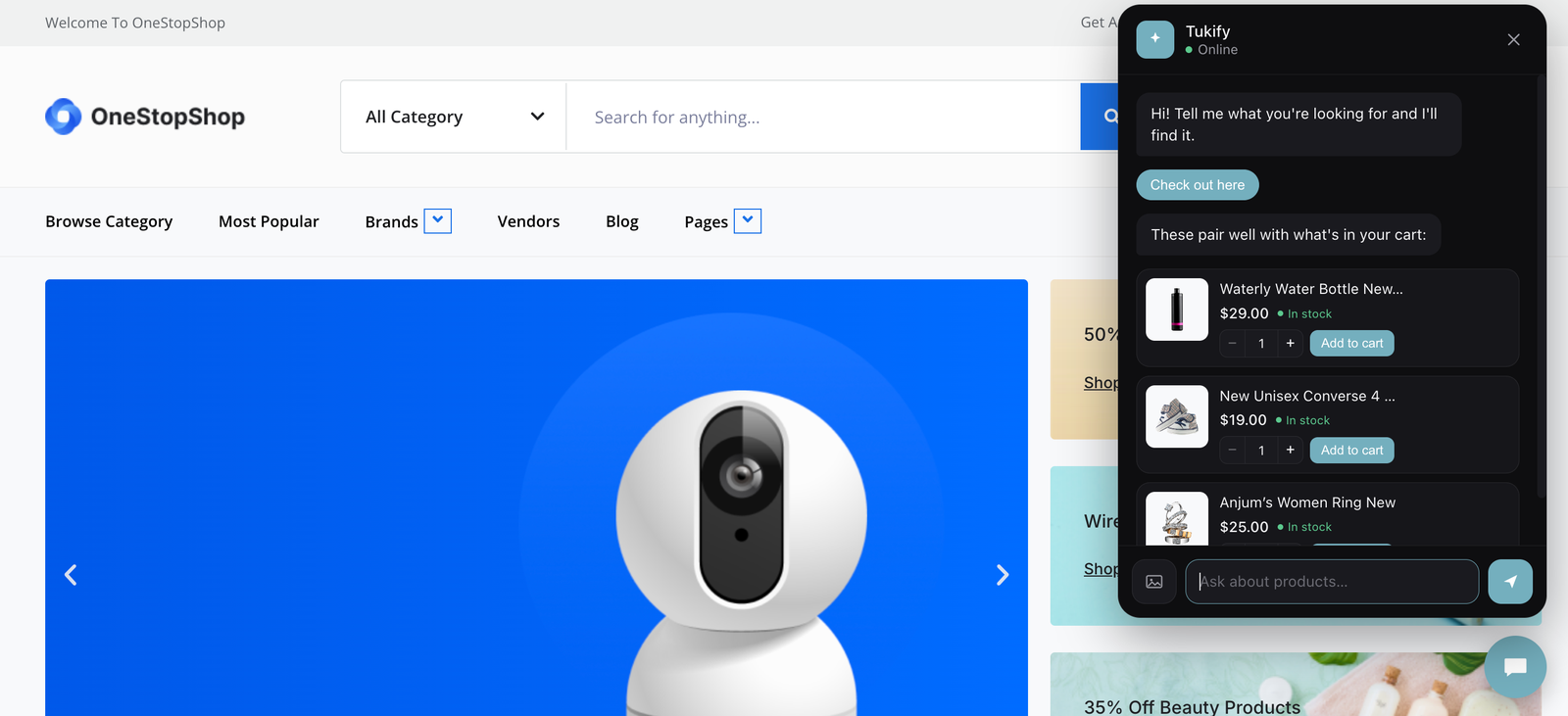
- Product recommendations - cart-aware upsell suggests genuinely complementary items based on what is already in the cart.
- Visual / image search - a shopper uploads a photo and Tukify finds similar products in your catalog, great for "find me something like this". A photo of a room or an outfit is broken into its individual items and each one is searched separately.
- In-chat product detail popup - tap a product to see full details, an image gallery, variations (size, colour) and add to cart, all without leaving the chat.
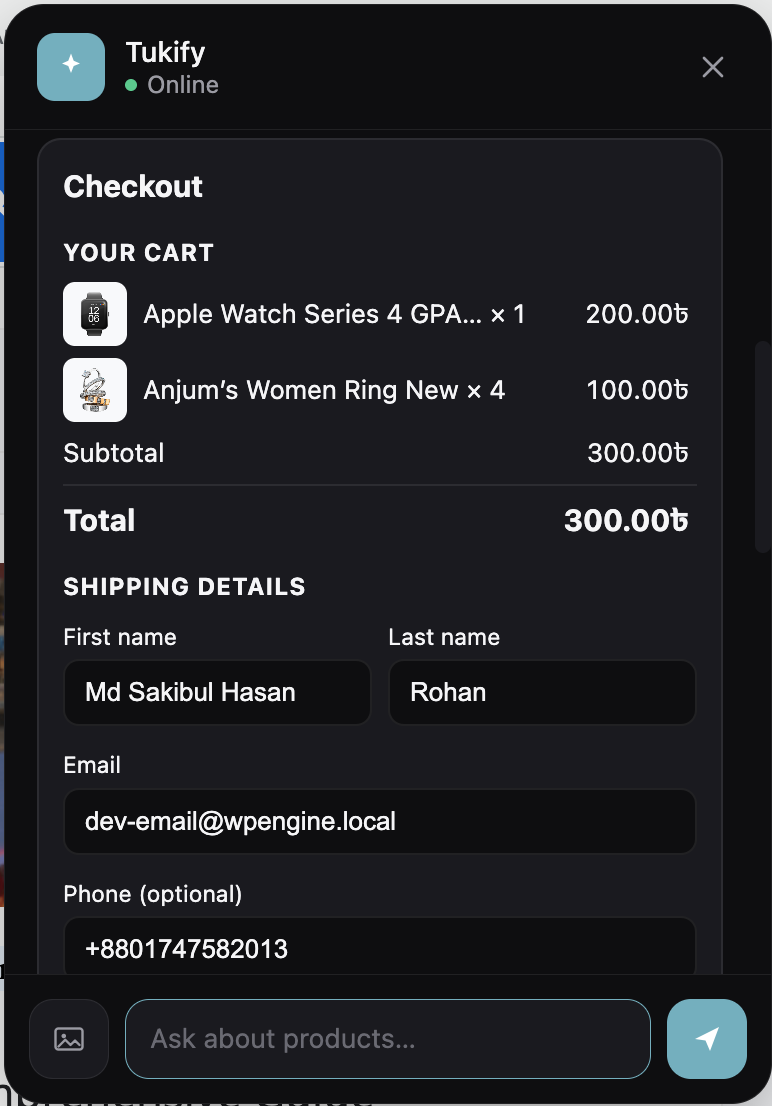
- Add to cart in chat - a quantity stepper and add-to-cart on every product card and in the detail popup, plus an optional guided in-chat checkout.
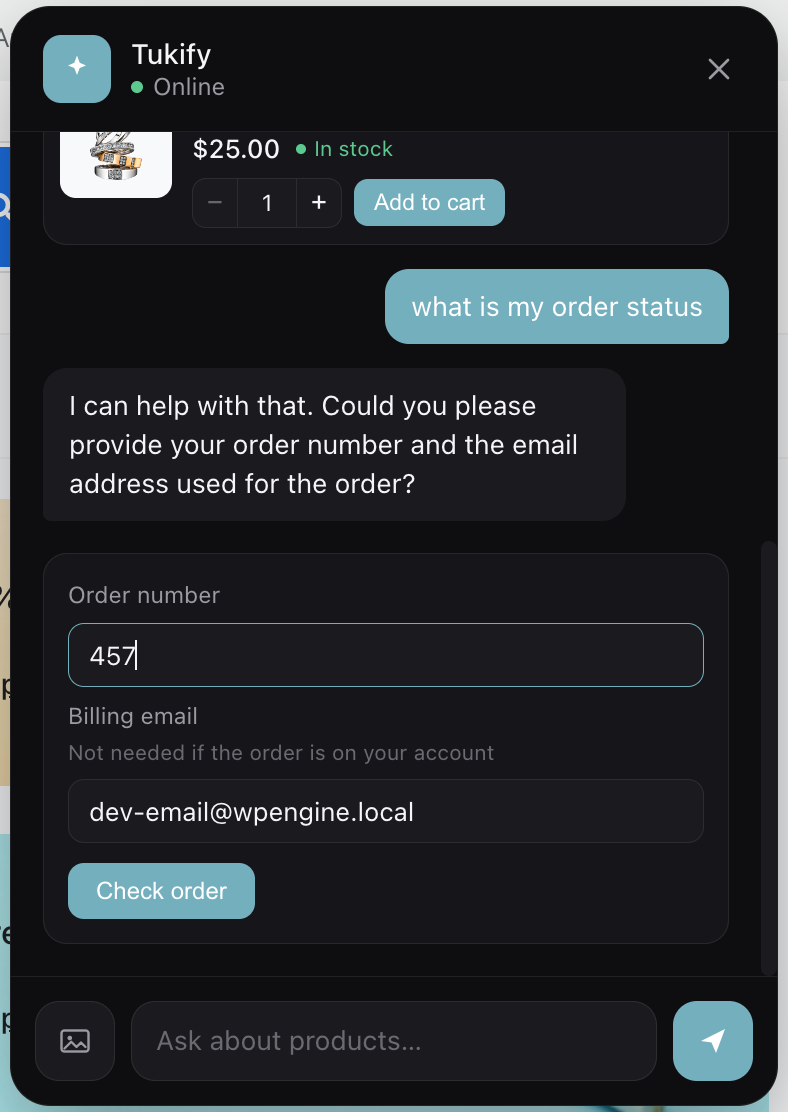
- Order status - a secure order-status lookup, verified by order number and billing email, right in the conversation.
- Clarifying questions - asks one short follow-up (with tappable quick replies) when a request is too vague, instead of dumping mediocre results.
- Natural-language filters - understands price, colour, size, brand, stock, category and sorting ("cheapest wireless headphones under $200") and applies them as real WooCommerce queries.
- Comparison mode - a side-by-side comparison of 2-3 products with a one-line trade-off summary.
- Policy and FAQ answers - answers shipping, returns and warranty questions from your own pages and a custom Q&A knowledge base.
- Abandonment help - if a shopper stalls on the cart or checkout page, or looks about to leave, Tukify offers a hand with the things that usually hold people up: shipping cost, sizing, and payment. Dismissible, and never more than once per visit.
- Bring your own API key - use Google Gemini, OpenAI / ChatGPT, Anthropic Claude, xAI Grok, or Groq. You pay your provider directly; Tukify never bills for inference.
- Choice of models - pick a chat provider and an embedding provider independently, and choose the model for each.
- Background indexing - embeds your catalog in the background via Action Scheduler, and only re-embeds products that changed.
- Presentation surfaces - a global floating chat widget plus three Elementor widgets (Chat, Search, Recommendations), each rendered in a Shadow DOM so your theme's CSS cannot break them.
- Conversion analytics - cart recovery rate, resolution rate, chat-assisted average order value against your store-wide average, and attributed revenue, over any date range. Plus top queries, zero-result queries, and unmet-demand insights.
- Knows a problem from a purchase - when a shopper sends a photo of a damaged or wrong item, Tukify stops selling and offers the order lookup and your returns policy instead.
- Privacy-first - all AI calls are server-side, keys are masked in the admin, and your catalog data stays in your own database. Analytics are aggregate counts only.
- Google Gemini - chat, embeddings and image (vision) search. Recommended default; has a free tier.
- OpenAI (ChatGPT) - chat, embeddings and image (vision) search.
- Anthropic (Claude) - chat and image (vision) search. No embeddings - use Gemini or OpenAI as the embedding provider.
- xAI (Grok) - chat and image (vision) search. No embeddings - use Gemini or OpenAI as the embedding provider.
- Groq (fast inference) - chat only, very fast, with a free tier. No embeddings or vision - use Gemini or OpenAI as the embedding provider, and image search falls back to a vision-capable provider.
- WooCommerce (active).
- An API key for at least one supported AI provider: Google Gemini, OpenAI, Anthropic (Claude), xAI (Grok), or Groq (fast inference). Gemini and Groq offer free tiers that are enough for development and small stores.
- If you pick Claude, Grok, or Groq for chat, you also need a Gemini or OpenAI key for embeddings (those providers have no embeddings endpoint).
- PHP 7.4+.
- Elementor is optional (only needed for the Elementor widgets).
安装:
- Upload the plugin to
/wp-content/plugins/tukifyor install it from the Plugins screen. - Activate the plugin. WooCommerce must be installed and active.
- Get an API key from a supported provider - Google Gemini (recommended; free tier at aistudio.google.com), OpenAI, Anthropic (Claude), xAI (Grok), or Groq (fast inference, free tier at console.groq.com).
- Go to Tukify > Settings, choose your provider, paste your key, and click Test connection.
- On the Tukify dashboard, click Reindex all products to embed your catalog (runs in the background).
- Enable the floating widget in Settings, and/or drop the Tukify Elementor widgets onto a page.
屏幕截图:


常见问题:
Which AI providers does Tukify support?
Five, and you bring your own API key for whichever you choose: Google Gemini, OpenAI (ChatGPT), Anthropic (Claude), xAI (Grok), and Groq (fast inference). You pick a chat provider and an embedding provider independently in Settings. Gemini and OpenAI handle chat, embeddings and image search; Claude and Grok handle chat and image search; Groq handles chat. Embeddings are always generated by Gemini or OpenAI.
Can shoppers search by image?
Yes. With visual (image) search, a shopper uploads a photo in the chat and Tukify identifies the product type and finds similar items in your catalog - ideal for "find me something like this". Image search uses a vision-capable provider (Gemini, OpenAI, Claude, or Grok).
Does it work without a paid AI subscription?
Yes. Tukify is bring-your-own-key, and both Google Gemini and Groq offer free tiers that are enough for development and many small stores. You connect your own key and pay your provider directly (often nothing on a free tier); Tukify never charges for inference.
Is my API key safe?
Yes. Every provider key is stored in your site's options, shown masked in the admin, and used only server-side. Keys are never sent to the browser or embedded in any front-end code, and all AI requests are made from your server.
Where is my catalog data stored?
Product embeddings are stored in a custom table in your own WordPress database. Tukify only sends product text to your configured embedding provider (Google Gemini or OpenAI) to generate those embeddings (see External services).
Does it work without Elementor?
Yes. The global floating chat widget works on any theme. Elementor is only required for the three optional Elementor widgets.
Will it invent products that aren't in my store?
No. Every answer is grounded in real retrieval - the assistant can only recommend products that exist in your catalog, and policy answers come only from your own content.
What happens to my data if I delete the plugin?
By default, deleting Tukify removes all of its data: its settings, its custom tables (product embeddings, knowledge base, analytics, back-in-stock subscribers, usage counters) and any cached data. If you would rather keep everything for a later reinstall, enable "Keep Tukify's data when the plugin is deleted" under Settings > Advanced before deleting. Deactivating the plugin never removes any data.
更新日志:
- New layout with a sidebar for every section. Moving between the Dashboard, the settings tabs and Back in stock is instant, with no page reload.
- Dark mode by default, with a Light mode switch in the header. The choice is saved per admin user and applied before the page shows, so there is no flash.
- The sidebar stays in place and only the content scrolls; the Save changes bar is always visible on settings tabs.
- Each section has its own address (for example #products), so reloading, bookmarking or saving brings you back to the same section.
- A Reset button discards unsaved changes.
- WordPress notices now appear neatly below the Tukify header instead of jumping into place.
- Larger controls (at least 44px) and visible keyboard focus throughout, with good contrast in both themes. Works down to phone width, where the sidebar becomes a row of tabs.
- Back in stock shows one card per product with its waiting shoppers.
- No settings were renamed or changed: everything you saved before is kept as is.
- Updated every provider's model list to its current lineup. New defaults: Gemini 3.8 Flash, GPT-6 Luna, Claude Haiku 5.5, Grok 4.7 and Groq gpt-oss-120b.
- Retired models (Claude 3.5, Grok 2 and 3, Groq Llama 3.x and DeepSeek) are removed. A store still set to one is moved to the provider's default automatically, with no need to re-save settings.
- Models that still work but are being phased out stay selectable, labelled with their shutdown date.
- Claude Haiku 5.5 and Sonnet 5.5 now answer without slow up-front reasoning, so replies are fast and never cut short.
- The chat keeps working on pages served from a full-page cache. Previously it could stop responding about a day after the page was cached.
- The guest rate limit now counts only AI requests, so normal browsing in the chat (opening products, the cart, "show more") no longer uses up a shopper's allowance. Sites behind a CDN or proxy can pass the real visitor IP with the new tuki_client_ip filter.
- A slow or unreachable AI provider now fails within about 35 seconds instead of keeping the shopper waiting for minutes.
- A product reindex that keeps failing (for example with an invalid key) now stops and shows the error instead of retrying forever.
- Password-protected pages and posts are no longer added to the knowledge base.
- The knowledge base no longer mixes results from different embedding models after you switch provider; a reindex now refreshes every entry.
- Image search with Claude no longer fails when the model wraps its answer in formatting.
- Order lookup accepts custom order numbers such as "INV-123".
- Adding a product from the Search or Recommendations widget no longer makes every chat on the page suggest add-ons.
- The image button is disabled while a reply is loading, so a photo is never silently dropped.
- Opening checkout twice no longer stacks two checkout forms.
- The connection status in the admin header now reflects your active chat provider's saved key.
- Wording that assumed Gemini now covers every provider.
- WhatsApp preview (still locked): the conversation table is created when the channel is unlocked, phone numbers are no longer kept in background job data, the damaged-item reply is no longer handed to a human, and clarifying questions reset for a returning shopper.
- The chat now opens itself with a helpful nudge when a shopper stalls on the cart or checkout page, or looks about to leave.
- Three triggers - checkout idle, cart idle, and exit intent - each switchable, with editable idle thresholds and message templates.
- The nudge offers quick-reply chips for the most common blockers: shipping cost, sizing, and payment. Each is answered from your live cart, shipping zones, and payment gateways plus your knowledge base, with no AI call.
- One frequency cap covers every trigger, so a shopper is nudged at most once per session and at most once per N hours.
- Never fires for logged-in administrators or shop managers, so it stays out of your way while you work on your own store.
- Replaces the separate "Exit intent" and "Proactive re-engagement" settings with a single Engagement tab. Your existing settings are migrated automatically.
- New KPIs on the dashboard: cart recovery rate, resolution rate, chat-assisted average order value against your store-wide average, and attributed revenue.
- New date-range filter - 7, 30, or 90 days, 1 year, or all time - and a trend line of attributed orders per day.
- Chat-to-sale is now range-aware and counts distinct sessions on both sides of the ratio. It previously compared every attributed order against chat sessions only, which could report over 100%.
- Order totals are recorded at attribution time, so revenue metrics need no per-order lookups when the dashboard loads.
- Aggregate counts only. No customer, order contents, or personal data is stored or displayed.
- Uploaded images are now understood before they are searched. A quick classification decides whether the photo shows a single product, a scene, a problem with an item, or something unclear.
- A photo of a damaged, faulty, or wrong item no longer returns products to buy. Tukify offers the secure order lookup and your own returns policy instead.
- Scene photos - a room, an outfit, a flatlay - detect the main items and search for each one, now covering furniture, lighting, decor, textiles, appliances, kitchenware, and plants as well as clothing.
- An image Tukify cannot read now asks one short question instead of guessing.
- Simple product photos take exactly the same path as before, and any classification failure falls back to it, so image search keeps working even if the extra step is unavailable.
- New: in-chat product detail popup (gallery, variations, add to cart).
- New: Groq (fast inference) chat provider.
- Coming soon: WhatsApp channel (preview in settings).
- Improved plugin listing and documentation.
- Checkout button now always appears at the bottom of the chat whenever the cart has items, in both new and existing chats (was inconsistent before).
- Added a subtle, dismissible review request on the plugin's own screens.
- Improved the readme and plugin listing (search keywords, clearer descriptions, multi-provider wording).
- New Tukify logo (transparent SVG) shown in the chat launcher, avatar, and admin header - it renders cleanly inside the round chat bubble, with no square corners.
- Added an Appearance setting to customize the chat bubble background colour, with a live preview and a low-contrast hint.
- Fixed prices showing as raw HTML entities (e.g. "$76.00" instead of "$76.00") in the chat checkout and order-status cards. Currency output is now decoded to plain text everywhere prices appear in the chat.
- Corrected plugin header metadata for the WordPress.org review: author name and distinct plugin/author URIs.
- Removed plugin-wide suppression of other plugins' admin notices; notices are now scoped to Tukify's own screens.
- Performance: added an (event_type, created_at) index for analytics range queries and a daily purge so the events table stays bounded.
- Performance: the semantic-search scan now reads embeddings in batches to cap peak memory on larger catalogs.
- Added API usage tracking with a per-day tokens/requests chart and estimated cost in Logs / Analytics.
- Added response caching (query embeddings + knowledge-base answers) with a TTL, enable/disable, and a clear button; nothing user-personal is ever cached.
- Added back-in-stock notifications: shoppers can ask to be emailed when an out-of-stock product returns, with a consent step, an admin list, an email template, and one-click unsubscribe.
- Added a quantity stepper on chat product cards.
- Added site-wide RAG over posts, pages, and products, with source citations under answers.
- Added secure order-status lookup, a size and fit advisor, "shop the look" multi-item visual search, demand insights, proactive re-engagement, and an opt-in in-chat checkout.
- Redesigned the admin dashboard.
- Added clarifying questions, natural-language filters, comparison mode, policy/FAQ knowledge base, cart-aware upsell, and exit-intent re-engagement.
- Added image-based (visual) search.
- Fixed cart accumulation when adding to cart from the chat widget.
- WooCommerce HPOS compatibility declared.
- Initial release: semantic search, RAG chat, background indexing, cart integration, analytics dashboard, floating widget and Elementor widgets.