
Turgenev
| 开发者 | al5dy |
|---|---|
| 更新时间 | 2026年9月25日 16:52 |
| PHP版本: | 8.1 及以上 |
| WordPress版本: | 7.1 |
| 版权: | GPLv2 or later |
| 版权网址: | 版权信息 |
详情介绍:
- SEO over-optimization and signals associated with Yandex Baden-Baden risk;
- keyword stuffing and unnatural keyword repetition;
- unusually frequent words and phrases;
- query / keyword coverage;
- stylistic problems, SEO clichés and bureaucratic wording;
- "wateriness" / low-information wording;
- long or difficult sentences;
- readability;
- the combined Turgenev risk score.
- SEO landing pages;
- commercial category and service pages;
- blog articles;
- product and category copy;
- agency content QA;
- copywriter review;
- editor approval workflows;
- Russian-language SEO content audits;
- pre-publication readability checks;
- detecting repetitive or template-like text.
- current Turgenev account balance;
- balance refresh;
- a direct balance top-up link;
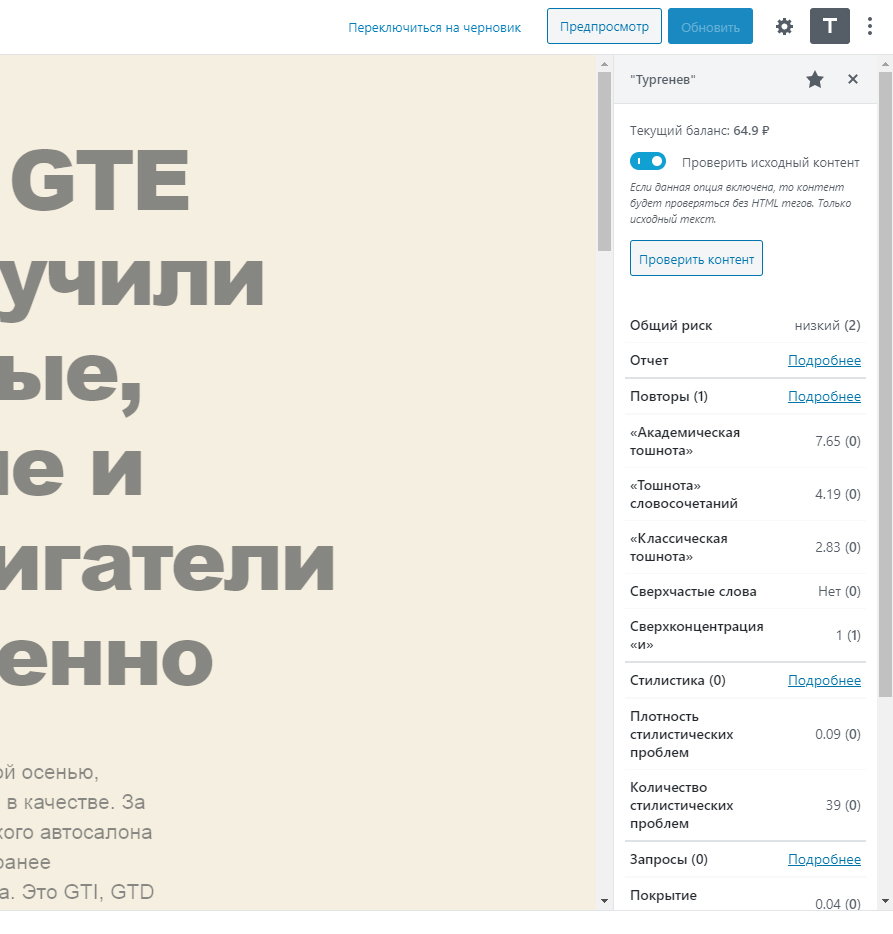
- Analyze document;
- optional HTML analysis (send markup) mode;
- overall risk;
- detailed analysis sections;
- links to provider reports;
- in-editor highlighting when the server supports the required DOM component.
- localized editor JavaScript;
- HTML source;
- browser-visible AJAX responses;
- Gutenberg configuration objects.
- a WordPress nonce;
- validation of the target post;
current_user_can( 'edit_post', $post_id )for that exact post;- server-side per-post and per-user rate limiting.
- an empty field keeps the current key;
- an invalid replacement does not erase the current key;
- a provider outage during verification does not erase the current key;
- only Delete API Key explicitly removes the saved key.
post_content, block attributes, revisions or autosaves. Your article remains your article.
Server-side rate limiting
Turgenev is an external service with account usage/billing, so the plugin does not rely only on a disabled button in JavaScript.
The WordPress backend applies independent request limits per user/post and per user across all posts. If either limit is exceeded, the request is rejected before contacting the provider.
Graceful server compatibility
The PHP DOM extension is optional.
Without ext-dom:
- account balance still works;
- normal content analysis still works;
- functionality that requires parsing the provider's HTML report is disabled gracefully rather than crashing the editor.
- word-frequency / repetition metrics;
- unusually frequent words;
- style-problem density;
- low-information wording;
- query coverage;
- readability based in part on sentence and word length.
安装:
- Sign in to your WordPress administration area.
- Open Plugins → Add New.
- Search for Turgenev.
- Install the plugin.
- Click Activate.
- Continue with the API/account setup below.
- Download the production Turgenev plugin ZIP.
- In WordPress open Plugins → Add New → Upload Plugin.
- Select the ZIP.
- Click Install Now.
- Activate Turgenev.
- Continue with the API/account setup below.
- Open Turgenev.
- Sign in or create a Turgenev account.
- Confirm the account if the provider asks you to verify your email.
- Open the API key / account page.
- Generate or copy your API key.
- If necessary, top up your balance.
- In WordPress open Settings → Turgenev.
- Paste your Turgenev API key into API key.
- Click Save API key.
- The plugin verifies the key using the provider balance operation.
- If verification succeeds, WordPress shows the current balance.
- If verification fails, the key is not saved. If an older working key already exists, it is preserved.
- Open a post, page or another post type that uses the Block Editor.
- Click Turgenev in the editor toolbar.
- Confirm that your current balance is available.
- Leave HTML analysis (send markup) disabled for normal visible-text analysis, or enable it when you intentionally want markup-aware analysis.
- Click Analyze document.
- Review Overall risk.
- Open the detailed sections to inspect frequency, style, keywords, formality and readability.
- Use report highlighting where available to inspect problem areas directly in the editor.
- Edit the content and analyze again when appropriate.
- Open a post type using the Classic Editor.
- Find the Turgenev metabox.
- Check your balance.
- Choose the analysis mode if needed.
- Click the analysis button.
- Review the returned risk and details.
屏幕截图:


常见问题:
What does this WordPress SEO plugin actually analyze?
Turgenev evaluates content through the external Turgenev text-analysis service. The integration surfaces the provider's overall risk and sections related to repetition/frequency, style, keywords, formality and readability. It is intended as an editorial and SEO content-quality tool, not as a search-ranking guarantee.
Is this a Yandex plugin?
No. This plugin integrates the independent Turgenev service with WordPress. Turgenev's published methodology discusses content signals and risk associated with Yandex's Baden-Baden text-quality / over-optimization algorithm.
Can Turgenev guarantee that a page will rank higher?
No. Search rankings depend on many factors. The provider itself describes its score as a risk estimate and recommends applying editorial judgment instead of mechanically removing every highlighted word.
Does it detect keyword stuffing and SEO over-optimization?
It exposes Turgenev analysis related to repetition, unusually frequent terms, keyword/query coverage and overall over-optimization risk. These signals can be useful when reviewing SEO copy, landing pages and commercial content.
Does it check readability?
Yes. Readability is one of the analysis sections returned by Turgenev.
Does it work with Gutenberg?
Yes. The Block Editor integration analyzes the whole current document and is independent of the selected block.
Does it work with the Classic Editor?
Yes. The plugin adds a Turgenev metabox on supported Classic Editor screens.
Do I need to save the post before analyzing it?
No. Gutenberg analysis reads the current editor state, including unsaved changes.
Can I analyze HTML instead of plain visible text?
Yes. Enable HTML analysis (send markup) in the Turgenev panel. By default, visible document text is used.
What is the maximum text length?
The current plugin runtime accepts up to 50,000 visible Unicode characters per analysis.
Where do I get the Turgenev API key?
Get your API key from the Turgenev API key / account page.
Where do I add money / top up the balance?
Use the Turgenev balance top-up page. The plugin also provides a top-up shortcut from the editor.
Is the Turgenev service free?
The WordPress plugin is GPL-licensed software. The external Turgenev service has its own billing model and current pricing. Check the provider website for authoritative pricing.
Does saving my API key spend a content-analysis request?
The plugin verifies a new key using the provider's balance operation rather than sending a dummy document to the risk-analysis endpoint.
Is my API key exposed to JavaScript?
No. Provider authentication is performed server-side by WordPress.
What happens if I enter a bad replacement API key?
The replacement is verified before storage. If it cannot be verified, the existing key remains unchanged.
What happens if Turgenev is temporarily unavailable while I change the key?
The new key is not committed and the previous working key is preserved.
Can another WordPress user analyze a post they cannot edit?
The plugin checks current_user_can( 'edit_post', $post_id ) on the server for document operations. A generic ability to edit some posts is not enough.
Does Highlight modify my saved WordPress content?
No. Highlighting is presentation-only. It does not intentionally write highlight markup into post_content, block attributes, revisions or autosaves.
Why is Highlight unavailable on my server?
Report highlighting requires the PHP DOM extension. Normal balance checks and content analysis continue to work without it. Ask your host to enable the standard PHP DOM/XML extension for your active PHP version if you want report highlighting.
Why does the plugin have rate limits?
The provider is an external service with account usage. Server-side limits help prevent accidental or scripted repeated requests from bypassing normal editor behavior.
Why does the score change after I edit the text?
Changing the text changes the analyzed input. The Turgenev provider also continues to improve its algorithms and dictionaries, so results may evolve over time.
Should I remove every word Turgenev highlights?
No. The provider explicitly warns against mechanical rewriting. A highlighted phrase is a signal to review context, not an instruction to delete it automatically.
Does the plugin send my entire database or website to Turgenev?
No. A document analysis sends the content being analyzed. A balance check sends the API key but not document content. See the External Service section for details.
更新日志:
- Major production-focused rewrite for WordPress 6.6+ and PHP 8.1+.
- Keep the Turgenev API key server-side instead of exposing it to editor JavaScript.
- Route balance and analysis requests through authenticated WordPress AJAX with nonce and object-level (
edit_post) capability checks; a genericedit_postscapability is never accepted on its own for document operations. - Add independent, server-side, filterable rate limiting for
risk,highlightsandbalance, enforced both per post and per user across all posts combined, so switching between posts cannot be used to exceed the effective budget. Rejected requests never reach the Turgenev provider. - Validate new API keys through the balance endpoint and preserve an existing key when validation fails or the field is left blank.
- Remove the legacy paid
riskrequest that was used only to validate settings. - Add defensive HTTP/JSON/provider-response validation, including strict Unicode-character length limits (50,000 visible characters) and rejection of malformed UTF-8 or embedded NUL bytes before any outbound request.
- Replace provider-controlled
innerHTMLrendering with safe DOM/text rendering; highlight previews are presentation-only and never modify saved post content. - Degrade gracefully when the PHP DOM extension (
ext-dom) is unavailable: analysis and balance are unaffected, and the Highlight action is hidden with a clear notice instead of failing. - Improve Classic Editor handling when TinyMCE is unavailable or in text mode.
- Remove arbitrary low-balance workflow deletion from the editor UI.
- Fix
tbclassAPI documentation typo/ambiguity. - Add GitHub Actions, dependency updates, release packaging, PHP smoke tests, JavaScript tests and Playwright E2E scaffolding (Gutenberg panel, Classic Editor metabox, authorization, nonce validation, no-API-key-exposure and missing-DOM-extension coverage).
- Align project licensing to GPLv2 or later.
- Bugfix check balance function.
- Add translations.
- Minor fixes.
- Add balance checker in settings page.
- Add translations.
- Minor fixes.
- Encode URL for API requests.
- Bugfix check content function.
- First release.