
Unloadly – Disable Unused CSS & JS
| 开发者 | babatechs |
|---|---|
| 更新时间 | 2026年10月5日 07:08 |
| PHP版本: | 7.4 及以上 |
| WordPress版本: | 7.1 |
| 版权: | GPLv2 or later |
| 版权网址: | 版权信息 |
详情介绍:
- Speed up your WordPress site — Pages load faster when they only download what they use.
- Disable plugins on specific pages — Keep a plugin active but stop it from loading on pages where it isn't needed.
- Simple for beginners — Select plugins from a list in the page editor. No code.
- Safe — The plugin keeps running. Only its frontend CSS and JS files are removed from the pages you choose.
- Lightweight — Unloadly does one job and doesn't add its own cache, minification, or delay-JS features.
- Per-page control — In the editor sidebar, select the plugins whose CSS and JS should not load on that page or post. Search the list when you have many plugins.
- Category and tag rules — Set a rule once on a category or tag and every post in it follows. A post with its own selection always wins over its terms.
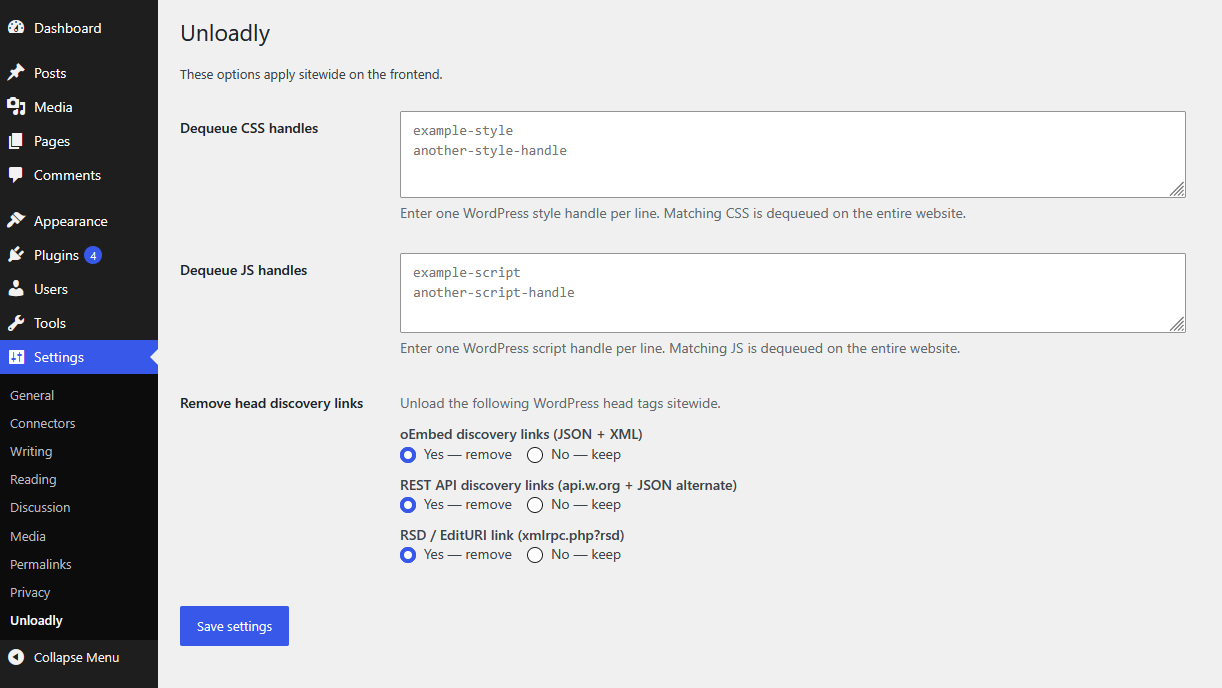
- Sitewide removal — On Settings → Unloadly, list individual style or script handles once, and they are removed on the entire frontend.
- Head cleanup — Optionally remove oEmbed, REST API, and RSD discovery links from
wp_head. - Quick check — View the page source and search for the plugin folder name. If the name is gone, those files were likely not printed. This is a hint, not a full audit.
- Developer hooks — Filters and actions are prefixed with
unloadly_. Seeincludes/Hook.php.
- Edit a page or post. In the Unloadly box, select the plugins that page doesn't need (for example WooCommerce on an About page, or a contact form plugin on every page except Contact).
- Update the page. Those plugins' CSS and JavaScript no longer load on that page.
- Optional: edit a category or tag (Posts → Categories or Posts → Tags) and select plugins there. Every post in that term inherits the rule, so you don't repeat the work. A post with its own selection ignores its term rules.
- Optional: open Settings → Unloadly to remove specific CSS or JS handles sitewide, and to strip discovery links from the document head.
- Clear your cache and test your page speed again.
- The post's own selection, when the post has at least one plugin selected.
- The terms of that post — the combined rules of its categories and tags. A rule on a parent category also covers posts in its child categories.
- Nothing per page, when neither is set. Sitewide handle rules still apply.
- WooCommerce — Disable shop CSS and JS on pages that are not the shop, cart, or checkout.
- Elementor and Divi — Disable builder CSS and JS on pages that don't use the builder. Leave them loaded on pages that do. Unloadly does not strip assets on Elementor editor or preview requests, so the canvas keeps its files.
- Contact forms and sliders — Load them only on the pages where they appear.
- Cache plugins — Change Unloadly rules, then flush the cache so visitors get the new HTML.
unloadly_. See includes/Hook.php.
Support
Need help? Open a thread on the WordPress.org support forum, visit the plugin page, or email support@versouq.com.
安装:
- Upload the
unloadlyfolder to/wp-content/plugins/, or install it from Plugins → Add New. - Activate Unloadly through the Plugins screen.
- Open Settings > Unloadly for sitewide options.
- Edit a page or post and use the Unloadly box to disable plugin CSS and JS for that page.
- If you use a page cache, flush it after you change rules.
屏幕截图:

常见问题:
How do I speed up my WordPress website by disabling plugins on certain pages?
Install Unloadly, edit a page, and in the Unloadly box select the plugins that page doesn't need. Update the page and clear your cache. The plugin stays active, but its CSS and JavaScript files no longer load on that page, so the page loads faster.
Why is my WordPress site slow even with a caching plugin?
A cache plugin makes pages quicker to deliver, but it doesn't stop plugins from adding their own CSS and JavaScript to every page. If many plugins load files on pages that don't use them, those pages stay heavy. Unloadly removes those unneeded files.
How do I disable a plugin on specific pages without code?
Edit the page, open the Unloadly box in the sidebar, and select the plugin. You don't need to look up script handles or write PHP. Only the plugin's frontend CSS and JS are stopped on that page; the plugin itself stays active.
How do I fix "Reduce unused JavaScript" in PageSpeed Insights or GTmetrix?
Find which plugins add scripts to pages that don't need them, then disable those plugins on those pages from the Unloadly box. Clear your cache and test again. Unloadly removes the plugin's JavaScript from that page so the browser never downloads it.
How do I fix "Remove unused CSS"?
The steps are the same. Select the plugins whose styles a page doesn't use, update the page, flush your cache, and re-test. Their CSS files are no longer printed on that page.
Does this replace a caching plugin?
No. Unloadly only removes selected CSS and JS from the page output. Use it with any page cache, and flush that cache after you change Unloadly rules.
Will this disable a plugin completely?
No. PHP still runs. Only matching frontend CSS and JS are dequeued.
Can I keep a plugin's assets on some pages?
Yes. Per-page rules are stored on that page or post. Sitewide handle lists apply everywhere.
How is this different from other asset managers?
Many asset managers list every individual script and style file on a page, which requires technical knowledge. Unloadly works at the plugin level: you choose which plugins a page doesn't need, and all of their frontend CSS and JS are removed together. Sitewide handle rules are available when you want finer control.
How do category and tag rules interact with page rules?
A post with its own Unloadly selection uses only that selection. A post with nothing selected inherits the combined rules of its categories and tags, including rules set on a parent category.
A post inherits a category rule but needs that plugin. What do I do?
Select any plugin in that post's Unloadly box. As soon as a post has its own selection, the term rules no longer apply to it, so build the list you want for that post.
Can I turn off term inheritance?
Yes. Return false from the unloadly_supported_taxonomies filter (pass an empty array) to hide the term fields, or use unloadly_resolved_plugins_for_post to change what a post inherits. unloadly_inherit_term_ancestors controls whether parent category rules cascade, and unloadly_apply_term_rules_to_archive controls whether term archives use them.
Does it work with WooCommerce, Elementor, or Divi?
Yes. Disable those plugins only on pages that don't use them. Leave WooCommerce loaded on shop, cart, and checkout. Leave Elementor or Divi loaded on pages built with them.
How do I check that a plugin's CSS and JS were unloaded?
View the page source and search for the plugin folder name (the directory under wp-content/plugins). If the name is gone, those files were probably not printed. That is a quick sanity check, not a complete audit. Some plugins load from a CDN, print inline code, or use handles with no folder path, so the name might be missing even when other code from that plugin is still on the page.
Where can I get support?
Open a thread on the WordPress.org support forum or email support@versouq.com.
更新日志:
- Added per-category and per-tag plugin unloading. Posts inherit the rules of their terms.
- Parent category rules cascade to child categories and to the posts filed under them.
- Term rules also apply on the term's own archive page.
- The editor box now lists the rules a post inherits and shows when its own selection overrides them.
- Added
unloadly_supported_taxonomies,unloadly_term_disabled_plugins,unloadly_resolved_plugins_for_post,unloadly_resolved_plugins_for_term,unloadly_inherited_plugin_details,unloadly_inherited_terms,unloadly_inherit_term_ancestors,unloadly_apply_term_rules_to_archive, andunloadly_term_saved.
- Initial release
- Per-page plugin CSS and JS unload
- Sitewide handle dequeue
- Head discovery link cleanup
- Public action and filter hooks