
VARZ Builder
| 开发者 | exstheme |
|---|---|
| 更新时间 | 2026年11月27日 20:39 |
| PHP版本: | 8.2 及以上 |
| WordPress版本: | 7.2 |
| 版权: | GPLv3 or later |
| 版权网址: | 版权信息 |
详情介绍:
style="--d:grid; --gtc:1fr 1fr; --gtc-m:1fr; --hov-bgc:#eee"
One small framework file (about 7 KB gzipped) understands all of them, so a page with a thousand styled elements loads the same stylesheet as an empty one:
- ⚡ No CSS generated per page, per post or per element - nothing to compile, cache, purge or regenerate
- 🧩 No post meta, no custom tables - the markup itself is the single source of truth
- 📦 Portable HTML - it works anywhere the framework is loaded: another site, a block, a template
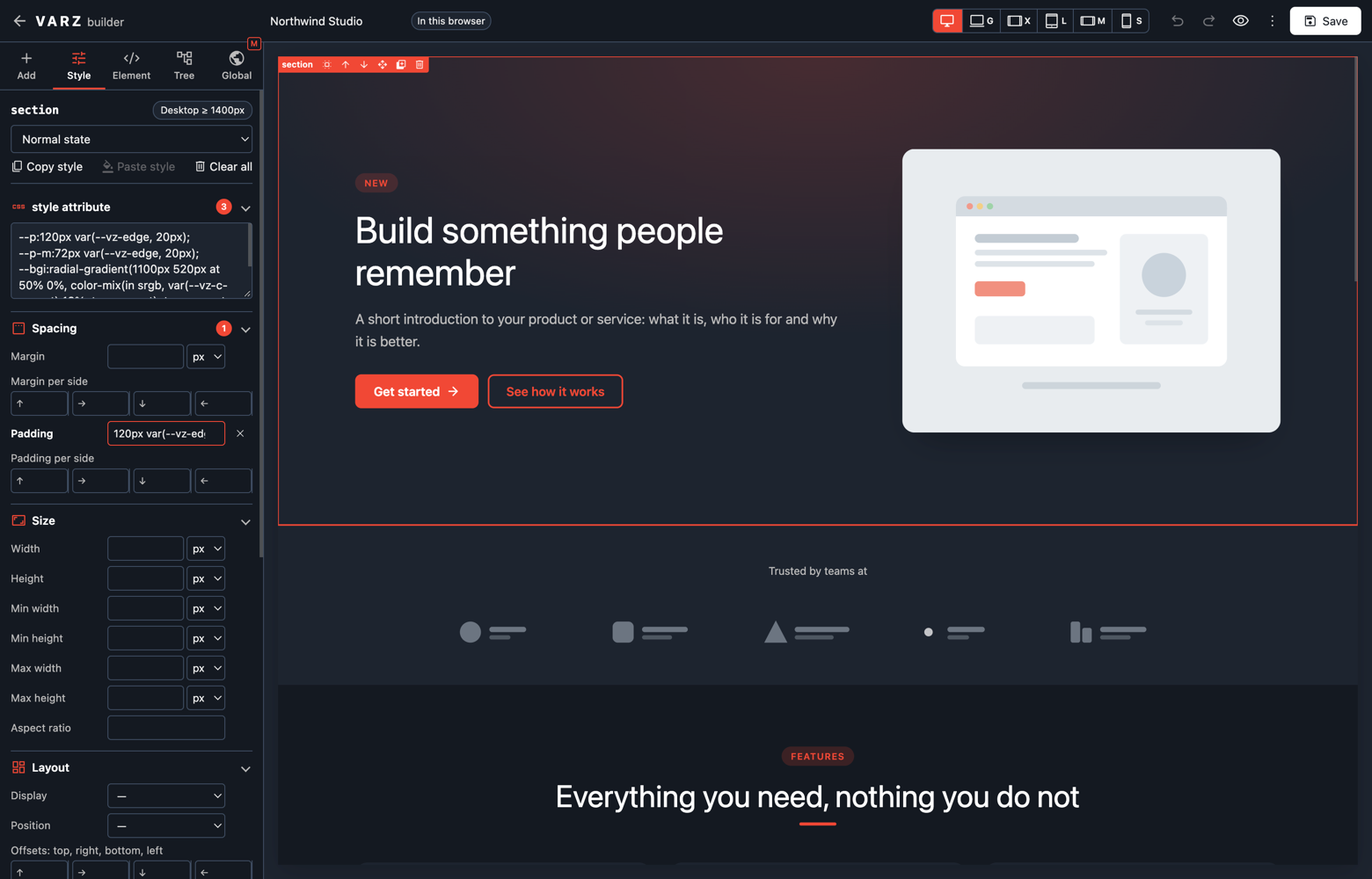
- 🎨 Visual builder - "Edit with VARZ" in the post list, the admin bar and the block editor. Drag and drop elements, a style editor for every CSS property with breakpoints (desktop, tablet, mobile) and states (hover, focus, ...), background images from the Media Library, overlays, shadows.
- ⭐ Icon element - 118 icons and your own, searchable, with looks (plain, circle, square, outline); size, color and background from the style editor.
- 🖱️ Interactive elements powered by varz.js - tabs, accordions, popups, side panels, slider, gallery with lightbox, click-to-play video.
- 🧱 VARZ blocks for the block editor - section (background overlay with filters and blend modes), container, grid, column, heading, text, buttons, image, tabs, accordion, slider, gallery. A round trip between the builder and the blocks.
- 📐 Patterns - ready sections, including a simple contact form.
- 🎛️ Site-wide design tokens - colors, typography, fonts, buttons and form fields in one place, shared with the VARZ theme.
- 🔗 Menu item icons (optional) - an icon for each menu item, shown in every menu: 118 built-in icons and your own (pasted SVG code, cleaned to plain shapes).
- 🌍 Translation ready.
- VARZ theme - the builder uses the theme's colors, tokens and its copy of the framework.
- Other themes - a "VARZ full width" page template (the theme's header and footer, the content at the full width; classic and block themes). VARZ colors stay light on the theme's light background (filter
varz_builder_color_scheme:''follows the visitor's system,'dark'). - Framework assets manager (themes without the framework) - one bundled build loads: 5 or 3 breakpoints, with or without the reset, plain (
--p) or prefixed (--vz-p) names, on VARZ pages only or on every page. With the VARZ theme the names follow its choice in Customizer > WordPress styles & scripts.
- VARZ > Settings > Clean up (each off by default, front end only) - emoji, jQuery Migrate, generator tags, RSD, shortlink, REST API and oEmbed links, feed links, Dashicons for visitors; with other themes also the block styles.
- VARZ > Variable names - converts saved content between plain and prefixed names (preview first, a revision for every converted item).
- Documentation
- Online builder - try it without WordPress
- VARZ CSS framework
- Video presentation
安装:
- In your admin panel, go to Plugins > Add New, search for VARZ Builder, click Install Now, then Activate.
- Go to VARZ > Settings to choose the post types and user roles that can use the builder.
- Open any page and click Edit with VARZ.
屏幕截图:


常见问题:
Does the plugin generate CSS for my pages? Is it fast?
No CSS is generated - ever. Builder pages and VARZ blocks keep every style in the element's own style attribute (style="--p:24px; --p-s:12px"), and one small framework file reads them all: about 7 KB gzipped, the same file for every page, cached by the browser after the first visit. There are no per-page or per-block stylesheets, no CSS files written to the uploads folder, nothing to compile, purge or regenerate after an update, and no extra database queries for styles. The only other CSS is a short list of your design tokens (colors, fonts, buttons) as CSS variables - the same on every page. A page with ten elements and a page with a thousand load the same CSS.
Who can use the builder?
Administrators always; other roles (by default editors) can be allowed in VARZ > Settings, for the post types chosen there. For users without the unfiltered_html capability WordPress filters the saved markup as usual: VARZ styles are kept, scripts, forms and embeds are removed.
What happens to my pages if I deactivate the plugin?
The content stays plain HTML with inline styles, so it still renders with the VARZ theme, which includes the framework. With other themes the framework stylesheet comes from the plugin; without it the VARZ variables have no effect.
How do I show menu item icons in my theme's own menus?
Enable Menu item icons in VARZ > Settings and pick the icons in Appearance > Menus. They show in every menu printed with wp_nav_menu(). Themes that build menus themselves can use the varz_menu_item_icon filter. Own icons: paste their SVG code under Custom icons in VARZ > Settings; developers can also use the varz_builder_icon_shapes filter.
Does the plugin collect any data?
No, it does not track visitors. Web fonts chosen in the design tokens: with the VARZ theme they are self-hosted by the theme; with other themes the font stylesheet is loaded from the font service you picked (fonts.bunny.net or fonts.googleapis.com), so visitors' browsers connect to it.
更新日志:
- New: a Video section for both video elements. Select a Video embed or a Video (click to play) on the page and the Element tab opens with its settings first: paste the video link in the form you copied it - a YouTube watch link, youtu.be, Shorts or a live link, with a start time (
?t=1m30s), or a Vimeo link - and the builder writes the player address itself (YouTube's privacy-enhanced youtube-nocookie.com player for embeds). Also there: the video title for screen readers, the cover image of click-to-play videos (the YouTube thumbnail in one click, the Media Library or any address), the shape (16:9, 4:3, 1:1 or 9:16 - a Shorts link picks 9:16 itself) and a button that turns one kind into the other, keeping the link, title and shape. - Fix: embedded videos and maps can be selected on the page. A click on a video or map in the builder canvas went to the embedded page (YouTube started playing), so the element could not be selected, moved or deleted there. A click now selects it; on the site the embeds work as before.
- Fix: code samples stay code. Opening a page in the builder turned escaped text into markup - a code sample showing
<h3>became a real heading, and saving the page stored it so. The page now reaches the builder unchanged. Pages saved with an earlier version keep the decoded markup: correct such samples once. - Fix: readable fields in the Customizer and on the Widgets screen. With a classic theme other than VARZ, the framework's reset reached WordPress's own fields on these two screens (they draw their block editor in the admin page itself), and on systems in dark mode text areas became dark on dark. The framework is no longer loaded on these two screens.
- Tested up to WordPress 7.2.
- Online builder: the word "null" no longer shows in the Element tab.
- Classic editor: an "Edit with VARZ" button in the title line, next to "Add New".
- Initial release.