
VEFmultiBooking
| 开发者 |
vimagesericfabre
bonaldi |
|---|---|
| 更新时间 | 2026年11月13日 04:53 |
| PHP版本: | 8.3 及以上 |
| WordPress版本: | 7.1 |
| 版权: | GPLv2 or later |
| 版权网址: | 版权信息 |
详情介绍:
- Guest rooms, cabins and gîtes — a price per night, a whole unit or a single bed in a dorm, optional extras such as breakfast.
- Guided activities — a river descent, a hike, a sled ride: fixed departures, a limited number of places, and a guide who has to be free.
- Courses and workshops — a pottery workshop or a yoga class, with a limited number of seats and a minimum number of participants.
- Appointments — a consultation or a treatment of 45 minutes, booked in the free slots of a practitioner and confirmed by you.
- Rentals — electric bikes by the half-day, a meeting room by the hour, equipment in limited stock.
- Stays — a room and a spa treatment in the same cart, paid once.
- Accommodation — rooms, cabins, gîtes, a private unit booked as a whole, or a shared capacity such as 6 beds in a dorm, each bed bookable on its own.
- Activities and services — rides, lessons, visits, guided tours, rentals, courses: a date and a time, a number of persons, optional extras.
- Stays — a package of nights and activities from several resources, booked and cancelled as a whole.
- Activities that need people — a guide, a driver, an instructor: a time slot is offered only while enough people are free to run it.
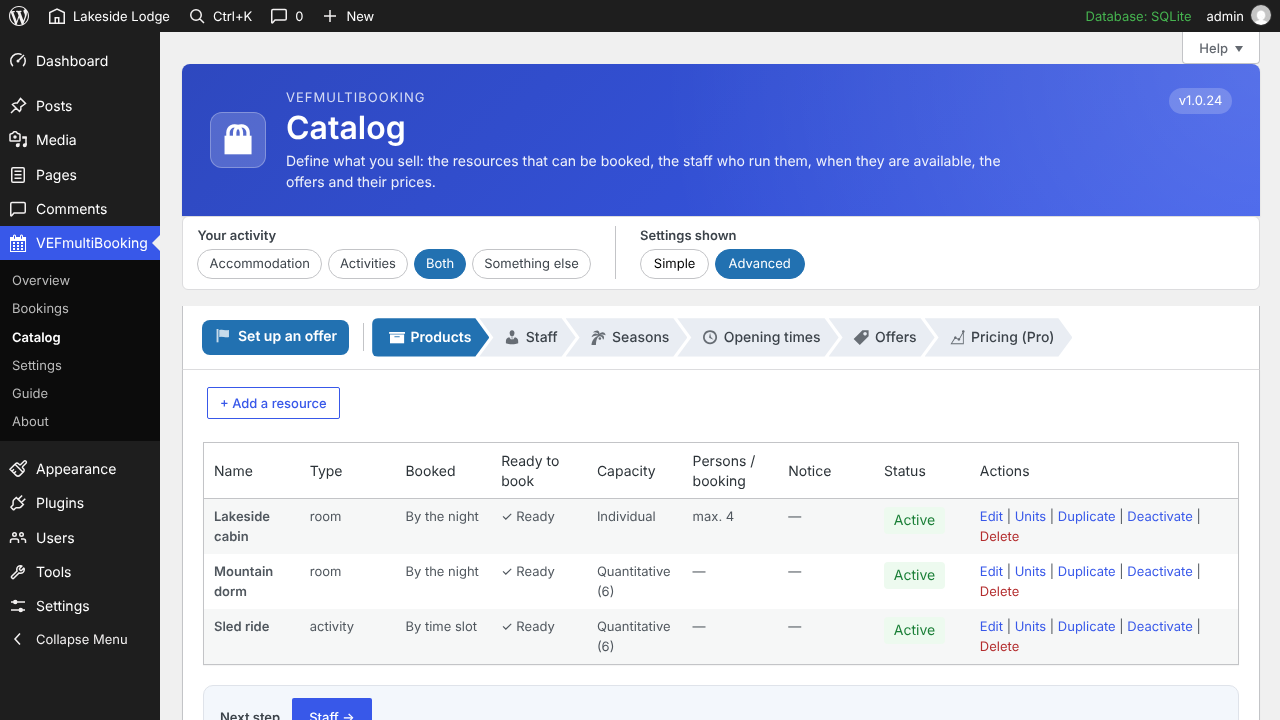
- Resources — everything that can be booked: an individual unit or a shared capacity.
- Availability — recurring rules generate the bookable slots for you; you can still change or close a slot, a unit or a whole period.
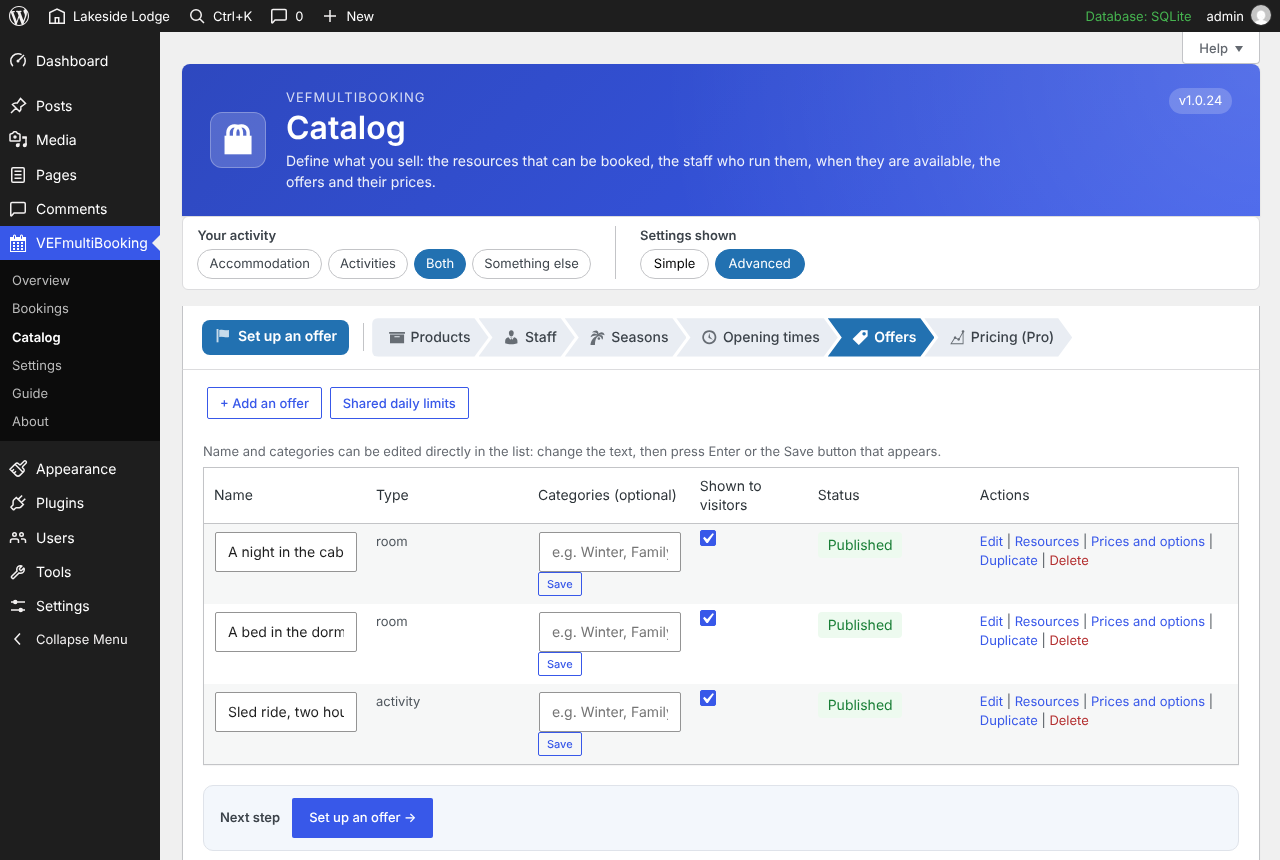
- Offers — what the customer actually buys: one or several resources, a price, optional extras.
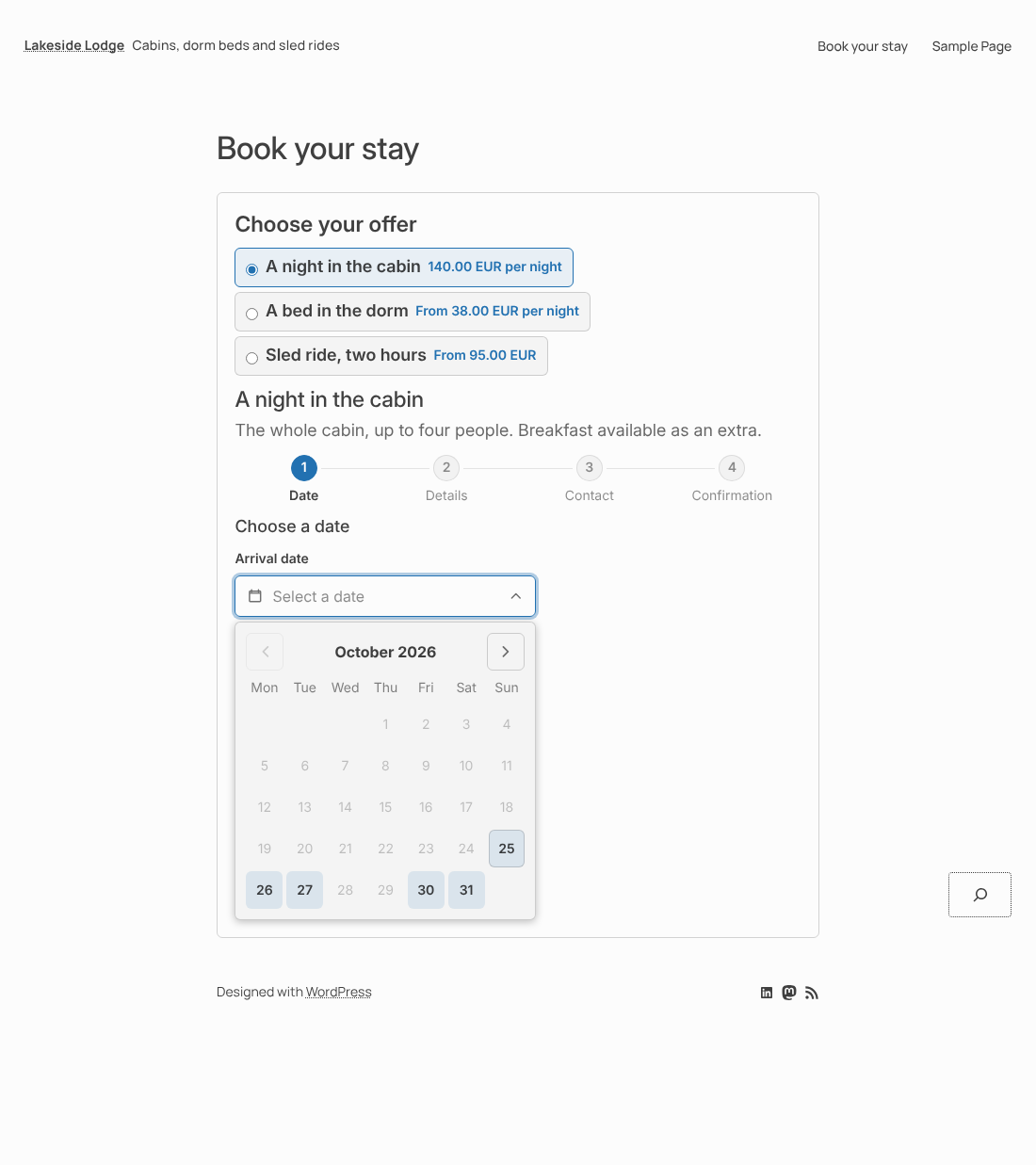
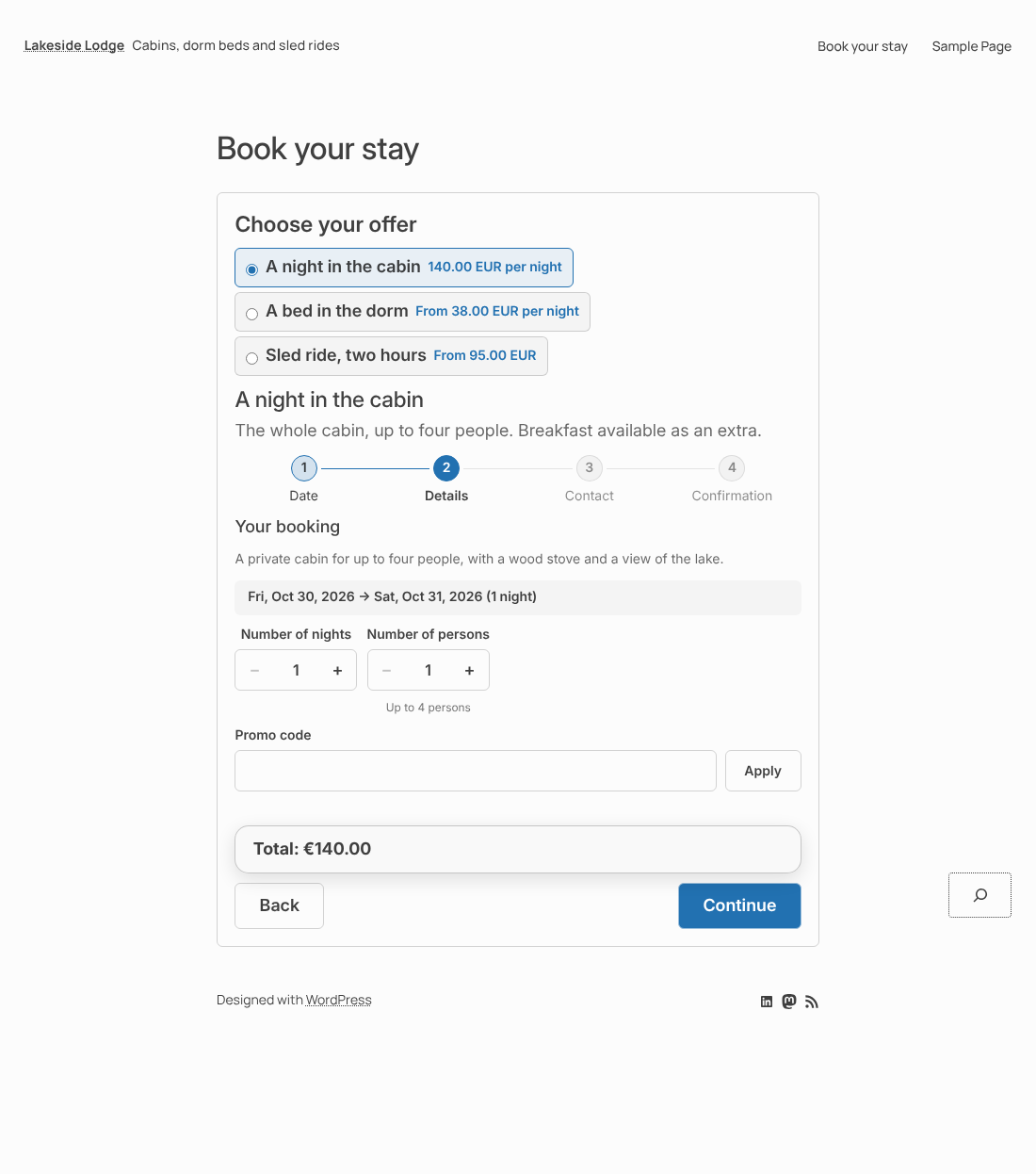
- Booking block — one complete module on your page: the visitor ticks an offer and the form adapts to it, up to the payment.
- Periods — a resource can be made bookable only during certain periods.
- Prices by category of customer — adult, child, student and so on, or a price by number of persons.
- Minimum number of persons — an activity can require a minimum, and the bookings wait until it is reached.
- No place blocked for nothing — an online booking that stays unpaid after the delay you set (30 minutes by default) is cancelled and its places are released.
- Cancelled bookings leave no personal data behind — after the delay you set (30 days by default), the name, e-mail address and phone number of a customer whose bookings are all cancelled are erased; the bookings stay, without any name.
- Closing online booking — for a holiday or a season, the form shows your own message instead, and you can still enter bookings by hand.
- Dates in a small calendar field where only the days that can be booked are enabled; − and + buttons for numbers.
- A cart: a visitor can book several offers in one go (a night, then a sled ride), gives their details once, pays once and receives a single e-mail. On an activity with several time slots in the same day, they can tick more than one, each with its own number of persons: every time slot stays a booking of its own, so one of them can be cancelled without touching the others. They are warned, never blocked, when two bookings take place at the same time.
- Optional extras with five pricing modes, chosen directly in the form.
- Questions for the visitor, owner validation when you want to approve a booking before it is confirmed, and shared daily limits across several offers.
- Optionally, buttons to filter the offers by category and a menu to sort them by price or name.
- It follows your theme: its fonts and heading sizes by default, and it adapts to every screen size.
- Dashboard with a getting-started list.
- Month, week, day and occupancy calendar, with drag-and-drop rescheduling.
- Bookings and customers, with customizable automatic e-mails to your customers and to you.
- Help on every screen, a getting-started guide, copyable diagnostic information and a support form.
- Multilingual sites: the texts you type can be translated with Polylang or WPML.
- Personal data can be exported and erased with the WordPress tools; an erased customer keeps no name, e-mail, phone or address, while the bookings and payments stay as anonymous accounting records. A suggested text for your privacy policy is provided.
- Booking numbers are long and random, so a confirmation or payment page cannot be reached by guessing a number.
- Payment confirmations are checked with the signature of Stripe and PayPal.
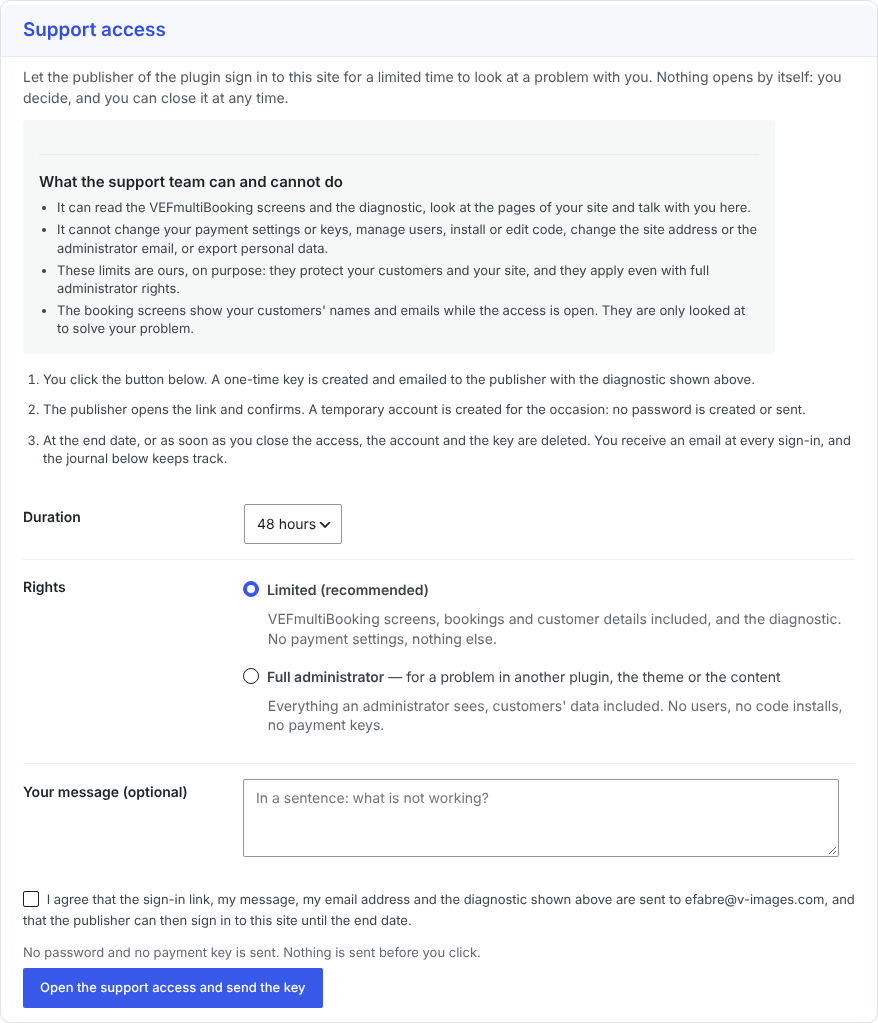
- If you ever need help, you can open a support access with a single click: temporary, limited to what support needs, closed whenever you want, and never started without you. You see what it can and cannot do before you open it.
- Sell better — pricing rules (season, occupancy, length of stay, family rates), promo codes, deposits and payment schedules.
- Save time — reminders and scheduled e-mails, a customer portal, a waitlist for full offers.
- See and grow — statistics and accounting exports, groups with a shared payment schedule.
- Move your data — import and export of the catalogue, customers, bookings and settings as CSV files, with a check before every import.
- VEFmusic — a free plugin for a band or a musician's site: audio player, album showcase, show calendar and an automatic press kit. A separate paid extension adds sales and ticketing. More on v-images.com.
- VEFpressKit — a downloadable press or media kit (PDF and zip) for any activity, with one stable link. More on v-images.com.
- VEFflipBox — a flip box for Divi 5, the block editor and Elementor. More on v-images.com.
- VEFdocsKit — PDF tools on your own server: images into PDF, merge, split, reorder and number pages. More on v-images.com.
安装:
- Install the plugin from Plugins > Add New, or upload the
vefmultibookingfolder to/wp-content/plugins/. - Activate it, then open the VEFmultiBooking menu.
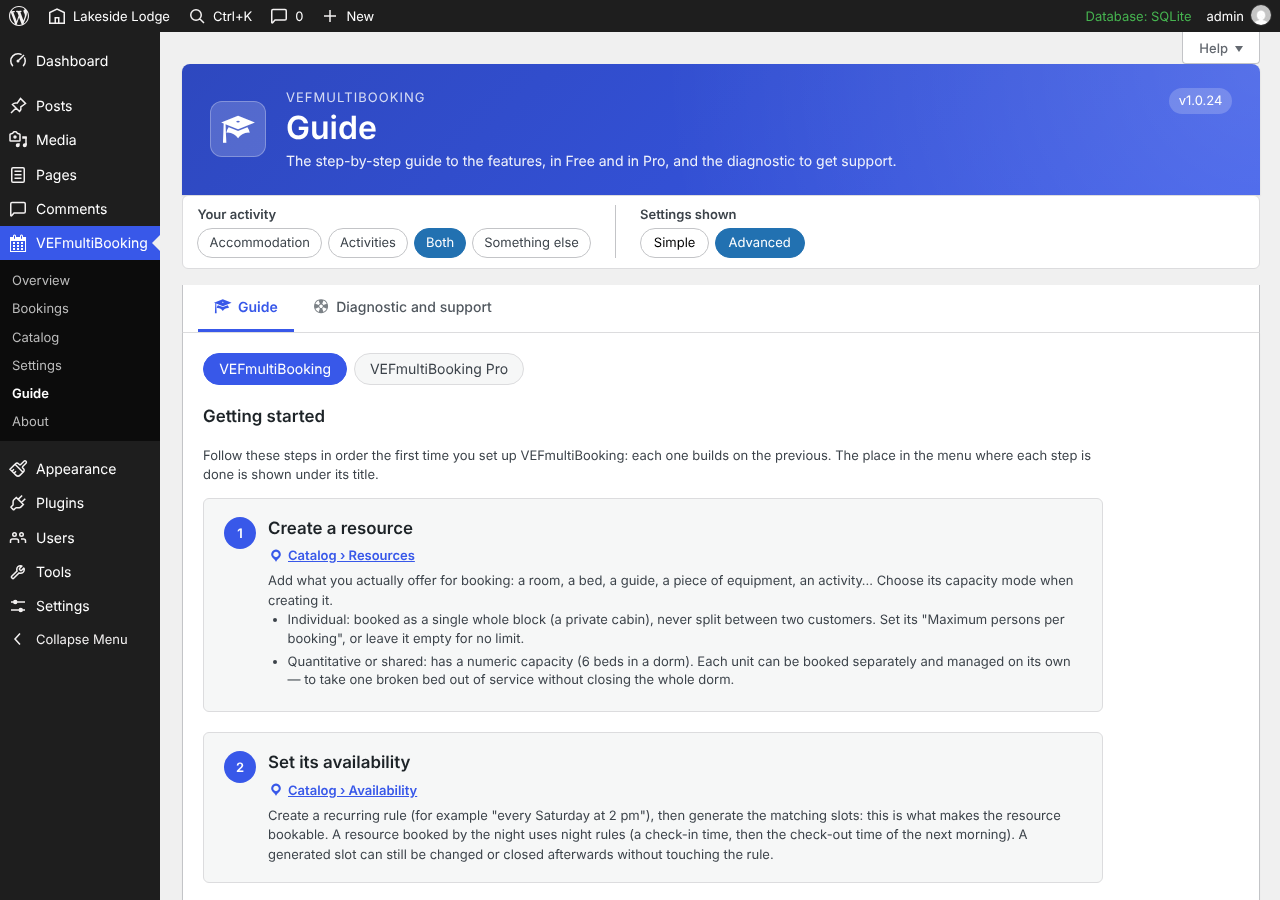
- Follow the Guide tab: create a resource, set its availability, create an offer, add the "VEF Booking" block (or Divi 5 module / Elementor widget) to a page, then enter your Stripe and/or PayPal keys in Settings.
屏幕截图:
常见问题:
What can the support team do with a support access?
Only what you chose to open, for the time you chose, and nothing starts without your click. With the default limited rights the support team reads the VEFmultiBooking screens and the diagnostic, looks at the pages of your site and talks with you in the Diagnostic tab. Even with full administrator rights it cannot change your payment settings or keys, manage users, install or edit code, change the site address or the administrator email, or export personal data. The booking screens show your customers' names and emails while the access is open; they are only looked at to solve your problem. You can close the access at any time, it ends by itself on the date you chose, you receive an email at each sign-in, and the conversation is erased when the access is closed.
How do I export or erase a customer's data?
Use the WordPress tools: Tools > Export Personal Data or Erase Personal Data, with the customer's email address. The export gives the customer record, their bookings and their answers. The erasure removes the name, email, phone and address and the answers to the questions; the bookings and their payments are kept without any personal data, because their dates and amounts are accounting records.
Do I need a license or an account?
No. The plugin is free and complete. An optional free license is offered on the License tab: it unlocks nothing and changes nothing in the plugin, it only lets the publisher keep in touch with you (news, offers) and answer support requests faster.
What does VEFmultiBooking Pro add?
Pro is a separate paid extension. It adds pricing rules (season, occupancy, length of stay, family rates), promo codes, deposits and payment schedules, reminders and scheduled e-mails, a customer portal, a waitlist, statistics with accounting exports and groups with a shared payment schedule. Everything in this plugin stays free and keeps working without it. The About tab presents the publisher and its other plugins.
Which page builders are supported?
The WordPress block editor, Divi 5 and Elementor. No shortcode is needed.
Can I use several currencies?
One currency per site, set in Settings before taking real bookings. Prices are never converted between currencies.
Can I test payments without charging a card?
Yes: enter your Stripe test keys and/or PayPal sandbox credentials and keep the test mode selected.
Can I have a feature added, or a custom plugin built?
V-IMAGES also develops custom WordPress plugins and can adapt its own plugins to your needs: a change to an existing plugin, a block, a module or a widget, or a complete plugin. Every request is considered, and every project is quoted individually. You can describe what you need on the custom development page.
更新日志:
- Fixed: in the Divi 5 Booking module, the "Offers proposed" list (used when a visitor adds another offer) was empty, so the offers to propose could not be chosen. All the published offers are now listed and ticked; untick the ones that must not be offered.
- Fixed: the "Success color" setting of the Divi 5 Booking summary module was missing in the Visual Builder.
- New: a License tab in Settings: free registration in one click, with a discount code for VEFmultiBooking Pro, and a list of the versions published on WordPress.org to go back to an earlier one.
- Changed: the About tab is shorter and presents V-IMAGES and its other plugins. VEFmultiBooking Pro is presented there by a single discreet card.
- New: each offer can have its own words in the booking form, the cart and the confirmation. In the offer, section "Wording and team": the word for the number of people ("Number of pieces", "Quantity"…) and the word shown before the person who leads the activity ("With", "Guide"…). Left empty, the usual wording stays. An offer with its own word for the people also says "3 left" instead of "3 spots left".
- New: each offer can have its own choice of what customers see of the people who run it: nothing, who leads the activity, or who leads it and a choice of the person. By default an offer follows the Staff tab, as before. An escape game can hide the people while a guided tour offers them, on the same site and even on the same activity.
- Fixed: an offer with a free price category (a free child price, for example) no longer reads "From 0.00 EUR": the free category is ignored in the "from" price, and an offer that is entirely free reads "Free".
- Fixed: the message shown when too many bookings are started with the same e-mail address (five per hour) said that a few minutes were enough. It now tells how long to wait. The limits can be changed with the
vefmb_rate_limitsfilter. - The database is updated automatically (three settings for each offer).
- Changed: the icons of the administration screens (set-up checklist, offers, resources, Guide, free license) are WordPress Dashicons instead of emoji.
- New: a "Need something custom?" section in the Licenses and versions tab and in the FAQ, with a link to the custom development page.
- The code comments are in English and the code is tidied. No change of behavior.
- New: an optional product of an offer that sells nights and activities can be charged on top of the price of the offer. Enter the extra price on the product, in the resources of the offer (Offers tab of the Catalogue), and choose how it is counted: per session, or per person and per session. Empty means included, as before. A guest who books ten sessions now pays ten supplements. The price shown while choosing, the cart, the confirmation, the e-mails and the booking detail show one line per supplement with the number of times it is counted, and a promo code applies to the total with the supplements.
- Fixed: moving a booking to another day in the calendar is refused when nobody who runs the activity is free that day, and the new departure now gets its people.
- Fixed: on a departure that gives one person to each customer, the people stay busy after a customer has left (booking cancelled or not completed in time) until the next booking of the departure, so nobody can be taken for another activity at the same time.
- The database is updated automatically (an extra price and the way it is counted, for each product of an offer).
- Fixed: in an offer that sells nights and activities, when a customer books several sessions of an activity, a person chosen for one session is no longer offered for another session that takes place at the same time.
- Fixed: a second session can use the same time as the first one, for another guest, as long as the activity has places left (a massage with a capacity of 2 booked for two guests, for example). The places and the people of all the sessions of an order are now counted together, so a time can no longer be over-booked. The times that the other sessions leave no room for are shown greyed out.
- New: in an offer that sells nights and activities, customers can choose the person who leads each activity (a masseuse, a ski instructor…) when the Staff tab is set to "Show who leads it, and let customers choose the person". The choice is checked again when the places are held; with any other setting nothing changes.
- Fixed: in an offer that sells nights and activities, a product marked "Optional" can now be left out: the order is no longer refused for lack of a day and a time for it. The activity is shown with "(optional)"; if the visitor starts it (a day chosen), a time must be chosen too, or the day cleared. The same applies when a booking is entered by hand in the administration.
- Fixed: after emptying "Bookings and customers" in Settings, the places those bookings had taken are given back to the opening times and activities, so the remaining places and the planning are right again.
- Fixed: the line of a promo code in the price details of a booking (confirmation screen, e-mails and administration) is no longer shown under the name of an option: it has its own line.
- Fixed: on a narrow screen, the price of an offer no longer runs out of its card, and a long offer name stays beside its button.
- New: in the detail of a booking that belongs to an order of several offers, you can record a manual payment for the whole order and mark the whole order completed in one action each, instead of one booking at a time.
- Fixed: a partially paid booking shows “Partially paid” instead of an internal code, in the list and in the detail of bookings.
- Fixed: opening times and future slots that still showed one place although the capacity of the product had been raised are brought back to the product's capacity, on update and each time the product is saved.
- New: a whole order (several offers booked together) can be confirmed in one action, from the booking detail or from the list of bookings. The customer receives a single e-mail for the order.
- New: a product run by your team can give one person to each customer (a massage, a lesson): a time slot then has as many places as there are free people, within the capacity of the product, and the customer can pick a person or leave it to you. The choice follows the other offers booked at the same time.
- Fixed: after the capacity of a product is raised or lowered, its opening times and its future slots follow it (the slots kept showing the old number of places).
- Fixed: after an offer is removed from the cart, clicking again on the offer that was chosen before shows the date selector.
- Improved: the help bubble of the capacity mode describes the three modes, and the one of the capacity explains what changing it does.
- Changed: in French, "Animé par" becomes "Animation".
- The database is updated automatically (one new setting per product).
- Added: a "Delete all my data when the plugin is deleted" setting in Settings, off by default. Without it, deleting the plugin keeps your bookings, customers, offers and settings as before.
- Changed: the message shown when online booking is closed is a plain panel with an even border, without the colored bar on its left side.
- Changed: the "what the support team can and cannot do" box of the support access now uses the full width of the page, like the other admin boxes.
- New: the offers can be put in the order you want by drag and drop (or with the arrows) in the list of offers; visitors see them in this order.
- New: the booking number starts with the date of the booking (year, month, day).
- New: the list of bookings shows the order date and the booking date in two columns, and the booking detail shows both.
- New: a Reset section in the Settings empties, on request, the catalogue, the bookings and customers, or the settings, after a word typed to confirm.
- Fixed: the French texts added in 1.5.0 (time slots of the same day, Guide cards, sorted lists) are back in the bundled translation.
- Improved: the period of the figures of the Dashboard has a help bubble.
- Fixed: the count of slots and free places in the calendar of opening times agrees with the numbers (1 slot · 1 free, 2 slots · 50 free).
- Improved: in an offer that sells nights and activities, the number of persons is set for each session of an activity (one person missing on one day), and the recap in the cart, the confirmation and the e-mails gives the number of persons of each session and the name of the room.
- Improved: the Dashboard figures cover every booking by default and can be limited to a period (from / to date); the pending payments and the confirmed revenue follow the same period.
- Improved: the help text of the calendar of opening times says what a click on a day allows.
- New: on an activity, the other time slots of the same day can be ticked together with the first one, each with its own number of persons (a massage at 8 am for one person and another at 2 pm for a second person, for example). They go into the cart as one line each, are paid once and remain separate bookings, so one of them can be cancelled alone. Offers with nights, several products, people of the team to choose or combinations of adults and children keep their usual form.
- Improved: every booked time slot is now named with its product, day, time and number of persons, on the confirmation page, in the cart recap and in the booking detail of the administration (a new "Booked time slots" table, sortable).
- Improved: the Time shown in the booking list names the product when several activities are booked together.
- New: the Planning of the Staff tab has a Booking column linking to the booking detail.
- New: the column headers of the lists of the administration (bookings, customers, resources, offers, opening times, seasons, staff, planning) can be clicked to sort.
- Improved: the answers of the booking calendar are never kept by a cache, and the scripts and styles are reloaded as soon as a file changes, so a visitor can no longer keep an old version of the night counter.
- Fixed: the status and the payment of a booking were shown in raw English in the booking detail; they are now translated.
- Improved: more help bubbles on the fields that had none (capacity mode, seasons, sender of the e-mails, PayPal mode, name of a person of the team).
- Improved: the Staff tab follows the order of the work (add the people, tick what they can run, then what customers see); the list of resources of the Opening times tab can be filtered when it is long.
- Improved: the Guide explains how to sell nights and activities in one offer.
- Improved: notices of the administration use a soft frame instead of a coloured left edge.
- New: a manual booking of an offer that sells nights and activities lets you choose the sessions of each activity, with the same checks as an online booking.
- Improved: in an offer with several rooms to tick, the days of the activities are offered once a room and its nights are chosen; the cart and the contact step list each activity with its days, times and persons; the number of persons of an activity has its own field style.
- Fixed: changing the persons of a stay from the administration is no longer refused or changed by the activities booked with it (a massage for one person in a room for two).
- Fixed: an activity that runs only from a minimum of participants is no longer sold inside a stay, which would have left the whole stay waiting for it; the check of an offer now explains it.
- Fixed: the check of an offer that sells rooms and activities no longer says that the products are never open on the same day when any room will do, and its outdated advice is gone.
- Fixed: the summary of a stay booked with activities (confirmation screen, e-mails, booking detail) now lists each activity with its day, its time and its number of persons, instead of showing times without a date.
- New: an offer can refuse the activities that would take place before the arrival time or after the departure time of its nights (Offers, "Activities and nights").
- Improved: in an offer that sells nights and activities, the activities are listed over the whole stay, two activities cannot take place at the same time for the same guest, an activity that takes fewer people than the room says so, and a room available for one night only says so.
- Fixed: the choice of a time no longer gets lost when the number of persons has just been changed.
- New: in an offer that sells nights and activities, the customer can book several sessions of the same activity during the stay (a massage on the second and the third day, for example) with "Add another session".
- Fixed: in an offer that sells nights and activities, an activity that takes fewer people than the room (for example one person at a time) no longer blocks the booking; each activity has its own number of persons, and a refusal is now brought into view. Also fixed: with several nights or several rooms, every day of the stay can be chosen for the activity.
- Fixed: the day and time choice of an activity in an offer that also sells nights is now fully translated.
- New: an offer that links rooms (or other nights) and an activity with time slots, such as a massage, now lets the customer choose the room and the dates, then the day and time of the activity within the stay. No need to compose a stay.
- Fixed: the pages "Licenses and versions", "Diagnostic and support", the guide and the settings now use the whole width of the right-hand area, like the other admin pages.
- New: a small "?" along the whole guide explains the title, each phase, each step, the product and offer being set up, the check before the next step and the start screen.
- Improved: the "?" circles are slightly smaller.
- New: the guided set-up starts by asking what you want to put on sale (accommodation, activity, package or something else), follows that product and its offer from the first screen to the last.
- New: "People needed to run it" is now a visible question, "Who runs it?", in the form of an activity; the Staff tab lists the products that run without anyone.
- New: "When can guests arrive?" (arrival days) is a visible question in the form of an accommodation and of a package.
- New: an offer can sell nights and activities together: "Compose a stay" in the resources of the offer builds its programme (the products, the number of nights, the day and time of each activity), and the booking form lists what the stay includes.
- New: a package has its own wording in the guide (its programme replaces the opening times).
- New: a small "?" next to many settings opens a short explanation (hover, focus or click); the steps of the guide are linked by arrows, the current one says "You are here" and the next step has its own large button.
- Improved: the steps of the guide show nothing as done until a product or an offer is chosen, and the product or offer you have just created is remembered.
- New: a tip when an offer sells nights and time-slot activities together, pointing to the package product.
- New: add-ons are told when a customer is erased (action
vefmb_customer_erased), so that they erase their own data too.
- New: the personal data of cancelled bookings is erased after a delay you set in the Settings tab (30 days by default, 0 keeps it): name, e-mail address, phone number and answers. The booking stays, without any name.
- New: an optional category filter and a sort menu (price, name) above the list of offers, in the booking module and in the Offers block (Settings tab, off by default).
- New: the confirmation shows the product booked (for example the room), not only the offer.
- Changed: the wording of the Staff tab speaks of time slots and customers.
- Changed: a product booked by the night is no longer listed in the Staff tab, and people no longer apply to nights.
- Fixed: a time slot booked by hand gets its team in the Planning as soon as the people are shown to customers.
- Changed: the readme gives more examples of what you can run with the plugin: rooms, guided activities, courses, appointments, rentals and stays.
- New: choose what visitors see about the staff. In the Staff tab, a new "What visitors see" setting shows the person who leads each departure, or lets the visitor choose who leads it. It is off by default, so nothing changes until you turn it on.
- New: a "Planning" table in the Staff tab lists the next 60 days with the team of each departure. The team is fixed at the first booking, so two visitors never see different leaders for the same departure. The booking details show who leads it.
- Improved: the checkboxes and the option rows of the booking form are larger and easier to tap, and a click on a whole option row ticks it.
- Improved: the recap of a booking keeps its text readable with rounded corners.
- Improved: a number and its unit of time (for example "3 nights") no longer split across two lines.
- Fixed: when the server answers with something other than expected, the booking form shows a clear message instead of a technical error.
- Fixed: the label of a quantity stepper is linked to its field.
- Database: one new table (version 24), created on update.
- English source texts; translations come from translate.wordpress.org.
- Fix: the block options script had no translations loaded in the editor.
- Source texts harmonised (email, ellipsis). No database change.
- Initial release on WordPress.org.