
VendBoard - Vendor Dashboard for WooCommerce
| 开发者 | webskipper1 |
|---|---|
| 更新时间 | 2026年10月11日 14:41 |
| PHP版本: | 7.4 及以上 |
| WordPress版本: | 7.1 |
| 版权: | GPLv2 or later |
| 版权网址: | 版权信息 |
详情介绍:
- Add new products
- Edit product content (title, short and full description)
- Change product price, SKU, and barcode (applied immediately)
- Update stock quantity and stock status (applied immediately)
- Publish or unpublish a product and set its catalog visibility (applied immediately)
- Add, remove and edit product variations: stock, price and SKU for each size or colour (applied immediately)
- Upload product images and videos New products and content changes (title, descriptions and images) are saved as Pending Review, while the store admin keeps full control over what gets published. Operational changes apply immediately instead: price, SKU, barcode, stock levels, publishing and catalog visibility, and product variations. Holding a stock figure in a queue while orders keep coming in, for example, would let an approval roll the level back and oversell the product.
- Each vendor is assigned to specific brands
- Vendors can manage only products related to their own brands
- Products are automatically linked to vendors
- Vendors work in a frontend dashboard without wp-admin access
- Store owners retain full control through admin approval Vendor-Friendly Dashboard
- Clean, WordPress-native frontend interface
- View products with images, stock quantity and status, price, description, SKU, and barcode
- Search products by name, SKU or barcode
- Choose how many products to show per page
- Paginated product list that stays fast with large catalogues
- Clear indicators showing missing or incomplete content
- New products and content changes are never published without approval Admin Moderation
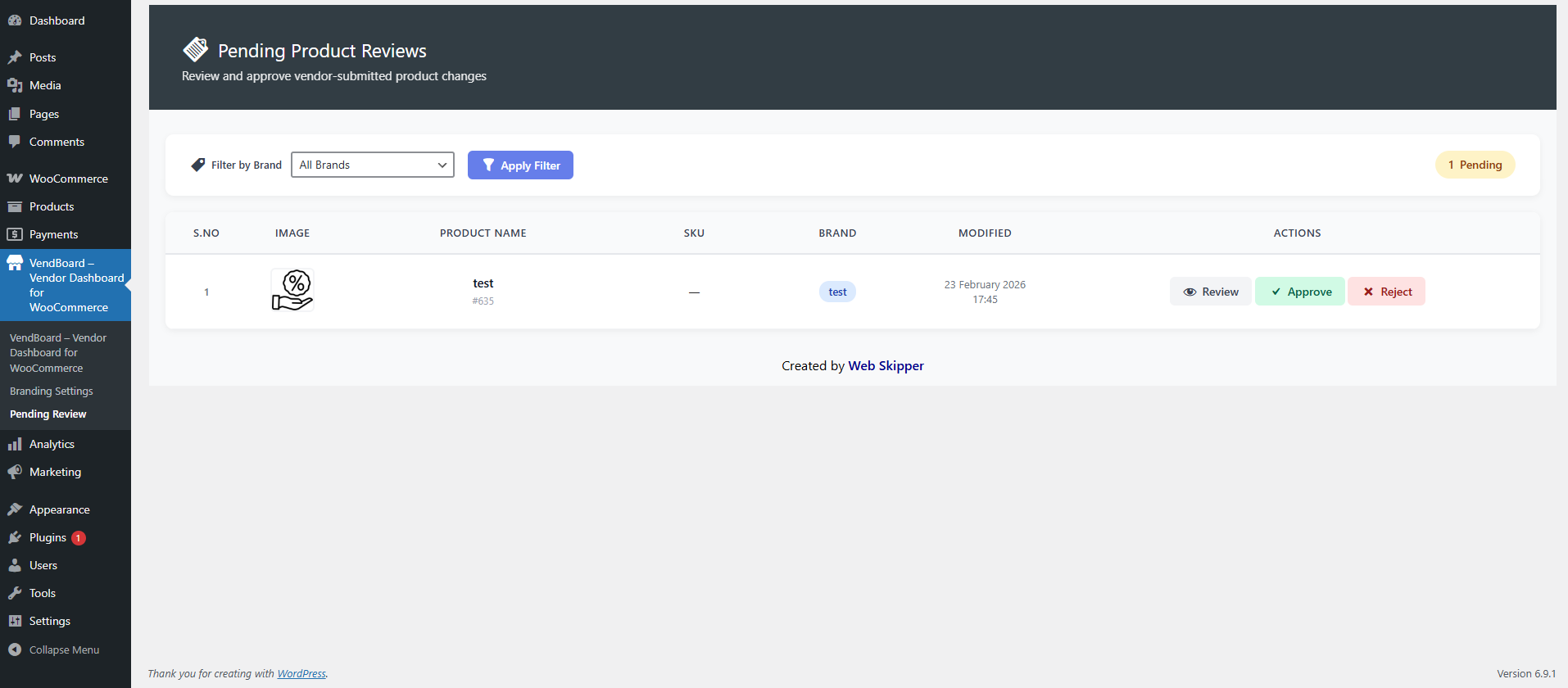
- Review all vendor product updates
- Approve or reject submitted changes
- Pro version: rejection comments for vendors Design & Customization
- Clean and modern WooCommerce interface
- RTL and LTR support (English / Hebrew)
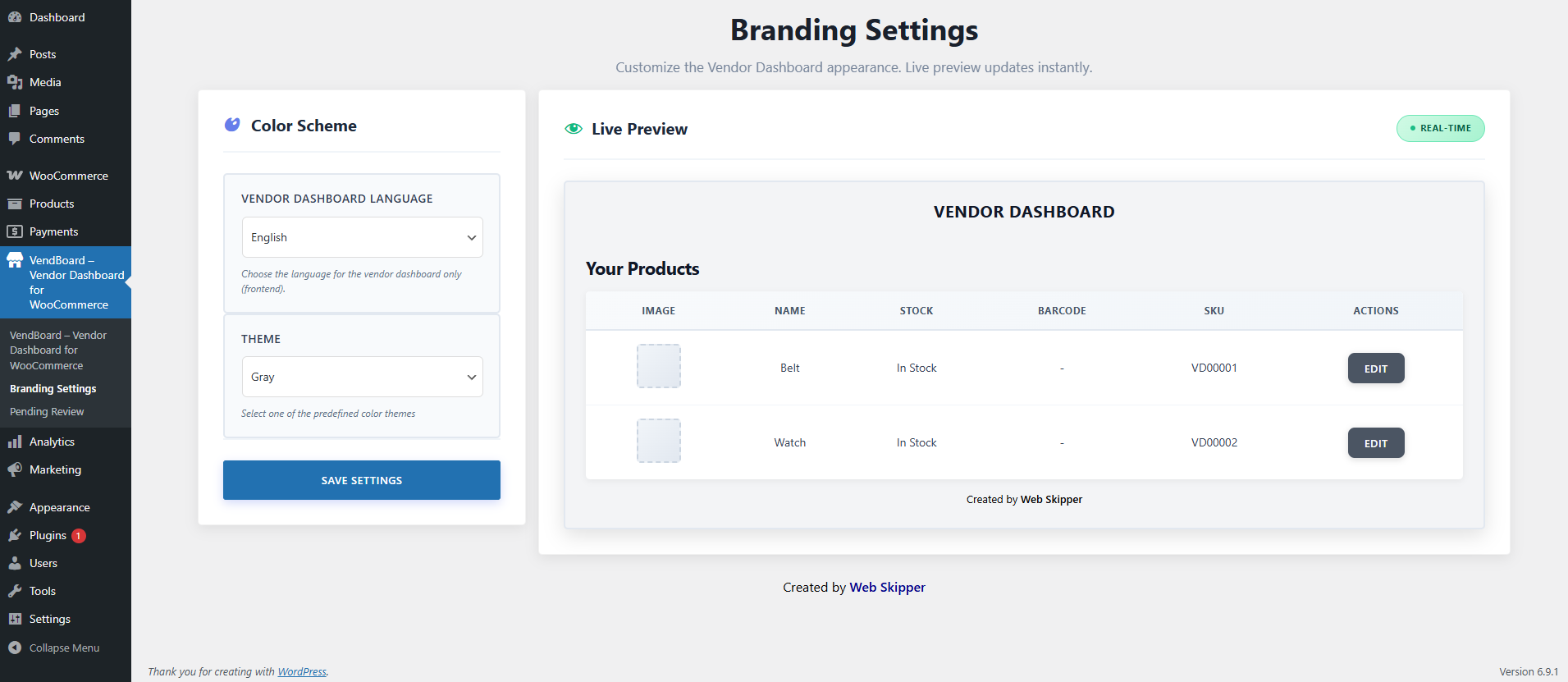
- Eleven predefined color themes
- Pro version: full color customization, logo upload, and white-label mode Extras
- Demo vendor account for testing
- Optional onboarding popup for new vendors Why Stores Choose This Plugin
- Safe Editing: vendors never risk site integrity
- Full Control: new products and content changes require admin approval
- Time Saver: reduces admin workload
- Vendor-Friendly: simple and intuitive interface
- Global Ready: suitable for international stores
安装:
- Go to Plugins > Add New.
- Search for "Vendor Dashboard".
- Install and activate the plugin.
- After activation, visit Vendor Dashboard from the admin sidebar.
- Enable the features you want to use.
屏幕截图:
常见问题:
What does this plugin do?
This plugin allows vendors to safely add and edit their own WooCommerce products without access to wp-admin. New products and content changes require admin approval before publishing.
Do vendors get access to wp-admin?
No. Vendors work only in a frontend dashboard. wp-admin access is restricted to administrators.
Can vendors see or manage other vendors products?
No. Each vendor can access and manage only their own products.
Can vendors add new products?
Yes. Vendors can add new products and edit existing ones from the frontend dashboard.
What product fields can vendors manage?
Vendors can manage product name, descriptions, images (featured and gallery), price, SKU, barcode, stock level, and product video (YouTube link).
How do vendors update stock levels?
The product edit screen includes a Stock Quantity field and a Stock Status selector. When a vendor enters a quantity, WooCommerce stock management is enabled for that product and the stock status is set automatically from the quantity (respecting your backorder settings). Leaving the quantity empty turns stock management off and uses the selected status instead.
Can vendors unpublish their own products?
Yes. The edit screen has a Product Status control for publishing or unpublishing, and a Catalog Visibility control for choosing whether a product appears in the shop, in search results, both, or neither. Like stock, these apply immediately. There is one deliberate limit: a product the administrator has never approved cannot be published by a vendor. New products still go live only through the approval workflow, so this cannot be used to bypass review. If a vendor unpublishes a product, approving their other pending edits will not silently put it back online.
Can vendors search their products?
Yes. The dashboard has a search box that matches product name, description, SKU and barcode, and the product list is paginated. Products waiting for approval are always listed in full, above the searchable list, so they never get lost behind a filter.
Can vendors manage product variations?
Yes. On any product that uses variations, vendors can set the stock, price and SKU for each variation from their dashboard, and can add new variations by choosing from the options you have already set up on that product. All variation changes apply immediately, without admin approval: stock, price, SKU, availability, and adding or removing variations. To add variations, vendors tick the combinations they sell in one list, fill in price, stock and SKU, and save them all at once. On a new product everything is reviewed together when you approve the product.
Can I choose which options vendors see?
Yes. Under Vendor Dashboard > Branding there is a list of your product attributes, and vendors can only use the ones you tick. Attributes already attached to a product are left alone, so hiding one never changes existing products. The values inside each attribute come from Products > Attributes, so editing or removing a value there changes what vendors can choose.
Can vendors create their own attributes?
No, and this is deliberate. Attributes such as Size and Colour are site-wide taxonomies shared by every product and every vendor, so only administrators create them and their values. Vendors choose from the values you have attached to their product, which means one vendor can never introduce a term that shows up in another vendor's products or your shop filters. When creating a product, a vendor chooses whether it is a single product or one with options, and ticks which of your attribute values it comes in. They can change the type until you first approve the product; after that it is fixed, because changing it on a live product affects its pricing. Vendors can still tick or untick option values later, to add a new size for example.
Do stock changes need admin approval?
No, and this is deliberate. Stock is operational data that your own sales keep changing, so if a vendor's figure sat in the approval queue while orders came in, approving it later would overwrite those sales and leave the store showing more units than actually exist. Applying stock straight away keeps the number honest. Vendors still only ever reach their own brand's products.
Are vendor changes published automatically?
New products, and changes to titles, descriptions and images, are saved as Pending Review until an administrator approves them. Price, SKU, barcode, stock, publishing, visibility and variation changes apply immediately.
How does admin moderation work?
Admins review vendor submissions and either approve or reject changes. Rejection comments are planned for the Pro version.
How does smart product sorting work?
Products are grouped automatically:
- In-stock products missing content
- Out-of-stock products missing content
- In-stock products with complete content
- Out-of-stock products with complete content Missing descriptions or images are clearly marked for easy editing.
What is included in the free version?
The free version includes:
- Vendor role and frontend dashboard
- Vendor-only product access
- Product creation and editing
- Admin approval workflow
- Smart product sorting
- Eleven predefined color themes
- English and Hebrew language support
- RTL and LTR compatibility
Is a Pro version planned?
Yes. Planned Pro features include rejection comments, full color customization, logo upload, and white-label mode. For custom features, contact us at info@web-skipper.co.il.
更新日志:
- Saving a product now returns the vendor to the page of the list they came from, keeping any search or stock filter. Previously they were sent back to page one, which meant clicking through the pages again.
- Added a "Go to page" box and a "Page X of Y" label below the product list, and more page numbers are shown at once.
- Vendors can choose to show 20, 50 or 100 products per page. The choice is remembered on their account.
- The options and variations sections on the vendor edit screen are now collapsible, with counts in each heading, so a product with many options is easier to work through.
- Added a setting (Vendor Dashboard > Branding) for choosing which product attributes vendors may use, so attributes that are not relevant to them can be hidden without removing them from the store.
- Renamed the "YouTube link / Short Description" field to "Short Description".
- Security: vendors are now always kept out of wp-admin. Previously, if the Vendor Dashboard page was missing or unpublished, vendors were let into wp-admin, and a URL parameter documented only in the source code let any vendor skip the redirect.
- The Vendor Dashboard page is recreated automatically if it has been deleted, and administrators see a notice if it has been unpublished.
- Vendors are taken straight to their dashboard when they log in.
- Fixed products created by vendors having no category. WooCommerce files every product under the default category, and without one some themes could not display the product page. Existing products without a category are filed under the default category the first time an administrator opens wp-admin after updating.
- A product's price, SKU and barcode now apply immediately, without admin approval. Prices are saved through WooCommerce, so an active sale price is no longer overwritten. New products and changes to titles, descriptions and images still require approval.
- Added a stock status filter to the vendor product list, so vendors with large catalogues can show only out of stock (or in stock, or on backorder) products. Works together with search and pagination.
- Vendors can now manage product variations from their dashboard: stock, price and SKU for each variation, plus switching individual variations on and off.
- Vendors can create many variations at once: every missing combination of the product's options is listed, and vendors tick the ones they sell and fill in price, stock and SKU. New variations go live immediately, without admin approval.
- Vendors can remove variations. Removal is permanent and asks for confirmation.
- When creating a product, vendors can make it a product with options and tick which of your global attribute values it comes in. The type can be changed until an administrator first approves the product; option values stay editable afterwards.
- Vendors cannot create attributes or attribute terms, and cannot change a product's type once it has been approved. Both stay with the administrator.
- All variation changes apply immediately, without admin approval: stock, price, SKU and availability.
- Fixed the product price field on variable products. It previously saved and was approved but had no effect, because WooCommerce derives a variable product's price from its variations rather than the parent. The field is now replaced with a pointer to the variations section.
- Fixed the product barcode being stored under two different meta keys. The WooCommerce product screen wrote
_vendboard_barcodewhile the vendor dashboard saved and approved to_barcode, so a barcode entered by an administrator showed as blank on the vendor edit form, and a barcode approved from a vendor never appeared anywhere afterwards. - All barcode reads and writes now use
_vendboard_barcode, falling back to any existing_barcodevalue so nothing already saved is lost. - Fixed products with an administrator-entered barcode being flagged for approval on every vendor save, even when nothing had changed.
- Security: fixed a broken access control issue where the product save endpoint did not verify that the submitted product belonged to the vendor's assigned brand. A signed-in vendor could edit products outside their own brand. All vendors should update.
- Security: added nonce and capability checks to the branding preview endpoint, and a nonce to the onboarding dismissal endpoint.
- Added product search on the vendor dashboard, matching name, description, SKU and barcode.
- Added pagination to the vendor product list. Previously the list was capped at 50 products with no way to reach the rest.
- Vendors can now publish or unpublish their own products and set catalog visibility. These apply immediately; products never approved by an administrator still cannot be published by a vendor.
- Approving pending edits no longer republishes a product the vendor deliberately unpublished.
- Added five more color themes: teal, indigo, pink, orange and slate.
- Fixed missing slash removal on submitted text, which could accumulate backslashes in titles, SKUs and barcodes.
- Fixed a possible fatal error on the branding preview when an unrecognised theme was stored.
- Removed a debug log call from the image upload path and restored the site locale after vendor saves.
- Added stock management for vendors: vendors can now edit stock quantity and stock status for their own products from the frontend dashboard.
- Stock changes are applied immediately rather than queued for approval, so an approval can never roll the stock level back over orders placed in the meantime. All other fields still require admin approval.
- Vendor dashboard product list now shows the stock quantity next to the stock status.
- A stock-only save no longer sends the product to the admin review queue, since there is nothing left to approve.
- Added a purple option to the predefined color themes.
- Updated "Tested up to" for WordPress 7.1.
- Fixed vendor product update issue.
- Improved styles.
- Removed inline scripts and styles, implemented proper WordPress enqueue.
- Escaped all shortcode outputs using proper WordPress escaping functions.
- Removed automatic demo user creation and weak password logic.
- Improved overall security and coding standards compliance.
- Fixed product save issues where changes were not reflected in the list due to meta key mismatch.
- Standardized
_vendboard_editedmeta key across the plugin for consistent pending product tracking. - Fixed brand assignment logic to support legacy meta keys (
VendBoard_assigned_brand,vd_assigned_brand). - Resolved "Access Denied" errors on the edit page by improving brand checking.
- Improved admin review workflow to properly clear pending flags on approval or rejection.
- Reverted decorative color changes to respect user branding settings.
- Fixed WordPress.org review issues.
- Improved i18n translator comments.
- Updated plugin name to VendBoard – Vendor Dashboard for WooCommerce.
- Fixed WordPress.org review issues.
- Improved i18n translator comments.
- Updated plugin name to Vendify – Vendor Dashboard for WooCommerce.
- Fixed WordPress.org review issues.
- Improved i18n translator comments.
- Updated plugin name to Managed Vendor Access for WooCommerce.
- Initial release.