Social Login, Passkeys, Magic Link & Email OTP – Passwordless Login by VentraConnect
| 开发者 |
fahdaslam
wpventra |
|---|---|
| 更新时间 | 2026年10月1日 20:53 |
| PHP版本: | 7.4 及以上 |
| WordPress版本: | 7.1 |
| 版权: | GPLv2 or later |
| 版权网址: | 版权信息 |
详情介绍:
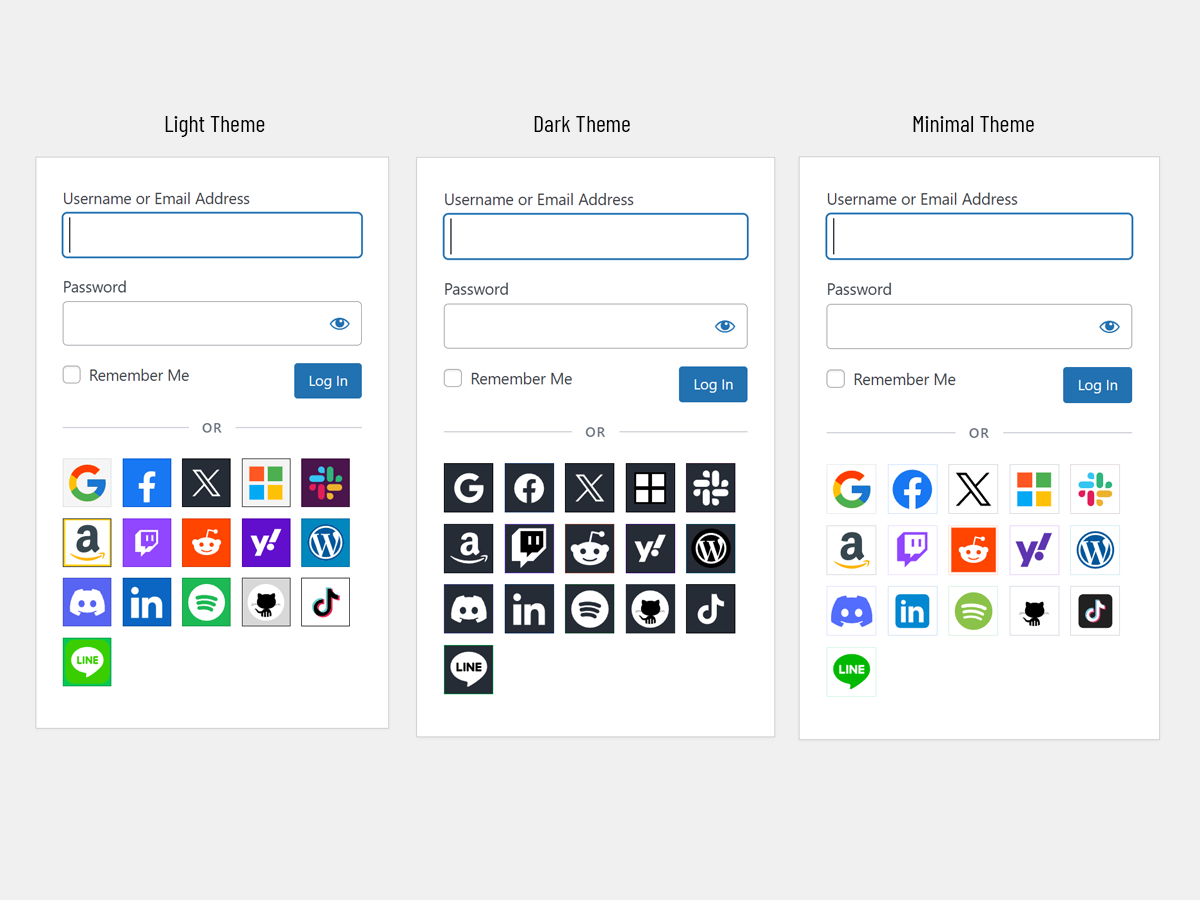
- Social Login: with 15+ providers, including Google, Facebook, X/Twitter, LinkedIn, Microsoft, GitHub and more.
- Native Passkeys: Secure passwordless sign-in using supported device authenticators such as Touch ID, Face ID and Windows Hello. Passkey authentication uses WebAuthn through your WordPress site, without relying on an external passkey platform.
- Passwordless Login with Magic Link and Email OTP
- Can run in Login only mode (existing users) or Login & Register mode (allow new accounts)
- Guardrails (optional): Unlike standard plugins that automatically create a new account whenever an unknown visitor uses a social button on your login screen, VentraConnect gives you full control over registration. Guardrails allow Social Login, Magic Link and Email OTP to securely authenticate your existing users while blocking the creation of new accounts from the login form when you choose. This prevents random visitors from turning your login screen into an accidental open registration form, while your official registration screen and custom onboarding flows continue to work exactly as intended.
wp-login.php) and also supports shortcodes for custom pages and page builders.
No proxy servers. No third-party tracking. VentraConnect connects directly to social providers through official OAuth flows. Passkey authentication is handled natively through your WordPress site using WebAuthn, without external platform dependencies.
| Setup | Docs | Pro Addon |
Modern WordPress login with VentraConnect
[youtube https://www.youtube.com/watch?v=FEi8XCa6sys]
屏幕截图:


常见问题:
Is VentraConnect secure?
Yes. VentraConnect uses official OAuth flows for Social Login, WebAuthn for Passkeys, and email verification for Magic Link and Email OTP. Social provider passwords are never received or stored by your WordPress site. For Passkeys, the private key remains on the user's device or authenticator; your WordPress site stores only the public credential data needed to verify future sign-ins. VentraConnect connects directly to enabled providers. There is no third-party proxy server in the middle and no additional tracking layer added by the plugin.
Does this plugin replace passwords completely?
In the free plugin, no. Classic WordPress username/password login remains available, while Social Login, Passkeys, Magic Link and Email OTP are optional methods you can enable or disable. In VentraConnect Pro, Password Phaseout controls let you decide how passwords are presented on supported forms:
- Off: Keeps normal password login unchanged.
- Recommended: Promotes modern sign-in methods while keeping passwords available.
- Strict: Can hide password fields for normal users on supported forms while retaining an administrator fallback path.
Can I use only one login method?
Yes. VentraConnect does not require you to enable every available method. You can use one or more Social Login providers only, Email OTP only, Magic Link only, Passkeys only, or combine methods based on the login experience you want to offer. Standard WordPress username/password login can remain available. In VentraConnect Pro, Password Phaseout controls can also change how password login is presented on supported forms.
Does it work with existing WordPress users?
Yes. For Social Login, Magic Link and Email OTP, VentraConnect checks the verified email address. When it matches an existing WordPress user, that user is signed in and no duplicate account is created. For Passkeys, existing users can sign in on supported login forms using a Passkey already registered to their WordPress account.
Does it create new user accounts?
It can. Social Login, Magic Link and Email OTP can create new accounts when the email address does not already exist, depending on:
- Each method's Login only or Login & Register setting.
- Your WordPress registration settings.
- Your Guardrails configuration.
Can I restrict who is allowed to create accounts?
Yes. Guardrails let you control whether Social Login, Magic Link and Email OTP can create new WordPress users, particularly from the default wp-login.php screen.
You can keep these methods available for existing-user login while sending new registrations through your own process, such as a custom registration page, LMS onboarding flow or membership signup process.
Guardrails do not replace your normal WordPress registration settings and do not govern the separate Passkey registration flow.
Can users register using Magic Link or Email OTP?
Yes. Each method can run in:
- Login only mode — available only to existing users.
- Login & Register mode — new users can also sign up through Magic Link or Email OTP when WordPress registration is open and Guardrails allow new accounts.
Does VentraConnect support Passkeys?
Yes. The free plugin includes native Passkey login, registration and profile-based Passkey management on supported WordPress environments. Users can add and remove multiple Passkeys from their WordPress profile, allowing secure sign-in from more than one device. Passkey authentication uses WebAuthn and does not rely on an external passkey service. For the best coverage across devices, site owners can enable Magic Link or Email OTP alongside Passkeys as fallback sign-in options for older devices, restricted browsers or situations where a user's Passkey is not available. VentraConnect Pro adds advanced Passkey placements and setup prompts for supported WooCommerce, LMS, membership and community integrations.
Can I use Passkeys with Magic Link or Email OTP?
Yes. VentraConnect lets you offer Passkeys alongside Magic Link and Email OTP. Passkeys provide fast passwordless sign-in on supported devices, while Magic Link and Email OTP can remain available as fallback options for users on older devices, restricted browsers or situations where their Passkey is not available.
Do Passkeys work with Touch ID, Face ID, Windows Hello and security keys?
VentraConnect uses WebAuthn, the browser standard for Passkeys. Users can sign in with supported device authenticators such as Touch ID, Face ID, Windows Hello, Android biometrics and compatible hardware security keys. Availability depends on the user's browser, device and authenticator support.
Does VentraConnect use an external Passkey service?
No. Passkey authentication is handled natively through your WordPress site using WebAuthn. VentraConnect does not require a separate cloud passkey platform, proxy relay or third-party Passkey subscription.
What data is stored from social providers and Passkeys?
For Social Login, VentraConnect may store:
- Provider user ID
- Name
- Email address
- Avatar URL
ventraconnect_sl_privacy_notice_html filter.
How do Passkeys help WooCommerce stores?
Passkeys help returning customers sign in without typing or resetting a password. On supported WooCommerce login and checkout experiences, customers can use a saved Passkey from their device, such as Face ID, Touch ID, Windows Hello or a security key. VentraConnect Pro can also encourage eligible logged-in customers to create a Passkey after checkout or on the Thank You page. Magic Link and Email OTP can remain enabled as passwordless fallback options for customers whose Passkey is unavailable. The result is a smoother returning-customer experience while giving store owners more control over account creation and login methods.
Where do I get OAuth credentials?
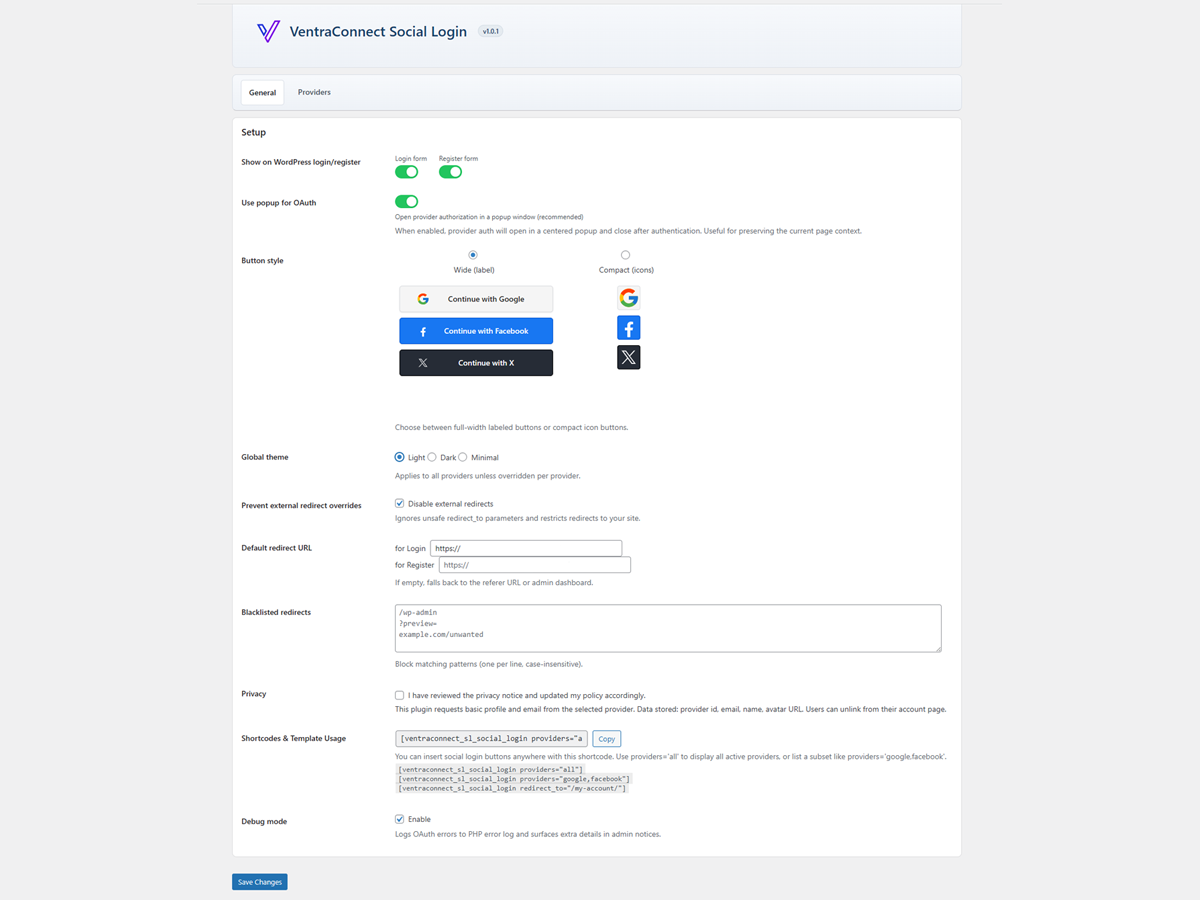
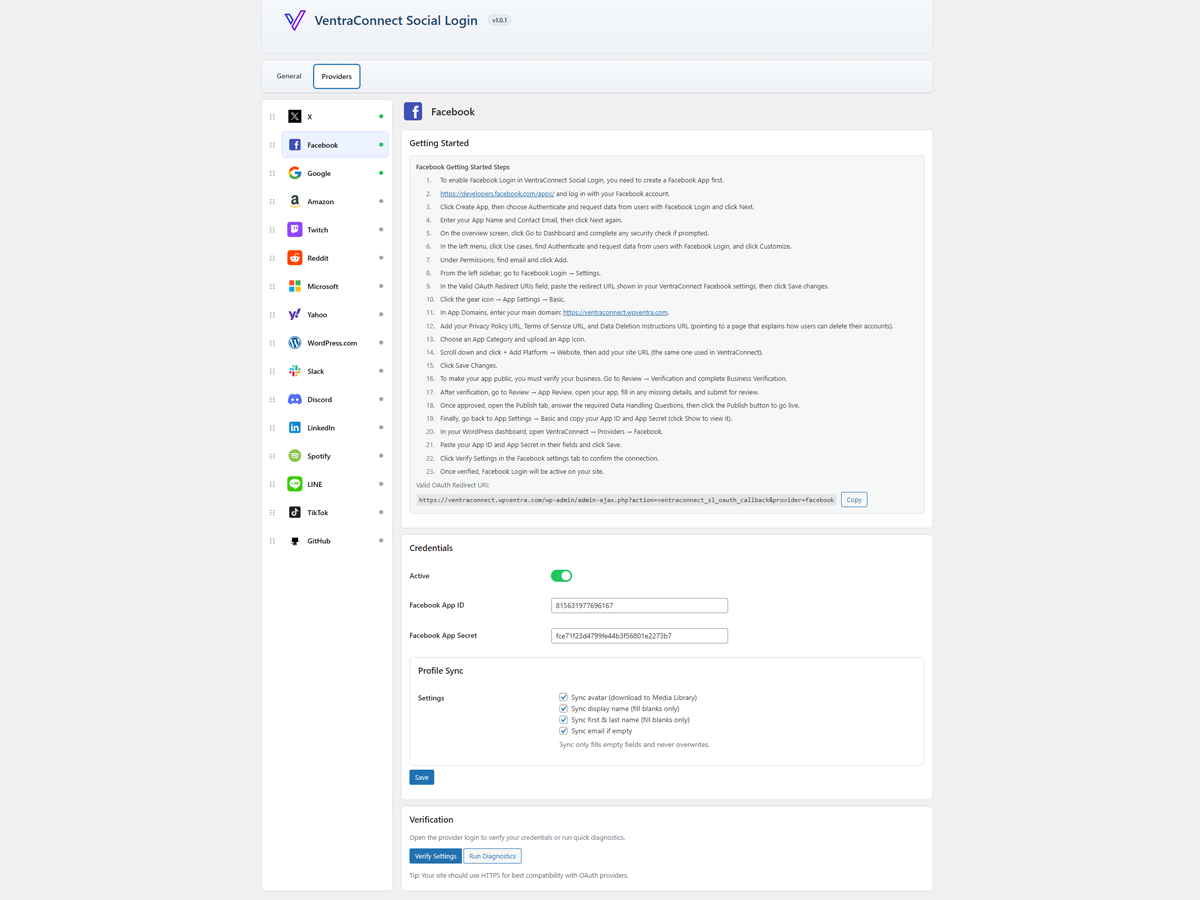
Links to each provider's developer console are shown in the plugin settings.
VentraConnect automatically generates the correct callback URL using WordPress admin-ajax.php. Always copy the callback URL shown in the settings instead of manually creating your own.
Will this slow down my site?
VentraConnect only loads its frontend assets where login methods are displayed. OAuth, Passkey and passwordless requests run only when a user starts a login or registration flow. There are no external proxy calls or background requests added to normal page loads.
Does it work with WooCommerce, LMS or membership plugins?
The free plugin works on default WordPress login and registration screens, plus custom pages where you place the VentraConnect shortcode. VentraConnect Pro adds integrations for:
- WooCommerce: Supported login, checkout, Thank You and My Account flows.
- LMS plugins: Tutor LMS, LearnDash, LifterLMS and LearnPress.
- Membership and community plugins: MemberPress, Ultimate Member, Paid Memberships Pro, Paid Membership Subscriptions (PMS) and BuddyPress.
Can I add login methods to custom pages or custom login screens?
Yes. The free plugin provides a shortcode for custom pages, page builders and custom login layouts. Social Login, Passkeys, Magic Link and Email OTP can appear through the main VentraConnect shortcode on your WordPress site. Pro adds integration-aware placements and inline Magic Link / Email OTP forms for advanced layouts.
Do you offer a Pro version?
Yes. VentraConnect Pro is an optional add-on for sites that need:
- Deep WooCommerce, LMS, membership and community integrations.
- Advanced Passkey placements, setup prompts and account-management experiences.
- Password Phaseout controls for supported forms.
- Advanced redirect controls.
- Custom-branded authentication emails.
- Inline Magic Link and Email OTP forms.
- Analytics, diagnostics and additional login insights.
Does VentraConnect include inline Magic Link and Email OTP forms?
Yes. VentraConnect Pro includes inline Magic Link and Email OTP form shortcodes for custom pages, Elementor popups, account dropdowns, WooCommerce account popups, membership login pages, LMS login pages and custom login layouts.
The free plugin displays Magic Link and Email OTP as login method buttons through the main VentraConnect shortcode and supported standard login flows. These buttons open the normal VentraConnect passwordless flow.
Pro inline forms place the actual Magic Link or Email OTP form directly inside your layout, allowing users to request a Magic Link or enter an Email OTP without first opening a separate modal.
Available Pro inline shortcodes:
[ventraconnect_magic_link_form]
[ventraconnect_email_otp_form]
Inline forms use your existing VentraConnect settings for expiry, resend behavior, registration mode, Guardrails, email validation, rate limits and redirects.
Setup guide:
https://wpventra.com/docs/inline-magic-link-email-otp-forms/
Can I customize authentication emails?
Yes. In the free plugin, you can edit the sender name, subject and message content for Magic Link and Email OTP emails. VentraConnect also includes polished default HTML email templates for both methods. In VentraConnect Pro, you can apply your own logo, accent colour and footer text to Magic Link, Email OTP and Passkey registration emails.
更新日志:
- Minor improvements and maintenance.
- Security: Require an explicit trusted verified-email signal before matching a new social provider subject to an existing WordPress user by email.
- Security: Hardened public Passkey registration responses to reduce account-status disclosure.
- Fix: Improved shortcode compatibility in supported login page configurations.
- Security: Hardened Email OTP verification with improved failed-attempt handling, verification throttling, secure OTP storage, and invalidation of previous codes when a new code is issued.
- Security: Revoked legacy active Email OTP codes on update.
- Props to Pedro Pinho for responsibly reporting this issue through WPScan.
- New: Added native Passkey login and registration for supported WordPress login and registration flows.
- New: Added WebAuthn-based Passkey authentication without requiring an external passkey platform or proxy service.
- New: Added Passkey management in the WordPress profile, allowing users to add and remove multiple Passkeys.
- New: Added Passkey support to the main VentraConnect shortcode for custom login pages.
- New: VentraConnect Pro now includes advanced Passkey placements for supported WooCommerce, LMS, membership and community flows.
- New: Added WooCommerce Passkey login and optional setup prompts on supported checkout, Thank You and My Account experiences.
- New: Added Tutor LMS and Paid Membership Subscriptions (PMS) integrations in VentraConnect Pro.
- Improved: Passkeys now work alongside existing Magic Link and Email OTP methods, giving site owners optional fallback sign-in choices when a Passkey is unavailable.
- Improved: Renamed Passwordless Mode to Password Phaseout across the admin interface and documentation.
- Improved: Passkeys now count as an available method in Password Phaseout safety checks and readiness guidance.
- Improved: Updated compact button layouts so Passkey, Magic Link and Email OTP remain full-width while social providers can use compact layouts.
- Improved: Updated Pro Passkey settings, button styling, admin preview and floating setup-panel controls.
- Security: Strengthened validation, escaping and compatibility checks across the plugin, with additional WordPress.org compliance improvements.
- Tweak: Updated plugin title, listing copy and readme content to reflect Social Login, Passkeys, Magic Link and Email OTP.
- New: Added polished default HTML email templates for Magic Link and Email OTP.
- Improvement: Magic Link emails now include a styled sign-in button and visible raw-link fallback.
- Improvement: OTP emails now use a clearer code-focused layout.
- Compatibility: Pro users can now apply logo, accent color, and footer branding to Magic Link and OTP emails.
- Fix: Corrected the plugin version display on the Support & Resources tab.
- Tweak: Improved translation support for provider sidebar labels in admin.
- Tweak: Minor internal code cleanup.
- New: Magic Link and Email OTP passwordless login are now available in the free plugin on core WordPress login/registration screens and shortcode-based login pages.
- Improved: Added per-method redirect overrides for Magic Link and Email OTP (same page, referer, homepage, custom URL), with stronger redirect validation.
- Security: Hardened redirect handling and clarified how default redirect URLs interact with passwordless overrides.
- Tweak: Updated readme and UI labels to reflect the new Free vs Pro split.
- Improved: Unified account guardrail checks into a shared helper so social login behaves more consistently across core WordPress login screens and WooCommerce My Account (pro).
- Improved: The
ventraconnect_sl_can_create_userfilter is now applied in a single place before any new account is created, making it easier to customise or lock down account creation rules. - Tweak: Internal refactors to the guardrail system to better support Pro-only passwordless login methods, without changing behaviour for sites using the free plugin only.
- Security: Hardened validation, escaping and capability checks around social login flows and settings pages in line with WordPress.org review feedback.
- Security: Reduced or removed debug output and ensured sensitive data is not exposed in logs by default.
- Tweak: Minor internal code cleanups to better align with WordPress.org plugin guidelines.
- Tweak: Updated readme and plugin listing copy to clarify Free vs Pro features and improve discoverability. No functional changes.
- New: Account guardrail option to allow or block new user creation on core WordPress login/registration screens when using social login.
- New: Email notifications for admin and user when a new account is created via social login.
- Tweak: UI and settings layout improvements in the admin.
- Tweak: Confirmed compatibility with WordPress 6.9.
- Fix: Prevent rare "Class VentraConnect\SocialLogin\Providers\Facebook not found" fatal on some hosting environments.
- Fix: Shortcode
redirect_toparameter is now respected and no longer overridden by the global redirect setting. - Fix: Default login vs registration redirect URLs are applied correctly after social login.
- Fix: Redirects are now more reliable when HOME/SITEURL or www/non-www hosts differ.
- Tweak: Hardened OAuth callback/state handling to make popup and REST-based flows more robust.
- Initial release.