
VERIFIED Crypto Checkout – Card to USDC WooCommerce Payment Gateway
| 开发者 | verifiedcreditcard |
|---|---|
| 更新时间 | 2026年8月4日 00:48 |
| PHP版本: | 7.4 及以上 |
| WordPress版本: | 7.0 |
| 版权: | GPLv3 or later |
| 版权网址: | 版权信息 |
详情介绍:
安装:
- Install the plugin from the WordPress plugin directory
- Activate VERIFIED Crypto Checkout
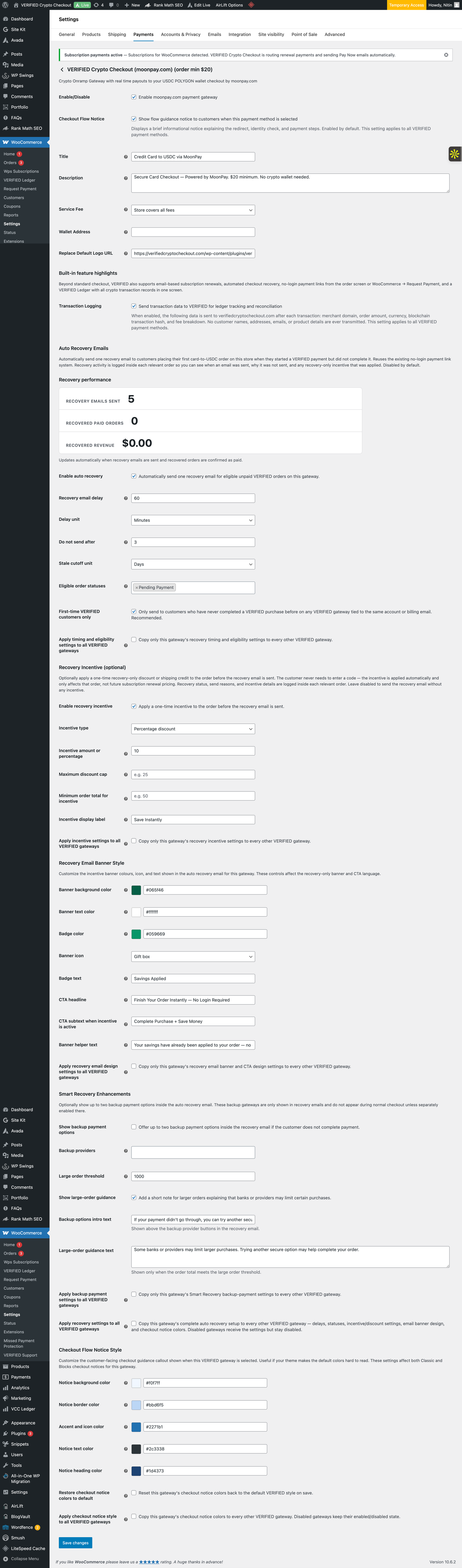
- Go to WooCommerce → Settings → Payments
- Enable one or more VERIFIED gateways and click Manage
- Enter your Polygon USDC wallet address
- Set your Service Fee preference (merchant-absorbed or customer-paid)
- Choose a specific provider or enable Auto-Routing
- Save and start accepting payments
屏幕截图:


常见问题:
Does WooCommerce support crypto payments?
WooCommerce does not include native cryptocurrency payments. Plugins like VERIFIED Crypto Checkout enable crypto-settled checkout through hosted crypto on-ramp providers.
What payment methods can my customers use?
Customers pay with credit cards, debit cards, Apple Pay, or Google Pay (Visa, Mastercard, and Maestro, depending on the provider and the customer's region). They do not need a crypto wallet or any crypto experience — the conversion to USDC happens automatically at the provider.
Do I need a merchant account or approval to accept payments?
No. There is no merchant account application, no underwriting, and no approval process. Install the plugin, enter your USDC (Polygon) wallet address, and you can begin accepting card payments. No third-party provider accounts are required to get started.
Is VERIFIED Crypto Checkout compatible with WordPress 7.0 and PHP 8?
Yes. The plugin is tested with WordPress 7.0 and runs on PHP 7.4 through PHP 8.3. It also remains compatible with WordPress 6.x and current WooCommerce releases, including both Classic and Blocks checkout.
Where do funds settle?
Payments settle directly to your configured wallet in USDC on the Polygon network (Chain ID 137).
Who holds the funds during a transaction?
Payments are processed by the hosted crypto on-ramp provider selected during checkout. VERIFIED does not custody, hold, or transmit funds at any point.
Is there a reserve on settlements?
No. VERIFIED does not hold a reserve. When a transaction is confirmed on-chain, USDC is sent directly to the merchant's Polygon wallet.
How long does settlement take?
On-chain settlement to your Polygon wallet typically occurs within minutes of payment confirmation.
Can I recover abandoned checkouts?
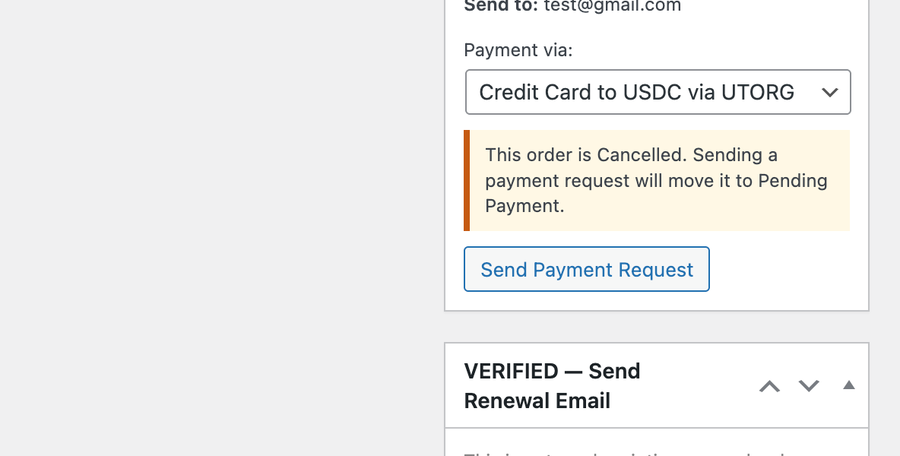
Yes. Open any Pending Payment, On-Hold, or Cancelled order and use the Request Payment for Order meta box to send the customer a direct Pay Now link. No login required on the customer's end.
Can I accept in-person payments with a QR code?
Yes. Open any unpaid WooCommerce order and use the In-Person QR Payment section to display a scannable QR code. The customer scans the QR code on their phone and completes payment on a secure hosted provider checkout page. No login is required, and no card data touches your WordPress site.
Can I use QR payments for phone orders, counter payments, or events?
Yes. The in-person QR payment feature is designed for manual WooCommerce orders, phone orders where the customer is nearby, counter payments, pop-up shops, trade shows, and other in-person situations where a customer can scan a QR code and pay on their own device.
Can I build an order from scratch and send a payment link?
Yes. Create a new order in WooCommerce → Orders → Add New, add billing details and line items, and use the Request Payment meta box to send a payment link. This works like a virtual terminal.
Do customers need crypto?
No. Customers pay with cards. Crypto conversion happens automatically at the provider level.
What if a card is declined?
Many banks block crypto purchases on credit cards. Debit cards (Visa or Mastercard) have significantly higher approval rates. Advise customers to try a debit card.
What does VERIFIED Crypto Checkout cost?
The plugin charges a 4% infrastructure fee per transaction. Merchants can absorb this or pass it to customers as a checkout line item. Third-party providers charge separate conversion fees. Polygon network fees are typically very low (often under $0.01).
Is the plugin free to install?
Yes. VERIFIED Crypto Checkout is free to install with no setup fee and no provider accounts required to begin. A 4% infrastructure fee applies per transaction (absorb it or pass it to the customer), and the on-ramp providers charge their own conversion fees.
Can high-risk or hard-to-bank businesses use VERIFIED Crypto Checkout?
Yes. Because there is no merchant account application or underwriting and settlement happens on-chain, the plugin is commonly used by businesses that have difficulty obtaining or keeping traditional credit card processing. Ensure your products comply with the on-ramp providers' terms and with applicable law in your jurisdiction.
Are there chargebacks or a rolling reserve?
USDC settled to your Polygon wallet is final and recorded on-chain, so there are no chargebacks or clawbacks on funds you have already received, and VERIFIED holds no rolling reserve.
Will customers need to verify identity on every purchase?
In most cases, once a customer completes KYC with a specific provider, subsequent purchases with that provider are faster or skip verification. Using a single dedicated provider (rather than Auto-Routing) maximizes returning-customer speed.
What happens if a provider is unavailable?
Merchants can switch providers at any time in WooCommerce settings. Auto-Routing automatically selects an available provider during checkout.
Is this a replacement for credit card processing?
No. VERIFIED Crypto Checkout is designed to expand payment options, not replace traditional payment gateways. Most stores use it alongside gateways such as Stripe or Authorize.Net.
Which subscription plugins are supported?
WooCommerce Subscriptions (paid) and Subscriptions for WooCommerce by WP Swings (free). Once either is active, VERIFIED detects it automatically — no extra configuration needed.
Can customers change their subscription payment provider?
Yes. Customers can log in to My Account → Subscription Payment and select a new provider. The next renewal email routes to the new provider automatically. If the new provider is one they have not used before, they will complete KYC once.
Does the abandoned checkout recovery send automatically?
Yes. The auto recovery system runs via Action Scheduler in the background. When an eligible customer abandons a VERIFIED checkout after reaching the provider, a recovery email is sent automatically after a configurable delay. No manual action is required.
Who is eligible for automated recovery emails?
Only first-time VERIFIED customers who reached the provider page but did not complete payment. Customers who have previously completed a successful VCCP order are excluded. Subscription renewal orders are also excluded — those are handled by the subscription renewal reminder system.
Can I offer a discount in the recovery email?
Yes. The incentive engine supports fixed discounts, percentage discounts, and shipping credits. Incentives are applied before the 4% infrastructure fee and are one-time only — they do not carry over to future orders or subscription renewals.
What are the checkout notices and can I turn them off?
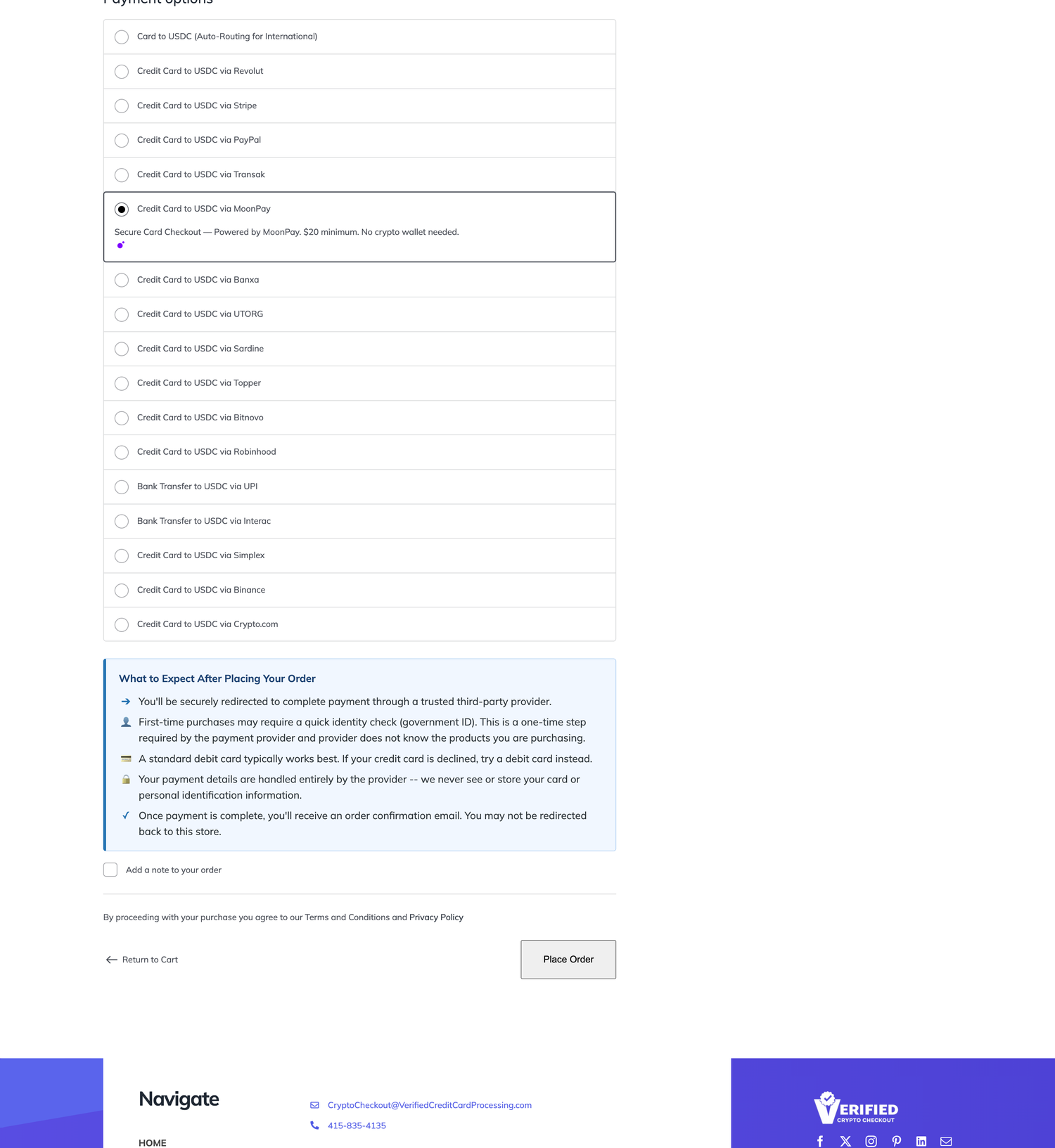
Checkout notices are short explanations shown to the customer on your checkout page when they select VERIFIED as their payment method. They explain the redirect to the provider, identity verification on first purchase, debit card guidance if credit is declined, and the automatic order confirmation flow. They can be configured in gateway settings.
How do I track how much revenue was recovered?
Recovered order count and recovered revenue totals are displayed in your gateway settings screen. Each WooCommerce order also shows a per-order audit log in the sidebar with email sent date, gateway used, incentive applied, and final amount sent.
更新日志:
- Settlement fix: payments that settle in ETH (or other non-USDC coins) are now automatically confirmed by reading the actual on-chain settlement at your payout wallet, instead of being held for manual review. Orders that arrive in a different coin than expected no longer get stuck in "Pending — review" when the full value has provably landed. The review note now links the correct block explorer for the settlement's network.
- The branded thank-you / receipt page is now on by default. New installs have it enabled out of the box; existing stores are turned on and shown a notice with a one-click way to turn it off if they prefer the previous direct redirect. It can always be changed under WooCommerce → VERIFIED Thank-You Page.
- Thank-you page: the Full receipt now shows a complete order summary — product images, item quantities and line totals, order subtotal/shipping/tax/total, the billing name and address, and the crypto payment details (method, on-chain verified amount, and the settlement transaction linked to the block explorer). Choose "Full receipt" under WooCommerce → VERIFIED Thank-You Page. No change when the thank-you page is off.
- Settlement safety: every payment gateway now verifies the settled amount before an order is marked paid. Previously some gateways completed an order on the provider's reported amount alone; they now apply the same amount check the other gateways already used, and a shortfall is confirmed on-chain before the order is completed or held for your review.
- Native-coin settlements (POL / ETH) are now recognised correctly. A payment that settles in a native coin instead of a stablecoin is valued on-chain rather than being mistaken for an underpayment.
- Discontinued providers Bitnovo, Guardarian and Utorg have been deactivated (the upstream provider no longer processes them), matching how MoonPay was handled: they are labelled deactivated, hidden from stores that do not use them, and any store that still has one switched on gets a clear warning. Your other gateways are unaffected.
- Missed-payment recovery now compares against the correct US-dollar amount on non-USD stores.
- Coinbase gateway: corrected the settled-amount check so it compares like-for-like in USD on stores that use a non-USD currency. Previously a Coinbase payment on a non-USD store could be compared against the wrong currency figure, which could either hold a good payment for review or let an underpaid one through. USD stores were unaffected and are unchanged.
- Coinbase gateway: the temporary payment wallet is now recorded so the plugin's on-chain verification and missed-payment recovery can see it. Previously a genuinely paid Coinbase order could be reported as "no payment found" and its wallet was invisible on the order screen. New orders only; existing orders are not altered.
- MoonPay deactivated by the provider: the gateway is now labelled DEACTIVATED, and merchants who still have it switched on get an explicit admin warning that customers cannot complete checkout with it.
- MoonPay is now hidden from the payment-methods list for merchants who do not already have it enabled, so no new store can adopt a provider that has stopped processing. Merchants who currently use it keep full control - it is not switched off for them.
- In-flight MoonPay payments are unaffected: the confirmation endpoint still runs, so any payment already in progress can still settle.
- CRITICAL money-safety fix: orders are no longer marked paid/shippable unless the payment is proven settled on-chain. If the provider reports a payment without a blockchain transaction hash, the order is now placed On Hold instead of Completed, with a clear note telling you not to ship until funds are confirmed in your wallet.
- Orders held this way are released automatically when the provider sends the settlement hash (previously that follow-up confirmation was discarded, so the hash was never recorded).
- Updated the reconciliation admin notice to reflect the new On Hold behaviour.
- MoonPay marked as discontinued: the upstream provider has permanently stopped processing MoonPay payments. The gateway settings screen now warns merchants to switch to an active payment method.
- Fixed: Resolved a checkout slowdown and flicker on stores using the WooCommerce Blocks checkout (most noticeable on newer WooCommerce versions). The plugin was unnecessarily loading the WordPress editor bundle onto the customer-facing checkout, which could delay payment options from appearing and briefly disrupt the order summary. The checkout script now loads only the small amount of code it actually needs, so payment methods appear immediately and the checkout renders cleanly. No changes to payment processing or settlement.
- Fixed: The Coinbase payment gateway now applies the same amount-verification check as every other payment method. Previously, a Coinbase callback would complete an order regardless of the amount received. It now compares the settled amount against the expected order total and, if it falls below the threshold, routes the order to the same review queue (with an audit note) used by all other gateways. Valid full payments complete automatically as before.
- Improved: A confirmed payment that settles in a non-USDC coin (for example ETH or POL) is now verified against the actual on-chain settlement transaction instead of a raw callback figure. The plugin reads what really arrived at the order's wallet — stablecoins counted at par, ETH/POL priced live — and when that confirms the payment (using the same threshold already applied to USDC, which allows for normal provider fees) the order is completed automatically. When it cannot confirm (a genuine shortfall, an un-priceable coin, or an unreachable network) the order is held for your review with a clear note of exactly what arrived, instead of a misleading "underpaid" message. This removes false "stuck pending" cases for real payments that settle in another coin, while still holding genuine underpayments for review.
- Improved: Missed Payment Protection now also re-checks recently-cancelled VERIFIED orders for on-chain settlement, not just pending ones. If a customer pays after WooCommerce auto-cancels their unpaid order, the matching USDC transfer is detected and flagged for your review. Orders are never reopened or completed automatically — you decide. Adds a "Cancelled-order lookback" window (default 3 days) and tightens the default scan timing (first check after 30 minutes, hourly) for faster detection. On-chain cost stays flat — each order is checked only once.
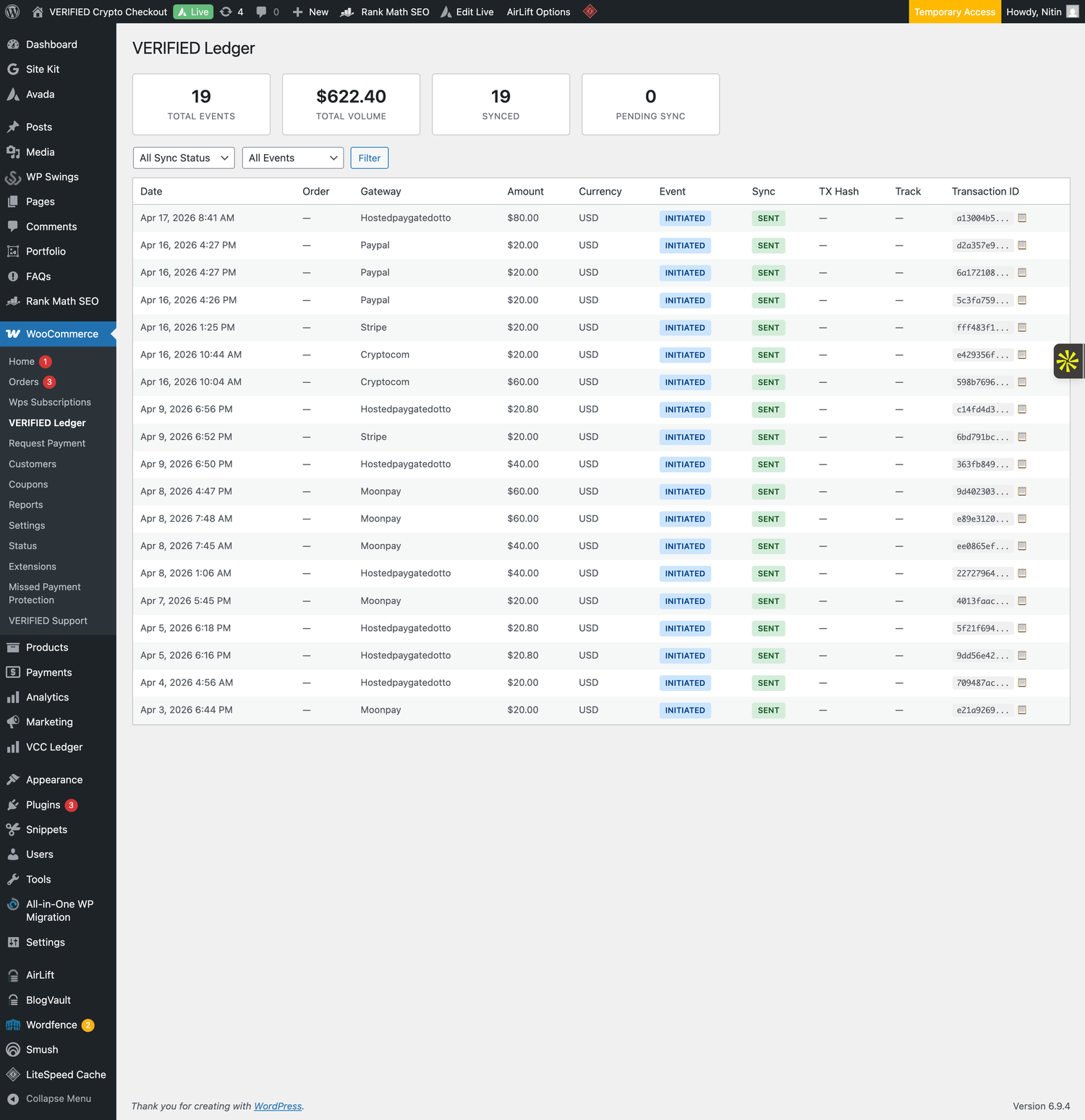
- Improved: Ledger and transaction views now show the friendly name "Auto-Routing" for the smart auto-routing gateway instead of its internal identifier. Display-only change — no impact on existing or in-flight orders, and historical rows are relabeled automatically.
- Fixed: A confirmed payment that settled in a non-USDC coin (for example ETH) could be incorrectly marked Failed by an internal amount check. Such orders now stay in Pending for merchant review instead of being marked Failed, an audit note (transaction ID + amounts) is added, and the store admin is always notified by email so they can confirm and complete the order. Applied consistently across all affected payment methods. No valid payment is auto-completed without review, and the provider remains the source of truth for confirmation.
- Updated: Crypto.com gateway now shows an upstream-availability notice (the provider is temporarily unavailable upstream); checkout auto-routes to an alternate provider so payments still complete.
- Added: Merchant Ledger CSV and Excel export — export the local transaction queue from the VERIFIED Ledger admin page with optional sync-status, event-type, and date-range filters. Each row includes a Polygonscan URL for transaction audit. Useful for accounting, reconciliation, and compliance review.
- Updated: Simplex gateway restored to standard status — removed the temporary upstream-issue notice now that the provider is operating normally again.
- Updated: Ramp Network gateway restored to standard status — removed the temporary upstream-issue notice now that the provider is active again.
- Compatibility: Tested with WordPress 7.0.
- Compatibility: PHP 8.1–8.3 hardening — defensive string handling for gateway settings and REST-context guards on admin includes.
- Maintenance: Minor code-quality and robustness improvements.
- Fixed: Auto-Routing checkout icon now correctly shows the 2x2 card brand grid on sites that upgraded from an older build (self-heal for stale stored icon URL).
- Added: Five new payment gateway options — Klarna (EU Buy Now Pay Later, €20 min), iDEAL (Netherlands bank transfer, €46 min), Blockchain.com (global card, $20 min), Guardarian (European card, $20 min), and Particle (global Web3 onramp, $30 min). Each gateway follows the same checkout flow as existing single-provider gateways. Merchants can enable any combination in WooCommerce → Settings → Payments. Auto-Routing already presents these providers automatically based on customer region; these standalone gateways give merchants the option to expose them as separate, branded checkout buttons.
- Added: New "EU Focused" group in the Smart Recovery backup-providers selector containing Klarna, iDEAL, Guardarian, Bitnovo, and Revolut — complements the existing Recommended, US Focused, and Global groups.
- Improved: Backup provider selector "US Focused" group now includes Blockchain.com. "Global" group now includes Particle.
- Note: Bundled icons for the five new gateways are placeholders (generic card visuals). Merchants can override each via the gateway settings "Replace Default Logo URL" field.
- Improved: Ramp Network gateway description — removed the "currently experiencing upstream provider issues" warning. Ramp Network is active again (back to normal routing after a temporary removal in April).
- Improved: Utorg gateway description now flags an upstream issue. Utorg has been removed from the current active-provider roster, so customers selecting this gateway may be auto-routed to an alternate provider. Same pattern previously applied to Ramp/Simplex/TransFi.
- Improved: Simplex gateway description softened to reflect an "unstable" status for this provider (between active and removed). Payments still complete via auto-routing; merchants and customers are unaffected.
- Improved: Custom Provider gateway settings now list all supported provider tag values with a note on which are officially documented vs extended, and a reminder that unrecognised values return a 400 error.
- Improved: Binance added to gateway title map and backup provider options group.
- Improved: Backup provider selector now includes a Global group (Binance, Revolut, Topper, Bitnovo, Utorg, Simplex, TransFi) alongside Recommended and US Focused groups.
- Added: In-Person QR Payment subsection inside the Order Payment Request meta box. Merchant selects a gateway and clicks "Display QR Code for Customer" to open a full-screen lightbox showing a scannable QR code linked to the existing tokenized Pay Now URL. Intended for counter, in-person, phone, manual order, and event payments — customer scans on their own device and completes payment on the hosted provider checkout. Cancelled orders are automatically moved to Pending Payment before token generation so the link can be redeemed. Customer-paid service fee (4%) is applied before QR generation, matching the email payment-request flow exactly. Auto-Routing gateway is preferred by default when active.
- Improved: Coinbase gateway description updated to inform customers that a Coinbase account is required and a payment method must be added. Continues to recommend debit over credit card to avoid cash advance fees and improve approval rates.
- Changed: All gateway titles updated from "Credit Card to USDC" to "Card to USDC" for accuracy — customers can pay with debit cards, not just credit cards. Coinbase title is "Card to USDC via Coinbase". Bank-transfer gateways (Interac, UPI) retain their existing "Bank Transfer to USDC" wording.
- Added: Coinbase Commerce gateway — customers pay with card via Coinbase; funds settle as USDC to your wallet. $1 minimum.
- Improved: Auto-Routing gateway now includes an automatic fallback to itself when a specific provider returns an error, ensuring customers are never left on a dead-end payment page.
- Improved: Auto-recovery emails now always include the Auto-Routing gateway as the first backup link, regardless of which gateway originally failed.
- Fixed: Interac and UPI gateway descriptions incorrectly read "Secure Card Checkout" — corrected to "Secure Bank Transfer Checkout" to accurately reflect that these are bank-transfer methods, not card payments. Fix applies to existing installs automatically without requiring merchants to reset the description field.
- Improved: All card-based gateway descriptions now recommend using a debit card to avoid cash advance fees and improve approval rates. Interac and UPI (bank-transfer gateways) unchanged.
- Improved: Checkout KYC notice now mentions government ID or SSN with an explicit "never shared with our store" clarification, addresses cash-advance fee risk on credit cards with a debit-card recommendation, and firms up the redirect behavior language ("will not" instead of "may not" be redirected back).
- Fixed: PayPal US-only note now always renders at checkout, even on sites that had a saved custom description from an earlier version. The gateway's get_description() override force-appends the warning if it's not already present, so merchants upgrading from 1.56.12 or earlier get the customer-facing clarification immediately without needing to reset the description field.
- Improved: PayPal gateway now clearly flagged as US-only at checkout and in admin settings — the upstream PayPal provider only supports US customers. Customers outside the US will see an inline note on the checkout description and a warning banner in the gateway settings. This matches the visual pattern used on Ramp/Simplex/TransFi gateways with upstream constraints.
- Added: Crypto.com standalone gateway (order min $5) — now available as a direct checkout option alongside Auto-Routing
- Added: Crypto.com + PayPal gateway IDs to uninstall cleanup list
- Improved: Simplex and TransFi gateway settings pages now show the same top-of-page warning banner as Ramp, for visual consistency across all gateways flagged with upstream-provider issues. Description notes are unchanged.
- Fixed: Ramp Network gateway restored at checkout — v1.56.9 hid it entirely, which left some merchants without any checkout option. Now it stays visible (respects the Enable/Disable toggle) with an upstream-issue note appended to the gateway description. Customers selecting Ramp may be auto-routed to an alternate provider; payments still complete.
- Added: Upstream-issue note appended to Simplex and TransFi gateway descriptions — both have been removed from the provider roster and may auto-route customers to alternates. Gateways remain visible; merchants can disable if they prefer to hide.
- Fixed: PayPal gateway class name registration case consistency
- Changed: Ramp Network gateway hidden from checkout — provider has temporarily deactivated the integration upstream. Existing settings preserved; gateway returns automatically when the provider re-enables it. No merchant action required.
- Added: Inline notice on the Ramp Network gateway settings page explaining the temporary unavailability
- Fixed: Ledger "paid" events now require a blockchain transaction hash — orders completed without a tx hash are held for manual wallet reconciliation instead of being logged, preventing agent commission disputes
- Added: Admin warning banner on ledger/orders pages when orders are waiting on manual tx-hash reconciliation
- Added: Order note is written when a paid event is skipped so the merchant knows to verify against Polygonscan
- Added: Smart Recovery — backup payment options in recovery emails (up to 2 alternate gateways per provider)
- Added: Large-order guidance messaging with configurable per-gateway threshold
- Added: Section-based copy controls — copy timing, incentives, design, or Smart Recovery settings independently across gateways
- Added: Recovery performance panel showing emails sent, recovered orders, and recovered revenue per gateway
- Improved: Safer backup-link token handling — failed backup attempts no longer corrupt the order payment method
- Improved: Token generator guards against invalid order IDs
- Improved: Ledger action handler capability hardening
- Fixed: Plugin details modal showing “No plugin found” on merchant update screen
- Moved the Apply to All auto recovery action into the recovery email settings section
- Apply to All now copies all recovery and checkout notice styling details without enabling disabled gateways
- Added immediate visual reset behavior for the one-time Apply to All and Restore Notice Defaults checkboxes
- Changed the default recovery incentive label to “Finish Checkout and Save”
- Fixed checkout notice color reset option so the Restore to Default control appears in gateway settings and resets the correct notice color fields
- Added one-click "Restore checkout notice colors to default" action in gateway settings
- Checkout notice color customization continues to support Apply to All across VERIFIED gateways
- Added Missed Payment Protection (webhook fallback system)
- Detects on-chain payments if webhook fails and alerts merchant
- Automated abandoned checkout recovery system — sends tokenized Pay Now emails to first-time customers who reached the provider but did not complete payment
- Incentive engine — supports fixed discount, percentage discount, or shipping credit on recovery emails, applied before the 4% infrastructure fee
- Recovered revenue tracking — total recovered orders and revenue displayed in gateway settings
- Per-order audit log — recovery email status, suppression reason, gateway used, incentive applied, and final amount shown in WooCommerce order sidebar
- Checkout notices — at-checkout callout on Classic and Blocks checkout explaining redirect flow, KYC, debit card guidance, and privacy
- Admin onboarding modal on first install and What's New banner for returning merchants
- WooCommerce → VERIFIED Support submenu added
- Pricing snapshot stored at recovery email send time to prevent amount mismatch on edited orders
- Added Order Payment Request feature — send Pay Now links directly from any WooCommerce order screen with full audit log, gateway selector, status warnings, and automatic order update after payment
- Payment request email with branded WooCommerce template, order summary table, KYC guidance, and Pay Now — No Login Required button
- Customizable email via WooCommerce → Settings → Emails → VERIFIED — Order Payment Request
- Fees applied automatically to manual orders when gateway is set to Customer pays fees
- Fixed Blocks checkout fee not showing due to WooCommerce Store API nonce change
- Switched fee sync script to use wp.apiFetch for cross-version WooCommerce compatibility
- Updated gateway descriptions with improved checkout instructions for all providers
- Fixed duplicate service fee safety-net to match cart fee calculation
- One-time migration to decode HTML entities in stored gateway descriptions
- Fixed UPI and Interac gateway titles to Bank Transfer to USDC
- Added Request Payment and Invoice tool for generating standalone payment links from WooCommerce admin
- Minimum order amounts displayed to customers at checkout for all gateways
- Updated plugin page content for WordPress.org listing
- Fixed Terms of Service banner persisting after acceptance on version updates
- Updated gateway titles to show order minimum amounts per provider
- Replaced gateway descriptions with compliant wording
- Removed Classic/Block checkout compatibility warning from gateway settings
- Added Terms of Service acceptance gating for payment gateways
- Merchant and central admin ledger dashboards
- Fixed wallet address sanitization for payment flow reliability
- Added transaction ledger logging for financial reconciliation
- Local queue table with automatic retry and exponential backoff
- Classic Checkout stable release
- 4% configurable infrastructure service fee
- Blocks checkout beta support