
Videomail for Ninja Forms
| 开发者 |
michael.heuberger
kbjohnson90 |
|---|---|
| 更新时间 | 2026年10月22日 17:45 |
| 捐献地址: | 去捐款 |
| PHP版本: | 8.1.0 及以上 |
| WordPress版本: | 6.9.5 |
| 版权: | CC0-1.0 |
标签
下载
详情介绍:
- Record from webcam, simple
- Allow video and audio inputs in your forms, wow!
- World first solution
- Very easy to add with Ninja Forms
安装:
- Upload the
videomail-for-ninja-formsplugin folder to your/wp-content/plugins/directory - Activate the plugin through the ‘Plugins’ menu in WordPress
- Visit the ‘Ninja Forms’ menu item in your admin sidebar
- Build a form using videomail Probably you also want to whitelist additional domains besides localhost. See whitelisting under FAQ.
屏幕截图:
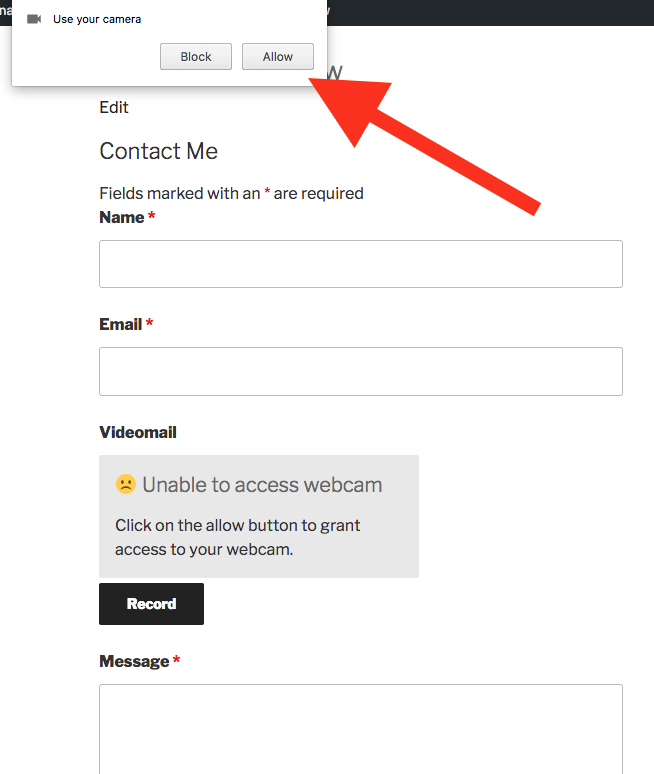
常见问题:
Donations?
That would be awesome :) Scroll to bottom of https://videomail.io/faq
Where is the documentation?
Check out that pretty online PDF at https://github.com/binarykitchen/videomail-for-ninja-forms/blob/master/doc/faq/videomail-for-ninja-forms-faq.pdf
What options are there?
That new recordable video field comes with many options you can configure yourself such as duration, width, audio on/off and much more. Each option is explained well at bottom of this PDF file: Videomail FAQ
How does whitelisting work?
For local development, everything will work right away because the localhost URL is already whitelisted on the videomail server. But once you deploy your Wordpress site out in the wild, we will have to whitelist your production URL(s). For that, just submit a Whitelist Request. Once your whitelist entry has been approved, you'll get a secret whitelist key. With that key, you can activate this plugin for your site. Just note that this requires registration on Videomail and that the first three months are free (trial period).
Is there a live example?
There is also the live site videomail.io. Have a look and play. You can see the videomail-client in action and use it right away for free, anytime, anywhere. Many people, especially Deaf and Sign Language users, already use it for their everyday communication.
Can I use videomail outside of WordPress?
Yes. There is a low level npm videomail-client package. This WordPress plugin relies on it.
Where is the support?
To get help, just use any of these contacts at https://binarykitchen.com
更新日志:
- Bump npm
- Include new heartbeat properly
- Video previews now stay forever until you click the send button or close the browser (no more timeouts) Change:
- Includes server handshakes to keep connection alive on any network Patches
- Sensitive data is redacted in error reports
- Massive audio recording improvements*
- Audio volume has been reset to 100% (by Deaf developers, grins) Changes*
- Better handling toward slow mobile users recording a Videomail on the road
- ^ Based on this, we also re-connect after any mobile interruptions Patches
- Plenty. For a starter, it's now available in any format/version for any WordPress user.
- Reconnect upon network failures
- Handle slow, mobile connections gracefully Change:
- Describe the release changes the better way
- Improve release procedure
- All videomail poster images become responsive to your needs :)
- Activate Videomail for Ninja Forms upon load
- More documentation for developers
- Fine-grade overall documentation based on demand
- Reconnect upon network failures, after 1s, 2s, 4s and 10s permanently. Change:
- Improve deployment docs.
- Reformat line-breaks in our documentation
- Overhaul releasing procedure
- Simpler version handling for developers Fix:
- Upon form errors, include the source for WordPress administrators
- Always give undefined PHP values a variable
- For mobile phones, it now can reconnect during network interruptions
- Do not process videomails without an alias any longer Security:
- Escape any sources, URL and API responses
- Duplicate browser windows while recording are now supported Change:
- Fake cameras are now blocked Fix:
- For mobile phones, it now can reconnect during network interruptions
- Reconnect instead of throwing an error upon network issues
- Include bot reporting Fix:
- Pass over versions properly in error reports Improvement
- Faster development releases
- Add installed versions to error reporting
- Better error reporting for mobile phones when switching Change:
- More status on Videomail are returned in API calls for better investigation Fix
- Do not collect device information any longer as they are bogus
- Improved camera handling for iPhones Fix
- Do not display video replay buttons while recording Change:
- Collect more error information about invalid camera constraints
- Blocking bots/AI to reduce your own web traffic
- Better error messages
- Embrace native devices Change:
- Bump Node.js v24 to v26
- Breaking: new Websocket endpoint for recording Security
- Better detection of bots and fake recordings
- Block fake recordings from virtual cameras Improvement
- Faster loading times thanks to the new Brotli compression algorithm
- In error reports, all Videomail-related versions are collected for easier investigating.
- Now headless web scrapers are correctly identified, reported and not wasting server resources, especially those from China. Improvement
- Simplified display of error messages, especially around security.
- Add extra diagnostic about bots and web scrapers, this to save your server resources.
- Reduce bundle size for faster page loads
- Split creation of WebSockets and Streams for further diagnostics
- Slower bundle sizes for faster loading times
- Collect more diagnostic upon WebSocket related errors Fix
- Create WebSocket first before the stream
- Proper usage of Websocket stream constructors for stricter browser
- Invalid Socket URLs from WordPress configurations are now detected earlier.
- URLs with trailing whitespaces and special characters are now trimmed and encoded properly. Chore
- Upgrade VC dependency
- New features: comments and threads are supported now. Change:
- Any errors from this plugin now come with a new name for better error separation. Fix
- Replace release script with manual git commands
- Do not override error explanations on edge error cases
- Better video recording support for older mobiles (frame control) Chore
- Upgrade VC dependency
- Bump Babel dependencies for better mobile and browser support
- Replace release script with manual git commands
- More robust error display over WebSockets Chore
- Upgrade VC dependency
- Bump Node.js to v24.15.0 Change:
- Early preparation for video replies. More to come ;)
- Make WebSocket connection more robust Chore
- Upgrade VC dependency
- Switch Prettier extension
- Remove obsolete WebSocket options to reduce race-condition related errors Chore
- Upgrade VC dependency
- Apply patches
- Export types
- Corrected documentation about whitelist key and polished its formatting further Chore
- Upgrade VC dependency
- Polished dev documentation Change:
- Upgrade pipeline dependencies
- Breaking: renamed site_name to whitelist_key. Retrieve your whitelist key on https://www.videomail.io/whitelist
- Some error messages are more user friendlier, less technical. Sorry :) Fix
- Correct height of videos, this by making it more responsive to your environment Change:
- Lay out the foundation for the upcoming new whitelist management. There a no breaking changes. Chore
- Apply security patches
- Videomail button states (enabled/disabled) are now more robust, especially for mobile devices
- Video recording duration can be limited on the spot Change:
- Accessibility: no more auto play - users have to click on the play button first before watching
- Bump to Node.js v24
- Replace deprecated prettier with the latest version Fix
- Do not emit resize event when not built Chore
- Upgrade VC dependency
- Polished dev documentation
- More user friendlier error messages for missing inputs Change:
- Include recording location which will assist investigating technical issues Fix
- Rename wrong option name from ninjaFormPlugin to videomailNinjaFormPlugin Chore
- Upgrade VC dependency
- Breaking change: switch to new Videomail API endpoint.
- Adds one missing comma :)
- Adds new advanced option "disableFormWhenSubmitting" to increase security during form submissions. Change:
- Defaults that new option "disableFormWhenSubmitting" to false, because plugins overlap with each other. Chore
- Upgrade VC dependency
- Exclude videomail-client from LiteSpeed Chore
- Upgrade VC dependency
- Upgrade Node.js
- Rename minified files to prevent LiteSpeed from minifying them all over again, see https://github.com/litespeedtech/lscache_wp/issues/908
- Clear LiteSpeed Cache when upgrading this plugin, see https://github.com/litespeedtech/lscache_wp/issues/895 Chore
- Upgrade VC dependency and re-release complete build
- Rearrange loading of Videomail-Client assets
- Upgrade VC dependency and re-release complete build
- Upgrade all libraries related to releasing new versions to WP.org
- Embrace the new upcoming Videomail features around user authentication, associating them with registered users
- They are not released yet, although, to avoid downtime and migrations, we are releasing new data structures early.
- Bonus: there more fun waiting animations to enjoy during encoding ;) Fix
- On the side, an important bug has been fixed where failed deliveries are properly reported back Chore
- Upgrade all dependencies to latest versions. All tested.
- Allow logins while recording Chore
- Upgrade Videomail-Client for big upcoming changes
- Polish changelog
- Also serialize unhandled play promises for more stability on Android phones Chore
- Upgrade Videomail-Client
- Also serialize all error variables from web sockets Chore
- Upgrade Videomail-Client
- Serialize all error variables for improved error reporting Chore
- Upgrade Videomail-Client Fix
- Corrects invalid version for the "Tested up to" field
- More robust error reporting from mobile devices Chore:
- Upgrade Videomail-Client
- Export more types
- Properly recognizes full height of iPhone devices
- Upgrade Videomail-Client
- Inject version in error reports
- Remove invalid import statement
- Proper versions of anything are properly recorded for any error reports Change:
- Bumps Videomail-Client to latest version
- After video processing, pick the correct API response (intelligence) Fix:
- Revert invalid imports (ESM back to UMD) Improvement:
- Better error messages (more human friendly)
- Upgrade Videomail-Client to v10 (15% faster)
- Speed: all is about 20% faster Change:
- Upgrade runs on Node.js v22 Bugs:
- No conflicts when React is on the same page
- Pause + Resume video recording won't crash when hit too many times
- New option "stretch' to let the video take full width of the parent container, regardless of the webcam resolution.
- Improve documentation for developers Change:
- Upgrade internal dependencies Bugs:
- Do not lint before build completes
- Upgrade Node.js and npm
- Tested on WordPress v6.5.4 Bugs:
- Correct invalid tags
- New option: "load_user_media_on_record". When enabled, webcam permission are only being asked for when user hits record button
- Upgrade deployment tools
- Fix deployment issues
- Internal technical improvements for releasing new versions
- Internal technical change: Bump to NodeJS v20 and npm v9
- Fix versioning
- Fix versioning
- Fix versioning
- Fix boolean check for media library addition
- Fix a releasing issue
- Do not save to media library when disabled Change:
- Deliver un-minified JS for easier debugging
- Repair broken bash comment
- Repair broken repo syncing
- Repair broken versioning
- Bump videomail-client which resolves a bug when webcam permissions are missing.
- Rebuild lockfile
- Include target folder
- Internal technical improvements for versioning
- Internal technical improvements for development
- Upgrade Videomail-Client Improvement:
- Prefer serving MP4 over WebM movies (better coverage, especially on mobiles)
- Bump all dependencies and rebuild with NodeJS v18
- Better detection of supported video types
- Fixes broken video type detection
- Audio and Video 99.9% in sync now Tasks:
- Upgrade all inside dependencies without breaking changes.
- Tested everything on latest WordPress v6.0.0 and works well Change:
- Upgraded all internal libraries, especially Videomail-Client on npm (they come with lots of stability fixes)
- Just a maintenance bump using latest Videomail-Client
- Better treatment of undefined form inputs
- Switch to node.js v16 and npm v7.18
- Runs security audit toward all dependencies
- Countdown and pause texts are bolder now
- Another workaround for more global pollution situations
- Works for older Backbone versions too or when other plugins pollute its global scope.
- Bump min required and tested versions
- Make it work along with the Conditional Logic add-on
- Required attribute works again with latest WP and Ninja Form versions Change:
- Upgrades Videomail dependency
- Fixed wrong FPS calculation. Now overall quality of encoded videos won’t be impacted when connectivity deteriorates toward the end. Change:
- Upgrades Videomail dependency
- Better release procedure
- Consistent source code
- Upgrades Videomail dependency
- Flip video feed horizontally to match with reality (all webcams are inverted by default)
- Ping more often to keep connection alive
- Also submit disabled form inputs
- Do not enable audio when already false
- Repaired merging fields into strings
- Repair readme.txt
- Lots improved under the hood, updated many libraries for speed and security. Bugs:
- Works again on IE11
- Fix invalid URLs for Windows machines
- Correct error message when on insecure HTTP with recommendation to switch to HTTPS
- Works again on older iPhones Change:
- Replaced lots of old code with modern code.
- Better readystate handling for faster page loads
- Improved error messages for iOS on Chrome
- Faster websocket streams
- Audio now enabled by default
- Improved documentation Bugs:
- More robust with exotic browsers
- Correct bad spelling
- Moved to a new, public repository and free now
- New option: save to media library - so that you can reuse the video for posts or pages yay!
- New option: image quality - with this you can improve video in cost of bandwidth Bugs:
- Much better error handling
- Now it does not mess with other rich content text editors anymore.
- Added missing licensing field under settings
- Now works on iPhones running on iOS11 and on Safari v11, yay. Bugs:
- Now works as an optional input (= not as a required field)
- Make it work again on all Edge browsers
- Do not zip extension in another zip. Changes:
- Bump videomail-client using ES6 code
- Improved error messages