Virtual Media Folders
| 开发者 | PerS |
|---|---|
| 更新时间 | 2025年12月31日 17:57 |
| PHP版本: | 8.3 及以上 |
| WordPress版本: | 6.9 |
| 版权: | GPLv2 or later |
| 版权网址: | 版权信息 |
详情介绍:
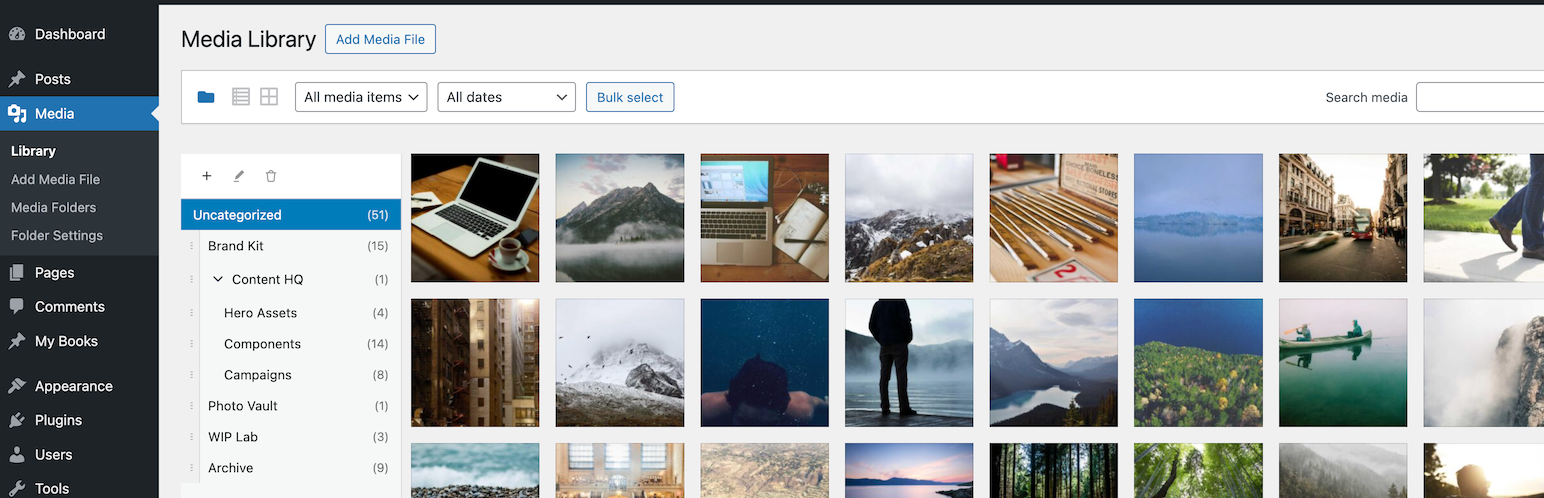
Virtual Media Folders brings virtual folder organization to your WordPress Media Library. Organize your media files into hierarchical folders without moving files on disk—folders are virtual, so your URLs never change.
Features
- Virtual Folders – Create hierarchical folder structures to organize media
- Drag & Drop – Easily move media between folders with drag and drop
- Sticky Sidebar – Folder navigation stays visible while scrolling through media
- Gutenberg Integration – Filter media by folder directly in the block editor
- Bulk Actions – Move multiple media items at once
- Keyboard Accessible – Full keyboard navigation support
- Internationalized – Ready for translation (Norwegian Bokmål included)
- Your media files stay exactly where they are on the server
- URLs never change when you reorganize
- Folders can be nested to create hierarchies
- Go to Media > Library
- Click the folder icon to show the sidebar
- Use + to create folders
- Drag media onto folders to organize / Bulk select media and use the "Move to Folder" action
- Click a folder to filter the view
- Show "All Media" – Display "All Media" option in sidebar
- Show "Uncategorized" – Display folder for unassigned media
- Jump to folder after move – Navigate to target folder after moving
- Default folder for uploads – Auto-assign new uploads to a folder
- Open the Media Library modal
- Use the folder sidebar to filter
- Select your media as usual
- Accessibility – Keyboard navigation and screen reader support
- Development – Setup, API reference, hooks, and contributing
- Virtual Media Folders AI Organizer – Uses vision-capable AI models to analyze actual image content and automatically organize your media library into virtual folders.
安装:
From WordPress Plugin Directory
- Go to Plugins → Add New in your WordPress admin
- Search for "Virtual Media Folders"
- Click "Install Now" and then "Activate"
常见问题:
Will this move my actual files?
No. Virtual Media Folders uses virtual folders. Your files stay exactly where they are on the server, and all URLs remain unchanged.
Can I nest folders?
Yes! You can create hierarchical folder structures with unlimited nesting levels.
Does this work with Gutenberg?
Yes! When inserting media in the block editor, you can filter by folder using the sidebar in the Media Library modal.
Can I assign media to multiple folders?
No, each media item belongs to one folder at a time. Moving media to a new folder removes it from the previous folder.
What happens if I delete a folder?
Only the folder organization is removed. Your media files are not deleted.
Is this compatible with my theme?
Virtual Media Folders works entirely within the WordPress admin. It doesn't affect your front-end theme.
更新日志:
1.3.8
- Changed: Hide (0) count on folders with subfolders to avoid confusion about empty folder branches
- Changed: Sidebar top now aligns horizontally with attachments-wrapper instead of first thumbnail
- Fixed: Folder sidebar now properly extends to viewport bottom and scrolls when content exceeds screen height
- Fixed: Sidebar uses fixed positioning to avoid clipping by parent containers
- Improved: Sidebar top alignment with first image thumbnail
- Fixed: React hook order error when entering bulk select mode
- Fixed: Race condition in folder refresh when moving media
- Improved: Bulk move folder dropdown now ordered like folder tree with hierarchy
- Added: Direct URL support for folder view via upload.php?mode=folder
- Fixed: Clicking folder icon from list view now correctly opens folder view
- Changed: Media folders taxonomy screen now mirrors sidebar ordering
- Changed: Removed sortable header UI from the Media Folders taxonomy list table
- Changed: Media Folders taxonomy UI is only visible when WP_DEBUG is true
- Changed: Folder counts endpoint now avoids per-folder queries for better performance
- Fixed: Suggestions REST response now matches stored suggestion labels (string-based suggestions)
- Fixed: Admin UI hardened notice rendering to avoid HTML injection
- Fixed: Admin UI reduced risk of duplicate event handlers/observers when scripts re-run
- Fixed: Settings page default folder dropdown now uses correct taxonomy (vmfo_folder)
- Fixed: Block editor folder filter now uses correct REST API endpoint (/wp/v2/vmfo_folder)
- Fixed: REST API schema title updated to vmfo-folder for consistency
- Fixed: Folder drag-drop reorder now persists correctly after page refresh
- Changed: Renamed all prefixes from VMF_ to VMFO_ for WordPress.org compliance
- Changed: Renamed taxonomy from media_folder to vmfo_folder for uniqueness
- Changed: Inline CSS now uses wp_add_inline_style() instead of embedded style tag
- Removed: GitHub update checker (WordPress.org handles updates)
- Added: Automatic migration for existing folder assignments from old taxonomy
- Added: .distignore file for proper distribution builds
- Changed: "All Media" folder now disabled by default in settings
- Fixed: REST API now returns all folders (removed meta_key ordering that excluded folders without vmf_order)
- Changed: Updated i18n-map.json with new accessibility component mappings
- Changed: Updated Norwegian (nb_NO) translations for all new accessibility strings
- Added: Keyboard-accessible move mode - press M to pick up media, arrow keys to navigate, Enter to drop
- Added: Screen reader announcements for all move mode actions
- Added: MoveModeBanner visual feedback during keyboard move mode
- Added: LiveRegion component for ARIA live announcements
- Added: useAnnounce and useMoveMode hooks for accessibility features
- Added: Visual drop target highlighting on folders during move mode
- Fixed: Screen reader instructions properly hidden from visual display
- Fixed: Enter key drops to folder without navigating during move mode
- Fixed: "Jump to Folder After Move" setting respected for keyboard moves
- Fixed: Mouse drag now cancels keyboard move mode to prevent conflicts
- Added: Auto-jump to target folder when moving the last file(s) from a folder
- Added: New bulk move AJAX endpoint for efficient bulk operations
- Performance: Bulk move now uses single AJAX request instead of one per file
- Fixed: Missing sprintf import causing error when selecting files in bulk mode
- Fixed: Sidebar visibility preserved when browser re-renders during bulk select mode
- Performance: Optimistic folder loading with localStorage caching for instant sidebar display
- Performance: Reduced API calls - secondary components read from cache instead of fetching
- Fixed: Eliminated layout shift with critical inline CSS for sidebar positioning
- Fixed: Folder order now persists correctly when dropping files on folders
- Fixed: REST API now returns vmf_order for proper client-side sorting
- Refactored: PHP REST API with shared helpers for capability checks, folder/attachment lookups
- Refactored: Settings class with centralized option retrieval and visibility enforcement
- Refactored: Admin class now uses Taxonomy::TAXONOMY constant instead of hardcoded strings
- Refactored: JavaScript folder API calls consolidated into shared utility
- Fixed: Test mock for useFolderData to properly handle parse:false API responses
- Removed: Unused SortableFolderList.jsx component
- Fixed: Block editor media modal now respects "Show All Media" and "Show Uncategorized" settings
- Fixed: Folder sidebar in Gutenberg modal matches Media Library settings visibility
- Changed: Replaced
wp_localize_scriptwithwp_add_inline_scriptfor proper boolean handling in JS config
- Fixed: Default folder filter not applying on initial page load when "Show All Media" is disabled
- Fixed: Media Library now correctly shows only uncategorized files on load when Uncategorized is the default
- Fixed: 500 error on plugin information page when GitHub API returns null
- Fixed: Added defensive handling for null plugin info in GitHubPluginUpdater
- Added: Drag-and-drop folder reordering with visible grip handle
- Added: Custom folder order persists via vmf_order term meta
- Added: Optimistic UI updates for instant visual feedback during reorder
- Changed: Consolidated drag-drop implementation for better performance
- Changed: Removed unused DndContext and DraggableMedia components (smaller bundle)
- Fixed: Folder reorder now updates instantly without waiting for server response
- Added: Contextual help tab "Virtual Folders" on Media Library page
- Added: GitHub repository link in contextual help sidebar
- Added: Filter hooks for settings (
vmf_default_settings,vmf_settings,vmf_setting_{$key}) - Added: When "Show All Media" is disabled, "Uncategorized" becomes the default folder
- Changed: Removed "Sidebar Default Visible" setting (now uses localStorage)
- Changed: Consolidated settings into single "Default Behavior" section
- Fixed: Settings checkbox interdependency now saves correctly
- Housekeeping
- Fixed: Removed duplicate item removal logic in DroppableFolder to prevent event conflicts
- Fixed: Single file drag-drop now correctly delegates view refresh to refreshMediaLibrary()
- Fixed: Moving files from "All Media" view no longer removes them from view (both bulk and single file moves)
- Fixed: Sort order is now preserved when moving files from "All Media" view
- Fixed: Updated all "Media Manager" references in source comments to "Virtual Media Folders"
- Fixed: Updated console.error message in media-library.js
- Fixed: Updated REST API paths from mediamanager/v1 to vmf/v1
- Fixed: Updated custom event names from mediamanager: to vmf: prefix
- Fixed: Updated WordPress filter name from mediamanager/folder-filter to vmf/folder-filter
- Fixed: Updated all text domains in Settings.php commented code
- Fixed: Renamed MediaManagerDndProvider to VmfDndProvider
- Fixed: Updated test namespaces from MediaManagerTests to VirtualMediaFolders\Tests
- Fixed: Regenerated translation files with correct references
- Fixed: Regenerated composer autoload files
- Major Release: Complete plugin rename from "Media Manager" to "Virtual Media Folders"
- Changed: New plugin slug "virtual-media-folders"
- Changed: Updated PHP namespace from MediaManager to VirtualMediaFolders
- Changed: Updated constants from MEDIAMANAGER_ to VMF_
- Changed: Updated REST API namespace from mediamanager/v1 to vmf/v1
- Changed: Updated CSS class prefixes from mm- to vmf-
- Changed: Updated JavaScript globals from mediaManagerData to vmfData
- Changed: Updated text domain from mediamanager to virtual-media-folders
- Changed: Renamed translation files to use new text domain
- Note: Breaking change - customizations using old namespace/classes need updating
- Fixed: Plugin Check compliance - added phpcs:ignore comments for false positives
- Fixed: Prefixed global variables in uninstall.php
- Fixed: Removed error_log debug function from GitHubPluginUpdater
- Added: uninstall.php for clean plugin removal (deletes folders, settings, transients, user meta)
- Changed: Updated folder structure in README.md to reflect PSR-4 changes
- Added: Collapsing a parent folder now moves selection to the parent when a child folder is selected
- Added: ArrowLeft keyboard navigation moves to parent folder when subfolder is collapsed or has no children
- Added: Edit Folder modal now includes Parent Folder selector to move folders within hierarchy
- Changed: "Rename Folder" modal renamed to "Edit Folder" for name and location changes
- Added: New "Show All Media" setting to show/hide the All Media option in sidebar
- Changed: Removed "Enable Drag & Drop" setting - always enabled (use bulk move as alternative)
- Changed: All settings now functional - Default Folder auto-assigns uploads, Show Uncategorized controls folder visibility, Sidebar Default Visible controls initial state
- Fixed: Sidebar position resets properly when uploader visibility changes
- Changed: "Jump to Folder After Move" setting now defaults to unchecked (disabled)
- Fixed: When "Jump to Folder After Move" is disabled, moved files are now removed from the source folder view
- Fixed: Sort order is now preserved after moving files between folders
- Added: New "Jump to Folder After Move" setting (enabled by default) to control whether view switches to target folder after moving files
- Added: URL now uses
mode=folderparameter when folder view is active - Changed: Bulk select mode is now automatically disabled after bulk moving files
- Changed: Smart Suggestions settings hidden until feature is fully implemented
- Added: Folder item counts now reflect the selected media type filter (Images, Videos, Audio, Documents)
- Added: New REST API endpoint for filtered folder counts
- Added: After bulk moving files, focus automatically switches to the target folder
- Fixed: Folder dropdowns now dynamically update when folders are added, renamed, or deleted
- Changed: BulkFolderAction and MoveToFolderMenu now listen for folder change events
- Changed: VMF_VERSION now uses actual version number in production (WP_DEBUG=false)
- Removed: Debug console.log statements from JavaScript
- Changed: Refactored PHP classes to PSR-4 autoloading structure
- Changed: Moved class files from includes/ to src/ directory
- Changed: Renamed classes to follow PSR-4 naming conventions (REST_API → RestApi, GitHub_Plugin_Updater → GitHubPluginUpdater)
- Housekeeping
- Changed: Refactored folder sidebar to share code between Media Library and Gutenberg modal
- Changed: Created shared hooks and base components for folder tree
- Added: Focus moves to Uncategorized or All Media after deleting a folder
- Added: Comprehensive code documentation throughout
- Fixed: Sticky sidebar now works correctly in Gutenberg media modal
- Fixed: Improved scroll detection for modal attachments wrapper
- Initial release
- Virtual folder organization
- Drag and drop support
- Sticky sidebar with fixed positioning on scroll
- Bulk move action with compact UI
- Gutenberg integration with folder sidebar
- Settings page
- Norwegian Bokmål translation