
Click to Chat by Virtualcode
| 开发者 |
virtualcode
webbyvivek |
|---|---|
| 更新时间 | 2026年9月20日 20:28 |
| PHP版本: | 8.0 及以上 |
| WordPress版本: | 7.1 |
| 版权: | GPLv2 or later |
| 版权网址: | 版权信息 |
详情介绍:
- Floating WhatsApp click-to-chat button
- WhatsApp number and prefilled message settings
- Device visibility controls for all devices, desktop only, or mobile only
- New tab or same tab link behavior
- Custom accessibility label for screen readers
- Left or right button position
- Bottom and side gap controls
- Button color and text color controls
- Icon-only or icon-with-text display
- Button text, text size, and icon size controls
- Button shape options: pill, rounded rectangle, or square
- Optional tooltip above the chat button
- Custom z-index control for sites with sticky headers or other floating widgets
- Page targeting for entire site, selected pages, or excluded pages
- Delayed display after page load
- Business days and business hours visibility
- Analytics-friendly click tracking for gtag or Classic Analytics when available
- Lightweight frontend output with no WhatsApp API dependency
- Works with most themes, builders, and WooCommerce stores
- General: phone number, message, device visibility, link target, and accessibility label
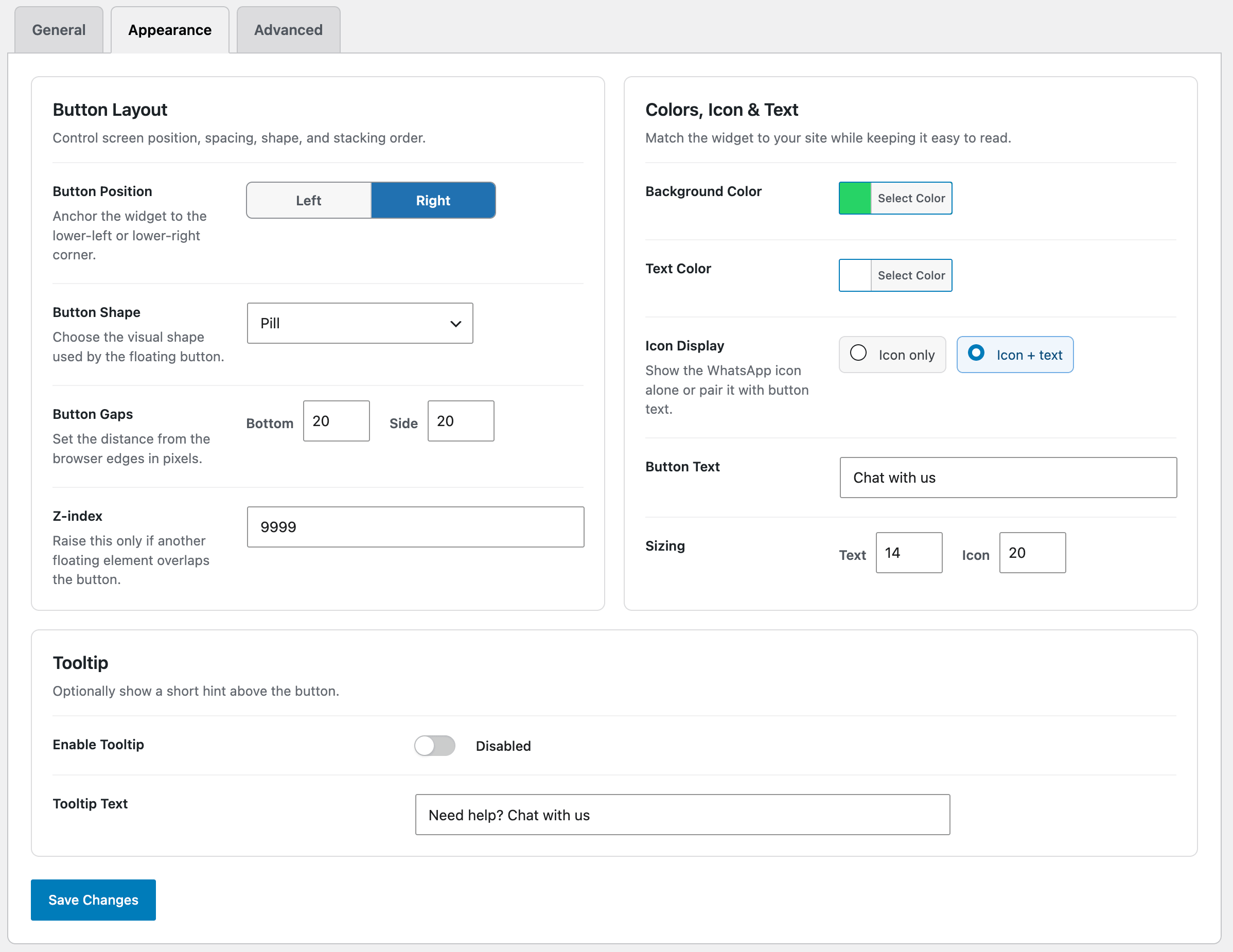
- Appearance: position, spacing, color, shape, sizing, tooltip, and z-index
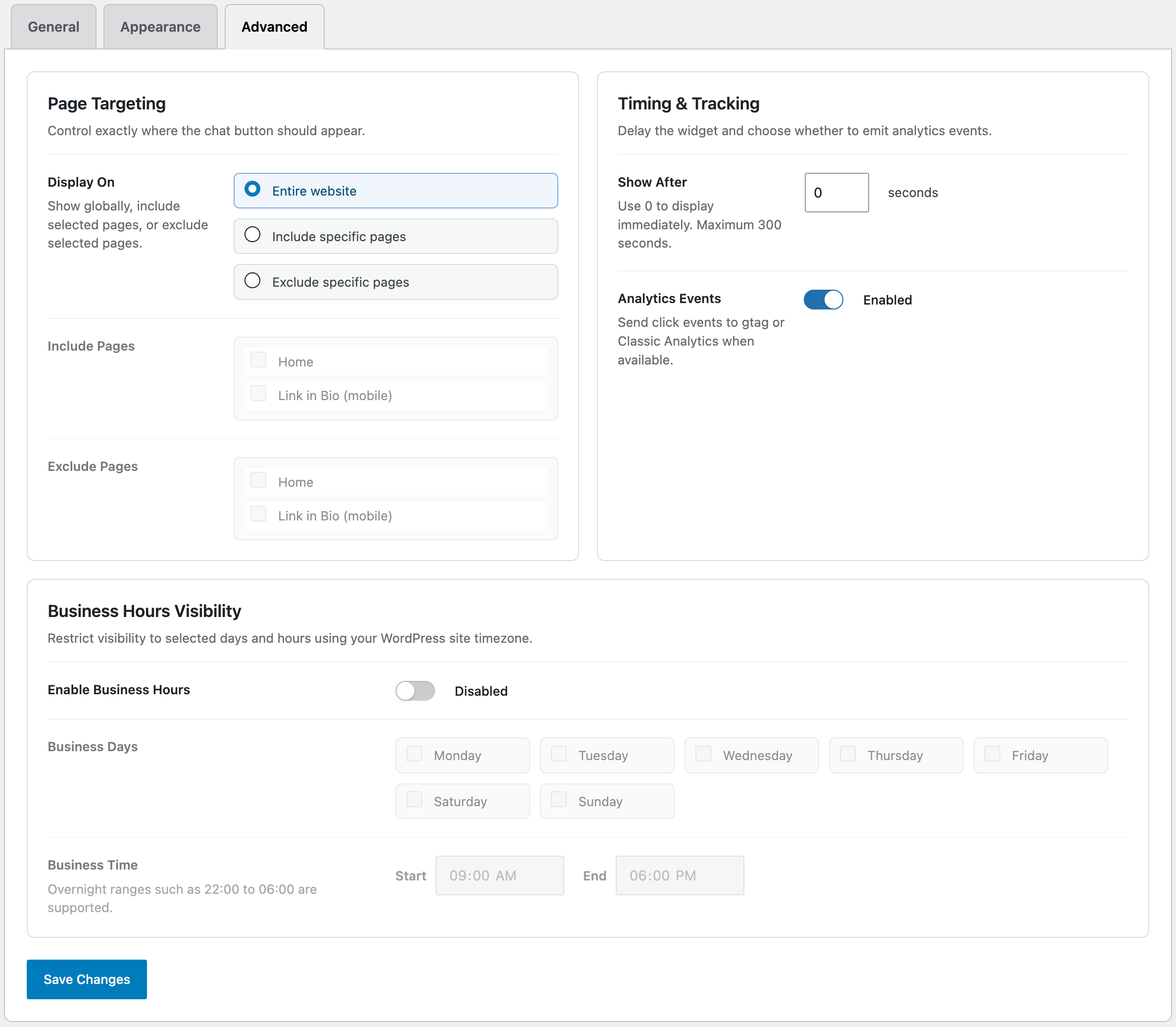
- Advanced: page targeting, delayed display, analytics events, and business hours
安装:
- Upload the plugin folder to
/wp-content/plugins/, or install it from the WordPress Plugins screen. - Activate the plugin from the Plugins screen in WordPress.
- Go to Click to Chat in the WordPress admin menu.
- Enter your WhatsApp number with country code.
- Add an optional prefilled message.
- Configure appearance, page targeting, delay, and business hours as needed.
- Save changes and check the frontend of your site.
屏幕截图:
常见问题:
Does this plugin require the WhatsApp API?
No. It uses standard WhatsApp Click to Chat links. You only need a valid WhatsApp number with country code.
Can I use a WhatsApp Business number?
Yes. You can use a regular WhatsApp number or a WhatsApp Business number.
Can I customize the button design?
Yes. You can adjust position, spacing, background color, text color, icon size, text size, button shape, button text, tooltip text, and z-index.
Can I show the button only on selected pages?
Yes. Use the Advanced tab to show the button across the entire site, include selected pages, or exclude selected pages.
Can I show the button only during business hours?
Yes. Enable business hours visibility and choose the days, start time, and end time. Overnight schedules such as 22:00 to 06:00 are supported.
Can I delay when the button appears?
Yes. Set the delay in seconds from the Advanced tab. Use 0 to display it immediately.
Can I show the button only on mobile or desktop?
Yes. Device visibility can be set to all devices, desktop only, or mobile only.
Does it support analytics tracking?
Yes. When analytics events are enabled, button clicks are sent to gtag or Classic Analytics if those scripts are already present on your site. The plugin does not install analytics scripts by itself.
Will this slow down my website?
The frontend output is intentionally lightweight. It loads one small CSS file and one small JavaScript file only when the widget should display.
Does it work with WooCommerce?
Yes. The button works on WooCommerce stores and standard WordPress sites.
更新日志:
- Refreshed the admin settings interface with a cleaner, more compact design.
- Updated admin typography: lighter heading weights and refined header logo spacing.
- Removed the descriptive text under section headings for a cleaner layout.
- Tightened the vertical spacing between setting rows.
- Split "Timing & Tracking" and "Business Hours Visibility" into separate settings boxes.
- Removed the extra focus outline around selected option text in the option controls.
- Updated the "Tested up to" version to WordPress 7.1.
- Changed the public plugin display name to Click to Chat by Virtualcode while preserving the plugin slug, folder name, option names, and identifiers.
- Redesigned the admin settings interface with modern cards, status summary, responsive layout, and cleaner controls.
- Fixed invalid nested settings forms in tab partials.
- Added configurable link target for opening WhatsApp in a new tab or the same tab.
- Added custom accessibility label support.
- Added button shape options.
- Added optional tooltip support.
- Added z-index control.
- Added analytics click tracking toggle.
- Improved admin JavaScript state handling and removed production console logging.
- Updated documentation, screenshots copy, installation instructions, and FAQs.
- Initial release.
- Floating WhatsApp chat button.
- Page targeting.
- Delay popup.
- Business hours visibility.
- Custom styles and sizes.
- Device visibility control.