
Visual Edit Lite – Visual Editor for Block Themes
| 开发者 | webtalkbot |
|---|---|
| 更新时间 | 2026年10月1日 04:11 |
| PHP版本: | 7.4 及以上 |
| WordPress版本: | 7.1 |
| 版权: | GPLv2 or later |
| 版权网址: | 版权信息 |
详情介绍:
- Edit text, links, images and video on the live page, where they are shown. Every save goes into that page's history.
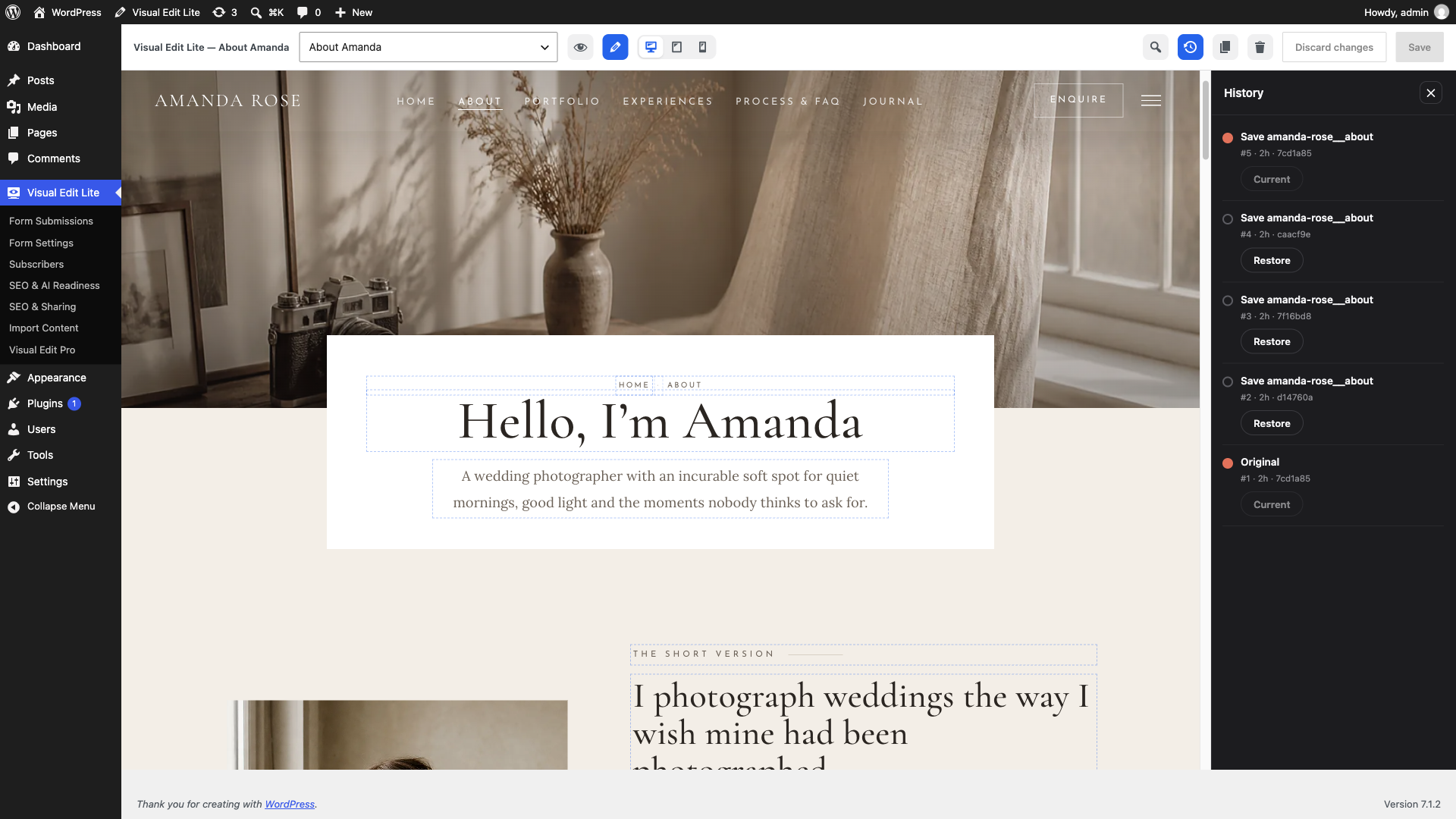
- Go back to any saved version. The ten most recent saves plus the Original are kept for every page, all listed and any of them restorable. The Original is never dropped.
- With a block theme, WordPress's editor opens inside a Visual Edit toolbar. You get a floating inspector, up to five Google Fonts, new sections from your theme's patterns, and duplicate or trash for the open page or post.
- Repeating content works as a list. You reorder, edit, add and remove FAQ entries, service cards, team members or portfolio tiles together.
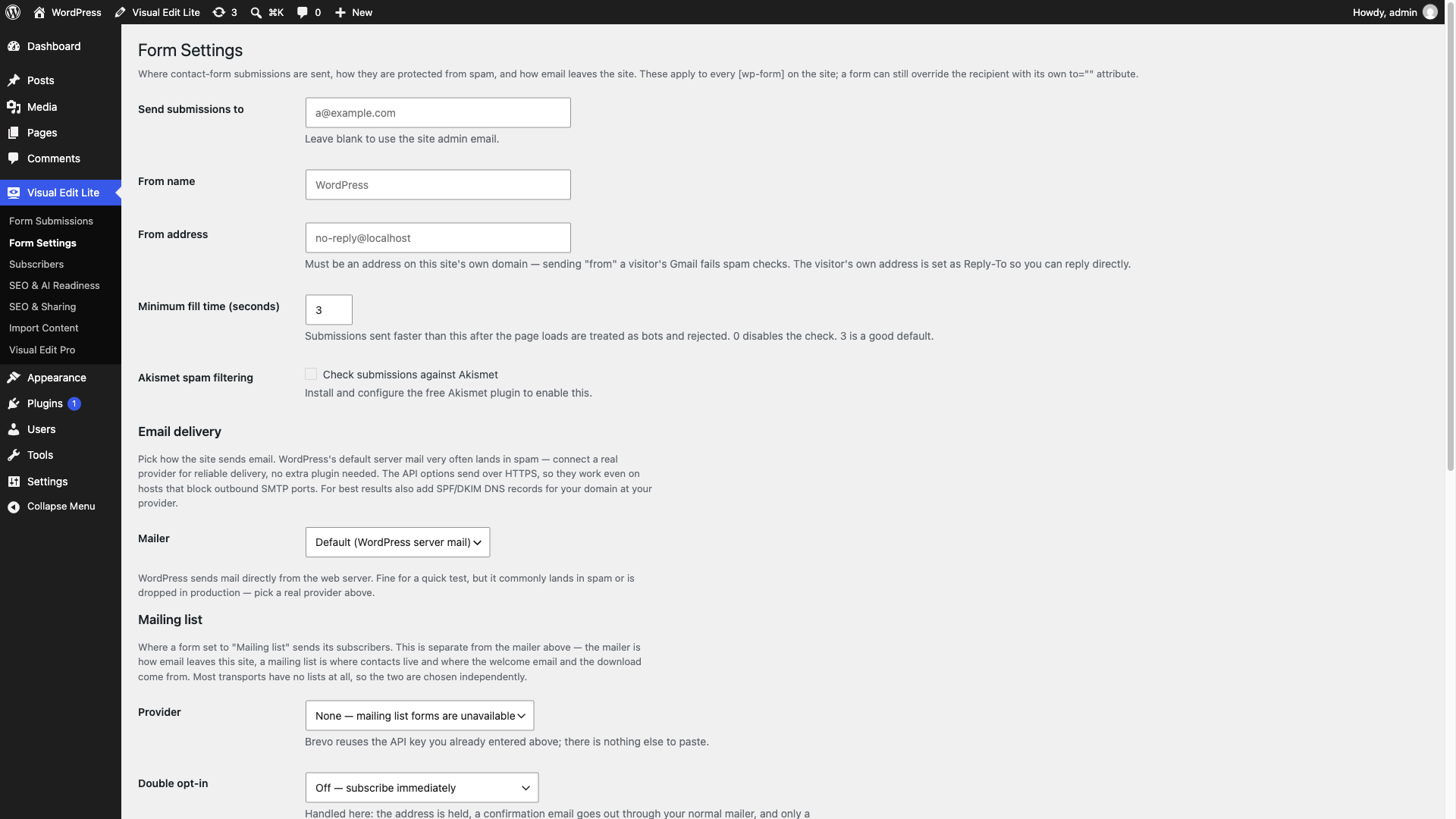
- Connect a designed HTML form by clicking, without rebuilding it. Submissions are stored in wp-admin and emailed through your server, SMTP, or Brevo, SendGrid, Postmark or Mailgun. A honeypot, a minimum fill time, a per-IP rate limit and, if you have it, Akismet hold off spam.
- You can also hand a form to Contact Form 7 or Fluent Forms. The design stays, and that plugin validates, checks spam, verifies its captcha, notifies and records.
- Mailing list signup comes with double opt-in, Brevo integration and a subscriber list in wp-admin.
- Blog listings repeat the design's own card markup for real WordPress posts, with a "load more" button for the next page.
- Menus keep the design's own navigation markup and are managed from Appearance → Menus.
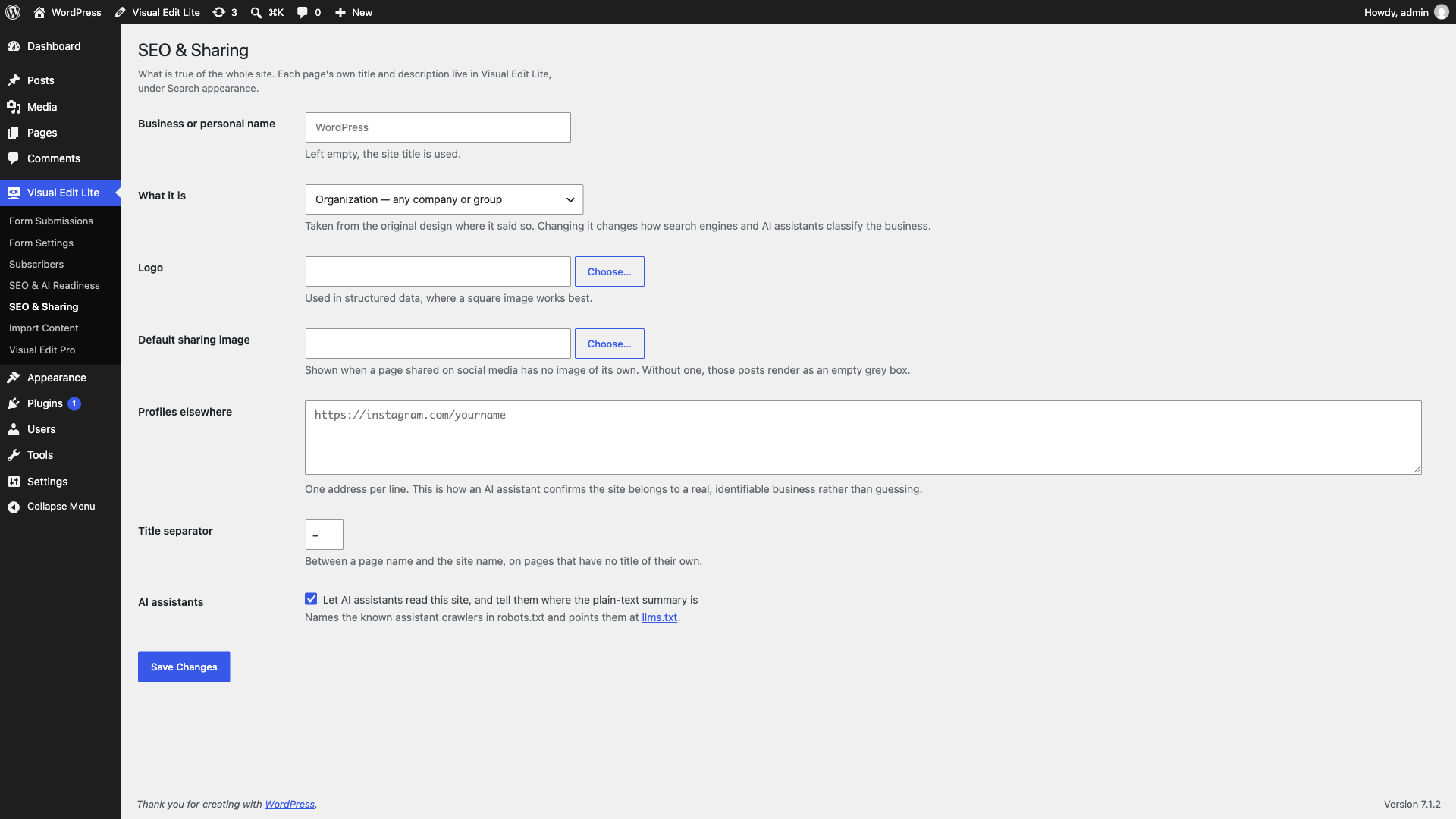
- Each page gets its own SEO titles, descriptions, Open Graph, canonicals, robots and redirects, carried over from the original site. They work with Yoast SEO and Rank Math when present, and stand on their own when not.
- For AI search, the plugin adds schema.org structured data including FAQ and an
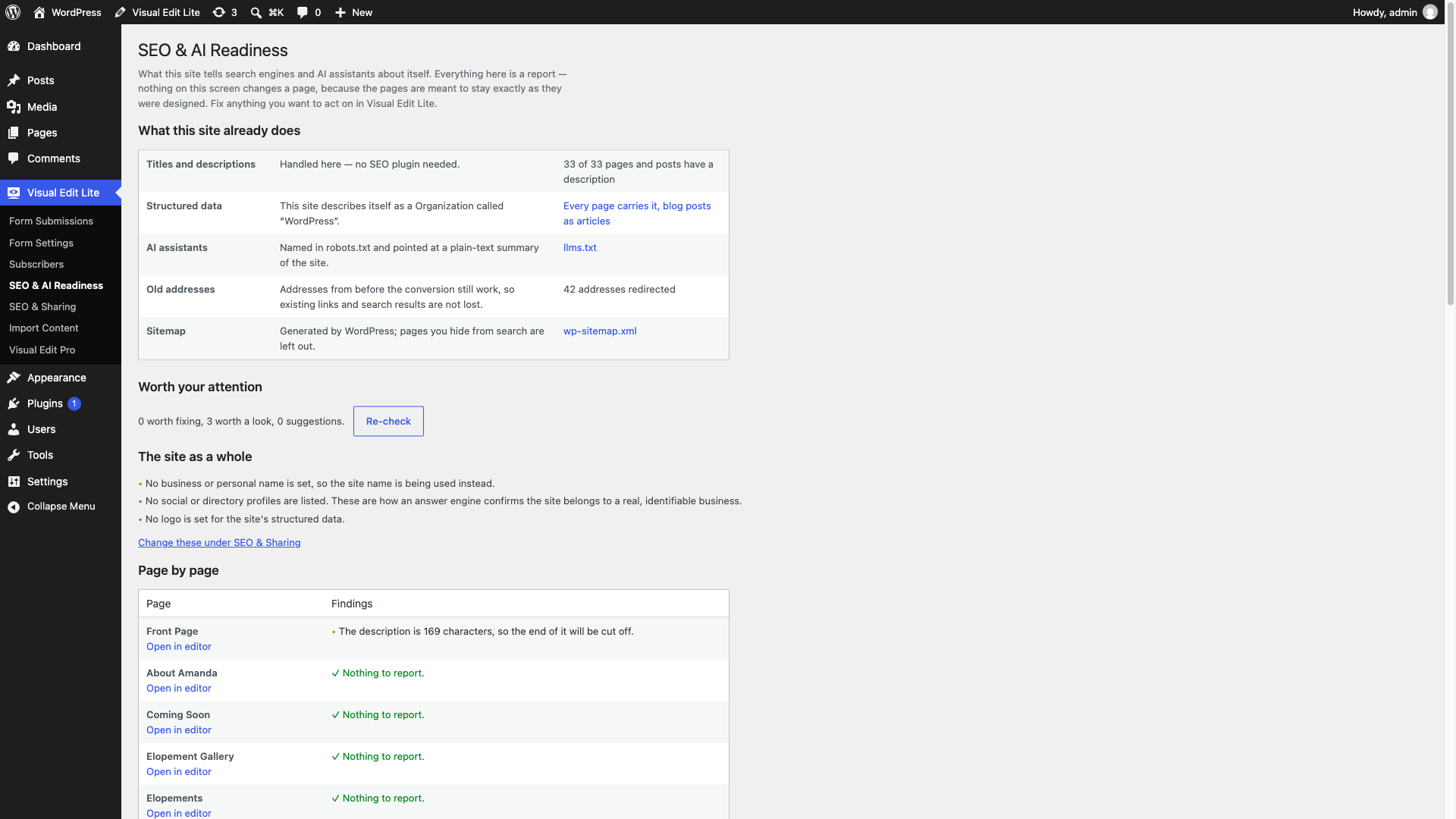
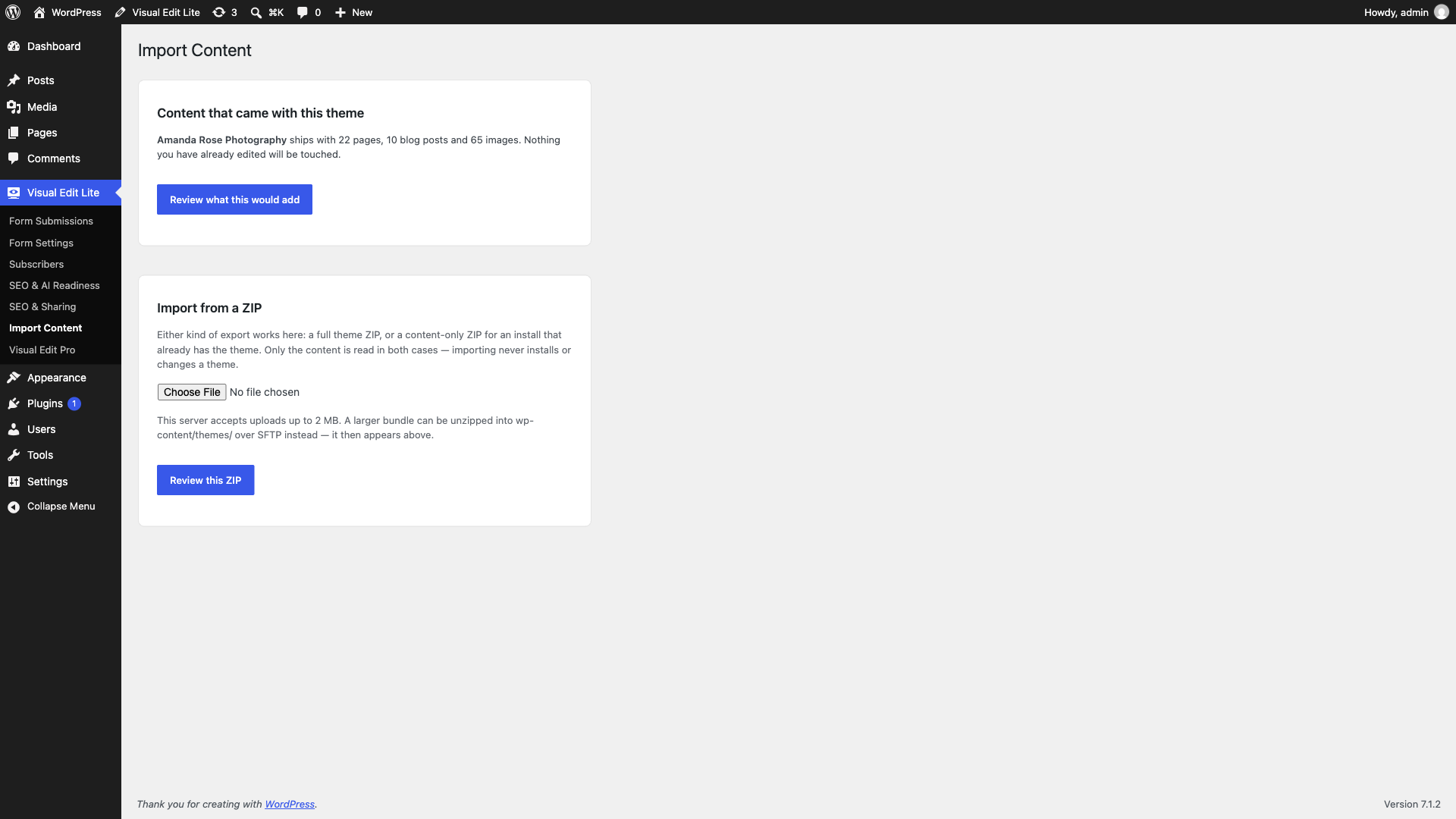
llms.txtfile. It also adds AI-crawler rules in robots.txt and a read-only audit of what the site tells search engines and AI assistants. This is about being readable by AI search. The plugin has no AI writing or image tools and sends nothing to any AI provider. - Import brings in a converted theme's content bundle (pages, menus, media, forms and SEO records), and you review it before anything is written.
clara_ve_theme_contract filter. The contract for converted themes is documented on GitHub: https://github.com/iOSDevSK/visual-edit-lite/blob/main/docs/developer/theme-requirements.md
Forms, email delivery, mailing lists, SEO, redirects and llms.txt do not depend on the theme and work on any site.
Important notes
- Raw-HTML editing requires the
unfiltered_htmlcapability, because markup round-trips through that editor. On a block theme the plugin uses WordPress's normal permissions for the page, template or other entity being edited. - Deactivating the plugin keeps all data and reverts the front page to the theme's shipped design until reactivation. Other pages keep their edited content.
- Deleting the plugin always removes stored secrets (SMTP password, provider API keys) and its own transients. Everything else (submissions, subscribers, edit history, page sources) is kept unless "also delete all stored data" is enabled under Visual Edit Lite → Form Settings → Uninstall. That option removes the plugin's options, its two database tables and the form submissions. It leaves your pages and their content in place. A few marker fields the plugin wrote on them also stay, and so do any files it imported into the Media Library or the uploads folder.
安装:
- Go to Plugins → Add Plugin and search for "Visual Edit Lite".
- Click Install Now, then Activate.
- Download the ZIP from this page.
- Go to Plugins → Add Plugin → Upload Plugin, choose the ZIP and click Install Now.
- Activate the plugin.
屏幕截图:
常见问题:
Does this front-end editor work with my theme?
Yes, if it is a block theme: Twenty Twenty-Five and other themes built on templates and patterns work out of the box. With a classic PHP theme the visual editor does not apply, but forms, email delivery, mailing lists, SEO, redirects and llms.txt still work. A theme converted from static HTML works when it declares the clara_ve_theme_contract filter, which every html2wp conversion does.
How do I edit my WordPress site with it?
Open Visual Edit Lite in the admin menu and pick a page. Then click the text, image or link you want to change, and its panel opens beside it. Each save becomes a restore point in the page's history. On a theme converted from static HTML, import the site's content first, as described under Installation.
Can I undo a change after I saved it?
Yes. Every save is a restore point. The History panel lists the ten most recent saves of the page plus the Original, and restoring any of them writes it back as the live page. The Original, the design exactly as the theme shipped it, is never dropped.
Is anything disabled until I pay?
No. Visual Edit Lite has no licence key, no trial period and no locked buttons. The features it does not have are not part of it, so there is nothing in the plugin waiting to be switched on.
Does it send my content anywhere?
No. Editing happens on your own server. The only outside connections are the ones you switch on yourself, such as Google Fonts if you pick one, an email provider if you select one, or Akismet if you enable it. Each one is described in the External services section of the description.
What happens to my pages if I deactivate or delete the plugin?
Deactivating keeps everything: your pages keep their edited content, and the front page shows the theme's shipped design until you reactivate. Deleting removes stored secrets and, only if you enable that option first, the plugin's own tables and submissions. Your pages stay.
Can I keep using Contact Form 7 or Fluent Forms with a designed form?
Yes. Click the form, choose the plugin and one of its forms, and check which of its fields each designed field fills. The design stays as it is; that plugin validates, checks spam, verifies its captcha, sends and records the submission.
Can I use it on a theme I built myself?
Yes, if the theme's pages are raw HTML and it declares the clara_ve_theme_contract filter. The requirements are documented on GitHub: https://github.com/iOSDevSK/visual-edit-lite/tree/main/docs
Does the front end work without JavaScript?
Forms submit and work without JavaScript. The editor itself is a wp-admin screen and needs JavaScript, like the block editor does.
Where do I report a bug?
In the support forum here, or on GitHub: https://github.com/iOSDevSK/visual-edit-lite/issues
更新日志:
- Fix: A Page List block in a navigation menu no longer offers move, remove or add controls whose changes could not be saved. Its pages are listed as they appear, in the order set on each page and then by title.
- New: "Convert to links" turns a Page List in a navigation menu into separate links you can reorder, the same way WordPress's own Edit Page List dialog does.
- New: A designed form can be handed to Contact Form 7 or Fluent Forms. Pick the form in the FORM panel and check which of its fields each designed field fills; that plugin then validates, checks for spam, verifies its captcha, sends and records the submission, while the design stays as it is. Without JavaScript the page comes back with the errors under the fields.
- New: On a block theme, the ⋯ menu of the Visual Edit Lite workspace can duplicate the page or post that is open, and move it to the trash. The copy is a draft and brings its content, categories and tags, featured image, search-appearance record and small-screen rules; its canonical address is not copied. The front page and the posts page cannot be removed from here.
- Changed: Duplicating works for posts as well as pages, and asks for the right to create whichever of the two is being copied.
- Fixed: A backslash in page content survives a save. Every write of page content now goes through wp_slash(), which WordPress expects.
- Changed: The readme no longer describes the paid edition, and documents the captcha providers a connected form plugin may load.
- Changed: The readme carries captions for the seven screenshots on the plugin's directory page.
- Changed: The plugin's homepage link points at html2wp.dev; the source stays on GitHub.
- Fixed: The SMTP password is stored exactly as it is typed. It was trimmed before being encrypted, so a password that begins or ends with a space saved without complaint and then failed to authenticate. Secrets are never put through a text sanitizer: they are encrypted, and never printed back. A pasted API key still loses the stray space or newline a paste leaves on it.
- Security: Each editor route asks for the right to do what it does, on top of the right to edit the page: copying a page asks for the right to create pages, removing one for the right to delete it, importing an image for the right to upload files, and a save, a restore or a search-appearance change addressed to one page asks about that page.
- Security: The form block's output is filtered through an allowlist of what a form may consist of at the moment it is returned, so nothing else can come out of it. The honeypot field is hidden by a stylesheet rule as well as its own inline one.
- Changed: Navigation class names supplied by a theme are escaped as attribute values when they are written into a menu.
- Changed: Edit history keeps the ten most recent saves of each page plus the Original. Every save the plugin holds is listed and can be restored. A page with a longer log is trimmed to that the next time its history is opened or the page is saved.
- Changed: Every stylesheet and script the plugin adds now goes through the WordPress enqueue API — the decorative and article styling layers, per-block styles, and the Form Settings and SEO & Sharing screens, whose behaviour moved into assets/admin-settings.js. Structured data is printed with WordPress's own inline script tag function.
- Changed: The paid plugin is mentioned in one place: a single plain item, Visual Edit Pro, at the end of the Visual Edit Lite menu, opening one screen of text with one link. The two Pro-marked items are gone, and nothing is added to any other admin screen.
- Removed: The part of the content exporter that could package a theme. Lite exports content bundles only; theme export is not in this plugin.
- Security: The public "load more" route answers only for a published page without a password, and gives one answer for every refusal. A listing no longer includes password-protected posts.
- Security: A form field whose name starts with an underscore is ignored, so a visitor cannot write one of the submission's internal meta keys.
- Security: The legacy static import copies only files of a type WordPress accepts as an upload, from inside the extracted folder. A double opt-in link stops working after fourteen days, and exporting parked content, which can include submissions and subscribers, requires an administrator.
- Added: A Credits section, and a notice in the four editor files that derive from Open Design (Apache License 2.0).
- Changed: The package ships the plugin only — the developer documentation lives on GitHub and is linked from this readme.
- Changed: Contributors names the wordpress.org account that owns the plugin, and the 1.27.0 upgrade notice fits the directory's 300-character limit.
- Changed: The Get Pro item opened the pricing page in a new browser tab. Replaced in 1.31.0.
- New: A screen in the Visual Edit Lite menu that lists what the separate paid plugin adds. Nothing is loaded from outside the site and nothing is sent anywhere. Reduced to a single menu item in 1.31.0.
- Changed: The plugin is listed as "Visual Edit Lite – Visual Editor for Block Themes". The menu, the admin bar and every screen are unchanged.
- Fixed: The + Section browser labels its two groups — Theme sections and Your sections.
- Save a section and use it on any other page. Save as a section… on the Section tab of a section's popup stores it as one of your site's own sections, listed under + Section as Your sections everywhere. Each copy you place is ordinary blocks you can edit one by one, independent of the page it came from. Saving happens at once rather than as an unsaved change, and a saved section is removed again under Patterns in the WordPress admin. A section holding a synced pattern, a template part or content bound to that one page cannot be saved, and the form says which it was.
ClaraVE.apply()can treat a run of neighbouring blocks as one, with three operations:groupwraps them in a single Group,ungrouptakes a Group apart again in its place, andmove-tomoves a run of blocks elsewhere on the page, including inside another container. Each is one change the editor undoes in one step. Blocks that are not next to each other, or that WordPress will not let move, are refused with the reason instead of quietly doing nothing.ClaraVE.saveSection()and asave-sectionevent for the same, and GET /block-patterns now says which source each section came from.
- A theme section shipped as one Custom HTML block — an FAQ of details, a list, a row of buttons — goes onto the page as native blocks when it is added with + Section: a Details block per question, headings, lists and buttons, each editable in the popup, in one undo step. Markup with no native block (an embed, an icon drawn in SVG, inline styles) stays Custom HTML exactly as it was. A Details block's popup edits its question.
- Forms from other plugins — Kadence Form, Contact Form 7, WPForms, Gravity Forms and others — are marked green in the block workspace like Visual Edit's own, and a Kadence Form can be sent by Visual Edit: choose Form Settings and a contact address or a mailing list in its popup. Kadence's own sending is switched off while connected, so nothing arrives twice.
- Form button styles reach a Kadence form in the editor, where Kadence draws the button as an editable box rather than a button.
- The HTML editor's popup has a pin: pinned, every element opens it in the same place, and dragging it moves the pin.
- History and other side panels no longer open over each other.
- On a phone the workspace toolbar keeps Save on screen.
- The block gate refuses a static core block written as a self-closing block comment (
wp:separator /), which the editor flags as invalid and the site shows as nothing. - For developers: the
clara_ve.toolbar.extrasandclara_ve.popup.topfilters, theclara-ve-dock-openedevent, theconvert-to-videooperation, Kadence images inset-image, andPOST /native/convert-blocks.
- Icons from a theme's or a plugin's own controls are no longer invisible in the dark editing popup. A whole family of icon sets is drawn with strokes rather than fills, and the contrast repair only ever looked at fills — so an icon picker full of line icons kept its author's dark grey on a ground the editor had just painted dark. They are repaired on the property they are actually drawn with, and never by filling them in.
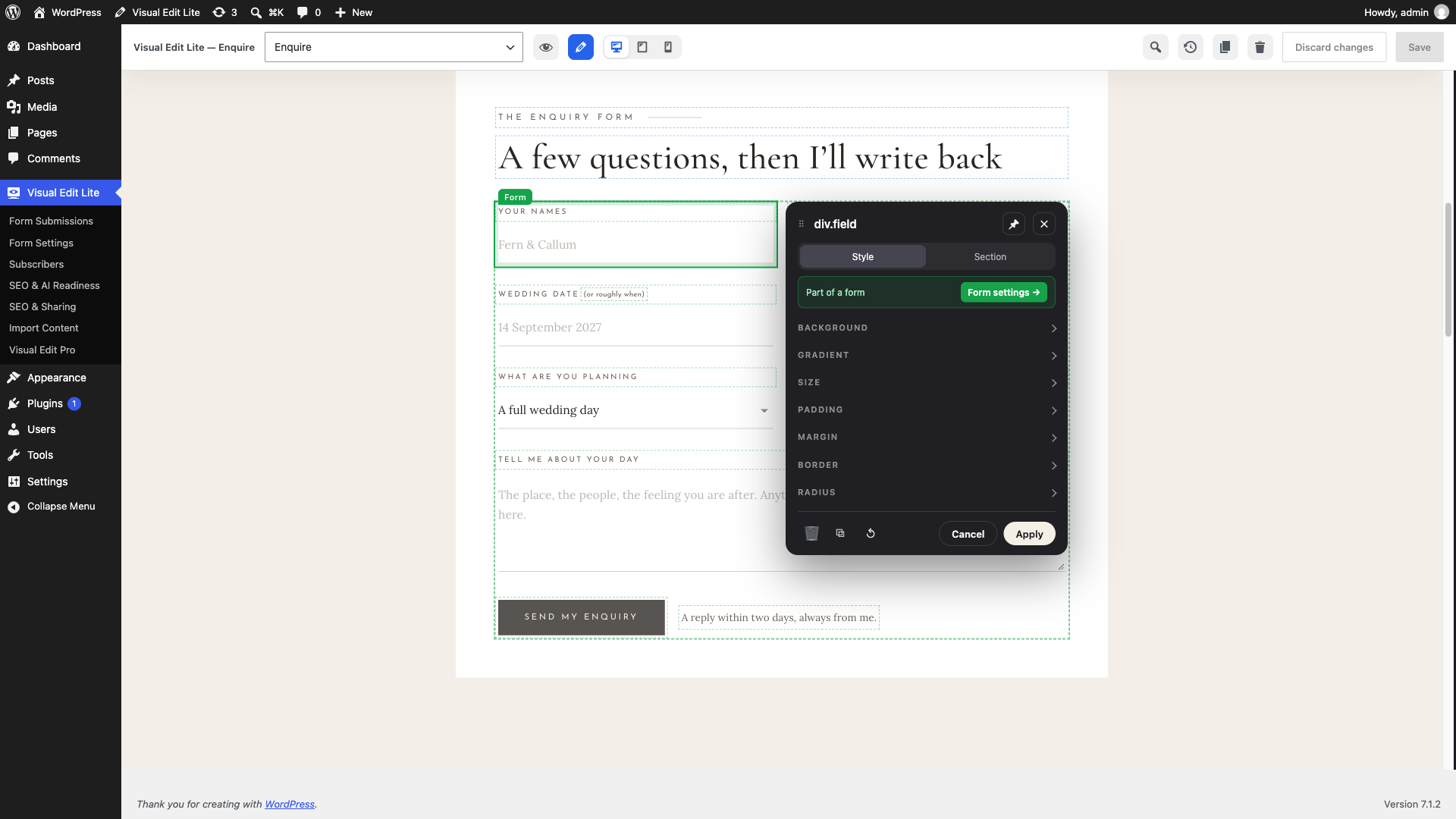
- A form whose fields cover it completely — a one-row signup is an input and a button, edge to edge — could not be connected at all: there was no pixel of the form left to click, and what a form does when someone submits it is only offered on the form itself. A field now says Part of a form and offers the way up, opening the form on the tab that holds those settings.
- A theme converted from HTML no longer white-screens its visitors. Such a theme carries its own form runtime that asks this plugin about Cloudflare Turnstile as soon as it is loaded; this edition has no Turnstile and had no answer, so every page holding a form died with a critical error — the public page, not only the editor. It now answers "off", which is the truth.
- On a theme converted from HTML, form submissions were being accepted and silently thrown away: the theme and the plugin signed the anti-spam timestamp in two different shapes, and the visitor saw a thank-you either way. They are delivered again, and stored.
- Where a form sends is signed into the page and checked on the way back, for every form — including one a converted theme renders and hands over. Until that theme signs the value itself, a per-form Send to on such a site falls back to the address in Form Settings rather than being taken from the request.
- A media bundle can no longer place a file in the uploads folder that you could not upload by hand: the extension has to be one this site allows.
- Send to and List on a form block are honoured only on a page whose author administers the site. Anyone who can publish could otherwise point a form at their own address, or at your mailing list. A form in a template part is unchanged.
- Forms are marked in green — the whole form, its fields and a Form label, in both editors and without clicking anything first. Everything else stays blue, so it is clear at a glance which part of a page collects answers.
- Block themes are now edited the way converted themes are: the page, one dark toolbar and one popup. WordPress's block toolbar, sidebar and breadcrumb bar no longer compete with it; ⋯ → Show WordPress controls brings them back. The WordPress admin bar and side menu stay available.
- A sidebar WordPress remembered from an earlier session no longer opens over the workspace. The Search appearance dialog says when the theme or the site-wide SEO settings keep Visual Edit from printing titles and descriptions on the public site.
- Clicking the block that is already selected reopens its popup after Apply or Cancel. Undo reverts one popup session at a time, and Reset styles is its own undo step. A responsive value can be set again after it was cleared and saved. Number fields ignore text that is not a number.
- Clicking a photo that sits under a theme's overlay or tint (a hero image behind its heading layer) selects the image, as in the HTML editor, so it can be replaced. Empty decorative groups no longer show WordPress's "Select a layout" placeholder over the design.
- WordPress's own editor UI shown inside Visual Edit (the Advanced tab, sidebars opened from ⋯, dropdowns, colour pickers and native dialogs) follows the popup design: the same type, rounded dark fields, grey labels, uppercase section titles, buttons, tabs and menus. Colours are measured after every change, so native controls stay readable while swatches and style previews keep their real colours. Menus, selects and scrollbars in the dark UI no longer show dark text, white tracks or double borders.
- Clicking a block outlines and labels it and opens the popup beside it, at the height of the click, without covering it. The popup stays put while you scroll, can be pinned, and is a bottom sheet on phones.
- The popup is organised into Content, Style, Section and Advanced tabs, with a path to parent blocks, Duplicate / Move / Delete, bold, italic and link for text selected on the page, an items list for containers, and "Add a section after this one".
- Style has a Desktop / Tablet / Mobile switch that edits the same fields per screen and switches the preview. The separate Responsive section is gone.
- Sections locked by WordPress (theme patterns, template parts) offer Unlock design — WordPress's own "Enable editing all patterns" setting, per session.
- + Section adds one of the theme's own sections with previews.
- History docks beside the page and says when a restored version still needs Save.
- The toolbar is reduced to page, device, undo/redo, History, Section, status, preview, More and Save.
- The converted-theme popup gains the same Content / Style / Section tabs, opens beside the clicked element, calls its button Apply, and offers RADIUS on every element rather than only boxes that hold a field.
- New
window.ClaraVEeditor API shared by both editors, with operations, events,clara_ve.popup.groups/clara_ve.popup.footer/clara_ve.toolbar.morefilters, and theclara_ve_workspace_config,clara_ve_workspace_enqueueandclara_ve_native_entity_savedPHP hooks. - The front-end block editor writes small-screen values into a block's
claraVeattribute when the block already uses it, and shows those values. - The Gutenberg sidebar integration is no longer loaded inside the workspace, where its panel appeared a second time inside the popup's native settings.
- Linking selected text from the popup: Enter applies the link, Esc closes the address field, an address without a scheme gets https://, an empty address says so instead of doing nothing, and the link still lands on the words picked first when the page selection changes while typing. Links inside running text get a dotted underline in the editor only, since many themes style them exactly like the text around them.
- A link inside the workspace that leads to any other screen (the dashboard, a list, the site) opens in the whole window instead of showing a second admin bar and menu inside the workspace.
- Document ▾ lists only content that can be opened (Global Styles and menu items no longer appear and fail to load), hides Previous/Next when there is one page of results, shows load errors readably in the dark menu, and WordPress's own site management opens as a labelled link in the whole window instead of replacing the workspace inside its frame.
- Native colour palettes inside the workspace show their real colours again (the dark skin had recoloured every swatch to the text colour), with room around the palette and a faint ring so dark theme colours stay visible.
- The block inserter shows separate rounded tiles with readable icons; block icons were painted near-black on the dark panel.
- Style any form from the popup: Form labels, Form fields and Form button groups (colours, fonts, sizes, case, letter spacing, field border shape and colour, border while typing, placeholder colour, button hover, corners). They work on what every form is made of, so a theme's shortcode form, Contact Form 7, WPForms or a hand-written HTML form all take the same settings, and they are saved on the block like other Visual Edit styling.
- Shortcode blocks show what the shortcode puts on the page on the workspace canvas instead of WordPress's text box; the shortcode itself is edited in the popup's Content tab.
- More › Site styles opens WordPress's Styles panel again on WordPress 7, which shows it only while a template is on screen: the page is shown inside its template while the panel is open and returns to the page alone after.
- Notices in Visual Edit's dark dialogs and menus are coloured by kind (error, success, warning), and Esc still closes Search appearance after saving (focus used to fall back to the page).
- Editable forms. A new Form block with field, text area, choice list, checkbox, row and send-button blocks: labels, notes, placeholders, choices, required fields, field names and the button text are edited in the popup (or WordPress's sidebar), fields are added from the form's popup and reordered or removed under Items. Submissions go to Form Submissions and are emailed to the Form Settings address — a recipient posted with the form is ignored — with the spam checks of connected forms; "Go to page" and "Message" set what happens after sending. The form is saved as plain HTML, so it stays visible (without sending) if the plugin is switched off.
- "Make this form editable" on a shortcode or HTML block holding a form turns it into form blocks, keeping its class names and so its look, its redirect and its thank-you sentence; its form styling carries over. One Undo step.
- A form says what it is for — "Contact form" or "Mailing list", the same two words in both editors — with the list picked by name and an optional address for that one form. A signup now reaches the mailing list and the Subscribers screen instead of arriving as an enquiry. What the form was set to is signed into the page, so a visitor cannot retype it into somewhere else; that now covers connected
[wp-form]forms as well as form blocks, and an unsigned or altered one falls back to the address in Form Settings rather than being refused. - Each form field keeps its own name in submissions: a second Email, a pasted or a duplicated field is numbered (email-2) instead of overwriting the first one's value, and renaming a label later does not move its column.
- Fixed repeated dropdown arrows and light disabled fields in the dark VE popup caused by WordPress admin select styles.
- Content-only editing now exposes permitted text/media controls instead of disabling the whole panel. Design controls remain restricted by WordPress.
- Recheck block editing mode and bindings when asynchronous media choices return.
- Added Gutenberg save history, per-document staged restores and native Undo/Redo.
- Fixed Google Fonts preview stylesheet duplication and removal.
- Gutenberg block themes now open WordPress's complete native Site and Post Editors from Visual Edit Lite. This covers every registered block, nested editing, Query Loops, navigation, patterns, templates, template parts and Global Styles through their native WordPress controls.
- Added a Visual Edit Lite Gutenberg sidebar with per-page search appearance, Media Library selection for sharing images and shortcuts to site tools.
- Added selected-block movement and responsive controls to Gutenberg. Page responsive values share Gutenberg's save state and undo/redo stack, render in the editor preview, and are included in VE history.
- Native Gutenberg saves now feed the existing VE page history while core keeps revisions for templates, parts and Global Styles. Autosaves are not recorded as explicit saves.