
Volixta Analytics Lite – Privacy-Friendly Real-Time Visitor Analytics & Google Analytics Alternative
| 开发者 | volixta |
|---|---|
| 更新时间 | 2026年11月1日 00:28 |
| PHP版本: | 8.0 及以上 |
| WordPress版本: | 7.1 |
| 版权: | GPLv2 or later |
| 版权网址: | 版权信息 |
详情介绍:
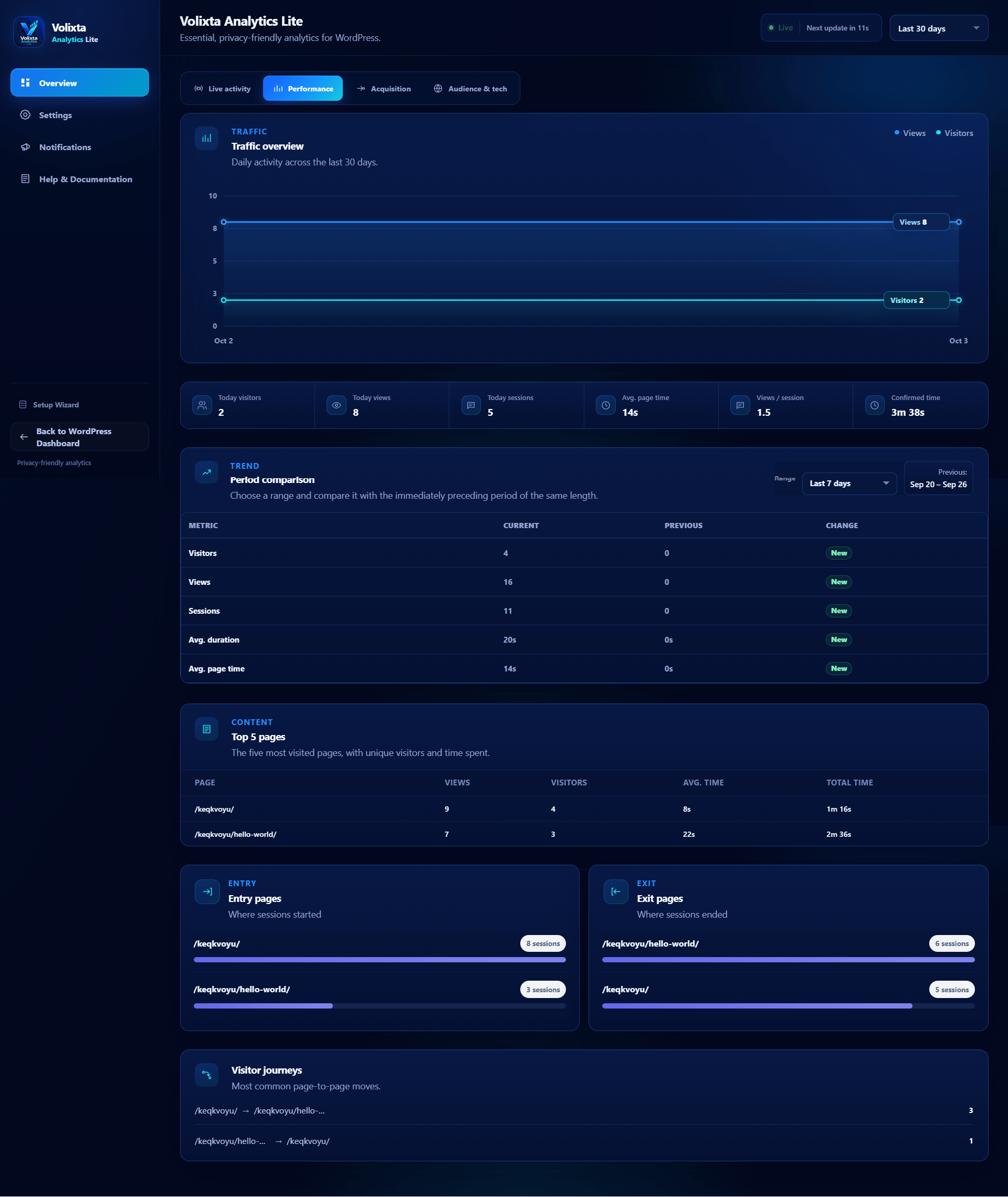
- Live activity with automatic refresh countdown.
- Real-time summary of current website activity.
- Page views, visitors, sessions and average visit duration.
- Top pages, entry pages, exit pages, referrers and navigation journeys.
- Audience reports for countries, languages, devices, browsers and operating systems.
- Acquisition reports for traffic channels, UTM campaigns and recognized AI referrals.
- Pseudonymous visitor and session measurement.
- No analytics cookies used for visitor or session identifiers.
- Respects the browser's Do Not Track setting.
- No raw visitor IP stored in the analytics table.
- Query strings removed from stored page URLs.
- Optional pseudonymous tracking of logged-in visitors, disabled by default.
- Administrators excluded from tracking by default.
- Optional local country detection with the DB-IP Country Lite database.
- Daily and monthly email summaries.
- Guided setup wizard.
- CSV export for the selected dashboard range.
- Optional Views column in WordPress Posts and Pages.
- Optional Volixta stats in the admin toolbar and a WordPress Dashboard widget.
- Full-width Volixta workspace with Standard (light), Immersive (blue/cyan) and Focus (muted dark) themes.
- Volixta Ecosystem page to discover compatible plugins and use native WordPress install and activation actions.
- WordPress multisite support.
- Visitor and session measurement is pseudonymous.
- The frontend tracker uses first-party localStorage and sessionStorage instead of analytics cookies.
- The pseudonymous visitor identifier stored in localStorage has a fixed lifetime of up to 13 months.
- The visitor identifier expiration is not extended each time the visitor returns.
- The frontend tracker respects the browser's Do Not Track setting.
- Raw visitor IP addresses are not persisted in the analytics table.
- Raw User-Agent strings are not persisted in the analytics table.
- Query strings are removed from stored page URLs.
- External referrer information is reduced before storage.
- Logged-in visitor tracking is disabled by default. It can be enabled from Settings or the setup wizard.
- WordPress user IDs are not stored in analytics records.
- Administrators remain excluded from tracking by default.
- Country detection is performed locally when the optional DB-IP database is installed.
- Notification emails contain aggregate analytics only.
安装:
- Upload volixta-analytics-lite to /wp-content/plugins/, or install it through the WordPress Plugins screen.
- Activate Volixta Analytics Lite.
- Complete the setup wizard.
- Open the Analytics dashboard.
- The setup wizard can optionally install the DB-IP Country Lite database; notification and country-detection settings can also be changed later.
屏幕截图:




常见问题:
Is Volixta Analytics Lite a Google Analytics alternative?
Yes. Volixta Analytics Lite can be used as a self-hosted alternative to Google Analytics for WordPress. It works independently, does not require a Google Analytics account and stores its analytics records in your own WordPress installation. You can also use Volixta Analytics Lite alongside Google Analytics or another analytics tool if you choose.
Do I need Google Analytics or another external analytics account?
No. Volixta Analytics Lite works independently and does not require an external analytics account.
Does Volixta receive my analytics data?
No. Visitor analytics records are stored locally on your site and are not sent to Volixta.
Does the plugin use analytics cookies?
No analytics cookies are used for Volixta Analytics Lite's visitor and session identifiers. The plugin uses first-party localStorage and sessionStorage instead.
How long is the visitor identifier stored?
The pseudonymous visitor identifier stored in localStorage has a fixed lifetime of up to 13 months. Its expiration date is not extended every time the visitor returns to the website.
Does that mean a cookie or consent banner is never required?
Not necessarily. Privacy and consent requirements may also apply to browser storage and other tracking technologies, depending on your jurisdiction and website configuration. Volixta Analytics Lite is designed to minimize the visitor information it stores, but site owners remain responsible for determining which requirements apply to their website.
Does the plugin store visitor IP addresses?
Raw visitor IP addresses are not persisted in the analytics table. They may be processed temporarily in memory for abuse protection and optional local country lookup.
Does the plugin store the full User-Agent?
No. Raw User-Agent strings are not persisted in the analytics table. They may be processed to determine information such as device type, browser and operating system.
Are URL query parameters stored?
No. Query strings are removed from page URLs before they are stored in analytics records.
Can I exclude logged-in users from tracking?
Yes. Logged-in visitor tracking is disabled by default. It can be enabled from Settings or the setup wizard. When enabled, logged-in visitors are measured pseudonymously without storing their WordPress user IDs. Administrators remain excluded by default.
How does country detection work?
Volixta Analytics Lite can estimate visitor countries using browser information. For improved country detection, you can optionally install the DB-IP Country Lite database. Once installed, IP-to-country lookups are performed locally on your WordPress server.
Is the DB-IP database downloaded automatically?
No. Initial installation is off by default and requires an explicit administrator action. Automatic DB-IP updates are also disabled by default and require a separate opt-in. When enabled, the plugin may check approximately every 30 days and download the current DB-IP Country Lite archive. Visitor IP addresses are not sent to DB-IP for these local country lookups.
What do the daily and monthly emails contain?
They contain aggregate analytics only, including headline metrics, top pages, traffic sources and device information.
Where is the notification email address stored?
It is stored in WordPress options together with the notification preferences and notification delivery state.
What happens if a summary email fails?
The plugin records the delivery state and a watchdog cron checks twice per day for missed reports. It can retry missed daily and monthly summaries automatically.
Does wp_mail() success mean the email definitely arrived?
No. It means WordPress accepted the message for delivery using your site's mail configuration. Final inbox delivery depends on your mail transport and receiving provider.
Does Volixta Analytics Lite support WordPress multisite?
Yes. Volixta Analytics Lite supports WordPress multisite installations.
What happens when I delete the plugin?
Deleting the plugin removes its analytics table, settings, notification settings and delivery state, scheduled events, cache and optional DB-IP database.
更新日志:
- Updated the plugin's WordPress.org listing title to better highlight its privacy-friendly, real-time visitor analytics features.
- Added: Volixta Ecosystem with plugin discovery, installation, activation and dashboard navigation.
- Improved: Full-width Standard layout for consistency with Immersive and Focus modes.
- Updated: Translation strings for new features.
- Added new translation strings.
- Fixed incorrect text in the review prompt.
- Added operating-system analytics to Audience & Tech.
- Added optional analytics Views columns to WordPress Posts and Pages.
- Added optional live-now admin-toolbar stats and a Volixta-styled WordPress Dashboard widget; both are opt-in and configurable from Setup Wizard and Settings.
- Added CSV export for Today, Yesterday, 7, 30 and 90 day dashboard ranges, with a compact icon control for mobile.
- Added a Last 90 days dashboard range while keeping Lite retention capped at 90 days.
- Expanded AI referral recognition, including Bard/Gemini legacy traffic, OpenAI, Meta AI, Poe, You.com, Phind and Mistral Vibe.
- Added a third Focus interface with a low-saturation charcoal palette, multiple muted accents for visual hierarchy, high text contrast, reduced visual effects, and dedicated styling across dashboard screens, FAQ accordions, controls, wizard steps and the WordPress Dashboard widget.
- Added a friendly review prompt that appears after 24 hours, with options to be reminded later or dismiss it permanently.
- Added settings to disable the Posts/Pages Views column, toolbar stats and Dashboard widget independently.
- Preserved 1.1.0 interface preferences during upgrade without reopening the setup wizard or changing the analytics database schema.
- Kept WordPress integration styling in dedicated external stylesheets and updated uninstall cleanup for every new 1.2.0 option.
- Added per-file cache-busting for admin, wizard, integration and tracker assets so replacing a 1.2.0 build cannot leave stale CSS or JavaScript in the browser.
- Matched email summaries and the Notifications preview to the selected Standard, Immersive or Focus interface palette, including distinct low-saturation Focus accents.
- Added a new immersive analytics interface with a full-screen, distraction-free dashboard.
- Added an interface setting to switch between the immersive experience and the standard WordPress admin layout.
- Updated the setup wizard with interface selection, clearer progress navigation and improved mobile behavior.
- Added quick access to the setup wizard from the analytics interface.
- Expanded Overview with dedicated Live Activity, Performance, Acquisition, and Audience & Tech sections.
- Improved traffic charts, period comparisons, country visualization, and performance statistics.
- Added a setting to show or hide the Overview summary cards; they are hidden by default.
- Improved mobile navigation, responsive layouts, and horizontal analytics tab scrolling.
- Refined colors, contrast, borders, notifications, and readability throughout the dashboard.
- Improved upgrade handling for existing installations and updated uninstall cleanup for the new settings.
- Improved Analytics tracking controls and status visibility across the dashboard and settings.
- Added clearer warnings when Analytics tracking is disabled.
- Added an Analytics dashboard notice with a direct link to settings when tracking is disabled.
- Added a setup summary warning when the wizard is reopened while Analytics tracking is disabled.
- Improved Analytics status handling so inactive tracking is clearly reflected in the dashboard.
- Stopped live activity polling while Analytics tracking is disabled.
- Improved tracking-related interface text and state consistency across the wizard, dashboard, and settings.
- Improved DB-IP privacy controls so installation and automatic updates require explicit administrator opt-in.
- Disabled automatic DB-IP updates when the DB-IP database is not installed.
- Improved DB-IP update scheduling and cleanup behavior.
- Improved uploads directory handling using WordPress filesystem and upload directory APIs.
- Improved WordPress script and style loading compatibility.
- Improved uninstall cleanup for DB-IP data and scheduled events.
- Added various security, permissions, and compatibility improvements.
- Improved the first-run setup wizard and navigation.
- Added optional DB-IP Country Lite installation directly from the setup wizard.
- Added optional automatic DB-IP database updates approximately every 30 days with explicit administrator opt-in.
- Improved GeoIP database installation, validation, storage, and filesystem compatibility.
- Added clearer tracking and administrator exclusion guidance during setup.
- Improved analytics endpoint availability checks and setup guidance.
- Improved WordPress admin UI integration and prevented unrelated third-party notices from appearing on Volixta Analytics screens.
- Added various security, compatibility, accessibility, and UI improvements.
- Updated documentation and translation strings.