
Appointment Bookings for Zoom GoogleMeet and more - Wappointment
| 开发者 |
wappointment
benheu |
|---|---|
| 更新时间 | 2026年5月24日 22:04 |
| PHP版本: | 7.4 及以上 |
| WordPress版本: | 7.0 |
| 版权: | GPLv2 or later |
| 版权网址: | 版权信息 |
标签
下载
详情介绍:
安装:
- WordPress 4.7(or greater)
- PHP version 7.0(or greater)
- MySQL version 5.6(or greater) or MariaDB 10.0(or greater)
屏幕截图:

常见问题:
Can I change text and colors of the booking form?
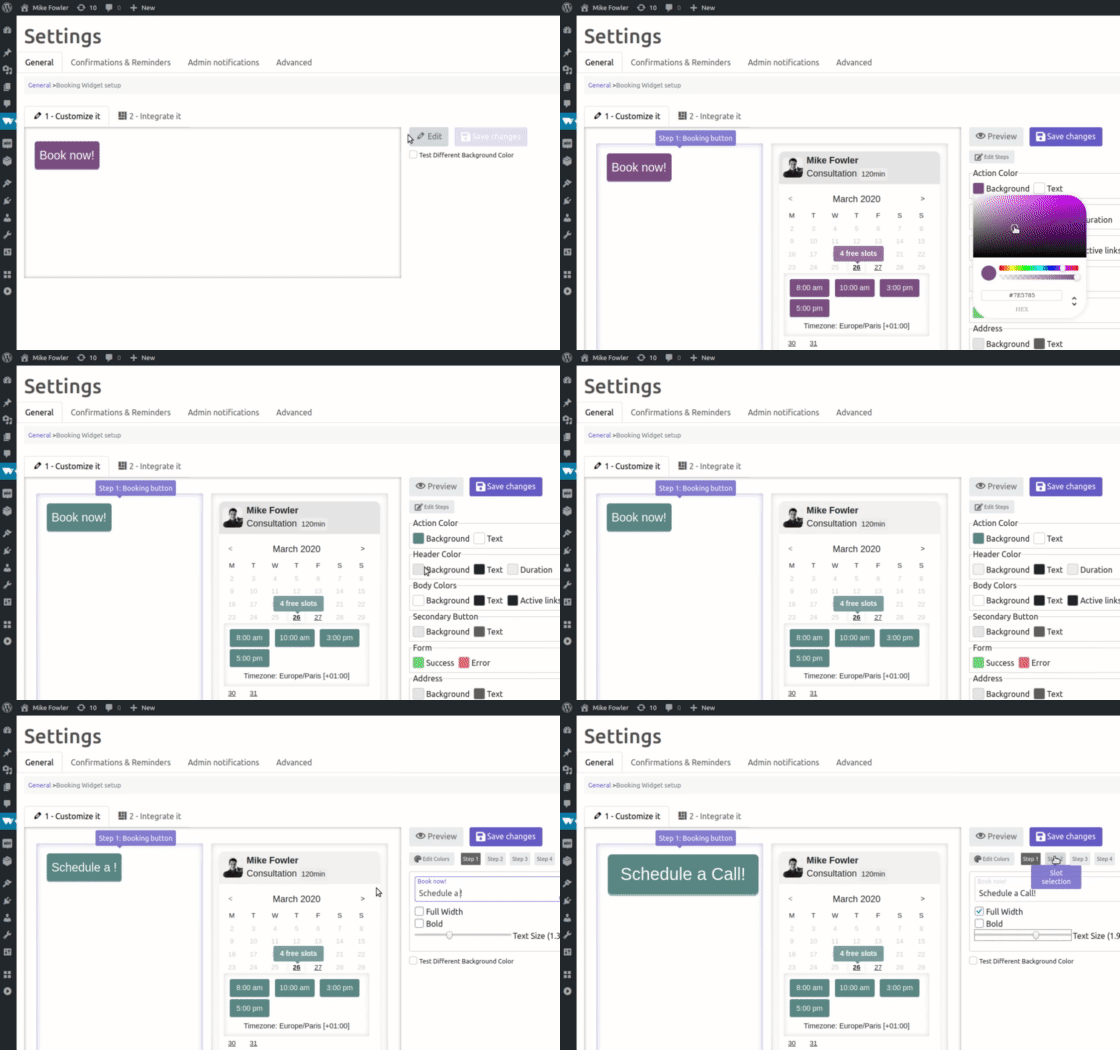
You can change all the texts, colors and few other parameters of each step of the booking process. We plan on adding several templates in the future, meanwhile simply use css to make it exactly the way you want.
Can I set time limits for cancelling and rescheduling appointments?
You can configure when clients can cancel and reschedule their appointments in the settings page Wappointment > Settings > General
Can I sync multiple calendars besides of my Google calendar?
Sure you can, we allow up to 4 calendars in the ics format to be synched from. It can be personal calendar(Google, Outlook, iCal, etc..) or from external applications handling part of your schedule
How often my Google calendar is being checked for sync?
Every 5 minutes we download your calendar and check for changes, we don't do it more often as it could be a heavy task depending on how big is your calendar.
Why do reminders go out late sometimes?
It depends on your website's configuration. The most reliable solution is to setup a cron task manually on your server(check your host's documentation) and disable WP cron (DISABLE_WP_CRON)
Why does nobody receive my confirmations or reminders emails?
Your emails most likely go straight to SPAM or don't event reach your inbox. Change the email sending method in Wappointment > Settings > Confirmations & Reminders just go for the easy and reliable solution, create a free account at SendGrid (100emails/day are free) and configure Wappointment with the SendGrid API
I need 10 minutes to prepare between 2 appointments, how do I proceed?
You can set buffer time for that particular case, you can define it in the Wappointment > Settings > Advanced. When someone books you, you will become unavailable during the time of the appointment + buffer time
更新日志:
- fixed security issue CVE-2025-68575 and CVE-2026-9188
- fixed phone validation script with new prefix not working
- fixed bug with conditional slots and group event
- fixed timezone and conditional slots issue
- fix timezone issue (thanks to lukesUbuntu)
- fixed error messages showing
- fixed remove addons tab
- fixed remove skype option
- improved timezone display in emails to show full timezone name instead of abbreviation
- enhanced vendor patches for PHP 8.1+ compatibility
- fixed deprecated warnings in Carbon and Illuminate packages
- fixed fatal error in backend (php version issue)
- fixed email reminder editor
- improved appointment date/time display to include timezone abbreviation in emails
- fixed php notices
- added search feature on clients listing
- fixed xss security issue
- fixed remove broken and unused full width mode
- fixed php notices
- fixed email notifications not going in specific server configuration
- fixed bug appointment history [wap_history]
- added proton.me as allowed domains for .ics calendars
- added office365 as allowed domains for .ics calendars
- fix reschedule not showing times
- fix reschedule auto select staff
- feat allow external domains for ics import
- fix security issue
- fix calendar dates in the backend when switching to winter time
- added PHP8 compatibility
- added reschedule from backend improved
- added multilang emails for "TranslatePress for Multiples languages sites"
- fixed dailight saving time bug
- fixed issue validation when creating appointment from backend
- fixed chrome issue
- fixed remove reminders from pending emails
- fixed custom field in confirmation email
- fixed chilean pesos formatting
- fixed set collate with default value
- improved .ics import recognize more recurrence
- fixed bug admin booking email not valid
- added random staff auto-selection
- added max booking per staff
- added email footer notes
- added reply to address through filter wappointment_replyto_email and wappointment_replyto_name
- fixed popup close when clicking on background
- fixed staff filtering
- fixed save to calendar button generated .ICS
- fixed double fields in .ics
- fixed calendar sync and custom DST issue for Outlook
- fixed issue with italian phone validation
- fixed indian rupee currency decimal separator
- fixed bug on calendar edit
- fixed multiple installations on same db
- fixed issue custom fields not saved when booking from backend
- added search box and improved pagination on media
- fixed phone number and skype missing from notification email
- fixed issues with .ics calendar import
- fixed set staff page on new event link
- fixed availability filter out old slots
- fixed issue auto-increment on availability slots generation in the frontend
- fixed jitsi meeting link showing too early
- fixed missing jitsi link from backend
- fixed admin duration when buffer, in emails and in admin
- fixed save to calendar button when booking confirmed for firefox and chrome
- fixed wrong duration sent to google cal
- fixed when no timezone is set in ics calendar default to staff timezone
- added "more starting times" option in Settings > Advanced custom segmenting over bookable time
- added option to use same staff email for different calendars
- added option to use the same wappointment.com account key on different accounts
- fixed issue for custom timezones when reading some .ICS calendars from Microsoft Exchange
- fixed issue admin notif double client data
- fixed issue deleted service
- fixed behalf booking when deleted client
- fixed behalf booking
- fixed translated strings
- added dirt detector in availability json response
- added fluid availability option
- fixed issue 3001 when using Zoom without app option
- fixed issue not available slot when available
- fixed today's slot picking strange value
- fixed issue start day of the week in admin calendar
- fixed issue php8
- added manager role
- added RTL emails
- fixed avoid display issue when a calendar staff is deleted
- fixed calendar ICS parse exdate on recurrent event
- fixed min start for availability
- added option to specify custom Jitsi Server URL
- added wp_remote option to avoid CURL errors
- fixed issue i18n date conversion in cancel and reschedule page
- fixed issue save to calendar button
- fixed auto cancel job issues
- refactored bits and pieces
- corrected fatal error
- added staff appointments shortcode
- added health panel for scheduled tasks
- added Jitsi in video meeting providers
- fixed bug Zoom Browser with google meet activated
- fixed issue ics attachments and save to calendar button fixed issue pay on site
- added TOS and privacy policy link in payment step
- added storing user details per order
- added extended data to email receipt
- added translatable strings
- fixed force user email issues
- fixed issue behalf booking
- fixed issue add to calendar button in booking confirmation
- fixed custom fields issue display in calendar and emails
- fixed issue "no idn encoder found" while sending email
- Remove SQL modes to avoid issue on certain servers
- Fixed issue with twilio
- Added compatibility with fluent SMTP plugin
- Added default availability and default assign services for new staff
- Added option to open Zoom meeting straight in the browser without the app
- Added mark as paid and cancel button in orders listing
- Added option to differentiate free event from Outlook
- Added cancel, reschedule and join meeting links to [wap_history] page
- Added allow to cancel 30 minutes before appointments take place
- Added pending appointment admin notification
- Added many translatable strings
- Fixed cache issue, staff listing in Settings > Calendars & Staff was dissappearing
- Improved, plugin is lighter
- Improved installation issue detection
- Lot of improvements and refactoring
- added ability to sell services on site
- fixed reply to email for admin notification
- fixed calendar sync from external ics and recurring events
- fixed issue broken booking form when using data privacy link
- added option to force email from loggedin user hidding the email field
- added option to open slots for a new day from a specific time
- fixed Security vulnerability reported by researcher Renos Nikolaou @r3n_hat
- added popup option for Booking widget shortcode
- improved popup system no more overlay from 3rd party themes or plugins
- fixed issue staff and service selection broken in specific use case
- added compatibility with plugin WP HTML Mail
- added option to show the meeting link only x minutes before the appointment starts
- fixed issue on save to calendar button
- added warning for PHP 8 users
- fixed exception for disappearing Sunday 1st in booking widget
- Added cancel and reschedule link in auto generated event in Google calendar
- Improved js event trigger on appointment confirmation for 3rd party integrations
- Added enable/disable auto-fill option of booking form for logged in users
- Added a "Wide format" for Services with long descriptions
- Fixed bug with cache ON and Calendars & Staff listing empty, impossible to create new staff
- Increased timeout limit on .ICS calendar sync
- Added link in email editor for making a new appointment with same staff
- Added option on booking widget editor to hide the staff name
- Added compatibility for unix socket for DB connection
- Added compatibility with Local by FlyWheel (Long overdue DB connection issue)
- added Limit active bookings per client, in order to avoid over booking from one single person
- fixed availability calculation issue with big busy slots
- fixed calendar synch not being refreshed automatically
- Reminder emails contain now direct link to Zoom Meeting or Google Meet for video appointments
- fixed shortcode issue with shortcode remover plugins
- fixed issue user account with different roles not appearing in Settings > Calendars & Staff
- disabling Wappointment's cache by default
- added hook after booking
- fixed style on button in booking form relative size
- fixed issue undefined email when editing Staff
- Added staff selection page in booking form
- First booking widget screen can now be a staff selection page using a shortcode attribute
- Optimization made on calendars availability check requests
- Added Staff field, for extra information describing your staff(to be used in emails and SMS reminders)
- Added staff permissions to allow staff to modify their own availability
- added appointment history shortcode for logged in users [wap_history]
- Admin notifications emails are now translatable with LocoTranslate or other translations system alike
- Improved overall usability in the backend interfaces
- Added centered option for the booking widget in shortcode mode
- Added email reminder duplicate option
- Improved shortcode generator
- Improved staff/Calendar creation
- Improved service creation
- Improved booking widget appearance
- Correction on calendar sync timezone handling issue
- Remove buffer from total duration in attached ics and in appointment's title
- Fixed missing service information in Wappointment > Calendar for each appointment
- Fixed missing translation on booking widget
- Fixed issue when modifying calendar on save, the custom avatar selection was lost
- Improved booking widget editor for payment selection in addons
- Fixed booking cancel sequence from the backend
- Improved css hiding external nag 99% efficient
- Improved foreign key handling on installation
- Allow calendar delete
- Fixed confirm button in pending appointment email
- Fixed Edit Cancel / Reschedule page in Settings > Advanced
- Fixed client delete issue
- Fixed triple email notifications sent
- Fixed issue installation on WordPress Multisite (db foreign keys name issue)
- Fixed problem to replace calendar/staff image
- Fixed improper service duration appearing in reschedule process of appointment
- Fixed missing translatable strings in booking widget editor
- Fixed multiduration when locked bookable service not being editable
- Fixed false duration in header compact mode
- Fixed issue calendar synch and non standard timezones
- Fixed issue emails not sending when "WP PGP Encrypted Emails" installed
- Fixed issue backend calendar page not showing with out orf range value of regav
- Fixed issue with booking confirmation message initial import
- Can create up to 3 services
- Can create up to 2 calendars
- Lot of interfaces improvements and bug fixes
- Improved calendar synch
- Fixed issue with availability calculation on edge case
- Hide button on preload of booking form
- Improved Google - Zoom connection for better performances
- Added missing confirmation message for video meetings
- Fixed bug on Zoom, Google meet link in appointment confirmation
- Fixed edge case admin calendar not loading events
- Added js hook for analytics on booking confirmation
- Added missing editable text for appointment viewing
- Fixed calendar loading unlimited loop error with recurrent event
- Fixed error when trying to Connect account to Zoom and Google Calendar
- Added Save to calendar button for Outlook Live
- Added Join Zoom Google Meet Meeting link straight in the admin email confirmation
- Fixed SMTP encryption issue SSL and TLS to send booking confirmation
- Fixed issue ics in emails Zoom Google Meet meeting room information is missing
- Fixed issue ics in booking confirmation step for iCal and Outlook
- Added Zoom Integration
- Added Google Calendar 2-way Sync
- Added Google Meet Integration
- Improvement on Email editor
- Phone countries can be ordered with Drag and Drop now
- Style corrections
- Client erase fixed
- Fixed issue with sunday appointments not showing in the admin calendar for some timezones
- Fixed issue on email headers, corrected double headers on site's method
- Compatible with WP Mail SMTP plugin
- Fixed corrupted version
- Corrected Appointments not showing in Admin Calendar on some websites
- Fixed DB tables install issue on foreign key client_id
- added colors preference in Admin calendar
- added client delete button
- setting your weekly availability works on tablets now
- usability improved in the booking widget editor
- automatic cleanup of weekly availability invalid values
- corrected default behaviour on mobile, full screen mobile is OFF if auto-open is ON
- added shortcode "pop_off" parameters to turn off pop behaviour and to force it too "pop"
- added exception on timezone detection for "AUS Eastern Standard Time"
- corrected issue with update information
- Added precision mode on Weekly Availability, you can now set your weekly schedule each 10min, 15min, 20min, 30min
- Added display preferences in Admin Calendar View
- Pref1: You can now set the starting time and end time showing on screen (e.g.: from 8am til 11pm)
- Pref2: You can now set the size of the interval for selection
- mobile booking form is now full screen always for better usability
- Improved Iphone scheduling form
- fixed styling issues in booking form distorter button or header compact mode with long service name
- fixed unkown eastern standard time on calendar sync
- fixed styling issues in booking form
- fixed unavailable booking slots close to current time appearing when they shouldn't
- fixed usability issues in Booking widget editor
- fixed various styling issue in the booking form
- fixed broken email preview for appointment reminders
- fixed large calendar version not expanding fully
- reduced size of calendar buttons days
- corrected calendar refresh in booking form
- fixed account switch bug re showing update page
- corrected error when booking appointment really close to starting time "left greater than right"
- set min width of floating booking form to 320px
- fixed missing error message in booking form
- added feedback script on deactivation
- Backward issue resolved
- Added client basic listing
- Booking form widget design improvements
- Booking form mobile improvements
- Added staff name 1-click edit
- Improved booking widget editor, made clearer
- Improved icons, colors and styling management
- refactored email generation and tag system
- Global refactoring
- Corrected bug on active staff switch
- Added update page information
- Added prefilled booking form when user is logged in
- Improved design of booking form
- Added rescheduled emails when rescheduling from the backend
- Added security plugin conflict detection
- Corrected bug when discarding active staff
- Refactored form generator latest version extendable
- added possibility to include more than one email for admin notifications
- fixed redirect issue on plugin setup
- fixed installation interrupted error with MySQL 5.6 due to unique keys length
- Fixed issue with email notifications
- fixed issue while updating reminder
- fixed new bug DB_CHARSET and DB_COLLATE in v1.5.4
- Improving email test when sending test appointment (cron trigger)
- Fixed Booking Widget Editor
- Fixed issue no available slots when little booking activity
- Fixed installation issue DB_CHARSET missing
- added Dates Localized when supported in booking widget
- fixed Calendar Synch issue
- fixed issue when instaling on local by FlyWheel
- added fix for cached websites, somehow could break frontend booking form
- Corrected style issue
- Fixed Save appointment to personal calendar button
- code refactor booking form and bug fixes
- Added option to turn the cancellation rescheduling page into a proper WordPress page so you can control the style
- Added client's phone number to Admin notifications when present
- Fixed edge case when permalinks are not turned on or server badly configured
- Fixed issue with recurring event on calendar sync
- Fixed issue dealing with failed jobs
- Fixed non standard timezone recognition when syncing calendar
- Fixed update notifications
- Corrected addons update issue
- improved style compatibility booking form
- improved weekly and daily appointments notifications for admins
- improved error detection on installation
- added spread the word section
- Improved wizard and onboarding
- Creating a booking page during onboarding is now a breeze
- Added .ics files to every emails containing appointment informations
- Now you can send prettier appointment confirmation emails using WPmail
- Refactored portions of code
- Added option for data protection link in booking form
- Added plenty of UI improvements and text corrections
- Corrected issues in MultiSite during installation
- Corrected calculation of today's first available slot(increased precision)
- Corrected wizard back button
- Corrected bug on phone field in the frontend
- Refactored bits of code
- Corrected style in frontend booking form
- Async availability requests made lighter
- Fixed Calendar admin view when buffer time is set
- Fixed slots appearing in today's date when not supposed to
- Fixed bug publish unpublish of reminder drops the email header
- Fixed bug loading media gallery before needing it when editing reminders
- Fixed bug at the end of the day showing calendar slot of tomorrow in today
- Improved Booking form style and animation
- Refactored email sending transport
- Improved scheduling system avoiding double event trigger
- Fixed calendar synch list
- Fixed today's slots in booking form
- Fixed booking form relative size to container
- Fixed Timezone appearance in booking form
- Fixed Added tips to select simplify the email sending method choice
- Fixed visual issue on iPhone
- Added Week view in booking form instead of full month
- Added day section when selecting a slot (morning, afternoon, evening)
- Added shortcode options large to have the booking form fill up the whole space where inserted
- Added shortcode option Auto open calendar so that when inserted in your booking page it show the available slots immediately
- Added localization of dates in the frontend booking form, auto display in your client's browser language
- Added phone input requirement
- Improved style of the selected day in booking form
- Fixed bug when booking error message appearing
- Added Buffer Time, time to prepare next appointment not included in appointment's duration, but removed from availability
- Added possibility to Sync more than 1 external calendar to calculate your availability
- Added tag replacement on subject of booking reminder or confirmation
- Added possibility to disconnect a calendar
- Fixed issue on calendar sync
- Fixed tag replacement in email reminders when using WP Mail
- Fixed issue on phone input missing flags
- Fixed issue on booking appointment from admin dashboard
- Tested and compatible with WP 5.4
- Fixed styling issue rescheduling form
- Updated addons page
- Fixed rescheduling issue
- Added Booking form auto-select first day with available slots
- Fixed checkboxes issue in Booking Form Editor
- Fixed month availability minor issue
- Added SendGrid API for email sending
- Added MailGun Area (EU, US) for email reminders
- Added header logo selection for email reminders
- Corrected rendering issues for emails
- Corrected bug for shortcode insertion of booking module
- Corrected booking module appearing on reschedule and cancel page
- Dropped vue-form-generator
- Fixed PHP 7.0 issue with frontend validation
- Fixed PHP 7.0 issue with swiftmailer
- Fixed errors catcher on install
- Fixed dragging issue for regular availability
- corrected addons page styling
- Allow only text version email for WP mail
- Fixed style frontend booking module
- Reverting package to PHP 7.0 compatibility
- Fixed compatibility issue with PHP 7
- Patching
- Corrected a few minor visual issues
- Your Booking button can float in the bottom right corner of your page now
- Clearer backend calendar to manage your appointment better
- Fixed bug staff selection on ms or prefixed site
- Fixed bug client updating contact info when taking appointment
- And tons of quick refactoring and interfaces corrections for more coherence
- Fixed shortcode bug inserted in page or post
- Added Set the staff taking the appointments from your WordPress users list
- Added Set the staff image within few clicks
- Added back to original timezone when previewing calendar in a different Timezone
- Fixed cron bug on low traffic sites
- Fixed Backend interfaces not working for subfolders WordPress installations
- Fixed a few bugs on admin calendar
- Fixed availability regeneration when updating weekly availability
- Fixed a few strings corrections
- Fixed MailGun API connection for emails delivery
- Fixed booking widget editing title was not working
- Added activation hook checking PHP version
- Cleaned up third party messages appearing
- Fixed installation process halting while mistaking a lack of MySQL user permissions
- Hello WordPress! Maintained at https://github.com/wappointment/wappointment