
WC - APG NIF/CIF/NIE Field
| 开发者 | artprojectgroup |
|---|---|
| 更新时间 | 2026年10月14日 05:17 |
| 捐献地址: | 去捐款 |
| PHP版本: | 7.4 及以上 |
| WordPress版本: | 7.2 |
| 版权: | GNU General Public License v3 or later |
| 版权网址: | 版权信息 |
标签
下载
详情介绍:
- Fully compatible with the Checkout block of the WordPress block editor.
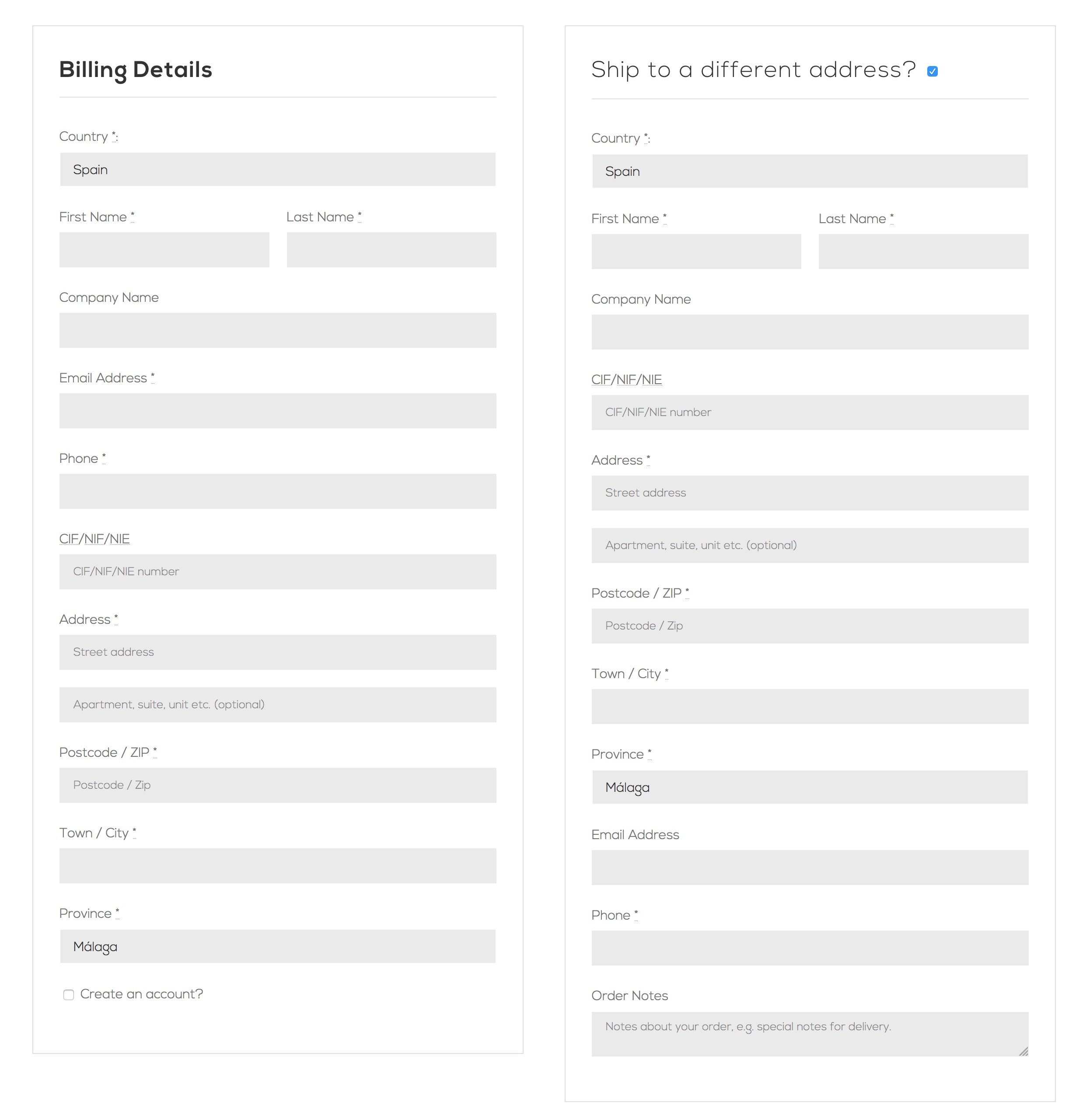
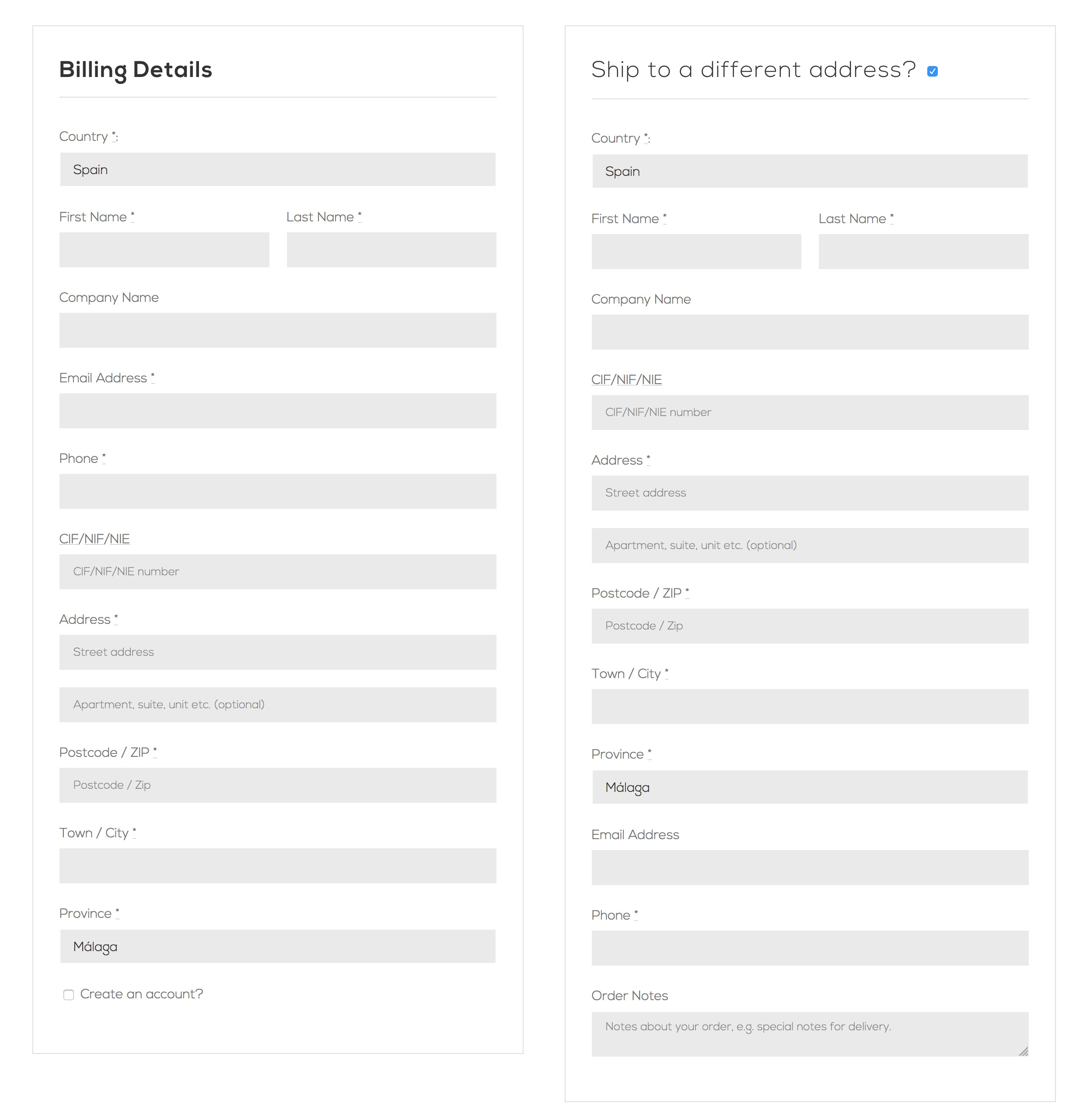
- You can require the NIF/CIF/NIE field in the billing form.
- You can require the NIF/CIF/NIE field in the billing form only from a given order amount.
- You can require the NIF/CIF/NIE field in the shipping form.
- You can hide the NIF/CIF/NIE field from the shipping form.
- You can customize the priority (position) of the field.
- You can validate the NIF/CIF/NIE field.
- You can validate the VIES VAT number field to apply a tax exemption.
- You can validate the EORI field to prevent the sale if a valid number is not entered.
- You can select the country(ies) where the EORI field will be validated.
- You can customize the label and placeholder of the NIF/CIF/NIE, VIES VAT number or EORI field.
- You can customize the error message of the field NIF/CIF/NIE, VIES VAT number or EORI.
- You can customize the error message if the maximum number of requests to the VIES VAT number verification API is exceeded.
- Add and require phone and email fields in the shipping form.
- You can remove the phone and email fields from the default address.
- You can display and customize an error message for the billing form using the
apg_nif_display_error_messageandapg_nif_error_messagefilters. - You can remove the Email and Phone fields from the submission form with the
apg_nif_add_fieldsfilter. - You can skip validation by country or external condition with the
apg_nif_skip_validationfilter. - You can override the required status for billing or shipping with the
apg_nif_skip_requiredfilter. - You can change the order amount compared against the configured threshold with the
apg_nif_importe_del_pedidofilter. - You can limit how many VIES/EORI lookups a single IP can trigger per minute with the
apg_nif_maximo_consultas_por_minutofilter (off by default). - Adds a customer download button in WooCommerce (Customers) that includes the NIF/CIF/NIE field in the CSV.
- Each identifier is checked with the official algorithm of its country, not just its shape.
- It validates documents from:
- Albania.
- Andorra.
- Austria.
- Argentina.
- Åland Islands.
- Brazil.
- Belgium.
- Bulgaria.
- Belarus.
- Switzerland.
- Chile.
- Colombia.
- Cyprus.
- Czech Republic.
- Germany.
- Denmark.
- Estonia.
- Spain.
- European Union.
- Finland.
- Faroe Islands.
- France.
- Great Britain.
- Greece.
- Croatia.
- Hungary.
- Ireland.
- Iceland.
- Italy.
- Liechtenstein.
- Lithuania.
- Luxembourg.
- Latvia.
- Monaco.
- Moldova.
- Montenegro.
- North Macedonia.
- Northern Ireland.
- Malta.
- Mexico.
- Netherlands.
- Peru.
- Norway.
- Poland.
- Portugal.
- Romania.
- Serbia.
- Sweden.
- Slovenia.
- Slovak Republic.
- San Marino.
- Ukraine.
- Uruguay.
- 100% compatible with WooCommerce PDF Invoices & Packing Slips.
- 100% compatible with WPML.
- 100% compatible with Checkout Field Editor (Checkout Manager) for WooCommerce
- English: by Art Project Group (default language).
- Spanish: by Art Project Group.
安装:
- Install the plugin in one of the following ways:
- Upload the
wc-apg-nifcifnie-fieldfolder to the/wp-content/plugins/directory via FTP. - Upload the full ZIP file via Plugins -> Add New -> Upload in the WordPress administration panel.
- Search for WC - APG NIF/CIF/NIE Field in Plugins -> Add New and click Install Now.
- Activate the plugin through the Plugins menu in the WordPress administration panel.
- Configure the plugin in WooCommerce -> NIF/CIF/NIE field or through the Settings link on the plugins page.
屏幕截图:
常见问题:
How do I configure the plugin?
The plugin settings are very simple: you only need to indicate whether you want the NIF/CIF/NIE field to be validated or not, and configure the optional VIES and EORI validation if you need them.
How do I fix duplicate NIF metadata from older orders?
If your store placed orders via the Checkout block (or the classic checkout) with an older version of the plugin, some orders may have duplicate or legacy billing_nif / shipping_nif metadata rows that prevent the field from updating correctly in the admin panel.
Option 1 – Settings page (recommended): Go to WooCommerce -> NIF/CIF/NIE field. If duplicates are detected, a "Fix duplicate NIF metadata" button appears at the bottom of the page. Click it to run the cleanup. The button disappears automatically once there are no more duplicates.
Option 2 – WP-CLI (large stores): Run the following command from the root of your WordPress installation to avoid HTTP timeouts:
wp eval-file wp-content/plugins/wc-apg-nifcifnie-field/includes/admin/limpieza-meta-duplicados.php
Where can I get support?
WC - APG NIF/CIF/NIE Field is a free plugin. Art Project Group does not provide free technical support, but offers a paid technical support service for installation and configuration.
更新日志:
- Fixed: valid identifiers from Cyprus, Malta and Serbia were rejected, because their check digit algorithms were not the official ones.
- Fixed: Dutch VAT numbers issued since 2020, which are not derived from the personal identification number, are accepted now.
- Fixed: Ireland, France, Portugal, Sweden, Slovenia, Latvia and Romania rejected valid forms of their identifiers.
- Fixed: Spanish NIF numbers from the K, L and M series were checked with the company algorithm instead of the individual one.
- Fixed: the + and * signs, which are part of some Irish and Dutch numbers, were stripped when the field was cleaned up.
- New: check digit validation for Albania, Andorra, Belarus, Moldova, Montenegro, North Macedonia, San Marino and Ukraine.
- New: Northern Ireland (XI) numbers are validated, instead of always rejected, and the Brazilian CNPJ accepts the numbers with letters issued from 2026.
- Fixed: the plugin redefined the Phone field and always left it as optional, ignoring the setting in Customize > WooCommerce > Checkout, and brought the field back even when it was set to hidden. WooCommerce already provides it, so the plugin no longer touches it.
- Security: the VAT exemption was kept in the customer session and was never rechecked when the order was placed, so an order could be completed without VAT using a number that did not match the order address. It is now recalculated from the final order data in both checkouts.
- Fixed: the United Kingdom check digit algorithm rejected valid VAT numbers (Tesco's GB220430231 or the BBC's GB333289454). It now follows the HMRC specification.
- Fixed: a VIES or EORI outage could leave a valid number remembered as invalid. Only conclusive answers are cached now, for 30 days if valid and 24 hours if not.
- Fixed: on the first load of the Checkout block the shipping form was not validated, so a NIF/CIF/NIE coming from the customer's saved address did not apply the exemption until the field was touched.
- New check digit validation for Iceland, Brazil (CNPJ and CPF), Peru, Colombia and Uruguay. Monaco now uses the French algorithm and the Åland Islands the Finnish one.
- Brazil, Mexico, Colombia, Peru and Uruguay added to the validated countries: their identifiers used to be accepted without any checking. Mexico's RFC is checked for structure and for a real date.
- The EORI number is checked for shape before querying HMRC or the European Commission.
- Security: data migrations no longer run for users without the
manage_woocommercecapability, the customer CSV export neutralizes formula injection, the checkout scripts escape everything they print, and every$_POSTread verifies its own nonce. - New
apg_nif_maximo_consultas_por_minutofilter to cap external VIES/EORI lookups per IP address. Off by default. - Fixed: a field sharing its label with the NIF/CIF/NIE one disappeared from the order admin, the missing SoapClient notice showed the link markup as plain text, and a fatal error was possible on the VIES endpoint without a WooCommerce session.
- Tested with WooCommerce 11.1.0. The translation template has been regenerated: nine strings that were in the plugin but missing from it are now translatable.
- New setting "Require billing field from this amount": the NIF/CIF/NIE field becomes required in the billing form when the order total (taxes included) is equal to or greater than the amount entered, even if the "Require billing field?" option is not checked. Leave it empty to disable it. It never affects the shipping form, which keeps behaving as configured. The
apg_nif_importe_del_pedidofilter lets you compare a different amount (for example, the subtotal without taxes or without shipping costs). - Fixed: in the Checkout block, the billing field was not enforced as required when "Show shipping field?" was unchecked and both required options were checked. The field was not registered as natively required and the plugin's own check was skipped, so the order could be placed with an empty NIF/CIF/NIE.
- Fixed: in the Checkout block, the per-form required check only ran when some validation (NIF/CIF/NIE, VIES or EORI) was enabled. Requiring the field in a single form without any validation active had no effect.
- Security: the AJAX endpoint that applies the VAT exemption in the Checkout block (
apg_nif_quita_iva_bloques) trusted the value sent by the browser and did not check any nonce, so any visitor could remove the VAT from their own order without a valid VAT number. It now verifies the nonce and recalculates the exemption on the server with the submitted VAT number and country. - The field label is now kept in sync with the order amount in both checkouts: the "(optional)" text disappears as soon as the order reaches the configured amount, and comes back if it drops below it (for example, after applying a coupon). The state is always calculated on the server, so the label and the validation can never disagree.
- In the Checkout block, with "Use same address for billing" ticked only the shipping form is shown, and that address is also the billing one: its NIF/CIF/NIE field now follows the billing rules, as it should.
- Fixed: when the field was required and left empty with validation enabled, two error messages were shown (the required one and the invalid format one). The format is no longer validated on an empty field.
- Fixed: uninstalling the plugin left behind the
apg_nif_meta_pedido_migradooption and the VIES/EORI cache transients. - The
json_split_objects()helper function has been renamed toapg_nif_json_split_objects(). It was declared in the global namespace without a prefix, which could cause a fatal error if another plugin declared the same name. - Internal cleanup: removed unreachable code, unused globals and an unnecessary address-fields lookup in the shipping form.
- Fixed: the metadata cleanup and the one-time automatic migration did not actually process the HPOS order table (
wc_orders_meta); they relied on the$wpdb->wc_orders_metaproperty, which WooCommerce does not set, so on HPOS stores the 4.14.0 migration touched onlypostmetaand left the orders untouched. The HPOS table is now detected from the database prefix, and the automatic one-time cleanup runs again on update to 4.14.1 to migrate those orders to_billing_nif/_shipping_nif.
- The order meta key for the NIF/CIF/NIE is now
_billing_nif/_shipping_nif(with a leading underscore), matching WooCommerce's native order meta convention (_billing_*) so the value is read by ERP integrations such as Holded and others that expect the underscored key. Reading still falls back to the legacybilling_nif/shipping_niffor orders placed with previous versions. - The duplicate-metadata cleanup tool now migrates the legacy
billing_nif/shipping_nifkeys to the canonical_billing_nif/_shipping_nif(in bothpostmetaand HPOSwc_orders_meta). Run it from the plugin settings or via WP-CLI on large stores. - This cleanup also runs automatically once, in the admin, right after updating to this version, so the migration happens without clicking the button (the settings button and the WP-CLI script remain available as an alternative for very large stores).
- Customer (user) meta is unchanged: it stays
billing_nif/shipping_nif, as WooCommerce stores customer billing fields without the underscore.
- Fixed the NIF/CIF/NIE field not being auto-filled when selecting a customer while creating or editing an order in the admin panel. The field is now rendered with the id that WooCommerce's customer-details script expects (
_billing_nif/_shipping_nif), while the value is still stored under the canonicalbilling_nif/shipping_nifkeys. - Unified the NIF metadata key across every save path. The classic checkout no longer leaves a legacy
_billing_nif/_shipping_nifcopy, and editing an order from the admin panel no longer creates a second metadata entry. - Rewrote the duplicate NIF metadata detection and cleanup tool. Detection now also finds orders where
billing_nifand_billing_nif(orshipping_nifand_shipping_nif) coexist, works on bothpostmetaandwc_orders_meta(HPOS, including sync mode and configurations where the cleanup button previously failed to appear), and caches the query for one hour to avoid performance issues on large stores. The cleanup migrates lone legacy keys to the canonical key, removes legacy keys when the canonical one already exists, and deduplicates repeated rows, so detection and cleanup always agree (fixing the case where the button appeared but reported "0 fixed"). - Reviewed and corrected the plugin's English texts. Fixed the wording of the settings description and field tooltips (e.g. "validate the field before submission", "allow and validate the VIES VAT number / the EORI number") and of the information box ("Contact us", "If you enjoy this plugin and find it helpful"), and renamed the "End Purchase block" reference to the correct WooCommerce term "Checkout block".
- Fixed the root cause of the NIF field not saving when editing an existing order from the admin panel: the field definition was missing an explicit
id, so WooCommerce was writing the admin-entered value to_billing_nif/_shipping_nifinstead ofbilling_nif/shipping_nif. As a result, the display always showed the original checkout value unchanged. - Fixed the duplicate NIF metadata detection function so it checks both
postmetaandwc_orders_meta(HPOS) regardless of the active storage mode. Previously the cleanup button could fail to appear on stores using HPOS sync mode or certain HPOS configurations.
- Fixed a regression introduced in 4.12.0 where editing the NIF field on an existing order from the admin panel and saving would silently discard the new value, leaving the old one in the database. This happened on stores with duplicate NIF metadata rows created by older versions of the plugin. The automatic deduplication hook has been removed; use the cleanup button in the plugin settings or the WP-CLI script instead.
- Fixed duplicate
billing_nif/shipping_nifmetadata rows generated when placing orders with Checkout Blocks, which caused the NIF field to appear unchanged after editing an order from the admin panel. - Added a "Fix duplicate NIF metadata" button in the plugin settings page to clean up existing duplicate rows in stores affected by previous versions.
- Fixed a Checkout Blocks regression introduced in 4.11.3 where the NIF/CIF/NIE field could be treated as a native address field during Store API requests and incorrectly trigger a required-field error on checkout.
- Fixed the NIF/CIF/NIE field in My Account address editing when the account page is rendered with the
[woocommerce_my_account]shortcode on stores using Checkout Blocks.
- Fixed order admin and formatted address NIF loading for orders created with Checkout Blocks by reading
billing_nifandshipping_niffirst, with fallback to legacy meta keys.
- Fixed
requerido_envioin classic checkout so the shipping NIF/CIF/NIE field is only required when the customer checks "Ship to a different address".
- Added the
apg_nif_skip_requiredfilter to override the required status for billing or shipping via hook.
- Added support for Italian
Codice Fiscalevalidation. - Fixed international prefix detection so non-ISO leading letters are not treated as country prefixes.
- Fixed Checkout Block VIES validation initialization in
valida-bloques-nif.js.
- Fixed compatibility with FunnelKit Builder custom checkout validation when showing the shipping field.
- Minor fixes.
- Added compatibility declaration for
product_instance_caching. - Improved VIES, EORI and VAT exemption handling.
- Added a new option to hide the shipping NIF/CIF/NIE field.
- Improved required billing/shipping field handling in the Checkout Block.
- Fixed compatibility with Checkout Field Editor (Checkout Manager) for WooCommerce.
- Minor fixes.
- Minor fixes.
- Added the
apg_nif_skip_validationfilter - Minor fixes.
- Fixed JavaScript validation.
- Minor fixes.
- Minor fixes.
- Minor fixes.
- Minor fixes.
- Minor fixes.
- Minor fixes.
- Addition of a customer download button in WooCommerce (Customers) that includes the NIF/CIF/NIE field in the CSV.
- Minor fixes.
- Minor fixes.
- Addition of document validation for new countries.
- Minor fixes.
- Minor fixes.
- Minor fixes.
- Added PHPDoc blocks throughout the code.
- Fixed compatibility with Checkout Field Editor (Checkout Manager) for WooCommerce.
- Minor fixes.
- Minor fixes.
- Fixed tax exemption handling.
- Minor fixes.
- Fixed required field handling in the addresses on the My Account page.
- Minor fixes.
- Fixed JavaScript validation.
- Minor fixes.
- Correction and unification of user metas.
- Added shipping country check to the tax exemption.
- Minor fixes.
- Minor fixes.
- Minor fixes.
- Minor fixes.
- Added the NIF field to the Checkout block address.
- Minor fixes.
- Added live validation.
- Improved security.
- Minor fixes.
- Minor fixes.
- Minor fixes.
- Minor fixes.
- Full compatibility added for VIES and EORI validation in the Checkout Block.
- General performance improvements.
- Full code compliance with WordPress security standards.
- Addition of document validation for new countries.
- Minor fixes.
- Small fixes.
- Added
apg_nif_add_fieldsfilter. - Improved validation.
- Small fixes.
- Small fixes.
- Improved security.
- Improved international validation process.
- Small fixes.
- Small fixes.
- Small fixes.
- Small fixes.
- Small fixes.
- Small fixes.
- Limits features to the Checkout Block.
- Small fixes.
- Small fixes.
- Small fixes.
- Small fixes.
- Small fixes.
- Improved compatibility with third party plugins.
- Improved compatibility with third party plugins.
- Small fixes.
- Fixed a bug affecting versions below WooCommerce 8.9.
- Added support for the Checkout block.
- Improved compatibility with third party plugins.
- Small fixes.
- Small fixes.
- Added HPOS support.
- Small fixes.
- Added EORI number validation option Upgrade sponsored by OldWood - Ground, Oil Varnishes & Natural Colours.
- Added option to select priority of the field NIF/CIF/NIE.
- Added two filters to display and customize an error message for the billing form:
apg_nif_display_error_messageandapg_nif_error_message. - Screenshot updated.
- Header updated.
- Stylesheet updated.
- Screenshot updated.
- Validates the shipping form only if it has been activated.
- Validates VIES number only for supported countries.
- Indicates the corresponding form in the field validation.
- Add the NIF/CIF/NIE field in the order search.
- Small fixes.
- Small fixes.
- Small fixes.
- Added support for Polylang.
- Small fixes.
- Small fixes.
- VIES validation fix for Greece and Ireland.
- Adjustment to make the new option compatible with WooCommerce PDF Invoices & Packing Slips.
- Now you can now remove the phone and email fields from the default address.
- Customizable error messages and translatable with WPML.
- Small fixes.
- Added tax exemption on shipping costs.
- Removed tax exemption on shipping costs.
- Added phone and email fields in international addresses.
- Small fixes.
- Remove double phone and email address in the Thank you page.
- Text field name translatable with WPML.
- Updated email account template.
- Small fixes.
- Small fixes.
- Added customization for the field label and placeholder.
- Updated screenshot.
- Small fixes.
- Removed all the changes of fields order.
- Small fixes.
- Added fields in WooCommerce PDF Invoices & Packing Slips for invoices with addresses outside Spain.
- Small fixes.
- Added error message and deactivation when SoapClient PHP class doesn't exist.
- Added WooCommerce 3.4 compatibility.
- Small fixes.
- Remove double phone and email address in the order email.
- Fixed CIF number validation.
- Remove double phone and email address in the order email.
- Header updated.
- Stylesheet updated.
- Screenshot updated.
- Fixed CIF number validation.
- Prevent NIF/CIF/NIE field validation out from Spain.
- Minor fixes.
- Display the email field in manually created orders in WooCommerce 3.x.
- Prevent NIF/CIF/NIE validation with VIES number validation selected.
- Text field name translatable.
- Improved performance.
- Fixed localization.
- Improved VIES number validation.
- Internationalization of VIES number validation.
- Added VIES VAT number validation option.
- Adjust to optimize WooCommerce 3.0 compatibility.
- Support for multisite installations.
- Display all fields in non registered users.
- Fixed email addresses format.
- Fixed missed Spanish translations.
- Display the email field in manually created orders.
- Display the email in customer data.
- Removed all custom classes from fields to improve universal compatibility with templates.
- Internal plugin structure fully rewritten for easy maintenance.
- Load the NIF/CIF/NIE field value in manually created orders.
- Added new setting options.
- Updated translation.
- Updated screenshot.
- Initial version.