
WPHEKA Backorder Split
| 开发者 |
akshayaswaroop
wpheka |
|---|---|
| 更新时间 | 2026年11月11日 20:31 |
| 捐献地址: | 去捐款 |
| PHP版本: | 8.1 及以上 |
| WordPress版本: | 7.1.4 |
| 版权: | GPLv3 |
| 版权网址: | 版权信息 |
详情介绍:
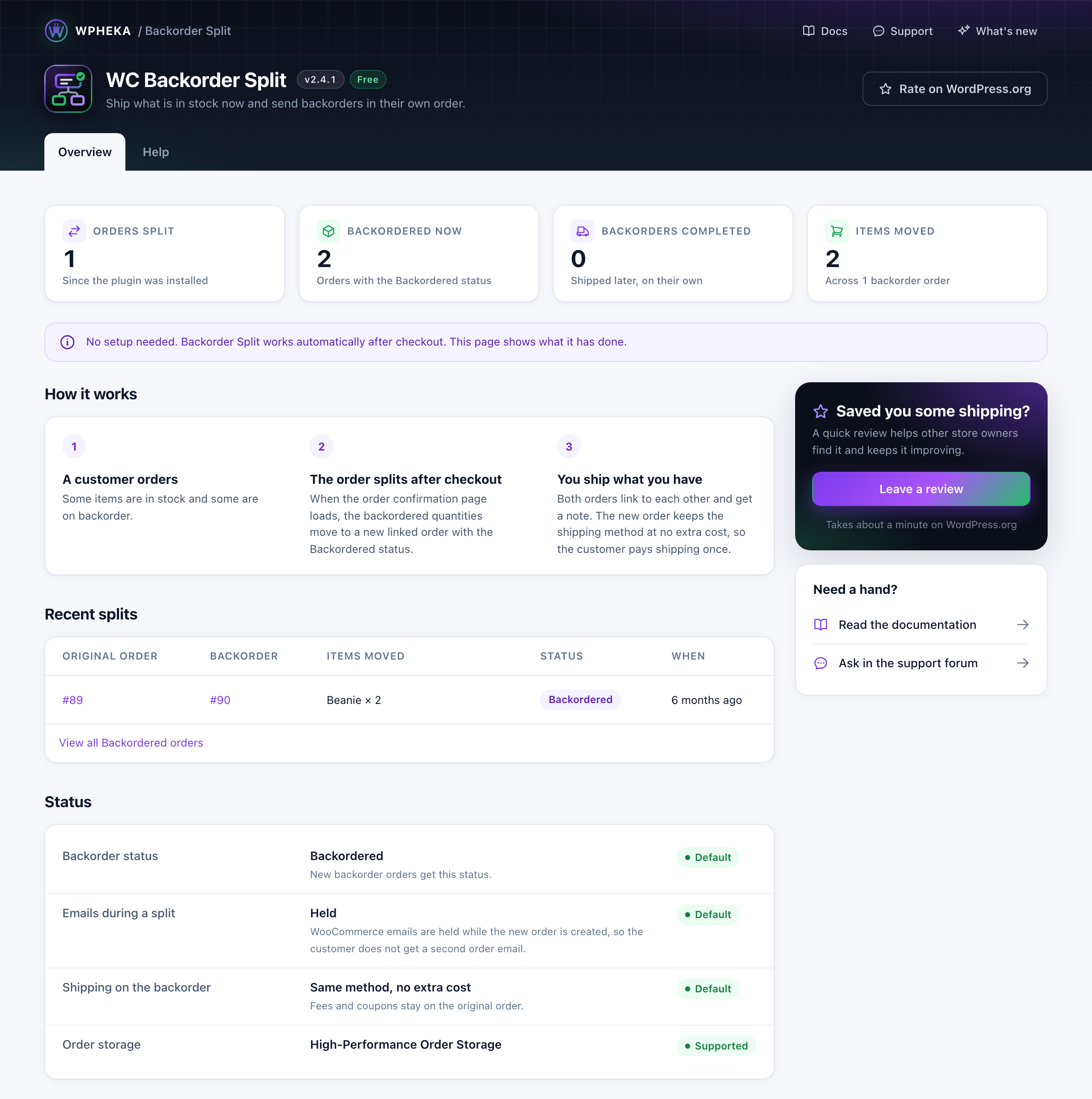
- Splits automatically after checkout - No settings, no screens to visit.
- Ship what is in stock today - The backordered quantity waits in its own order.
- Shipping is paid once - The backorder order keeps the same shipping method at no extra cost. Fees and coupons stay on the original order.
- Nothing more to pay - The customer pays nothing more and gets no second order email.
- Backordered status - Its own tab on the orders screen and a bulk action to set it.
- Linked orders - Both orders link to each other and each gets a note naming the other order.
- Overview page - WPHEKA > Backorder Split shows how many orders were split, what is backordered now and the latest splits.
- HPOS Compatible - Full support for WooCommerce High-Performance Order Storage
- Developer Friendly - Extensive hooks and filters for customization
wcbs_before_split_order- Action before order splittingwcbs_after_split_order- Action after order splittingwcbs_backorder_created- Action when backorder is createdwcbs_split_order_error- Action on split errorwcbs_should_split_order- Filter to prevent splittingwcbs_backorder_items- Filter to modify backorder itemswcbs_backorder_status- Filter to change backorder statuswcbs_meta_fields_to_copy- Filter to add/remove meta fields copied to backorderwcbs_disable_emails_on_split- Filter to control email suppression during splitwcbs_copy_charges_to_backorder- Filter: return true to copy shipping costs, fees and coupons to the backorder order in full (the behaviour before 2.4.0)
安装:
- WooCommerce 4.2 or later
- Upload 'wc-backorder-split' to the '/wp-content/plugins/' directory or install the plugin through the WordPress plugins screen directly.
- Activate the plugin through the 'Plugins' menu in WordPress
- Done!
屏幕截图:
常见问题:
How does it work?
When a customer buys more of a product than you have in stock and the product allows backorders, the extra quantity moves to a new order with the Backordered status. The original order keeps what is in stock, so you can ship it now. Both orders link to each other and get a note. There is nothing to set up: install it and the next order with a backordered item splits by itself.
When does the split happen?
When the order confirmation page loads after checkout, on the classic checkout and on the block checkout. An order is split once and only once, even if the page is reloaded. If the payment fails, the order is left whole until a retried payment goes through. Orders you add by hand in wp-admin are not split and neither is an order whose customer never reaches the confirmation page. The "Change status to backordered" bulk action on the orders screen changes the status only. It does not split the order.
What happens to shipping, fees and coupons?
They are paid once, on the original order. The backorder order keeps the shipping method at no extra cost, so you can see how to ship it. Each order's items keep their share of any coupon discount, so the two orders add up to what the customer paid. Developers can restore the full copy with the wcbs_copy_charges_to_backorder filter.
What if nothing in the order is in stock?
The order is not split. It gets the Backordered status instead.
Does the customer get a second order email?
No. WooCommerce's emails are held while the backorder order is created, so the customer sees one order confirmation.
Is the customer charged again for the backorder order?
No. The plugin never takes a payment. The backorder order shows the original order's payment method and is not marked as needing payment. The customer makes one payment and the two orders' totals add up to it.
Does it work with variations?
Yes. Variations with their own stock and variations that share their parent's stock are both handled.
Where do I see what it has done?
Under WPHEKA > Backorder Split: orders split, orders backordered now, backorders completed, items moved and the five latest splits.
更新日志:
- Fix - An order still waiting for payment when its confirmation page loads (redirect and offsite gateways) is no longer split there. It stays whole, so a failed and retried payment pays the full amount. It splits once the order is paid (processing or completed), also when you confirm it yourself in wp-admin.
- Fix - The confirmation page and the gateway's payment notification arriving at the same moment can no longer split one order twice.
- Tweak - New screenshot of a split order on the orders screen.
- Fix - An order whose payment failed is no longer split when its confirmation page loads. It stays whole, so a retried payment pays the full amount. It splits once the payment goes through.
- Fix - An order with every item on backorder no longer changes from Failed to Backordered, which hid the failed payment.
- Tweak - The plugin is now called WPHEKA Backorder Split. New listing text.
- Tweak - The deactivation feedback dialog uses
.trigger( 'focus' )instead of jQuery's deprecated.focus()shorthand. - Enhancement - WordPress 7.1.4 compatibility.
- Tweak - Notices from WordPress and other plugins no longer show on the WPHEKA > Backorder Split page, where they printed above the header and then jumped into place. They still show on every other screen.
- Fix - On sites in a right-to-left language the labels in the Status list sat against the edge of the card. They now have the same margin as the rest of the row.
- Feature - New WPHEKA > Backorder Split page: orders split, backordered now, backorders completed, items moved, the latest splits and how it works.
- Fix - Shipping is now charged once. The backorder order keeps the shipping method at no extra cost, and fees and coupons stay on the original order, so the two orders add up to what the customer paid. Orders split before 2.4.0 are unchanged.
- Feature - The
wcbs_copy_charges_to_backorderfilter restores the full copy of shipping, fees and coupons. - Fix - The "Change status to backordered" bulk action now shows on the orders screen with High-Performance Order Storage.
- Fix - The internal stock reading saved on order items is no longer shown under the product on the order screen.
- Tweak - Minimum WooCommerce version is 4.2 everywhere. Support link goes to the wordpress.org forum.
- Enhancement - WordPress 7.1.3 and WooCommerce 11.2.1 compatibility.
- Fix - Closing the review request with its X now hides it for 14 days for that user instead of returning on the next Dashboard load.
- Fix - Orders with several items sharing the same stock, such as variations whose stock is managed on the parent product, now split correctly. Each item used to count the full stock, so these orders were not split at all.
- Fix - Variable products now split correctly. Stock was read from the parent product, which has none when stock is managed per variation.
- Fix - Orders placed with the Checkout block are now split. The plugin did not run during block checkout.
- Fix - Raising a quantity in the cart before checkout no longer moves in-stock items into the backorder order or marks the whole order backordered without splitting it.
- Fix - An order where nothing was in stock now just changes status instead of leaving the original order empty.
- Enhancement - Errors are logged to WooCommerce > Status > Logs instead of the server's PHP error log.
- Enhancement - WooCommerce 11.1.2 compatibility.
- Feature - Asks for a review on the Dashboard once the plugin has been used, with a link that pre-selects a five-star rating. Shown only after three orders have been split, dismissed per user rather than for the whole site, and never shown again once dismissed.
- Fix - The deactivation feedback dialog no longer leaves its button stuck on "Processing" if the request fails; deactivation proceeds either way.
- Security - The backorder success notice no longer reveals whether an order id exists to users who cannot edit orders.
- Fix - Order links in the backorder notice and the linked-orders panel now work on stores using High-Performance Order Storage. They used the legacy post editor URL, which does not resolve once orders live in their own tables.
- Fix - The deactivation feedback dialog is translatable again. Its text passed a text domain to a function that ignores the argument, and the domain named a different plugin.
- Security - Escaped the deactivation dialog's markup and its inline script.
- Enhancement - Declared compatibility with the Cart and Checkout blocks, verified against the order path WooCommerce's Store API actually uses.
- Enhancement - Adopted the WPHEKA framework for the HPOS declaration and plugin bootstrapping.
- Enhancement - Requires PHP 8.1 and WordPress 6.5. WordPress 7.1 and WooCommerce 11.0.1 compatibility added.
- Enhancement - Backorder order creation now suppresses WooCommerce emails to prevent duplicate new-order and processing notifications.
- Enhancement - Backorder order now inherits all standard order fields: currency, prices include tax, customer IP, user agent, transaction ID, date paid, date completed, and stock reduced flag.
- Enhancement - WooCommerce order attribution and VAT exemption meta fields are now copied to the backorder order.
- Enhancement - Line items are cloned (not re-added via add_product) preserving product variations, custom fields, and all item-level meta data.
- Enhancement - Per-unit prices are captured before any order mutation so discount-adjusted totals remain correct on both orders.
- Enhancement - _reduced_stock meta is now split proportionally between the original and backorder order items.
- Enhancement - Address indexes (_billing_address_index, _shipping_address_index) are now copied to the backorder order for correct address search results (HPOS-aware).
- Enhancement - Both orders are scheduled for WooCommerce Admin analytics re-import after a split so revenue reports stay accurate.
- Enhancement - Added wcbs_meta_fields_to_copy and wcbs_disable_emails_on_split filters for developer extensibility.
- Fix - Stock quantity 0 at cart time now correctly removes the item from the original order instead of leaving it duplicated across both orders.
- Fix - Removed erroneous add_item() call after in-place source item update that caused calculate_totals() to double-count the item.
- Security - Fixed unsanitized $_SERVER['REQUEST_URI'] access in REST API detection.
- Enhancement - Added comprehensive order data copying: shipping methods, payment info, fees, coupons, and taxes.
- Enhancement - Added order relationship linking between parent order and backorder.
- Enhancement - Added order notes to both orders explaining the split operation.
- Enhancement - Added admin panel display showing linked orders in order details.
- Enhancement - Added developer hooks for extensibility (wcbs_before_split_order, wcbs_after_split_order, wcbs_backorder_created, wcbs_split_order_error).
- Enhancement - Added filter hooks for customization (wcbs_should_split_order, wcbs_backorder_items, wcbs_backorder_status).
- Enhancement - Improved item meta data copying during split to preserve product variations and custom data.
- Enhancement - Added comprehensive PHPDoc documentation with @since tags throughout codebase.
- Fix - Critical: Added protection against duplicate order splits on page reload.
- Fix - Fixed fatal error "Call to a member function save() on int" when copying item meta data.
- Fix - Fixed order splitting logic to work correctly when product stock status is already 'onbackorder'.
- Fix - Removed unnecessary is_on_backorder() check that prevented stock quantity tracking.
- Fix - Properly retrieve order item objects after add_product() to enable meta data copying.
- Fix - Updated version number consistency across all plugin files.
- Fix - Updated @version tags in PHPDoc blocks to reflect current version.
- Fix - Made bulk action text translatable for better localization support.
- Fix - Added return value to is_request() method for better error handling.
- Security - Added CSRF protection with nonce validation for AJAX requests.
- Security - Added capability checks for admin operations.
- Security - Enhanced input validation and sanitization.
- Enhancement - Improved error handling with try-catch blocks and logging.
- Enhancement - Added comprehensive PHPDoc documentation.
- Enhancement - Optimized performance by loading admin styles only on relevant pages.
- Enhancement - Improved database query efficiency using specific item types.
- Enhancement - Enhanced product and order validation throughout the codebase.
- Enhancement - Added detailed error logging for debugging and monitoring.
- Fix - Fixed class reference in singleton pattern documentation.
- Fix - Improved code structure and readability.
- Tweak - Maintained full HPOS (High-Performance Order Storage) compatibility.
- Enhancement - WooCommerce Version 9.8.5 compatibility added.
- Enhancement - WooCommerce Version 9.1.4 compatibility added.
- Enhancement - WooCommerce High Performance Order Storage compatibility added.
- Enhancement - WooCommerce Version 6.5.1 compatibility added.
- Fix - Negative stocks checking issue fixed.
- Fix - Parent order quantity issue fixed.
- Tweak - WC 4.9.0 support added.
- Enhancement - Deactivation feedback form added.
- Enhancement - Plugin structure updated.
- Tweak - WC 4.2 support added.
- Order status updation issue fixed
- Order splitting bug fixes
- Guest user data in backorder bug fixed
- Initial release