
WCFM Marketplace - Multivendor Marketplace for WooCommerce
| 开发者 | wclovers |
|---|---|
| 更新时间 | 2026年8月30日 13:41 |
| 捐献地址: | 去捐款 |
| PHP版本: | 7.4 及以上 |
| WordPress版本: | 7.0.2 |
| 版权: | GPLv2 or later |
| 版权网址: | 版权信息 |
标签
下载
详情介绍:
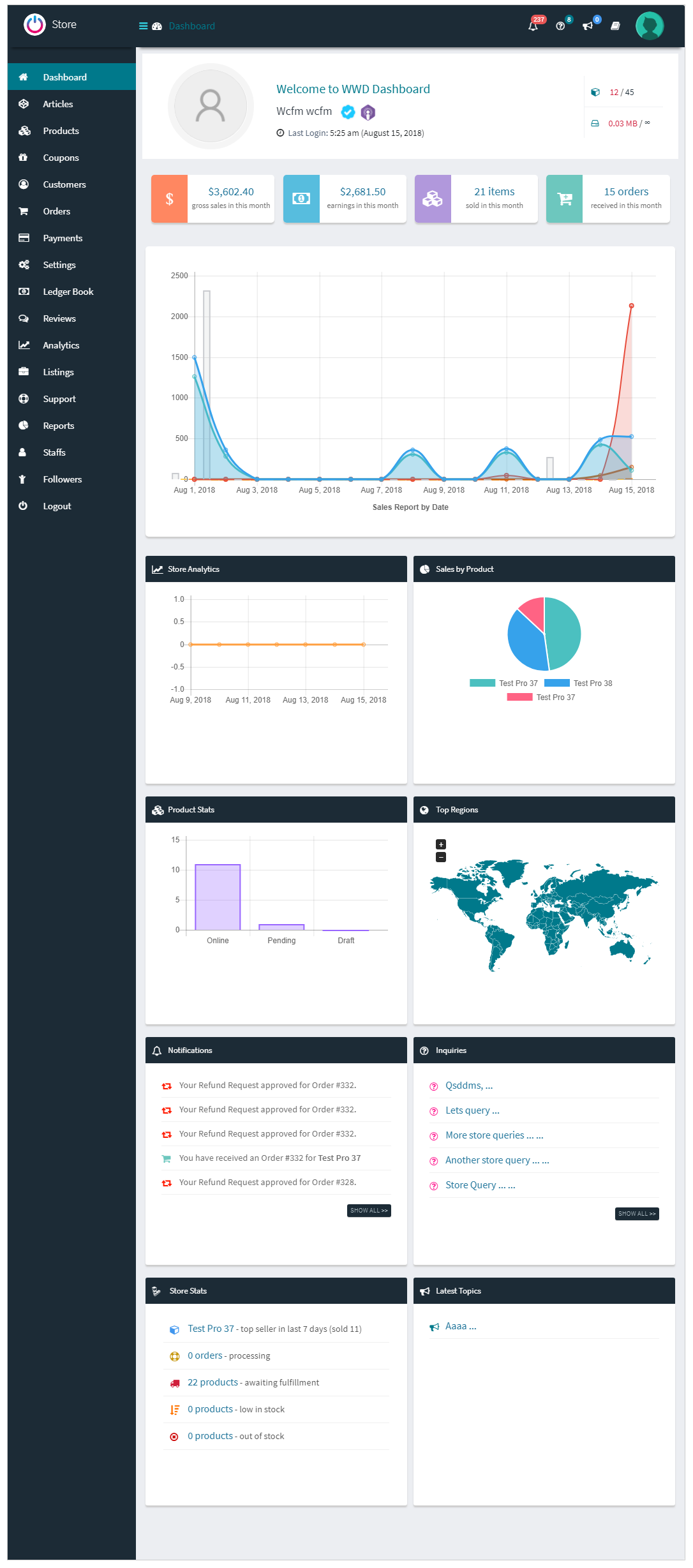
- 👉 100% Frontend Vendor Dashboard (No unintentional wp-admin access)
- 👉 Hyper-Flexible Commission & Payout Rules
- 👉 Automated Stripe Split Payments
- 👉 Advanced Vendor Shipping & Logistics
- 👉 Extensive AI Content & Image Studio (via WCFM AI Suite) Building a successful marketplace requires more than just splitting orders—it requires an engine that handles complex vendor logistics, protects your margins, and ensures your sellers present a professional storefront. WCFM Marketplace is that engine. Whether you are building a digital goods hub, a local delivery network, or a global retail empire, WCFM Marketplace provides the enterprise-grade architecture you need to scale securely and profitably.
- AI Copywriting & Image Enhancement: Vendors can generate SEO-optimized product descriptions from simple prompts or product photos, and instantly upgrade amateur images by removing backgrounds or adding professional lifestyle scenes.
- Monetize AI with the Credit Economy: Worried about unpredictable API costs? Set monthly free AI credit allowances per vendor membership tier, and sell extra AI credit packs via automated WooCommerce checkout. Turn your vendors' AI usage into a brand-new, high-margin revenue stream for your marketplace.
- AI Insights Dashboard: Track marketplace-wide AI adoption, monitor credit revenue, and see exactly which AI-assisted products are driving the most sales.
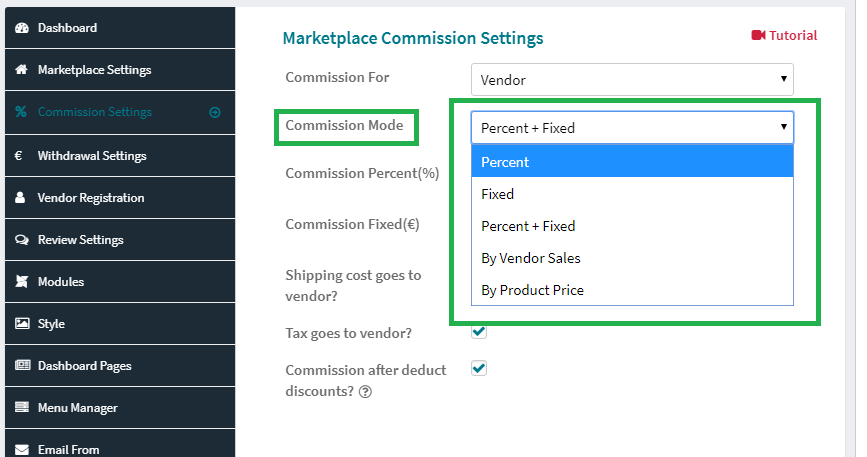
- Hyper-Flexible Commission Rules: Configure commissions by Fixed, Percentage, Percent + Fixed, Vendor Sales, Product Price, Category, or specific Membership tiers. Override globally, per vendor, or per product. Read more...
- Stripe Split Pay (SCA Compliant): Automatically split payments between your marketplace platform and your vendors at checkout. Support for 3D Secure, cross-border payments, and direct charges.
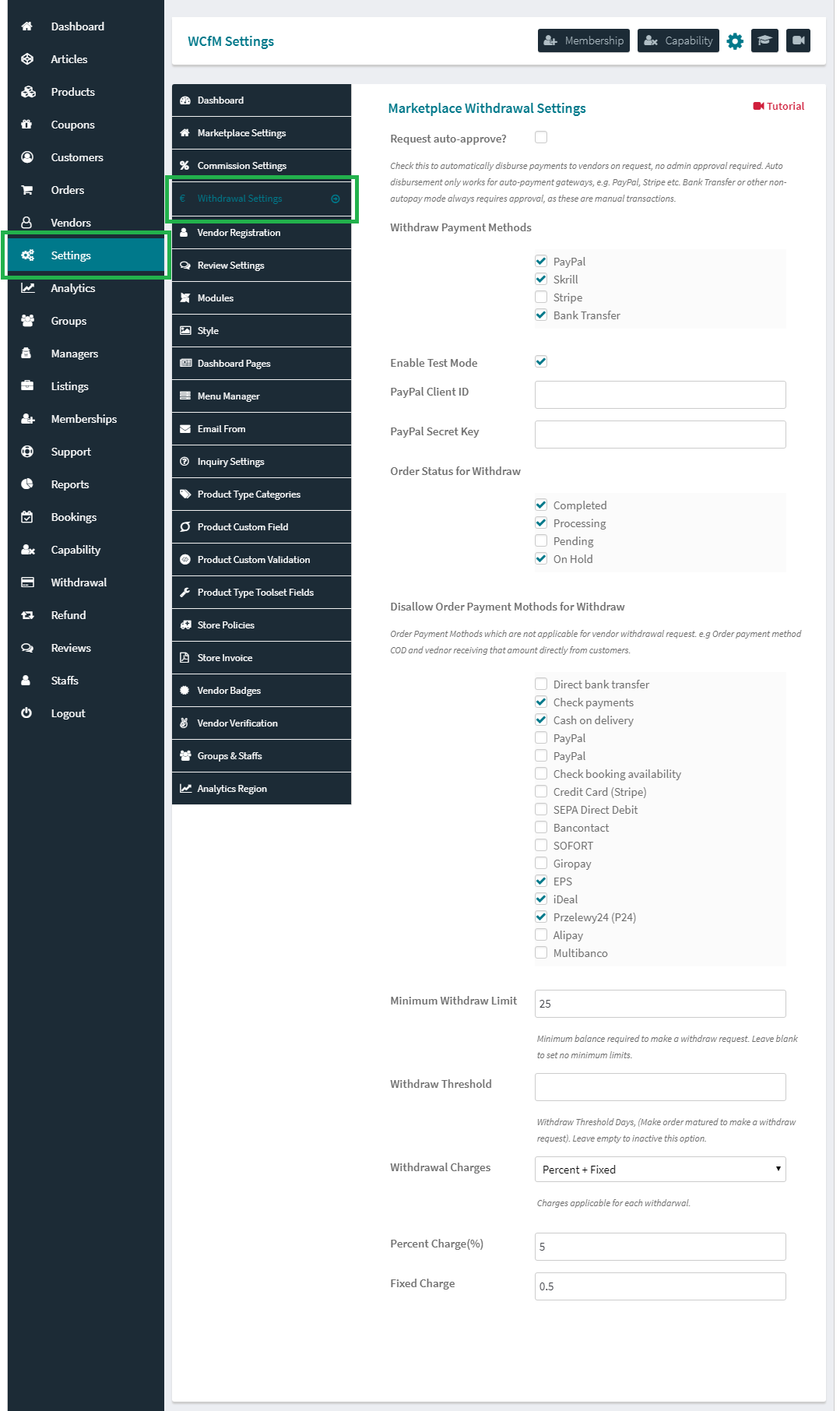
- Global Payout Gateways: Extensive payout support including PayPal Direct Pay - Marketplace API, PayFast, PayStack, MangoPay, Skrill, Bank Transfer, and Cash. Plus, a developer-friendly API to build custom gateways (Developer's guide).
- Versatile Withdrawal Options: Empower your vendors with flexible, stress-free payout controls - Schedule Withdrawal, Withdrawal by Order Status, or Manual Withdrawal.
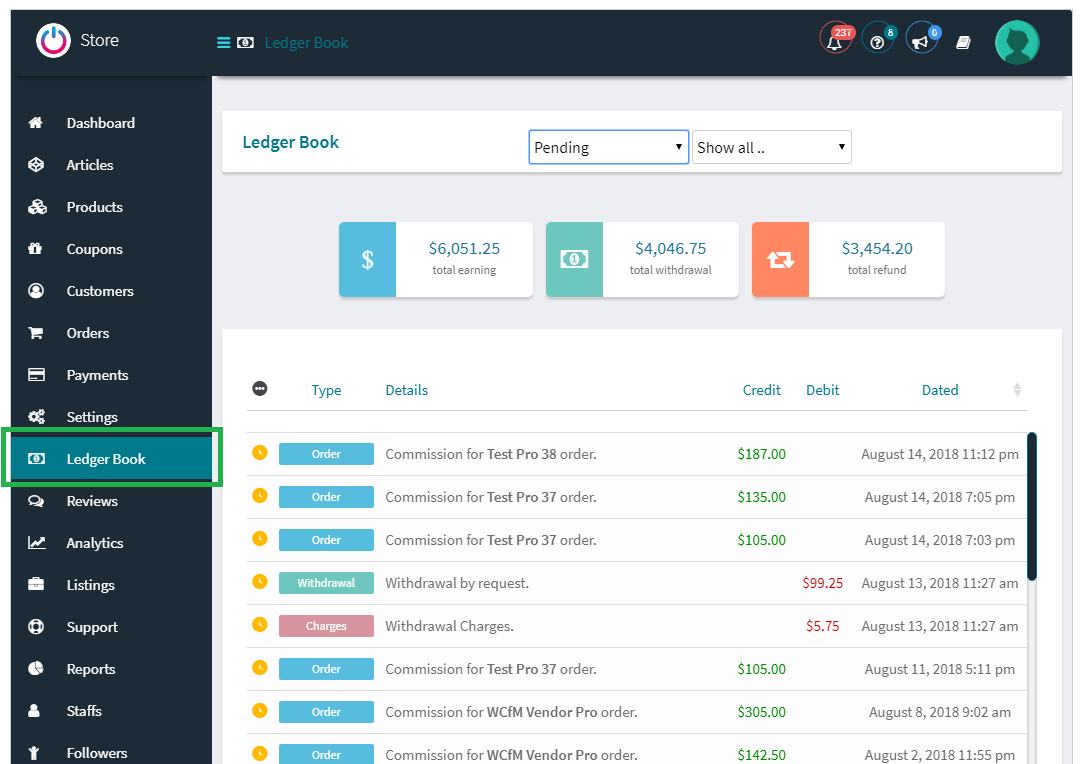
- The Ledger Book & Reverse Withdrawal: Maintain pristine financial records. Automatically deduct platform fees, shipping taxes, and handle "Reverse Withdrawals" when vendors owe you money (e.g., for platform-paid shipping labels, ads, or refunds).
- Next-Gen Vendor Shipping Engine: Support for Zone, Country, Weight-based, and Distance Rate Shipping. Vendors can configure complex shipping classes, local pickup, and postcode restrictions directly from their frontend dashboard. Read more...
- Single Product Multi-Vendor (SPMV): Allow multiple sellers to offer the exact same product. Buyers see a "More Offers" tab to compare price and vendor ratings, creating a competitive, Amazon-style marketplace experience.
- Comprehensive Refund Module: Customers can request partial or full refunds, including tax and shipping. Admins can approve, reject, or negotiate, with commissions automatically recalculated and ledger books updated in real-time.
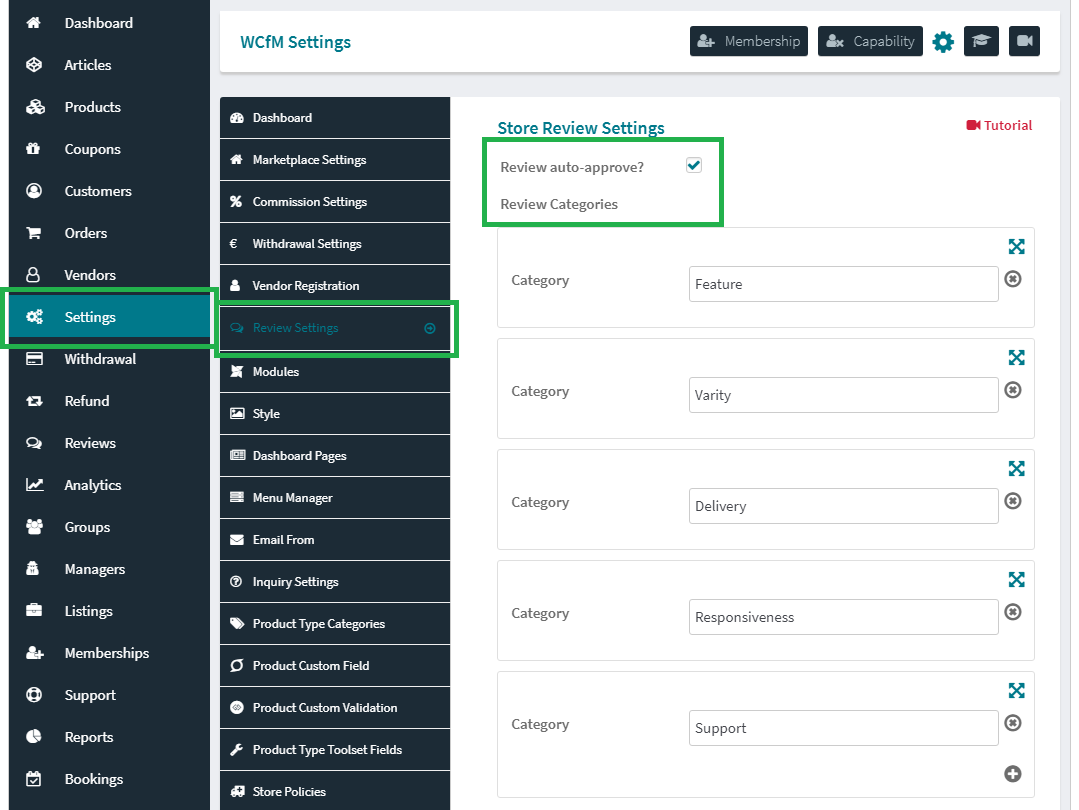
- Vendor Verification & Trust: Build buyer confidence with ID verification modules, store reviews, and badge systems.
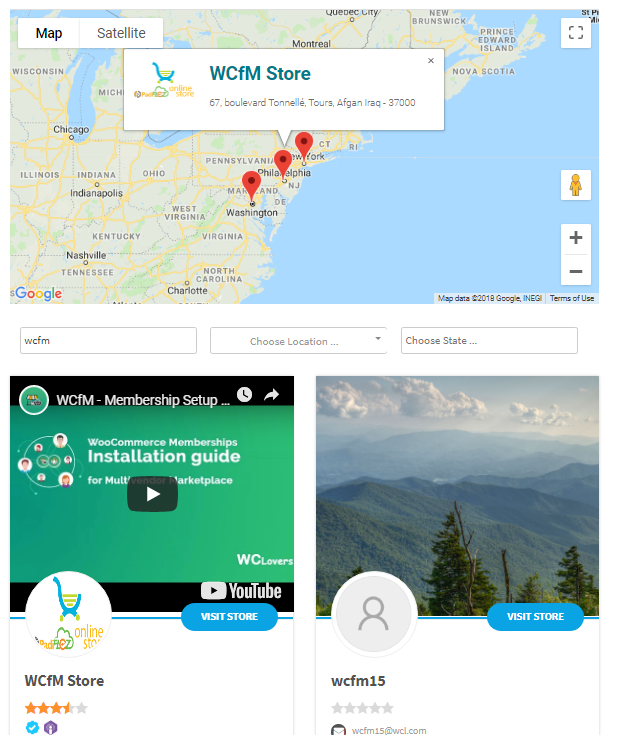
- Beautiful Marketplace Store Pages: Radius search, city/zip filters, category filtering, and interactive maps (Google Maps & OpenStreetMap) for local vendor discovery. Read more...
- Store Hours & Vacation Mode: Vendors can set complex opening hours, daily time slots, and vacation modes that automatically hide "Add to Cart" buttons.
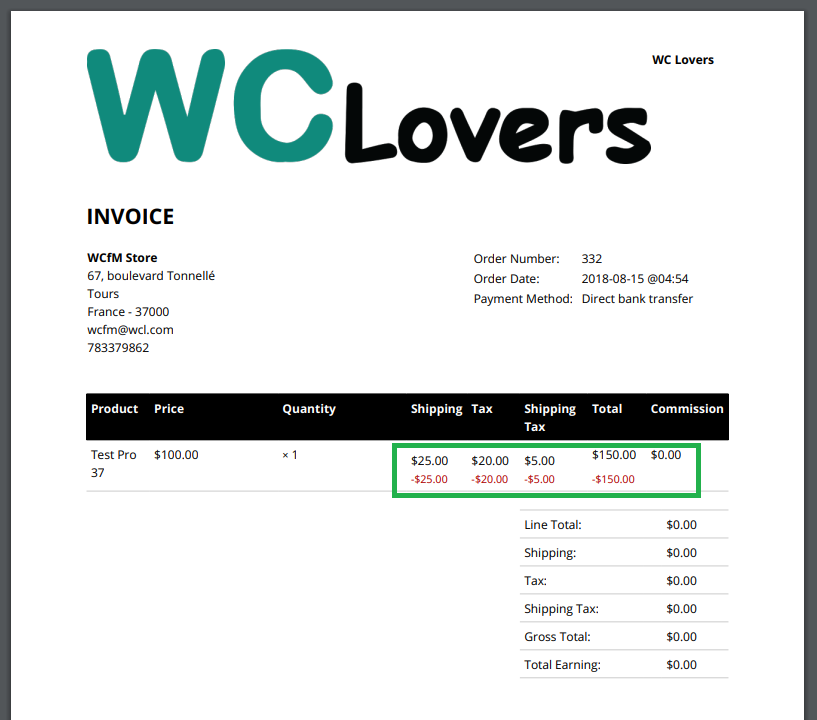
- Store Invoices & Packing Slips: Vendors can generate professional, branded PDF invoices and packing slips for their orders.
- Live Chat & Support Tickets: Reduce admin bottleneck. Vendors can chat directly with customers via integrated Live Chat and manage their own support tickets.
- Elementor Integration: Build custom, pixel-perfect vendor store pages using Elementor.
- REST API Ready: Connect your marketplace to external CRMs, ERPs, or build a custom headless frontend.
- White-Label Mobile App: Give your vendors a native mobile experience with the WCFM Vendor App integration.
- WPML & Multilingual: Fully compatible with WPML for global, multi-language marketplaces.
- Bookings & Appointments: Exclusively compatible with WooCommerce Bookings, Appointments, and Rental systems.
- Subscriptions: Empower vendors to offer product subscriptions, allowing them to offer services or products on a recurring basis while you earn recurring commissions.
- 70+ Integrations: Works flawlessly with Yoast SEO, RankMath, ACF, Toolset, FooEvents, ShipStation, and dozens more. View full compatibility list.
- Chinese - Taiwan (Thanks to Ming)
- Spanish (Thanks to Felipe @sophivorus)
安装:
- WordPress 5.5 or greater
- WooCommerce 7.0 or greater
- PHP version 7.4 or greater
- MySQL version 5.6 or greater
屏幕截图:

常见问题:
Is the AI Suite included in the free WCFM Marketplace plugin?
Find answers to the most common questions about configuring and using WCFM Marketplace. No, the WCFM AI Suite is a separate premium addon. You need both the free WCFM - Frontend Manager and WCFM Marketplace plugins installed as the foundation, and then you can add the AI Suite addon to unlock the AI copywriting, image enhancement, and credit economy features.
Can I migrate from Dokan or WC Vendors to WCFM Marketplace?
Yes! If you already have a multi-vendor store setup using WC Marketplace, WC Vendors, or Dokan, you can easily switch using the free WCFM Marketplace Migrator plugin.
Where do I report security bugs found in this plugin?
Please report security bugs found in the source code of the WCFM Marketplace plugin through the Patchstack Vulnerability Disclosure Program. The Patchstack team will assist you with verification, CVE assignment, and notify the developers of this plugin.
更新日志:
- Fixed - Stored Cross-Site Scripting (XSS) vulnerability in the store banner and store list card, where a vendor's video banner value was rendered without escaping whenever it was not a valid YouTube URL.
- Security - Store video banners now render an embed only for a valid YouTube URL and no longer output the raw banner value.
- Fixed - Stored Cross-Site Scripting (XSS) vulnerability in the [wcfm_stores] and [wcfm_stores_map] shortcodes, where a contributor-level user could inject executable HTML through the store search and radius filter attributes, reported by Ananda Dhakal (Patchstack), Credit goes to Ananda Dhakal for identifying this issue.
- Security - The store list search form now escapes the search query along with the radius range and coordinate values before they are rendered into the search form markup.
- Fixed - Stored Cross-Site Scripting (XSS) vulnerability in the [wcfm_store_info] shortcode, where a contributor-level user could break out of a class attribute through the data, icon and label attributes and inject executable HTML, reported by Ananda Dhakal (Patchstack), Credit goes to Ananda Dhakal for identifying this issue.
- Security - The [wcfm_store_info] shortcode now escapes the data, icon and label attribute values before they are rendered into the store-info markup.
- Fixed - Unauthenticated SQL Injection vulnerability in the distance-based shipping method, where a customer's checkout location coordinates were used in the store-distance query without numeric validation, reported by Ivaylo Atanassov, Credit goes to Ivaylo Atanassov for identifying this issue.
- Security - Store-distance calculations now force all incoming location coordinates to numeric values before they are used in any database query.
- Fixed - Unauthenticated refund request creation on guest-checkout orders, where an anonymous visitor could submit refund requests against any guest order, reported by Shikhali Jamalzade, Credit goes to Shikhali Jamalzade for identifying this issue.
- Security - Refund request submissions now require an authenticated customer and verify order ownership with a strict match.
- Enhance - WooCommerce 11.0+ compatibility check added
- Fixed - Insecure Direct Object Reference allowing a vendor to unapprove or delete another vendor's store review, reported by Mustafa Ahmed, Credit goes to Mustafa Ahmed for identifying this issue.
- Security - Strengthened product review status updates to prevent cross-vendor manipulation.
- Feature - Stripe Split Pay: brand-new payment engine built on Stripe's Payment Element and PaymentIntents, with up-to-date SCA / 3D Secure authentication for marketplace split payments.
- Feature - Stripe Split Pay: full multi-vendor cart support, including Direct and Destination charge flows across sellers within a single order.
- Feature - Stripe Split Pay: order-pay support for pay-for-order links and customer payment retries on the modern engine.
- Feature - Stripe Split Pay: new "Stripe Split Pay Status" diagnostics panel to verify connection and configuration from the dashboard.
- Enhance - Stripe Split Pay: bundled Stripe PHP SDK updated to v20.2.1 with a pinned API version for consistent, predictable behaviour.
- Enhance - Stripe Split Pay: hardened the existing (legacy) payment path with typed error handling, idempotency keys, and a kill-switch to force the legacy engine when required.
- Enhance - Stripe Split Pay: checkout pre-flight validation now flags vendor onboarding or connection issues before an order is placed.
- Enhance - Added a developer filter to customise the store-list card output.
- Enhance - Tagged store-list vendor queries with a context marker for more reliable third-party query targeting.
- Enhance - Themes and page builders can still supply their own vendor store layout, and WCFM now points it out in the admin when something takes the store page over, so an unintended change does not go unnoticed. Integrations should use the new "wcfmmp_store_template" filter; "wcfmmp_enforce_store_template" keeps WCFM's own template where a takeover is unwanted.
- Fix - Stripe Split Pay: corrected application-fee and refund handling for Direct and Destination charges so vendor and admin shares always reconcile.
- Fix - Vendor store pages triggered a fatal error alongside Divi ("Argument #1 ($template) must be of type string, null given"), because the store page was rendered without handing a template path back to WordPress.
- Fix - Divi Theme Builder support on store pages now verifies each Divi function before calling it, so Divi releases that move or rename them no longer break the store page.
- Fix - Store URLs that do not resolve to a visitable store (unknown slug, non-vendor user, or an offline store) now return a proper HTTP 404 with the theme's 404 page, instead of a blank page.
- Security - Patched a Stored XSS vulnerability in the Media Manager.
- Security - Strengthened vendor shipping zone authorization to prevent cross-vendor shipping setting manipulation.
- Enhance - WordPress 7.0 compatibility check added.
- Enhance - WooCommerce 10.9.1 compatibility check added.
- Fix - Store Featured Products widget: "Hide out of stock items" no longer overrides the widget's product visibility query.
- Security - Patched a SQL Injection vulnerability in the Reviews Dashboard.
- Security - Patched an unauthenticated SQL Injection vulnerability in the Store List Map integration.
- Enhance - PHP compatibility expanded: now supports versions 7.2–8.4
- Fixed - PHP Fatal error: Uncaught Error: Call to undefined function wcfm_is_store_page.
- Fixed - Broken Access Control vulnerability reported by benzdeus, Credit goes to benzdeus for identifying this issue.
- Fixed - Insecure Direct Object Reference to Unauthenticated Arbitrary Refund Request Creation vulnerability reported by Gibran Abdillah, Credit goes to Gibran Abdillah for identifying this issue.
- Enhance - Secured single and bulk media deletion.
- Enhance - Secured shipping zone setting update by preventing cross-vendor setting manipulation.
- Fixed - Refund logic division by zero issue.
- Enhance - WordPress 6.9+ compatibility check added
- Enhance - WooCommerce 10.4+ compatibility check added
- Fixed - Notice: Function _load_textdomain_just_in_time was called incorrectly.
- Fixed - Minor bug fixes
- Enhance - Added vendor display support for HPOS-based orders on the WP Admin orders list
- Enhance - WooCommerce 10.3+ compatibility check added
- Fixed - Resolved issue where orders with initial payment failures did not appear on the vendor dashboard
- Fixed - Corrected distance rate shipping to display the proper distance unit on vendor dashboard
- Fixed - Resolved Undefined variable error in store_info shortcode.
- Enhance - WordPrss 6.8+ compatibility check added
- Enhance - WooCommerce 9.9+ compatibility check added
- Enhance - WooCommerce 9.7+ compatibility check added
- Fixed - Stripe vendor connect issue for cross border countries. Now vendor needs to choose from a list of supported countries.
- Fixed - Minor bug fixes
- Enhance - WordPress 6.7+ compatibility check added
- Enhance - WooCommerce 9.5+ compatibility check added
- Fixed – Cross Site Scripting (XSS) vulnerability in store list search as reported by Le Ngoc Anh, Credit goes to Le Ngoc Anh for identifying this issue.
- Fixed – PHP Fatal error Class Stripe\StripeClient not found when Woocommerce Booking plugin active
- Fixed – Stripe Gateway is disabled. Please re-check withdrawal setting panel. This occurs mostly due to absence of Stripe Secret Key when Woocommerce Booking plugin active
- Enhanced – Added condition for missing source_transaction parameter in stripe transfer args
- Fixed – Stripe Split Payment Issue with Cross-Border Payments: If the platform account and connected account(s) are not from the same country, Stripe payments fail when using "direct charge" mode.
- Fixed – Minor typo & bug fixes
- Enhanced – WooCommerce 9.0+ compatibility added
- Enhanced – Filter added for Store list page map that can show all store markers irrespective of pagination - apply_filters('wcfmmp_show_all_vendor_markers_on_map', false)
- Fixed – Order review page - payment radio button style issue, Payment stuck issue
- Fixed – Removed double slash in URLs from the vendor store page tabs
- Fixed – Stripe Split Pay - Direct charge stripe_fee added to admin & vendor both, a new filter added to enable/disable this behaviour - apply_filters( 'wcfmmp_prevent_stripe_direct_charge_deduct_transaction_fee', true )
- Fixed – Stripe Split Pay -
$wpdb->prefixwas not added towcfm_marketplace_orderstable query correctly - Fixed – Stripe Split Pay - Separate charges & transfer -
source_transactionparameter added - Fixed - Store new email sent twice issue, order with
wc-checkout-draftstatus removed from getting store_new_order email
- Enhanced – WordPress 6.5+ compatibility added
- Enhanced – WooCommerce 8.9+ compatibility added
- Enhanced – WooCommerce 8.7+ compatibility added
- Fixed - Menu Manager Label changed after settings update
- Fixed - Staff can not see orders in order-list page
- Fixed - WooCommerce Checkout page stuck when using Stripe Split Pay
- Fixed - Duplicate product issue on shop page & more offers
- Enhance - WooCommerce 8.6+ compatibility added
- Fixed - Order details page error when using WooCommerce 8.6+
- Fixed - Resolve fatal error in vendor dashboard payment settings due to missing admin stripe credentials
- Enhance - WooCommerce 8.4+ compatibility check added
- Enhance - Stripe Connect implemented with Stripe Accounts API instead of the deprecated OAuth module
- Fixed - Yith request a Quote compatibility issue
- Fixed - Some SQL queries & minor issues fixed
- Enhance - WooCommerce 8.3+ compatibility check added
- Enhance - WooComerce HPOS compatibility added
- Fixed - Short code Cross site scripting(XSS) issue fixed
- Enhance - WordPress 6.3+ compatibility check added
- Enhance - WooCommerce 8.1+ compatibility check added
- Enhance - WordPress 6.2+ compatibility check added
- Enhance - WooCommerce 7.8+ compatibility check added
- Feature - Store multiple branch support added (WCFM - Ultimate needed)
- Enhanc - Additonal data can be added to map marker using filter 'wcfmmp_map_additional_store_info'
- Enhanc - Refund threshold date can be modified using filters 'wcfm_order_refund_threshold_start_date' & 'wcfm_order_refund_threshold_end_date'
- Fixed - Shipping package key reset isuue for some vendors
- Enhance - WooCommerce 7.5+ compatibility check added
- Fixed - Store list map pagination issue when auto location filter is on
- Fixed - Product list map auto zoom issue
- Fixed - Payment settings issue when Stripe Split is off
- Fixed - Other minor fixes (undefined variable warning, type etc.)
- Fixed - PHP Warning: Undefined variable fixed on store list page
- Enhance - WooCommerce 7.3+ compatibility check added
- Enhance - Stripe library updated to 10.2.0
- Fixed - Store List page pagination issue resolved
- Fixed - Refund roundoff issue resolved
- Fixed - PHO 8.0+ some issues resolved
- Enhance - WooCommerce 7.0+ compatibility check added
- Enhance - PHO 8.0+ compatibility added
- Fixed - Shipping calculaton issue resolved
- Enhance - WooCommerce 6.7+ compatibility check added
- Fixed - WPML email translation issue resolved
- Enhance - WooCommerce 6.5+ compatibility check added
- Fixed - WCFM APP store order status update issue resolved
- Enhance - WooCommerce 6.4+ compatibility check added
- Fixed - Admin panel WooCommerce menu not visble issue resolved
- Enhance - WordPress 5.9+ compatibility check added
- Enhance - WooCommerce 6.2+ compatibility check added
- Enhance - WooCommerce 6.1+ compatibility added
- Enhance - wcfmmp_is_allow_shipping_refund - filter new parameters added ($order_id, $vendor_id, $refund_id, $refund_info)
- Enhance - Commission calculation on shipping tax new filter added - wcfmmp_is_allow_commission_on_shipping_tax
- Enhance - Vendor get shipping tax as commission new filter added - wcfmmp_is_allow_vendor_get_shipping_tax
- Fixed - Store List page pagination issue resolved
- Fixed - Store page coupon widget broken issue resolved
- Fixed - Store setup GEO Location data not properly saving issue resolved
- Fixed - Vendors sales report not showing refunded amount issue resolved
- Enhance - WooCommerce 6.0+ compatibility added
- Fixed - Auto-withdrawal for completed order status not generating issue resolved
- Enhance - Ajax functions nonce check and user permission check added
- Fixed - Admin area PHP error issue resolved
- Fixed - PayPal payout not processing issue resolved
- Fixed - Store rating with count display issues resolved
- Enhance - WooCommerce 5.9+ compatibility check added
- Fixed - Some security issues resolved
- Enhance - WordPress 5.8+ compatibility check added
- Enhance - WooCommerce 5.7+ compatibility check added
- Fixed - Store widgets throwing warning isssue resolved
- Fixed - Some filters wrong parameters issue resolved
- Enhance - WooCommerce 5.4+ compatibility check added
- Enhance - Item id added to filter "wcfmmp_commission_deducted_tax"
- Enhance - Item id added to filter "wcfmmp_commission_deducted_transaction_charge"
- Fixed - ON Partial Refund "Commission on Tax" not properly updating issue resolved
- Fixed - ON Refund "Shipping cost" not refunding issue resolved
- Enhance - WooCommerce 5.2+ compatibility check added
- Fixed - wcfm-script-core.js "file" undefined issue resolved
- Fixed - Store setting dulicate slug error not showing issue resolved
- Fixed - Product Custom attributes with "double quotes" variation not properly saving issue resolved
- Fixed - Store SEO Yoast SEO deprecated function warning issue resolved
- Fixed - Vendor registration "date" type custom fields date-format issue resolved
- Fixed - Downloadable product multiple file upload issue resolved
- Enhance - WordPress 5.7+ compatibility check added
- Enhance - WooCommerce 5.1+ compatibility check added
- Enhance - WordPress 5.6+ compatibility check added
- Enhance - WooCommerce 4.8+ compatibility check added
- Enhance - Facebook for WooCommerce 2.2+ compatibility added
- Fixed - "Stripe Split Pay Remaining Pay Error: This value must be greater than or equal to 1." issue resolved
- Feature - Facebook store sync with vendor store option added - Documentation
- Enhance - WooCommerce 4.6+ compatibility check added
- Enhance - Vendor store location setting current location detect option added
- Enhance - Google Map type change filter added - wcfm_google_map_type
- Fixed - Variation "Commission on Tax" Admin mode calculation issue resolved
- Fixed - Full refund user receive multiple emails issue resolved
- Fixed - Vendor specific shipping package generation issue resolved
- Fixed - Vendor shipping setting auto-reset issue resolved
- Fixed - Product taxonomy Map showing all stores issue resolved
- Fixed - Product filter be Store not sync with location search issue resolved
- Enhance - WooCommerce 4.4+ compatibility check added
- Enhance - Country Based Restrictions for WooCommerce compatibility added
- Enhance - Vendor shipping setting "Shippling Class" WPML compatibility added
- Enhance - Checkout user location field current location locate option added
- Enhance - Product custom fields "Multi Select" field type support added
- Fixed - Store list category filter not working issue resolved
- Fixed - On Mobile store list map icons are not clickable issue resolved
- Fixed - Vendors pending withdrawal amount showing wrong data issue resolved
- Fixed - Vendors able to withdraw refunded order items issue resolved
- Fixed - Disable Multi vendor checkout condition conflict with Min/Max quantity condition issue resolved
- Fixed - "Filter Products by Store" widget not working for vendor users issue resolved
- Fixed - Vendor shipping zone setting "Back to zone list" on click setting panel broken issue resolved
- Fixed - "Category wise attributes" previously selected attributes not reset on category change issue resolved
- Fixed - WooCommerce - PDF Vouchers "Generate Code" not working from "Popup Add Product" issue resolved
- Fixed - ShipStation order sync Tax, Shipping cost not working as per vendor issue resolved
- Fixed - ShipStation order sync order note and status not properly updating issue resolved
- Fixed - Vendor coupon "Exclude Products" not saving issue resolved
- Feature - ShipStation integration for vendors (WCFM Ultimate required) - Documentation
- Enhance - PayFast vendor payment gateway published at GitHub (Split payment supported) - Details
- Enhance - PayStack vendor payment gateway published at GitHub - Details
- Enhance - MangoPay vendor payment gateway published at GitHub - Details
- Enhance - Vendor Profile ACF user type fields support added (WCFM Ultimate required)
- Enhance - WooCommerce 4.3+ compatibility added
- Tweak - YiTH Request a Quote one vendor's products at a time restriction added
- Tweak - PW Gift Cards redeem only for the issuer vendor's products restriction added
- Tweak - ELEX Shipping addons compatibility revoked, instead recommend to use WooCommerce Multi-Vendor Support for ELEX Shipping Plugins
- Fixed - Store list search with pagination issue resolved
- Fixed - Country wise shipping calculation issue resolved
- Fixed - Product page vendor info display "as Tab" location display issue resolved
- Fixed - Vendor profile complete bar "Store Description" checking issue resolved
- Fixed - Product page location still visible when vendor disabled "Address" or "Location" display issue resolved
- Fixed - In Mobile store location not showing properly using Google Map APP issue resolved
- Fixed - Store list page OpenStreetMap Radius filter not working from sidebar issue resolved
- Fixed - OpenStreetMap Radius filter always showing all map pointers issue resolved
- Fixed - Multiple vendors order's refund popup item meta display issue resolved
- Fixed - Some missing strings are added to translation file
- Enhance - WooCommerce 4.2+ compatibility added
- Enhance - "Filter Products by Store" widget added for WooCommerce product archive pages to filter products by vendor
- Enhance - Vendor order support added for Manual booking associate with existing order
- Enhance - WCFM Delivery - delivery time slots WPML compatibility added
- Enahnce - Checkout delivery location field compatibility added for "Force shipping to the customer billing address" setting option
- Enahnce - YiTH Request a Quote Premium "accepted quote" pay page shipping compatibility added
- Enahnce - YiTH Request a Quote Premium "accepted quote" vendor order compatibility added
- Fixed - Vendor product variation export issue resolved
- Fixed - Store list page map pointer not visible at proper position issue resolved
- Fixed - Store list page map pointer position change on map zoom change issue resolved
- Fixed - Trashed orders visible to vendors issue resolved
- Fixed - Distance shipping setting panel broken issue resolved
- Enhance - Page load performence improved
- Enhance - Store List search by "City" and "Zipcode" option added - Documentation
- Enhance - Products Custom Taxonomy add/access capability option added (WCFM Ultimate required)
- Enhance - Edit order item wise cost and quantity edit option added (WCFM Ultimate required)
- Enhance - Vendors capability check improved
- Enhance - Vendor additional info edit "File/Image" type fields support added
- Enhance - Store and Product location using map url improved to show exact location on Google map with marker
- Enhance - Store setup responsive and RTL CSS improved
- Tweak - Map default pin icon changed
- Fixed - Variable product "Free Shipping" threshold calculation issue resolved
- Fixed - COD order store new order email trigger issue resolved
- Fixed - Product archive radius filter "no match" condition showing all stores on map issue resolved
- Fixed - Map default location and default zoom not working for all maps issue resolved
- Fixed - Store and product list map "auto_zoom" not working properly issue resolved
- Fixed - Store carousel shortcode "per_row" attribute not working issue resolved
- Fixed - Plugin activation error issue resolved
- Enhance - WooCommerce 4.1 compatibility added
- Enhance - Local Pickup shipping option vendor's address append with shipping label
- Enhance - Delivery Time "Week Day Off" and "Daily basis time slots" compatibility added
- Enhance - WooCommerce Bookings "Global Availability" vendor wise compatibility added (WCFM Ultimate required)
- Enhance - Refund request popup item meta display option added
- Enhance - If cart items shipping not required then "Delivery Location" auto-disable option added
- Enhance - Google Map store location display "cluster" support added
- Enhance - Checkout user location auto-detect option added
- Enhance - Store List display improved
- Tweak - Admin mode commission setting "Commission on Tax" calculate on Admin's Fee, previously always calculate on vendor's earning
- Fixed - Store list not showing when "sort by order" change issue resolved
- Feature - Delivery Time module compatibility added - WCFM Delivery addon required - Documentation
- Enhance - Multivendor Checkout disable option added (WCFM Admin Setting -> Order Setting)
- Fixed - Distance rate shipping vendor setting "cost field" not visible issue resolved
- Feature - Distance rate shipping option added - Documentation
- Enhance - User location by map input under checkout option added
- Fixed - Yoast SEO vendor stores sitemap generation issue added
- Fixed - Without WCFM Membership addon Admin setting page load issue resolved
- Feature - YiTH Request a Quote Premium compatibility added (WCFM Ultimate Required)
- Enhance - Shipping by Country and Shipping by Weight "Pickup from Store" option added
- Enhance - Vendors are allowed to manage own Product reviews
- Enhance - Store reviews "star rating" visibility as per WooCommerce rating setting synced
- Enhance - WooCommerce German Market product fields compatibility added
- Enhance - Pending approval product "Reject with Reason" option added
- Enhance - Store Policies removed Admin and Vendors new order e-mails
- Enhance - Store location setting "Open Street Map" pointer dragging support added
- Enhance - Product object checking improved
- Enhance - [wcfm_policy] - short code added, works for single product and vendor's store page
- Enhance - Product page full "sold by" box link to store filter added - wcfmmp_is_allow_full_sold_by_linked
- Enhance - Store list full "store card " link to store filter added - wcfmmp_is_allow_full_store_card_linked
- Fixed - Store setup page "wcfm_setting_options" JS parameter missing issue fixed
- Fixed - Group archive showing all vendors issue resolved
- Feature - Post Expirator compatibility added
- Enhance - WooCommerce 4.0+ compatibility added
- Enhance - WP 5.4+ compatibility added
- Enhance - Admin order list "vendor/store filter" option added
- Enhance - Withdrawal request auto-cancel on refund process
- Enhance - Reverse Withdrawal auto-cancel and re-generate on refund process
- Tweak - Store page policy tab title display change to as per vendor's "Policy Tab Label" setting
- Fixed - Order item Tax refund issue resolved
- Fixed - Stripe Split pay direct charge full refund application not fully refunded issue resolved
- Fixed - Yoast SEO - Store page "Canonical URL" trailing slash missing issue resolved
- Fixed - Rank Math SEO - Store page "Meta Description" and "Canonical URL" not properly rendering issue resolved
- Fixed - Without policy content "Policies" heading visible under order details page issue resolved
- Fixed - Without customer support content heading visible under order details page issue resolved
- Fixed - Without "policy" and "customer support" content headings visible under store invoice issue resolved
- Fixed - On install "wcfm_get_option" function not-defined error issue resolved
- Feature - PW WooCommerce Gift Cards compatibility added
- Enhance - Store page url base WPML compatibility added
- Enhance - FooEvent Check-in APP Rest API compatibility added
- Enhance - Store category filter SEO improved
- Enhance - Product list GEO location auto-filter compatibility added
- Tweak - SPMV "more offers" product list "out of stock" products exclude
- Feature - Store list "registration custom fileds" meta filter widget added
- Enhance - Store Zone Shipping "No class cost" support added
- Enhance - Inquiry and Support Tickets "My Account" view improved
- Enhance - Firebase Chat conversation email format improved
- Enhance - Bookable and Appointment products order commission invoice improved
- Enhance - Store and product radius filter Firefox display improved
- Enhance - Store zone shipping locaton rule "postcode ranges" compatibility added
- Enhance - Store list full card linked option added - enable by pass TRUE to this filter "wcfmmp_is_allow_full_store_card_linked"
- Fixed - Archived products breaking store page pagination issue resolved
- Feature - Firebase chat - Offline Messages and Chat History view added (WCFM Ultimate required)
- Feature - Order item quantity wise refund request option added
- Feature - Order item tax refund request option added
- Enhance - Customers are now allowed to place "Partial refund request"
- Enhance - Vendors are now allowed access "Refund Requests" dashboard
- Enhance - Reports data generation performence improved
- Enhance - Vendor "Store Invoice" setting manage option added under Admin's vendor manage
- Enhance - "wcfm_store_info", "wcfm_chat_now" and "wcfm_follow" short codes will work for any vendor created post page
- Dev - Stripe "Express Connect API" support added, enbale by return TRUE to this filter - wcfm_is_allow_stripe_express_api
- Dev - Vendor's own product purchase commission disable option added, enable by return FALSE to this filter - wcfm_is_allow_vendor_own_product_commission
- Fixed - Firebase chat - Chat copy email not sending issue resolved
- Fixed - Vendor verification not opening issue resolved
- Fixed - Store list map not showing stores as per "search_category" issue resolved
- Fixed - Store widget throwing PHP undefined index issue resolved
- Fixed - OpenStreetMap load over HTTPS/SSL issue resolved
- Fixed - Report graph point showing long decimal numbers issue resolved
- Fixed - Multilingual site using WPML store list page map markers not loading issue resolved
- Enhance - WooCommerce 3.9+ compatibility added
- Enhance - Vendor orders liting page search by "Order ID" option added
- Enhance - Whole order shippment tracking update option added under order details
- Enhance - Product CSV Import as Admin "Store" column support added to import products for specific store/vendor
- Enhance - Schedule order email "Store Invoice" generate and attach with mail support added
- Enhance - Vendor coupon apply validation added
- Enhance - Store reference added with vendor's order note
- Enhance - WoodMart theme 360 degree image and variation image gallery compatibility added
- Enhance - Advanced Product Size Charts for WooCommerce plugin compatibility added
- Enhance - Germanized for WooCommerce 3.1+ compatibility added
- Enhance - WooCommerce Bookings "Resources" delete and filter by store/vendor option added
- Enhance - "Group Archive" page map support added
- Dev - Order item policies show by vendor filter "wcfm_is_allow_order_item_policies_by_vendor" added, return TRUE
- Dev - Order policies disable for emails filter "wcfm_is_allow_order_item_policies_by_vendor" added, return FALSE
- Dev - Order policies disable for invoice filter "wcfm_is_allow_policy_under_order_invoice" added, return FALSE
- Fixed - Store "Slider Banner" not loading issue resolved
- Fixed - Electro theme and Fancy Product Designer conflict issue resolved
- Fixed - Store "Default Banner" and "Default Logo" not loading issue resolved
- Fixed - Non-vendor products author reset to current user on update issue resolved
- Fixed - For only Admin product Stripe split pay gateway checkout processing issue resolved
- Feature - License Manager for WooCommerce compatibility added (WCFM Ultimate required)
- Feature - Payment gateway specific transacton charge/fee deduct from vendor commission option added (Setup from WCFM Admin Setting -> Payment Setting, vendor wise override possible from WCFM Vendor Manage -> Commission & Withdrawal)
- Enhance - Vendor store weight based shipping "Free Shipping" threshold support added
- Enhance - WooCommerce Quick View Pro compatibility added
- Enhance - ELEX Role based Price compatibility added
- Enhance - GEO my WP Leaflet map library support added
- Enhance - WP Offload Media Pro compatibility added
- Enhance - Dashboard logout url change to site's frontend url
- Fixed - GEO Location Map center setup setting not loading issue resolved
- Fixed - Store location setting Google map not loading issue resolved
- Fixed - Store badges hover not working after store list refresh issue resolved
- Feature - Open Street Map (Free map library) support added
- Feature - Firebase Free Chat API support added - Documentation
- Enhance - Vendor order item wise notification disable filter "wcfm_is_allow_itemize_notification" added, return "false" to disable
- Enhance - Fancy Product Designer 4.2+ compatibility added
- Enhance - WooCommerce Multilingual 4.7+ compatibility added
- Enhance - Divi Theme builder support added
- Enhance - Store address show capability setting check added for Map vendor card information
- Enhance - On store page tab change page scroll to proper position support added
- Fixed - Vendors not able to see wePOS products issue resolved
- Enhance - Netgsm SMS plugin support added for vendor registration OTP verification
- Enhance - "Add to Store" products list restricted by capability wise allowed product types
- Enhance - Vendor can see other vendors' coupons under order details restriction added
- Enhance - Vendor registration custom fields "multi-select" type field support added
- Enhance - WPML sites membership using "WC Products" non-default langugage subscription thank you page redirect support added
- Enhance - "wcfm_store_info" shortcode "store_badges" data support added
- Enhance - WooCommerce Tiered Table Price Premium compatibility added
- Enhance - SPMV more offers product list sorting option added
- Tweak - SPMV products showing lowest cost product at products archive pages, previously showing first created product
- Tweak - Vendor email notification send to "store email", previously send at "account email"
- Tweak - On Booking cancel "Admin Calcel Email" send to vednors, previously "Customer Cancel Email" send to vendors
- Fixed - Product "excerpt" and "description" fields custom validation not working issue resolved
- Fixed - Expired coupon visible on store page issue resolved
- Fixed - WooCommerce Sequential Order Numbers not visible every where issue resolved
- Fixed - WooCommerce Product Badges not reset issue resolved
- Fixed - Add announcement page showing "Invalid Topic" issue resolved
- Fixed - Product custom validation message visible shipment tracking update form issue resolved
- Fixed - Stripe gateway throwing "Invalid Source Object" issue resolved
- Fixed - Store setup "Enhanced Select" field load issue resolved
- Enhance - WordPress 5.3 compatibility added
- Enhance - WooCommerce 3.8 compatibility added
- Enhance - WooCommerce Tiered Table Price plugin compatibility added
- Enhance - WooCommerce Deposit remaining payment invoice generate compatibility added
- Enhance - Order contains multiple vendors items edit by one vendor support added
- Enhance - Vendor product import new category create and assign to products support added
- Enhance - Store Hours timezone wise check added
- Enhance - Store new order email product thumbnail display support added
- Enhance - Article/Post Yoast SEO meta support added
- Enhance - Product and Article All in One SEO meta title and description support added
- Enhance - Product and Article Rank Math SEO focus keyword and meta description support added
- Enhance - SPMV disable showing same products multiple items under widgets
- Enhance - SPMV products quick edit view restricted to edit product title
- Enhance - WPML translated products quick edit view restricted to edit meta information
- Enhance - Store page breadcrumb WPML compatibilty added
- Enhance - Store page address display linked with Google Map
- Enhance - Product bulk delete option added
- Enhance - Estimated shipping time display short code added - [wcfm_shipping_time]
- Enhance - FooEvent PDF ticket download option added
- Fixed - FooEvent ticket barcode not rendering issue resolved
- Fixed - Free shipping condition display decimal format issue resolved
- Fixed - Admin's product count showing "0" issue resolved
- Fixed - Store list page order by rating exclude vendors without review issue resolved
- Fixed - On membership cancel archived/draft products able to re-publish issue resolved
- Fixed - Vendors able to import more than product limit capability issue resolved
- Fixed - Without product limit vendor able to import product issue resolved
- Fixed - Zone shipping cost unable to set rule issue resolved
- Fixed - Product "Off Line" bit reset issue resolved
- Fixed - Auction product manager tab not visible properly issue resolved
- Fixed - Analytics view broken due to deleted products issue resolved
- Fixed - Notification sound file load issue resolved
- Enhance - Single product page product's location display option added
- Enhance - Store Setup widget "Divi Theme" compatibility added
- Enhance - BuddyPress message sync "allowed email notification" setting check added
- Enhance - Store list page RTL display improved
- Enhance - Product list page GEO search RTL display improved
- Enhance – Affiliate commission reset on order status change (cancel, failed, refunded etc ...) compatibility added
- Enhance – Affiliate commission reset on order item refund compatibility added
- Enhance – Affiliate commission reset on order item delete compatibility added
- Enhance – Affiliate commission reset on order delete compatibility added
- Fixed - Refunded order "Admin Fee" display wrong amount under vendor's orders list issue resolved
- Fixed - Vendor's order status change notification generate for only one order item issue resolved
- Fixed - Store Social "pinterest" link to "instagram" issue resolved
- Feature - WCFM Marketplace integrate with Elementor addon compatibility added
- Enhance - Vendor commission order support added for Manual Booking order
- Enhance - Vendor commission order support added for Manual Appointment order
- Enhance - Vendor commission order support added for Deposit remaining amount payment order
- Enhance - Withdrawal, Withdrawal Request, Reverse Withdrawal screens "date range" filter added
- Enhance - Product and Vendor Registration custom filed "HTML Block" field type support added
- Enhance - GEO Radius search "Miles" unit support added
- Enhance - Live Chatbox "Store Logo" set at chat popup
- Tweak - Store List "classic" theme style changed, old classic style can be used by "compact" theme
- Fixed - Store page "Category Filter" all store categories not visible issue resolved
- Fixed - Vendor's store shipping "Taxable" status "None" not working issue resolved
- Fixed - Brazilian Checkout field conflict with Wirecard CPF field issue resolved
- Fixed - Live Chatbox not closing issue resolved
- Feature - Wirecard (Moip) payment gateway (customer & vendor split payment) added
- Enhance - Commission applicable on Tax and Shipping custom condition "Fixed Commission" applied multiple times takedn care of
- Enhance - Subscription Renewal order "Admin Mode Commission" support added
- Enhance - Vendor Shipping "Flat Rate" cost rule support added
- Enhance - Store SEO WPML compatibility added
- Enhance - Store page social - snapchat display option added
- Enhance - "wp-admin" articles, coupons, orders, bookings, appointments, subscriptions listing "Store/Vendor" reference added
- Enhance - Store list and products search by location map default position setting option added
- Enhance - Hide "Become a Vendor" link from "My Account" page setting option added at WCFM Admin Setting -> Vendor Registration Tab
- Enhance - "Sold by Label" applied for all dashboard modules "Vendor/Store" display
- Enhance - WC Appointments "two way" Gcal sync compatibility added
- Enhance - Analytics "Data Cleanup" option added
- Feature - Vendors may apply to become affiliate option added (WCFM Affiliate addon require)
- Feature - Affiliate commission calculate on vendor's commission compatibility added - Documentation
- Enhance - Membership subscription using Stripe SCA compatibility added
- Enhance - Product Tags input as "drop-down" option added, vendors allowed to choose from pre-defined tags
- Enhance - Store page WooCommerce default "Rating Filter" and "Active Filters" widgets compatibility added
- Enhance - Vendor and Affiliate Registration custom fields WPML compatibility added, you may create different type of fields for different languages
- Enhance - WCFM Marketplace new store order email "Group Manager" added in CC (WCFM - Group & Staff addon require)
- Tweak - Category wise commission calculation changed - from now this will consider "maximum commission" from all associated categories for a product, can be changed to consider "minimum commission" by appling filter "wcfmmp_is_allow_max_category_commission" to return false
- Feature - Stripe Split pay "3D Secure and SCA" enable option added
- Feature - Product list filter by user location (Radius Search) option added
- Enhance - GEO Location search separate setting panel added (WCFM Admin Setting -> GEO Location)
- Enhance - Stripe Split pay "3D Secure and SCA" enable option added
- Enhance - Enfold Theme compatibility added - Store List and Store page display
- Enhance - Commission calculation after considering discounts "membership commission" check added
- Tweak - Partially Refunded order's commission re-calculate based on orginal order commission rule, previously re-calculate based on current commission setting
- Fixed - Commission calculation after considering Vendor's coupon issue resolved
- Feature - WooCommerce Dynamic Pricing compatibility added (WCFM Ultimate require)
- Feature - MSRP for WooCommerce (Algoritmika) compatibility added (WCFM Ultimate require)
- Feature - Cost of Goods for WooCommerce (Algoritmika) compatibility added (WCFM Ultimate require)
- Enhance - Rank Math SEO compatibility added
- Enhance - Store list radius search default filter by user's current location option added
- Enhance - Offline and disable sotre products auto-archived option added
- Enhance - Notification message sync with BuddyPress messages option added
- Enhance - Off day store hours check improved
- Enhance - Store URL base edit field custom validation added
- Enhance - Archived products can be directly accessible by its URL
- Enhance - WCFM Product Bulk Update status change "Archived" status added
- Enhance - Product duplicate SKU check improved
- Tweak - Payment Setting new tab created under WCFM Admin Setting, previously payment setup comes under "Withdrawal Setting" tab
- Enhance - Booking and Appointment confirmation order, Renewal Order Stripe Split Pay compatibility added
- Enhance - Vendors' weight based shipping "per unit cost" support added
- Enhance - Store Invoice generate as per site's current language (WPML) compatibility added
- Enhance - WC 3.7 "Product Imporer" compatibility added
- Tweak - Withdrawal completed vendor order rest on "wp-admin" order edit restricted
- Fixed - Manual add vendor issue resolved
- Fixed - Vendor profile complete bar capability check issue resolved
- Fixed - Category wise "0" commission set issue resolved
- Fixed - Vendor preferred payment method not saveing when "Direct PayPal" addon enabled issue resolved
- Fixed - Variable product store hours disable purchase not working issue resolved
- Fixed - Cost of Good for WooCommerce empty label visible under invoice and packing slip issue resolved
- Feature - Vendor Commission Tax deduction option added
- Enhance - WC 3.7 compatibility added
- Enhance - WooCommerce Quote Request plugin's compatibility added
- Enhance - Stripe Split Pay "transfer_charge" will automatically reverse during refund
- Enhance - Vendor's media dashboard "File Name" added for better reference
- Fixed - Store list for only "has product" stores pagination issue resolved
- Fixed - Stripe Split Pay Admin product item process issue resolved
- Fixed - Store logo and banner image not uploading issue resolved
- Fixed - Full order refund amount calculation issue resolved
- Fixed - Installation Setup screen not set issue resolved
- Feature - Store "Logo" and "Banner" images edit option added
- Feature - Customer "Order Add Note" option added under order details (WCFM Ultimate require)
- Tweak - Store Setup URL changed, now it's browse from site frontend. Previously browsed from "wp-admin"
- Tweak - Stripe Split Pay for existing customers use same stripe account, instead creating a new account each time
- Enhance - Stripe Split Pay "Guest Checkout" compatibility added
- Feature - Vendor "Order Add Note" "Attachment" add option added
- Enhance - Store setup custom color setting compatibility added
- Enhance - Store list map default poi remove filter added - wcfmmp_is_allow_map_poi
- Fixed - Vendor orders "needs shipping" for "local pickup" checking issue resolved
- Fixed - Dashboard Admin setting "save" button missing issue resolved
- Fixed - Reviews disable store list page display issue resolved
- Feature - Scheduled "Data Cleanup" option added
- Enhance - Vendor orders list "product" filter added
- Enhance - Tech Market theme compatibility added
- Enhance - Single product page "Sold by" new position opton "Below Title" added
- Fixed - Store Review module option not working issue resolved
- Fixed - Store name on banner display issue resolved
- Fixed - Stripe split pay checkout page payment gateway display issue resolved
- Fixed - Store default banner not loading issues resolved
- Fixed - Product manager custom validation check issue resolved
- Enhance - WC 3.6.5 compatibility added
- Enhance - Divi theme shop page template support added
- Enhance - Stripe split pay invalid integer checking added
- Fixed - Store list page vendor widget display issue resolved
- Fixed - Main order complete when all vendors' orders completed filter not working issue resolved
- Fixed - Inquiry and Support notification setting not working issue resolved
- Fixed - Few PHP warning issues resolved
- Fixed - Admin "add new vendor" page not loading issue resolved
- Feature - Periodic Withdrawal option added
- Enhance - YiTH Quick Product view "Store Hours" and "Vacation Mode" compatibility added
- Enhance - Flatsome Quick Product view "Store Hours" and "Vacation Mode" compatibility addedue resolved
- Enhance - More Offers product details button custom color support added
- Enhance - WC Extra Product Options order item meta disaply support added
- Enhance - Ledger Book descripton order reference added
- Enhance - Downloadable products "woocommerce_uploads" directory compatibility added
- Enhance - Store Invoice download option added under Admin's order details
- Enhance - Store Policies and Customer Support setting option added under Admin's Vendor Manager
- Enhance - Store SEO and Social setting option added under Admin's Vendor Manager
- Enhance - Store SEO and Social setting option added under Vendor's Store Setup Widget
- Enhance - Store Description added under Vendor's Store Setup Widget
- Tweak - Store Setup Widget "Policy Setting" field change to editor, previously those was normal textarea
- Tweak - Store List "alphabetical" order by work for "Store Name", previously work for vendor's username
- Tweak - "WCFM Stripe Split Pay" payment gateway name change to "Marketplace Stripe Split Pay"
- Fixed - Reverse Withdrawal commission status always "Unpaid" disaplay issue resolved
- Fixed - Store Hours timezone issue resolved
- Fixed - Shipment Tracking not available at disable "Order Sync" issue resolved
- Fixed - Vendors able to see other vendors' order note issue resolved
- Fixed - Hidden products visible under "Add to My Store Catalog" issue resolved
- Fixed - Vendor able to see other vendor's order note issue resolved
- Fixed - Few PHP warning issues resolved
- Enhance - Inquiry and Support reply "Attachment" support added
- Enhance - Store list shortcode default "orderby" attribute support added
- Enhance - French Translation update
- Enhance - YiTH Quick Product view Store "Sold By" display compatibility added
- Enhance - Flatsome Quick Product view Store "Sold By" display compatibility added
- Enhance - Vendors order list "Allowed Order Status" custom validation added
- Enhance - Store button colors custom color setting improved
- Enhance - Inquiry and Chat Now button display together improved
- Enhance - Store Hours default setting option added under "Admin Setting"
- Fixed - Vendor Shipping setting reset if vendor shipping capability OFF issue resolved
- Fixed - Invalid commission setting generating negative commission issue resolved
- Fixed - Vendor customer "Total Spent" amount display issue resolved
- Fixed - Store page "catalog mode" check issue resolved
- Enhance - Woocommerce Product Availability Scheduler plugin's compatibility added
- Enhance - wePOS compatibility added
- Enhance - Admin vendor manager "Commission & Withdrawal" and "Store Hours & Vacation" separate setting section added
- Enhance - Store location using map disable "Store visiblity" setting added
- Enhance - Article, Coupon and Customer vendor association option added under Admin Dashboard
- Enhance - Product Multivendor global and group wise capability option added
- Enhance - Inquiry reply/manage separate capability option added
- Enhance - Vednor profile "Additional Info" edit opton added under Admin Vendor Manager
- Tweak - Product Multivendor "Product Title" edit disabled
- Fixed - Stripe Split Pay and Auto-withdrwal Request conflict issue resolved
- Fixed - Memebership commission reset vendor wise commission setting issue reolved
- Fixed - Admin vendor manager update store SEO setting reset issue resolved
- Fixed - Withdrawal and Payment page "Default Status" filter not working issue resolved
- Fixed - Vendor's order details "Admin Feee" twice visibility issue resolved
- Fixed - Store coupon widget "FREE Shipping Coupon" description display issue resolved
- Feature - "Commission by Purchase Quantity" - new commission rule added
- Feature - Product Multivendor - other vendors' products catalog page "Add to My Store" added under vendor dashboard - Documentation
- Enhance - FooEvents Check-in App Compatibility added (WCFM Ultimate Require)
- Enhance - Store page title and breadcrumb OceanWP theme compatibility added
- Enhance - Vendor media bulk delete option added
- Enhance - Product low and out of stock dashboard and SMS notificaton added
- Enhance - Store and Store List page "Inquiry" custom button label compatibility added
- Enhance - Refund request approve/reject note option added for Admin
- Enhance - Withdrawal and Refund requests approve/reject Admin "note" added to vendor's notification message
- Enhance - Vendor order note customer email notification vendor email added as "Reply-to" email
- Enhance - Store List category filter list created based on include-exclude short code attributes
- Tweak - Store New Order email will trigger after payment processed successfully, previously triggered on new order created by WC at checkout
- Tweak - All Vendors "Followers" manage page added under Admin dashboard, previously only vendors allow to manage own followers
- Tweak - Product Multivendor module option added, previously it was a checkbox under "Marketplace Setting" tab (Re-check and save your setting once)
- Tweak - Single product multi-vendor single product page button label change to "Add to My Store", perviously it was called "Sell this Item"
- Fixed - Admin Fee display negative issue resolved
- Fixed - Stripe split pay payment failed check issue resolved
- Feature - Store Hours multiple slots support added
- Feature - Store Facebook page feed display shortcode added - wcfm_store_fb_feed
- Feature - Store Twitter profile feed display shortcode added - wcfm_store_twitter_feed
- Enahnce - Vendor's products review sync with store reviews setting option added
- Enhance - WooCommerce price range filter store page compatibility added
- Tweak - Store Invoice item tax always visible, previously depend upon commission tax setting
- Fixed - Shipping class cost insert issue resolved
- Feature - WooCommerce Min/Max Quantities compatibility added (WCFM Ultimate require)
- Feature - WooCommerce 360 Images compatibility added (WCFM Ultimate require)
- Feature - WooCommerce Product Badge Manager compatibility added (WCFM Ultimate require)
- Enahnce - Single product multi-vendor "more offers" short code added - wcfm_more_offers
- Tweak - Store list page "category filter" options filtered by only store categories, previously all categories listed
- Tweak - "Vacation Mode" message display at store header, previously visible with individual products
- Tweak - Store Email "woocommerce_order_details_after_order_table" hook enabled by default
- Tweak - Negative shipping cost input restricted
- Fixed - "Vacation Mode" widget product list issue rsolved
- Fixed - Vendor's customer not visible issue resolved
- Enahnce - Stripe split pay API refund compatibility added
- Enahnce - Marketplace order sync with WC edit order refund
- Enahnce - Marketplace order sync with order item add from WC edit order
- Enahnce - Marketplace order sync with order item edit from WC edit order
- Enahnce - Marketplace order sync with order item delete from WC edit order
- Enahnce - WC 3.6 compatibility added
- Feature - WooCommerce Wholesale Prices compatibility added (WCFM Ultimate required)
- Enhance - Local pickup orders shipping address hidden from order listing and order details
- Enhance - Zone shipping postcode restriction check "wildcards" support added
- Enhance - Custom order status compatibility added
- Enhance - Vendor Order details WPML compatibility added
- Enhance - Store specific separate "email" field added
- Tweak - Order edit "applied discount" apply on total order cost, perviously applied on each item
- Tweak - Membership upgrade address fields prefill with vendor's store address, previously prefilled with vendor' profile address
- Fixed - Mobile banner load issue resolved
- Fixed - Vendor's customer load issue resolved
- Fixed - Store lists map short code load issue resolved
- Feature - Country and weight based shipping global shipping rate setting option added
- Enahnce - Store shipping global enable/disable option added
- Enahnce - ZONE shipping global enable/disable option added
- Enahnce - Store page "About" and "Policy" tab enable/disable store setting option added
- Enahnce - Store page iPad display improved
- Enahnce - Single product multi-vendor tab display improved
- Enahnce - Single product multi-vendor on product delete vendor will again have relist option
- Enahnce - Single product multi-vendor dulicate products hide filter added - wcfm_is_allow_product_loop_duplicate_hide
- Enahnce - Store order API refund option support added
- Enahnce - Store order multiple items refund request option added
- Enahnce - Store review start rating display improved
- Enahnce - My Account order list "Store Invoice" download option added
- Enahnce - Store new order email "Store Invoice" attachment added
- Enahnce - Subscription renewal order "Store Invoice" support added
- Enahnce - WCFM Admin dashboard "Vendor Listing" page store address and contact information added
- Fixed - Article ACF image/file upload issue resolved
- Enahnce - Manual order multiple item compatibility added (WCFM Ultimate require)
- Enahnce - Store template Divi theme comaptibility added
- Fixed - Vendor dashbord "awaiting fulfillment" count display issue resolved
- Fixed - Vendor Withdrawal request page access issue resolved
- Feature - WCFM APP compatibility - https://docs.wclovers.com/wcfm-app/
- Enahnce - WCFM - Affiliate addon compatibility - https://wclovers.com/product/woocommerce-frontend-manager-affiliate/
- Fixed - Store header long address display issue resolved
- Fixed - Add New vendor data save issue resolved
- Enahnce - Commissiion calculation discount consider - Admin Coupon and Vendor Coupon separate setting option added
- Enahnce - Commission rule by Vendor Sales and Product Price - percent + fixed option added
- Enahnce - Vendor "Free shipping coupon" compatibility added
- Enahnce - Shipping calculation "item cost including tax" option supported
- Enahnce - Store Shipping rules widget vendor's custom shipping method title compatibility added
- Enahnce - Store social profile display using handler option added
- Fixed - Store Map Location save issue resolved
- Feature - Store List Radius Search option added (https://docs.wclovers.com/store-list/)
- Feature - Fancy Product Designer compatibility added (WCFM Ultimate require)
- Enhance - Store commission invoice download option added for Admin
- Enhance - WC price filter store page compatibility added
- Enhance - Store List page default template changed to "classic" (old template can be used by short code attribute theme="simple")
- Enhance - Store banner display improved (no more stretched)
- Enhance - Store header custom color supported for mobile view
- Enhance - Store page title and breadcrumb review count visible issue resolved
- Enhance - Single prodict multi-vendor capability checking improved
- Enhance - Store Map info window modify filter added - wcfmmp_map_store_info
- Enhavce - Store Map icon change filter added - wcfmmp_map_store_icon
- Enhance - Few grammatical improvements
- Tweak - Store List page default "per_row" change to 4 (previously it was 2)
- Tweak - ReHUB theme compatibility hooks removed (compatibility added by theme itself)
- Fixed - Ledger Book, Withdrawal Request, Review time display issue resolved
- Fixed - Store Map Location save issue resolved
- Feature - WC "products" short code "store" attribute support added to show products list for a specific store
- Enhance - Store page WC attributes filter compatibility added
- Enhance - Store page video banner full width display enhanced
- Enhance - Individual reviews category rating display added
- Enhance - Review Date display localizatiion support added
- Enhance - Without order sync vendor order list "mark complete" condition check added
- Enhance - Vendor Order shipped status availability condition check added
- Enhance - Vendor Order refunded status condition availability check added
- Enhance - Store video banner full width display added
- Enhance - Store endpoints WPML compatibility added
- Enhance - Variable product import issue resolved (WCFM Ultimate require)
- Enhance - Inquiry and Support customer notification store email "reply-to" reference added
- Enhance - Inquiry and Support vendor notification customer email "reply-to" reference added
- Enhance - Netgsm plugin compaibility added for SMS notification
- Tweak - Store page header-footer strech issue resolved - theme compatibility
- Tweak - Product vendor deselect option added
- Tweak - Product approve by user data stored with product meta - _wcfm_product_approved_by
- Tweak - Add review rating by default set as 5 star
- Tweak - Reviews manage dashboard mobile view visible columns changed
- Fixed - Mobile view help tooltip display issue resolved
- Fixed - Admin add new vendor "Store Description" save issue resolved
- Fixed - Vendor profile custom field edit issue resolved
- Fixed - Dashboard few missing icons added
- Feature - Store page header re-organised (please clear your site caches after update)
- Enhance - Store setting progress bar suggestion display improved
- Enhance - Order Sync condition check improved
- Enhance - Same vendor multiple items stripe split pay compatibility added
- Enhance - wcfm_stores short code "search_category" multiple category support added
- Enhance - Store default logo upload option add under Admin Marketplace Setting
- Fixed - Mobile view free shipping help message display issue resolved
- Fixed - Some spelling mistakes corrected
- Feature - Withdrawal invoice download option added (WCFM Ultimate require)
- Enhance - Sales report graph date localization support added
- Tweak - Font Awesome old version compatibility added (Please refresh site caches after update)
- Feature - Sales by vendor report added for Administrator
- Enhance - Store product template restructured - all WC themes default compatibiliy added
- Enhance - Store page title endpoint specific compatibility added
- Enhance - Store product listing next page SEO meta properly set
- Enahnce - Order shipping package sold by label capability label display support added
- Fixed - Store carousel gap between slides issue resolved
- Feature - WooCommerce Measurement Price Calculator plugin compatibility added (WCFM Ultimate required)
- Feature - Store list carousel short code added - wcfm_stores_carousel
- Enhance - Revo and E-Market theme exclusive compatibility added
- Enhance - Store header un-follow option added
- Enhance - On store product delete store taxonomy list refreshed
- Enhance - Withdrawal, Payment, Refund screen date display translation support added
- Fixed - Store list exclude check with filter issue resolved
- Fixed - Vendor ledger display alignment issue resolved
- Feature - FooEvents (https://www.fooevents.com/) compatibility added (WCFM Ultimate required)
- Enhance - Dashboard icon library upgrade to Font Awesome 5 (Free) - Please clear your caches after update
- Enhance - Dashboard date display WP date-time and timezone setting used
- Enhance - WCFM - Delivery SMS notification added
- Tweak - Store mobile header badge display position change
- Enhance - Country shipping minimum order amount to avail Free Shipping option added
- Enhance - On full refund item stock restored
- Enhance - SMS Plugin - MSG91 WooCommerce SMS Integration Lite compatibility added
- Enhance - Non-latin (Arabic, Greek etc ..) store slug compatibility added
- Enhance - Sold By label edit setting option added, can be use separate lable using WCFM - Groups
- Enhance - Store logo visible with sold by label
- Enhance - Admin vendor manager store phone added
- Enhance - Admin vendor manager store description edit option added
- Enhance - Store page vendor title display using H1 tag, SEO improvement
- Enhance - Store page responsive CSS improved
- Tweak - Withdrawal as per individual vendor's order status when "Order Sync" disabled
- Fixed - Notification setting update issue resolved
- Enhance - Sold By group wise capability option added
- Enhance - GEO my WP single product page location display option added - enable using filter "wcfm_is_allow_product_location_display"
- Enhance - Vendor coupon only for vendor products condition added without WCFM Ultimate
- Enhance - Country and Weight based shipping "Free Shipping" support added
- Enhance - Country and Weight based shipping WC 3.5+ shipping compatibility added
- Enhance - Multiple item refund support added
- Tweak - On refund request order status change option disabled
- Tweak - Other shipping option hide if Free Shipping available
- Fixed - Partial refund or one item refund "Shipment Tracking" option missing issue resolved
- Fixed - Enquery and Support form recaptcha issue resolved
- Fixed - New order with multiple item duplicate notification issue resolved
- Enhance - Store page category hierarchy display toggle option added
- Enhance - Store Policies WPML compatibility added
- Enhance - Invalid order item repair option added
- Enhance - ReHUB Theme catalog template compatibility added
- Enhance - Store and Store List widget title theme compatibility added
- Enhance - Store page breadcrumb display with Store Name
- Tweak - If vendor not added policies then global policies will be visible Store Policies
- Fixed - Store page head title shows store name twice issue resolved
- Fixed - Store list on filter inquiry button not working issue resolved
- Fixed - Store list state filter issue resolved
- Feature - WCFM - Delivery addon compatibility added - WCFM Delivery
- Enhance - For Local pickup shipping store address added as pickup address
- Fixed - Commission calculation shipping cost issue resolved
- Fixed - Store new order email header hook issue resolved
- Enhance - Store list exclude membership attribute support added - exclude_membership
- Enhance - Per product shipment processing time option added
- Enhance - Store Info widget added
- Enhance - Listing page store info visible support added
- Enhance - Listing page enquiry button support added
- Fixed - Site map xml date format issue resolved
- Enhance - Shipment processing time displayed in single product page and order shipping
- Tweak - Shipping processing time option is now applicable for all shipping types (previously only works for "Shipping by Country")
- Fixed - Store online/offline notification title issue resolved
- Enhance - Store list location search widget "city" and "zip" support added
- Enhance - Store setup widget disable option added
- Enhance - Store Order item meta display improved
- Enhance - Store Order email display improved
- Fixed - Auto-withdrawal generate on new order status issue resolved
- Fixed - Store shipping edit escape issue resolved
- Feature - Registration OTP verification compatibility added (Indian Users - https://wordpress.org/plugins/sms-alert/, Others - https://woocommerce.com/products/twilio-sms-notifications/)
- Enhance - Registration form file upload compatibility added
- Enhance - Welcome email WPML compatibility added
- Enhance - Thank you page content WPML compatibility added
- Enhance - RTL CSS improved
- Fixed - Store page WPML language switcher issue resolved
- Feature - Withdrawal request auto-generate option added for certain order status - Documentation
- Enhance - WCFM Marketplace vendor's orders list change to merged view (previously it was itemized) compativility added
- Enhance - Store description and policies WPML compatibility added
- Enhance - Store page WPML language switcher compatibility added
- Enhance - Store description embed code support added
- Enhance - Store new order email "Local Pickup" shipping condition check added
- Enhance - Store invoice customer email and phone display capability check added
- Enhance - Multiple bookable product commission order generation issue resolved
- Fixed - Refund popup other vendor's item visible issue resolved
- Enhance - Product wise shipping override - vendor shipping setting condition checking added
- Enhance - Martfury theme template compatibility added
- Enhance - Store List sidebar disable setting option added
- Fixed - Store page endpoints empty issue resolved
- Feature - Store orders manage option added under Admin dashboard vendor manager
- Feature - Store endpoints translation option added
- Enhance - Store page WPML language switcher compatibility added
- Enhance - WCFM Ultimate chat module multi-lingual compatibility added
- Enhance - WCFM Ultimate chat button - vendor online indicator added
- Enhance - WCFM Ultimate chat button short code support added - wcfm_chat_now
- Enhance - Store location setting option added under admin's vendor manage
- Enhance - Store List GEO Locate auto-filter disable option added
- Enhance - Store setup widget payment setting capability check added
- Feature - WCFM Marketplace - REST API compatibility added
- Feature - Product low and no stock vendor notification added
- Enhance - WC Geo Locate used for showing default store list by users location
- Enhance - Registration store slug exists check added
- Feature - WCFM Ultimate order edit compatibility added
- Enhance - WCFM Manual Order discount option compatibility added
- Enhance - Store coupons "Show on store" conditional option added
- Enhance - ReHub theme different product catalog compatibility added
- Fixed - Store List filter not working issue resolved
- Feature - Vendor Shipping edit option added under Admin Vendor Manager
- Feature - Store Description WPML compatibility added
- Feature - Store list page new template introduced
- Enhance - Store list page sorting option added
- Enhance - Store list only with stores those has products: short code attribute added -> has_product
- Enhance - Store list custom color setting support added
- Fixed - Store List category filter issue resolved
- Feature - WCFM Ultimate vendor add new order compatibility added
- Feature - Weight based vendor shipping option added - Documentation
- Feature - Store list page inquiry button support added
- Feature - Store custom taxonomy widget added
- Enhance - Store canonical url properly rendered
- Tweak - Store frontend class load on ajax - product listing on ajax support added
- Tweak - Store list video banner auto-play disabled
- Fixed - Store category widget icon missing issue resolved
- Fixed - Store setup tooltip display issue resolved
- Feature - WCFM Ultimate Chat Module compatibility added - Documentation
- Feature - Stores Map short code added - wcfm_stores_map
- Enhance - Stripe connect option added in Store setup widget
- Enhance - Store List responsiveness improved
- Enhance - Store List per_page shortcode attribute option added
- Enhance - Store List map_zoom shortcode attribute option added
- Enhance - Store List per_rown upto 5 stores display compatibility added
- Enhance - Store widgets store offline and disable check added
- Tweak - On WC order delete and trash commission and withdrawal deleted
- Fixed - Refunded order admin fees display issue resolved
- Fixed - Yoast SEO store sitemap gneration issue resolved
- Fixed - Store rating display CSS issue resolved
- Fixed - Store coupon display issue resolved
- Fixed - Stores list refresh on load issue resolved
- Feature - Store Off-line/On-line Admin control option added
- Feature - Store related products rule option added
- Feature - Mobile specific special banner opton added
- Feature - Store category display extended upto n-th hierarchy
- Enhance - Store Coupon widget coupon details added
- Enhance - Mixed cart (Admin Products + Vendor Products) Stripe Split Pay compatibility added
- Enhance - Stripe Split Pay subscription product order compatibility added
- Enhance - Store setup WC 3.5 compatibility added
- Enhance - Commission process PHP warning check added
- Enhance - Store List card auto-height set
- Enhance - Store list page filter responsiveness improved
- Enhance - Vendor setting page filter responsiveness improved
- Enhance - "Visible Sold By" checking added for "Store" display in Order details page and Orders Email
- Enhance - Store and Store List default banner setting option added
- Enhance - Withdrawal and Withdrawal Requests page bulk select option added
- Tweak - Store category page url change by category slug instead category ID
- Fixed - Refund processing issue resolved
- Fixed - Missing strings added for translation
- Feature - Store List page location filter added
- Feature - Store List page map added for showing store location
- Feature - Store List video banner type support added
- Enhance - Slider Banner hyperlink option added
- Enhance - Store page title set as per store name
- Enhance - Other multi-vendor plugin conflict check added
- Enhance - Global scripts and styles minification added
- Enhance - Articles can be added as store tab possibility added
- Enhance - Store video and slider banner type capability option added
- Tweak - Vendor Dashboard date filters change into date range picker
- Fixed - Multiple Stripe payment option at store setup widget issue resolved
- Fixed - Awaiting shipment wrong count showing issue resolved
- Fixed - On admin update store description reset issue resolved
- Feature - Store opening/closing hours feature added - Documentation
- Feature - Category wise commission system added
- Feature - Store Coupons widget added
- Enhance - Profile additional information fields edit opton added
- Enhance - Email address added at store list page
- Enhance - Vendor Shipping country restriction opton added - enable using filter "wcfm_is_allow_store_shipping_countries"
- Fixed - Social Profile update issue resolved
- Feature - WooCommerce POS compatibility added (https://wordpress.org/plugins/woocommerce-pos/)
- Feature - Store New Order WC Emails template added
- Enhance - Store setting progress bar capability availability check added
- Fixed - Vendor Shipping method title save issue resolved
- Fixed - Minor CSS issues resolved
- Feature - SMS Notification added (Indian Users - https://wordpress.org/plugins/sms-alert/, Others - https://woocommerce.com/products/twilio-sms-notifications/)
- Feature - Media Manager added
- Feature - Store product review sync with store review
- Feature - Admin email notification for different notifications separate email address setting option added
- Enhance - Vendor new product for existing coupons auto assigned
- Enhance - Notification sound disable setting option added
- Enhance - Registration "Store Name" availability check added
- Enhance - Admin allow to manage vendor's vacation mode
- Enhance - Customer support country specific states support added
- Enhance - Vacation mode message added at store page top
- Tweak - Shipped order status will available only with WCFM Ultimate
- Tweak - Stripe Split Pay JS load only for checkout page restricted
- Fixed - Admin order status update issue resolved
- Fixed - Stripe Split Pay JS published key missing error issue resolved
- Fixed - Vendor Store URL base empty update issue resolved
- Fixed - "is_testmode" variable undefind PHP notice issue resolved
- Feature - Stripe Split Pay compatiblity added
- Feature - Notification manager added
- Enhance - Vendor Shipping setup WC Shipping class support added
- Feature - Reverse Withdrawal Module added - Documentation
- Feature - Store inquiry short code added - "[wcfm_inquiry store=""]"
- Feature - Store follow short code added (available only with WCFM Ultimate) - "[wcfm_follow store=""]"
- Feature - Product Search store widget added
- Feature - Recent Articles store widget added
- Enahnce - WC Order status sync on vendor order status change option added
- Enahnce - Withdrawal request auto-cancel on order cancel/failed
- Enahnce - Refund request auto-cancel on order cancel/failed
- Enahnce - Store setup widget WPML compatibility added
- Enahnce - Store sidebar left/right position setting added
- Enhance - wcfm_stores shortcode "excludes" parameter support added for exclude specific stores - Documentation
- Enhance - Vendor Shipping zone setting city filter optional setting added - enable using filter "wcfmmp_city_select_dropdown_enabled"
- Enhance - Shipping package name "visible sold by" condition check added
- Enhance - Withdrawal and Transaction dashboard orders linked to order details page
- Enahnce - Store Category widget WPML compatibility added
- Enahnce - Store billing details added with withdrawal requests
- Enahnce - Store profile additional info display using "wcfm_store_info" short code support added
- Enahnce - Bulk product store assign/change option added
- Tweak - Store Category widget disaply change to hierarchical (upto 2 level)
- Developer - Custom Payment gateway integrate options added - Documentation
- Developer - "wcfm_exclude_vendors_list" - filter added for excluding vendors/stores from any list
- Fixed - Store List page pagination missing issues resolved
- Fixed - Store List page empty issues resolved
- Feature - Top Selling and Top rated vendors list widget added - Documentation
- Enhance - Store product list template sync with WC shop template
- Enhance - Everywhere option added in country list in shipping by country
- Enhance - Vendor order status change notification added
- Enhance - Translations updated
- Tweak - Store list pagination sync with WC pagination
- Tweak - Country list in shipping by country fetched from shipping countries in the woocomerce settings instead of selling countries
- Fixed - Membership and Vendor specific commision setting "Giving Shipping" and "Giving Tax" update issue resolved
- Fixed - Local picup not showing when local picup price set to zero
- Fixed - Delete store category visible issue resolved
- Fixed - Refund Popup reCaptcha issue for loggedin users resolved
- Fixed - Minor CSS issues resolved
- Feature - Customer refund request option added
- Feature - Single Product sold by Tab template option added
- Feature - Vendor store link added at BuddyPress members page
- Enhance - WCFM Groups store list page template sync with store list page
- Enhance - "wcfm_store_info" short code "store_location" and "store_social" data option support added
- Enhance - WCFM Marketplace refund request form Google reCaptcha support added
- Enhance - Vendor social widget Instegram added
- Tweak - WPML duplicate category display restrict
- Fixed - Minor CSS issues resolved
- Fixed - Store Tabs URLs broken issue resolved
- Feature - Store List separate banner option added
- Feature - Vendor store no of products per page option added
- Feature - Cash Pay payment option added
- Enhance - Store Banner dimension setting option added
- Tweak - Cancelled and Failed orders hidden from vendor order list
- Tweak - Completed and Processing commission order status auto-update option added on the basis of main order status
- Fixed - WPML store slug double slash issue resolved
- Fixed - Store slug update to original issue resolved
- Feature - Slider store banner support added
- Feature - Video store banner support added
- Fixed - Store slug update error issue resolved
- Fixed - Some CSS issue resolved
- Feature - Shop Slug edit option added
- Feature - Store display style manage options added - Documentation
- Feature - Email, Phone, Address hide from store vendor store setting added
- Enhance - Sold by display advanced template added
- Enhance - Sold by display position option added
- Enhance - Store name display position option added
- Enhance - Store sidebar disable option added
- Enhance - Vendor commission order sync with WC order item delete
- Enhance - Vendor commission order sync with WC order delete
- Enhance - Some missing strings added for translation
- Tweak - Rating required for new review restriction added
- Fixed - Some CSS issue resolved
- Feature - Payment Gateway specific withdrawal charge option added
- Feature - Withdrawal charge Tax option added
- Feature - GEO my WP single product location support added
- Enhance - Admin panel associate vendor field search option added
- Tweak - Withdrawal charge calculation change for total withdrawal amount instead individual commission amount
- Fixed - Review count display issue resolved
- Fixed - WCFM Marketplace Customer list fetch issue resolved
- Fixed - WCFM Marketplace Store analytics issue resolved
- Feature - Store page RTL support added
- Feature - Store list RTL support added
- Feature - Product Variation specific commission option added
- Enhance - Vendor shipping zone delete confirmation added
- Enhance - Vendor country shipping disable notice option added
- Enhance - Listify theme template compatibility added
- Enhance - Store column added in wp-admin product list
- Enhance - Store association option added in wp-admin add/edit product
- Enhance - Product commission option added in wp-admin add/edit product
- Tweak - For Vendor products only vendor shipping options available at checkout, if no vendor shipping setup then admin option will visible
- Fixed - Cancel withdrawal not available for withdrawal issue resolved
- Fixed - Fixed commission not calculated for all quantities issue resolved
- Fixed - WCFM Marketplace Cancel withdrawal multiple vendor notification issue resolved
- Feature - WCFM Membership plan commission support added
- Enhance - My Account "Store Manager" link label sync with dashboard page title
- Enhance - "Review by only store users" option added
- Enhance - "Become a Vendor" allowed to logged in users
- Enhance - Admin frontend "Add Vendor" support added
- Fixed - Commission not able to set less than "1" issue resolved
- Fixed - Shipping and Tax always goes to vendor issue resolved
- Fixed - Coupon discount consider in commission calculation issue resolved
- Fixed - Missing strings added for translation
- Fixed - Some CSS issue resolved
- Feature - Single Product Multivendor feature added - Documentation
- Feature - Store description option added
- Feature - Product specific shipping cost override option added
- Enhance - "wcfm_store_info" short code auto-fetch vendor id at store and single product page
- Enhance - Vendor Ledger Book capability option added
- Fixed - Store location search field invisible issue resolved
- Fixed - Vendor capability check issue resolved
- Fixed - Some PHP notice issue resolved
- Fixed - Some CSS issues resolved
- Initial version release