
ThankRedirect - Custom Thank You Pages for WooCommerce
| 开发者 |
wpkin
richardmallick oxilab |
|---|---|
| 更新时间 | 2026年10月13日 05:24 |
| PHP版本: | 7.4 及以上 |
| WordPress版本: | 7.1 |
| 版权: | GPLv2 or later |
| 版权网址: | 版权信息 |
详情介绍:
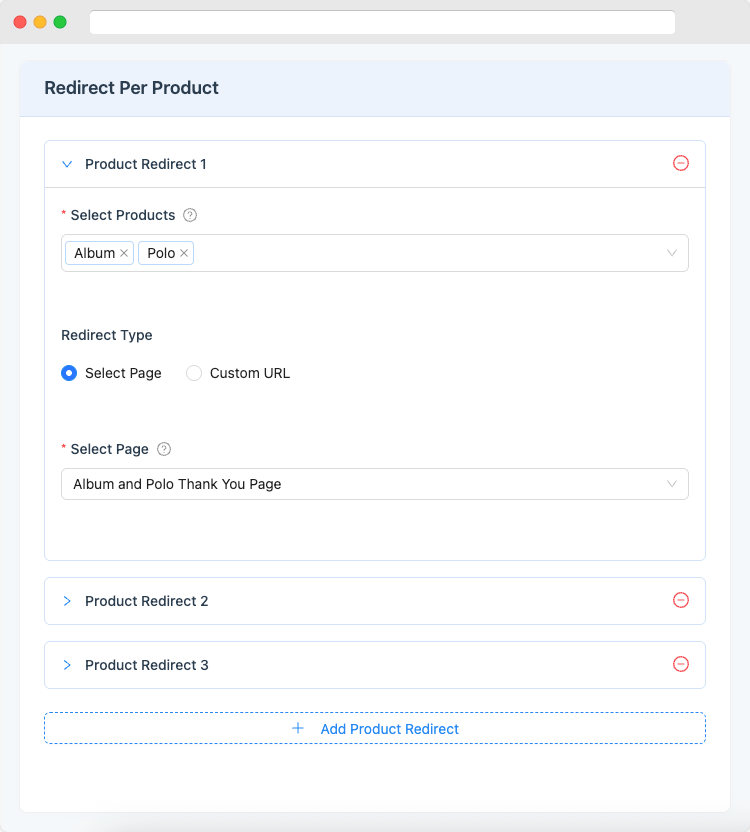
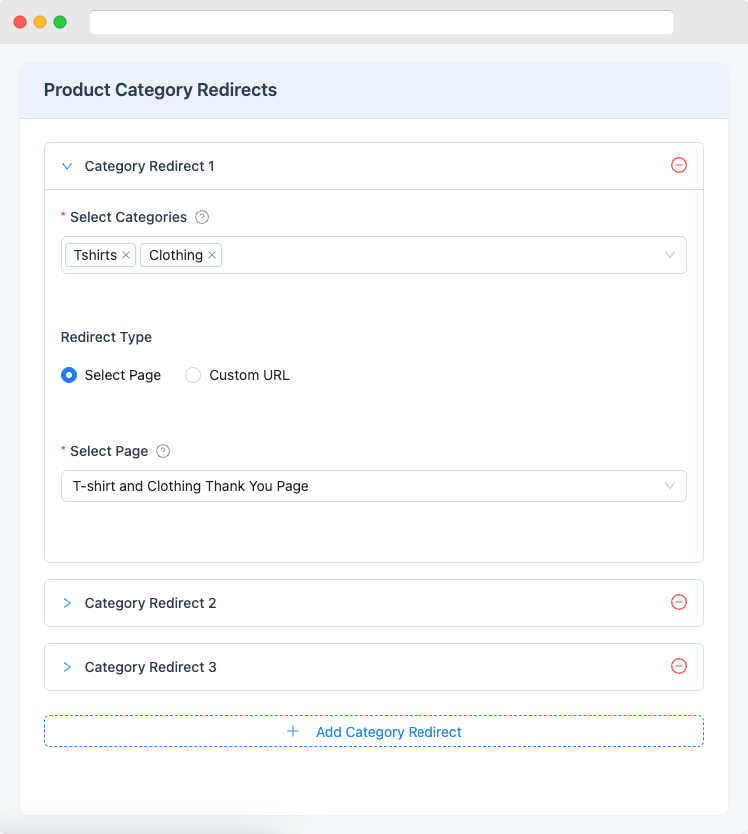
- What they bought: different page for different products or categories
- Who they are: different page for wholesale customers vs retail (Pro)
- How they paid: different page for PayPal, Stripe, bank transfer, etc. (Pro)
- What variation they ordered: specific pages for product variations (Pro)
- 📈 Increase sales: Offer a one-time discount, upsell a related product, or promote a bundle deal
- 🤝 Build loyalty: Show a personal welcome message, a how-to video, or exclusive member content
- 💬 Get reviews: Ask for a product review or testimonial while the excitement is fresh
- 📢 Grow your audience: Invite them to follow you on social media or join your email list
- 📊 Track conversions: Send accurate purchase data to Google Analytics or Facebook Pixel (Pro)
- User Role Redirects: Show a different thank you page to wholesale customers, members, or any other user role
- Payment Method Redirects: Customize the experience for customers who paid with PayPal, Stripe, bank transfer, or any other gateway
- Product Type & Tag Redirects: Create redirect rules for digital products, subscriptions, or any product tag
- Product Variation Redirects: Target specific product variations, like size or color, with dedicated pages
- Brand Redirects: Redirect based on product brand (works with WooCommerce Brands and YITH Brands)
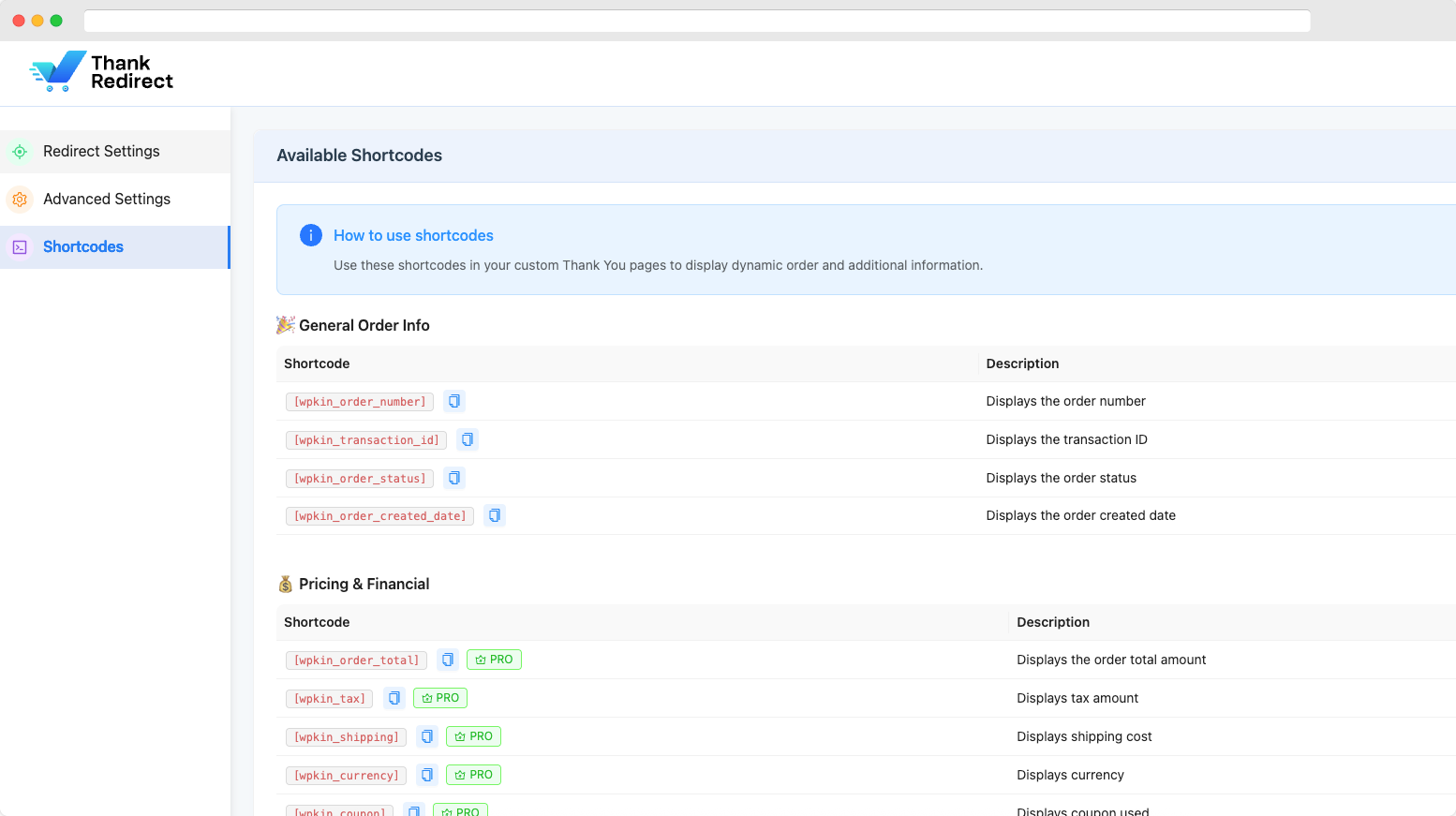
[wpkin_order_number]: The order number[wpkin_transaction_id]: The payment transaction ID[wpkin_order_status]: The current order status (e.g. Processing, Completed)[wpkin_order_created_date]: The date the order was placed-
[wpkin_customer_name]: The customer's full name Pro Shortcodes: -
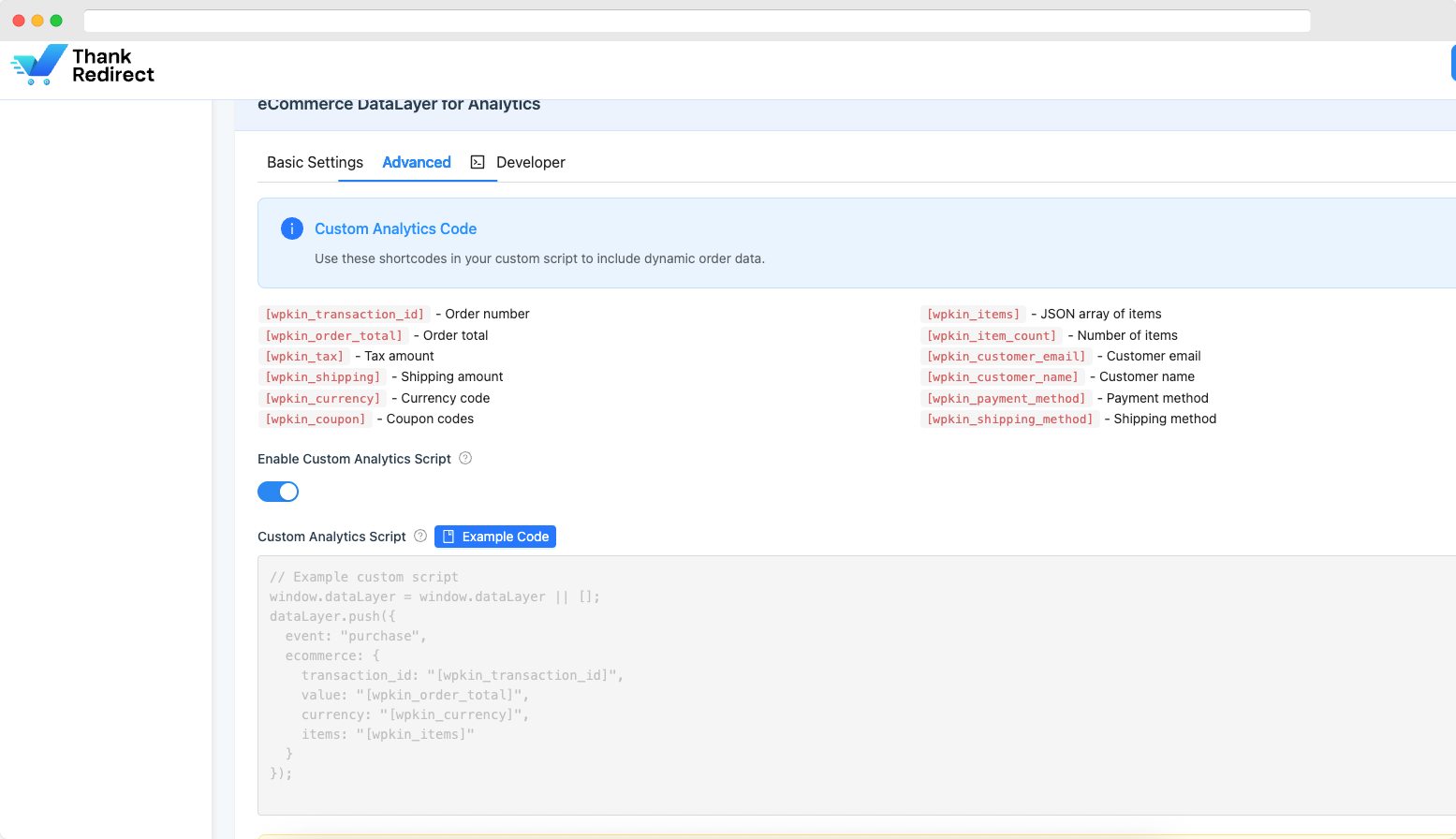
[wpkin_order_details]: Complete order summary (items, customer info, billing address, and total in one shortcode) [wpkin_order_total]: The total amount paid[wpkin_tax]/[wpkin_shipping]: Tax and shipping costs[wpkin_coupon]: Coupon codes used in the order[wpkin_first_name]/[wpkin_customer_email]: Customer's first name and email address[wpkin_billing_address]/[wpkin_shipping_address]: Full billing and shipping addresses[wpkin_items]: A list of all products in the order[wpkin_downloads]: Download links for digital products[wpkin_payment_method]/[wpkin_shipping_method]: Payment and shipping method names- ...and more!
- Store owners who want to increase repeat sales and average order value
- Marketers who need accurate conversion tracking for ads and analytics
- Agencies building custom shopping experiences for clients
- Membership sites that need different post-purchase flows for different user roles
- Digital product sellers who want to deliver downloads or access links on a custom page
安装:
- Upload the plugin files to the
/wp-content/plugins/wc-thank-you-pagedirectory, or install the plugin through the WordPress plugins screen directly. - Activate the plugin through the Plugins screen in WordPress.
- Go to ThankRedirect in your WordPress dashboard to configure your settings.
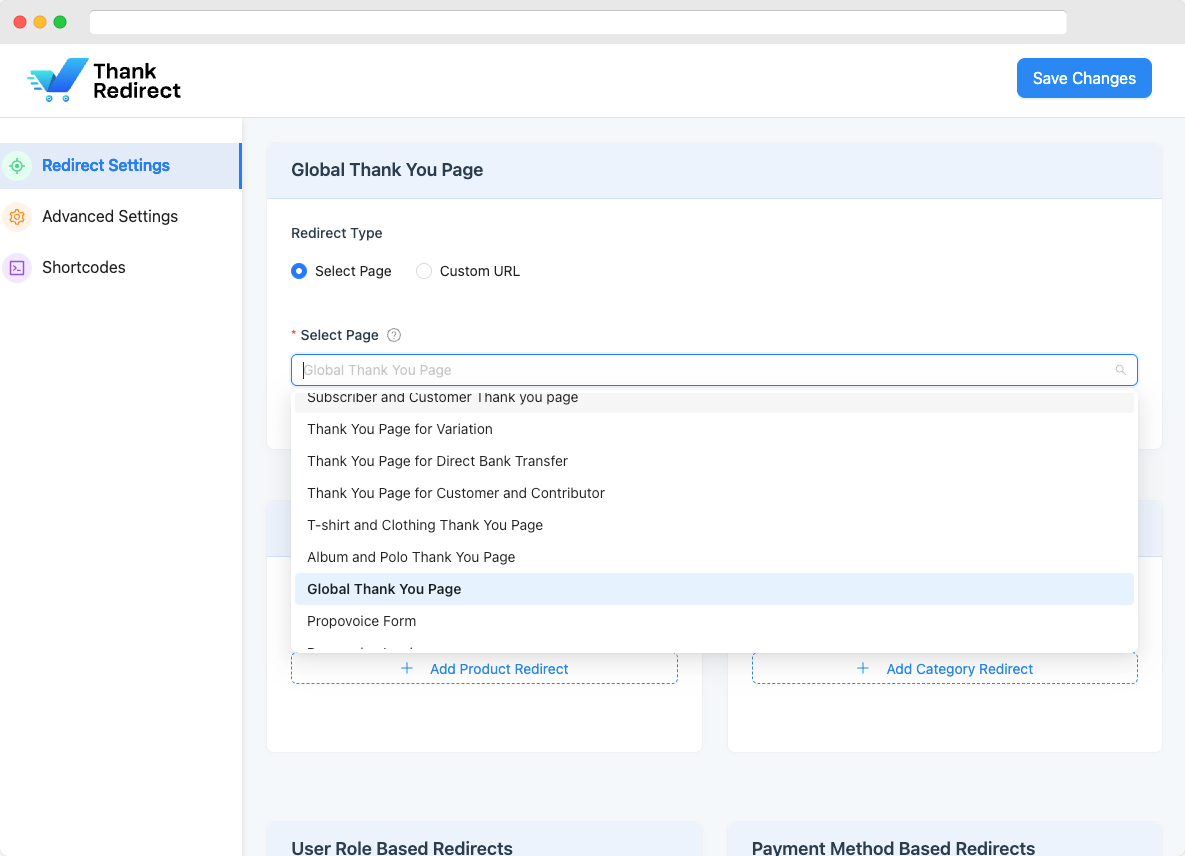
- Set up your first redirect rule: global, per-product, or by category.
- Done! Your customers will now be redirected to your custom thank you page after every purchase.
屏幕截图:
常见问题:
Will this work with my theme?
Yes. ThankRedirect works with any WordPress theme that supports WooCommerce. There is no theme dependency.
Do I need to know how to code?
No. ThankRedirect is designed for everyone, from beginners to advanced users. Everything is managed through a clean settings panel. No PHP, CSS, or JavaScript knowledge required.
Can I show a different thank you page for different products?
Yes! With the free version, you can set unique redirect pages for individual products and product categories. The Pro version adds even more rules based on user roles, payment methods, product tags, variations, and brands.
How do I show order details on my custom thank you page?
Use the built-in shortcodes. For example, add [wpkin_order_number] to your page and it will automatically display the customer's order number. All shortcodes are listed in the plugin settings.
Will this slow down my website?
No. ThankRedirect is lightweight and loads only what it needs, only on the pages where it is needed. It has no impact on your store's front-end performance.
Does it work with Elementor and Gutenberg?
Yes. ThankRedirect has a built-in template library inside both Elementor and Gutenberg. You can browse and import ready-made thank you page designs directly from the editor.
Does it work with WPML and multilingual plugins?
Yes. ThankRedirect is compatible with WPML and other popular multilingual plugins. You can set different redirect pages for different languages.
Can I track Google Analytics and Facebook Pixel conversions?
Yes, with ThankRedirect Pro. It pushes a complete purchase event to Google Analytics (GA4 via dataLayer) and Facebook Pixel with full order data: items, values, currency, and more.
What happens if no redirect rule matches an order?
The customer simply sees the default WooCommerce thank you page. ThankRedirect never interferes with orders: it only changes where the customer is sent after a successful purchase.
Can I use this plugin for free?
Yes! The free version includes global redirect, per-product redirect, category-based redirect, templates, and shortcodes. The Pro version unlocks advanced rules and analytics.
更新日志:
- NEW: New Settings page, separate from the redirect rules: your license (status, plan, expiry date and the masked key, with Activate, Change or Renew), Access, Tracking (analytics, URL personalization, redirect delay), Advanced (custom script, developer hook) and a Danger zone. Changes save automatically.
- NEW: Access: choose whether Shop Managers can open Redirect Rules and Getting Started and change the rules. It stays Administrators only unless you change it, as before. The Settings page always stays with administrators.
- NEW: Danger zone: choose to delete ThankRedirect's rules and settings when the plugin is deleted (off by default, deactivating never removes anything), and reset all settings after typing reset to confirm.
- SECURITY: Thank you pages now show order details (shortcodes and tracking) only to the people WooCommerce shows its own order page to: the logged in customer, or for a guest order the same browser, the first 10 minutes after checkout, or store staff. A forwarded or saved link shows nothing, and never the sample values.
- SECURITY: Thank you pages opened with an order are no longer stored by page caches or CDNs, so one customer's details can't be shown to the next visitor.
- SECURITY: The order key is only added to thank you pages on your own store. A custom URL on another site gets the order ID only.
- SECURITY: Saving the redirect rules now ignores any setting the page doesn't own.
- SECURITY: Customer details placed in the custom tracking script are now escaped, so a name with quotes in it can't run its own code on the thank you page.
- SECURITY: Only administrators (users who can post unfiltered HTML) can change the custom tracking script; for anyone else the saved script is kept.
- SECURITY: Order detail shortcodes now escape the text they print.
- SECURITY: Custom redirect URLs must start with http or https: other addresses, such as javascript:, are removed when saving and are never followed.
- SECURITY: The thank you page template library can now only be read by people who can edit content.
- FIX: A custom thank you page URL on another site no longer sends customers to the WordPress admin when the redirect happens from the order received page.
- FIX: Customers sent to a thank you page by a Variation or Brand rule now get the order details in the page address, like every other rule, so shortcodes and analytics work on that page.
- FIX: Facebook Pixel now sends its standard Purchase event when the event name is left as purchase, so Facebook counts it as a purchase. The dataLayer event is unchanged.
- FIX: Getting Started no longer lists features the plugin doesn't have, shows the redirect delay correctly as a Pro feature, and explains that Pro needs only a license key, not a second plugin.
- FIX: Saving the redirect rules no longer resets URL personalization, the analytics options and the redirect delay to their defaults.
- FIX: Google Analytics, Facebook Pixel and the custom script now send each order once: reloading the thank you page, going back to it or opening the link again no longer counts the sale twice. Store staff opening a customer's thank you page don't send it either.
- FIX: Failed and cancelled orders now stay on the WooCommerce order page, which tells the customer the payment didn't go through and offers to pay again, instead of going to a thank you page.
- FIX: A rule whose page was deleted, drafted or made private is now skipped, so the next matching rule or your default page is used instead of a page customers can't open.
- FIX: The transaction ID shortcode no longer shows a sample ID for orders that have no transaction ID.
- FIX: The Install WooCommerce link in the notice now installs the right plugin.
- TWEAK: Redesigned the Getting Started page in the same layout as Redirect Rules: a quick start checklist that shows what is already set up, a redirect flow chart of your own rules in the order they are checked, every check explained with an example, a guide to building your thank you page, questions and answers, what's new, and a Free vs Pro comparison.
- TWEAK: Category rules now explain that only categories set on the product itself count, and User role rules that guest orders skip them.
- TWEAK: The old Settings page is now called Redirect Rules, and is redesigned to be easier to follow: a new plugin header shared by every ThankRedirect screen, a menu that lists every section with its status, an overview that explains how redirects work, rules written as plain sentences with an example for each, a searchable shortcode list, and a bar that appears when you have unsaved changes, with Discard.
- TWEAK: When a field needs attention, saving now opens the section that holds it and scrolls to the field.
- TWEAK: On the free plan, Pro sections now say they are a Pro feature and their controls stay locked, instead of saving settings that do nothing.
- TWEAK: The custom tracking script now has a code editor with line numbers and syntax colors. Click an order detail to insert it at the cursor, or insert an example straight into the editor.
- TWEAK: The custom analytics script now lists only the placeholders it fills in, and its example code uses them.
- TWEAK: Redesigned the Account page to match the ThankRedirect settings screens, with the plugin header, clear cards for your license details, billing address and invoices, and a layout that works on phones.
- TWEAK: The Account page now always shows the Payments card for licensed sites, with a clear message when the license is a free localhost license or was bought with a different account. The Billing card is shown only when the license belongs to the connected account, since it edits that account's billing details.
- TWEAK: Product and product variation dropdowns now show a clear loading indicator: "Loading more products…" appears at the bottom of the list while scrolling fetches the next batch, and "Searching products…" appears while a search is running.
- TWEAK: The search indicator now appears the moment you start typing instead of after a short delay, so it is always obvious that results are being fetched.
- TWEAK: The next batch of products now starts loading slightly before you reach the bottom of the list, making long product lists feel smoother to scroll.
- FIX: Fixed product dropdowns not listing every product on large stores: the settings page was capped at 500 products, so anything beyond that limit never appeared in the "Redirect Per Product" list and could not be selected.
- NEW: Product and product variation dropdowns now load on demand with server-side search and infinite scroll, so stores with thousands of products can find and select any product instantly.
- NEW: Products can now be searched by SKU as well as by name.
- TWEAK: Product variations are now searchable by their parent product name.
- PERFORMANCE: Greatly reduced settings page load: the product list no longer runs one database query per product (previously 501 queries) and the settings payload is roughly 8x smaller.
- FIX: Selected products that were later moved to draft or pending now keep showing their name instead of a bare numeric ID, preventing saved redirect rules from being lost when the settings are re-saved.
- FIX: Fixed global redirect not working as WooCommerce default: the plugin now hooks into WooCommerce's order-received URL generation at checkout time so payment gateways receive the correct return URL directly, with no redirect flash and full compatibility with all payment gateways and caching plugins.
- NEW (PRO): Added
[wpkin_order_details]shortcode, which displays a complete order summary including order info, customer details, billing address, items table, and order total in one shortcode. - NEW: Added "Upgrade to Pro" button with crown icon in the admin header. It links to the pricing page and is automatically hidden for Pro users.
- FIX: Active tab now persists on page reload: the selected menu tab is saved in the URL hash so reloading the page returns to the same tab.
- TWEAK: Left sidebar navigation is now sticky: the menu stays fixed while the page content scrolls.
- FIX: Fixed nested sub-tabs (e.g. Basic Settings / Advanced / Developer inside Advanced Settings) breaking due to CSS specificity conflicts introduced by the sticky sidebar.
- TWEAK: Applied Inter font consistently across all plugin pages and Ant Design components for a uniform look regardless of the active theme.
- FIX: Improved redirect reliability: redirects now fire before page output to prevent conflicts with other plugins and themes.
- FIX: Fixed delayed redirect JavaScript not rendering correctly.
- FIX: Fixed REST API endpoints not working when WordPress is installed in a subdirectory.
- TWEAK: Updated branding to Oxilab.
- NEW: Added Elementor template library integration.
- FIX: Fixed redirect issue.
- NEW: Added dedicated settings page
- NEW: Added Global Thank You Page Redirect
- NEW: Added Per-Product Redirect
- NEW: Added Product Category Redirect
- NEW (PRO): User Role Based Redirects
- NEW (PRO): Payment Method Based Redirects
- NEW (PRO): Product Type Based Redirects
- NEW (PRO): Product Tag Based Redirects
- NEW (PRO): Product Brand Based Redirects
- NEW (PRO): Product Variation Based Redirects
- NEW (PRO): URL Personalization
- NEW (PRO): eCommerce DataLayer for Analytics
- NEW (PRO): Redirect Delay
- NEW: Shortcodes (Free & Pro)
- Tweak: Tested for compatibility with WordPress 6.8.
- Fix: Resolved a per-product redirect issue.
- Tweak: Tested for compatibility with WordPress 6.3.
- Security: Added PHPCS and WPCS for improved code quality.
- NEW: Added initial shortcode support.
- NEW: Added a dashboard icon.
- Tweak: Updated author URL.
- Initial stable release.