
WebberZone Code Block Highlighting
| 开发者 |
webberzone
ajay |
|---|---|
| 更新时间 | 2026年9月10日 19:29 |
| 捐献地址: | 去捐款 |
| PHP版本: | 7.4 及以上 |
| WordPress版本: | 7.1 |
| 版权: | GPLv2 or later |
| 版权网址: | 版权信息 |
详情介绍:
core/code block with Prism.js highlighting in the browser, or optional server-side highlighting with highlight.php — no shortcodes, no block replacement, no risk of breaking existing posts.
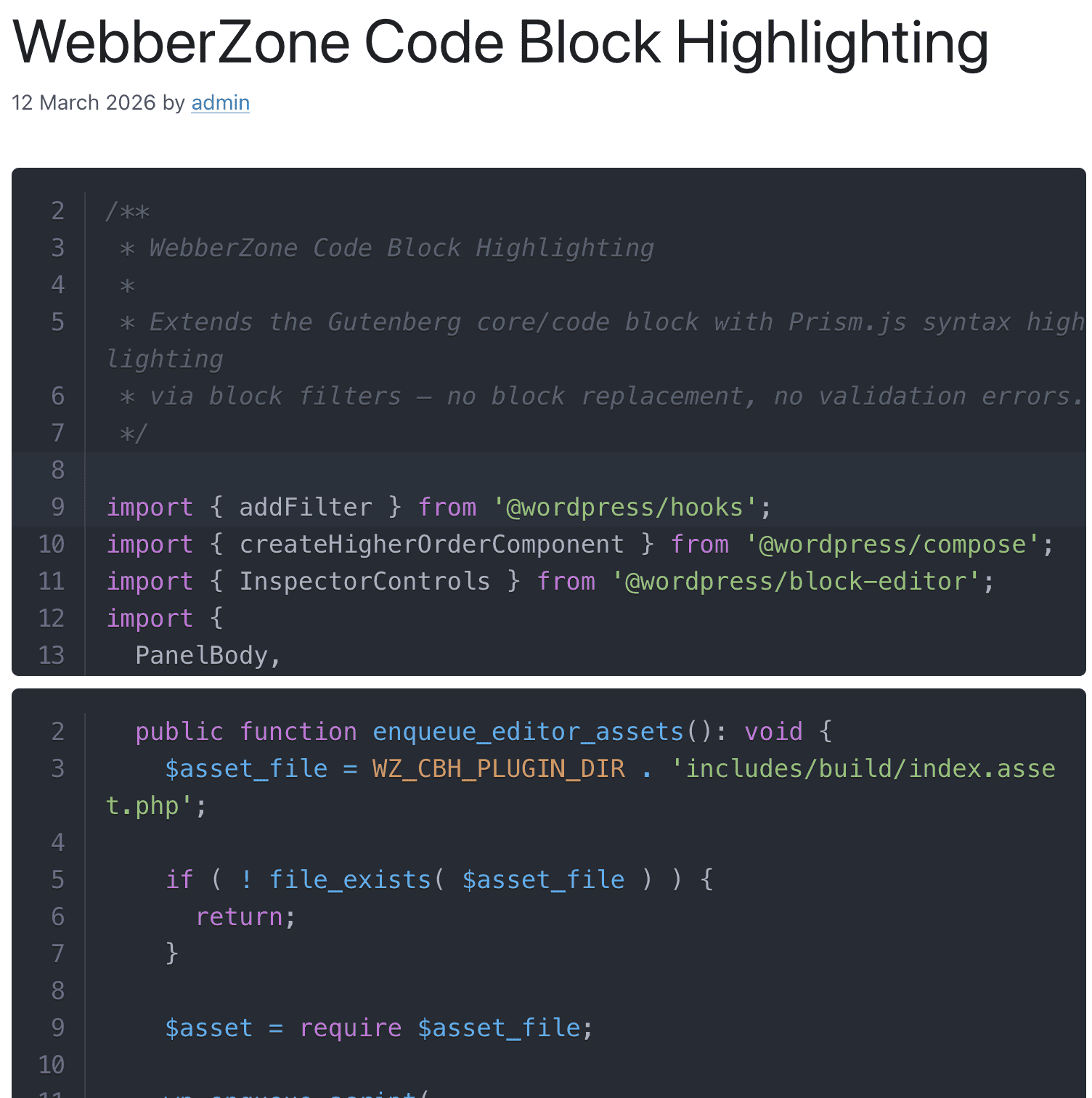
Simply activate the plugin and your code blocks will instantly display beautiful, readable syntax highlighting on the frontend. Choose from 40+ programming languages and 21 colour themes, all controlled from the block editor's Inspector Controls sidebar.
Two highlighting modes
Pick the rendering mode that best fits your site from the settings page:
- Client-side (default) — Prism.js highlights your code in the browser. Best for interactive features such as copy-to-clipboard and expand/collapse.
- Server-side (highlight.php) — Code is pre-highlighted on the server with highlight.php, so no Prism.js or any other JavaScript is loaded for highlighting. Ideal for performance, Core Web Vitals, AMP-style setups, and strict content-security policies.
- Safe by design — Works as a filter on top of
core/code. Existing posts are never invalidated. Deactivate the plugin and your blocks are still valid standard WordPress code blocks. - Zero configuration — Activate and start writing. No setup wizard, no shortcodes.
- No highlighting JavaScript in server mode — Server-side mode pre-renders syntax colours on the server. No Prism.js or any other JavaScript is enqueued for highlighting.
- Smart asset loading — Theme CSS (and, in client mode, Prism JS) only load on pages that actually contain code blocks. Pages without code stay fast.
- Per-block controls — Set language, theme, line numbers, word wrap, title, highlighted lines, and max height individually for each block.
- Developer-friendly — Filters to add languages, override themes, and force asset loading.
wzcbh_languages filter to add or remove entries from the language picker.
Included themes (21)
A11y Dark, Coldark Cold (Light), Coldark Dark, Dracula, Duotone Dark, Duotone Light, GitHub (Light), Gruvbox Dark, Gruvbox Light, Lucario, Material Dark, Material Light, Night Owl, Nord, One Dark, One Light, Shades of Purple, Solarized Dark, Synthwave '84, VS Code Dark+, Xonokai (Monokai).
Per-block features
- Language selector — Choose the programming language from the sidebar; applies the correct Prism grammar automatically.
- Line numbers — Toggle line numbers per block, with a configurable start line.
- File title / label — Add an optional filename or label displayed in the code block toolbar.
- Highlight lines — Specify lines or ranges (e.g.
1,3-5) to visually highlight using Prism's line-highlight plugin. - Max height with expand/collapse — Set a maximum height in pixels; an expand/collapse toolbar button appears automatically.
- Word wrap — Toggle soft word wrapping per block.
- Highlighting mode — client-side (Prism.js) or server-side (highlight.php)
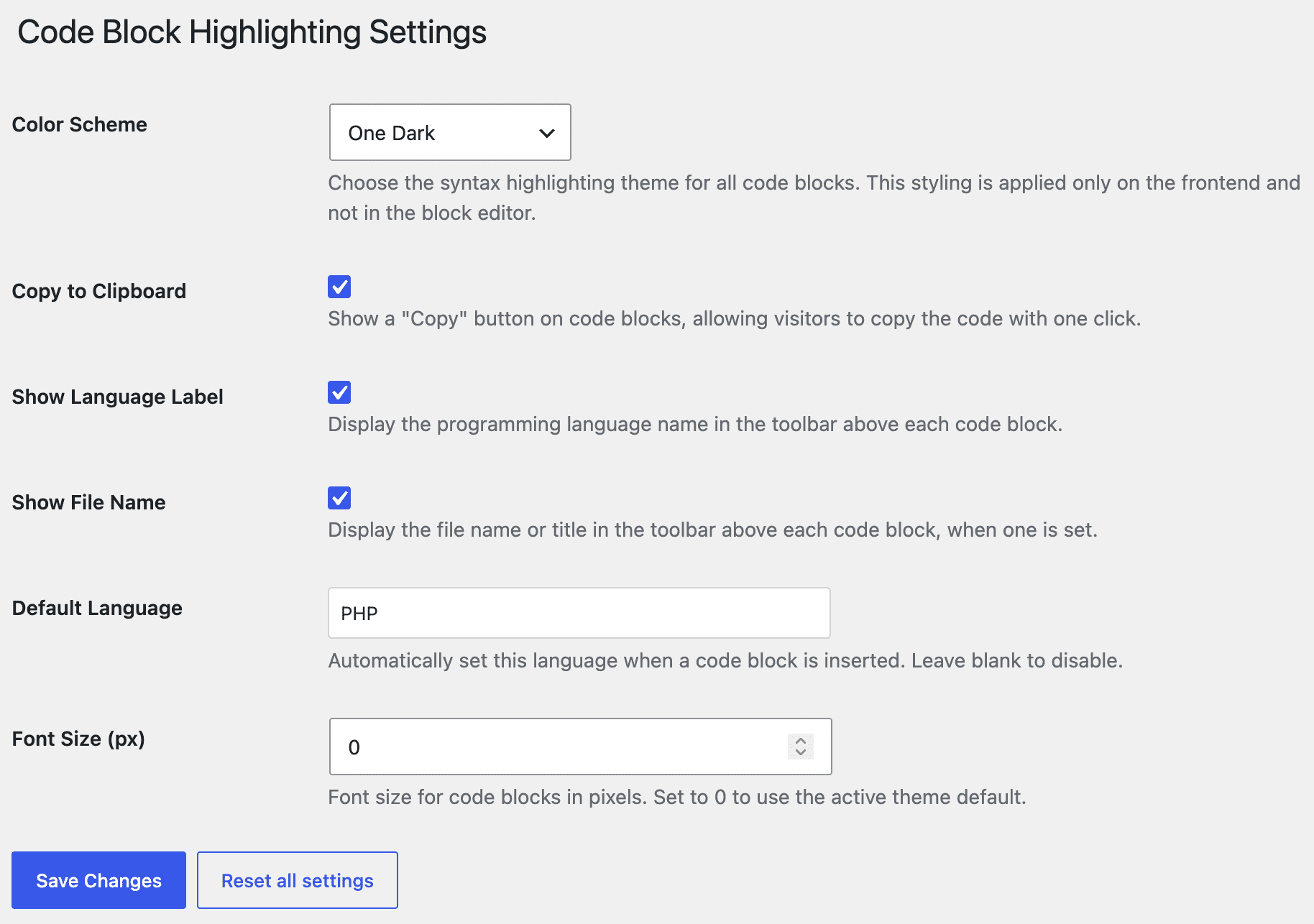
- Default colour scheme (theme)
- Default language
- Default line numbers toggle and start value
- Default word wrap
- Copy-to-clipboard button
- Show language label in toolbar
- Font size
wzcbh_languages— Filter the language list array (slug => label)wzcbh_color_scheme_css_url— Override the Prism theme CSS URLwzcbh_force_load_assets— Force Prism assets to load on every page
- Contextual Related Posts — Display fast, intelligent related posts to keep visitors on your site longer
- Top 10 — Track daily and total visits and display popular and trending posts
- WebberZone Snippetz — Manage custom HTML, CSS and JS snippets across your site
- Knowledge Base — Create a knowledge base or FAQ section on your WordPress site
- Better Search — Contextual search results sorted by relevance
- Auto-Close — Automatically close comments, pingbacks, trackbacks and manage revisions
- Popular Authors — Display popular authors in a WordPress widget
- Followed Posts — Show related posts based on what your visitors have already read
- WebberZone Link Warnings — Add accessible warnings for external links and target="_blank" links
安装:
- Go to Plugins > Add New in your WordPress admin.
- Search for WebberZone Code Block Highlighting.
- Click Install Now, then Activate.
- Download the plugin zip file.
- Extract it to your
wp-content/plugins/directory. You should end up with awebberzone-code-block-highlighting/folder. - Go to Plugins in your WordPress admin and activate WebberZone Code Block Highlighting.
屏幕截图:
常见问题:
Does this plugin replace the core Code block?
No. WebberZone Code Block Highlighting uses JavaScript and PHP filters to extend the native core/code block. It never swaps the block for a custom one, so existing posts are never invalidated and the plugin can be deactivated without leaving behind broken blocks.
Will my code blocks break if I deactivate the plugin?
No. Because the plugin extends core/code rather than replacing it, deactivating simply removes the highlighting. Your code content is stored in standard WordPress block markup and remains valid.
Which programming languages are supported?
40 languages out of the box: Apache Config, Bash, C, C++, C#, CSS, Dart, Docker, F#, Go, GraphQL, Groovy, Haskell, HTML, Java, JavaScript, JSON, JSX, Kotlin, Lua, Markdown, Nginx, Objective-C, Perl, PHP, PowerShell, Python, R, Ruby, Rust, Sass, Scala, SQL, Swift, TOML, TSX, TypeScript, Vim, XML, and YAML.
Use the wzcbh_languages filter to add or remove entries from the language picker. Note: adding a language to the filter only affects the UI dropdown — the corresponding Prism.js grammar must also be available on the frontend (either bundled in frontend.js or loaded separately).
How do I add a custom or additional Prism theme?
- Add the theme mapping in
build-prism.js. - Copy the generated CSS to
includes/assets/. - Register the slug in
includes/admin/class-settings.php. - Run
npm run build:prism.
wzcbh_color_scheme_css_url filter to point to any CSS file without touching the plugin source.
What is the difference between client-side and server-side highlighting?
In client-side mode (the default), Prism.js runs in the visitor's browser and highlights your code on page load. This mode enables interactive toolbar features such as copy-to-clipboard and expand/collapse. In server-side mode, the plugin uses highlight.php to pre-render the highlighted markup on the server. No JavaScript is loaded for highlighting, which is great for performance, Core Web Vitals, and sites with strict content-security policies. Both modes share the same 21 Prism themes and produce visually identical results, so you can switch freely from Settings > Code Block Highlighting.
Does server-side highlighting work without JavaScript?
Yes. When server-side mode is enabled, syntax colours are baked into the HTML on the server — no Prism.js or any other JavaScript is enqueued for highlighting.
Does Prism.js load on every page?
No. Theme CSS and (in client-side mode) Prism JS are only enqueued on pages that contain at least one code block. All other pages are unaffected. Use the wzcbh_force_load_assets filter to override this behaviour if needed.
How do I highlight specific lines in a code block?
Enter a comma-separated list of lines or ranges in the Highlight Lines field in the Inspector Controls sidebar (e.g. 1,3-5,8). This maps to the data-line attribute consumed by the Prism line-highlight plugin.
Can I show a filename or label on the code block?
Yes. Use the Title field in the Inspector Controls sidebar. The label is displayed in the Prism toolbar above the code block.
Does the plugin support dark mode or multiple themes?
The plugin ships with 21 Prism themes. The active theme is selected globally on the settings page (Settings > Code Block Highlighting). Per-block theme switching is not currently supported.
Is this plugin compatible with the WordPress block editor (Gutenberg)?
Yes. The plugin is built specifically for the Gutenberg block editor (WordPress 6.6+) and uses the native block filter APIs. It does not support the Classic Editor.
Where do I report security bugs found in this plugin?
Please report security bugs found in the source code of the WebberZone Code Block Highlighting plugin through the Patchstack Vulnerability Disclosure Program. The Patchstack team will assist you with verification, CVE assignment, and notify the developers of this plugin.
更新日志:
- Server-side highlighting is faster on pages with several code blocks, and very large blocks now fall back to unhighlighted text rather than stalling the page — the threshold is filterable with the new
wzcbh_server_highlight_max_bytes. - Settings screens and per-block help text now use American English.
- Hardened settings sanitization so every field type is sanitized before it is stored, with choice fields validated against the options they register.
- Hardened textarea sanitization in the settings framework.
- The color scheme setting is now validated everywhere it is used to build a file path.
- A file name containing
$0,$1or\0was written into the block's markup as the surrounding tag text instead of the name itself; line ranges and download file names were affected the same way. - Copying a code block in server-side mode added a blank line after every highlighted line.
- Server-side mode repeated the language class the block had already saved, and could add an empty
classattribute. data-title,data-lineanddata-startwere written twice on every code block.- With line highlighting on, server-side mode could render one line more than the line-number gutter showed, and the extra line could pick up the highlight.
- A "Highlight lines" value spanning a very large range, such as
1-999999999, exhausted memory while the page was rendering. - The "Settings" link in the admin banner, and the redirect at the end of the setup wizard, pointed at an address that returned a permissions error.
- Code blocks stopped the page rendering when a theme or plugin made the main query return post IDs rather than posts.
- Deprecation notices on PHP 8.6 from calling
trim()without an explicit second argument.
- Setting defaults are now resolved from a single lightweight list instead of building every settings field, so reading an option early in the page load no longer risks a "translation loading triggered too early" notice.
- Settings on a multisite network read another site's values in the same request after a
switch_to_blog()call. - The settings wizard silently dropped repeater field rows on save.
- File name tab: the file name set on a block renders as an editor-style tab above the code block, colored to match the active Prism theme, in both client-side and server-side modes.
- "File Name Style" setting to choose between the new tab and the previous toolbar label.
wzcbh_file_tab_htmlfilter to customize the file name tab markup.- Download snippet button next to "Copy" in the toolbar, saving the snippet as a file named after the block's file name, or
snippet.{ext}derived from its language. - "Download Snippet" setting to turn the download button off globally, and a "Download button" control to turn it off per block.
wzcbh_download_extensionsfilter to customize the language-to-file-extension map used for downloads.
- File names saved by the older Code Syntax Block plugin, stored as a
titleattribute on the<pre>, were not displayed on the frontend until the post was re-saved. - The block editor canvas picked up
background: windowfrom the forced-colors media query in several themes, leaving the editor code block unstyled.