WebberZone Link Warnings
| 开发者 |
webberzone
ajay |
|---|---|
| 更新时间 | 2026年10月15日 03:59 |
| 捐献地址: | 去捐款 |
| PHP版本: | 7.4 及以上 |
| WordPress版本: | 7.1 |
| 版权: | GPLv2 or later |
| 版权网址: | 版权信息 |
详情介绍:
WP_HTML_Tag_Processor class to efficiently parse and modify links at render time. Server-side filters also process widget output, navigation menus, comment text, and block-theme template parts when their General settings are enabled. A lightweight JavaScript scan handles remaining theme output after the page loads and applies the same rules. Your stored content remains untouched — the plugin only alters rendered output and does not interfere with REST API responses or admin editing screens.
Why warn users about external links?
target="_blank"can disorient screen reader users- Sudden context changes impact usability
- Accessibility audits often recommend user warnings
- Agencies and site owners often need documented user warnings during accessibility reviews
- Multiple Warning Methods: Choose from inline indicators, modal dialogs, or redirect screens — or combine them
- Flexible Scope: Target external links only, or external links plus all
target="_blank"links - Customizable Indicators: Configure visual icons, text, or screen reader-only warnings
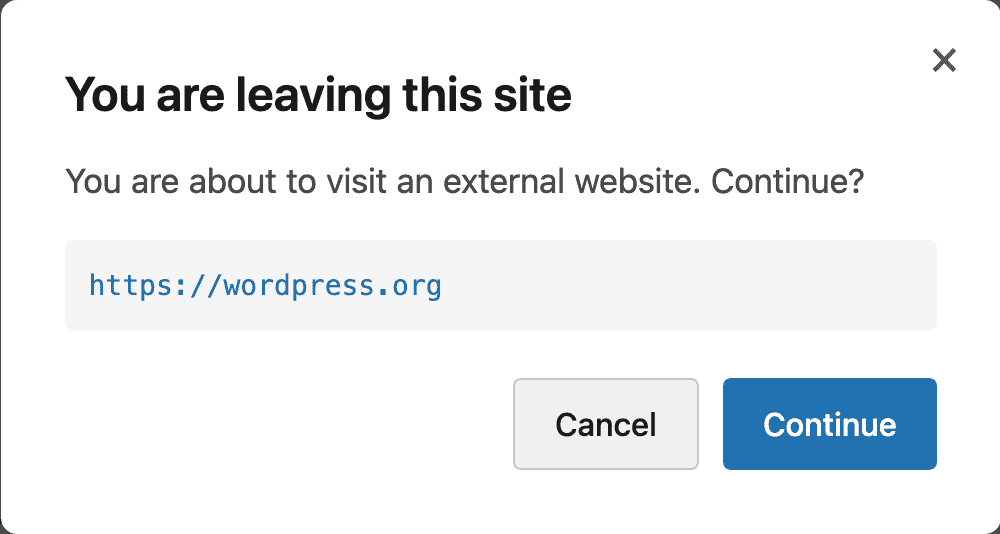
- Modal Dialog: Show a confirmation dialog before users navigate to external sites with keyboard navigation and focus management
- Dismissible Modals: Let repeat visitors tick "Don't show again" so the modal is skipped for a session or for a set number of days, per destination domain or sitewide
- Redirect Screen: Display an intermediate page with a configurable countdown before external navigation
- Force External: Add a class to any link or wrapper element to force it to be treated as external — useful for tracking URLs or redirects that use internal paths
- Automatic Link Attributes: Add
nofollow,sponsored,ugc,noopener,noreferrerandtarget="_blank"to external links, affiliate links, or both — no post edits needed - Affiliate Link Marking: Flag a link or container with a class and give affiliate links their own attributes
- Domain Exclusions: Allow trusted domains to treat them as internal links
- Sitewide Coverage: Server-side filters process widget output, navigation menus, comment text, and block-theme template parts, while the JavaScript scan covers remaining theme output
- Post Type Control: PHP-side processing is scoped to configured post types; JS scanning covers the full page regardless
- Built to support accessibility best practices for external link behaviour in WordPress: Adds screen reader text, ARIA attributes, and keyboard-friendly modal confirmations
- Setup Wizard: Get started quickly with a guided setup wizard on first activation
- Template Override: Override the redirect screen template in your theme for full design control
- RTL Support: Full right-to-left language support for all frontend and admin styles
- Multisite Compatible: Network activate and configure per-site settings
- Privacy Focused: Does not collect personal data or send link data to third-party services
- Performance Optimized: Uses WordPress's native
WP_HTML_Tag_Processorclass to process links at display time - Developer-Friendly: Filters and actions allow developers to customize behavior, exclude domains, and output
This plugin assists with user awareness of external navigation. It does not automatically make your website fully accessible or legally compliant.How it works After activation, the setup wizard guides you through the initial configuration. You can also configure the plugin at Settings > WebberZone Link Warnings. Warning Methods:
- Inline indicators only (visual and/or screen reader text)
- Modal dialog (JavaScript-based confirmation)
- Redirect screen (intermediate page with countdown)
- Combined approach (inline + modal)
- Combined approach (inline + redirect)
- External links only
- External links and all
target="_blank"links
- Icon only (↗)
- Text only (customizable)
- Icon + text
- None (screen reader only)
- Custom modal messages and button text
- Modal frequency, dismissal scope and "Don't show again" label
- Custom redirect page content and countdown duration
- Link attributes for external and affiliate links (
nofollow,sponsored,ugc, open in a new tab,noopener,noreferrer) - Affiliate link class and wrapper class (defaults:
wzlw-affiliate,wzlw-affiliate-wrapper) - Domain exclusion list
- Post type selection
- Force-external class name (default:
wzlw-force-external)
- Contextual Related Posts - Display related posts on your WordPress blog and feed
- Top 10 - Track daily and total visits to your blog posts and display the popular and trending posts
- WebberZone Snippetz - The ultimate snippet manager for WordPress to create and manage custom HTML, CSS or JS code snippets
- Knowledge Base - Create a knowledge base or FAQ section on your WordPress site
- Better Search - Enhance the default WordPress search with contextual results sorted by relevance
- Auto-Close - Automatically close comments, pingbacks and trackbacks and manage revisions
- Popular Authors - Display popular authors in your WordPress widget
- Followed Posts - Show a list of related posts based on what your users have read
安装:
- Navigate to Plugins > Add New
- Search for "WebberZone Link Warnings"
- Click "Install Now" and then "Activate"
- Upload the
webberzone-link-warningsfolder to/wp-content/plugins/ - Activate the plugin through the 'Plugins' menu in WordPress
- Go to Settings > WebberZone Link Warnings to configure
屏幕截图:
常见问题:
Does this plugin affect SEO?
Out of the box, no. WebberZone Link Warnings only modifies how links are displayed to users and never alters the href attribute or link structure.
If you enable the Link Attributes settings under Settings > WebberZone Link Warnings > Advanced, the plugin will add rel and target attributes to matching links, which is a deliberate SEO signal that you control. Attributes on links inside post content are written server-side and are present in the HTML that search engines download. Attributes on links elsewhere on the page — navigation menus, widgets, footers and other theme output — are applied by the JavaScript scan after the page loads, so they are only visible to crawlers that execute JavaScript.
Is it accessible?
Yes. The plugin adds screen reader text, ARIA attributes, and (for modal mode) keyboard navigation and focus management.
Does it work with multilingual sites?
Yes. WebberZone Link Warnings is translation-ready. It uses standard WordPress translation functions and works with popular multilingual plugins such as WPML and Polylang.
Does this work with page builders?
Yes. Post content is processed via standard WordPress filters (the_content and the_excerpt). In addition, a JavaScript scan runs after the page loads and processes any links not already handled by PHP — including output generated by page builders, theme templates, navigation menus, and widgets.
Can I customize the redirect screen template?
Yes. Copy the template file to your-theme/webberzone-link-warnings/redirect-screen.php to override the default redirect screen with your own design.
How can I force an internal link to be treated as external?
Add the class wzlw-force-external directly to the <a> tag:
<a href="/go/partner/" class="wzlw-force-external">Partner link</a>
To force all links inside a container, add wzlw-force-external-wrapper to the wrapper element instead:
<div class="wzlw-force-external-wrapper"><a href="/go/product-a/">Product A</a><a href="/go/product-b/">Product B</a></div>
Both class names are configurable under Settings > WebberZone Link Warnings > Advanced.
How do I add rel="nofollow" or rel="sponsored" automatically?
Go to Settings > WebberZone Link Warnings > Advanced and use the Link Attributes section. Tick any combination of rel="nofollow", rel="sponsored", rel="ugc", "Open in a new tab", rel="noopener" and rel="noreferrer" under External Links, Affiliate Links, or both.
Attributes already on your links are kept. A link that carries rel="me author" becomes rel="me author nofollow" rather than losing its original values, and a link that already has rel="NoFollow" is not given a second copy — matching ignores case.
noopener and noreferrer are only added to links that actually open in a new tab, either because the link already has target="_blank" or because you enabled the new-tab option. Every option is off by default and nothing is added unless you tick it — the plugin has never rewritten rel on your links before this version.
They are deliberately separate options. Current browsers already imply noopener for target="_blank", so ticking it mainly satisfies security scanners and older browsers and costs you nothing. noreferrer is the one with a behavioural cost: it also stops the referrer being sent, so leave it unticked for affiliate links if your merchant relies on the referrer for attribution.
How do I mark affiliate links?
Add the class wzlw-affiliate directly to the <a> tag:
<a href="https://merchant.example.com/product" class="wzlw-affiliate">Buy now</a>
To mark every link inside a container, add wzlw-affiliate-wrapper to the wrapper element instead:
<div class="wzlw-affiliate-wrapper"><a href="https://merchant.example.com/a">Product A</a><a href="https://merchant.example.com/b">Product B</a></div>
Affiliate links receive both the External Links and Affiliate Links attribute sets. Both class names are configurable and accept comma-separated values under Settings > WebberZone Link Warnings > Advanced.
Note that marking a link as an affiliate link also treats it as external for warning purposes, exactly like the force-external class. An internal cloaked URL such as /go/product/ will show your configured modal, redirect screen or indicator, and a domain on your exclusion list will show a warning if you also give the link an affiliate class.
How can I prevent icons from appearing on specific links?
Add the class wzlw-no-icon to any link where you don't want an icon to appear. For example:
<a href="https://example.com" class="wzlw-no-icon">Link without icon</a>
This suppresses the visual indicator (icon and/or text). The modal or redirect warning still applies if your warning method includes one. Screen reader text and ARIA attributes are still added.
To exclude all links inside a wrapper element (e.g. a navigation block or card), add the class wzlw-no-icon-wrapper to the containing element:
<div class="wzlw-no-icon-wrapper"><a href="https://example.com">Link without icon</a></div>
All links inside that wrapper will have their visual indicators suppressed.
Can I customize the icon that appears?
Yes. Go to Settings > WebberZone Link Warnings > Display tab and find the "Icon Style" dropdown. You can choose from several preset icons:
- ↗ Arrow (North-East) - default
- → Arrow (Right)
- ⬈ Arrow (Up-Right)
- ⧉ External Link Symbol
- 🔗 Link Emoji
- 🌐 Globe Emoji
-
- Asterisk
- Custom (enter your own)
Can visitors stop the modal from showing every time?
Yes. Go to Settings > WebberZone Link Warnings > Display and set "Modal Frequency" to either "Once per browser session" or "Once every N days". The modal then shows a "Don't show again" checkbox. When a visitor ticks it and clicks Continue, the dismissal is remembered and the link behaves like a normal link on later clicks.
"Dismissal Scope" controls how far that goes. "Per destination domain" suppresses the modal for the domain the visitor dismissed and leaves every other external link alone. "All external links" suppresses it everywhere on the site.
Dismissals live in the visitor's browser, in sessionStorage for the session option and localStorage for the N days option. No cookies are set and nothing is stored against a user account, so the setting is per browser rather than per person. Clearing site data resets it.
The default is "Always show the modal", which is the behaviour from earlier versions.
Does this modify my database content?
No. The plugin only alters rendered output. Your stored content remains unchanged.
What happens if I deactivate the plugin?
Your links return to their original state. The plugin doesn't modify your content in the database — it only changes how links are displayed.
Where do I report security bugs found in this plugin?
Please report security bugs found in the source code of the WebberZone Link Warnings plugin through the Patchstack Vulnerability Disclosure Program. The Patchstack team will assist you with verification, CVE assignment, and notify the developers of this plugin.
更新日志:
- Links with no visible text, such as social icons or linked images, received a visual indicator that broke fixed-size icon layouts. Screen reader text is still added.
- The visual indicator could wrap onto a line of its own, for example inside a narrow header button.
- Links with the no-icon class and
target="_blank"received duplicate screen reader text when the same content passed through more than one filter.
- Settings page and setup wizard field labels were not linked to their fields, so clicking a label did not focus the field and screen readers did not announce the label.
wzlw_update_option()andwzlw_delete_option()failed with a PHP error when the stored settings option was not an array.
- Redirect screens triggered deprecated header and footer template notices on block themes and other themes without
header.phporfooter.php.
- Warnings for configured downloadable file extensions, including files hosted on the current site.
- Downloadable File Extensions, Download Modal Title, and Download Modal Message settings.
- Distinct download indicator icon, with query strings and fragments ignored when matching file extensions.
- Server-side processing for widgets, navigation menus, comments, and block-theme template parts, with all four sources enabled by default under General > External Content.
- Marked excluded domains in the markup so the JavaScript scan honored the same exclusions as PHP.
- Stopped activation from writing a duplicate copy of the default settings.
- Hardened modal and redirect scripts against malformed link markup and mismatched destination URLs.
- External links without a scheme, such as
//example.com/page, were treated as internal and received no warning. - Redirect destinations containing
&,#, or+failed signature checks and sent visitors to the home page. - Force-external links and internal
target="_blank"links sent visitors to the home page instead of the redirect warning screen. - No-icon, force-external, or affiliate wrappers containing an
<iframe>,<script>,<textarea>, or similar element suppressed warnings on subsequent links. - Links with an uppercase
</A>closing tag received no icon or screen reader text.