WebBiz Toolkit
| 开发者 |
webbiztw
webbiz |
|---|---|
| 更新时间 | 2026年6月19日 00:17 |
| PHP版本: | 7.4 及以上 |
| WordPress版本: | 7.0 |
| 版权: | GPLv2 or later |
| 版权网址: | 版权信息 |
详情介绍:
WebBiz Toolkit is a block editor extension plugin tailored for bloggers, providing four practical features:
Key Features
1. Text Highlight Styles (3 styles)
Apply professional text highlighting effects in the editor toolbar with one click:
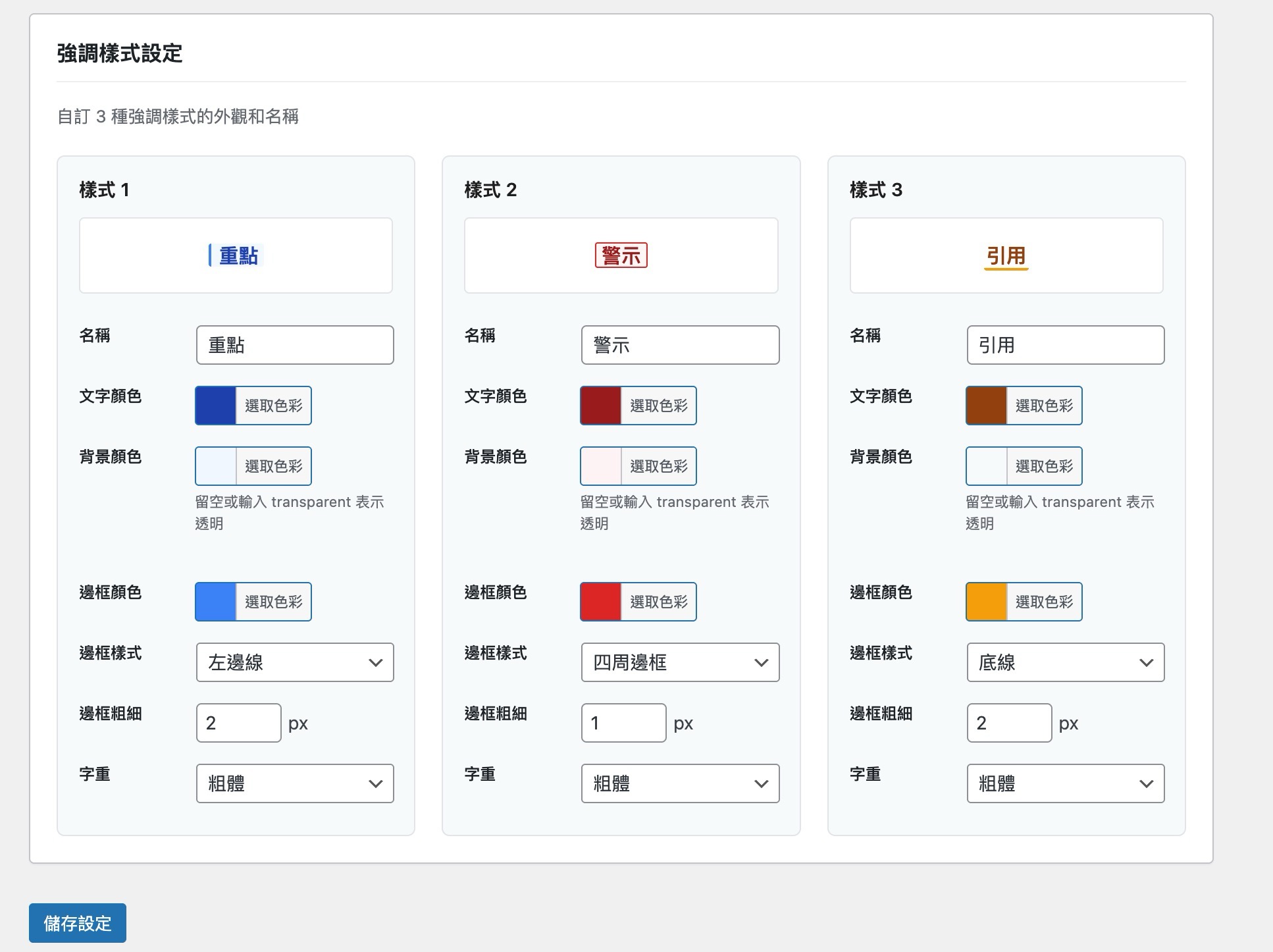
- Focus - blue left border and light blue background
- Warning - red border and light red background
- Quote - orange underline All styles are fully customizable. You can adjust colors, borders, and labels on the settings page.
- Movie, TV series, or comic plot discussions
- Game walkthrough guides and hints
- Quiz answers
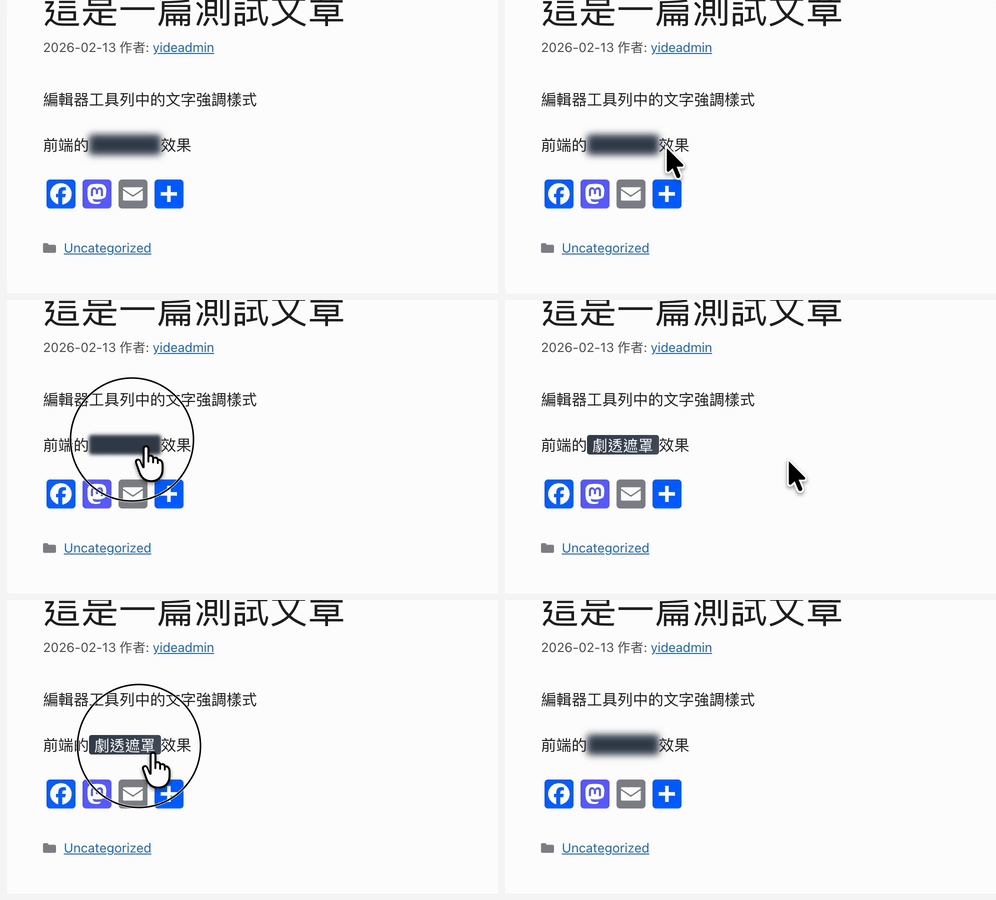
- Surprise content Offers three styles: Blur, Blackout, and Underline.
Hello世界123 -> Hello 世界 123
4. Interactive Q&A Block (2 styles)
Create interactive Q&A sections where answers are hidden by default and revealed upon clicking.
Perfect for tutorials, FAQ pages, exam preparation, and educational content.
Why Choose WebBiz Toolkit?
- Lightweight & Fast - Only loads the features you enable, helping keep your site fast.
- Block Editor Native - Built with WordPress Block Editor APIs.
- CJK Typography Friendly - Designed for Chinese/Japanese/Korean content formatting.
- Zero Coding Required - Ready to use after installation with an intuitive settings page.
- SEO Friendly - The Q&A block automatically generates FAQPage Schema JSON-LD structured data.
- Bloggers - Emphasize key text, hide spoilers, and improve readability.
- Educators - Build interactive quizzes and self-check questions.
- Review Sites - Hide spoilers in movie, TV series, or game reviews.
- Documentation - Mark warnings, tips, and important notes.
安装:
- Go to "Plugins -> Add New" in the WordPress admin panel.
- Search for "WebBiz Toolkit".
- Click "Install Now" and then "Activate".
- Go to "Settings -> WebBiz Toolkit" to enable the features you need.
- Download the plugin ZIP file.
- Go to "Plugins -> Add New -> Upload Plugin" in the WordPress admin panel.
- Select the ZIP file and install it.
- Activate the plugin.
屏幕截图:




常见问题:
Which WordPress versions are supported?
WebBiz Toolkit requires WordPress 6.0 or higher and the Block Editor.
Will this slow down my website?
No. WebBiz Toolkit is modularly designed. It only loads features you enable, and the frontend CSS is optimized to stay lightweight.
Can I use multiple highlight styles at the same time?
Yes. You can mix and match different highlight styles within the same paragraph.
Does the spoiler mask work on mobile devices?
Yes, the spoiler mask supports touch interactions and works on mobile phones and tablets.
Does the auto-spacing feature modify my original content?
Yes, the auto-spacing feature directly updates the block content. We recommend backing up important content before use.
Does the Q&A block support SEO structured data?
Yes. WebBiz Toolkit automatically generates FAQPage Schema JSON-LD structured data for the Q&A block, which helps with SEO.
更新日志:
1.0.7
- Normalized plugin source strings to English for WordPress.org translation packs.
- Updated editor, admin, and block-related source strings so Traditional Chinese is managed through GlotPress translations.
- Updated the translation template for the corrected source language.
- Applied WordPress Coding Standards cleanup and security-scan hardening.
- Improved uninstall multisite cleanup variable naming for WPCS compatibility.
- Added a reusable PHPCS ruleset for release checks.
- Improved the layout of the Q&A style settings page, updated the preview area to use frontend style rules, and reduced redundant spacing.
- Unified Traditional Chinese interface terminology, removing mixed English and Traditional Chinese labels.
- Updated the translation template and added all new and modified translatable strings.
- Added a packaging script and package check to prevent development files from being mixed into the WordPress.org release package.
- Updated the settings page to an extensible tab structure, preparing for future settings menu integration with other WebBiz plugins. The appearance and behavior of the settings page remain unchanged when this plugin is used standalone.
- Fixed an issue where frontend alignment was not applied when wide/full-width alignment was selected for the Q&A block.
- Updated the Q&A block to use block.json and added a static fallback so that existing Q&A content remains visible even if the plugin is deactivated or the module is disabled.
- Updated frontend styles for the Q&A block to load only when the post contains a Q&A block.
- Fixed the background color picker on the Q&A style settings page: the palette no longer covers the "transparent" option when expanded, and the picker is now correctly disabled with a hint message when "transparent" is checked.
- Updated the toolbar button for Chinese-English auto-spacing to only show in blocks that can actually be processed.
- Made editor interface strings translatable and updated the translation template.
- Cleaned up internal code: consolidated dynamic CSS and color processing for highlight styles into a single source, removing redundant editor dependencies and unused code.
- Added custom settings for the "Minimal" and "Card" styles of the Q&A block.
- Enabled customizable border colors, width, border radius, text color, badge color, background color, and font size for the Q&A block.
- Fixed keyboard navigation and accessibility states for the spoiler mask to correctly output expanded/collapsed states.
- Fixed spoiler mask style rendering under keyboard focus, reduced motion settings, and print styles.
- Configured the Chinese-English auto-spacing to skip code blocks, keyboard input tags (kbd), scripts, styles, and text input fields to prevent unintended modifications.
- Updated frontend styles to load conditionally based on enabled features, reducing unnecessary CSS.
- Fixed an issue where text highlight styles did not display on the frontend.
- Initial release.
- Added 3 customizable text highlight styles.
- Added the spoiler mask feature with 3 styles: Blur, Blackout, and Underline.
- Added the Chinese-English auto-spacing feature.
- Added the interactive Q&A block with 2 styles.
- Added FAQPage Schema structured data support.
- Added a complete settings page with live preview.