
WebEquipe Webhook Manager
| 开发者 |
webequipe
bdsarwar |
|---|---|
| 更新时间 | 2026年7月28日 20:01 |
| PHP版本: | 7.4 及以上 |
| WordPress版本: | 7.0 |
| 版权: | GPLv2 or later |
| 版权网址: | 版权信息 |
详情介绍:
WebEquipe Webhook Manager captures events from forms, WooCommerce, and any WordPress action hook, then delivers normalized JSON (or form-encoded) payloads to one or more webhook endpoints you define.
It is built around two concepts:
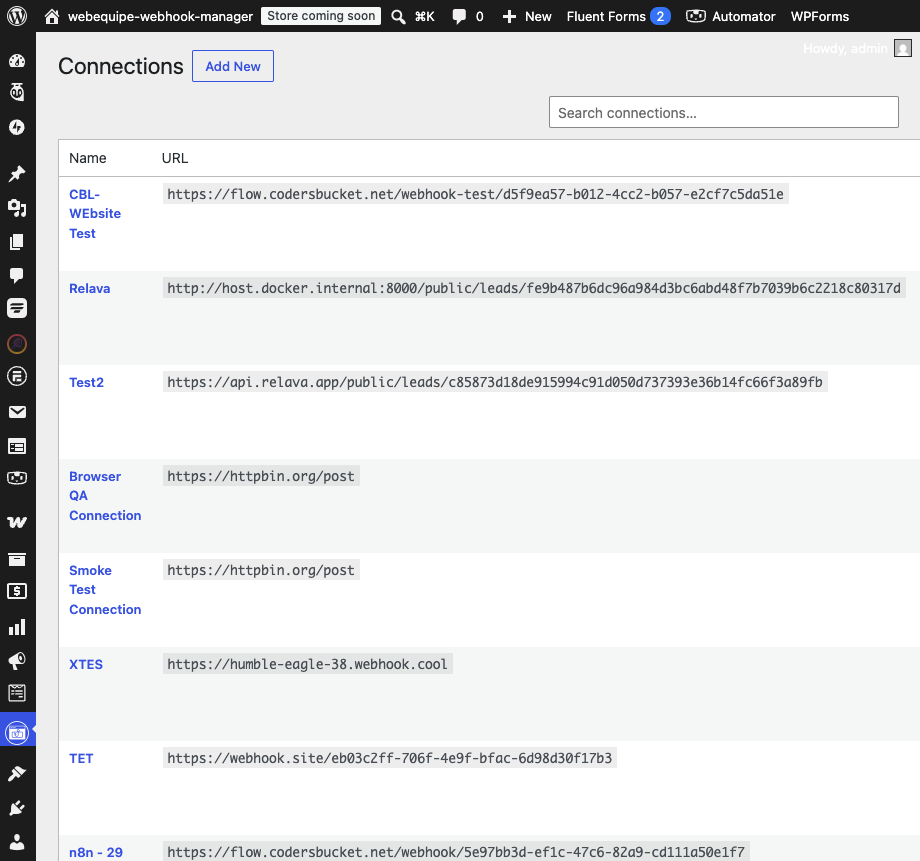
- Connections — reusable destinations (URL, HTTP method, content type, authentication, custom headers, timeout, SSL verification, optional HMAC signing secret).
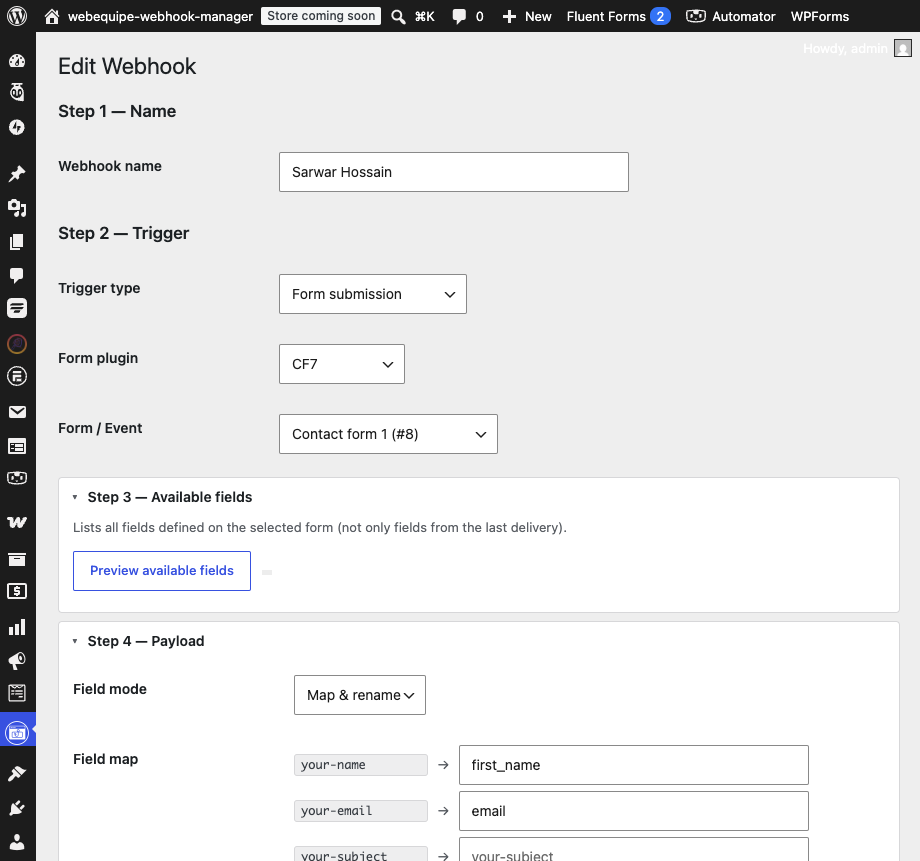
- Webhooks — rules that map a trigger (a form submission, a WooCommerce event, or a WordPress action hook) to one or more connections, with optional payload shaping and conditions.
- Triggers: form submissions (Contact Form 7, WPForms, Fluent Forms, Formidable Forms, Ninja Forms), WooCommerce events, and any WordPress action hook (with an on-demand hook picker).
- Payload shaping: send all fields, pick a subset, or remap field keys; inject static fields; apply per-field transforms.
- Conditional delivery: only send when field conditions match (AND/OR).
- Authentication: Bearer token, Basic auth, custom headers, and HMAC-SHA256 request signing.
- Delivery logging with request/response capture, replay, and CSV export.
- Dashboard with delivery stats and recent activity.
- Secrets (auth tokens, signing secrets) are encrypted at rest.
安装:
- Upload the plugin to
/wp-content/plugins/or install it from the Plugins screen, then activate it. - Go to Webhook Manager → Connections and add a connection (the destination URL and any authentication).
- Go to Webhook Manager → Webhooks and add a webhook: choose a trigger, select the connection(s), and (optionally) shape the payload.
- Use the Test Connection / Send Test buttons to confirm delivery.
- Trigger the real event and confirm a success entry under Webhook Manager → Logs.
屏幕截图:

常见问题:
Which form plugins are supported?
Contact Form 7, WPForms, Fluent Forms, Formidable Forms, and Ninja Forms. WooCommerce events and arbitrary WordPress action hooks are also supported.
How do I verify the HMAC signature on the receiving end?
When a signing secret is set, requests include a header X-WEWM-Signature: t=<unix>, v1=<hex>. Recompute hash_hmac('sha256', "$t.$rawBody", $secret) and compare it to v1 using a constant-time comparison.
Does the plugin send my data anywhere by default?
No. Payloads are sent only to the connection URLs you configure. Nothing is sent to the plugin author.
Where are delivery logs stored?
In custom database tables in your own WordPress database. You can set a retention period and export or replay logs from the Logs screen.
Does it provide shortcodes or blocks?
No. The plugin is configured entirely from the WordPress admin and does not register shortcodes or blocks.
更新日志:
1.0.3
- Logs CSV export now matches the on-screen Logs list columns (ID, Date, Webhook, Source, Trigger, Connection, Status, HTTP), including the resolved webhook name and trigger label.
- Fix: Logs CSV export could return only the header row (no data) on some hosts; the filtered log query now uses the same reliable query style as the log list.
- Security: file publishing (URL file mode) enforces a MIME/extension allowlist before copying uploads to the public uploads folder; unknown types and executable/script files (php, phtml, phar, exe, js, svg, html, ...) are rejected.
- Fix: Logs list and detail always query the database directly (no stale object-cache empty lists).
- Fix: action-hook logs match hook-name filters; list queries no longer depend on a JOIN to wewm_webhooks.
- Fix: default Logs list uses a direct paginated DB query (same reliability as log detail view).
- Fix: webhook detail Logs tab uses direct webhook_id queries instead of the complex filter SQL.
- Fix: delivery logging auto-recovers when enable logging was accidentally stored off on new installs.
- Admin warning on the Logs screen when delivery logging is disabled in Settings.
- Form save validation for webhooks and connections (server-side and client-side).
- Admin error notices when required fields are missing on save.
- Manual trigger label updated to "Manual" (was "Manual / test").
- Delivery logs redact sensitive request/response headers (Authorization, X-WEWM-Signature, API keys).
- Log settings now enforced: enable logging, payload snapshots, and response snippets.
- WordPress.org compliance: conditional asset loading, no inline admin CSS, sanitized webhook validation input.
- Fix: delivery logging no longer silently stops when enable logging was stored off before 1.0.1; connection tests now create log entries.
- Fix: fresh installs auto-create log tables, correct logging checkbox saves, and show pending log rows for async deliveries.
- Initial release.