
Webkoding ShopKit Connect for WooCommerce
| 开发者 | webkoding |
|---|---|
| 更新时间 | 2026年10月9日 13:53 |
| PHP版本: | 7.4 及以上 |
| WordPress版本: | 7.1 |
| 版权: | GPLv2 or later |
| 版权网址: | 版权信息 |
详情介绍:
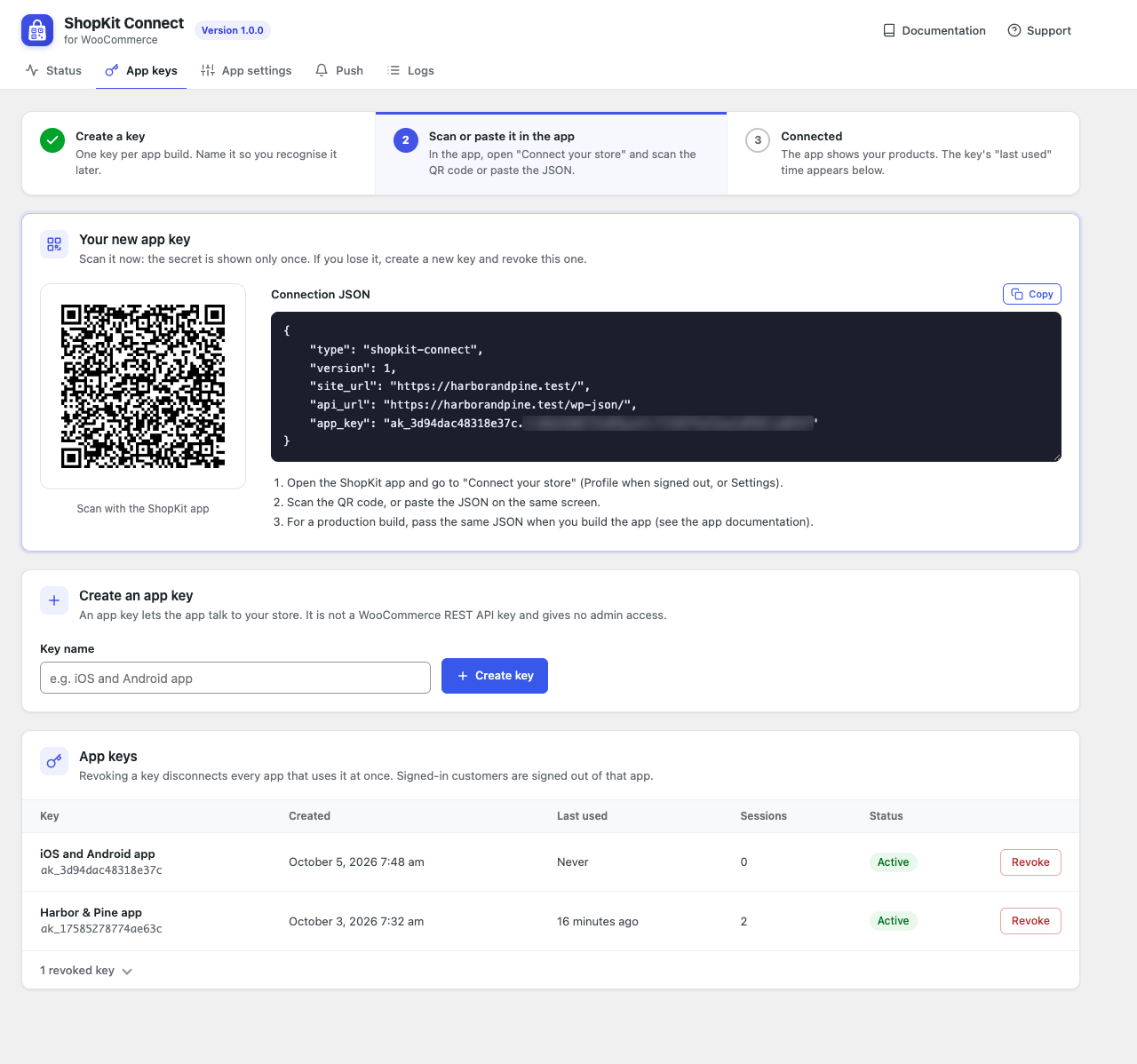
- App keys and a connection code. Create a key under WooCommerce > ShopKit Connect and scan its QR code in the app ("Connect your store") or paste the connection JSON there; the app then shows your store, without a rebuild. For a production build the same JSON goes into the app's build configuration instead. Your WooCommerce REST API keys never go into the app.
- Customer accounts. Sign in, register, password reset by email, profile and password changes, and account deletion. Sign-in uses short-lived tokens that are stored hashed, can be revoked, and are throttled against password guessing.
- Checkout on your own checkout page. The app hands its cart to your normal WooCommerce checkout in a secure in-app browser, so every payment gateway you already use works. The hand-off link works once, expires after 5 minutes and only opens from the app that asked for it.
- Order history with status timeline, customer notes and shipment tracking numbers (from WooCommerce Shipment Tracking or compatible plugins).
- Address book, wishlist and a notification feed.
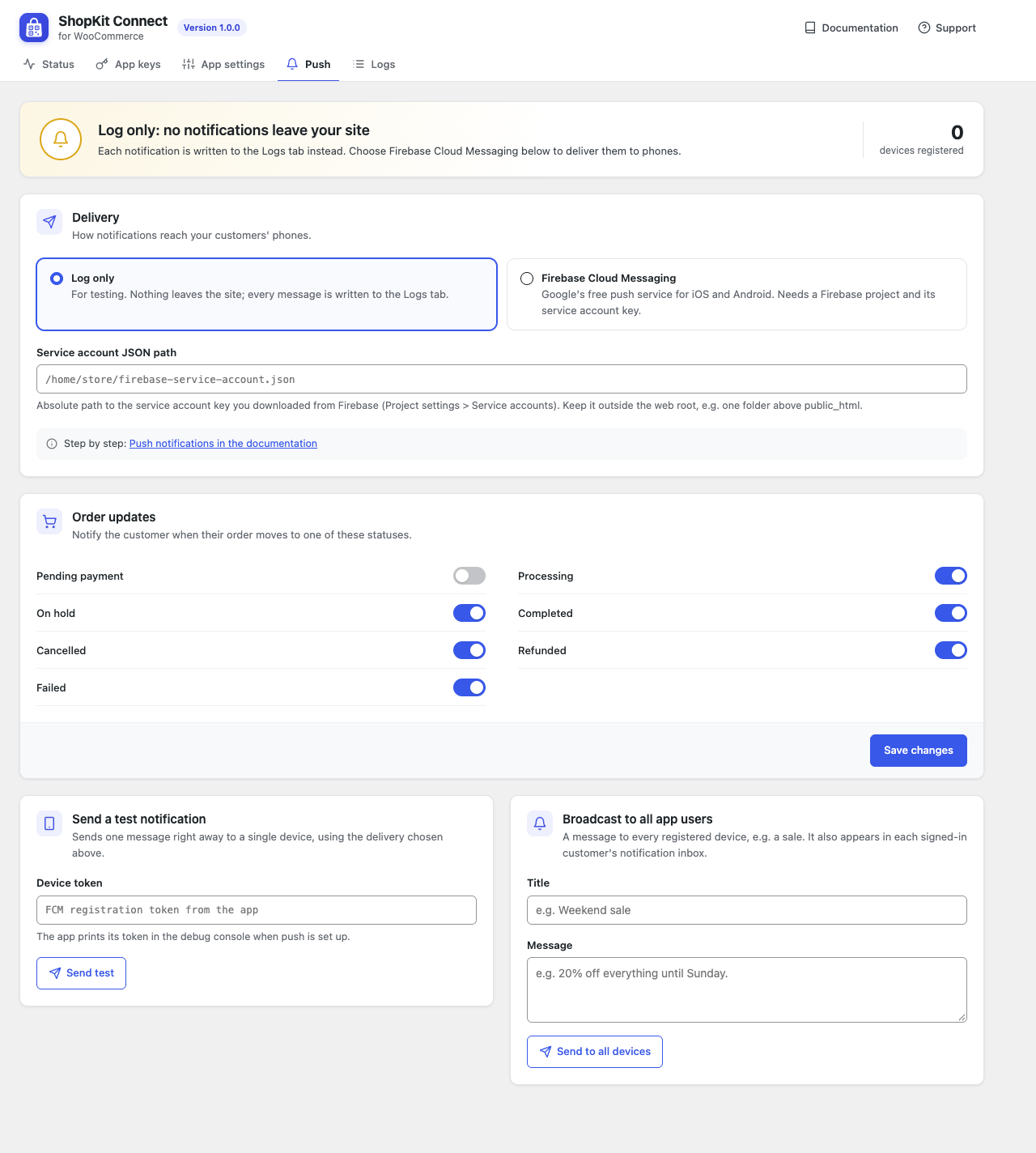
- Push notifications when an order status changes, plus broadcasts, through Firebase Cloud Messaging. Messages are sent in the background with Action Scheduler, so orders never wait for them.
- Extras the app's screens use: review summary per star, review writing, sale end dates for countdowns, units sold, colour swatches for attribute terms, and coupons you choose to show in the app.
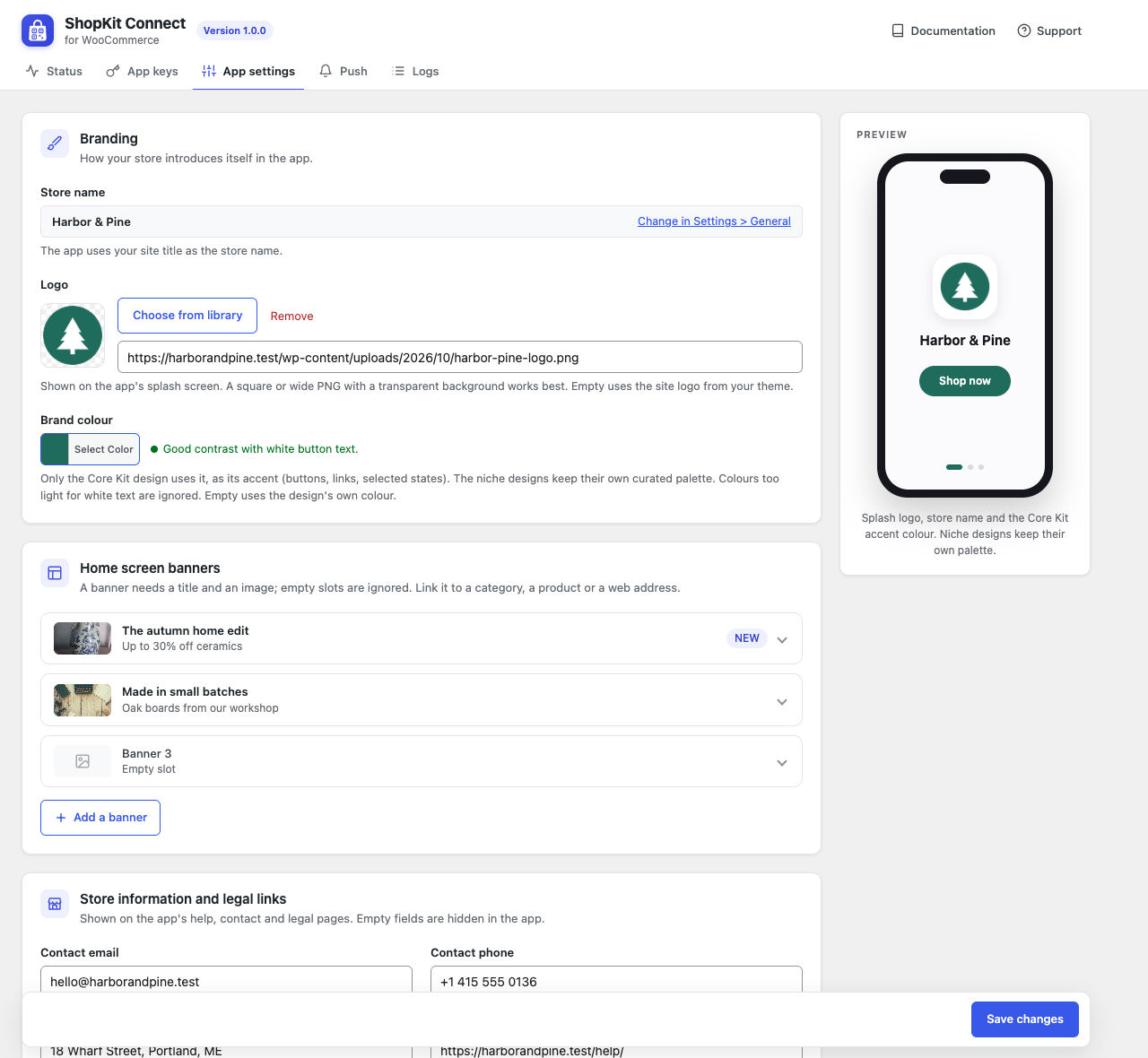
- Store settings for the app: logo (splash screen), a primary colour (used as the accent by the Core Kit design; the niche designs keep their own palette), home screen banners, contact and legal links, feature switches.
安装:
- Install and activate WooCommerce.
- Install this plugin from Plugins > Add New, or upload the zip, and activate it.
- Go to WooCommerce > ShopKit Connect. Fix anything the Status tab marks red (HTTPS is required for a live app).
- On the App keys tab, create a key. In the ShopKit app open "Connect your store" and scan the QR code or paste the connection JSON. For a production build, pass the JSON at build time instead (
--dart-define=SHOPKIT_CONNECTION=...), which also hides the in-app connect screen. The key is shown only once. - Optional: set your logo, colour, banners and links on the App settings tab, and Firebase on the Push tab.
屏幕截图:
常见问题:
Do I need the ShopKit app?
Yes. This plugin is the server side of the ShopKit mobile app. On its own it adds REST endpoints and an admin page, nothing on your storefront.
Does the app see my WooCommerce REST API keys?
No. The app only gets an app key created by this plugin. It identifies the app and can be revoked at any time; customer data needs the customer's own sign-in on top of it.
Which payment gateways work?
All of them. Payment happens on your normal checkout page inside the app's in-app browser, then the app shows its order confirmation.
Can shop managers or administrators sign in to the app?
No. Accounts that can edit posts, manage WooCommerce or manage options are store staff, and staff never get an app token, so an app token can never become a back-office login. Accounts protected by two-factor authentication are refused too, because the app cannot complete a second factor. Use a customer account to test the app. Developers can change the staff capability list with the wkskc_staff_capabilities filter and add rules with wkskc_user_can_use_app.
What happens when a customer deletes their account in the app?
The plugin deletes the WordPress user, their WooCommerce customer data, their wishlist, devices and notifications, and anonymises their own orders if "Remove personal data from orders on request" is on in WooCommerce > Settings > Accounts & Privacy. Data that is only linked by email address (for example guest orders or comments) is not erased automatically, because the app cannot prove the customer owns that address. Instead a standard WordPress "Erase Personal Data" request is created: its owner confirms it by email and you process it under Tools > Erase Personal Data.
Is email address verification required for a changed email?
Yes. When a customer changes their email in the app, the new address receives a confirmation link and the change only happens after it is opened.
How do I show a colour dot for attribute terms?
Edit a term under Products > Attributes and fill in "Swatch colour (ShopKit app)". Colours set by popular variation swatch plugins are read too.
How do I list a coupon in the app?
Tick "Show in the ShopKit app" on the coupon. Coupons that are expired, used up or limited to specific emails are never listed.
My host blocks the Authorization header.
The app can send the token in an X-ShopKit-Token header instead.
Which languages are supported?
The plugin is translation-ready; translations are provided as language packs from translate.wordpress.org. Its REST API answers the app in the language the app asks for (the Accept-Language header) when a translation is available; admin and shop pages keep the site language.
更新日志:
- Security: the checkout hand-off no longer stores any WordPress session token; the web session is created when the one-time link is redeemed. Existing hand-off links are cleared on update.
- Security: a new app key is shown once on the page that creates it and is never stored, not even briefly; refreshing the status checks needs a nonce.
- Translations now come from translate.wordpress.org.
- First release.
- Translations: Turkish and Arabic included.