
Widewalk – Accessibility Toolbar
| 开发者 | walletup |
|---|---|
| 更新时间 | 2026年10月15日 06:33 |
| 捐献地址: | 去捐款 |
| PHP版本: | 7.4 及以上 |
| WordPress版本: | 7.1 |
| 版权: | GPLv2 or later |
| 版权网址: | 版权信息 |
详情介绍:
- Free in the way that matters: no account, no API key, no third-party service, nothing to buy on a second screen.
- About 8 KB gzipped in total. One small script and its stylesheet, no framework and no jQuery.
- It renders in a shadow root, so a hostile theme cannot break it and it cannot leak into your page. It is tested against a theme built to break it.
- Works past WordPress too: one script tag drops the same panel onto pages you keep WordPress only to administer.
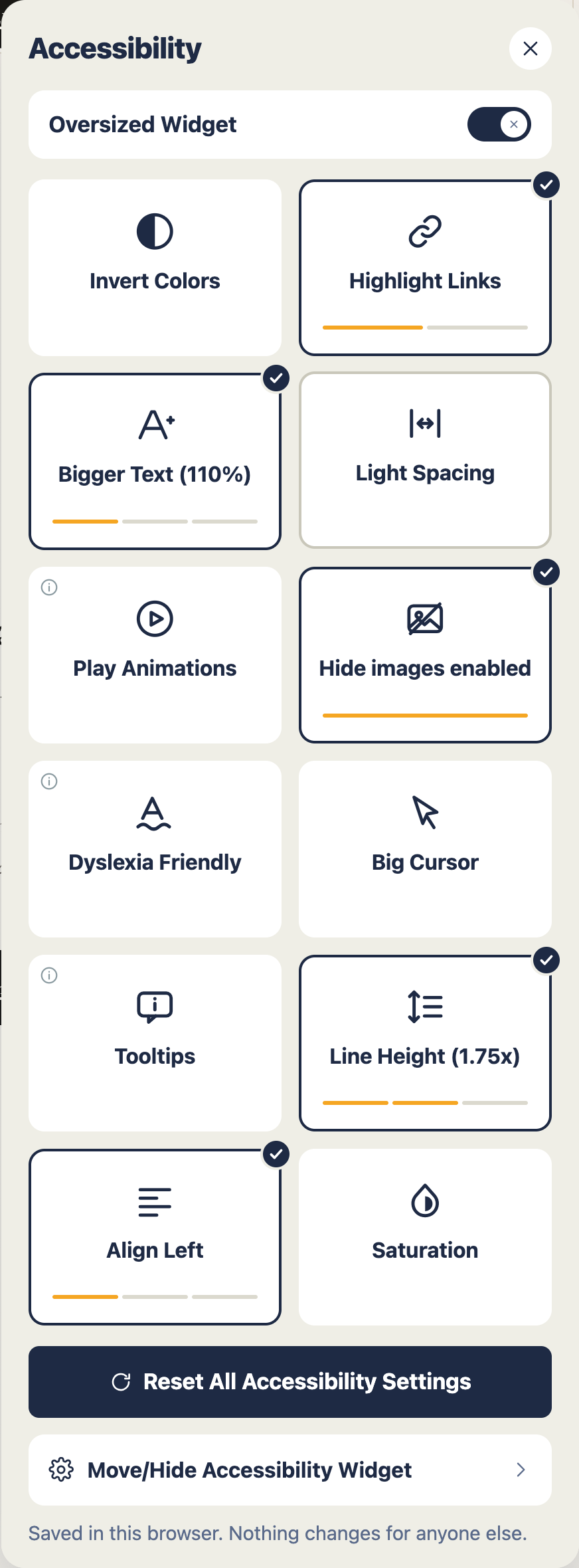
- Bigger Text, at 110%, 125% and 150%
- Line Height, at 1.5x, 1.75x and 2x
- Letter and word spacing, from light through to heavy
- Invert Colors, then High Contrast
- Saturation: low, high, or monochrome
- Highlight Links, then Boxed Links
- Dyslexia Friendly type
- Big Cursor, then Bigger Cursor
- Pause animations
- Hide images
- Text alignment: left, centre, right
- Tooltips, which read out the descriptions a screen reader gets and a mouse user never sees
!important, a forced box model, oversized icons, a page claiming the highest
stacking order there is. It came through without a mark.
Block themes, classic themes, page builders. It mounts on wp_footer, which
every theme fires.
Works past WordPress, too
Plenty of sites keep WordPress for the admin and build their public pages in
plain PHP, in React, or as static files. Nothing on those pages runs a WordPress
footer, so the panel never arrives. Add one line to your own instead:
<script src="/wp-content/plugins/widewalk/assets/embed.js" defer></script>
Same panel, same controls, the settings you already chose. Nothing else to set up.
Light, and quiet about it
- About 7 KB gzipped covers everything a visitor downloads. One stylesheet, one small script, no framework, no jQuery.
- Switch the panel off and nothing at all is added to your pages.
- No account, no API key, no third-party service, no fonts pulled from somebody else's server.
- Nothing is tracked about your visitors and no cookie is set. Preferences sit in local storage on the visitor's own device, under a single key.
- One request can leave, and only if you press the button that sends it. It carries counts, never content. See External services below.
- Every control works from the keyboard alone, with a focus outline you can see.
- The panel is a labelled dialog. Focus stays inside it while it is open, and returns where it came from when it closes.
- Changes are announced to screen readers as they happen.
- Motion stops when a visitor's device has asked for less of it.
- Text and background inside the panel meet WCAG 2.2 AA contrast.
安装:
- Install from Plugins → Add New, or upload the folder to
/wp-content/plugins/. - Activate it.
- Open Settings → Widewalk and switch the panel on.
- While you are there, publish your accessibility statement from one of the two templates. Read it through afterwards and make it true of your site.
屏幕截图:

常见问题:
Does this make my site ADA or WCAG compliant?
No, and treat anything that says otherwise with suspicion. Conformance rests on your own markup: headings, alt text, contrast, link text, forms, error messages. Widewalk helps a visitor read what you have written. It cannot repair what sits underneath. Use it alongside the real work.
Is Widewalk an accessibility overlay?
No. An overlay scans your page and rewrites it for every visitor, usually with a promise of automatic compliance attached. Widewalk changes nothing until a visitor asks it to, changes it only for that visitor, and promises nothing about your legal position.
My site's front end isn't WordPress. Can I still use it?
Yes. Plenty of sites keep WordPress for the admin and build their public pages
in plain PHP, in React, or as static files. Nothing on those pages runs a
WordPress footer, so add one line to your own:
<script src="/wp-content/plugins/widewalk/assets/embed.js" defer></script>
That is the whole integration. It reads the settings you chose in the admin and
mounts the same panel, with the same controls.
Settings has the line ready to copy, and a box where you can give it one of your
own pages. It will fetch that page and tell you whether the line arrived, so you
are not left guessing.
Will it work with my theme?
Yes. The panel lives inside a shadow root, so your theme's rules do not reach it and its rules do not escape into your pages. It has been tested against popular themes and against a stylesheet built on purpose to wreck it. Block themes, classic themes and page builders are all fine.
Will it slow my site down?
Everything a visitor downloads comes to roughly 7 KB gzipped: one stylesheet, one small script, no framework, no jQuery. With the panel switched off, nothing is added to your pages at all.
Does it collect anything about my visitors?
Nothing. No tracking, no analytics, no account, no cookie. Preferences are held in local storage in the visitor's own browser. Nothing about a visitor is read, kept or sent, and that does not change if you connect the site: the note that travels then is about the site, never about anyone reading it.
Is it GDPR-friendly?
There is nothing about your visitors to disclose: nothing is collected about them, nothing is stored and nothing is shared. Preferences never leave their device. If you connect the site, what travels is your own site address and a count of findings, which is yours to decide on and yours to undo.
Can I choose which controls appear?
Yes. All twelve have their own switch. Offer what suits your site and leave the rest off.
Do I really need an accessibility statement?
If you are offering a panel like this, you should say what you are aiming for, what you know still falls short, and how somebody tells you about a barrier. Public bodies in many countries are required to publish one. Widewalk writes the page in two lengths and links the panel to it.
Does it work on phones?
Yes. The panel is built for touch as much as for mouse and keyboard, and the controls are large enough to press without aiming.
Can somebody use it with a keyboard, or a screen reader?
Yes. Every control is reachable by keyboard with a visible focus outline. The panel is a labelled dialog, focus is held inside it and returned when it closes, and each change is announced.
Pausing animation does not stop my slideshow. Why?
A slideshow that moves on a timer is a script, and a plugin cannot safely reach
into another script's timers. Widewalk stops what it can reach: animation and
transitions from your stylesheet, video and sound, and moving SVG.
For the rest it tells your page, and the page can stop itself. Two lines in your
theme are enough. Widewalk puts data-a11y-animations on the html element,
and fires a widewalk:motion event on the document:
if (document.documentElement.hasAttribute('data-a11y-animations')) return;
Put that at the top of whatever advances your slides, and it will hold still
while a visitor has asked it to.
Does it respect "reduce motion"?
Yes. When a visitor's device asks for less motion, the panel stops animating. They can also pause animation across your whole site from inside the panel.
Can I move the button?
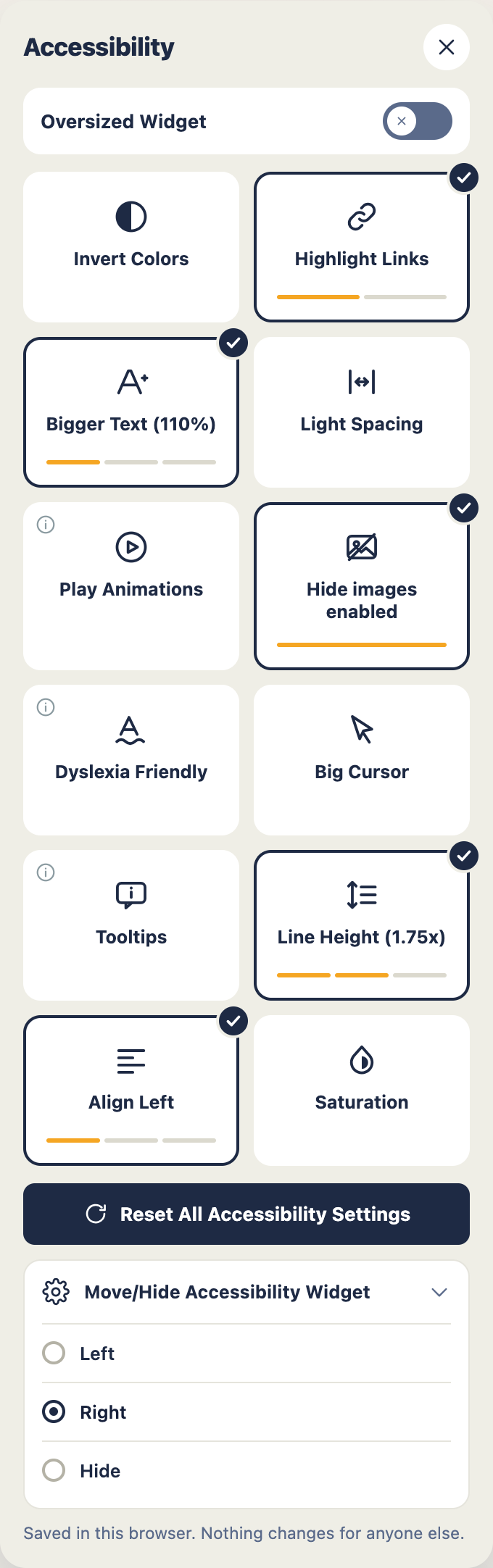
Yes, to either bottom corner, from the settings screen. A visitor can move it themselves as well, if it is sitting over something they need.
I already have an accessibility toolbar. Can I run both?
Please don't. Two panels arguing over the same page is worse than either one on its own. Pick the one you prefer and turn the other off.
Does it need JavaScript?
Yes. The panel is a set of controls, and without a script there is nothing for them to control. Where scripting is unavailable, nothing is added to the page.
Is it available in my language?
Every string is translatable, and translations arrive through translate.wordpress.org. Contributions are very welcome.
更新日志:
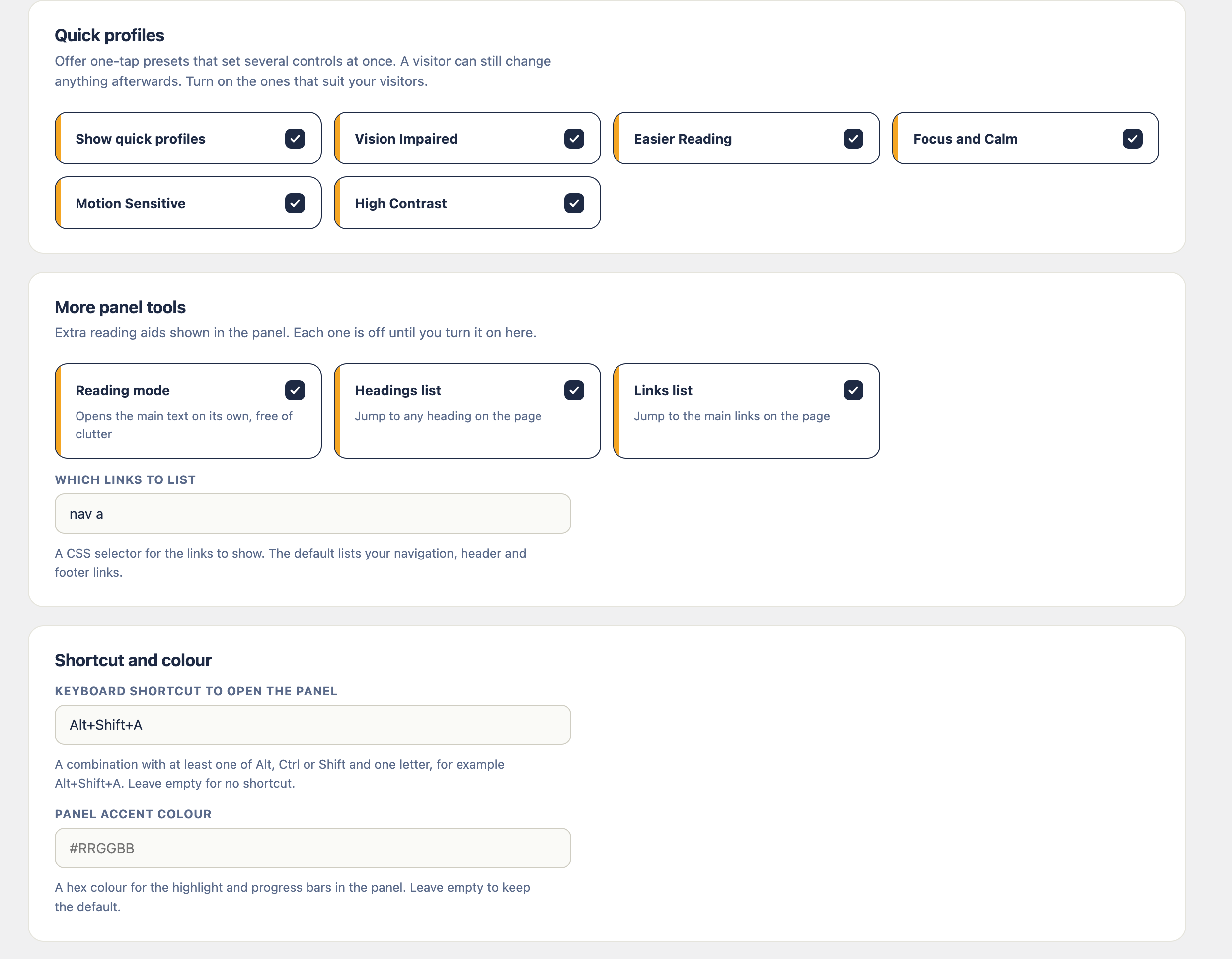
- New: quick profiles. One tap sets several controls at once for a way of reading, such as vision impaired, easier reading, focus and calm, motion sensitive, or high contrast. Offer the ones that suit your visitors.
- New: eight more controls, each with its own switch. A plain readable font, a strong keyboard focus outline, outlined headings, a screen dimmer for light sensitivity, a mute for every sound, a reading guide and a reading mask that follow the pointer, and a magnifier lens for the text you point at.
- New: a reading mode that opens the main text of a page on its own, clear of menus, sidebars and footers.
- New: two ways to get around a long page from the panel, a list of its headings and a list of its links, each one a jump straight to the spot.
- New: a light high-contrast scheme to sit beside the dark one, and a justify option for text alignment.
- New: open the panel with a keyboard shortcut you choose, and give the panel your own accent colour to match your brand.
- Improved: every new control and panel tool stays off until you switch it on, so updating changes nothing on your site until you decide it should.
- Maintenance: packaging cleanup.
- New: right-to-left support. On Hebrew, Arabic, Farsi and Urdu sites the panel mirrors and reads in the page's own direction.
- Improved: the toolbar follows the reading direction set by your site or your translation plugin, so a page shown right-to-left gets a right-to-left panel.
- New: use your own image for the toolbar button, set right from the settings screen.
- New: hide the floating button and open the panel from your own link instead. Give any link or button the class widewalk-open or the attribute data-widewalk-open, anywhere on the page.
- New: a script API for themes and page builders, Widewalk.open(), Widewalk.close(), Widewalk.toggle() and Widewalk.isOpen().
- New: developer filters widewalk_launcher_icon to return your own button markup, and widewalk_hide_launcher to drop the floating button in code.
- Improved: your own trigger reflects whether the panel is open, and focus returns to it when the panel closes. With the button hidden it stays reachable by keyboard and screen reader as a fallback.
- Improved: video and audio a visitor starts themselves keep playing while animations are paused.
- Improved: script-driven animations settle into their finished state instead of holding partway.
- Improved: turning images off keeps interface icons, embedded frames, form controls and your logo in view; only pictures are hidden.
- New: the toolbar button shows a count while any preference is active, and the pause and hide controls start fresh on a new visit.
- New: a widewalk:change event and documented data-a11y-* attributes let a theme respond to every control; mark anything to leave alone with data-widewalk-keep.
- Improved: the toolbar reflects your system's reduced-motion setting.
- Improved: the optional script for pages WordPress does not build can be scoped to a path.
- New: a content report reads your published pages against thirteen WCAG criteria. Each finding is one line with a count; open it for the pages concerned and what to do.
- New: work through the findings one kind at a time, ask for that one check again, and watch the count fall. Findings the report no longer finds can be taken out of your statement.
- New: keep the report's three counts with WalletUp once a week as a dated record of your work, off your own server, and watch them fall over time. Off until you switch it on, and every field is shown before anything is sent.
- New: the statement records another way to reach anything still out of reach.
- Improved: the report says what it cannot decide, so nothing is claimed that a person has not checked.
- New: the accessibility statement records the standard you aim for, what it covers, how it was assessed, when you last looked at it, anything left out of it, and the points you know fall short. That last list stays live on the page, so publishing once is enough.
- Improved: the panel sizes itself to the screen it is on, and its heading and close button stay within reach while you move through the controls.
- Improved: caches are refreshed whenever the plugin's files change, and page optimisers are asked to leave the panel's script whole.
- New: a
widewalk:motionevent, and thedata-a11y-animationsmarker on the page, so a slideshow or anything else driven by a script can hold still while a visitor has asked for stillness. Two lines in a theme are enough, and the FAQ shows them.
- Improved: pausing animation reaches video, sound and moving SVG, as well as the animation a stylesheet controls. Anything a visitor had already paused is left alone, and everything resumes when the control is switched off again.
- Improved: tooltips appear beside the pointer, and only for the thing being pointed at. A label that repeats words already on the screen stays quiet.
- Improved: both of those hold from the moment a page opens, not only after the control is pressed again.
- New: a card on the settings screen for sites whose public pages WordPress does not build. It shows the one line to paste, with a button to copy it, and will fetch a page of yours and tell you whether the line arrived.
- New: on a server that can do it, Widewalk will offer to add that line for you. It shows exactly what it would write before you decide, keeps your file first, checks your front page afterwards, and puts everything back untouched unless the page comes back whole with the line in it. You can undo it at any time, and pasting by hand always works instead.
- Improved: clearing the page cache after a change is more dependable, using each caching plugin's own published method.
- Improved: where a theme or kit already puts this same panel on the page, the plugin stands aside rather than adding a second one.
- New: the panel can be added to pages WordPress does not render. A site whose front end is plain PHP, React or static files adds one script tag and gets the same panel, with the same settings.
- Improved: bigger text now reaches every theme. Sizes are set on the text itself, so a theme that measures in fixed pixels grows with the rest.
- Improved: switching the panel on, or changing what it offers, clears the page cache so visitors see it straight away.
- New: a reading panel on every page, with twelve controls a visitor sets for themselves. Text size, line height, letter spacing, contrast, saturation, link marks, dyslexia-friendly type, cursor size, animation, images, alignment and tooltips.
- New: each control steps through its settings and names the one in force, so a visitor always knows where they are.
- New: every control can be offered or withheld from a single settings screen.
- New: writes your accessibility statement in a complete or a short version, out of what you have switched on, and links the panel to it.
- New: the panel can sit in either bottom corner, and a visitor can move it themselves.
- Isolated inside a shadow root, so it survives any theme and disturbs none of it.
- Keyboard operable throughout, focus held and returned, changes announced, motion dropped when the visitor asks for less.
- About 7 KB gzipped on the front end, and nothing at all when the panel is off.
- No tracking, no cookies, no account, and no request leaves unless you send it.