Rich Showcase for Google Reviews
| 开发者 |
richplugins
widgetpack |
|---|---|
| 更新时间 | 2026年10月21日 02:53 |
| PHP版本: | 7.2 及以上 |
| WordPress版本: | 7.1 |
| 版权: | GPLv2 or later |
| 版权网址: | 版权信息 |
标签
下载
详情介绍:
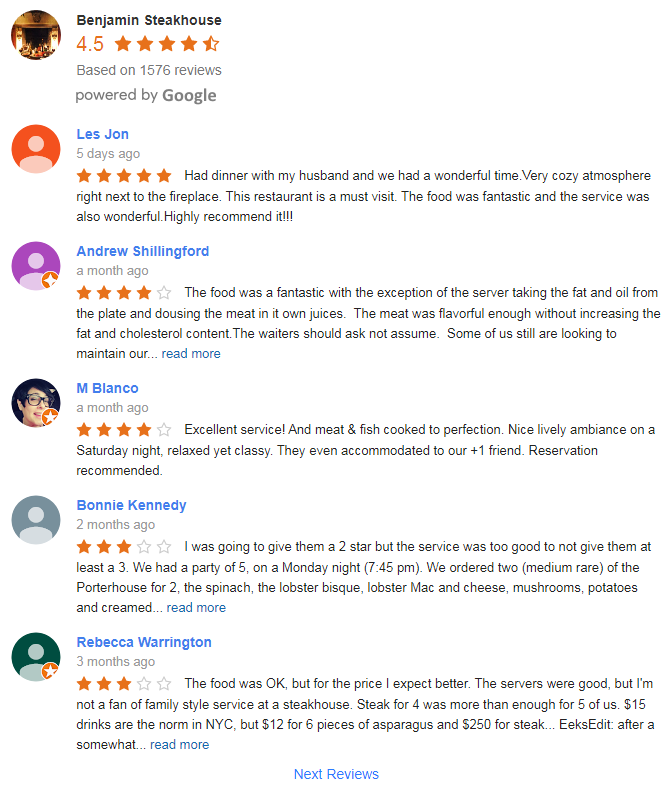
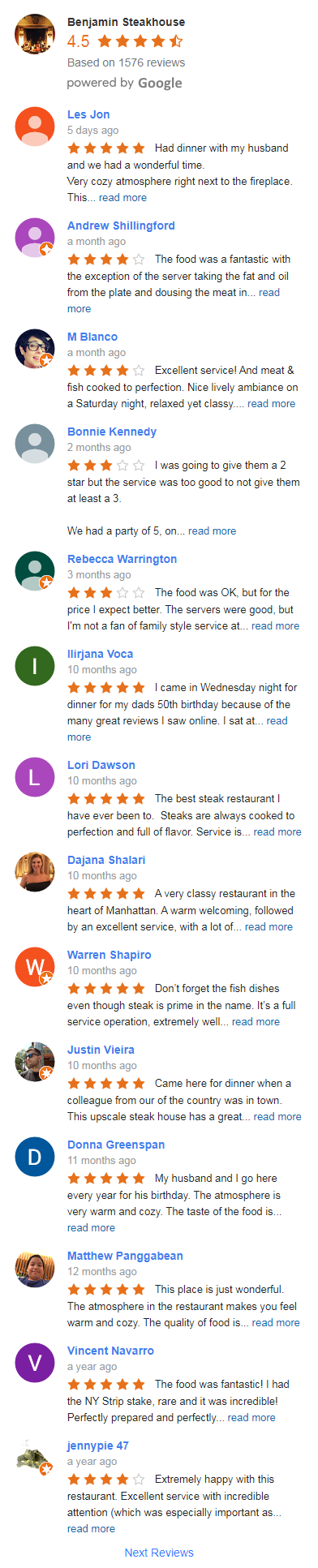
- Responsive layouts: Slider, Grid, List and Rating
- Rating layout can open the reviews in a popup on click
- Floating Google rating badge with review count and a live line from your reviews, shown on every page of the site or only where you add it
- Pagination for List and Grid layouts
- Trim long reviews with a "read more" link
- UI options to customize star, text, rating and review colors
- Additional styling with your own CSS
- Works with dark themes
- Upload a custom business photo
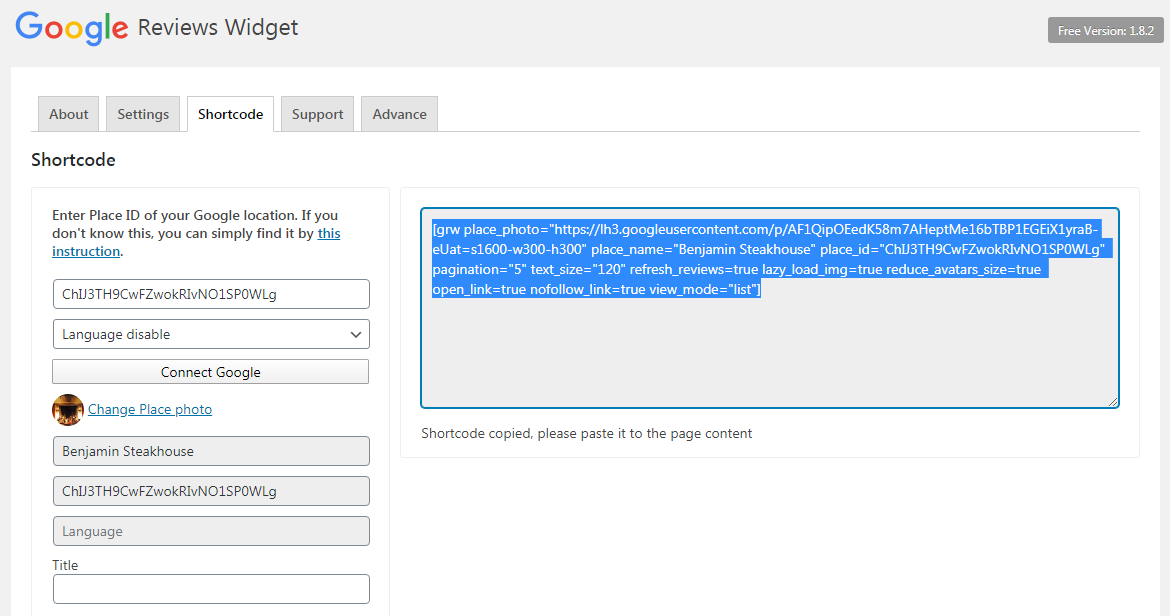
- Display reviews using shortcode, widget, block, or page builders (Elementor, WPBakery, Divi, Beaver Builder, SiteOrigin)
- No limits on created widgets or shortcodes
- Optimized for performance: one CSS and one JS file, about 24 KB compressed in total, lazy-loaded images
- Show up to 10 Google reviews on initial setup - NO API KEY REQUIRED
- Connect multiple Google business places
- Places page: every connected place with its rating and last update; update reviews, create a widget or delete the place from there
- Badges: pick a preset, set position, tone and size, then publish the badge on the whole site in one click
- Automatically updates reviews and ratings when using your own API key
- Fully ADA compliant: built for Accessibility
- Fully GDPR-compliant: no external requests, all data loads from your own website
- Choose which reviews to display or hide, option to hide reviews without text
- "review us on Google" button to collect new reviews
- Supports multiple languages
安装:
- Upload the plugin files to the '/wp-content/plugins/' directory, or install the plugin through the WordPress Plugins screen directly.
- Activate the plugin through the Plugins menu in the WordPress admin panel.
屏幕截图:


常见问题:
Do I need a Google API key?
No, you can connect and display up to 10 Google reviews without any API key - just paste your Google Maps URL or Place ID and you're done. An API key is only needed if you want reviews to update automatically. We provide a step-by-step guide in the plugin's Support section showing how to create a free Google API key.
Is the plugin GDPR-compliant?
Yes. All review data, business photos, and reviewer avatars are stored locally on your WordPress site after the initial connection. No external requests are made when visitors load your pages, so no personal data is shared with Google or any third party on page view. There's also an option to display only the first name and initial of the reviewer's last name.
Can I connect multiple Google Business locations?
Yes, there are no limits on the number of Google Business places you can connect. Reviews from multiple locations can be combined in a single widget and sorted by date, or you can create separate widgets for each location.
Will reviews update automatically?
Yes, when you add your own free Google API key, the plugin will refresh reviews on a daily schedule. Without an API key, the initial 10 reviews are loaded once; you can fetch the latest reviews at any time from the Places page.
Does it work with Elementor, Gutenberg, and WPBakery?
Yes. The plugin provides a native Gutenberg block, a shortcode that works in any page builder (Elementor, WPBakery, Beaver Builder, Divi, SiteOrigin), and a classic sidebar widget. You can mix all three on the same site.
How do I embed Google reviews on a WordPress page?
Open Google Reviews in the admin menu, find your business in the connection wizard and save the widget. Paste its shortcode into any page, add the Google Reviews block in the editor, or place the classic widget in a sidebar.
Why do I get only 5 reviews with my own API key?
The Google Places API returns 5 reviews per request. The plugin checks daily and keeps every new review it sees, so the list grows over time.
Can I hide some reviews?
Yes. Every review has a hide button in the widget builder, and there is an option to hide reviews without text.
Can I show only the rating without reviews?
Yes. The Rating layout shows the stars, the score and the number of reviews, and can open the reviews in a popup on click.
How do I add a Google rating badge to every page?
Open Google Reviews / Widgets, click Create Widget, find your place, pick a badge design and click "Display on the site" on the Publish step. The badge floats in a corner or as a top or bottom bar on every page; one badge at a time is shown site-wide. To show a badge only on some pages, use its shortcode or the Google Reviews block instead.
Can one badge show the rating of several locations?
Yes. Connect several places to one badge and it shows their combined rating, weighted by the number of reviews, and the total review count.
Does the plugin slow down my site?
No. Reviews are served from your own database, and the plugin loads one CSS and one JS file, about 24 KB compressed in total, with lazy-loaded images.
更新日志:
- New: one editor for every widget: Set up holds the design gallery, the business header and the review card lines, with the live preview.
- New: a place connected in two languages shows the reviews of each language.
- New: hide a review from the widget preview, in this widget or on all widgets.
- New: Places page settings per place: auto-update, stored images and photo.
- New: six Rating designs: the business header alone, in one line, in a card, with big stars or without the name.
- Change: the editor opens the gallery on the widget's own design.
- Change: Editors see the widgets list only; widgets are edited by administrators.
- Change: a widget with several places shows one header with their overall rating and total review count.
- Improved: the Publish step names the page the widget is on and offers a draft page only when there is none.
- Improved: the block's widget list refreshes when you return to the editor.
- Fixed: a review without text showed once per language when one place was connected in two languages.
- Fixed: a place connected in two languages doubled the review count on a badge.
- Fixed: wordmark, compact, trust and partner badges stretched to the full screen width on phones.
- New: sticker designs for the site badge: round stamps and seals, a Google ring, a pennant, a trust strip with reviewer photos, partner cards.
- New: wordmark badge designs.
- New: size and color controls for the badge elements on the design step.
- Change: a saved widget keeps its own design; Reset to default style in the builder returns to it.
- Improved: a failed connection says why.
- Improved: slider arrows have names for screen readers.
- Improved: a badge that opens reviews lifts on hover.
- Fixed: the header of a list or rating widget ran past the page edge on full-width themes.
- Fixed: Create widget on the Places page opened the wrong editor and saved a list.
- New: Create Widget gallery with ready-made slider, grid, list, rating and badge designs, previewed with your own reviews.
- New: one click creates a draft page with the new widget.
- Change: badges are listed under Widgets, and the Badges menu item is removed.
- Change: a site without widgets starts on Create Widget; connecting reviews there needs no API key.
- Change: widgets with card styles show an outlined review button.
- Change: the mouse wheel moves the slider one step per turn, and scrolling down goes to the next reviews.
- Improved: the slider keeps its cards in place when the window is resized or the phone is rotated.
- Fixed: editing a badge from the block editor could turn it into a list.
- Fixed: the block's Edit button with no widget chosen opened another widget for editing.
- Fixed: the Widgets list had no All, Published and Trash links.
- Fixed: cards showing under the slider arrows in Firefox.
- New: card styles for the slider and grid: 19 presets with an editable layout and colors.
- New: card styles show the review text in whole lines with "read more" that opens it in place; the number of lines is adjustable.
- New: CSS variables field in Advanced Options to restyle the cards and the header by hand.
- New: option to anonymize profile photos: the first letter of the reviewer's name on a colored circle instead of the photo.
- Fixed: hiding a review did not work for reviews stored in more than one language.
- New: rating label above the business name (Top rated, Excellent, Great...).
- New: header settings: line order, short review count, hide rating number, sizes and colors.
- New: the slider header can sit on the left, on top or below the reviews.
- New: background, rounded corners and shadow for the header.
- Change: the widget builder shows only the options that apply to the chosen layout.
- Improved: less HTML on pages with review widgets.
- Fixed: the connection wizard showed five stars for every place.
- Fixed: review texts and owner replies are always shown as plain text.
- Fixed: in the dark theme the review text, review card and business name colors were ignored.
- Improved: official Google logo in 'powered by Google'.
- Improved: text contrast of 'powered by' and the review button.
- Improved: keyboard focus is visible on all links and buttons.
- Improved: the badge, the reviews popup and 'read more' work from the keyboard.
- Improved: screen readers announce each review's rating when ARIA labels are enabled.
- Improved: larger click area for close buttons.
- Improved: fewer database writes during the scheduled reviews update.
- Fixed: theme paragraphs (wpautop) breaking the widget layout.
- Fixed: reviews missing on the site after an incomplete database update.
- Fixed: line breaks in review texts.
- Improved: with your own Google API key the plugin picks the right Places API automatically; the "Use old Places API" option is removed.
- Improved: Google API key errors are shown under the key in Settings / Google.
- Improved: slider dots support keyboard navigation and pass the PageSpeed "Touch targets" audit.
- Fixed: database writes on every page view; the badge is now served from the cache.
- Fixed: a plugin update turned the reviews auto-update back on.
- Fixed: the block did not load assets with "Load assets on demand" enabled.
- Fixed: badge and widgets did not start when scripts are delayed by optimization plugins.
- Fixed: badge popup: review dates, scroll position, close button on phones.
- Fixed: floating badge width on phones.
- Fixed: badge top bar covered the WordPress toolbar.
- Fixed: Quick Edit link opened the post editor instead of the builder.
- Fixed: a widget restored from the trash stayed hidden.
- Fixed: place names with quotes were cut off in the builder.
- Fixed: Save button stayed disabled after a connection error.
- Fixed: duplicate place requests during the scheduled update.
- New: Badge page. A floating badge with your Google rating, review count and a live line that rotates sentences from your reviews and facts like the date of the latest review.
- New: the badge is shown on every page of the site with one click, or on chosen pages with the shortcode or the block.
- New: presets to start from, then position (four corners or a top/bottom bar), tone (light, dark, glass), size, width, corners, one-star mode, an optional Top rated label.
- New: connect several places to one badge to show their combined rating.
- Change: on a new install without widgets, the plugin opens the Badge page after activation instead of the widget builder.
- Change: the old badge layout from the first versions is replaced by the new one.
- Fixed: review dates were rounded up, so a review could read a month older than on Google.
- Fixed: in some themes and page builders the slider stretched the page sideways on mobile.
- New: Places page with every connected Google place, its rating, review count and last update.
- New: update reviews of a place, create a widget from it or delete it with its reviews from the Places page.
- New: the review language is preselected from the country of the connected place.
- New: optional feedback form on deactivation; only the chosen reason and the plugin version are sent.
- Improved: review counts are shown with thousands separators.
- Fixed: the plugin header could appear on admin pages of other plugins. See changelog for all versions.