
Widget Logic
| 开发者 |
wpchefgadget
widgetlogics |
|---|---|
| 更新时间 | 2026年4月15日 00:15 |
| PHP版本: | 5.4 及以上 |
| WordPress版本: | 6.9 |
| 版权: | GPLv2 or later |
| 版权网址: | 版权信息 |
详情介绍:
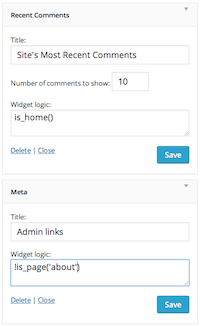
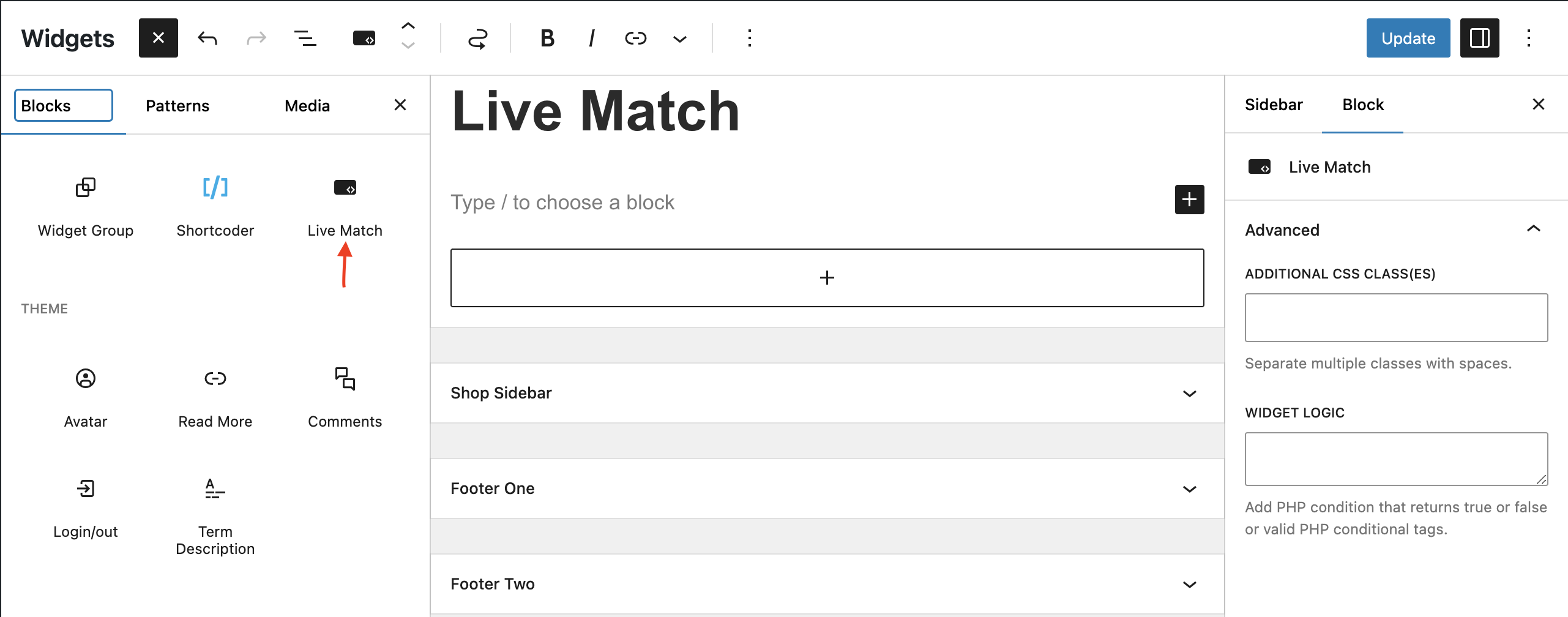
- Now you can control widget in Gutenberg Widgets editor as well as in Classic Editor. It is just as easy as before but also in gutenberg view.
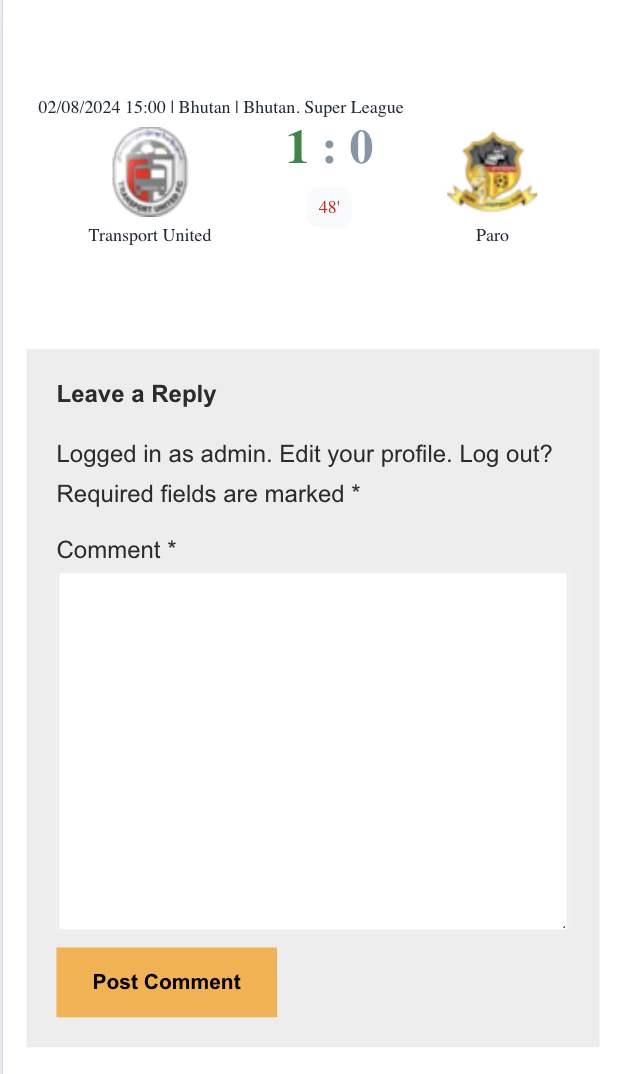
- Pre-installed widgets let you add special widget with one click of the mouse. First pre-installed widget is Live Match that let you add widget of one random live football game with real time score updates (teams logos, livescore, minute of the match, tournament name). And more interesting widgets to come!
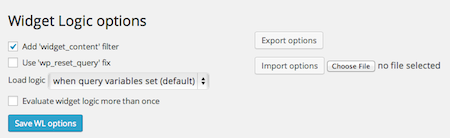
- Use 'wp_reset_query' fix -- Many features of WP, as well as the many themes and plugins out there, can mess with the conditional tags, such that is_home is NOT true on the home page. This can often be fixed with a quick wp_reset_query() statement just before the widgets are called, and this option puts that in for you rather than having to resort to code editing
- Load logic -- This option allows you to set the point in the page load at which your widget logic if first checked. Pre v.50 it was when the 'wp_head' trigger happened, ie during the creation of the HTML's HEAD block. Many themes didn't call wp_head, which was a problem. From v.50 it happens, by default, as early as possible, which is as soon as the plugin loads. You can now specify these 'late load' points (in chronological order):
- after the theme loads (after_setup_theme trigger)
- when all PHP loaded (wp_loaded trigger)
- after query variables set (parse_query) – this is the default
- during page header (wp_head trigger)
widget_logic_allowed_functions filter to add custom PHP functions that will be allowed in Widget Logic fields. By default, only WordPress conditional tags and a whitelist of safe functions are available. This filter allows you to extend the functionality and use your own custom functions.
To add a custom function, add the following code to your theme's functions.php file:
``add_filter('widget_logic_allowed_functions', 'my_allowed_functions');
function my_allowed_functions($functions) {
$functions[] = '_my_custom_function_name_';
return $functions;
}
You can add multiple functions by using one wrapper function:
``add_filter('widget_logic_allowed_functions', 'my_allowed_functions');
function my_allowed_functions($functions) {
$functions[] = 'is_special_page';
$functions[] = 'is_user_verified';
$functions[] = 'get_sidebar_title';
return $functions;
}
IMPORTANT NOTE ON VARIABLES: Widget Logic is designed to work with simple data types (strings, numbers, booleans). If you need to use complex variables, global state, or conditional logic that depends on many factors, create a custom function in your theme's functions.php file and call it from Widget Logic:
Good approach (in functions.php):
```function is_special_page() {
global $post;
$special_ids = array(5, 10, 15);
$conditions = some_complex_function();
return is_page() && in_array($post->ID, $special_ids) && $conditions;
}`
Then in Widget Logic field, simply use: is_special_page()
Less ideal approach (in Widget Logic field):
Avoid putting complex logic directly in the Widget Logic field. Keep it simple and let your custom function handle the complexity. This keeps your widget settings clean and maintainable.
```
Interaction with External Services
Widget Logic uses the external service to obtain up-to-date information about the results of football matches. widgetlogic.org is a source of sports information, that provides a wide range of information about football, including various leagues, tournaments, and championships from around the world.
The functioning of the widgetlogic.org service is based on delivering real-time data about selected matches without the need to refresh the page. This means that data is automatically updated without requiring page reload. This approach ensures users quick and uninterrupted access to the latest sports data without the effort of manually updating information, allowing them to stay informed about ongoing events in real-time.
屏幕截图:
常见问题:
Can I use Widget Logic in Gutenberg widgets view?
Yes, you can! Starting from 6.0.0 you can use Widget Logic in Gutenberg widgets and in Classic Widgets. So if you have earlier version, please update plugin.
What can I try if it's not working?
- Switch to the default theme. If the problem goes away, your theme may be interfering with the WP conditional tags or how widgets work
- Try the
wp_reset_queryoption. If your theme performs custom queries before calling the dynamic sidebar this might help. - Try a different 'Load logic' point. Most wordpress conditional tags only work 'after query variables set', but some plugins may require evaluation earlier or later.
- The 'Evaluate widget logic more than once' option may be needed if you have to use an early 'Load logic' point.
I'm getting errors that read like "PHP Parse error… … eval()'d code on line 1"
You have a PHP syntax error in one of your widget's Widget Logic fields. Review them for errors. You might find it easiest to check by using 'Export options' and reading the code there (Though be aware that single and double quotes are escaped with multiple backslash characters.) If you are having trouble finding the syntax error, a simple troubleshooting method is to use 'Export options' to keep a copy and then blank each Widget Logic field in turn until the problem goes. Once you've identified the problematic code, you can restore the rest with 'Import options'.
It's causing problems with Woo Commerce / other popular plugin
This is often, not always, fixed by trying the different 'Load Logic' options. The 'after query variables set' option looks like it might be a better default, try it.
What's this stuff in my sidebar when there are no widgets?
Since v .50 the widget logic code runs such that when dynamic_sidebar is called in a theme's code it will 'return false' if no widgets are present. In such cases many themes are coded to put in some default sidebar text in place of widgets, which is what you are seeing. Your options, if you want this default sidebar content gone, are to either edit the theme, or as a work around, add an empty text widget (no title, no content) to the end of the sidebar's widget list.
How do I get widget X on just my 'home' page? (Or on every page except that.)
There is some confusion between the Main Page and the front page. If you want a widget on your 'front page' whether that is a static page or a set of posts, use is_front_page(). If it is a page using is_page(x) does not work. If your 'front page' is a page and not a series of posts, you can still use is_home() to get widgets on that main posts page (as defined in Admin > Settings > Reading).
Logic using is_page() doesn't work
I believe this is fixed in 5.7.0. Let me know if that is not the case. If your theme calls the sidebar after the loop you should find that the wp_reset_query option fixes things. This problem is explained on the is_page codex page.
How do I get a widget to appear both on a category page and on single posts within that category?
Take care with your conditional tags. There is both an in_category and is_category tag. One is used to tell if the 'current' post is IN a category, and the other is used to tell if the page showing IS for that category (same goes for tags etc). What you want is the case when:
(this page IS category X) OR (this is a single post AND this post is IN category X)
which in proper PHP is:
is_category(X) || (is_single() && in_category(X))
How do I get a widget to appear when X, Y and Z?
Have a go at it yourself first. Check out the 'Writing Logic Code' section under Other Notes.
Why is Widget Logic so unfriendly, you have to be a code demon to use it?
This is sort of deliberate. I originally wrote it to be as flexible as possible with the thought of writing a drag'n'drop UI at some point. I never got round to it, because (I'm lazy and) I couldn't make it both look nice and let you fall back to 'pure code' (for the possibilities harder to cater for in a UI). The plugin Widget Context presents a nice UI and has a neat 'URL matching' function too.
Widgets appear when they shouldn't
It might be that your theme performs custom queries before calling the sidebar. Try the wp_reset_query option.
Alternatively you may have not defined your logic tightly enough. For example when the sidebar is being processed, in_category('cheese') will be true if the last post on an archive page is in the 'cheese' category.
Tighten up your definitions with PHPs 'logical AND' &&, for example:
is_single() && in_category('cheese')
更新日志:
- WordPress.org Plugins Team fixing versioning issue.
- Fixed minor bug with Live Match widget
- Enhanced Configuration section with detailed documentation for
widget_logic_allowed_functionsfilter - Added examples for adding custom functions to Widget Logic
- Added best practices guide for using variables with custom functions
- Improved documentation on separating complex logic from Widget Logic fields
- added support for more WordPress functions in the allowed functions in that account added:
- is_product_category
- has_category
- etc...
- reworked main logic function to avoid EVAL
- !IMPORTANT! from this version not all php code will be executed in Widget Logic field
- if you need more php functions you can add it with using
add_filter('widget_logic_allowed_functions', '[your_custom_function_here]'); - removed
widget_logic_eval_overridefilter
- fixed Live Match widget block
- load of External Services only when Live Match widget used
- added settings option for enable new functionality
- fixed bug for php7.2
- Bug fixes
- Gutenberg widgets editor added
- Pre-installed widgets added (Live Match)
- Bug fixes
- Code cleanup
- Security update. The export feature has been protected with nonce.
- Security update. Huge thanks to the Plugin Vulnerabilities Team!
- The plugin's security has been improved, big thanks to Paul Dannewitz for his excellent security audit!
- The widget_content filter option has been removed from the settings block, but kept in the code for backward compatibility. The plan is to remove it completely and make the plugin simpler (let us know what you think).
- Code cleanup.