WindCodex GeoBlock – WooCommerce Country Restriction & Geo Blocking
| 开发者 |
dhimahisolutions
windcodex |
|---|---|
| 更新时间 | 2026年9月28日 12:07 |
| PHP版本: | 7.4 及以上 |
| WordPress版本: | 7.0 |
| 版权: | GPLv2 or later |
| 版权网址: | 版权信息 |
详情介绍:
- Stop failed deliveries – Block customers from ordering products you cannot ship to their location.
- Stay legally compliant – Restrict alcohol, supplements, age-restricted, or regulated products by region.
- Honour licensing agreements – Limit digital downloads and licensed content to permitted territories.
- Build country-specific catalogs – Show a tailored product range to each market automatically.
- Reduce chargebacks – Prevent orders you would only have to cancel and refund anyway.
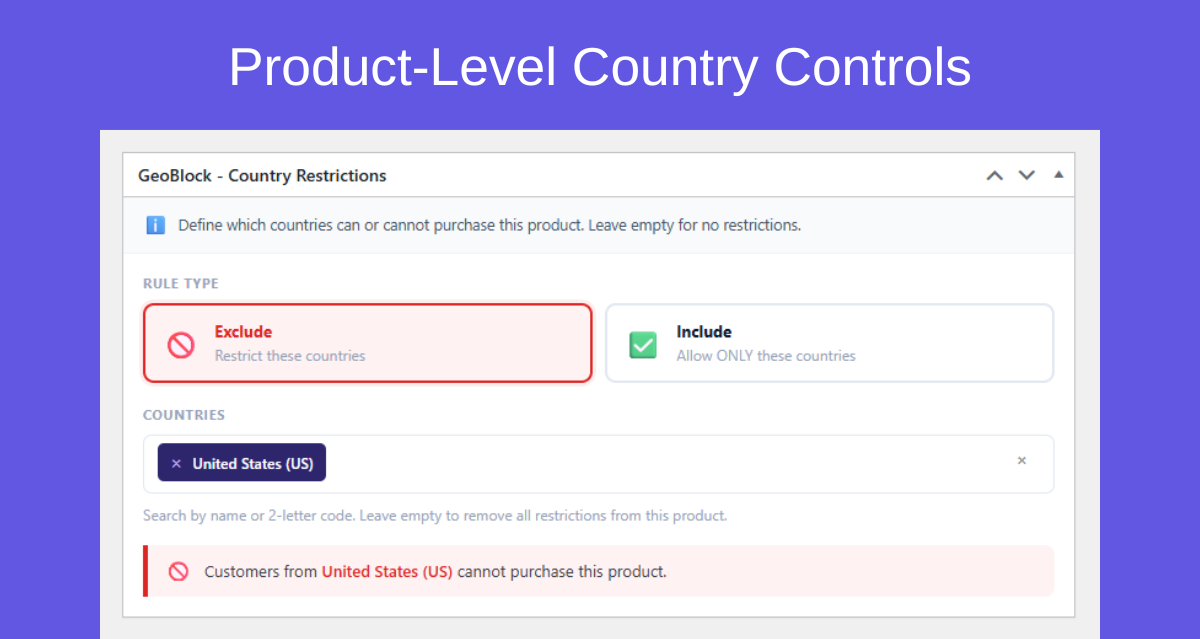
- Per-product country rules – Set include or exclude rules on any product from the product edit screen, with a searchable country selector and live rule summary.
- Include or Exclude mode – Whitelist specific countries (only they can buy) or blacklist countries (everyone except them can buy).
- Custom restriction message – Write your own HTML message with links, bold text, or any WordPress-allowed markup.
- Configurable message position – Place the restriction notice above the title, below the title, after the description, or before product meta.
- Redirect on restriction – In Hide mode, send restricted visitors to any URL instead of a 404 page.
- Cart & checkout protection – Restricted products added to cart before a rule was applied are automatically removed, with a clear customer notice.
- Server-side add-to-cart validation – Blocks direct POST, REST API, and AJAX add-to-cart attempts. Not just client-side.
- Smart country detection (6 layers) – Shipping address → billing address → WC session → transient cache → MaxMind GeoLite2 → store base country. No manual input needed.
- Cloudflare IP support – Reads
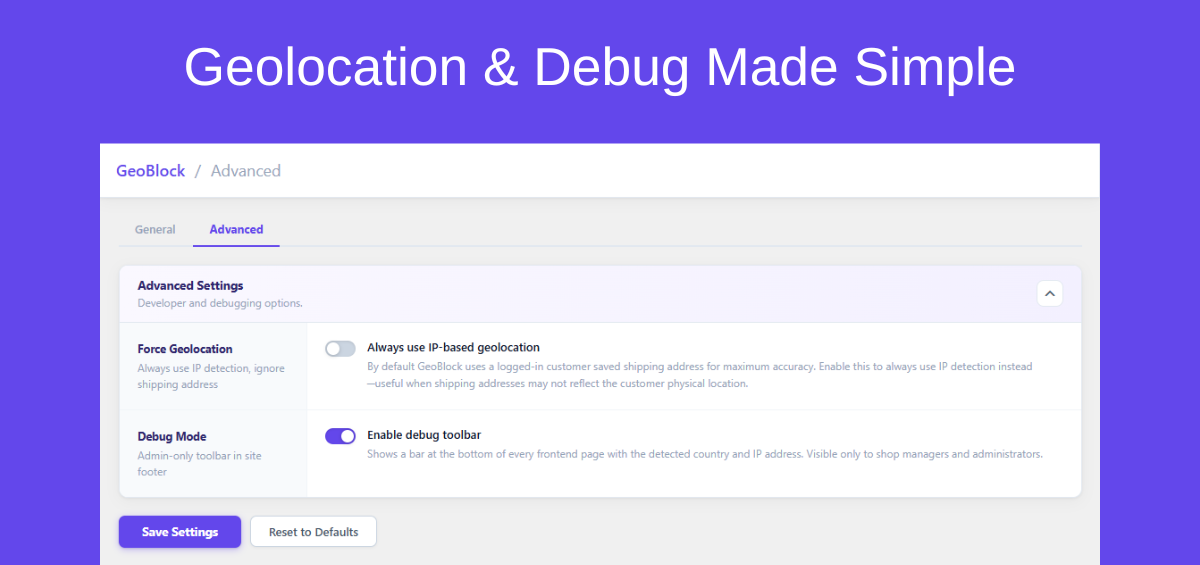
CF-Connecting-IPautomatically for sites behind Cloudflare. - Force Geolocation option – Ignore saved addresses and always detect country from current IP.
- Session & transient caching – Country detection results cached per session. Zero repeated geolocation lookups.
- Admin debug toolbar – Shows detected country, IP address, detection source, and a settings link. Visible to admins only.
- Shortcode support –
[geoblock_product_message]renders the restriction message in any page builder, custom template, Elementor, or Divi. - HPOS compatible – Fully supports WooCommerce High-Performance Order Storage.
- Translation ready – Complete
.potfile included. Compatible with Loco Translate and WPML String Translation.
- Price Based on Country for WooCommerce – Restriction message takes priority over country-based pricing on restricted products.
- WPML – Rules set on the original-language product automatically apply to all translated copies. No duplicate rules per language.
- WooCommerce Product Bundles – Restricting the bundle parent blocks the entire bundle from purchase.
- WooCommerce Subscriptions – Both
subscriptionandvariable-subscriptionproduct types fully supported. - WP Rocket – Product pages automatically excluded from page cache so every visitor gets the correct restricted or unrestricted version.
- Speed Optimizer by SiteGround – Product pages bypass SiteGround's dynamic cache via
SGCACHENOCACHEandsgo_bypass_cache.
- Block alcohol or age-restricted products from countries where they are prohibited by law
- Restrict physical goods to only the countries you ship to
- Limit digital downloads to licensed territories
- Hide out-of-stock regional variants from international markets
- Display a "contact us to order in your region" message instead of hiding the product
- Build exclusive country-specific product catalogs for different markets
[geoblock_product_message]
Attributes:
id– Product ID to check. Defaults to the current product in the loop.class– Extra CSS class(es) added to the message wrapper div. Examples:[geoblock_product_message id=123][geoblock_product_message id=123 class="my-notice highlight"]
- Install and activate the plugin.
- Go to WooCommerce > GeoBlock and choose a restriction mode.
- Open any product and find the GeoBlock - Country Restrictions meta box.
- Select Include or Exclude, choose your countries, and save.
- GeoBlock automatically detects each visitor's country and applies your rules in real time.
- WordPress 5.8 or higher
- WooCommerce 7.0 or higher
- PHP 7.4 or higher
- WooCommerce Geolocation must be enabled: WooCommerce Settings > General > Default customer location > Geolocate
安装:
- Go to Plugins > Add New.
- Search for WindCodex GeoBlock.
- Click Install Now, then Activate.
- Download the plugin ZIP file.
- Upload the
windcodex-geoblockfolder to/wp-content/plugins/. - Activate through the Plugins screen in WordPress.
- Go to WooCommerce > Settings > General and set "Default customer location" to Geolocate or Geolocate (with page caching support).
- Go to WooCommerce > GeoBlock Restrictions to choose your global restriction mode.
- Edit any product and use the GeoBlock - Country Restrictions meta box to set rules.
屏幕截图:
常见问题:
Does this plugin require any API key or account?
No. GeoBlock uses WooCommerce's built-in geolocation engine (MaxMind GeoLite2), which is already bundled with WooCommerce. No external API key, account, or paid service is needed.
Which countries can I block or restrict?
All countries supported by WooCommerce – the same full list used in WooCommerce shipping and tax settings. You can restrict any single country or any combination of countries on each product independently.
How do I block a specific country from purchasing a product?
Open the product in your WordPress admin, find the GeoBlock - Country Restrictions meta box, select Exclude, choose the countries you want to block, and save. That country's visitors will be blocked immediately.
Can I restrict products to only specific countries (whitelist)?
Yes. Select Include mode in the meta box and choose the countries that are allowed to purchase. All other countries will be restricted automatically.
Will this work with page caching plugins like WP Rocket or LiteSpeed?
Yes. Set WooCommerce's "Default customer location" to Geolocate (with page caching support) (AJAX mode). Country detection happens via AJAX after page load, so it works correctly on fully cached pages. GeoBlock also includes a built-in WP Rocket compatibility layer that excludes product pages from cache.
What happens if WooCommerce geolocation is not enabled?
GeoBlock shows a warning banner in the plugin settings page. Without geolocation, guest visitors fall back to the store's base country and restrictions will not apply to them. Logged-in customers with a saved shipping or billing address are still detected correctly.
Does this work with variable products?
Yes. Country rules are set at the parent product level and automatically apply to all variations. In Hide and Catalog Only modes, the entire product including all variations is restricted. In Message mode, variation dropdowns and the Add to Cart button are both hidden on the product page.
What if a customer uses a VPN?
GeoBlock detects country based on IP address. A customer using a VPN may appear to be in a different country. For stores where VPN circumvention is a concern, enable the "Force Geolocation" option, which ignores saved addresses and always uses current IP detection.
What happens if a restricted product is already in a customer's cart?
GeoBlock automatically removes restricted products from the cart when the customer visits the cart or checkout page, and displays a clear notice explaining why. Checkout is also blocked as a final safety net even if the cart page was skipped.
Can I set different country rules for different products?
Yes. Each product has its own independent set of rules. Product A can be restricted to Europe only, Product B excluded from one specific country, and Product C open to everyone – all at the same time.
Does geo blocking affect SEO or Google indexing?
No. Country restrictions are applied at the application layer. Search engine crawlers are not affected and your products continue to be indexed normally. Country-based product restrictions are standard, accepted practice in international e-commerce.
Is this plugin GDPR compliant?
Yes. GeoBlock processes IP addresses only to determine the visitor's geographic country – a legitimate interest under e-commerce operation. No personal data is stored beyond the session and transient TTL (1 hour). No data is shared with third parties. Update your own privacy policy to document your use of geolocation.
Does this work with WooCommerce Subscriptions?
Yes. GeoBlock's compatibility layer hooks into WooCommerce Subscriptions' own purchasability filters and fully supports both subscription and variable-subscription product types.
Can I use this with Elementor, Divi, or other page builders?
Yes. Use the [geoblock_product_message id=PRODUCT_ID] shortcode in any page builder element or custom template to display the restriction message anywhere on your site.
How do I test that country restrictions are working correctly?
Enable Debug Mode in WooCommerce > GeoBlock Restrictions > Advanced. An admin-only debug toolbar will appear at the bottom of every frontend page showing the detected country, IP address, and detection method. You can also temporarily set your own country as a restricted country to verify the hide or message behaviour.
Does the "Hide completely" mode still show the product on direct URL?
No. In Hide completely mode, the direct product URL returns a 404 page. You can also configure a redirect URL to send restricted visitors to a custom page (like a contact or coming-soon page) instead of a 404.
How is country detection performed?
GeoBlock uses a 6-layer detection chain: (1) shipping address, (2) billing address, (3) WooCommerce session, (4) WordPress transient cache, (5) MaxMind GeoLite2 database via WooCommerce's built-in engine, (6) store base country fallback. Results are cached per session to avoid repeated lookups.
Does GeoBlock work with WooCommerce Blocks?
Yes. WooCommerce Blocks compatibility is declared. Cart and checkout protection applies regardless of whether classic or block-based cart and checkout is used.
更新日志:
- Added: "Docs" link next to "Settings" on the Plugins screen.
- Added: Support Forum link in the Help menu.
- Improved: Refreshed Help menu design. The menu now closes with the Escape key and is correctly announced to screen readers.
- Improved: Uninstalling GeoBlock now removes all of its settings and per-product restriction rules. If GeoBlock Pro is active, nothing is removed, because Pro uses the same settings and rules.
- Added: Loads plugin translations via
load_plugin_textdomain()for full compatibility with translation plugins (Loco Translate, WPML String Translation) and manually installed language packs. - Updated: Regenerated the
.pottranslation template with the latest translatable strings.
- Improved: Settings page UI for better usability.
- Added: Admin review request notice.
- Added: Pro features notice.
- Initial release.
- Three restriction modes: Hide completely, Hide from catalog (Catalog Only), Show restriction message.
- Per-product Include/Exclude country rules with searchable Select2 country selector.
- Custom restriction message with HTML support and configurable position on product page (4 positions).
- Redirect URL option for Hide completely mode.
- Allow purchase via direct URL toggle for Catalog Only mode.
- 6-layer country detection: shipping address → billing address → WC session → transient cache → MaxMind GeoLite2 → store base.
- Cloudflare
CF-Connecting-IPheader support for reverse-proxied sites. - Session and transient caching for geolocation performance (1-hour TTL).
- Force Geolocation option to ignore saved addresses and always use IP detection.
- Cart and checkout protection – restricted products auto-removed if added before rule was applied.
- Server-side add-to-cart validation via
woocommerce_add_to_cart_validationblocks API/AJAX bypass attempts. - Variation ID parent resolution – rules on parent product correctly block all child variations.
[geoblock_product_message]shortcode for page builder and custom template compatibility.- Admin debug toolbar (admin-only) showing country, IP, and detection source.
- AJAX save and reset with toast notifications and sticky footer save bar.
- HPOS (High-Performance Order Storage) compatibility declared.
- WooCommerce Blocks compatibility.
- Built-in compatibility: Price Based on Country, WPML, WooCommerce Product Bundles, WooCommerce Subscriptions, WP Rocket, Speed Optimizer by SiteGround.
- Translation-ready with complete
.potfile included.