WindCodex ReturnDesk – WooCommerce Returns, Refunds & RMA Management
| 开发者 | windcodex |
|---|---|
| 更新时间 | 2026年9月28日 12:16 |
| PHP版本: | 7.4 及以上 |
| WordPress版本: | 7.0 |
| 版权: | GPLv2 or later |
| 版权网址: | 版权信息 |
详情介绍:
- Reduce support volume – Customers handle return requests themselves instead of contacting you first. Fewer emails, fewer back-and-forth threads.
- Automate returns processing – Define eligibility rules once. ReturnDesk enforces your return window, allowed statuses, and sale-item policy automatically – no manual review needed.
- Enforce your WooCommerce return policy – Show your policy and return address inline in the request flow so customers always know what to expect.
- Build customer trust – A clear, accessible returns process is a key purchase-confidence signal that reduces cart abandonment.
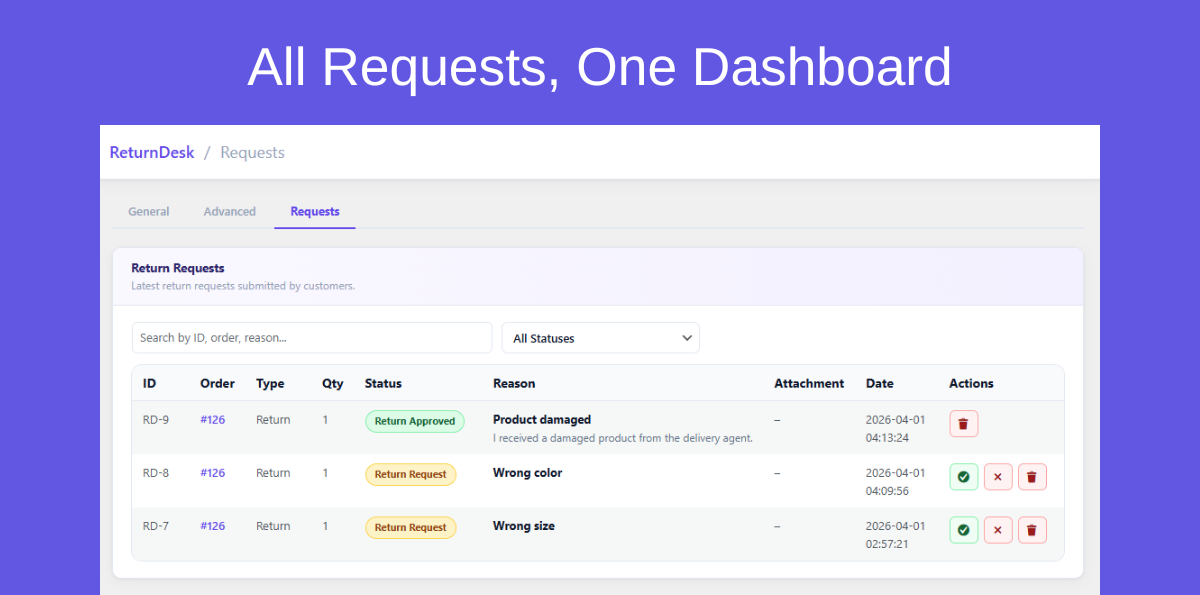
- Keep operations organized – All return merchandise authorization (RMA) requests in one place. Review, approve, reject, and track from the WooCommerce admin. No spreadsheets.
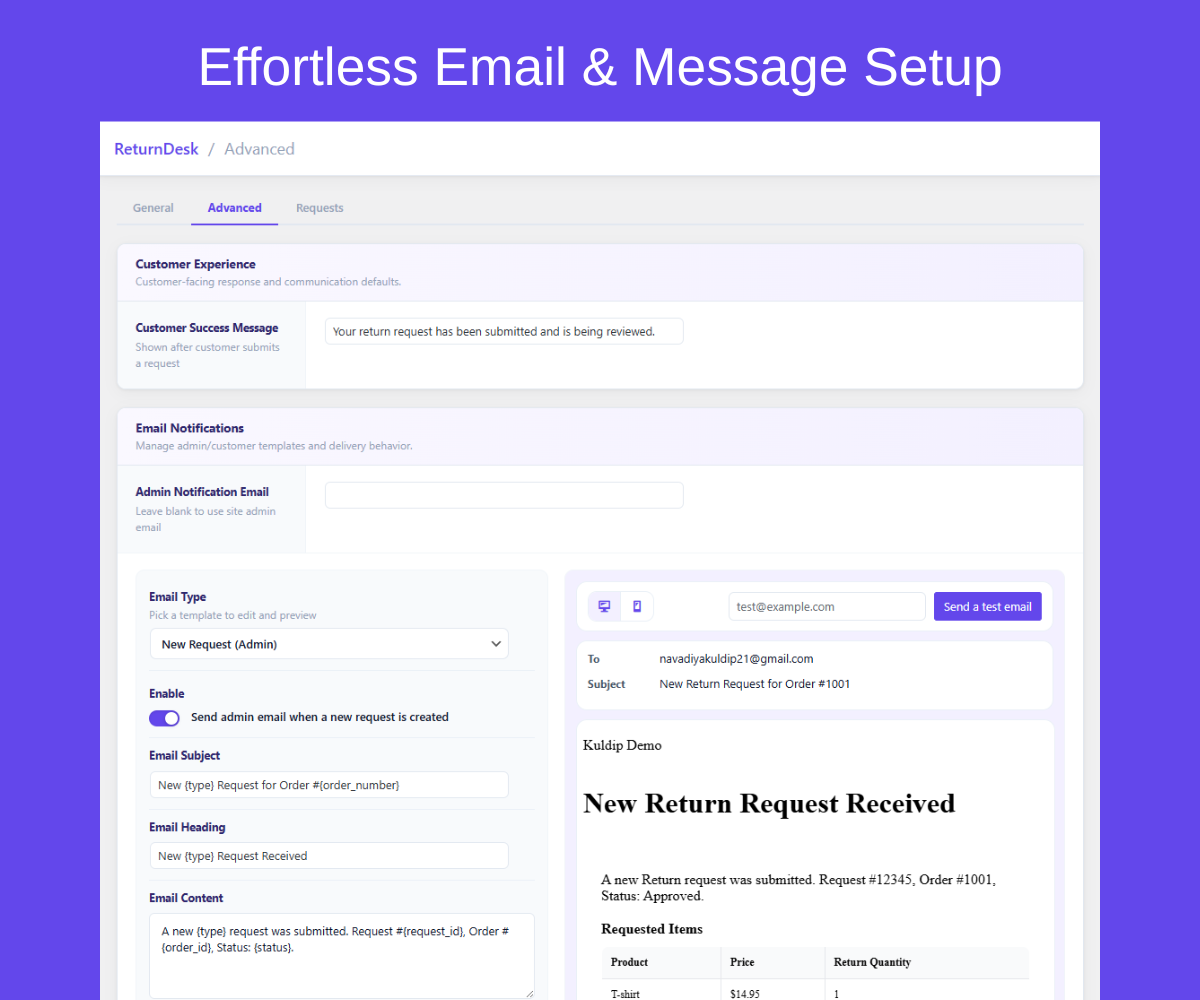
- Professional email notifications – Fully editable email templates for admin and customer communications. Every status change triggers the right message automatically.
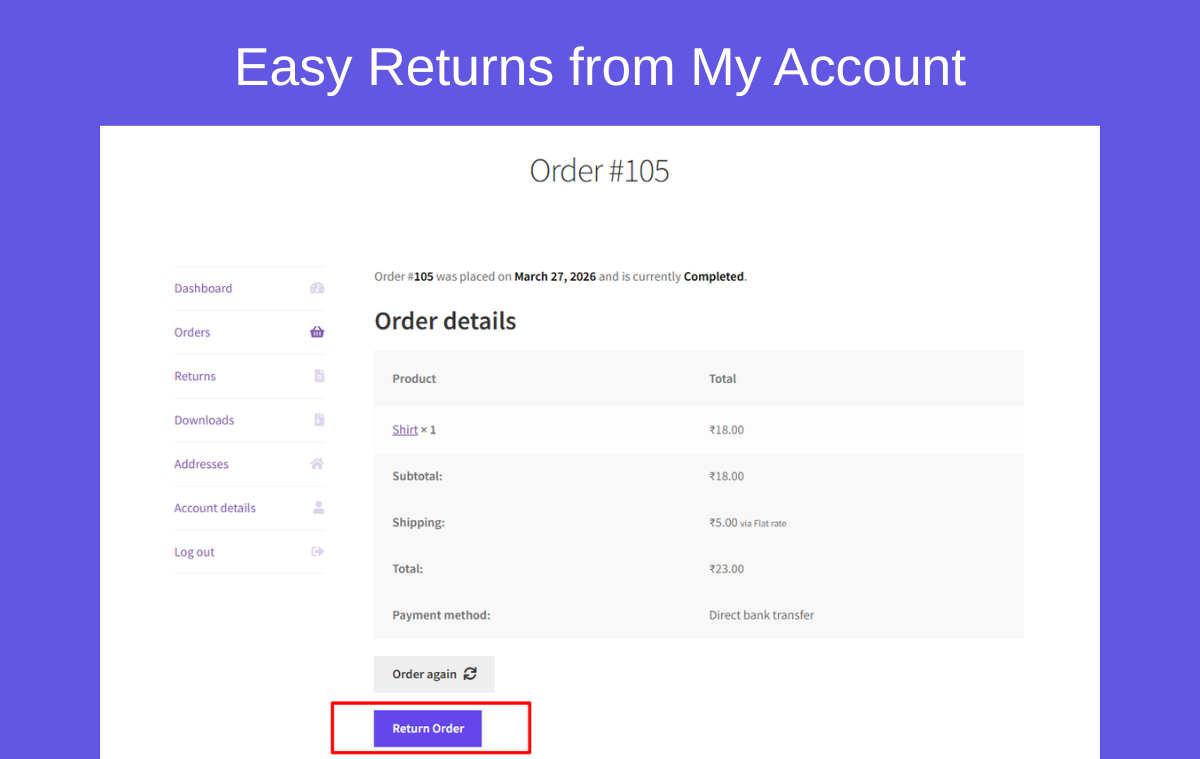
- Self-service return portal – Return request button and form embedded in the My Account order view. Customers do not need to leave your site.
- Eligibility rules – Set return window in days, restrict eligible order statuses, and control whether sale items qualify.
- Return policy & address display – Show return instructions and the return shipping address directly in the customer request flow to reduce back-and-forth questions.
- Admin request management – Full request list with search and filter. Approve or reject requests in one click. View attachments. Delete requests.
- Email notification system – Separate email groups for admin (new request) and customer (new request confirmed, approved, rejected, cancelled). Each template has editable subject, heading, body, and additional content.
- Live email preview & test send – Preview email templates in desktop and mobile views and send test emails before going live.
- Return reasons list – Configure your own list of selectable return reasons for customers to choose from.
- Custom success message – Set the message customers see after successfully submitting a return request.
- Terms & conditions integration – Link your returns T&C page in the return request flow.
- Translation ready – POT file included in the
languagesdirectory. Works with Loco Translate.
- Common settings – Allowed order statuses, terms & conditions page link.
- Return address – Address line 1 and 2, city, state, country, postcode/ZIP, and phone.
- Return rules – Enable or disable returns, return window (days), allow or block sale-item returns.
- Return form – Return guidelines text and configurable return reasons list.
- Customer message – Custom success message shown after request submission.
- Email settings – Admin notification address, enable/disable per email group, editable templates: New Request (admin), New Request (customer), Approved (customer), Rejected (customer), Cancelled (customer).
- Email tools – Live preview (desktop/mobile) and test email sender.
- Request management – Search and filter request list, approve/reject pending requests, delete requests, view attachments.
- Enforce a WooCommerce return policy automatically – for example a strict 14 or 30-day return window from order date.
- Accept returns only for completed or delivered orders and block requests on processing or refunded orders.
- Automate returns so customers never need to email support – everything handled through the My Account portal.
- Display the WooCommerce refund plugin request form directly in the My Account order view without redirecting customers.
- Provide clear return instructions and a return shipping address to reduce confusion and back-and-forth emails.
- Collect structured return reason data to identify recurring product issues and reduce future returns.
- Standardize the return process across multiple staff members so every request is handled consistently.
- Install and activate ReturnDesk.
- Go to WooCommerce → ReturnDesk and configure return settings.
- Set eligibility rules (days, allowed order statuses, sale-item policy).
- Add return policy text and return address details.
- Customers submit return requests from My Account → Orders → View on eligible orders.
- Review and manage all requests from the WooCommerce admin return management screens.
- WordPress 5.8 or higher
- WooCommerce 7.0 or higher
- PHP 7.4 or higher
安装:
- Go to Plugins → Add New.
- Search for WindCodex ReturnDesk.
- Click Install Now, then Activate Plugin.
- Download the plugin ZIP file.
- Upload the
windcodex-returndeskfolder to/wp-content/plugins/. - Activate through the Plugins screen in WordPress.
- Open WooCommerce → ReturnDesk.
- Configure return window, allowed statuses, and sale-item policy.
- Add return policy content and your return shipping address.
- Place a test order, mark it complete, and verify the return request flow from My Account.
屏幕截图:
常见问题:
Does ReturnDesk require WooCommerce?
Yes. ReturnDesk is a WooCommerce-specific plugin and requires WooCommerce to be installed and active.
Where do customers submit return requests?
Customers see a "Request Return" button on eligible orders under My Account → Orders → View. Clicking it opens the return request form directly within your site.
How do I control which orders are eligible for returns?
In ReturnDesk settings, you can set the return window in days (counted from the order date), and specify which order statuses qualify – for example, only "Completed" orders.
Can I block sale items from being returned?
Yes. Sale item eligibility is a dedicated toggle in the return rules settings. You can allow or block sale-item returns globally.
How do I approve or reject a return request?
Go to WooCommerce → ReturnDesk → Requests in your admin. Each request has one-click Approve and Reject buttons. Approving or rejecting sends the corresponding email notification to the customer automatically.
Can customers attach photos or files to their return request?
Yes. Customers can attach files (such as photos of damaged items) when submitting a request. Attachments are visible to admins in the request detail view.
Does the free version support exchanges or store credit?
No. The free version handles return requests only. Exchanges and store credit options are available in ReturnDesk Pro.
Can I edit the email templates?
Yes. Every email template – New Request (admin), New Request (customer), Approved, Rejected, Cancelled – has editable subject, heading, body, and additional content fields. You can also preview templates in desktop/mobile view and send test emails before going live.
Is there a way to test the return flow without a real customer?
Yes. Place a test order in your own store, set its status to Completed (or whatever status your settings allow), then visit the order in My Account and use the return request form to test the complete flow end to end.
Does ReturnDesk support multiple languages?
Yes. A POT file is included in the languages directory and the plugin is fully translation-ready. Use Loco Translate or any standard WordPress translation tool.
Can customers request exchanges instead of refunds?
Exchanges are a Pro feature. The free version handles return requests only. You can use the return reason and custom success message to guide customers who need an exchange toward contacting you directly.
Does ReturnDesk support partial returns on multi-item orders?
Partial returns are available in ReturnDesk Pro. In the free version, return requests apply to the full order.
Can I set different return windows for different products?
The free version applies one global return window to all products. Per-product return windows are available in ReturnDesk Pro.
Does ReturnDesk work with WooCommerce Subscriptions?
ReturnDesk works on any order type that WooCommerce creates. Return requests on subscription-related orders are supported as long as the order status matches your eligibility settings.
Can I send WhatsApp notifications for return updates?
WhatsApp notifications are a Pro feature. The free version includes email notifications for all return status changes (new, approved, rejected, cancelled).
How do I give customers store credit instead of a refund?
Store credit is a Pro feature. In the free version, refunds and credit decisions are handled manually by the store admin after approving a return request through the WooCommerce admin.
Can I automatically approve return requests?
Auto-approval rules are available in ReturnDesk Pro. In the free version, each request requires manual review and one-click approval or rejection from the admin request list.
How do I customise the return request email templates?
Go to WooCommerce → ReturnDesk → Email Settings. Each email template (New Request for admin, New Request for customer, Approved, Rejected, Cancelled) has editable subject, heading, body, and additional content fields. Use the live preview tool to check desktop and mobile rendering before saving.
Is there a Pro version?
Yes. ReturnDesk Pro adds advanced features including auto-approvals, exchanges, store credit, partial returns, per-product return windows, WhatsApp notifications, and extended reporting. Visit windcodex.com for details.
Does this plugin work with WooCommerce HPOS (High-Performance Order Storage)?
Yes. ReturnDesk is compatible with WooCommerce High-Performance Order Storage (HPOS/custom order tables).
更新日志:
- Added: "Docs" link next to "Settings" on the Plugins screen.
- Added: Support Forum link in the Help menu.
- Improved: Refreshed Help menu design. The menu now closes with the Escape key and is correctly announced to screen readers.
- Changed: Return Guidelines is now a rich text editor instead of a plain textarea, and content is displayed as formatted HTML (paragraphs, lists, links, bold, etc.) instead of being forced into a bulleted list.
- Fixed: Return Guidelines with HTML formatting (bold, links, etc.) were rendered as escaped text instead of formatted HTML in the customer's "approved" return status notice.
- Added: Loads plugin translations via
load_plugin_textdomain()for full compatibility with translation plugins (Loco Translate, WPML String Translation) and manually installed language packs. - Updated: Regenerated the
.pottranslation template with the latest translatable strings.
- Improved: Settings page UI for better usability.
- Added: Admin review request notice.
- Added: Pro features notice.
- Initial free release.
- Customer-facing return request flow embedded in My Account order view.
- Eligibility rules: return window in days, allowed order statuses, sale-item policy toggle.
- Return policy text and return address display in customer request flow.
- Admin return request management with approve, reject, and delete actions.
- Five email notification templates with editable subject, heading, body, and additional content.
- Live email preview (desktop/mobile) and test-send tool.
- Configurable return reasons list and custom success message.
- POT file included for full translation support.