
WindCodex ScraperBlock – Block AI Scrapers & Bots from WordPress & WooCommerce
| 开发者 | windcodex |
|---|---|
| 更新时间 | 2026年9月28日 22:02 |
| PHP版本: | 7.4 及以上 |
| WordPress版本: | 7.0 |
| 版权: | GPLv2 or later |
| 版权网址: | 版权信息 |
详情介绍:
- Your original content gets harvested and used without permission or attribution.
- AI training traffic inflates your server load and bandwidth costs.
- WooCommerce store owners face a specific threat – price bots and competitor scrapers continuously harvest product prices, stock levels, and catalog data to undercut your pricing in real time.
- Proprietary product descriptions, pricing strategies, and business data are exposed to competitors and AI systems.
- Scraper traffic can mask real user patterns in your analytics.
- Master protection switch – Enable or disable all ScraperBlock protections with a single toggle.
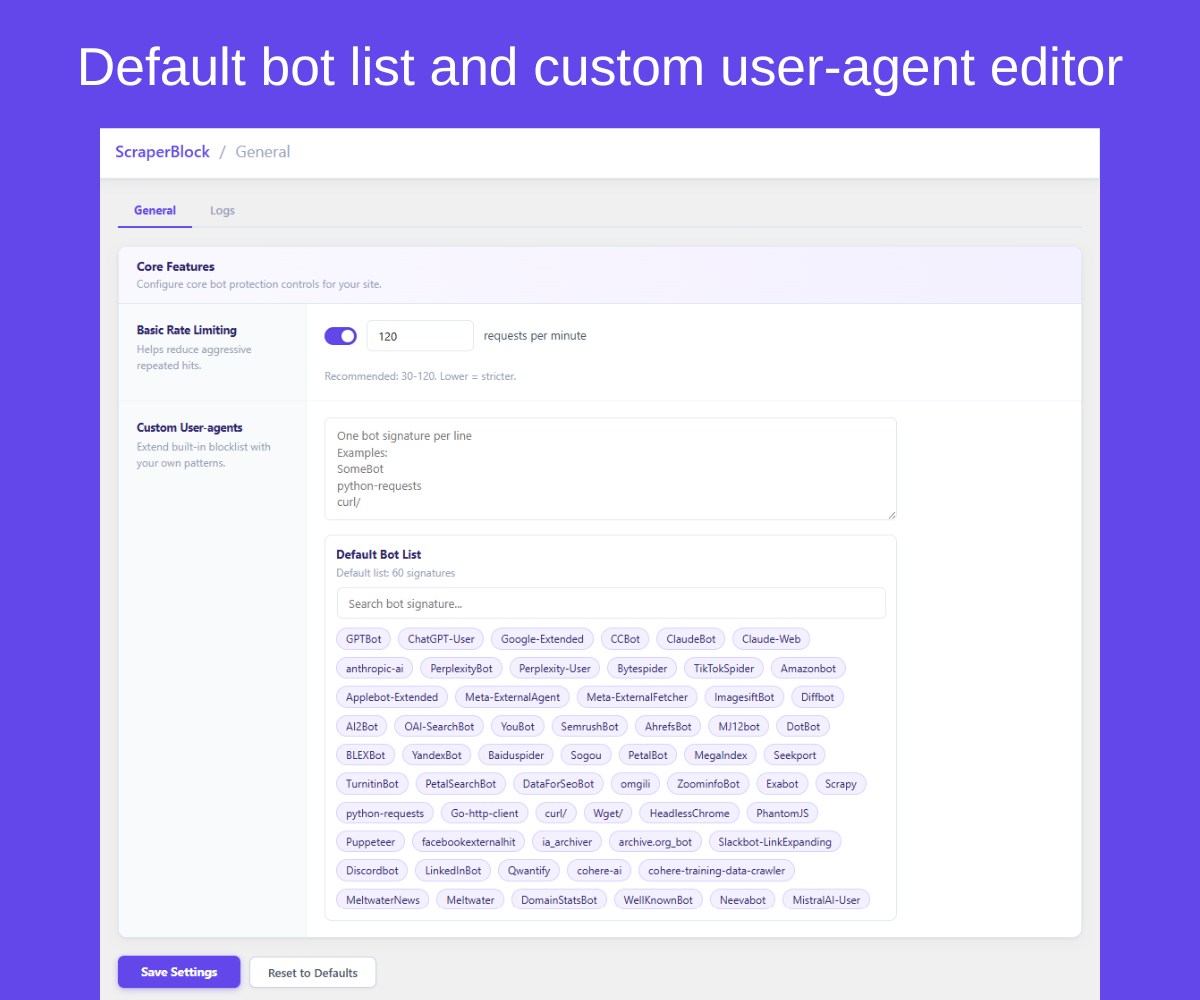
- 50+ default bot signatures – Pre-loaded, categorized list of known AI scrapers, content crawlers, and price bots including GPTBot (OpenAI), ClaudeBot (Anthropic), Google-Extended, ByteSpider (ByteDance), CCBot (Common Crawl), Diffbot, PerplexityBot, and more. Maintained and updated regularly.
- Custom user-agent rules – Add your own bot signatures, one per line. Target bots not in the default list.
- Allow AI search bots – Optionally let AI search and assistant bots (OAI-SearchBot, ChatGPT-User, PerplexityBot, Perplexity-User, MistralAI-User) read your pages so your store can appear in AI answers, while AI training crawlers stay blocked. Off by default. Blocking Methods
- Runtime user-agent blocking – Intercepts matching bots at the PHP layer before any content is served. Works on all server types.
- robots.txt blocking – Automatically injects
Disallowdirectives for blocked bots into your robots.txt file. Signals crawlers to stay away before they visit. -
Apache
.htaccessblocking – Adds server-levelRewriteRuleblocks for matched user-agents. Stops bots before they reach PHP (Apache only). AI Opt-Out Meta Tags -
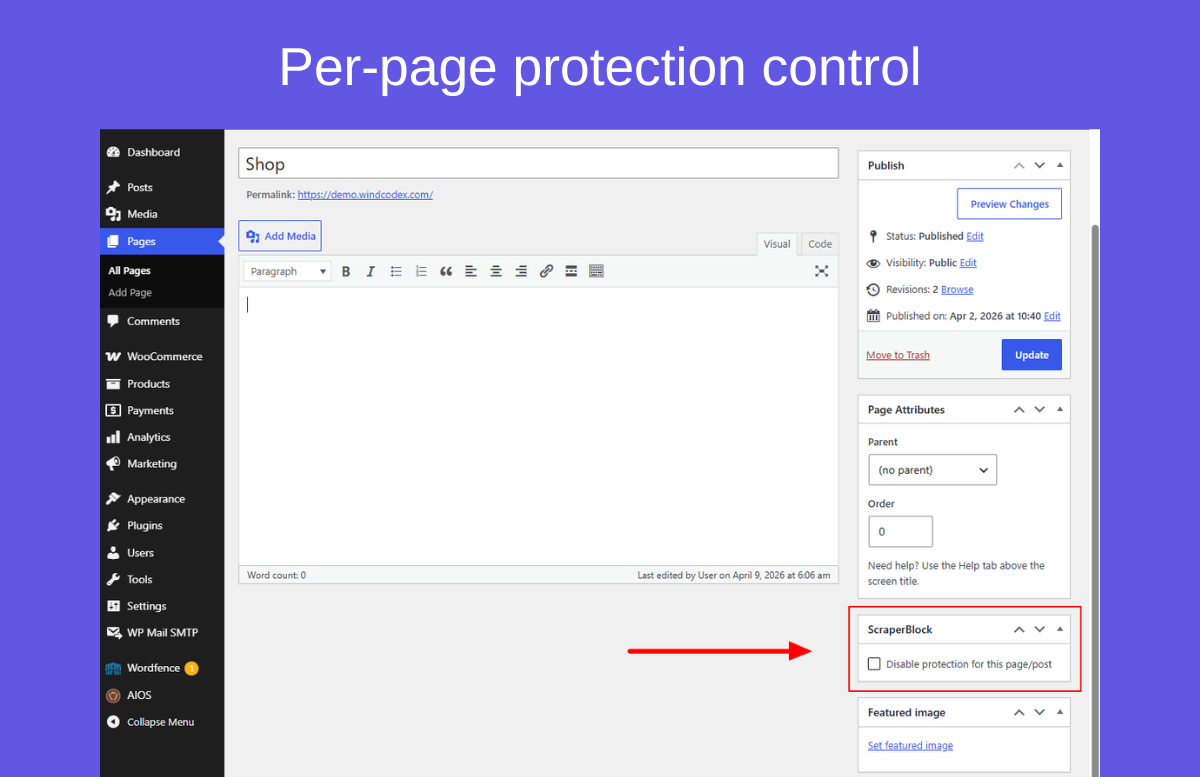
noaiandnoimageaimeta tags – Outputs<meta name="robots" content="noai, noimageai">on your pages. Signals AI training opt-out to crawlers that respect meta directives. - Per-page meta control – Override protection settings on individual posts and pages using a meta box in the editor. Enable, disable, or customize protection per page. Monitoring
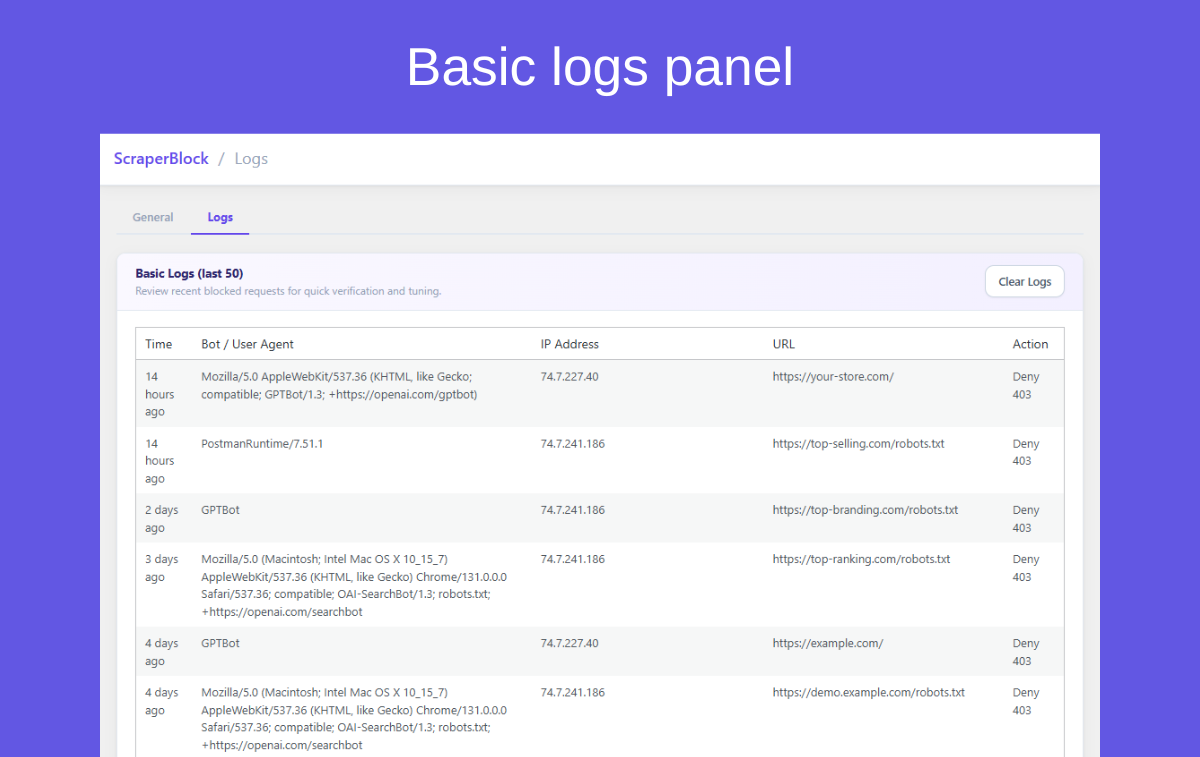
- Basic block log – Stores the last 50 blocked request events with IP, user-agent, URL path, reason, and timestamp.
- Live dashboard count – Shows a basic count of blocked requests from the last 24 hours. See activity at a glance without leaving wp-admin.
- Basic rate limiting – Limit request frequency from individual IPs to reduce scraper throughput.
- Bloggers and content creators – Protect original articles and creative work from AI training scrapes.
- WooCommerce store owners – Block competitor price scrapers and AI bots that harvest product prices, descriptions, and stock levels to undercut your pricing or feed your catalog into AI systems.
- News and media publishers – Opt out of AI content aggregation and training dataset inclusion.
- Membership and course sites – Prevent paid content from being scraped by bots that bypass login pages via API or sitemap traversal.
- Agencies – Deploy consistent bot protection across client sites.
- Install and activate ScraperBlock.
- Go to Settings > ScraperBlock.
- Enable the protection modules you want (runtime blocking, robots.txt, meta tags, per-page control).
- Save settings.
- Monitor blocked requests in the Logs panel and Dashboard count widget.
- Content poisoning – Serve subtly corrupted content to detected scrapers, degrading the value of stolen data.
- Honeypot traps – Invisible links that only bots follow – automatically flag and block crawlers.
- Behavioural detection – Identify bots by traffic pattern, not just user-agent string.
- Real-time threat feed – Cloud-updated block list with new bot signatures pushed automatically.
- Geo-based blocking – Block all traffic from specific countries at the application layer.
- IP allowlists & blocklists – Block individual IP addresses and CIDR ranges in addition to user-agents.
- Block scheduling – Define time windows when protection is active or relaxed.
- Advanced analytics – Full traffic breakdown by bot, country, URL, and time range with CSV export.
- WordPress 5.8 or higher
- PHP 7.4 or higher
- Apache is required only for
.htaccessblocking mode. All other modes work on any server.
安装:
- Go to Plugins > Add New.
- Search for WindCodex ScraperBlock or ScraperBlock.
- Click Install Now, then Activate.
- Open Settings > ScraperBlock to configure your protections.
- Download the plugin ZIP file.
- Upload the
windcodex-scraperblockfolder to/wp-content/plugins/. - Activate through the Plugins screen in WordPress.
屏幕截图:
常见问题:
Does this plugin block all bots automatically?
ScraperBlock blocks requests that match the built-in default bot list or your custom user-agent signatures. The default list includes 50+ known AI scrapers and content crawlers. Bots not on the list are not blocked unless you add their signature manually.
Which AI bots does ScraperBlock block by default?
The default list includes GPTBot (OpenAI), ClaudeBot (Anthropic), Google-Extended (Google AI training), ByteSpider (ByteDance), CCBot (Common Crawl), Diffbot, PerplexityBot, YouBot, and more. The list is maintained and updated with new bot signatures regularly.
Will ScraperBlock affect Google Search or Bing indexing?
No. The default bot list targets AI training and content scraping crawlers only. Google Search bot (Googlebot), Bing bot (bingbot), and other standard search engine crawlers are not in the default list and are not blocked. Your SEO and search indexing are unaffected.
Does blocking bots in robots.txt actually stop them?
robots.txt is a voluntary standard – compliant crawlers will respect it, but malicious or poorly configured bots may ignore it. For stronger enforcement, use runtime blocking (PHP layer) or .htaccess blocking (Apache) in addition to robots.txt directives. ScraperBlock lets you enable all three simultaneously.
What is the difference between runtime blocking and .htaccess blocking?
Runtime blocking intercepts requests at the PHP level – it works on any web server (Apache, Nginx, LiteSpeed, etc.) but runs after the server has already accepted the connection. Apache .htaccess blocking runs at the web server level before PHP executes, making it more efficient for high-traffic sites on Apache. Both can be enabled together.
Does .htaccess blocking work on Nginx or LiteSpeed?
No. .htaccess blocking is Apache-specific. For Nginx and LiteSpeed sites, use runtime blocking and robots.txt mode – both work on any server.
What are noai meta tags?
noai and noimageai are meta tag directives that signal to AI crawlers that the page's content and images should not be used for AI training. They follow the same convention as the existing noindex and nofollow meta robots tags. Compliance varies by crawler – ScraperBlock outputs these tags on all pages (or per-page if configured) so that compliant crawlers respect your opt-out.
Can I disable protection on a specific page?
Yes. ScraperBlock adds a meta box to the post and page editor. You can enable or disable protection individually per page, overriding the global settings.
How do I monitor which bots are being blocked?
The Logs panel shows the last 50 blocked events with IP address, user-agent, URL, reason, and timestamp. The Dashboard widget shows a basic count of blocks in the last 24 hours. Advanced analytics with full historical data, filtering, and CSV export are available in ScraperBlock Pro.
Does ScraperBlock block competitor price scrapers?
Yes. Price scrapers typically use identifiable user-agent strings. If a competitor's price bot is in the default block list or you add its user-agent signature manually, ScraperBlock will block it at the PHP layer before any content is served. For WooCommerce stores, this prevents competitors from automatically monitoring and undercutting your prices.
What is content poisoning and is it in the free version?
Content poisoning is an advanced technique where detected bots are served subtly incorrect or corrupted content instead of a hard block – degrading the quality of scraped data without alerting the scraper operator. Content poisoning is a ScraperBlock Pro feature. The free version uses hard blocking (403 or redirect response) for all matched bots.
How do I know if my site is being scraped right now?
Go to Settings > ScraperBlock > Logs. The block log shows the last 50 blocked events with IP address, user-agent, URL path, and timestamp. The Dashboard widget shows a count of blocked requests in the last 24 hours. If you see high volume from unfamiliar user-agents not yet in the default list, copy the user-agent string and add it to your custom signatures. Advanced analytics with full historical data and filtering are available in ScraperBlock Pro.
Does rate limiting affect real visitors?
Rate limiting counts page requests per visitor (IP address plus browser) and applies to everyone who is not logged in. The default of 60 requests a minute is far more than a person browsing your site will make, so real visitors aren't affected, while scrapers that pretend to be a normal browser are slowed down. Visitors over the limit get a "429 Too Many Requests" response for a minute. Logged-in users are never rate limited.
Is this plugin compatible with Cloudflare?
ScraperBlock's runtime and robots.txt/meta modes work independently of Cloudflare. If you use Cloudflare's bot management features, they complement each other – Cloudflare blocks at the edge, ScraperBlock blocks at the application layer for any traffic that reaches your origin server. .htaccess mode applies only to requests that reach your Apache server, same as without Cloudflare.
Does ScraperBlock affect my site's performance?
ScraperBlock is a lightweight plugin. User-agent matching is a string comparison that runs early in the request lifecycle and exits immediately for legitimate traffic. The performance overhead for real visitors is negligible.
更新日志:
- Fix:
.htaccessblocking didn't block any bots. The rules are now combined correctly (with[OR]), so matching bots are rejected by Apache before WordPress loads. Existing rules are rewritten automatically the first time an admin page loads after updating. - Fix: A custom user agent containing a space could produce an invalid
.htaccessfile. Spaces are now escaped safely. - Fix: Basic Rate Limiting only applied to bots that were already blocked by user agent, so it never slowed anything down. It now applies to every visitor who is not logged in, which catches scrapers that pretend to be a normal browser. Requests over the limit get a 429 "Too Many Requests" response with a Retry-After header.
- Added: "Allow AI Search Bots" setting. When enabled, AI search and assistant bots (OAI-SearchBot, ChatGPT-User, PerplexityBot, Perplexity-User, MistralAI-User) can read your pages so your store can appear in AI answers, while AI training crawlers stay blocked. Applies to runtime blocking, robots.txt directives and
.htaccessrules. Off by default, so existing protection is unchanged. - Added: "Docs" link next to "Settings" on the Plugins screen.
- Added: Support Forum link in the Help menu.
- Improved: Refreshed Help menu design. The menu now closes with the Escape key and is correctly announced to screen readers.
- Added: Loads plugin translations via
load_plugin_textdomain()for full compatibility with translation plugins (Loco Translate, WPML String Translation) and manually installed language packs. - Updated: Regenerated the
.pottranslation template with the latest translatable strings.
- Improved: Settings page UI for better usability.
- Added: Admin review request notice.
- Added: Pro features notice.
- Initial release.
- Runtime user-agent blocking with 50+ default AI scraper and crawler signatures.
- robots.txt blocking directives injection.
- Apache
.htaccessblocking rules. noaiandnoimageaimeta tag output.- Per-page protection control in post and page editor.
- Custom user-agent signature editor (one per line).
- Basic rate limiting per IP.
- Basic block log (last 50 events) with IP, user-agent, URL, reason, and timestamp.
- Live dashboard count (last 24 hours blocked requests).