
WindCodex SwitchGuard – WordPress User Switching & Audit Log for WooCommerce
| 开发者 | windcodex |
|---|---|
| 更新时间 | 2026年7月29日 14:26 |
| PHP版本: | 8.1 及以上 |
| WordPress版本: | 7.0 |
| 版权: | GPLv2 or later |
| 版权网址: | 版权信息 |
详情介绍:
- Switch from the Users list with a single click – no page reloads
- Switch from any user profile edit screen
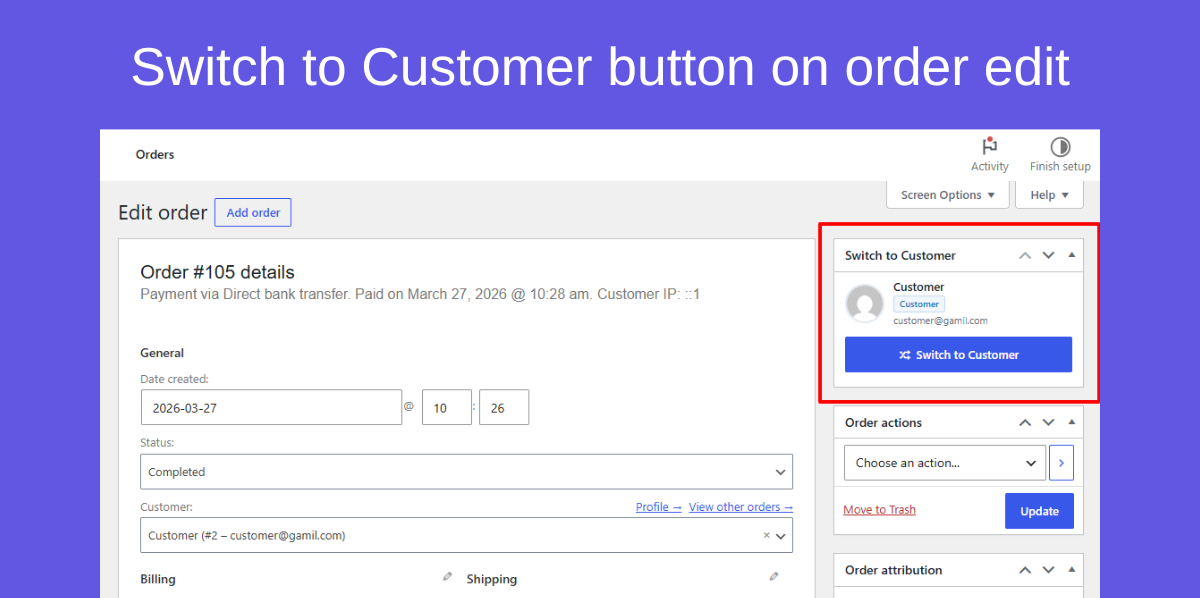
- Switch from WooCommerce order screens – jump straight into the customer's account to reproduce checkout or order issues
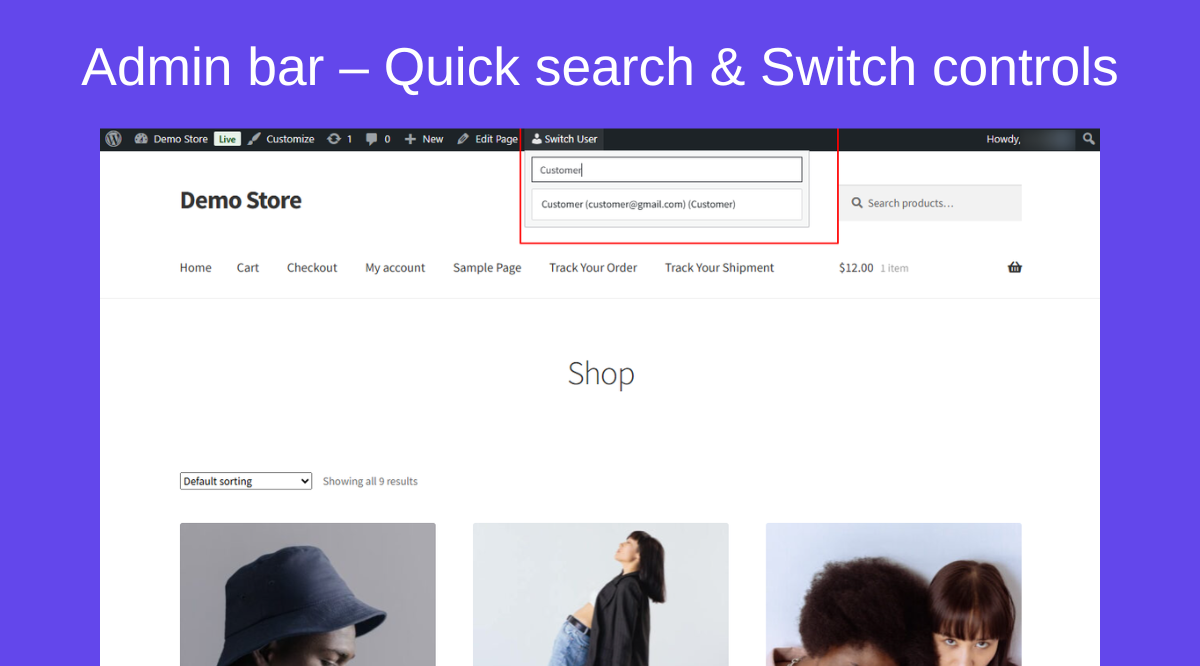
- Admin bar quick search – find any user by name or email and switch instantly from any page Access Control
- Switching is enabled by default – you opt out deliberately when you are ready
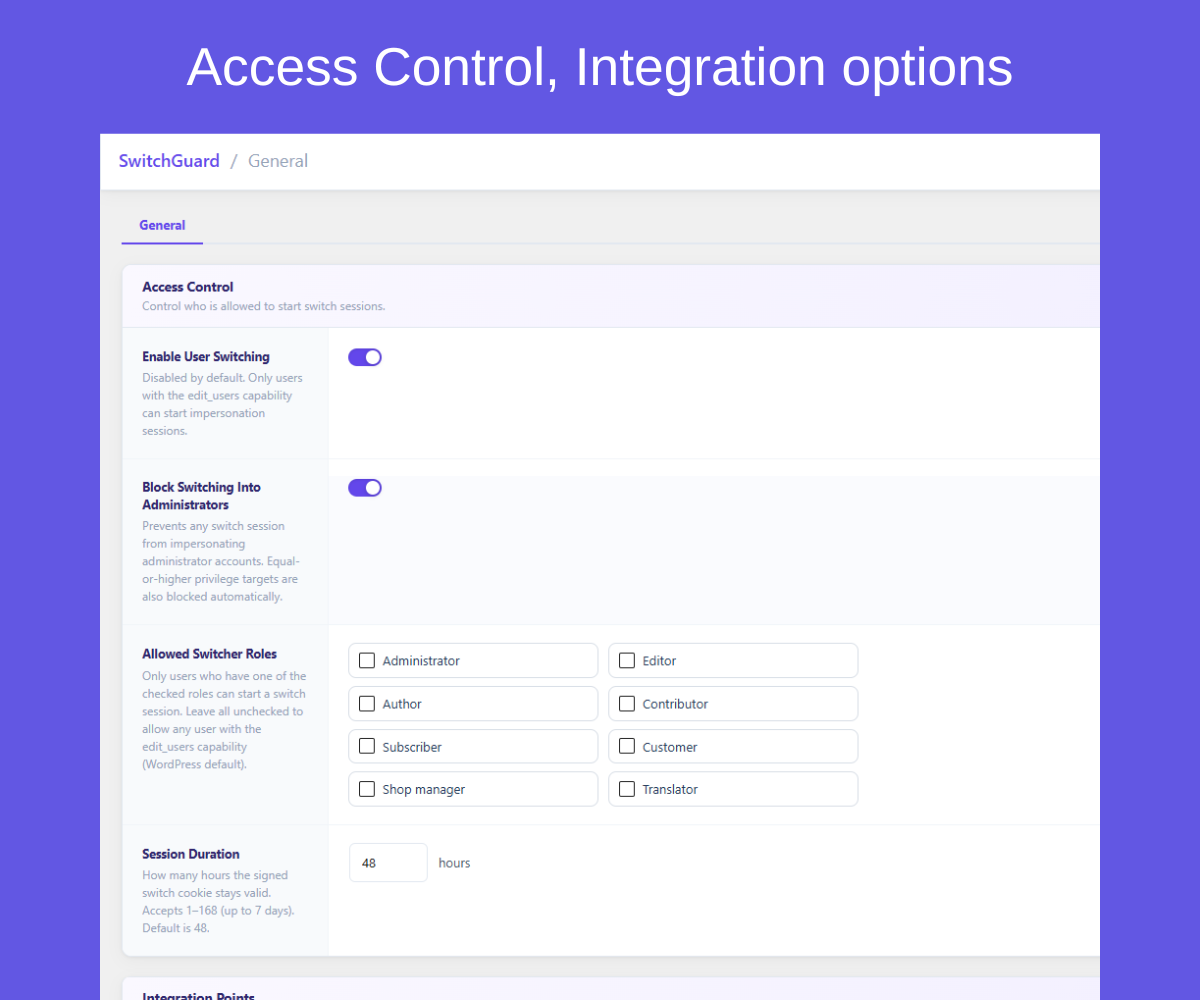
- Restrict switching to specific WordPress roles (e.g., only Shop Managers or Editors)
- Automatically blocks switching into administrator accounts
- Equal-or-higher privilege accounts are always blocked – no configuration needed
- Configurable session duration from 1 to 168 hours (default 48 hours) Security & Audit
- Every switch action protected by WordPress nonces – full CSRF protection
- Switch sessions stored in a signed, HTTPOnly cookie – tamper-proof and replay-resistant
- Every switch action is recorded – who switched, when, from which IP, and for how long. A full audit log dashboard is available in SwitchGuard Pro
- No passwords stored, logged, or transmitted – ever
- Full WordPress multisite support Switch Back
- Prominent Switch Back button always visible in the admin bar during any active switch session
- Switch Off to end the session permanently and return to your original account
- Session expires automatically when the configured cookie TTL is reached
- WordPress support agencies – debug client accounts without password sharing or account handover
- WooCommerce store owners – review orders from the customer's exact perspective
- Membership site admins – verify what members see after plan changes or role updates
- Help desk and support teams – reproduce user-reported issues in seconds without a support ticket
- Developers and QA teams – test role-restricted content, locked pages, and feature flags in context
- Role hierarchy enforcement – switch targets must have strictly lower privilege than the switcher. Peer and admin accounts are blocked at the server level.
- Explicit opt-in – switching is enabled by default, not disabled. You turn it off deliberately.
- HMAC-signed cookie session – the switch origin is signed with a secret key, not stored in a plain cookie or database row that can be tampered with.
- Nonce on every action – switch, switch back, and switch off actions are all CSRF-protected with WordPress nonces.
- Idle timeout – automatic switch-back after a configurable period of inactivity
- Re-authentication gate – require password confirmation before privileged switches
- IP allowlist – restrict switching to known office or VPN IP ranges
- Scheduled windows – allow switching only during defined hours or days
- Per-user grants – give specific users permission to be switched into
- Full audit log dashboard – every switch event recorded with actor, target, IP address, and timestamp
- Email alerts – notify admins when a switch session starts or ends
- Locked user protection – prevent switching into flagged or suspended accounts
- Activate SwitchGuard – User Switching is enabled by default.
- Go to the SwitchGuard settings page in wp-admin and configure which roles can switch.
- Click Switch To next to any user in the Users list, profile screen, or WooCommerce order screen.
- Work in the target account – browse the frontend, check orders, test content.
- Click Switch Back in the admin bar to return to your original account instantly.
- WordPress 6.0 or higher
- PHP 8.1 or higher
- WooCommerce is optional – order-screen switching only appears when WooCommerce is active
安装:
- Go to Plugins > Add New Plugin.
- Search for WindCodex SwitchGuard or SwitchGuard.
- Click Install Now, then Activate.
- Navigate to SwitchGuard in the left sidebar and configure your settings.
- Download the plugin
.zipfile. - Go to Plugins > Add New Plugin > Upload Plugin.
- Upload the zip and click Install Now, then Activate.
- Go to SwitchGuard in the left sidebar to configure.
屏幕截图:
常见问题:
Is user switching safe?
Yes – when done correctly. SwitchGuard protects every switch action with WordPress nonces (CSRF protection), enforces role hierarchy so you can only switch into lower-privilege accounts, and stores the session in a signed HTTPOnly cookie that cannot be tampered with or replayed.
Does SwitchGuard store passwords?
Never. SwitchGuard switches your WordPress session without touching the login form. No passwords are read, stored, logged, or transmitted at any point.
Who can switch user accounts?
By default, any user with the edit_users capability (typically Administrators). You can restrict this to specific roles – for example, allowing only Shop Managers to switch – from the Access Control settings.
Can I accidentally switch into an administrator account?
No. SwitchGuard automatically blocks switching into any account with equal or higher privilege than the switcher. The "Block switching into administrators" setting adds an explicit extra layer on top of this rule.
How do I switch back to my original account?
A Switch Back button is always shown in the WordPress admin bar during an active switch session. Click it to return instantly. You can also click Switch Off to end the session entirely.
How is this different from the "User Switching" plugin?
SwitchGuard adds security layers that are not present in most other user-switching plugins: explicit opt-in (on by default), strict role hierarchy enforcement (server-side, not just UI), HMAC-signed session cookies (not plain database rows), nonce protection on every action, and a WooCommerce order-screen integration with an admin-bar quick-search switcher.
Does it work with WooCommerce?
Yes. When WooCommerce is active, a Switch to Customer button appears on order edit screens, letting you jump into the customer's account to reproduce checkout issues, verify order history, or check account details exactly as they see them.
Does the switch session expire automatically?
Yes. The switch session is stored in a cookie with a configurable TTL (default 48 hours, adjustable from 1 to 168 hours). When the cookie expires, the session ends and you are returned to your original login state.
What happens if I close the browser during a switch session?
The switch session is stored in a persistent cookie (not a session cookie), so it survives browser restarts until the configured TTL expires. Once expired, you will need to log in again.
Does SwitchGuard work on WordPress multisite?
Yes. SwitchGuard is fully compatible with WordPress multisite networks.
Is SwitchGuard compatible with 2FA or membership plugins?
SwitchGuard bypasses the login form entirely, so it works alongside most 2FA and membership plugins. If a plugin enforces its own session validation on every page load, there may be edge cases – check the plugin documentation or contact support.
Can I log or audit switch sessions in the free version?
The free version records basic switch activity in signed session cookies but does not include a persistent audit log. A full audit log with actor, target, IP, and timestamp is available in SwitchGuard Pro.
Can I restrict which users can be switched into?
In the free version, you can restrict who can perform switches by role. Per-user target grants – allowing only specific users to be switched into – are available in SwitchGuard Pro.
更新日志:
- Added: Loads plugin translations via
load_plugin_textdomain()for full compatibility with translation plugins (Loco Translate, WPML String Translation) and manually installed language packs. - Updated: Regenerated the
.pottranslation template with the latest translatable strings.
- Improved: Settings page UI for better usability.
- Added: Admin review request notice.
- Added: Pro features notice.
- Initial release.
- One-click user switching from Users list, profile, and WooCommerce order screens.
- Admin bar quick user search (name/email) with instant switch.
- Explicit opt-in (enabled by default), role-based access control, and session duration settings.
- Role hierarchy enforcement – equal-or-higher privilege targets blocked automatically.
- Signed HTTPOnly session cookie with configurable TTL (1–168 hours).
- CSRF-protected switch, switch-back, and switch-off actions.
- Multisite compatible. Translation-ready.