
Set Price Note (Units, Offers, Editions) for WooCommerce
| 开发者 |
shivashankerbhatta
afthemes |
|---|---|
| 更新时间 | 2026年10月14日 16:00 |
| 捐献地址: | 去捐款 |
| PHP版本: | 7.4 及以上 |
| WordPress版本: | 7.0.0 |
| 版权: | GPLv2 or later |
| 版权网址: | 版权信息 |
详情介绍:
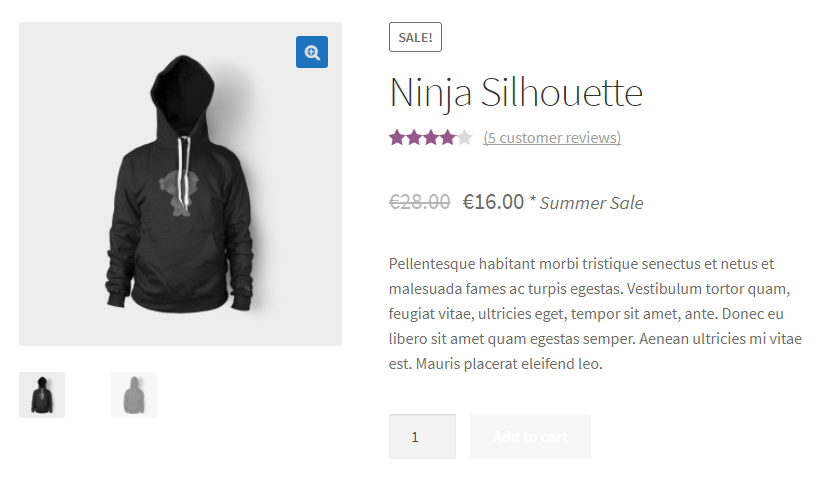
woocommerce_get_price_html visualization filter loop. This foundational architectural strategy guarantees your pricing context renders flawlessly across your site's archive query grids, individual single product viewports, related product slider modules, transactional shopping cart rows, checkout evaluation workflows, and automated customer outgoing email invoices. It delivers this display transparency safely without causing validation errors in your database schema or introducing validation conflicts with active theme templates.
How It Drives Store Growth
- Drastically Reduces Customer Support Backlogs: Cut off repetitive support ticket queries regarding product counts, package metrics, minimum volumes, or subscription bounds before they happen.
- Streamlines Complex B2B & Wholesale Configurations: Explicitly communicate multi-pack definitions, wholesale weight parameters, minimum threshold commitments, or specific tax inclusions inline, removing barriers for commercial corporate procurement.
- Maintains Core Checkout Visibility: Build complete transactional transparency by automatically synchronizing your custom pricing notes from initial point-of-sale displays directly into mini-carts, sliding drawers, main cart loops, and email alerts.
- Optimized for Maximum Infrastructure Performance: Developed following stringent WordPress core coding standards with an explicitly zero-bloat methodology. Your site's loading velocity, DOM depth metrics, and Core Web Vitals rankings remain completely unaffected.
安装:
- Access your internal WordPress administrative control panel and navigate to Plugins > Add New.
- Input "Set Price Note for WooCommerce" directly into the upper right keyword search criteria box.
- Locate our official module, click the Install Now button, allow the download process to complete, and select Activate.
- Download the complete technical zip archive bundle (
woo-set-price-note.zip) straight from the official WordPress.org plugin index directory. - Connect to your host server utilizing your preferred secure FTP application or control panel manager.
- Extract and transfer the uncompressed plugin directory path directly into your environment's deployment target folder:
/wp-content/plugins/. - Open your dashboard Plugins panel index list, find the module within your local table rows, and click Activate.
- Access the global path WooCommerce > Price Note Settings to choose your default separation character string (such as
/or-). - Open and edit any individual product listing within your electronic catalog index.
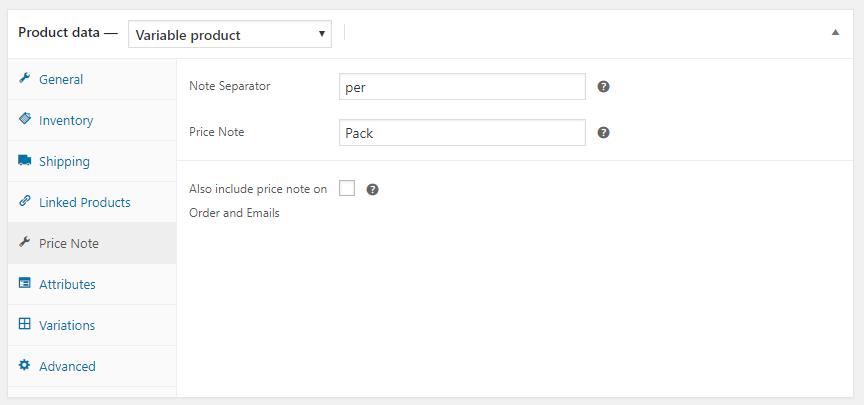
- Scroll down into your product parameters and select the newly created Price Note panel option tab located on the side list of the Product Data metabox.
- Fill out your measurement metrics (e.g., Per Box, Per Meter, Pack of 12) or your limited time promotional phrases.
- Save or update your master product changes, clear your caching layer, and load the public frontend view to verify your display layout live!
屏幕截图:

常见问题:
Does this plugin modify my actual product prices or break checkout payments?
No. The core plugin functions strictly as a visual presentation filter by hooking directly into the standard WooCommerce execution layer (woocommerce_get_price_html). It dynamically appends text labels to the frontend price string without altering your raw database integers, mathematical cart subtotals, tax calculation rules, shipping formulas, or payment gateway processes.
Will adding a price note conflict with my Google Shopping feed or SEO Schema?
No. Because the visual mutations are applied dynamically at the theme rendering stage rather than modifying the underlying catalog metadata tables, your product structured data markup remains perfectly intact. Automated scraping indexers, Google Merchant Center feeds, Facebook Catalog syncs, and Schema Rich Snippets will continue to read your exact numerical pricing figures cleanly.
Can I use these custom labels on variable products and variations?
The free core version lets you assign a global price note to the parent variable product container, which displays cleanly across your shop archives. If your store requires individual, distinct price suffixes for each specific variation (e.g., small size sold "per piece" and large size sold "per box") that update automatically via AJAX on the frontend when an attribute changes, you will want to upgrade to Set Price Note Pro.
Does it support modern WooCommerce Gutenberg Cart and Checkout Blocks?
Yes. The plugin is built following modern WordPress development paradigms and functions seamlessly across classical template shortcodes as well as contemporary Full Site Editing (FSE) block configurations. For advanced, deeply nested styling overrides within modern Gutenberg blocks, the Pro version offers dedicated integration layouts.
Can I hide the price suffix on specific store layouts like Cart or Emails?
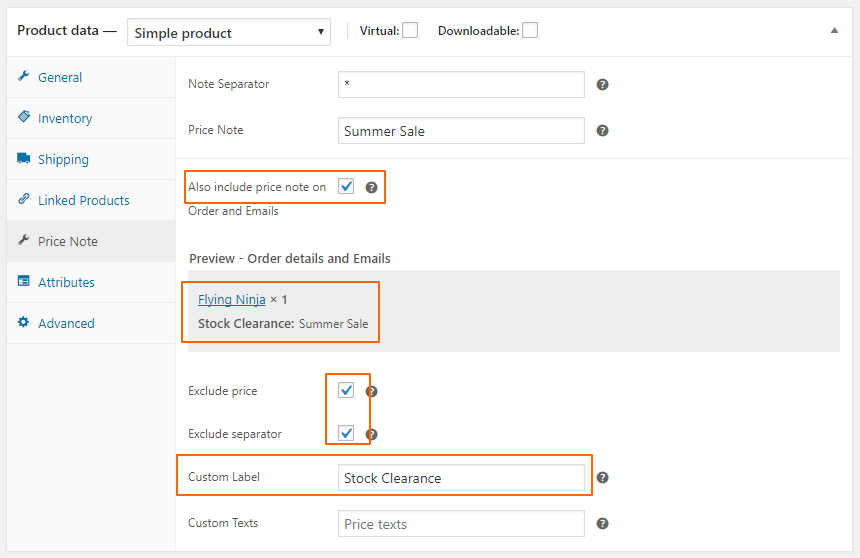
Yes. The plugin features a built-in administrative control panel under WooCommerce Settings allowing you to granularly toggle visibility parameters. You can choose whether your custom measurement labels carry over into shopping cart tables, checkout checkout steps, final invoice screens, or automated transactional customer email templates.
Is the plugin compatible with multi-currency and wholesale role extensions?
The free core version applies your custom strings universally per product. If you require advanced conditional visibility logic—such as showing one text suffix to standard retail customers and a different wholesale notation (like "Ex. VAT") to verified business user roles, or adapting labels dynamically across active multi-currency switchers—Set Price Note Pro includes built-in conditional rules for role-based and regional marketing.
Is it translation-ready for multilingual WooCommerce stores?
Absolutely. The codebase is fully internationalized (i18n compliant) and includes a clean structural template .pot file. You can easily translate your pricing labels, separators, and dashboard settings into any language using standard translation tools like Loco Translate, WPML, or Polylang.
How do I upgrade to the automated Pro features?
You can explore our advanced bulk automation workflows directly through your local dashboard options tab or visit the official AF Themes website (https://afthemes.com) to instantly secure a premium commercial license key.
更新日志:
- Enhancement: Hardened core administrative security protocols with strict data sanitization layer, explicit input validation, and secure cryptographic nonces across all individual meta rows.
- Fix: Completely redesigned the single product editing experience, introducing an interactive settings panel container nested seamlessly inside the native WooCommerce product data meta box.
- Fix: Added an optimized layout header link to bridge the interface gap between granular single-product parameters and the central global settings management panel.
- Performance: Refactored database option retrieval routines to dynamically fallback onto a standardized production default matrix (
get_default_settings), mitigating overhead. - Tested: Declared full technical framework verification and core stability benchmarking up to WordPress 7.0.0 and WooCommerce 10.8.1.
- Performance: Completely refactored core loop executions to drop database memory usage on archive pages down to zero.
- Fix: Resolved a minor edge case string conflict when running alongside multi-currency exchange extensions.
- Update: Refreshed core localization framework string matrix mappings.
- Optimization: Added precise internal caching for heavy variable product configuration strings.
- Feature: Introduced custom label override options for checkout document rows inside the administration screen.
- UI: Updated dashboard options styling to perfectly align with native WordPress design languages.