
Wordfence Login Security
| 开发者 |
wfryan
wfmattr mmaunder wfmatt |
|---|---|
| 更新时间 | 2026年8月11日 00:10 |
| PHP版本: | 7.0 及以上 |
| WordPress版本: | 7.1 |
详情介绍:
WORDFENCE LOGIN SECURITY
Wordfence Login Security contains a subset of the functionality found in the full Wordfence plugin: Two-factor Authentication, XML-RPC Protection, and Login Page CAPTCHA.
This plugin is being discontinued on or around August 12, 2026.
All of its features are already included in the main Wordfence plugin, which is also available to use for free. We recommend installing Wordfence to continue receiving updates, security improvements, and full functionality.
Install the full Wordfence plugin
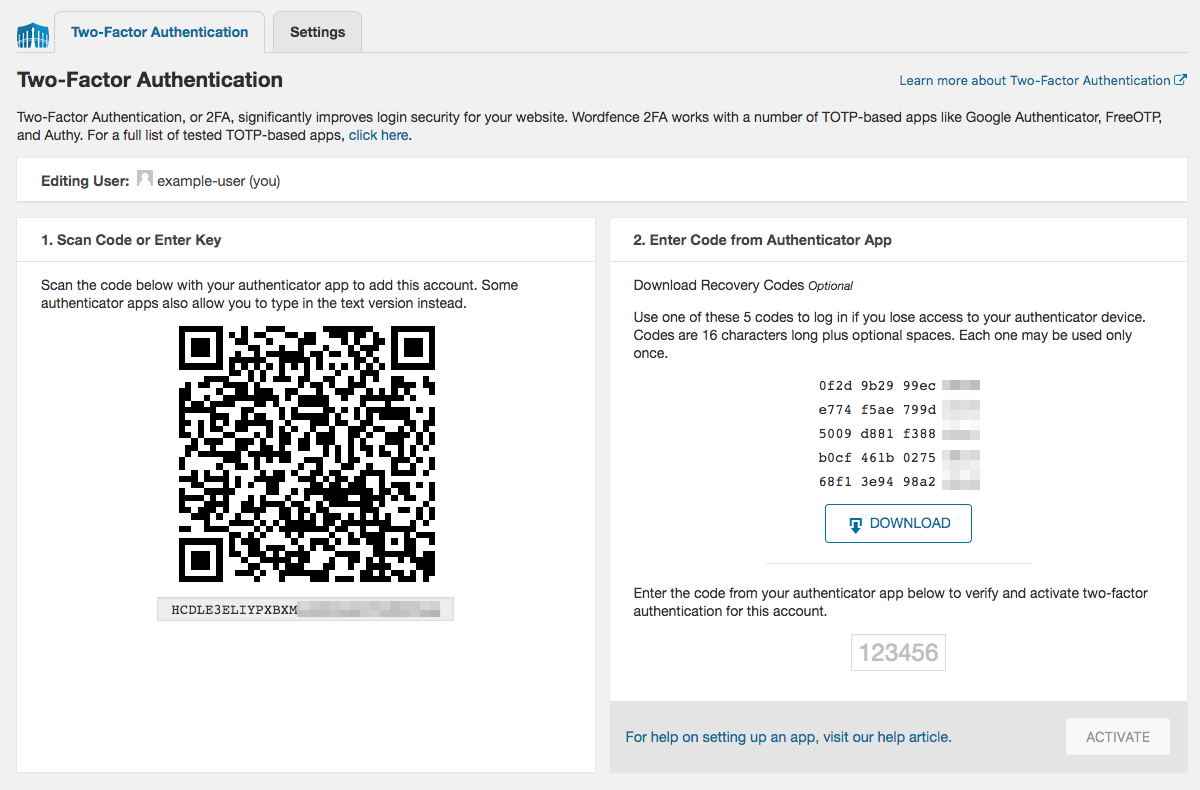
TWO-FACTOR AUTHENTICATION
- Two-factor authentication (2FA), one of the most secure forms of remote system authentication available.
- Use any TOTP-based authenticator app or service like Google Authenticator, Authy, 1Password or FreeOTP.
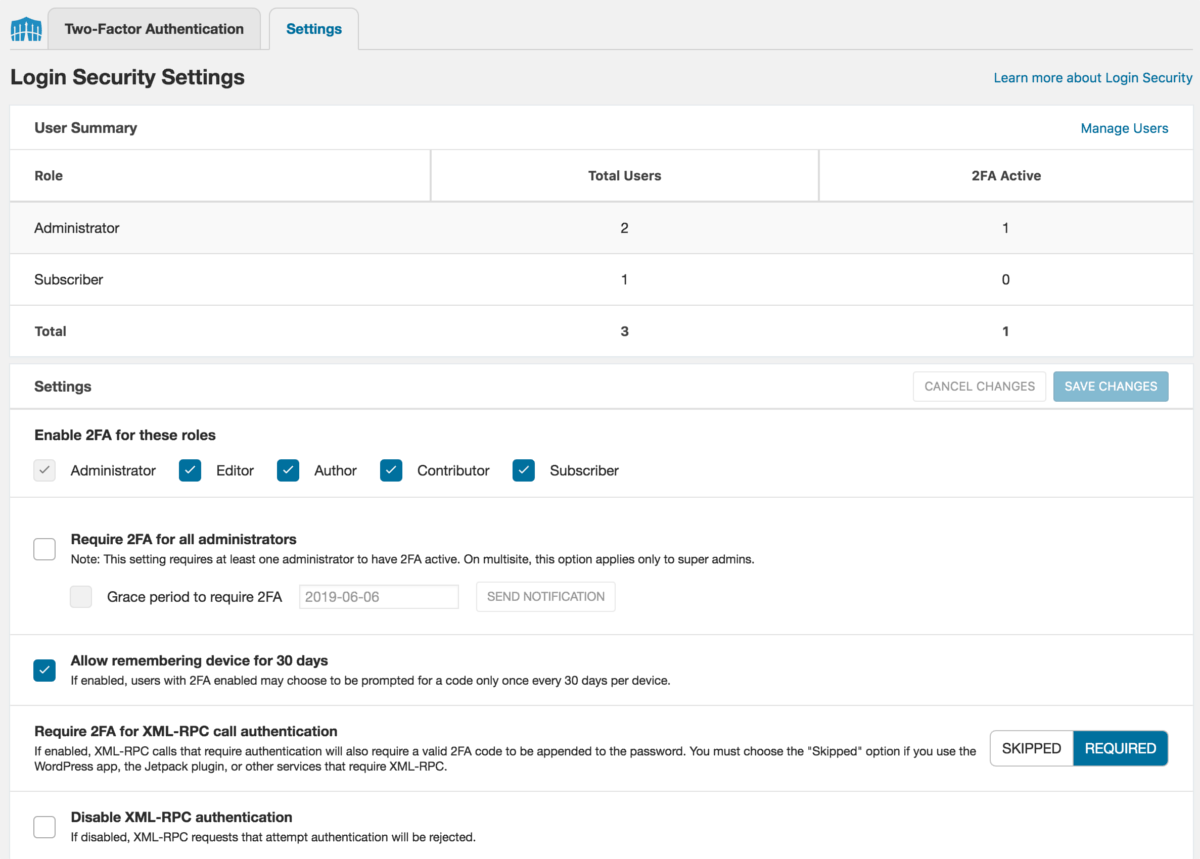
- Enable 2FA for any WordPress user role.
- Completely free to use, no limits or restrictions of any kind.
- Easily enable Google ReCAPTCHA v3 on your login and registration pages.
- Stops bots from logging in without inconveniencing your site visitors.
- Robust protection against password guessing and credential stuffing attacks distributed across large IP pools
- XML-RPC is the biggest target for WordPress attacks, but is often overlooked.
- Protect XML-RPC with 2FA or disable it altogether if it’s not needed.
安装:
Secure your website using the following steps to install Wordfence:
- Install Wordfence Login Security automatically or by uploading the ZIP file.
- Activate the Wordfence Login Security through the 'Plugins' menu in WordPress. Wordfence Login Security is now activated.
- Go to the 'Login Security' menu and activate two-factor authentication and configure other settings.
- Install Wordfence Login Security via the plugin directory or by uploading the ZIP file.
- Network Activate Wordfence Login Security. This step is important because until you network activate it, your sites will see the plugin option on their 'Plugins' menu. Once activated, that option disappears.
- Now that Wordfence Login Security is network activated, it will appear on your Network Admin menu for super administrators and individual sites for users who have permission to activate 2FA.
屏幕截图:

更新日志:
1.1.18 - August 10, 2026
- Change: Hardened 2FA flow when installed next to plugins with non-standard authentication (credit: Austin Ginder of Anchor Hosting)
- Change: Hardened 2FA remember cookie handling
- Fix: Fixed an issue with the 2FA embed shortcode that could prevent loading needed JavaScript/CSS assets
- Fix: Fixed an error with Divi i18n when a user had exhausted all 2FA recovery codes
- Note: The standalone Login Security plugin will be discontinued around August 12, 2026. Sites using it should install the full Wordfence plugin to retain this functionality
- Improvement: Migrated all deprecated JavaScript libraries in use to a Vue-based infrastructure
- Improvement: Better coverage of
aria-accessibility attributes - Fix: WordPress 7.0 compatibility fixes
- Note: The standalone Login Security plugin will be discontinued around July 1, 2026. Sites using it should install the full Wordfence plugin to retain this functionality
- Change: Reworked setting caching to avoid issues with some object caches
- Improvement: General compatibility improvements and better error handling for PHP 8+
- Change: Revised the formatting of TOTP app URLs to prioritize the site's own URL for better sorting and display
- Fix: Fixed the last captcha column in the users page so it no longer displays "(not required)" on 2FA users since that no longer applies
- Fix: Revised the behavior of the reCAPTCHA verification to use the documented expiration period of the token and response to avoid sending verification requests too frequently, which could artificially lower scores in some circumstances
- Change: Removed the extra site link from the CAPTCHA verification email message to avoid confusion with the verify link
- Change: CAPTCHA verification when enabled now additionally applies to 2FA logins (may send an email verification on low scores) and no longer reveals whether a user exists for the submitted account credentials (credit: Raxis)
- Fix: Fixed an issue where user profiles with a selected locale different from the site itself could end up loading the site's locale instead
- Fix: Fixed an issue where a login lockout on a WooCommerce login form could fail silently
- Fix: Compatibility fix for WordPress 6.4 on the login page styling
- Fix: Addressed an issue with multisite installations when the wp_options tables had different encodings/collations
- Fix: 2FA AJAX calls now use an absolute path rather than a full URL to avoid CORS issues on sites that do not canonicalize www and non-www requests
- Fix: Addressed a race condition where multiple concurrent hits on multisite could trigger overlapping role sync tasks
- Fix: Improved performance when viewing the user list on large multisites
- Fix: Fixed a UI bug where an invalid code on 2FA activation would leave the activate button disabled
- Fix: Reverted a change on error modals to bring back the additional close button for better accessibility
- Fix: Changed text domain to wordfence-login-security to match plugin slug as required by WordPress
- Fix: Added translation support for additional strings
- Improvement: Added translation support for strings in JavaScript
- Improvement: Updated JavaScript libraries
- Improvement: Added "Text Domain" header to support translation functionality
- Fix: Prevent double-clicking when activating 2FA to avoid an "already set up" error
- Improvement: Further improved performance when viewing 2FA settings and hid user counts by default on sites with many users
- Fix: Adjusted style inclusion and usage to prevent missing icons
- Fix: Avoided using the ctype extension as it may not be enabled
- Improvement: Added 2FA management shortcode and WooCommerce account integration
- Improvement: Improved performance when viewing 2FA settings on sites with many users
- Fix: Ensured Captcha and 2FA scripts load on WooCommerce when activated on a sub-site in multisite
- Fix: Prevented reCAPTCHA logo from being obscured by some themes
- Fix: Enabled wfls_registration_blocked_message filter support for WooCommerce integration
- Improvement: Added feedback when login form is submitted with 2FA
- Fix: Restored click support on login button when using 2FA with WooCommerce
- Fix: Corrected display issue with reCAPTCHA score history graph
- Fix: Prevented errors on PHP caused by corrupted login timestamps
- Improvement: Hardened 2FA login flow to reduce exposure in cases where an attacker is able to obtain privileged information from the database
- Improvement: Added option to toggle display of last login column on WP Users page
- Improvement: Improved autocomplete support for 2FA code on Apple devices
- Fix: Corrected issue that prevented reCAPTCHA scores from being recorded
- Fix: Prevented invalid JSON setting values from triggering fatal errors
- Fix: Made text domains consistent for translation support
- Fix: Clarified that allowlisted IP addresses also bypass reCAPTCHA
- Fix: Prevented login errors with WooCommerce integration when manual username entry is enabled on the WooCommerce registration form
- Fix: Corrected theme incompatibilities with WooCommerce integration
- Fix: WooCommerce integration notice can now be dismissed on any admin page
- Change: Updated messaging around 2FA for WooCommerce roles
- Improvement: Added 2FA and reCAPTCHA support for WooCommerce login and registration forms
- Improvement: Added option to require 2FA for any role
- Improvement: Added logic to automatically disable NTP after repeated failures and option to manually disable NTP
- Change: Updated reCAPTCHA setup note
- Change: Updated plugin headers for compatibility with WordPress 5.8
- Improvement: Made a number of WordPress 5.6 and jQuery 3.x compatibility improvements.
- Improvement: Replaced the terms whitelist and blacklist with allowlist and blocklist.
- Fix: Sync roles to new sites in multisite configurations
- Fix: Corrected 2FA config links in notices for multisite
- Fix: Corrected inactive user count when users with 2FA have been deleted
- Fix: reCAPTCHA will no longer block requests with missing tokens in test mode
- Changed: AJAX endpoints now send the application/json Content-Type header.
- Changed: Added compatibility messaging for reCAPTCHA when WooCommerce is active.
- Fixed: The "Require 2FA for all administrators" notice is now automatically dismissed if an administrator sets up 2FA.
- Fix: Added styling fix to the 2FA code prompt for WordPress 5.3.
- Fix: Added compatibility tags for WP Tide.
- Improvement: Added additional information about reCAPTCHA to its setting control.
- Improvement: Added a constant that may be overridden to customize the expiration time of login verification email links.
- Improvement: reCAPTCHA keys are now tested on saving to prevent accidentally inputting a v2 key.
- Improvement: Added a setting to control the reCAPTCHA human/bot threshold.
- Improvement: Added an option to trigger removal of Login Security tables and data on deactivation.
- Improvement: Reworked the reCAPTCHA implementation to trigger the token check on login/registration form submission to avoid the token expiring.
- Fix: Widened the reCAPTCHA key fields to allow the full keys to be visible.
- Fix: Addressed an issue when outbound UDP connections are blocked where the NTP check could log an error.
- Fix: Added handling for reCAPTCHA's JavaScript failing to load, which previously blocked logging in.
- Fix: Fixed the functionality of the button to send 2FA grace period notifications.
- Fix: Fixed a missing icon for some help links when running in standalone mode.
- Initial release