
WP ULike – Like Buttons, Voting & Engagement Analytics
| 开发者 | alimir |
|---|---|
| 更新时间 | 2026年8月4日 02:10 |
| 捐献地址: | 去捐款 |
| PHP版本: | 6.0 及以上 |
| WordPress版本: | 7.0 |
| 版权: | GPLv2 or later |
| 版权网址: | 版权信息 |
标签
下载
详情介绍:
- Like buttons on posts via auto-display,
[wp_ulike]shortcodes, or the ULike Button block - Top List block to showcase your most popular posts, comments, users, BuddyPress activities, and bbPress topics
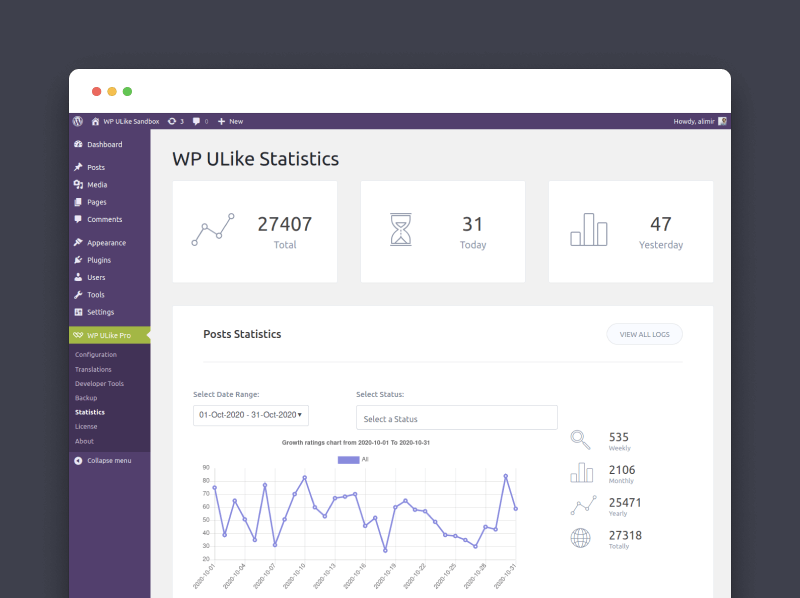
- Statistics dashboard with Overview, growth tips, engagement reports, publish-timing insights, vote logs, dark mode, and focus mode
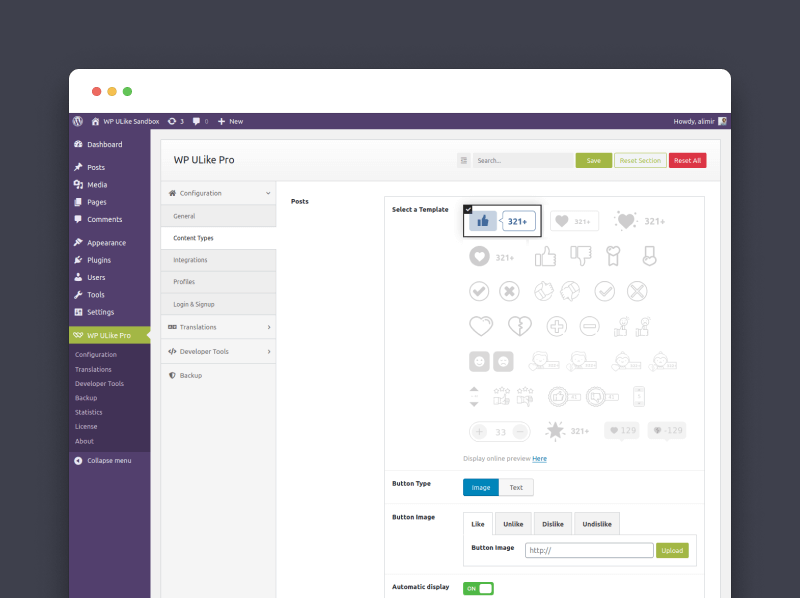
- Button customizer with real-time preview, four button styles, colors, icons, and RTL support
- Auto-display settings for posts, comments, BuddyPress, bbPress, and WooCommerce
- Settings backup (JSON export/import) and Site Health table check
- Privacy tools for user-linked vote data and optional IP anonymization
- Swap likes for emoji reactions or 5-star ratings and pick the reaction style that fits each page
- See who liked each post and how engaged readers really are (top fans, engagement vs page views)
- Know what to publish next with content intelligence, heatmaps, and top-country reports
- Compare likes to sales with full WooCommerce store reports
- 20 more button styles and Display Automation to match your brand and place buttons without code
- Rating and FAQ schema published as schema.org markup so search engines can read your ratings
安装:
- WordPress 6.0 or greater
- PHP 7.3.0 or greater
- MySQL 5.6 or greater
- PHP 8.1+ (faster and more secure)
- MySQL 5.6+
- 128 MB WordPress memory on busier sites
- From WordPress admin: Plugins → Add New, search "WP ULike", Install, Activate.
- Manual: unzip the download, upload to
wp-content/plugins/, activate from Plugins.
屏幕截图:
常见问题:
Do visitors need to register or login to like content?
No. Voting is one click by default. You can require login in Settings if your site is members-only.
Does WP ULike work with any theme?
Yes. WP ULike adapts to your theme automatically. Contact support if you need help with styling.
Is WP ULike compatible with other plugins and caching?
Yes. Compatible with major caching plugins (WP Rocket, W3 Total Cache, LiteSpeed, and others) and popular WordPress plugins including WooCommerce, BuddyPress, bbPress, Elementor, GamiPress, and myCRED.
Will it slow down my site?
No. The like button loads minimal code on your pages, and vote responses are lightweight and optimized for speed. The frontend uses vanilla JavaScript with no jQuery. Statistics load in WordPress admin only and use smart caching as your site grows.
Is WP ULike secure?
We follow WordPress security practices: nonces, hardened AJAX, optional IP anonymization. Details at wpulike.com/security.
Can I use WP ULike on a multisite setup?
Yes. Each site gets its own settings and stats.
Can I customize the button appearance?
Yes. Use the built-in customizer with real-time preview to change colors, icons, and spacing. No code required. Free ships 4 button styles, and Pro adds 20 more plus emoji reactions and star ratings, for 26 in total.
Where do like buttons appear by default?
On single posts. Use blocks, shortcodes, or auto-display settings to place buttons elsewhere.
How do I show a list of my most popular posts?
Add the Top List block to any page or post, pick what to rank (posts, comments, users, BuddyPress activities, or bbPress topics), and set how many to show. It builds a leaderboard of your most liked content, and it is included in the free plugin.
Like buttons appear on my homepage, archive, or PostX block grid. How do I hide them?
Open WP ULike → Configuration → Content Types → Posts → Automatic Display and use the Hide Automatic Display On list to select Home / Front Page, Archives, Categories, Search Results, Tags, and Author Page. The button will then only show on individual posts. For block grids (PostX, etc.), also check the Plugin & theme conflicts section on the Help screen.
Can I use emoji reactions or star ratings instead of like buttons?
Yes, with Pro. The free plugin ships 4 like-button styles. Pro adds emoji reactions and 5-star ratings as their own reaction types, so you can pick what fits each page. Browse the templates.
Does it support dislike or down votes?
Two-way voting uses a Pro template. The free plugin ships 4 like-button styles, and Pro adds up/down, arrow, thumb, and Positive/Negative templates when you want both signals.
What's the difference between WP ULike Free and Pro?
Free includes like buttons, a full statistics dashboard (Overview, reports, when-to-publish insights, logs, and tips), blocks, customizer, auto-display settings in Settings, backup, and privacy tools, with no vote limits. Pro adds emoji reactions and star ratings, who liked each post, engagement rates vs page views, full geography and content intelligence, WooCommerce sales comparisons, 20 more button styles, Display Automation, profiles, share buttons, and more. See the full comparison. Both plugins stay active together.
If I buy Pro, do I lose my existing likes?
No. Pro installs beside the free plugin and reads the same data. Your existing votes, counts, and settings carry over untouched. Pro also comes with a 14-day money-back guarantee.
更新日志:
- Fixed: Post Types now correctly limits Singular auto-display. With the default Posts-only setting, like buttons no longer appear on pages (and other unlisted types).
- Improved: Clearer auto-display labels for Singular and Post Types in Settings.
- Improved: Admin RTL compatibility and several small stability fixes.
- Added: Pulse, a faster, unified like-storage engine. New installs start on Pulse automatically; existing sites keep working with an optional background upgrade.
- Added: Storage upgrade screen (WP ULike → Storage Upgrade) with progress bar, pause/resume, finish step, and optional cleanup of old tables. WP-CLI support:
wp ulike pulse status|start|pause|sync|verify|enable|drop-legacy. - Added: Site Health integration (Tools → Site Health) for tables, storage/migration, leftover log-table cleanup, and a copyable Info dump. Help links there for actions.
- Improved: Statistics, top lists, and vote logs now route through Pulse queries with mode-aware reads and a versioned, scoped query cache.
- Improved: GDPR export/erase now covers Pulse rows alongside legacy logs.
- Removed: Deprecated post rating value API (
wp_ulike_get_rating_valuenow returnsnullwith a deprecation notice). - Fixed: Multiple stability and performance fixes across admin and frontend.
- Fixed: PHP 8 fatal (
Unknown named parameter $id) on every vote whenwp_ulike_after_processcallbacks run. The vote saved, but AJAX returned 500.
- Fixed: Minor issue with the new Statistics dashboard.
- Added: Statistics dashboard. Open WP ULike → Statistics for a home screen with your key numbers up front.
- Added: Overview. See total engagement, today's activity, and how this week compares to last week.
- Added: Growth tips. Short suggestions based on your data (momentum, milestones, and helpful nudges as your site grows).
- Added: Engagement reports. Charts and top-content lists for posts, comments, and other content types you use.
- Added: When to publish. Peak hours and time windows so you can see when people vote most.
- Added: WooCommerce store reports in Statistics (Pro) when WooCommerce is active.
- Added: Logs. Browse and manage vote history by content type.
- Added: Dashboard settings. Turn announcement popups on or off, pick light/dark mode, and adjust sidebar options.
- Added: Focus mode. Hide the WordPress admin chrome for a distraction-free stats view.
- Improved: Faster, smoother navigation between Overview, reports, and logs.
- Improved: Clearer empty states and more reliable vote counts.
- Fixed: Several minor admin issues.
- Improved: Redesigned Settings and Customizer panels for better UX.
- Fixed: Several small issues for a more reliable experience.
- Added: One-click Repair database tables on Help when tables are missing.
- Improved: Frontend init batches DOM updates with
requestAnimationFramefor AJAX-loaded content (BuddyPress, bbPress, load-more). - Improved: Button styles resist theme width/transform conflicts; bbPress layout fixes.
- Improved: Settings import on Help now asks for confirmation before overwriting.
- Removed: Legacy settings framework from the plugin. It was previously kept for WP ULike Pro post metaboxes.
- Improved: Settings and Customizer panels now follow your WordPress admin color scheme (light, dark, and high-contrast).
- Improved: Smoother voting and admin behavior under the hood.
- Fixed: Several small issues for a more reliable experience.
- Added: Help screen under WP ULike with quick status, shortcuts, documentation links, troubleshooting, and settings backup/restore.
- Added: Optional feedback when deactivating the plugin (Plugins screen).
- Added: Site Health test for WP ULike database tables.
- Fixed: No longer redirects to the plugin screen right after activation.
- Fixed: Minor admin and usability issues reported by users.
- Added: Top List Gutenberg block, a ranked leaderboard for most liked posts, comments, users, BuddyPress activities, and bbPress topics.
- Added: Declared and verified compatibility with WordPress 7.0 (Armstrong), including Block API v3 and the iframed block editor.
- Improved: Deferred frontend script loading and safer block rendering.
- Improved: Admin notices restyled for WordPress 7 with a minimal layout, fixed button underlines, and clearer text contrast.
- Improved: Admin notices now use vanilla JavaScript instead of inline jQuery.
- Improved: Plugin config passed to scripts via inline JSON instead of
wp_localize_script.
- Added: Support for WordPress Export Personal Data and Erase Personal Data tools for votes stored under a user account.
- Added: Declared compatibility with WooCommerce’s newer order storage option, so shops using it see fewer “incompatible plugin” notices.
- Improved: Like button block updated for current Gutenberg / block editor expectations.
- Improved: Safer handling of unusually large saves in Settings and the button customizer (admin only).
- Improved: Better compatibility with recent PHP versions when the plugin loads its code.
- Added: Kinsta purge cache support.
- Fixed: Small sanitization improvement.
- Improved: Performance optimizations across page loading, statistics display, and data processing for faster response times.
- Improved: Enhanced security and reliability improvements for widgets and statistics functionality.
- Improved: Optimized user experience when viewing likers lists and activity data.
- Removed: Composer dependency replaced with native WordPress solution for improved compatibility and reduced plugin footprint.
- Added: Redesigned settings panel, live-preview customizer, and statistics dashboard.
- Improved: Faster frontend and admin performance; removed jQuery from frontend scripts.
- Fixed: Stability fixes across the 5.0 release.