
WPCore Plugin Manager
| 开发者 | stueynet |
|---|---|
| 更新时间 | 2026年10月31日 02:48 |
| PHP版本: | 7.4 及以上 |
| WordPress版本: | 7.1 |
| 版权: | GPLv2 or later |
| 版权网址: | 版权信息 |
详情介绍:
- One list of all your sites on WPCore.com.
- For each site: the WordPress, PHP, database and web server versions, and the plugins and themes with their versions and available updates.
- Collections of plugins from the WordPress.org directory, and custom plugins uploaded to WPCore.com as ZIP files.
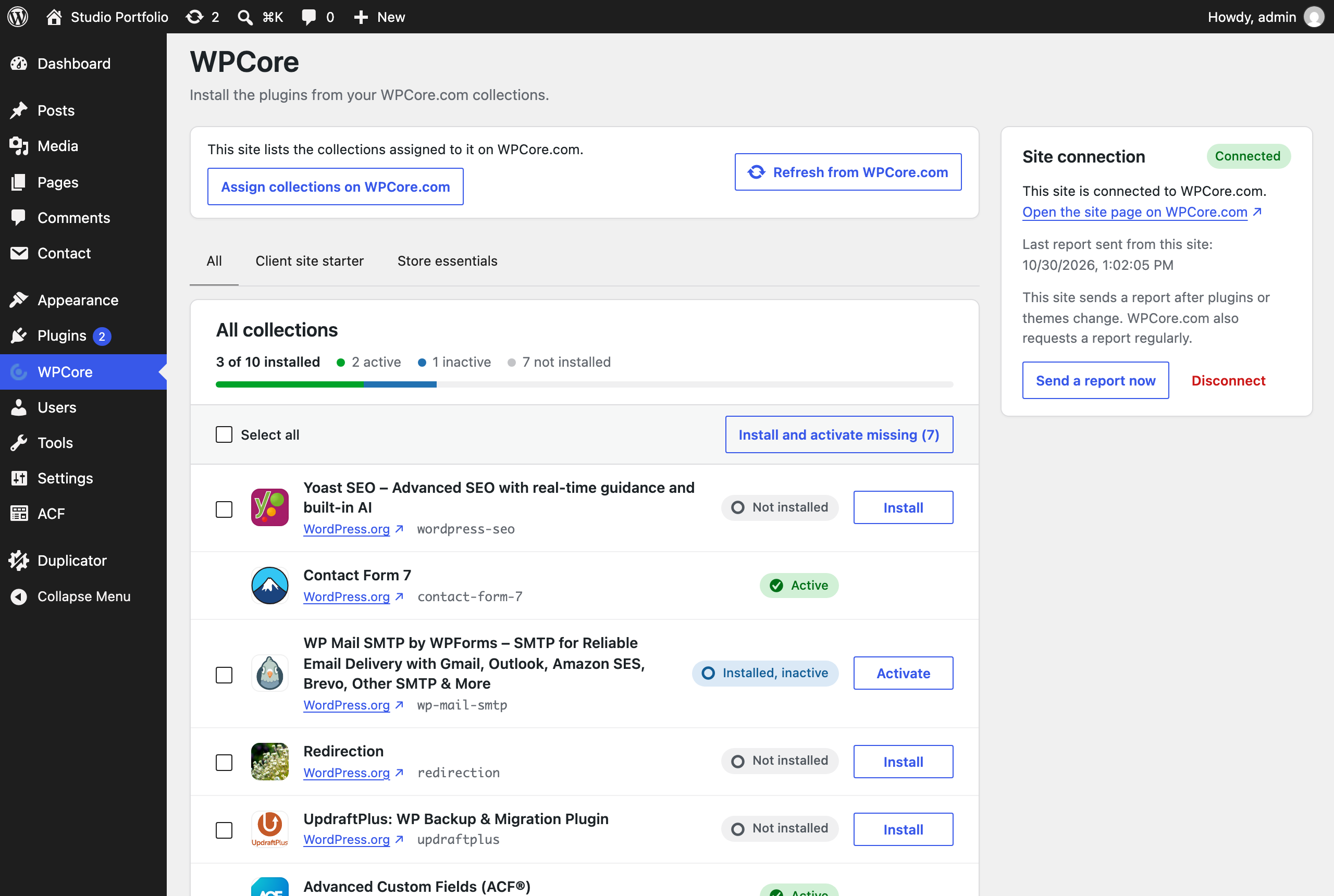
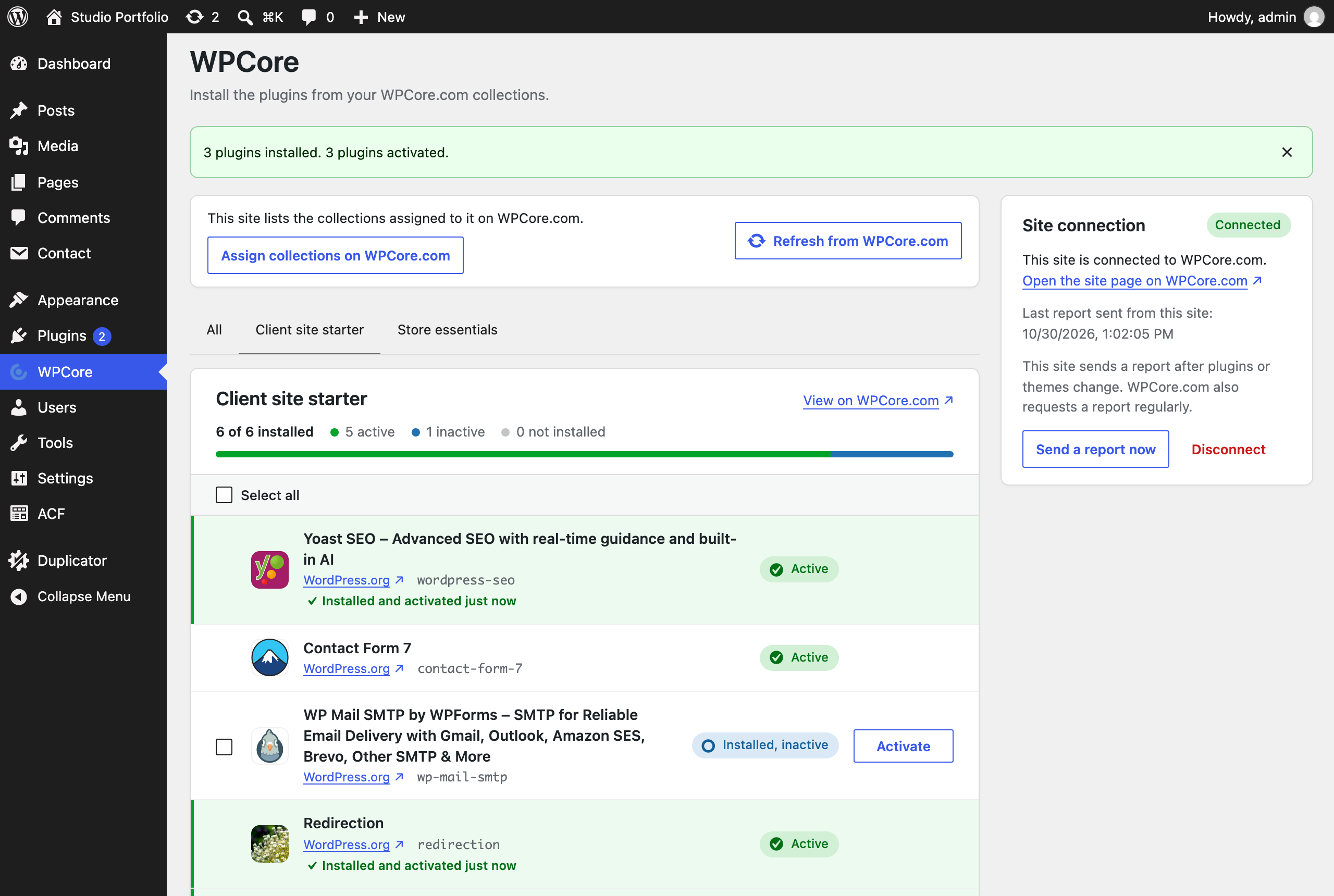
- The WPCore screen installs, or installs and activates, the plugins of the assigned collections, and shows the result for each plugin.
- The plugin sends WPCore.com an update after a plugin or theme change. WPCore.com also requests an update from each site on a schedule.
- WP-CLI commands list and install the plugins of the assigned collections.
wp wpcore list lists the plugins of the collections assigned to the site and their status on the site. wp wpcore install installs them. On a site that is not connected, both commands take collection keys.
Source code
The plugin includes the uncompressed source of the admin screen JavaScript and styles in assets/src/. build/ holds the compiled files.
External service
This plugin connects to the WPCore API at https://wpcore.com/api/.
When you save a connection key from the Sites page of wpcore.com, the plugin sends a site report to https://wpcore.com/api/sites/, and the response holds the collections assigned to the site. The plugin also sends the report when the WPCore screen needs the collections and the copy it holds is 5 minutes old, and when WP-CLI installs or lists them. WPCore.com also requests the report from the site on a schedule, at most once an hour. The report contains the WordPress version and available core update, the site title, the home URL, the admin URL, the language, the timezone, the environment type, whether the site is a multisite, the automatic update settings, whether the site uses HTTPS, whether it discourages search engines, the debug, file editing and WP-Cron settings, the time of the last change to a published post, the PHP version, the PHP memory limit, time limit and upload size limit, whether the site uses a persistent object cache, the database server and version, and the web server. For each installed plugin and theme, it contains the name, version and status. For each must-use plugin and drop-in, it contains the name and version. For each plugin and theme, it also contains whether WordPress.org hosts it, whether it updates automatically, and the version and requirements of an available update. For each theme, it also contains the parent theme and whether it is a block theme. The plugin sends no report until you save a connection key, and stops when you disconnect the site or deactivate the plugin. While the site is connected, the plugin also sends the report after a plugin or theme change, at most once a minute.
On a site that is not connected, the plugin reads the collections whose keys you add on the WPCore screen. The request contains the collection keys and the plugin version.
The WPCore terms and privacy policy apply.
安装:
- In the WordPress admin, go to Plugins > Add New and search for "WPCore".
- Install and activate WPCore Plugin Manager.
- At wpcore.com, open Sites, click Add a site and enter the site's name and address.
- On the site page, click Copy key.
- In the WordPress admin, go to WPCore, paste the key into the Site connection box and click Connect. The site page on wpcore.com fills in within a few seconds.
- On wpcore.com, create a collection and add plugins to it.
- On the site page, open the Collections tab and assign the collection.
- On the WPCore screen, click Install and activate missing, or select the plugins and click Install.
屏幕截图:

常见问题:
Can WPCore.com change my site?
No. WPCore.com reads the list of what is installed on the site and tells the plugin which collections are assigned to it. It cannot install, update, remove or change anything on the site. Plugins are installed only when you click Install on the WPCore screen.
Who can request a report from my site?
The plugin answers only requests signed with the site's connection key. The key is not a WordPress password and cannot be used to log in. To replace a key, click Reset key on the site page on wpcore.com and paste the new key into the WPCore screen.
Does the plugin send data before I connect the site?
No. The plugin sends no site report until you save a connection key.
What happens when I disconnect the site or deactivate the plugin?
The plugin tells WPCore.com that the site is disconnected and deletes the connection key. WPCore.com keeps the last report and stops requesting reports from the site. To connect the site again, paste the key again. To remove the site and its details from WPCore.com, delete the site on its site page.
Can I use someone else's public collection?
Clone it on wpcore.com, then assign your copy to the site. A connected site gets only collections that you own.
更新日志:
- Connect the site to WPCore.com in the new Site connection box. WPCore.com then shows the site's versions, plugins and themes, and the updates waiting.
- A connected site lists the collections assigned to it on WPCore.com instead of the saved collection keys.
- The plugin updates WPCore.com after you install, update, activate or remove a plugin or theme.
- With two or more collections, the WPCore screen shows an All tab and one tab per collection.
- WP-CLI commands on a connected site use the assigned collections.
- Deactivating the plugin disconnects the site from WPCore.com.
- Collection keys still work on a site that is not connected. A later version removes them.
- Removed the export links.
- The plugin includes the uncompressed source of the admin screen JavaScript and styles in
assets/src/.
- Rebuilt the plugin.
- Removed the TGM Plugin Activation library.
- Each collection is cached for 12 hours. A key that matches no collection is cached for 1 hour.
- A saved key that matches no collection is listed as not found.
- Requests to wpcore.com verify the HTTPS certificate.
- Deleting the plugin removes its data from every site in a multisite network.
- Plugins install with the WordPress core plugin installer. Installed plugins are not downloaded again.
- New WPCore screen: add and remove collection keys, select plugins, install or install and activate them, and see the result for each plugin.
- Export links use plugin folder names, and the active plugins export includes network-activated plugins.
- Fixed a bug with PHP 8.
- Removed calls to screen_icon.
- Added WP-CLI support.