WPGeared Better Export
| 开发者 | wpgeared |
|---|---|
| 更新时间 | 2026年10月2日 05:37 |
| PHP版本: | 7.4 及以上 |
| WordPress版本: | 7.1 |
| 版权: | GPLv2 or later |
| 版权网址: | 版权信息 |
详情介绍:
- See the total number of items matching your filters.
- See how many items will actually be exported after applying an item limit.
- Confirm the active content type, statuses, dates, author, taxonomies, fields, and output settings.
- Inspect up to five sample items using the values prepared for the export.
- Review an estimated output size before downloading.
- Change a setting and the previous preview is cleared automatically, preventing stale results from being mistaken for the current selection.
- Preview matching content, selected settings, sample rows, and estimated size before exporting.
- Export straight to WXR for migrations or CSV for spreadsheets, reporting, and BI tools.
- Targeted filtering by date range, post status, taxonomy, author, post type, and limits.
- Select exactly which CSV columns to include, including relative URLs and featured images.
- Built-in quick presets (Last Month, This Year, etc.) keep repetitive workflows fast.
- Familiar WordPress-style interface with grouped filters and a sample preview.
- Batched WXR Import: Private chunked uploads, validation, author mapping, saved progress, pause/resume, separate media processing, and failure reports
- Export Preview: Check matching and effective counts, active settings, sample rows, and estimated size before downloading
- Dual Export Formats: Export posts and pages as WXR for migration, or export public content types as CSV for analysis
- Advanced Filtering: Filter by date range, post status, categories, tags, author, content type, and item limit
- Selective Field Export: Choose from 18 CSV fields so the file contains only the data you need
- Related Media: Independently include featured images and other attached media in WXR, with image alt text and attachment data
- Quick Date Presets: Apply common WXR date ranges such as Last Month, This Month, and This Year
- Custom Filenames: Choose the downloaded CSV filename
- Browser Table: Display selected data in the browser when a downloadable CSV is not required
- Full post/page content
- Categories, tags, and registered custom taxonomies, including hierarchy and term metadata
- Non-spam comments (including pending and trashed comments) and comment metadata
- Public and protected custom fields, preserved in their original serialized form where applicable
- Featured images and other media attached to the selected posts/pages, including image alt text
- Original GUIDs and creation/modification dates
- Author information
- Post ID, Title, Slug, URL
- Content and Excerpt
- Categories and Category URLs
- Tags and Tag URLs
- Author information
- Published and Modified dates
- Status and Post Type
- Comment count
- Featured Image URL
- Date Range: Filter by specific date ranges with date pickers
- Quick Presets: Use preset ranges (Last Month, This Year, etc.)
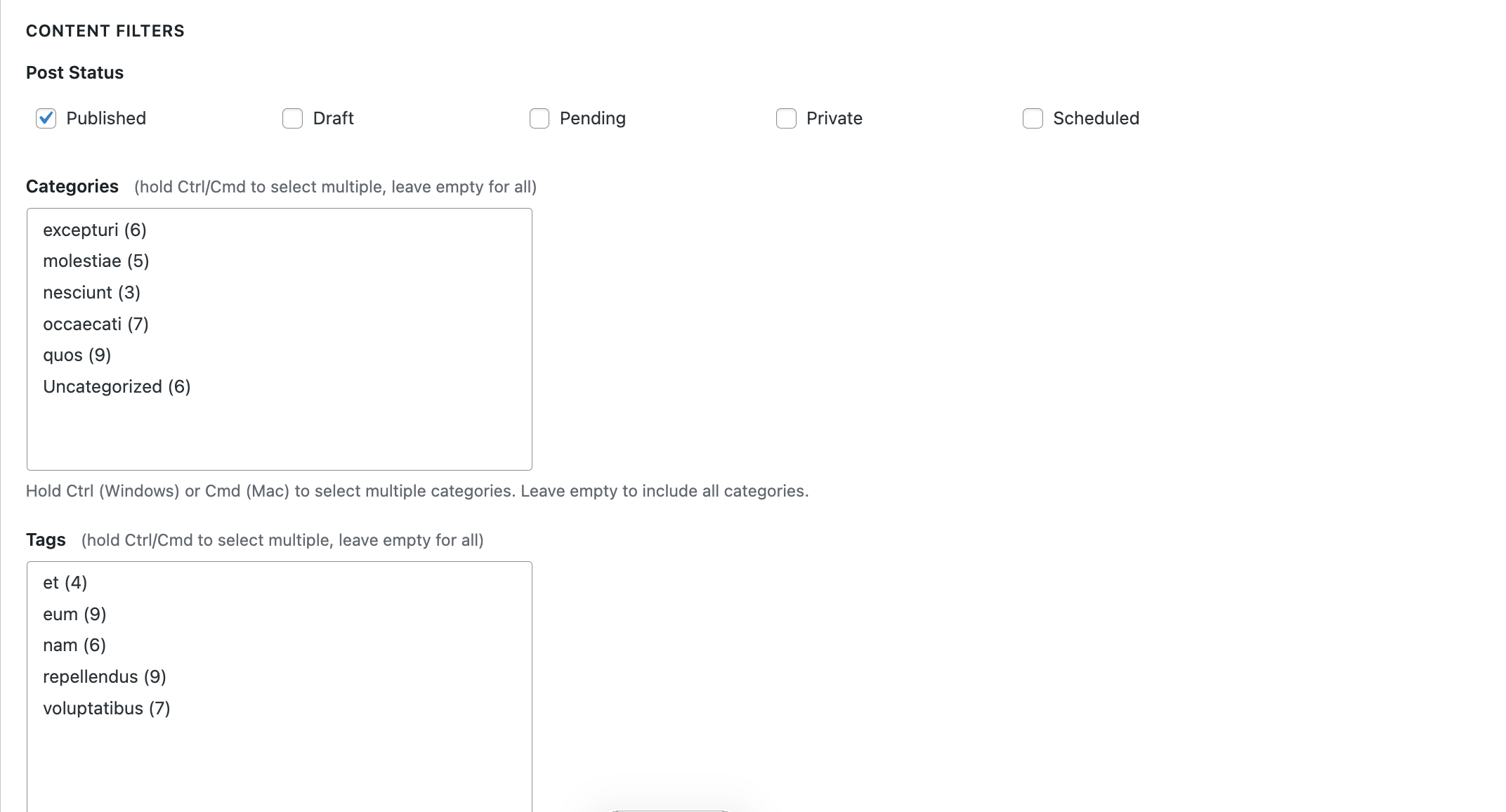
- Post Status: Filter by Published, Draft, Pending, Scheduled, Private, or Trashed
- Categories & Tags: Multi-select dropdowns for easy selection
- Author: Filter by specific authors
- Content Limits: Set maximum number of items to export
- Migrating specific content between WordPress sites
- Creating backups of filtered content
- Exporting data for analysis in Excel or other tools
- Exporting content by date range or category
- Testing exports before full site migration
- Migration specialists move only the content they need, avoiding bloated XML files.
- Content teams track editorial output with CSV datasets filtered by author or taxonomy.
- Data analysts receive clean, ready-to-query exports for Excel, Google Sheets, or BI tools.
- Agencies streamline QA by exporting smaller test batches before large moves.
安装:
- In Plugins → Add New, search for “WPGeared Better Export” and click Install Now (or upload the ZIP manually).
- Activate the plugin via Plugins → Installed Plugins.
- Open Tools → Export Posts to access WXR Export, Data Export, and Import.
- Choose your content, filters, fields, and export options.
- Click Preview Export to verify the count, active settings, sample rows, and estimated size.
- When the preview looks correct, select Download WXR, Download CSV, or View data table, depending on the chosen format.
- Open Tools → Export Posts → Import on the destination site.
- Upload a valid WordPress XML file. Wait for Ready to import; no destination content is written during this check.
- Review counts, author mappings, and media/link settings, then click Start import.
- Keep the page open. Use Pause, or return later and select the saved job followed by Continue.
- Review the final counts and failures. Correct missing source files, plugins, or other causes and use Retry failed items. Dependent records may need a second retry after their missing media/parent is restored.
- Remove saved import data when you no longer need resume history. Cancellation and cleanup do not undo imported content.
屏幕截图:


常见问题:
Will importing avoid timeouts completely?
No. Batches target roughly three seconds of work, up to ten ordinary records or one media stage per request, with a one-second pause. XML preparation is also bounded. A single operation can take longer, and host limits, disk space, slow media servers, or plugin hooks can still cause failures. Progress is saved; completed records do not need to restart. A worker lock may take up to five minutes to expire after an interrupted request. Reload the page if your login or security token expires.
Does import change the original website?
No. It reads the uploaded XML and downloads referenced files from the source. Content changes happen on the destination site. Export behavior remains unchanged.
How do I export posts?
Go to Tools → Export Posts, select your filters, review Preview export, then select Download WXR. Use the Data Export tab for Download CSV or View data table.
Can I export pages or CPTs?
Yes. The WXR tab exports posts or pages for WordPress migration. The Data Export tab exports posts, pages, individual public custom post types, or All public content types together.
Will featured images be included?
Enable "Featured Images" and "Other Attached Media" to include featured-image records and files whose WordPress parent is one of the selected posts/pages. WXR stores URLs and metadata, not the image files themselves. The source URLs must remain reachable, and the importer must be allowed to download attachments. Images linked from external sites or the media library without one of these relationships are not automatically collected. CSV exports can include the Featured Image URL column.
What if the export reports invalid XML data?
The default behavior stops before a download and identifies the affected record. Fix that source value, or explicitly select "Skip affected metadata" to leave those metadata rows out of this export. Skipping can remove plugin-specific data; use it only when you accept that loss. The XML ends with an omission count. Invalid post/comment/term text still stops the export. No source data is changed, and raw serialized values are not edited because doing so can corrupt their structure.
Are all custom fields included?
With "Custom Fields" enabled, public and protected post/attachment metadata are exported, except _edit_lock and values excluded by native WordPress export filters. Essential attachment file information and alt text are retained when media are included even if custom fields are disabled. Disabling "Featured Images" also excludes the post's thumbnail reference. Term metadata and comment metadata accompany their respective records. Registered custom taxonomies must also exist at the destination to be imported.
What format should I use?
- Use WXR for migrating content to another WordPress site.
- Use CSV for data analysis, reporting, or external use.
How many columns can I export in CSV?
You can choose from 18 fields, including ID, title, URL, taxonomies, author data, dates, status, post type, comment count, and featured image URL. Only the selected columns are included.
Can I check an export before downloading it?
Yes. Click Preview Export to see how many posts/pages match, how many will be exported after applying the limit, the active settings, up to five sample rows, and an estimated output size. Media items are additional to these counts. The sample is not a full integrity check; the complete file is prepared and checked when downloading. Changing any export setting clears the previous preview so stale results are not shown.
How do I export very large datasets safely?
Start with Preview Export to check the matching count and estimated size. Use non-overlapping date ranges for separate exports; an item limit alone repeatedly selects the same newest matching items. WXR is staged in a temporary file before downloading, requiring temporary disk space roughly equal to the XML size. Exports remain synchronous and subject to server memory and execution-time limits; background processing is not included in this release.
Do I need special permissions?
Exports require the WordPress export capability. Imports additionally require import and upload_files, plus the destination post type permissions. Import jobs are bound to the user who created them.
更新日志:
- Redesign the admin workspace with compact filters, a side-by-side preview and consistent WXR, Data Export and Import tabs.
- Add keyboard-friendly content tabs, labeled compact taxonomy selectors and responsive layouts for smaller screens.
- Keep preview counts and samples beside the download action; clear stale results when settings change and ignore superseded responses.
- Retain every export option, existing format/default, strict XML handling and saved import recovery behavior.
- Clarify that WXR contains media records and source URLs, with file download occurring during import.
- Keep valid XML and its saved preparation progress resumable after database read/write failures; retry temporary storage failures automatically.
- Keep source-validation errors separate from infrastructure errors and retain transactional checkpoints.
- Restore import controls after removing saved history, including when the following refresh fails.
- Confirm completed upload pauses while preserving safe recovery if the final upload response is lost.
- Validate uploaded chunk fields and document narrow Plugin Check exceptions for existing safe output, local file movement, and plugin-owned database cleanup.
- Automatically recover from temporary timeout, connection, and server failures during uploads and batches.
- Check saved progress and the worker lease before retrying, including lost responses after committed work.
- Resume running imports when the Import tab is reopened; preserve explicit pause/cancel and persist pauses requested during a batch.
- Report recovery attempts, exhausted retries and expired sessions clearly.
- Add a dedicated Import tab with private chunked XML upload and bounded validation before destination writes.
- Add durable jobs, a site-wide worker lock, transactional item checkpoints, pause/resume/cancel, and duplicate-file detection.
- Import supported content, comments, taxonomies and metadata with existing-user author mapping.
- Download media and generate image metadata separately, with bounded retries for temporary network errors.
- Reconcile parents, featured images, known imported links, and supported core media block IDs.
- Show saved/complete/skipped/failed counts, actionable failures, retry controls and staging cleanup.
- Retain the 1.3.1 export-fidelity fixes; export processing remains synchronous.
- Include child attachments and featured images independently, with deduplicated media records.
- Preserve image alt text, protected attachment metadata, comment metadata, and term hierarchy/metadata.
- Export custom taxonomy relationships, original GUIDs, and modification timestamps.
- Honor native content, excerpt, and metadata export filters; remove duplicate thumbnail references.
- Preserve serialized metadata bytes and carriage returns through XML parsing.
- Prepare complete WXR files before download; stop with a record identifier on invalid XML data.
- Add an explicit option to skip invalid metadata, recording the omitted-row count without changing site data.
- Added Preview Export to both the WXR and Data Export tabs.
- Added total matching counts and effective export counts after item limits are applied.
- Added summaries of the active content, status, date, author, taxonomy, field, and output settings.
- Added up to five sample items using the same prepared values as the export.
- Added estimated WXR, CSV, and browser-table output sizes.
- Automatically clears stale previews and cancels an in-progress preview when settings change.
- Unified preview and download query validation so both paths apply the same filters.
- Protected preview requests with WordPress nonces and the standard
exportcapability.
- Added highlights section and refreshed readme copy for better Plugin Directory visibility.
- Clarified installation and FAQ instructions for WXR/CSV workflows.
- Prepared structure for upcoming banner, icon, and screenshot assets.
- Fixed performance issue - added version parameter to wp_register_style() for proper cache busting
- Fixed coding standards errors for WordPress core hook usage
- Added phpcs:ignore comments for the_title_rss filter (WordPress core hook)
- Updated author information to WPGeared
- Updated author URI to https://wpgeared.com
- Updated contributors to match WordPress.org username
- Fixed deprecated utf8_encode() function - replaced with mb_convert_encoding() for PHP 8.2+ compatibility
- Improved CSS/JS enqueuing - now using wp_add_inline_style() and wp_add_inline_script() following WordPress best practices
- Enhanced encoding detection for better character handling in exports
- Added tabbed interface with WXR and Data Export tabs
- Added CSV export functionality with 18+ field options
- Added support for custom post types
- Improved UI with Better Search Replace style design
- Added multi-select dropdowns for categories and tags
- Added attachment export for featured images
- Fixed PHP 8+ compatibility issues
- Improved security with proper escaping functions
- Fixed UTC timestamp generation
- Fixed InputNotSanitized warnings using phpcs:disable/phpcs:enable blocks
- Improved input sanitization handling for Plugin Repo check
- Fixed MissingUnslash warnings by unslashing directly in assignment
- Improved phpcs:ignore comment placement
- Fixed remaining Plugin Repo input sanitization warnings
- Added phpcs:ignore comments for proper input handling flow
- Fixed array input sanitization warnings for Plugin Repo check
- Improved $_POST array handling with proper isset() checks
- Fixed remaining Plugin Repo coding standards issues
- Fixed array input sanitization warnings
- Improved phpcs:disable/phpcs:enable block usage
- Fixed Plugin Repo coding standards compliance
- Improved phpcs:ignore comment formatting
- Fixed input sanitization warnings
- Fixed WordPress coding standards compliance issues
- Improved security with proper input sanitization
- Fixed escaping issues for better security
- Major update with CSV export, improved UI, and enhanced features
- Added Data Export tab with advanced filtering
- Improved UI design similar to Better Search Replace
- Added multi-select dropdowns for categories and tags
- Enhanced featured image export in WXR format
- Initial release
- WXR export functionality
- Basic filtering options