
Yatoon Salon Booking & Appointments
| 开发者 |
yatoon
freemius |
|---|---|
| 更新时间 | 2026年10月23日 11:32 |
| PHP版本: | 7.4 及以上 |
| WordPress版本: | 7.1 |
| 版权: | GPLv2 or later |
| 版权网址: | 版权信息 |
标签
下载
详情介绍:
- Local WordPress scheduling, availability checks, customer records, notifications, and booking management
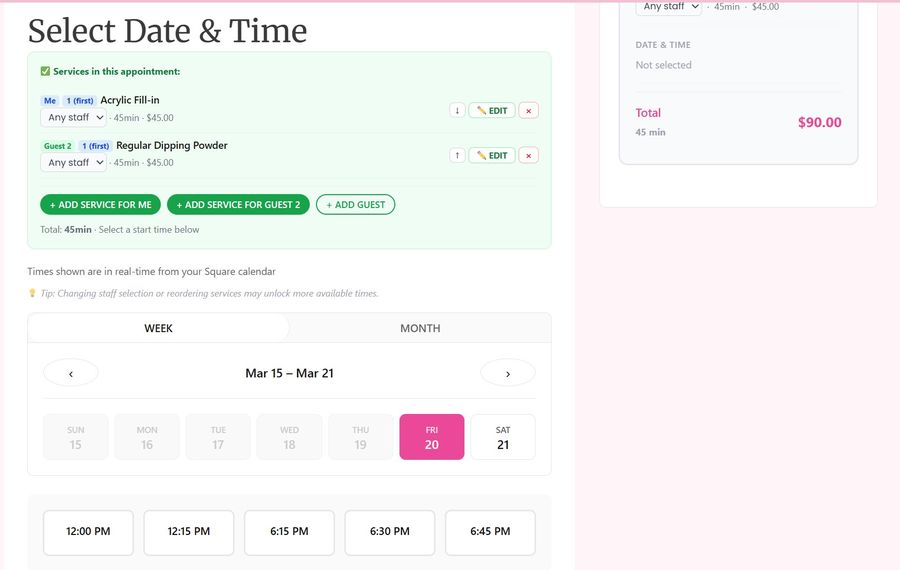
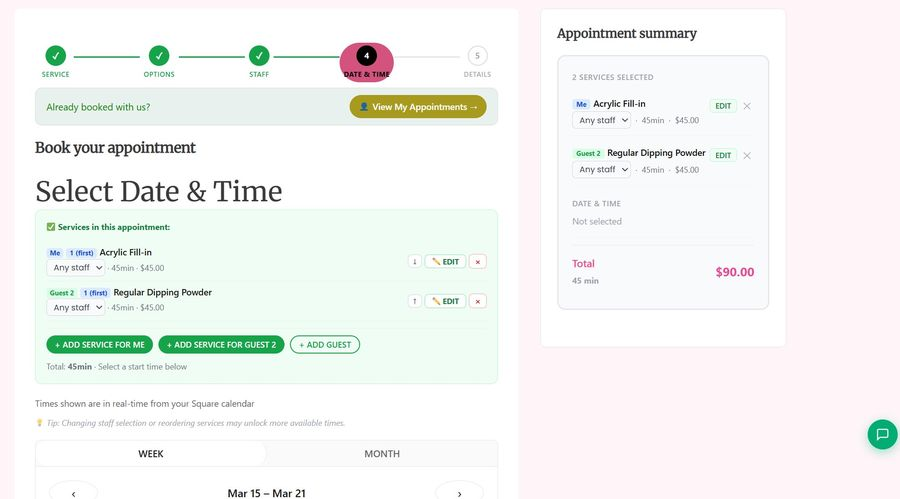
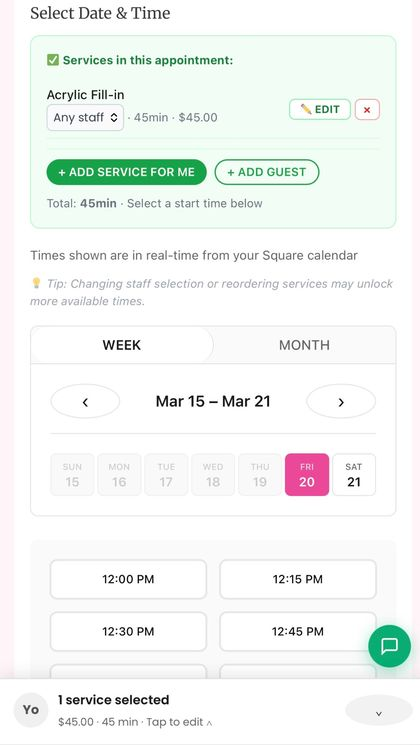
- Mobile booking for services, options, professionals, dates, times, customer details, and confirmation
- Customer self-service for reviewing, rescheduling, cancelling, and rebooking appointments
- Staff calendar workflows with mobile rescheduling, temporary breaks, shared-resource checks, and capability-based Yatoon roles
- Services, categories, images, variations, add-ons, pricing, staff qualifications, schedules, breaks, and closed dates
- Waitlist, service menu, customer portal, staff portal, booking blocks, Elementor, and shortcode integrations
- Customer-facing AI Chat when WordPress AI Client and a provider are connected and Chat is enabled by an administrator
- A mobile booking flow for services, variations, add-ons, professionals, date, time, customer details, and confirmation
- Several services or guests in one booking journey, with separate staff choices and reference photos where enabled
- Clear service durations, prices, appointment summaries, directions, and calendar actions
- Secure self-service for viewing, rescheduling, cancelling, rebooking, and eligible service changes
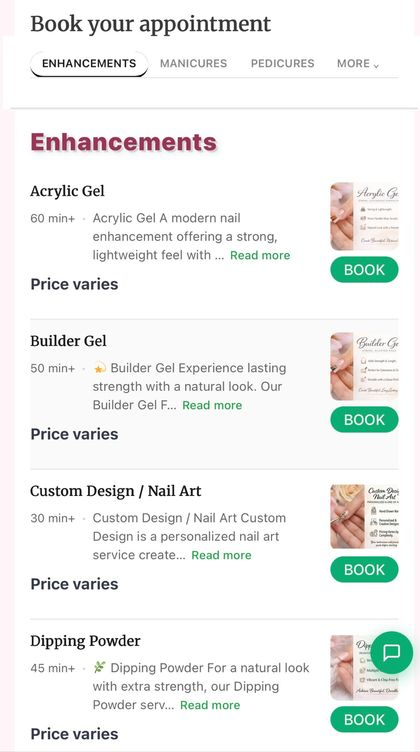
- A branded service menu, discovery storefront, portfolio, favorites, quick rebooking, and lightweight installable customer app
- Services, categories, images, variations, add-ons, pricing, staff qualifications, and schedules
- Business hours, staff schedules, breaks, time off, closed dates, and availability rules
- Appointment calendar, client records, notes, reports, notifications, and waitlist
- Mobile-friendly rescheduling, temporary break controls, shared-resource checks, and role-specific staff workspaces
[yatoon_booking]- complete booking form[yatoon_service_menu]- visual service menu with Book buttons[yatoon_customer_portal]- customer self-service portal[yatoon_staff_portal]- mobile staff schedule portal[yatoon_discovery]- discovery storefront and booking entry points
安装:
- Install and activate Yatoon Salon Booking & Appointments.
- Open Yatoon Booking > Settings > Features & setup > Setup Wizard.
- Add your services, prices, durations, staff, schedules, business hours, breaks, and closed dates.
- Connect only the payment, calendar, messaging, or platform integrations your workflow needs.
- Add the booking block, Elementor widget, builder element, or
[yatoon_booking]shortcode to a public page. - Run a test booking, customer self-service, and staff workflow before launch.
- Exclude booking and portal pages from full-page caching and delayed JavaScript optimization.
docs/quick-start.md, docs/validation.md, and reproducible focused test instructions in tests/README.md.屏幕截图:



常见问题:
What does Pro add?
Pro adds unlimited staff, two-way Square Appointments synchronization, one-way Vagaro import with booking creation, online payments and deposits, no-show tracking, SMS and calendar integrations, advanced customer self-service, growth tools, multi-location operations, and priority support.
Does Yatoon require Square?
No. Yatoon Free runs in Local mode inside WordPress. Square, Vagaro, Stripe, PayPal, Twilio, Google Calendar, and Outlook Calendar are optional integrations.
How does AI Chat connect, and how fast is it?
AI Chat uses the WordPress AI Client and the provider connections configured by the site owner. It does not use a separate AI Relay or expose provider credentials in the browser. The chat keeps the complete provider response and shows a clear sending state; it does not use fake character-by-character playback. The current public WordPress AI Client returns a complete text result rather than exposing a stable token-stream API to plugins, so this release does not claim token-by-token streaming.
Are AI features enabled automatically?
No. New installations keep Chat Concierge, the booking-form Style Assistant, natural-language rescheduling, and reply drafts off until an administrator enables each feature. Connecting a provider or entering an API key does not publish an AI widget by itself. Existing sites keep their saved settings when updating.
What does the Square integration cover?
Yatoon Pro supports two-way Square Appointments synchronization - creating, updating, and cancelling Square bookings and receiving Square webhooks - plus Square online payment, deposit, and refund options. Point of sale is limited to recording that an appointment was paid in Square POS or Tap to Pay so it settles correctly in Yatoon's own reports and invoices; Yatoon does not replace the Square point-of-sale application.
What exactly does the Vagaro integration do?
It reads services, staff, and availability from Vagaro and creates new appointments in Vagaro when a customer books. It is an import plus booking creation, not two-way synchronization: Yatoon does not push Vagaro reschedules or cancellations, receive Vagaro webhooks, or run a scheduled re-pull.
Can customers book more than one service or guest?
Yes. Each guest can have separate services, staff assignments, timing, and reference photos while remaining part of one booking journey.
Does Pro support deposits and online payments?
Yes. Configure the provider and deposit rules required by your business, then test the complete payment and refund workflow in the provider's test environment before going live.
Does the no-show rule charge the customer automatically?
It requires a deposit; it does not take money on its own. Once a customer reaches your threshold, their next booking is treated as a deposit booking and checkout asks for the deposit amount configured under Payments, through the gateway configured there. If no deposit gateway is set up, the rule can only flag the customer.
How does Yatoon protect against schedule conflicts?
It checks staff qualification, working hours, breaks, closed dates, existing appointments, shared resources, and external availability where applicable. A final server-side check runs immediately before the change is saved.
Can customers and staff manage appointments from a phone?
Yes. Customers can use the lightweight booking app and Customer Portal, while the Staff Portal is designed for mobile daily operations.
What database hosting does conflict protection require?
Booking writes require MySQL/MariaDB connection-scoped advisory locks (GET_LOCK). Lock acquisition, availability checks, booking writes, and lock release must use the same primary database connection and server. A connection pool, multiplexing proxy, read/write router, or multi-writer cluster must preserve that connection and server for the whole operation. Open Tools > Site Health to check advisory-lock support; that probe does not certify every proxy or cluster routing configuration. If required locks cannot be acquired, Yatoon refuses the booking write and returns a retry/error message rather than saving an unprotected appointment. Ask the host to confirm connection pinning and run concurrent booking checks on a disposable site before launch.
Does Yatoon work with page builders?
Yes. Major booking surfaces are available through Gutenberg blocks, Elementor widgets, shortcodes, and adapters for Bricks, Beaver Builder, Divi, and Brizy.
Is Yatoon multilingual?
Yatoon bundles Simplified Chinese, Traditional Chinese, Spanish and Vietnamese catalogs. Technical coverage is measured against the current source catalog in languages/translation-coverage.json; untranslated messages fall back to English. Critical 4.8.3 customer copy was reviewed in English and Simplified Chinese; the complete catalogs have not received independent native-speaker review. Site owners can edit service names, descriptions, policies and labels.
Where can I get help?
Downloads, licensing, updates, and priority support are available through Yatoon.com. Copy the privacy-safe technical summary from Operations when reporting an integration problem.
更新日志:
- Popular and recommended services open their details and options in one click, including services hidden by a search filter.
- Keep policy and consent checkboxes compact on mobile and desktop; make optional comments and gift-card entry collapsible.
- Show persistent inline required-field errors and retain entered booking details during corrections.
- Restore usable settings screens for stale links and correct payment setup shortcuts.
- Update the bundled Freemius WordPress SDK to 2.13.5.
- Fix empty button font choices on the Brand page and a staff-limit notice that counted inactive staff.
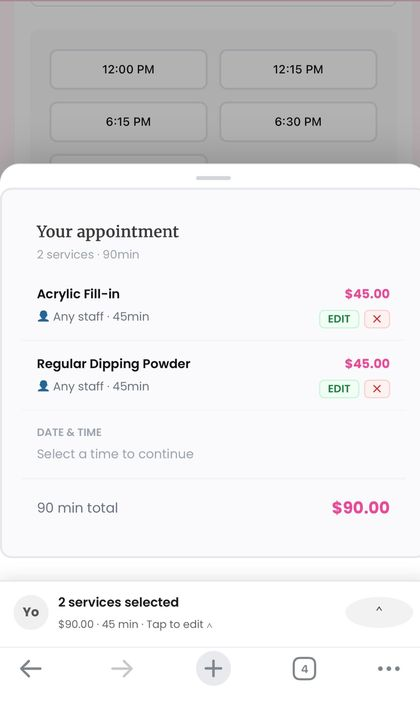
- Keep the mobile cart drawer attached to the bottom bar when the browser toolbar shows or hides, and stop the page scrolling behind it.
- Booking locks now work on hosts without MySQL named locks (a built-in lock table is used automatically; Site Health shows the active mode), making simultaneous bookings safer.
- Marketing consent: promotional emails carry an unsubscribe link and List-Unsubscribe headers; promotional SMS (broadcasts and automations) honours opt-in and STOP / START replies; optional "offers" checkboxes on the booking form; consent choices included in personal-data export.
- Broadcasts skip opted-out clients, send in background batches, and never resend a delivery whose outcome is uncertain.
- Automations: timed triggers no longer miss bookings when WP-Cron runs late, and the Test button only messages the signed-in administrator.
- Prices follow the shop currency everywhere (new yatoon_format_money filter).
- Large client lists: phone and email lookups and the Square loyalty tools no longer load the whole client table.
- Staff PIN checks reject repeated patterns; uninstall also removes the lock table.
- Plugin Check clean-up: translator comments, ordered placeholders, SQL preparation and output escaping.
- Smaller booking-form CSS with unchanged appearance, updated Spanish, Vietnamese and Chinese translations, and new regression tests.
- Make the lifetime-spend VIP threshold configurable and let owners set individual clients to automatic, VIP, or not VIP.
- Keep customer booking-history status labels compact and prevent narrow history columns from stretching rows.
- Fix saving employee weekly schedules and date-specific overrides in the Free edition.
- Allow authorized customer email and phone edits while preserving linked booking history.
- Add Gemini 3.8 Flash and Claude Haiku 5.5 as the latest model options and defaults.
- Translate AI model option descriptions into the bundled locales while keeping model names in English.
- Complete the bundled Spanish, Vietnamese, Simplified Chinese, and Traditional Chinese translations.
- Correct JavaScript percent formatting for membership discounts.
- Use the uploaded Business Logo for installable app icons, falling back to the bundled Yatoon icon.
- Disclose optional Google, Apple, and Facebook sign-in; describe partial translations and database hosting requirements.
- Consolidate plugin feedback on Today while preserving earlier opt-outs and snoozes; defer cron label translations until init and include focused integration test instructions.
- Summarize visits once on the owner Today page while retaining individual service details and actions.
- Present local and legacy Square multi-service appointments as complete units, label add-ons, fold cancelled items, and exclude cancelled visits from the default list without removing their history.
- Add a built-in Help & demo guide, quick-start documentation, and a quiet optional WordPress.org review invitation after sustained appointment use.
- Keep appointment filters visible when there are no results, clarify full CSV export, and improve customer list paging and accessible searches.
- Coordinate service search with category navigation, support category names and multiple search terms, improve mobile search controls, and retain translated More labels.
- Consolidate General settings save actions in a persistent bar with accurate unsaved-state feedback and tuck template reset into More tools.
- Add named setup steps with completion based on saved configuration and resume the first unfinished step.
- Keep the selected appointment time visible in the mobile cart, clarify selected versus confirmed appointments, and improve translated step guidance and accessible status labels.
- Simplify the admin sidebar to six workspaces plus All tools; add related-page navigation and searchable Website & Growth and Settings hubs. Keep original pages, permissions, direct links and complete tool search available.
- Condense repeated settings navigation, clarify Pro badges, maintain bundled translations and repair the legacy Deposit & Prepay settings link.
- Search the booking history by name, email, or phone; show each customer once, exclude cancelled appointments, and manually send review invitations with corrected email addresses.
- Archive services while preserving bookings, options and employee assignments.
- Use effective employee service durations for REST booking creation and availability.
- Correct staff utilization using actual saved schedules and time off; aggregate material costs across all services.
- Remove all owned scheduled task argument variants on deactivation without removing business data.
- Preserve zero-minute add-ons in the service editor and clarify service archive actions.
- Clarify staff customer access and sync diagnostics.
- Compact WordPress submenu with seven core shortcuts; remaining tools are organized in a searchable, permission-aware All tools directory. Original page registrations, direct URLs and topbar search remain available.
- Employee hours now preserve different weekday and split-shift schedules; date-specific one-time changes override only that date and the recurring default returns automatically.
- Schedule validation protects saves and availability, create and reschedule paths. Square remains the default availability source in Square mode; optional Yatoon restrictions limit Yatoon bookings without changing Square calendar availability.
- Calendar appointments are displayed using the timezone saved with each booking, including bookings near day boundaries.
- Calendar hover details remain fully visible within the browser window instead of being clipped by the scrolled day grid.
- Refined staff profile, message, checkout and editor sheets with consistent accessible close controls.
- Customer-profile merge with its own permission, matching contact review, retained-profile selection, atomic consolidation and historical contact aliases.
- Make snapshots consistent, restore all tables in one checked transaction, invalidate snapshots on erasure and remove them on full-data uninstall.
- Validate restored booking availability; report actual bulk-update outcomes and protect schema retries with database locks.
- Recover unfinished Stripe events and Square staff saves; serialize payment attempts and report failed journal writes.
- Refresh expired frontend nonces once, limit active checkout holds and alert on persistent payment exceptions.
- Store reference photos outside the public website and migrate previously tagged uploads to private access links.
- Preserve mobile category, padding, validation-scroll and review-summary fixes; use responsive recovery cards.
- Restricted public employee data and unified staff, variation and add-on scheduling, Any Staff duration ranges, waitlist matching and location checks.
- Added encrypted checkout recovery, expiring Local-calendar payment holds, provider reconciliation and reuse of existing verified payments after interrupted submissions.
- Fixed complete failed-job counts and pagination; added owner-facing availability diagnosis and private customer / visit context in Today.
- Fixed peak resource capacity and cleanup occupancy; added optional Local-calendar service stages with saved booking snapshots.
- Reduced initial booking JavaScript with a lazy checkout component; retained scrolling seasonal effects and added an optional reduced-motion-aware glass surface.
- Retained the compact mobile flow, current-catalogue Book Again and guarded optional location modules on booking pages.
- Placed waitlist controls beside booking setup and added switch status and a settings shortcut on the Waitlist page.
- Unified confirmation emails in one responsive layout with an easy-to-open appointment link. Existing plain-text preferences still work.
- Refined the appointment summary card, mobile spacing, and service-change emails.
- Improved waitlist recovery, including same-day signup and checks for every selected service.
- Clarified accepted mail status and service names in appointment changes.
- Improved the setup wizard and first booking checklist.
- Clarified setup availability checks and booking readiness.
- Simplified the default admin menu and strengthened local Any Staff selection.
- Fixed confirmation emails to show selected service options and service-change emails to preserve the original option.
- Signing out of the Staff Portal now ends the session on the server, not just in the browser. Previously the sign-out button only cleared local data, leaving the staff token usable until it expired on its own; if the sign-out request fails the portal now stays signed in and says so rather than implying it worked.
- Fixed the installable offline app never registering: the Service Worker scripts are served through a rewrite rule, so WordPress redirected them to a trailing slash and the browser refused them. Both the booking and staff workers now load, and the error they logged on every page is gone.
- The calendar's booking popover now re-checks which way it should open while the day grid scrolls, instead of keeping the direction it was given when it opened.
- Stopped shipping three Pro-only admin screens that no Free site could reach.
- Added a guided first-run flow for Business, Team, Services, real staff availability, and the Booking Page, with a dashboard checklist for anything skipped.
- Fixed Review Request emails so
{service_name}is populated from the linked service, added a real-booking preview, and replaced the overly promotional Google CTA with a calm invitation to share honest feedback. - Removed stray asterisks from review settings and email buttons, and stopped filtering Google review invitations by an internal rating so every invited client receives the same optional feedback path.
- Made internal star-rating emails opt-in, prevented them from being sent alongside the direct Google review request, fixed their settings save path, and added their service details and delivery outcomes.
- Replaced the short in-memory delivery history with an additive database-backed delivery ledger, migrating retained records and adding Sent / Failed filters plus 25 / 50 / 100 row pagination.
- Added scoped color modes: Customer Booking Widget supports Follow system, Light, and Dark; Yatoon Admin and Staff Portal support Light and Dark.
- Added a shared semantic color-scheme token layer without duplicating the existing Beauty, Clean, and Luxury theme styles.
- Updated the booking progress Current state to use each selected theme's primary, border, and Light/Dark/Follow-system surface tokens instead of a fixed fill; completed steps remain green.
- Fixed Theme Preview persistence so Save Theme always saves the theme currently being previewed and the matching seasonal effect.
- Restored Custom as an explicit storefront choice: named themes now control their complete component palette, while Custom applies the merchant's saved colors and per-button styling without deleting those settings.
- Added the Custom Theme Library: Brand & Colors edits become a pending Custom theme, then can be named, saved, applied, renamed, or deleted. Free stores one Custom theme; Pro stores up to five.
- Made Custom Theme Library management discoverable beside Brand & Colors: saved themes now have explicit Use, Edit, Rename, and Delete actions, and a visible pending-save prompt appears after palette changes are saved.
- Loaded the Custom Theme Library controller on the Brand & Colors menu itself, so its top-of-page prompt and save, use, edit, rename, and delete actions work on the screen where palette changes are made.
- Moved the Custom Theme Library into the actual Brand & Button Settings screen, made Brand saves mark a pending Custom theme through its Settings API path, and made that screen available in Free with the one-theme limit.
- Added saved Custom themes by name to Front-end style and Theme Preview. Choosing one applies its complete saved snapshot; later visual edits clear the active snapshot and require an explicit update or new saved theme.
- Fixed named Custom themes sharing the last globally saved palette. Save or Update now captures the current Brand controls as an independent sanitized snapshot, so every saved theme restores its own appearance.
- Clarified the Custom Theme Library workflow: Edit this theme loads its saved controls, Apply theme activates a saved theme, and Save changes to selected theme stores edits explicitly.
- Removed the redundant Custom-theme selector. Editing a named theme now locks that exact theme as the save target, loads its stored controls immediately, and sends the live form snapshot as JSON so saved themes cannot be confused with one another.
- Simplified Custom Theme Library actions to one Use and edit this theme control, which activates the selected theme, loads its values, and locks it as the only save target.
- Seasonal effect controls now appear only for their matching theme: Festive Red Snowfall, Halloween Bats and Pumpkins, or Emerald Sparkles. Restored the optional Halloween pumpkins and gave all seasonal effects gentle free-direction drift and rotation while preserving reduced-motion support.
- Added the Modern booking theme with structured cards, contemporary spacing, teal actions, refined focus states, and full Light/Dark compatibility.
- Added a scoped Theme Preview to Booking Experience settings with Beauty, Clean, Luxury, and Modern specimens, plus a nearby Save Theme action that persists the selected theme and its matching seasonal effect; Preview controls only expose Snowfall for Festive Red and Bats for Halloween.
- Added the Festive Red booking theme with Light/Dark/Follow system support and an optional low-density, reduced-motion-safe Seasonal Snowfall effect scoped to the booking widget and Theme Preview.
- Organized Core and Seasonal themes in settings and added the polished Halloween theme with optional reduced-motion-safe bat decoration in the widget and Theme Preview.
- Improved Festive Red Snowfall contrast and stacking so the optional effect remains visible above widget surfaces without intercepting interaction.
- Kept booking data, APIs, and permissions compatible; the only new database object is the additive notification delivery ledger.
- Added a Delivery activity view with Sent / Failed filters across the retained WordPress email outcomes, explicit retry feedback, and a notification-only retry action that avoids racing an in-progress worker.
- Improved Front Desk performance for busy days with server-backed customer, service, status, and professional filters that remain compatible with incremental Load more results.
- Added import conflict reporting for duplicate, ambiguous, and incomplete rows, with preview-safe results and bounded sample details before records are changed.
- Added deeper salon reporting metrics including repeat-client, retention, rebooking, cancellation, no-show, completion, average-ticket, booked-hour, commission, contribution, and forward-revenue views.
- Made multi-location and shared-resource scheduling consistent across calendar, Front Desk, availability, booking, and customer workflows.
- Added location-aware waitlist storage, filtering, exports, claim links, and scheduled availability checks. The waitlist migration is represented by schema manifest revision 16; the internal YATOON_DB_VERSION remains 4.7.1.
- Updated release metadata and Dashboard generated assets for 4.7.5.
- Added a Daily Staff Time Grid with one shared local-time axis across employee columns, precise appointment placement and duration, overlap lanes, break and unavailable backgrounds, shared-resource visibility, and a current-time line. Desktop moves continue through existing availability and server-side reschedule validation; mobile keeps a single-employee grid with Move / Reschedule fallback.
- Made appointment cards quicker to inspect: hover-capable desktop pointers show the existing quick preview with a short handoff delay, while desktop clicks, touch taps, and keyboard activation open the existing full appointment details modal. Move / Reschedule remains in the card action menu, and calendar source, minified, RTL, and manifest assets were rebuilt.
- Restored the customer-facing AI Chat as a shared Free and Pro feature. Both packages now load one canonical Concierge class and six shared traits; customer chat remains available in Free when an administrator connects a provider and enables it.
- Kept customers inside AI Concierge when final contact validation rejects a phone number, email address, or customer name. The editable contact form now reopens with the entered details preserved.
- Fixed typed chat messages being accepted before the AI consent box was checked. The consent gate now covers every typed message before it is added to the conversation.
- Improved multi-person chat booking so shared services, guest names, selected options, prices, durations, and professionals remain correct through review and confirmation.
- Improved the mobile chat control, service and option selection, running visit summary, and recovery when a customer changes a service, professional, date, or time.
- Added clearer local booking workflows for mobile staff rescheduling, temporary breaks, shared-resource checks, and capability-based Yatoon roles.
- Completed the 4.7.3 release metadata and asset-manifest updates, and removed obsolete Concierge build artifacts from both release packages.
- Added the customer-facing AI Chat to Free and Pro as an opt-in feature. Customers can describe what they want, review real services and availability, and continue through the existing booking flow.
- Hardened AI chat input, consent handling, sensitive-data screening, bounded requests, multilingual responses, and provider rate limits.
- Improved customer self-service, responsive booking layouts, availability checks, notifications, and local booking reliability.