Youtube Video Search
| 开发者 | mauriya |
|---|---|
| 更新时间 | 2026年7月3日 00:03 |
| 捐献地址: | 去捐款 |
| PHP版本: | 8.0 及以上 |
| WordPress版本: | 7.0 |
| 版权: | GPLv2 or later |
| 版权网址: | 版权信息 |
详情介绍:
- Your channel comes first. Add your channel(s) once. Every search checks your channel for matches before anyone sees a public result — or restrict search to your channel only, with one checkbox. Either way, your content is what visitors find.
- Drop it in anywhere, no code required. A Gutenberg block, a classic widget, a shortcode, or a template tag — pick whichever fits how you build. All four are the exact same search box under the hood, so behavior never differs between them.
- It actually helps your SEO, not just your visitors. Your latest uploads are rendered as real, crawlable links directly in the page's HTML on page load — not hidden behind a search box that only JavaScript can fill in. Every video listing carries schema.org VideoObject structured data (the same markup Google uses for video rich results), and a machine-readable JSON feed of your channel is available for your own tools or AI integrations.
- Modern, mobile-first design. A responsive card grid, automatic dark mode, and a fluid video player that looks right from a phone to a widescreen monitor — no theme-specific CSS fighting required.
- Your API key never leaves your server. Every YouTube Data API request is proxied through your own site; visitors' browsers never see your key, unlike plugins that print it straight into page JavaScript.
- Gutenberg block — search, insert, done. Live preview in the editor.
- Classic widget for any sidebar/footer widget area.
[youtubesearch]shortcode with optional heading/placeholder attributes.ytps_render_search()template tag for theme developers.- Multiple instances on one page (e.g. widget + block together) work independently, out of the box.
- Configure one or more of your own channels; matched videos are shown first, or exclusively, your choice.
- Server-rendered, crawlable "latest videos" grid + schema.org JSON-LD for SEO — no JavaScript required for search engines to see real content.
- A cached JSON REST feed of your channel's videos (
/wp-json/ytps/v1/videos) for your own tooling or AI agents. - Real-time search suggestions, debounced search-as-you-type, keyboard accessible.
- Modern, mobile-responsive card grid with automatic dark mode.
- Works with or without an API key configured (shows a friendly notice to visitors instead of breaking).
- No third-party CDN dependencies (no Bootstrap, no external jQuery) — uses WordPress core's own bundled scripts.
- WordPress 6.4+
- PHP 8.0+
- A free YouTube Data API v3 key from Google Cloud Console (the plugin installs and displays fine without one; search itself needs a key)
安装:
- Upload the plugin to
/wp-content/plugins/, or install it through the Plugins screen in your dashboard. - Activate the plugin.
- Go to Settings → Youtube API Setting.
- Enter a YouTube Data API v3 key. Don't have one? Click the "Get a free API key" link on that page — it takes about two minutes in Google Cloud Console (enable the "YouTube Data API v3", then create an API key under Credentials).
- (Recommended for creators) Enter your channel — a
@handle, a full channel URL, or a channel name — and choose whether your channel's videos should be shown first alongside public results, or exclusively. - Place the search box using whichever method fits your workflow:
- Block editor: click +, search "YouTube Video Search", insert.
- Widget: Appearance → Widgets, add "YouTube Video Search" to any widget area.
- Shortcode: paste
[youtubesearch]into any post, page, or text widget. - Theme file: add
<?php if ( function_exists( 'ytps_render_search' ) ) { ytps_render_search(); } ?>to a template.
- Go to Google Cloud Console.
- Create a project (or select an existing one).
- Go to APIs & Services → Library, search for "YouTube Data API v3", and click Enable.
- Go to APIs & Services → Credentials, click Create Credentials → API key.
- Copy the key and paste it into Settings → Youtube API Setting on your site.
屏幕截图:
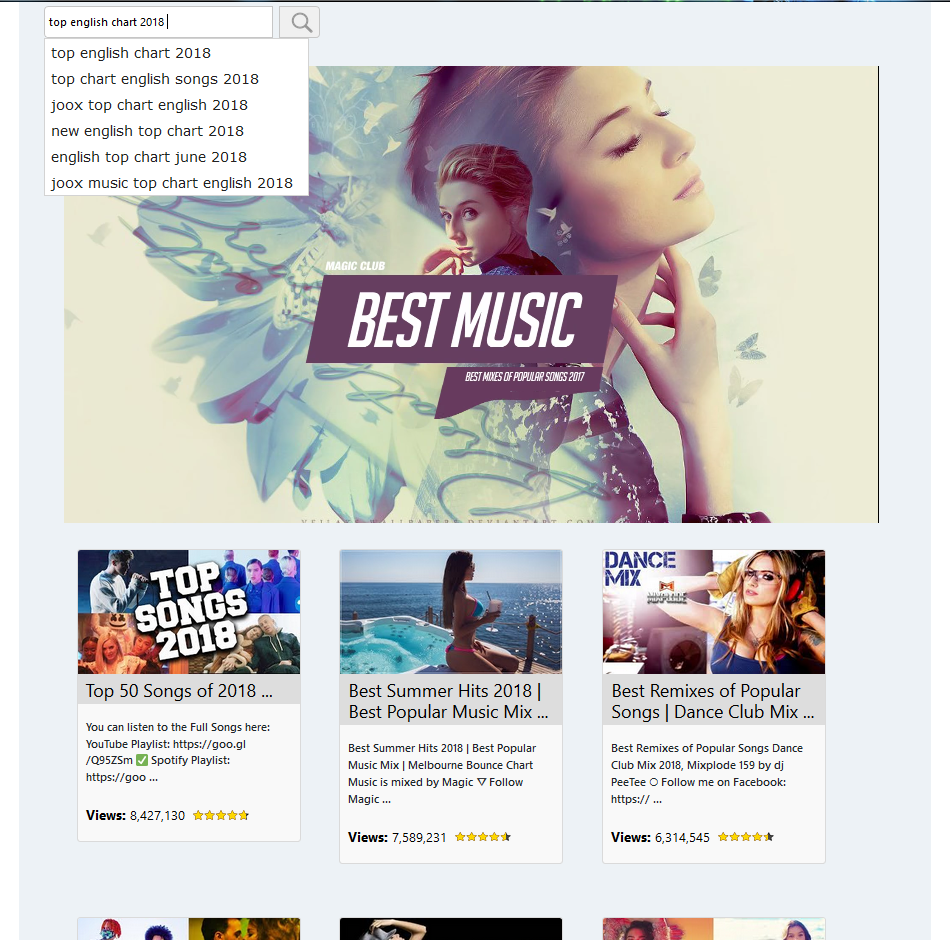
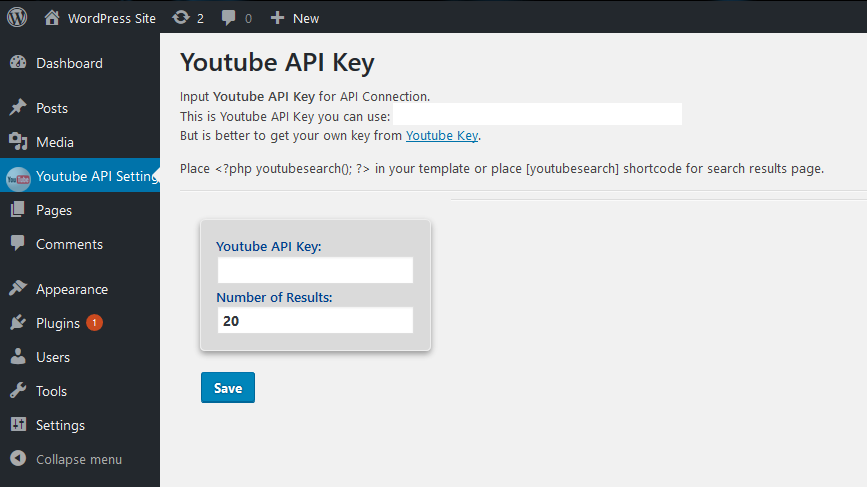
常见问题:
Does the plugin work before I add an API key?
Yes. The search box displays normally; searches will show a short notice asking visitors to check back later until an API key is added.
Is my API key visible to visitors?
No. It's stored in the WordPress options table and used only in server-side requests. It's never printed into page HTML or JavaScript — a meaningful difference from plugins that embed the key directly in the page source, where anyone can view-source and lift it.
How does channel priority work?
If you list your channel(s) and leave "Only show videos from the channel(s)" unchecked, a search first checks each configured channel for matches, places those at the top of the results, then fills remaining slots with public search results for the same keyword. Checking that box hides public results entirely and searches your channel(s) only.
Can I list more than one channel?
Yes, up to 5, one per line or comma-separated. Each can be a @handle, a full channel URL, or a channel ID.
Is this actually good for SEO?
The plugin renders your channel's latest videos as real, indexable HTML on page load (with genuine <a href> links to YouTube, not JavaScript-only content), and includes schema.org VideoObject structured data automatically. That's a meaningfully different starting point than a plugin whose entire result set only exists after a visitor manually searches. It's not a guarantee of rankings — no plugin can promise that — but it gives search engines real content to work with.
What's the JSON feed for?
When you configure a channel, the plugin exposes /wp-json/ytps/v1/videos — a cached, schema.org-shaped JSON list of that channel's latest uploads. It's meant for your own use: custom integrations, other tools on your site, or AI agents/crawlers that prefer structured data over parsing rendered HTML.
Can I use the block and widget on the same page?
Yes. Each instance (block, widget, shortcode) works independently — search state, results, and the video player don't interfere with each other even if several are on the same page.
What happened to the dislike count?
YouTube removed public dislike counts from the Data API in December 2021. The like indicator reflects a like-to-view ratio instead.
Does this work with my theme?
The plugin ships its own self-contained styles (no Bootstrap, no external CDN) and uses standard WordPress hooks for blocks/widgets, so it should work with any properly-coded theme. If something looks off, it's almost always a CSS specificity conflict — the support forum is the place to flag it.
更新日志:
- Fix: the search input field's CSS selector still referenced the old markup structure from before multi-instance support was added (
#queryinstead of.ytps-query), so it never matched and the input rendered unstyled — visible as an oversized, empty-looking search bar with a plain browser-default text box instead of the intended compact search field. Styling now applies correctly. - Fix: added missing styling for the optional heading text (block/widget/shortcode
headingattribute).
- Fix: reverted the main plugin file name from
youtube-post-search.phpback toyoutubepostsearch.php. The 3.2.0 rewrite renamed it, which broke the update path for sites with the plugin already installed and active — WordPress tracks active plugins by exact file path, and the old path no longer existed after updating, silently stopping the plugin from loading. Fresh installs of 3.2.0 were unaffected; in-place updates from an earlier version were not. If you experienced the search box not working after updating to 3.2.0, updating to 3.2.1 resolves it with no configuration changes needed.
- New: Gutenberg block ("YouTube Video Search") with live editor preview and per-instance heading/placeholder options.
- New: classic widget for sidebars and footer widget areas.
- New: multiple instances (block + widget + shortcode) now work correctly together on the same page — each has independent search state and playlist.
- New: SEO — the search box now server-renders your configured channel's latest uploads as real, crawlable
<a href>links with schema.org VideoObject JSON-LD, instead of starting as an empty box that only fills in after a visitor searches. - New: cached JSON REST feed at
/wp-json/ytps/v1/videosfor your channel's videos, with a<link rel="alternate">discovery tag in the page head. - New: live search results also carry client-side schema.org structured data as they load.
- New: "How to Use This Plugin" reference panel added directly to the Settings screen — copy-paste snippets for all four placement methods plus SEO/growth tips.
- Improvement: video cards are now real anchor links (work with JavaScript disabled, support ctrl/cmd-click to open in a new tab), progressively enhanced to open inline when JavaScript is available.
- Improvement: added
uploadDate(from the API'spublishedAt) to structured data output.
- Redesigned front end: modern CSS Grid card layout, fluid down to mobile widths, automatic dark-mode support, animated loading state, debounced search-as-you-type.
- Video player is now fully responsive via CSS aspect-ratio instead of JavaScript width calculations.
- New: configure one or more of your own YouTube channels. Matching videos from those channels are shown first, ahead of public search results for the same keyword.
- New: "Only show videos from the channel(s)" checkbox to restrict search entirely to your configured channel(s).
- New: results now display the source channel name, and channel-sourced cards carry a badge.
- Channel names/@handles/URLs are resolved to canonical channel IDs once on settings save (not on every search), keeping front-end search fast and quota-light.
- Full rewrite for WordPress 6.4–7.0, PHP 8.0–8.3.
- Security: API key is no longer printed into front-end HTML/JS; all YouTube API calls are proxied server-side via a nonce-protected AJAX endpoint.
- Security: settings form now uses a nonce and capability check; all output is escaped and all input is sanitized.
- Fix: plugin options are no longer deleted on simple deactivation (moved to uninstall.php, WordPress-standard behavior).
- Removed dependency on Bootstrap CDN; replaced with a small self-contained stylesheet.
- Removed dependency on jQuery/jQuery UI CDN; now uses WordPress core's bundled copies.
- Removed the hardcoded shared demo API key.
- Removed deprecated dislikeCount usage (no longer returned by the YouTube API).
- Autocomplete suggestions now proxied server-side (fixes mixed-content failures on HTTPS sites).
- Performance: video statistics for a search's results are now fetched in a single batched API call instead of one call per video.
- Numbers of comments.
- Star rating.
- Libraries updated.