
Jinkosoft
| 开发者 | jinkosoft |
|---|---|
| 更新时间 | 2026年3月18日 19:01 |
| PHP版本: | 7.4 及以上 |
| WordPress版本: | 6.7 |
| 版权: | GPLv2 or later |
| 版权网址: | 版权信息 |
详情介绍:
Jinkosoft brings embeddable business widgets into WordPress with a lightweight integration flow.
From one admin page you can connect your Jinkosoft account, activate the widgets available for your workspace, and choose how each widget should appear on your website.
Current widgets included in this bundle:
- Slotflow: an embeddable booking widget for appointments and calls
- Lead Capture Widget: an embeddable popup widget for collecting leads and contact requests
- Review Widget: an embeddable social proof widget for collecting and displaying reviews
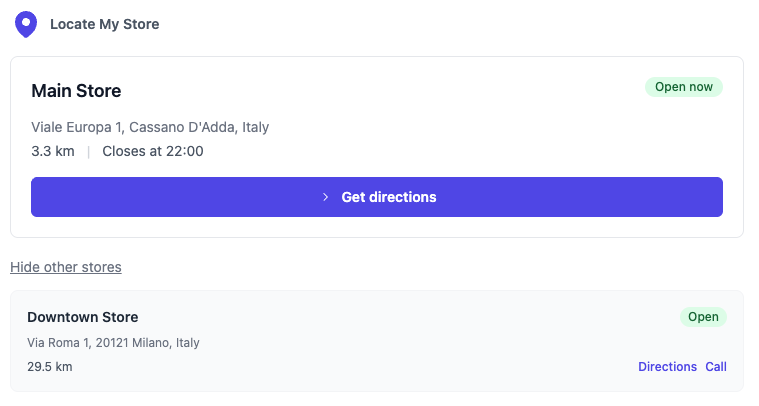
- Locate My Store: an embeddable store locator that points visitors to the right location
- pick an available date
- choose a time slot
- submit their details
- confirm a booking directly from your website
- open or receive a popup form on the page
- submit contact details or a short message
- complete a lead capture flow without leaving the website
- open a lightweight review form from the widget
- submit a star rating and written review without leaving the page
- add native reviews that you can moderate from the Jinkosoft dashboard
- point visitors to the most relevant store
- show key details such as address, distance, and opening status
- make it easy to start directions
- reduce friction for businesses with multiple locations
- Connect or create your Jinkosoft account directly from WordPress
- Enable the widgets you need from one plugin page
- Insert widgets with shortcode exactly where you want them
- Manage widget-specific settings such as form slug selection for Slotflow, Lead Capture Widget, and Review Widget
- Open the related Jinkosoft dashboard directly from WordPress
- Add a booking form to a sales page or contact page
- Use different Slotflow forms on different pages with shortcode attributes
- Add a popup lead capture form to landing pages or campaign pages
- Show testimonials and collect new reviews from the same embeddable review widget
- Show a store locator on location or visit-us pages
安装:
- Upload the
yps-bundlefolder to/wp-content/plugins/ - Activate the plugin through the Plugins menu in WordPress
- Open
Jinkosoftfrom the WordPress admin menu - Create an account or log in with your existing Jinkosoft account
- Click
TryorConfigureon the widget you want to use - Copy the shortcode and place it in the page, post, or block where the widget should appear
- For Slotflow, Lead Capture Widget, and Review Widget, select the form you want to display
屏幕截图:
常见问题:
Do I need a Jinkosoft account?
Yes. The plugin connects to Jinkosoft services, so you need a Jinkosoft administrator account to activate and configure the available widgets.
How do I display a widget?
You can:
- insert it with shortcode
- choose the exact page position where the widget should appear
[jinkosoft-slotflow form="demo-booking"]
[jinkosoft-lead-capture form="newsletter-popup"]
[jinkosoft-review-widget form="homepage-reviews"]
Will this plugin slow down my WordPress site?
The plugin is designed to stay lightweight on the WordPress side. It does not ship a large internal booking, lead capture, review, or locator application inside WordPress. Instead, it relies on the external Jinkosoft services and only loads the required embeddable widget scripts when the widget is actually used.
Does this plugin use third-party services?
Yes. This plugin relies on external services provided by Jinkosoft.
更新日志:
1.2.0
- Add Review Widget
- Add Lead Capture Widget
- Initial release: Locate My Store, Slotflow