
ZEJ Forms
| 开发者 | mzeeshanejaz786 |
|---|---|
| 更新时间 | 2026年7月26日 08:15 |
| PHP版本: | 7.4 及以上 |
| WordPress版本: | 7.0 |
| 版权: | GPLv2 or later |
| 版权网址: | 版权信息 |
详情介绍:
- Drag-free visual builder with a live canvas preview, plus Build, Design, and Settings modes.
- Field types: text, email, phone, textarea, select, radio, checkbox, consent, number, URL, date, time, and file upload.
- Per-field label, key, placeholder, required toggle, and choice options.
- Starter templates for Contact, Quote, Newsletter, and Support.
- Gutenberg block,
[zejfo_form id="1"]shortcode, and azejfo_render_form( 1 )template tag.
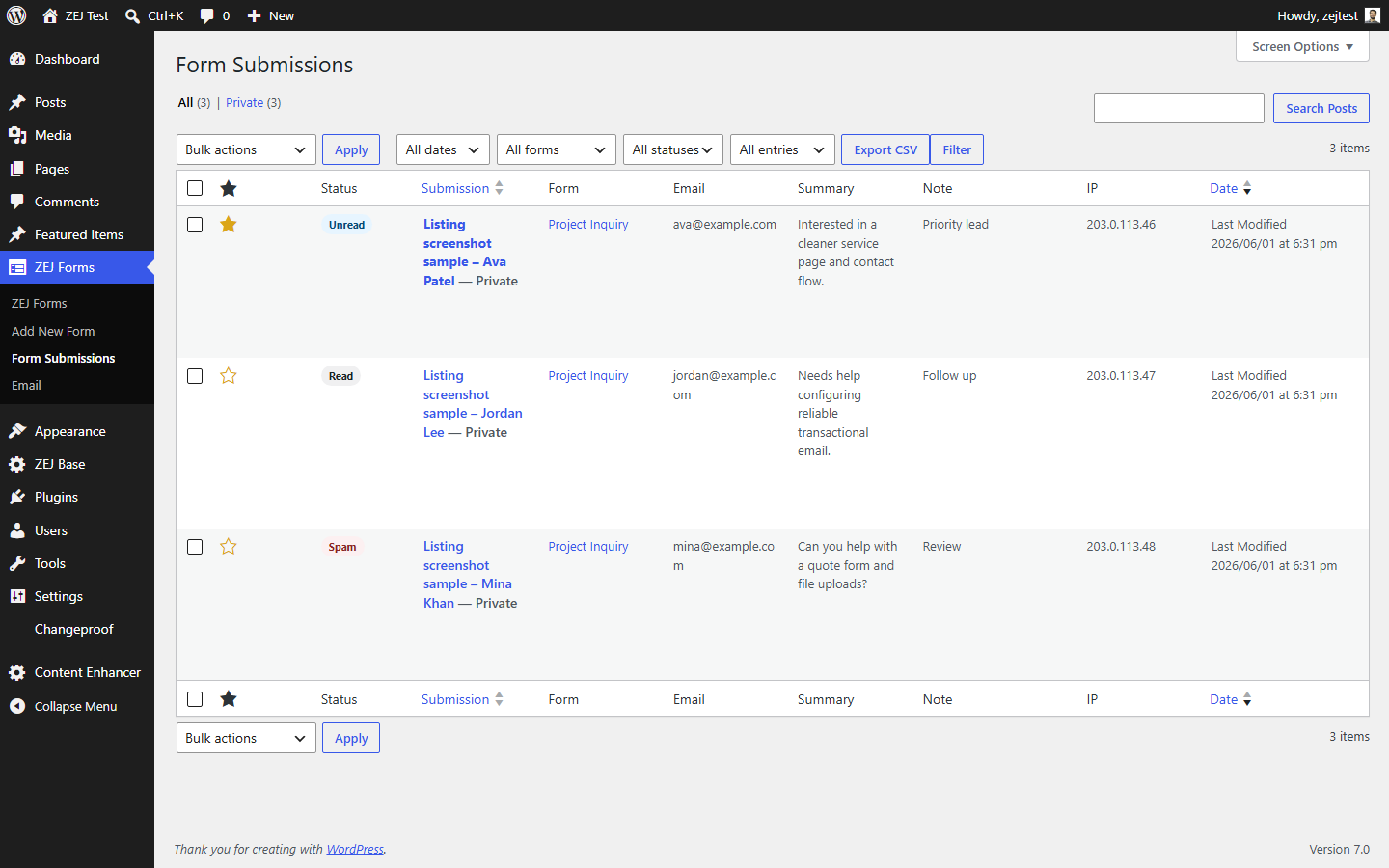
- Every submission can be stored in WordPress as a private entry - searchable, filterable, and exportable to CSV.
- Submissions are saved before the notification email is attempted, so a mail outage can never discard a real lead.
- If a notification email fails, the stored lead is flagged in the dashboard so you still see it.
- Read / unread / spam status, starring, internal notes, and bulk actions.
- Conditional visibility rules to show or hide fields based on other answers.
- Dynamic labels, placeholders, and required-state dependencies.
- Optional multi-step layout using per-field step numbers.
- Prefill from URL parameters, page context, post meta, or the logged-in user.
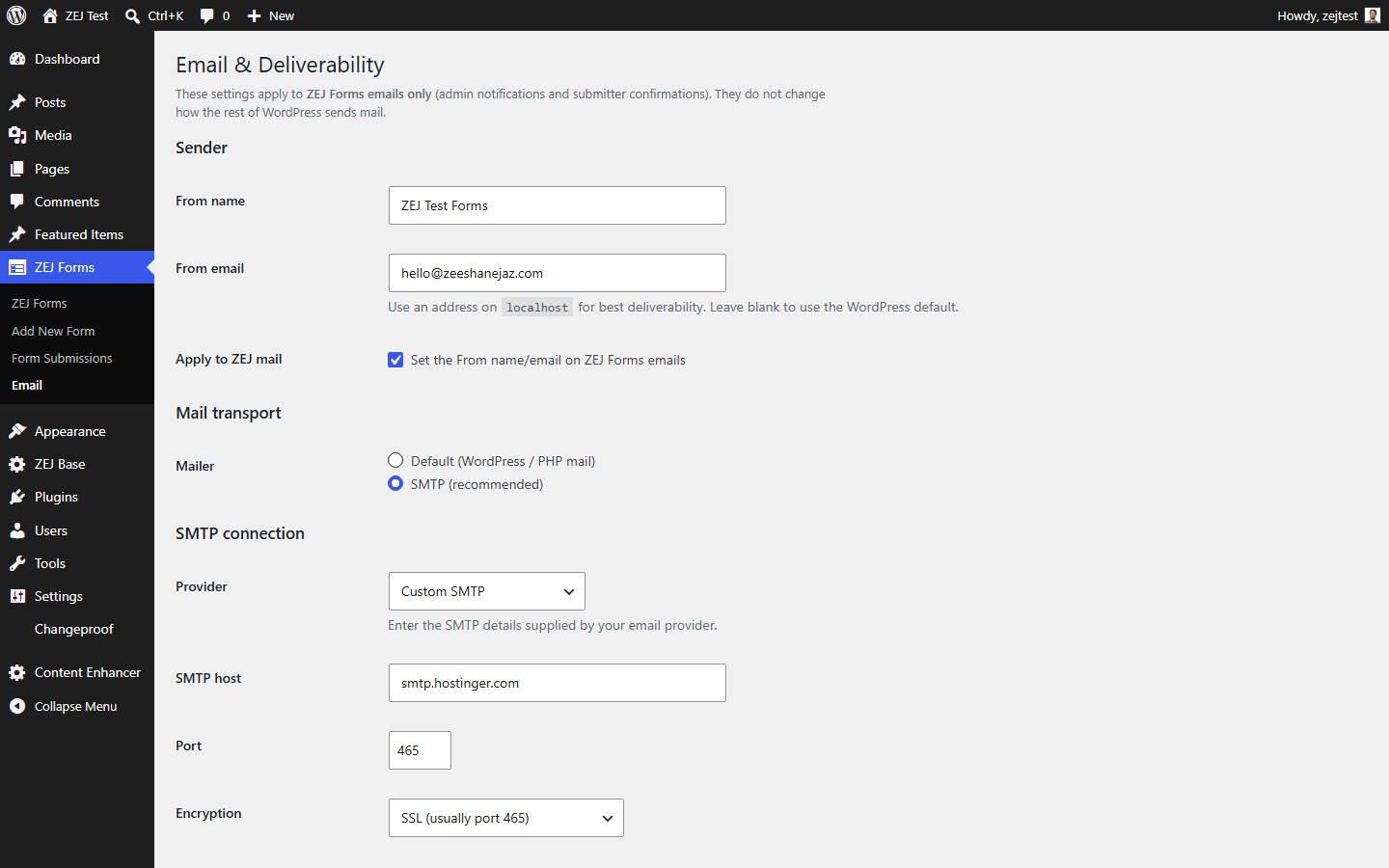
- Scoped SMTP that applies to ZEJ Forms email only - it never changes how the rest of WordPress sends mail.
- Provider presets for Gmail / Google Workspace, Brevo, SendGrid, Mailgun, and Postmark, plus custom SMTP.
- A branded From name and address, with the SMTP password encrypted at rest or supplied via the
ZEJFO_SMTP_PASSWORDconstant. - A deliverability check for From alignment, transport, SPF, and DMARC, and a test send that reports the real failure reason instead of a generic error.
- Optional confirmation email to the person who submitted the form, with HTML templates you can override from your theme.
- Honeypot field and a signed form-start timing check.
- Configurable minimum submit time and maximum link count.
- Per-IP rate limiting.
- Optional Akismet integration.
- Send submissions to a named webhook destination after a successful submission.
- Presets for Zapier, Make, n8n, Pabbly Connect, HighLevel, Google Sheets (Apps Script), HubSpot, and Kit.
- Field mapping, custom headers, HMAC-signed payloads, and test payloads.
- A built-in MCP endpoint: on WordPress 6.9 or newer, Claude Desktop, Cursor, and compatible MCP clients connect straight to ZEJ Forms with no additional plugins required.
- Two minute setup from ZEJ Forms > AI Access: the page checks the endpoint, creates a WordPress application password for you, and hands you ready-to-paste config for Claude Desktop and Cursor. Revoke the connection from the same page at any time.
- Registers ten abilities with the WordPress Abilities API, so any other MCP setup (including the official MCP adapter plugin) can expose them too; both can run side by side.
- Agents can list forms, read full form definitions, browse and count entries, export entries as CSV, and check the email deliverability status, including whether a notification email failed to send.
- A separate write switch under ZEJ Forms > AI Access, off by default, decides whether agents may create, update, and duplicate forms. Agents can never delete forms or entries.
- Entry lists leave out submitted values unless the agent asks for them explicitly, and secrets such as SMTP passwords, webhook keys, and API keys are never included in any response.
- A self-test button on the AI Access page runs two abilities through the real pipeline so you can see it working before connecting any AI.
- On WordPress older than 6.9 the plugin simply skips all of it; nothing breaks and nothing is exposed.
- Optional frontend stylesheet driven by
--zej-custom properties. - Nine presets plus per-form controls for layout, spacing, radius, button width and alignment, and colors.
- A Design canvas that previews your form as you adjust it.
- A personal-data exporter and eraser, integrated with WordPress' core privacy tools.
- Suggested privacy-policy text.
- Optional IP anonymization (
add_filter( 'zejfo_anonymize_ip', '__return_true' );). - A clean uninstall that removes the plugin's options, forms, and stored submissions.
安装:
- Upload the
zej-formsfolder to/wp-content/plugins/, or install the plugin through the Plugins > Add New screen. - Activate the plugin through the Plugins screen in WordPress.
- Open ZEJ Forms in the admin menu. A starter "Project Inquiry" form is created automatically.
- Add the form to a page with the ZEJ Form block, the
[zejfo_form id="..."]shortcode, orzejfo_render_form( $id )in a template. - Visit ZEJ Forms > Email to set a branded From address, optionally configure SMTP, and run the deliverability check.
屏幕截图:


常见问题:
Does ZEJ Forms guarantee my emails reach the inbox?
No - and be cautious of any plugin that claims it does. Inbox placement depends on your domain, DNS (SPF/DMARC), and sending reputation. ZEJ Forms gives you guided SMTP setup, a deliverability check, and a test send that reports the real error, so you can fix problems instead of guessing.
Are submissions saved even if the email fails?
Yes, when submission storage is enabled. The submission is stored before the notification email is attempted, and a failed notification is flagged on the saved entry. You will not lose a lead because of a mail problem.
Does SMTP affect the rest of my site's email?
No. ZEJ Forms' SMTP and custom From settings apply only to email that ZEJ Forms sends. WordPress core and other plugins continue to send mail exactly as before.
Will it work with my theme?
Yes. Forms render with semantic markup and minimal CSS. You can enable the optional stylesheet and presets, or style everything yourself using the .zej-form and #zej-form-{id} selectors.
Can visitors upload files?
Yes. Enable uploads per form and set a size limit and an allowed-extension list. Uploads are validated by extension and MIME type through WordPress' own upload handling.
How do I handle data export and deletion requests?
ZEJ Forms integrates with the WordPress privacy tools under Tools > Export Personal Data and Tools > Erase Personal Data, matching stored submissions by the submitter's email address.
Is there a Pro version?
The free plugin is designed to be complete for everyday contact and lead forms. Any future Pro features will ship as a separate add-on; the free plugin will not be crippled to push an upgrade.
更新日志:
- Fixed: on themes that set a display property on containers, multi-step forms showed every step at once and conditional fields were all visible, because a theme rule could override the hidden attribute. Hiding is now enforced.
- Fixed: a form could not be saved in the builder. The inline preview kept its required attributes, so the browser refused to submit the editor until every previewed field was filled in.
- Fixed: preview fields no longer carry submitting names, so a field keyed post_title or post_status can no longer overwrite the form post when you save.
- Fixed: conditional rules were discarded whenever a field row was rebuilt (AI import, template apply, duplicate field). The rule survived in storage but was wiped from the row before saving.
- New: checkbox fields with options are now real "tick all that apply" groups. Previously a checkbox ignored its options, rendered a single yes/no box, and stored only "Yes". Ticked values are stored and can be matched with the "contains" rule. Consent and option-less checkboxes are unchanged.
- New: build a form with your own AI. The builder's Templates & AI tab gives you a prompt to paste into any AI chat and takes the JSON back, including conditional logic, steps and settings. Nothing is sent anywhere by the plugin, and it works on free AI plans with no connection to set up.
- New: starting a form opens a template picker (Contact, Quote request, Booking inquiry, Newsletter, or start blank), and field rows keep only the common settings on the main path.
- Security baseline is now on by default: new blank-built forms get the time-trap/signature check and the per-IP rate limit without any configuration. Forms started from a template already carried this on.
- Every blocked submission (honeypot, time-trap, rate limit, link-count, or spam provider) is now counted, and a new "Spam Blocked" dashboard widget shows the current month's total with a reason breakdown.
- Hardened submission handling: an array sent for a normally single-value field is flattened instead of tripping a PHP notice, and text/textarea values are capped in length before storage.
- Fixed: style presets were never applied in the editor preview because the class names were generated malformed.
- Built-in MCP endpoint at zej-forms/v1/mcp: initialize, ping, tools/list, and tools/call over JSON-RPC, exposing the ten ZEJ Forms abilities to Claude Desktop, Cursor, and compatible clients with no additional plugins.
- One-click connection flow on the AI Access page: mints a WordPress application password, shows ready-to-paste Claude Desktop and Cursor config once, and lists existing connections with a revoke button.
- Connection status on the AI Access page: endpoint URL, a live loopback check that verifies the route answers and requires authentication, an application password availability check with the exact fix for local http sites, and a plain warning when the site runs over http.
- Self-test button: runs list-forms and get-email-status through the real ability pipeline in the browser, no AI involved.
- Write tools called over MCP while the write switch is off now receive the full explanation of how to enable it, instead of a bare permission denial.
- Uninstall also removes the application passwords the connection flow created.
- AI operable forms: registers ten abilities with the WordPress Abilities API (WordPress 6.9+), covering forms, form definitions, entries, entry counts, CSV export, and the email deliverability status.
- Write abilities (create, update, and duplicate form) sit behind a new AI Access switch that is off by default; read abilities run under the same capability checks as the admin screens.
- New AI Access admin page under ZEJ Forms shows whether the Abilities API is present, which abilities are registered, and holds the write switch.
- Privacy by default: entry lists return metadata only unless field values are explicitly requested, and SMTP passwords, webhook secrets, and API keys are never included in ability responses.
- Forms created or updated by agents use the exact meta format of the visual builder, so they open and edit normally.
- On WordPress without the Abilities API, registration is skipped cleanly and the plugin behaves exactly as before.
- WordPress.org review: replaced the short pre-review code prefix with the canonical
zejfo_/ZEJFO_prefix across PHP functions, constants, options, meta keys, AJAX actions, hooks, shortcode, custom post types, script handles, and JavaScript globals. - Migration: existing local/test form and submission data is migrated from the old prefix to the canonical prefix without deleting legacy data.
- Quality: added JavaScript file documentation headers and normalized frontend asset line endings for PHPCS/WPCS compliance.
- WordPress.org compliance hardening: nonce verification, input sanitization, and output escaping across all forms, handlers, and settings.
- Privacy: complete personal-data exporter and eraser integration, privacy-policy content, and opt-in IP anonymization.
- External services disclosure: explicit documentation of Akismet and webhook integrations with privacy policies and terms of service links.
- Security: SMTP password encryption, encrypted-at-rest storage, and optional environment-variable configuration via ZEJFO_SMTP_PASSWORD constant.
- Code quality: comprehensive PHPCS/WPCS cleanup across all 20 production PHP files (WordPress, Extra, Core, Docs standards).
- Documentation: complete PHPDoc on every function with @since 0.4.0, @param, and @return annotations.
- No functional changes; 0.4.1 is a pure compliance and documentation polish for WordPress.org readiness.
- Visual builder with a direct-manipulation canvas: per-field toolbar (move, duplicate, delete) and between-field inserters.
- Stronger canvas empty state and starter templates with intent copy and field previews.
- Email and Deliverability: scoped SMTP, provider presets, encrypted password storage, deliverability check, and a test send that reports the real error.
- Submissions are stored before the notification email is attempted, so a delivery failure never loses a lead; undelivered notifications are flagged on the entry.
- Privacy: personal-data exporter and eraser, suggested privacy-policy content, and opt-in IP anonymization.
- Hardened CSV export against spreadsheet formula injection.
- Added a clean uninstall routine.