
zimpliScribe
| 开发者 | zimplico |
|---|---|
| 更新时间 | 2026年6月1日 23:56 |
| PHP版本: | 7.4 及以上 |
| WordPress版本: | 7.0 |
| 版权: | GPLv2 or later |
| 版权网址: | 版权信息 |
详情介绍:
- Content Tool — text + intent prompt + suggestion chips (Proofread, Translate, Make shorter / longer). Combine chips as you go.
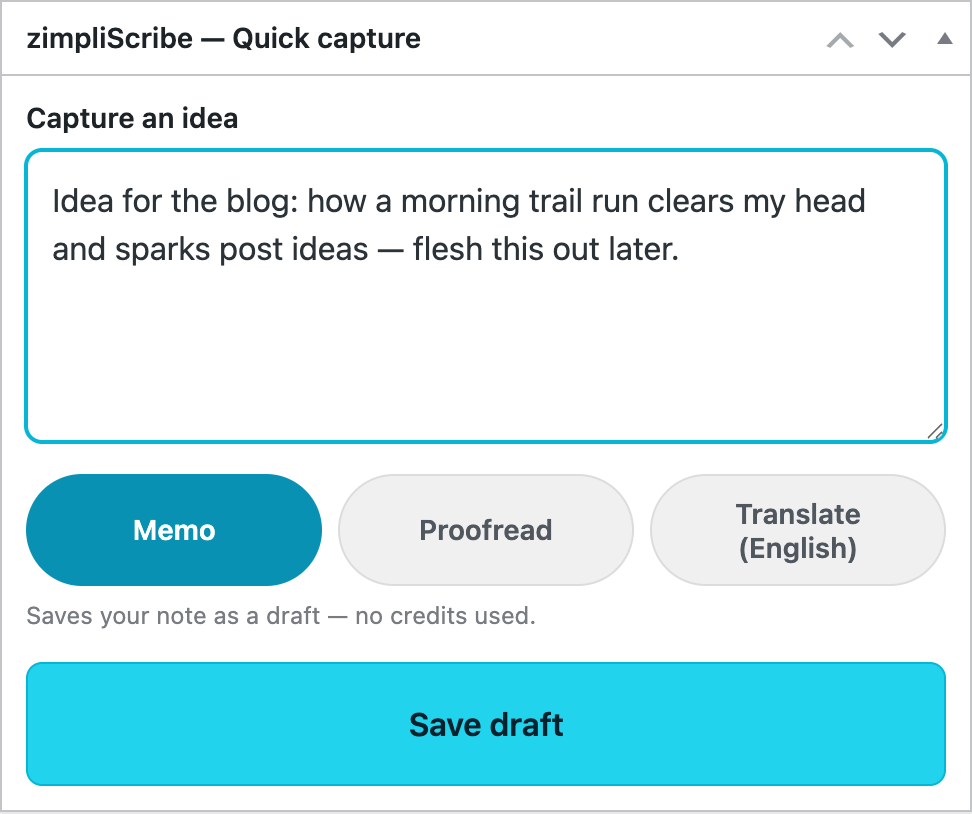
- Quick Capture — a simplified, voice-friendly box (Memo · Proofread · Translate, then Save Draft) as a Dashboard widget and the default view on mobile. Record quick drafts from anywhere, hands-free with your keyboard's dictation.
- Image input — attach any image from the WordPress media library, or upload directly (mobile camera supported via OS picker). Sent alongside your text.
- Insert image — adds attached images to the result as Markdown links; resolves to real
<img>tags when saved. - Maximize mode — give the result panel the full width when you're reviewing long output.
- Save as Draft — create a WordPress post or page directly from the result.
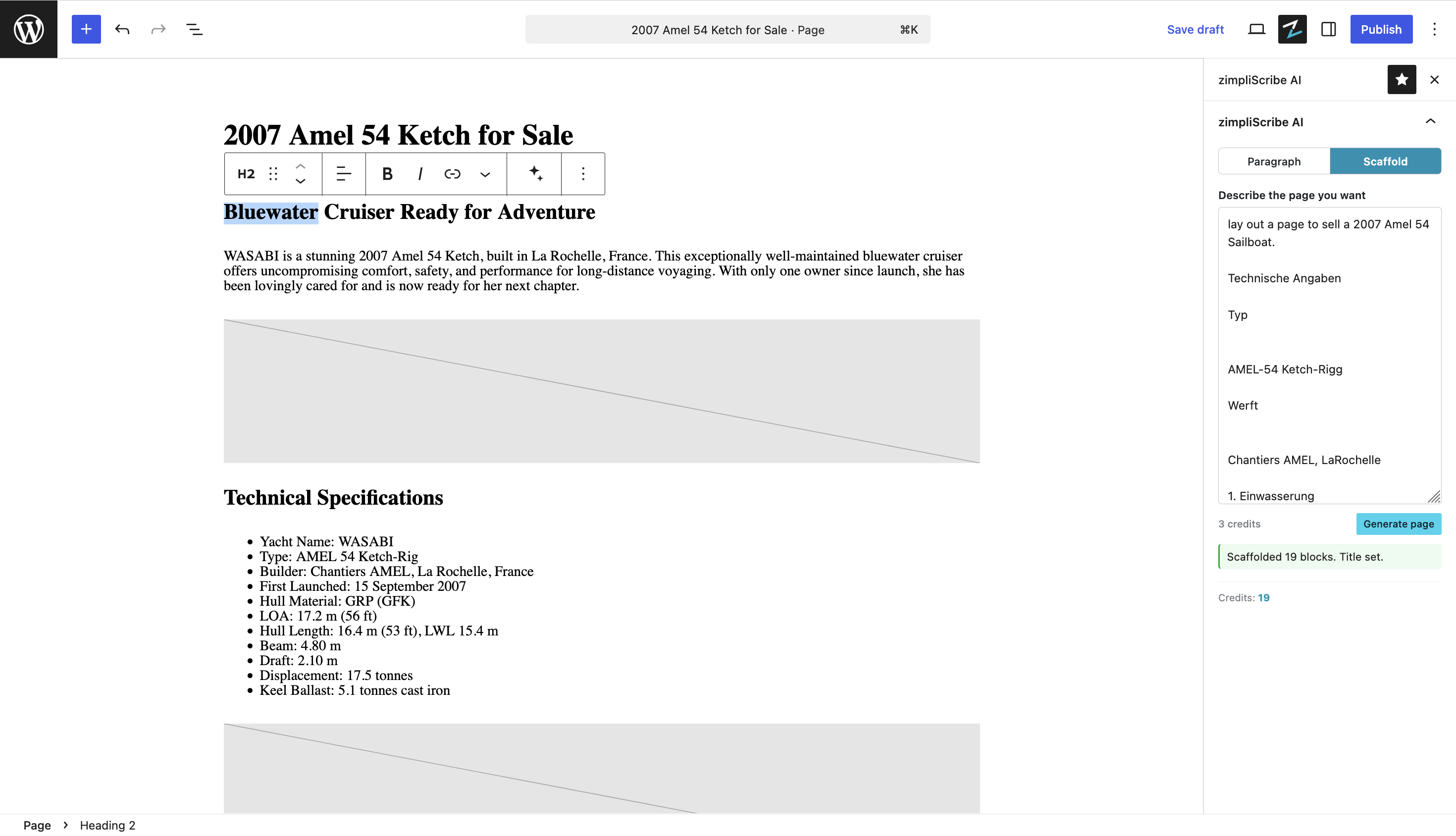
- Gutenberg sidebar — work on selected blocks: Send to AI, Replace Block, Insert After.
- Per-site credits widget — current balance and renewal date in the admin header.
- Install and activate the plugin.
- Visit WP admin → zimpliScribe → Register Site. The plugin generates a one-time challenge token.
- The API verifies the token by calling back to your site's public REST endpoint — same approach as Let's Encrypt's HTTP-01 challenge.
- Your site goes active with 25 welcome credits plus 5 free every month.
- Use the Content Tool tab or the Gutenberg sidebar.
site_id that the API validates per-request against the registered domain via the browser's Origin header.
Privacy
Text and images submitted via zimpliScribe are sent to the zimplico.de API and forwarded to the AI provider for processing. Content is not stored long-term by zimplico.de — see the privacy policy at https://zimplico.de/privacy.html for specifics on retention, processing, and provider details.
External services
This plugin relies on external services to provide its functionality. No data is sent before you actively register your site, and no AI request is sent until you submit one.
zimplico.de API (https://api.zimplico.de/zimpliscribe)
- Purpose: site registration, credit accounting, AI request proxying, and billing portal links.
- Data sent: site URL (during registration), opaque per-site token (on every request), the text and any images you submit for processing.
- When sent: registration is triggered when you click Register Site. AI requests are sent only when you click Send to AI or Generate page.
- Terms of service: https://zimplico.de/terms.html
- Privacy policy: https://zimplico.de/privacy.html xAI Grok (https://api.x.ai)
- Purpose: AI model that processes your text and image prompts. zimplico.de forwards your request to xAI on your behalf — the plugin does not call xAI directly and no xAI credentials are stored in WordPress.
- Data sent: the text and any images included in your AI request, plus an internal system prompt.
- When sent: only when zimplico.de receives an AI request from your site.
- Terms of service: https://x.ai/legal/terms-of-service
- Privacy policy: https://x.ai/legal/privacy-policy
- No AI provider API keys are ever held in WordPress.
- No personal data about WordPress users (authors, admins, commenters) is sent — only the content you explicitly submit in the plugin UI.
安装:
- Upload the
zimpliscribefolder to/wp-content/plugins/, or install through the WordPress plugin directory. - Activate the plugin from the Plugins menu in WordPress.
- Go to zimpliScribe → Register Site and click Register.
- Wait for the API to verify your domain (a few seconds).
- Open any post in the Gutenberg editor and look for the zimpliScribe panel in the sidebar.
屏幕截图:


常见问题:
Do I need an OpenAI / xAI / Anthropic account?
No. The plugin connects to zimplico.de, which handles AI provider relationships and billing on your behalf. You only need a zimplico.de account, which is created automatically when you register your site.
How much does it cost?
Every new site gets 25 welcome credits (non-expiring) plus 5 free credits a month. Beyond that, top up via the billing portal — current per-credit pricing is shown at registration time and on the billing page.
What happens if I run out of credits mid-request?
The plugin will display the response from the API and offer a link to the billing portal in a new tab. Your in-progress text is preserved.
Can I use my own AI provider key instead?
No — that's the point. Provider keys live server-side at zimplico.de, where they can be rotated and monitored centrally. WordPress never holds AI credentials.
Does this work with non-Gutenberg editors?
The dedicated zimpliScribe admin page works regardless of editor. The Gutenberg sidebar requires the block editor.
Does it work on multisite?
Each site in a multisite network registers separately and has its own credit balance. The plugin will be activatable network-wide in a future release.
更新日志:
- Fix a rendering artifact in the admin menu icon (a stray triangle in the top of the Z), caused by WordPress recoloring SVG menu icons. The brand mark is now built from clean closed shapes.
- New Quick Capture: jot an idea fast — a dictation-friendly box with Memo (saves a free draft), Proofread, and Translate, plus one big Save Draft button. It appears as a Dashboard widget (pinned to the top) and becomes the default view when you open the plugin on a phone, so you can record quick drafts from anywhere — hands-free with your keyboard's voice dictation.
- Updated the credits information for the current model: a 25-credit welcome bonus plus 5 free credits every month, with your welcome, purchased, and gifted credits never expiring. The header credits breakdown now labels the non-expiring balance as "saved" rather than "paid."
- Add a one-time, dismissible review request that appears only after several successful generations — never before you've gotten value — linking straight to the WordPress.org reviews page. "Maybe later" snoozes it; dismissing hides it for good.
- Polished the plugin directory icon and refined the listing description.
- Fix a fatal error on the admin screen: a botched escaping pass had mangled every
esc_attr_e()into the non-existentesc_attresc_html_e(), which crashed the Content Tool / Settings / Contact tabs (and prevented site registration, since the page died before its JavaScript loaded). Restored toesc_attr_e(). - Brand refresh of the admin screen: the Split-Z mark and a two-tone wordmark now lead the page header, the menu icon is the brand mark, and the slate + cyan palette replaces the stock-WordPress blue across the credits widget, status badges, tabs, suggestion chips, mode toggle, and primary buttons.
- Block editor: the sidebar panel is rebranded to the same slate + cyan palette (including Gutenberg's own buttons and focus states), its toolbar/menu icon is now the Split-Z brand mark instead of a generic pencil, and the Settings tab explains how to reopen and pin the panel from the editor's Options menu.
- Move
/* translators: */comments to sit immediately above their__()calls insidewp_kses()wrappers, so the WPCS i18n sniff picks them up. No functional or text changes.
- WordPress Coding Standards pass: escape all
_e()output withesc_html_e(); wrap intentional inline HTML strings withwp_kses(__()); add/* translators: */comments for placeholder-bearing translations;wp_unslash()superglobals before sanitization; cache attachment-by-filename lookup. No functional changes.
- API base URL bumped to
https://api.zimplico.de/zimpliscribe(was…/zimplscribe) to match the renamed Go service. Pairs with the 1.14.0 plugin rename; both ends now use the consistentzimpliscribepath.
- Plugin renamed to
zimpliscribethroughout (folder, file names, Text Domain, internal identifiers) to match the brand and the wordpress.org slug. Breaking change for sites running the devzimplscribeversion: deactivate and delete the old plugin folder, install fresh, and re-register the site. WP options (zimplscribe_*→zimpliscribe_*), REST namespace (zimplscribe/v1→zimpliscribe/v1), and AJAX action names were all renamed; the previous installation's stored data is not migrated.
- English-language Privacy Policy and Terms of Service published at https://zimplico.de/privacy.html and https://zimplico.de/terms.html — plugin disclosure and imprint links now point at these.
- Remote API calls now verify TLS certificates (removed legacy
sslverify => falsefrom all wp_remote_* calls).
- Inline disclosure on the Register Site screen explaining what data is sent to the zimplico.de API and when.
- Imprint links updated to point to the live (German) Terms and Privacy pages; English translations in progress.
- Stability and UX improvements in the content tool result panel.
- Image input + insert-image support.
- Gutenberg sidebar with Use Selected Block / Send to AI / Replace Block / Insert After.
- Initial public release.