ABCode Cache Warmer
| 开发者 | ashbrentnall |
|---|---|
| 更新时间 | 2026年8月19日 02:01 |
| 捐献地址: | 去捐款 |
| PHP版本: | 7.4 及以上 |
| WordPress版本: | 7.1 |
| 版权: | GPLv2 or later |
| 版权网址: | 版权信息 |
详情介绍:
- Warmed: the page was not cached, and now it is
- Cached: it was already warm, nothing to do
- No cache: the page is deliberately uncacheable, such as a cart or checkout
- Failed: shown with the actual error
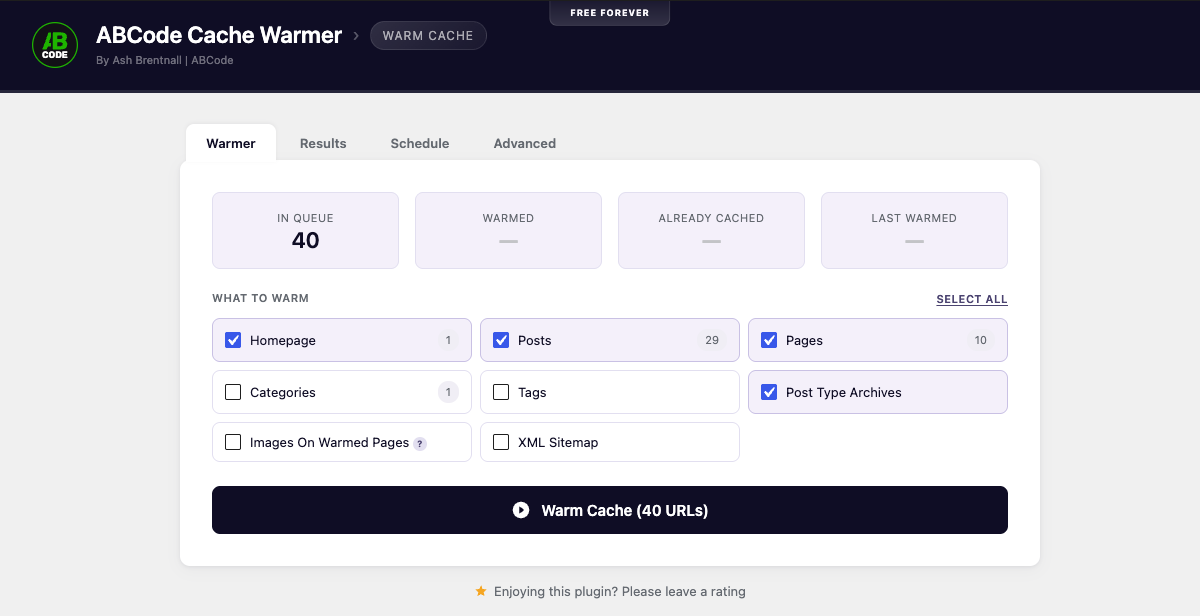
- Homepage
- Posts, pages and any public custom post type, all on by default
- Post type archives such as /products/ or /portfolio/, plus your blog page
- Category, tag and custom taxonomy archives
- Attachment pages
- Images referenced by the pages being warmed
- Your XML sitemap, core, Yoast or Rank Math
- Any extra URLs you add by hand
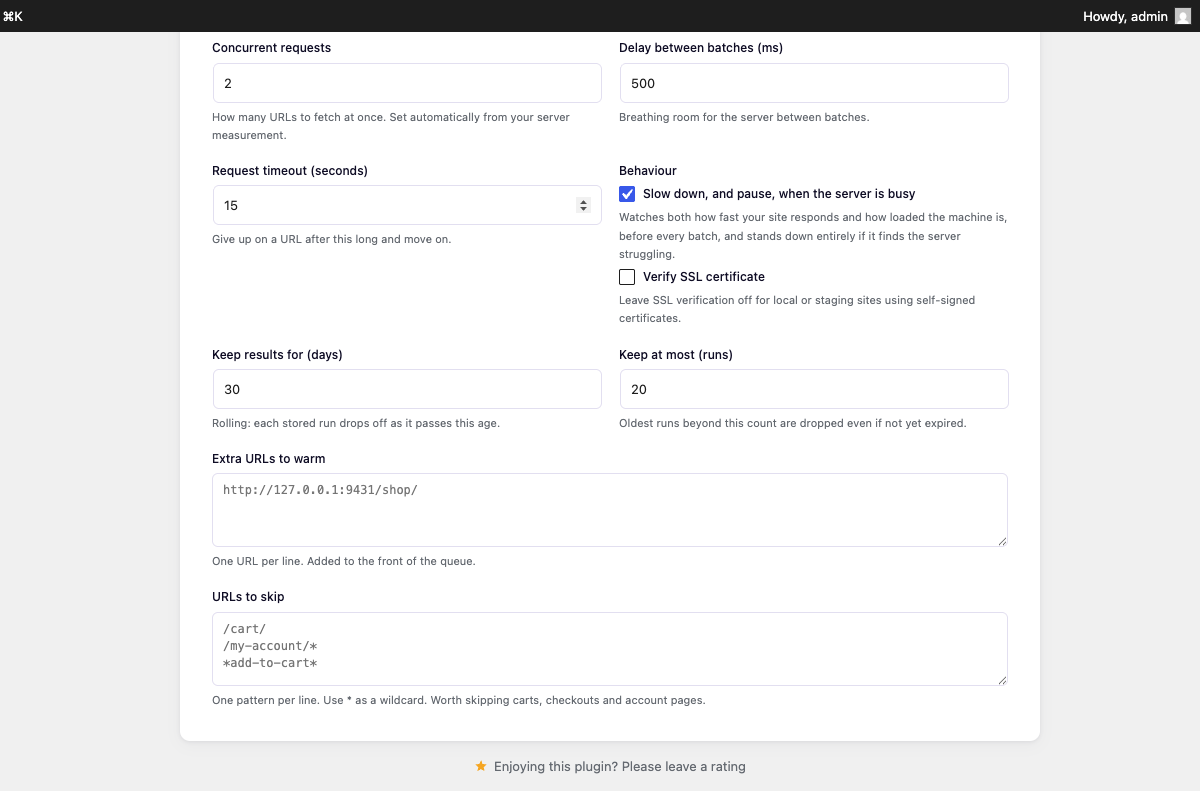
* as a wildcard, useful for carts, checkouts and account pages that should never be cached anyway.
About images
Warming raw image files is usually pointless, and this plugin does not push you into it. Image files are served straight off disk by your web server with no PHP involved, so there is no cold cache to prevent.
There is one case where it genuinely helps: plugins that build each image on first request, such as ShortPixel Adaptive Images, Optimole, EWWW Easy IO, Jetpack or a WebP/AVIF converter. There, the first visitor really does wait for the conversion.
For that case the plugin takes a smarter route than crawling your media library. It reads the image URLs out of the HTML it has already downloaded while warming your pages, so it warms exactly the files (and exactly the responsive sizes) your live pages reference, rather than thousands of library items no page uses. Images are always queued behind every page, and capped per run so an image-heavy site cannot drown out the page warming.
Free forever
No URL limits. No locked features. No upsells. The whole plugin does the whole job.
Who made this
ABCode builds and maintains this plugin. If your site needs more than a warm cache, we also do WordPress speed optimisation as a service. The plugin stays free and complete either way.
安装:
- Upload the plugin folder to
/wp-content/plugins/, or install it through the Plugins screen. - Activate it.
- Go to Tools → Cache Warmer.
- Pick what to warm and press the button.
屏幕截图:
常见问题:
Does this replace my caching plugin?
No. It works alongside whatever cache you already run. Your caching plugin builds and serves the cache; this plugin makes sure the cache exists before a visitor needs it.
Do I need to leave the page open?
No. While the tab is open the browser drives the run, which is the fastest option and gives you live results. Close the tab and WP-Cron takes over, so the run keeps going in the background. Come back later and the page picks up exactly where it got to, you never have to start again. Background progress depends on WP-Cron. The Schedule tab checks whether cron is actually being serviced rather than guessing from configuration: DISABLE_WP_CRON with a server cron running wp-cron.php (the setup most managed hosts use) is reported as healthy, and a warning only appears when scheduled tasks are genuinely overdue and nothing is firing them.
Can it warm on a schedule?
Yes. The Schedule tab runs warming every hour, twice a day, daily or weekly, using whichever sources you picked on the Warmer tab. Daily, twice-daily and weekly runs fire at a time you choose, in your site's timezone (most sites want the early hours, so 3am is the default) and weekly runs on the day you pick. Twice-daily runs at the two times you choose, they need not be twelve hours apart. Purge-triggered warming deliberately has no quiet-hours setting: a purge means the cache is cold right now, and making visitors wait until 3am for warm pages would defeat the point. The load-aware throttling is what keeps that immediate response polite.
Does it warm automatically when I clear my cache?
Yes, and it is on out of the box, that is the whole point of the plugin. Clear your cache and, a minute later, the warmer starts rebuilding it, so the cold window closes before your visitors find it.
It listens for the purge actions fired by WP Rocket, LiteSpeed Cache, W3 Total Cache, WP Super Cache, WP Fastest Cache, Cache Enabler, SiteGround Optimizer, Breeze, Hummingbird, WP-Optimize, Nginx Helper and Autoptimize. The Schedule tab shows which of those it found on your site.
StackCache on 20i hosting is fully supported, by a different route: it fires no purge action of its own, so the warmer hooks the exact events its source purges on. A full purge, switching theme, saving the Customiser, activating or deactivating a plugin, or pressing StackCache's own Purge Cache button in the admin bar or its settings page, triggers a full warm. Its single-page purges are matched with single-page warms: the publish trigger covers edits, and an approved comment re-warms just the page it landed on.
Purges that announce themselves are caught instantly. For the ones that do not, StackCache's own purge button, a host clearing the cache at server level, an eviction, a watchdog checks the cache every ten minutes by fetching your homepage and reading the same cache headers the warmer reads. A cold homepage alone is never trusted as proof of a full purge: the watchdog confirms against sentinel pages spread across the site, saved from your last run. Only a quorum of them also being cold starts a full warm, a single purged or evicted page stays a local event, and the checks themselves will have re-warmed it. However the cache gets emptied, the cold window is minutes, not until the next schedule.
Using something else? Any cache that fires an action when it clears can be wired in with one line:
add_filter( 'abcw_purge_hooks', function ( $hooks ) { $hooks[] = 'my_cache_cleared'; return $hooks; } );
Can I see what was warmed after the fact?
Yes. The Results tab lists every retained run (when it ran, what triggered it, and how it went) and each one expands to its full per-URL results: what happened to every URL, which cache layer answered, and the time of day it was warmed. Every URL is a link that opens in a new tab, so chasing down a failure is one click. The newest run opens itself. You choose how long runs are kept, in Advanced settings: an age in days and a maximum count. Retention is rolling, each stored run drops off individually as it passes the age you set, rather than being wiped in bulk. Nothing here needs a database table.
What happens when only one page is cleared?
Only that page gets warmed. Fixing a typo clears one page, so recrawling the whole site would be absurd, the warmer just re-requests the page that went cold, as a single request, entirely separately from the full-run machinery. Only a site-wide purge starts a full run. Publishing works the same way: it warms the post plus the pages that list it, your homepage, its post type archive, and your blog page if you use a static front page. An approved comment (which most page caches silently purge the post for) re-warms just that one page, under the same setting. Targeted warms are logged on the Results tab like any run, bucketed by the hour, so what was re-warmed after each edit stays answerable. The publish trigger matters most on hosts whose cache clears edited pages silently, such as StackCache on 20i: there is no purge action to hear, so without the publish trigger a saved post simply stays cold until something else warms it.
What stops it warming over and over?
Two things. A burst of purges (a bulk edit fires one per post) folds into the single run already waiting, and a five minute cooldown stops a site that purges constantly from crawling itself back to back. The wait before warming is adjustable on the Schedule tab, and the cooldown is filterable with abcw_auto_cooldown.
What happens if my server rate limits the warmer?
The warmer backs off and retries, rather than ploughing on. An HTTP 429 is treated as an instruction, not a failure: the refused URLs go back on the queue for up to two more attempts, the crawl drops to one request at a time with a full second between, and the run stands down for the server's Retry-After window (a minimum of thirty seconds) before trying again. A URL still refused after three attempts is marked failed with a note suggesting lower concurrency. Instantly rejected requests are also kept out of the speed measurements, so a burst of rejections cannot trick the adaptive throttle into thinking the server is fast.
Will this inflate my analytics?
Google Analytics, Matomo, Plausible, Fathom and anything else JavaScript-based will not see the warmer at all. Those tools count a visit when their script runs in a browser; the warmer downloads HTML and never executes JavaScript, so no tracking ever fires. It cannot trigger ad impressions for the same reason.
Server-side counters are the exception. Tools that count visits in PHP or from server logs (WP Statistics, log analysers, hosting bandwidth graphs) will see the warming requests, and only on cache misses, since a cache hit never reaches PHP. To make filtering easy, every warming request carries a DNT: 1 header, which privacy-respecting analytics plugins already honour, and an X-ABCode-Cache-Warmer header that log tooling can exclude on. The abcw_request_headers filter adjusts them.
Will this slow my site down?
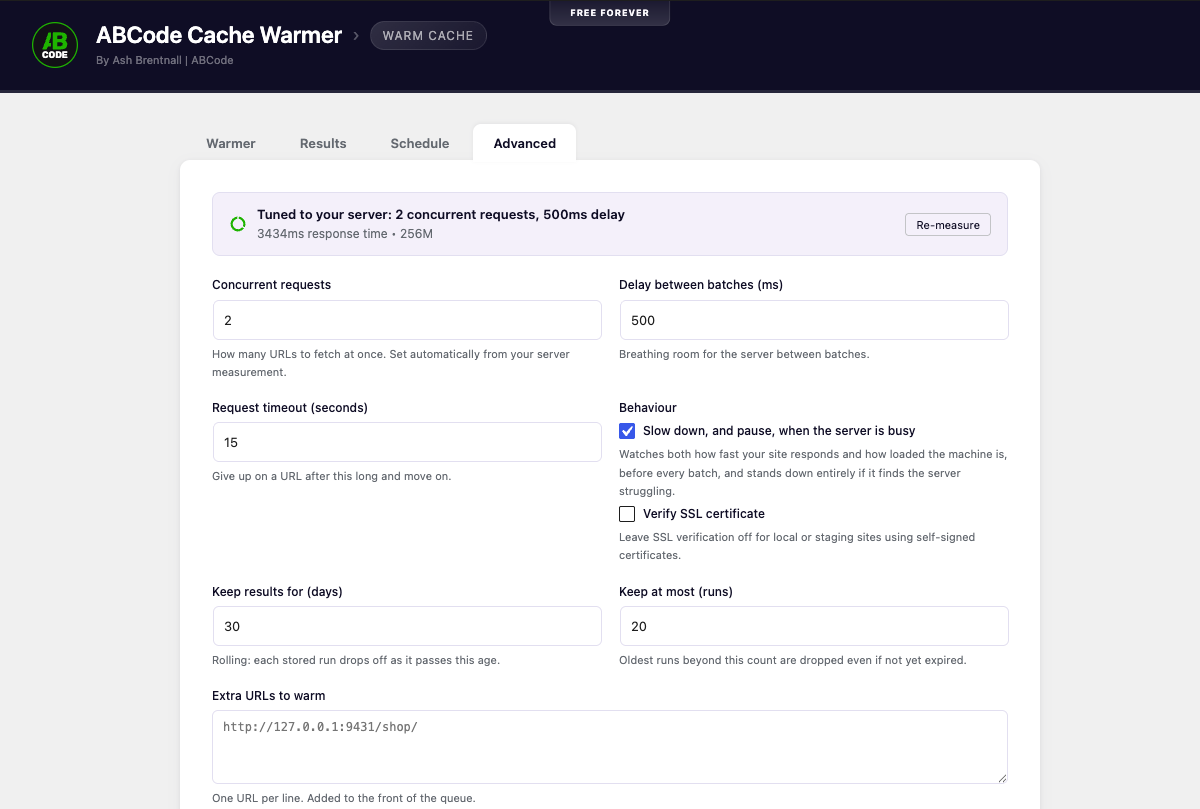
Warming adds no work overall. Every cold page has to be rendered exactly once by somebody, warming only decides that it is the warmer that waits for it rather than a visitor, and lets you choose when. The only genuinely extra work is rendering pages nobody would have visited before the cache expired anyway. While a run is going, the load it adds is simply your concurrency setting: five concurrent requests is five simultaneous visitors, no more. Everything else the plugin does is rounding error next to that. It is also careful about when it does it. Before every batch it checks both how fast your site is responding and how loaded the machine actually is, and scales itself down accordingly, down to a single request at a time, and to a complete standstill if the server is genuinely struggling, resuming once it recovers. Those are two different signals on purpose: on shared hosting the box can be flat out serving someone else while your site still answers quickly. The one thing it cannot see is how many PHP workers your host gives you. If that number is small, set the concurrency by hand: 2 on entry-level shared hosting, 4 or 5 on a decent VPS, 8 or more on a dedicated server.
Is a repeat run as expensive as the first?
No, far cheaper. An already-warm page returns a cache hit that never touches PHP, so a scheduled run over a warm site costs a fraction of the first crawl. The expensive case is a run straight after a full purge, when everything is cold, which is exactly why the automatic run waits before it starts, and why on a large site it is worth pushing that wait up to several minutes.
Why is SSL verification off by default?
Local and staging sites very often use self-signed certificates, and verification would make every request fail there. The plugin only ever requests URLs on your own domain, so this is low risk, but you can turn verification on in Advanced settings.
Should I warm my images?
Probably not. Warming a page caches that page's HTML, it does not fetch the images on it, because only a real browser does that. If your images are ordinary files, your web server sends them without touching PHP and there is nothing to warm. Turn images on only if you run a plugin that generates images on first request (ShortPixel Adaptive Images, Optimole, EWWW Easy IO, Jetpack, or a WebP/AVIF converter). On a site with many thousands of images, warm the pages and leave images off.
Some URLs report "No cache", is that a problem?
No. It means the page is intentionally excluded from caching, which is correct behaviour for carts, checkouts, account pages and anything personalised. Add those to the skip list to keep them out of future runs.
Does it work with a page builder / WooCommerce / multisite?
Yes. Any public post type is warmable. On WooCommerce, add /cart/, /checkout/ and /my-account/* to the skip list. On multisite, each site has its own settings and runs independently.
更新日志:
- German, Spanish, French, Italian and Brazilian Portuguese translations, plus the .pot template for anyone translating into another language.
- Added the Domain Path header, which is what tells WordPress where the bundled translations live.
- No change to warming behaviour.
- Automatic warming the moment your cache is cleared, with built-in support for WP Rocket, LiteSpeed Cache, W3 Total Cache, WP Super Cache, WP Fastest Cache, Cache Enabler, SiteGround Optimizer, Breeze, Nginx Helper and Autoptimize.
- StackCache (20i) support, verified against its source: the exact events it purges everything on, plus instant detection of its own Purge Cache button in both the admin bar and its settings page. Approved comments (which silently purge the commented page) re-warm that page under the publish trigger.
- A cache watchdog: every ten minutes the homepage's cache headers are checked, and a cold result is confirmed against sentinel pages across the site before a full warm is started, catching purge buttons, server-level clears and evictions that no WordPress hook announces, without ever launching a site-wide crawl over one cold page.
- Single-page purges warm just that page instead of starting a full run.
- Publishing warms the post plus the pages that list it, rather than the whole site.
- Load-aware throttling: server load is checked before every batch, scaling concurrency down and pausing the run outright when the machine is under real pressure.
- Optional trigger for when content is published or updated.
- New Results tab: every retained run is kept in full and expands to its complete per-URL results, with a warmed-at time against every URL and each URL clickable in a new tab. Retention is rolling and yours to set, an age in days and a maximum run count, with old runs dropping off one at a time as they expire.
- Select all / Clear all for the warming sources.
- Repeat purges fold into one run, with an adjustable delay and a cooldown so a busy site cannot crawl itself back to back.
- Results now appear one URL at a time as each response lands, rather than a batch at a time.
- Scheduled runs now fire at chosen clock times in the site's timezone, daily at a time you pick, twice daily at two independent times, weekly on a chosen day, instead of whenever the setting happened to be saved.
- The WP-Cron notice now measures instead of assumes: DISABLE_WP_CRON with a working server cron is reported as the healthy setup it is, and the warning is reserved for cron queues that are genuinely overdue.
- Rate limiting (HTTP 429/503) is now handled properly: refused URLs are retried after the server's Retry-After window instead of being written off, the crawl drops to a gentle single request while limited, and a run can no longer burn through its queue at full speed against a server that is rejecting everything instantly.
- Broader cache detection: Varnish transaction IDs, Batcache, Sucuri, QUIC.cloud, the standard RFC 9211 Cache-Status header, Cloudflare's stale/updating/revalidated states, and page signatures for WP Fastest Cache, Breeze and WP-Optimize. Origin-level hits are no longer masked by an edge cache reporting a miss in front of them.
- Purge listening added for Hummingbird and WP-Optimize, and the LiteSpeed purge hooks corrected to the names LiteSpeed actually uses.
- Cache layers are now detected outermost-first, so an edge hit is no longer misread as a fresh warm just because it carries the origin's frozen MISS header from when the entry was built. Affected 20i (StackCDN over StackCache) and Cloudflare-over-LiteSpeed setups.
- StackCache and StackCDN cache headers are now read properly, so 20i sites report real hit/miss results instead of assuming every response was a fresh render.
- The adaptive throttle no longer mistakes heavy pages for a struggling server. Its response-time baseline now drifts with the site instead of being frozen at the first batch, a run that starts on light pages and reaches a heavy section backs off briefly, re-baselines, and comes back to full speed, instead of crawling the rest of the site at one URL at a time.
- A run on a busy shared server no longer stalls indefinitely: after a few attempts at waiting for the load to drop, it crawls at one URL at a time rather than never finishing.
- Page builder template post types (Elementor, Beaver Builder, Divi, Oxygen, Brizy) are no longer offered as warming sources at all: their URLs are editor machinery, and rendering one outside its context caches a junk entry. Post format archives and builder taxonomies are gone for the same reason. Anything exotic can still be warmed via the manual include list, and
abcw_internal_post_types/abcw_internal_taxonomiesfilters adjust the exclusions. - Attachment Pages only appear as a source on sites where WordPress actually serves attachment pages, since WordPress 6.4 a fresh install redirects them to the file, leaving nothing to warm.
- A run that finds no cache headers at all now says so, instead of quietly reporting every URL as warmed.
- Database writes during a run cut by around three quarters: the live row log is stored apart from the run's counters, and the permanent record is written once per batch instead of once per chunk.
- Long runs no longer stop reporting when the page's security token expires, each progress response carries a fresh one.
- Requires WordPress 5.6 or newer, which was already true in practice; the header now says so.
- Fixed: a schedule was silently lost when the plugin was deactivated and reactivated; the saved setting now rebuilds its cron event automatically.
- Fixed: a queued single-page warm could be lost if the server killed the request part-way; the queue now survives and is finished by the next trigger.
- Fixed: the last rows of a run could be lost, and the progress bar stop a URL short of 100%, because the run record was deleted the instant it finished.
- Fixed: rows could appear twice on a slow site, when progress requests overlapped each other.
- Fixed: URLs containing
./or doubled slashes warmed the same page twice under two different addresses. - Warming requests now carry
DNT: 1and anX-ABCode-Cache-Warmerheader, so server-side analytics can filter them out. JavaScript analytics such as Google Analytics never saw them anyway. - New
abcw_purge_hooks,abcw_purge_post_hooks,abcw_auto_cooldown,abcw_load_steps,abcw_internal_post_types,abcw_internal_taxonomiesandabcw_request_headersfilters. - Renamed the admin menu entry to Cache Warmer.
- Initial release.
- Parallel cache warming with no third-party dependencies.
- Automatic server measurement and adaptive throttling.
- Per-URL cache hit/miss reporting across major caching layers.
- URL sources for posts, pages, custom post types, post type archives, taxonomies, attachment pages and XML sitemaps.
- Optional image warming, discovered from the pages being crawled and capped per run.
- Breadth-first hierarchy ordering so parent pages warm before their children.
- Live results, each URL appears in the table the moment it finishes.
- Runs continue in the background via WP-Cron when you close the tab, and resume where they left off.
- Scheduled warming: hourly, twice daily, daily or weekly.
- Tabbed interface: Warmer, Results, Schedule and Advanced.
- Manual include and wildcard skip lists.
- Working stop button.